What Is Cloud Hosting? A Comprehensive Guide

Cloud hosting is a modern approach to deploying and managing websites, applications, and data using virtualized computing resources spread across multiple servers in the cloud. The model allows businesses to quickly adjust their resource usage based on real-time demand, avoid infrastructure limitations, and pay only for what they consume. As a result, cloud hosting provides the flexibility and reliability needed to support today’s dynamic online services and fast-growing digital ecosystems.

This article explains cloud hosting and its key features, types, and the benefits of implementing cloud hosting architectures into your daily operations.
what is cloud hosting

What Is Cloud Hosting?

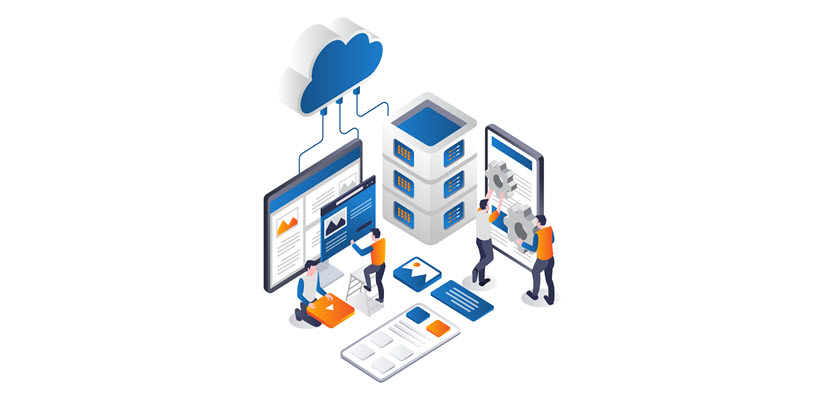
Cloud hosting enables websites, applications, and services to run on virtual servers that draw their resources from a large pool of physical machines in a cloud provider’s data centers. Instead of renting a single physical server, you consume compute, memory, storage, and networking as abstracted resources, typically delivered via virtualization or containers.

Customers usually pay per hour or per second of compute, per GB of storage, and per GB of data transfer, rather than fixed monthly server rentals. This makes cloud hosting well-suited for variable or unpredictable workloads. The workloads include CI/CD-driven deployments, microservices architectures, and global applications that need to be close to users in multiple regions.

To ensure the best option for hosting your business operations, check out our article that compares colocation and cloud hosting.

How Does Cloud Hosting Work?

Cloud hosting abstracts physical infrastructure into flexible, on-demand services that you consume as compute, storage, and networking. Here is a detailed step-by-step explanation:

  1. Infrastructure virtualization. Cloud providers start by virtualizing their physical servers using hypervisors or container orchestration platforms. This splits large physical machines into many isolated virtual machines (VMs) or containers.
  2. Resource pooling and abstraction. These VMs, storage devices, and network components are grouped into large resource pools. You no longer see individual servers. Instead, you see abstract units like vCPUs, GBs of RAM, storage volumes, and virtual networks.
  3. Resource provisioning. Through a web portal, CLI, or API, you request compute instances, storage, or networking. The cloud control plane translates your requests into actions on the underlying infrastructure. The control plane provisions the underlying infrastructure by creating VMs, attaching disks, assigning IPs, and configuring security groups.
  4. Workload deployment. Once instances and storage are ready, you deploy your applications (web servers, databases, microservices) onto them. Load balancers, DNS, and virtual networks are configured so that traffic routes correctly between components and out to end users.
  5. Traffic distribution and performance management. Incoming requests are distributed across multiple instances using load balancers and autoscaling policies. As demand rises, new instances can be launched; as it falls, unnecessary instances are terminated.
  6. Monitoring and automation. Metrics and logs (CPU, memory, latency, error rates) are continuously collected. Based on these signals, automated rules can restart failed instances, scale the environment, or trigger alerts. Backups, snapshots, and replication further protect data and enable quick recovery.
  7. Usage tracking. Throughout this process, the cloud platform measures your consumption of compute time, storage capacity, and data transfer. Instead of paying for fixed hardware, you are billed for what you actually use.

Cloud hosting fundamentally shifts how organizations think about infrastructure. Instead of purchasing and operating hardware, teams focus on application logic and business outcomes while the cloud handles elasticity, reliability, and operational complexity behind the scenes. This model not only accelerates deployment cycles but also enables experimentation. Resources can be provisioned in minutes and retired just as quickly if they are no longer needed.

Key Features of Cloud Hosting

Cloud hosting comes with a set of core capabilities that distinguish it from traditional single-server hosting models. These features are built to handle dynamic workloads, improve resilience, and simplify infrastructure management:

Together, these features make cloud hosting a flexible, resilient, and automation-friendly foundation for modern applications and services.

Cloud Hosting Architecture

Cloud hosting architecture is typically organized into layered components that separate how infrastructure is managed from how applications run.

At the bottom is the physical layer, which includes servers, storage arrays, and networking gear in multiple data centers. The provider builds a virtual infrastructure layer over them using hypervisors and software-defined networking (SDN).

Above that sits the control plane. This layer exposes management consoles, CLIs, and APIs for provisioning and configuring resources. The data plane actually processes user traffic and application workloads.

Cloud environments are usually segmented into regions and availability zones. Each zone consists of one or more isolated data centers. This layout lets you design applications that survive localized failures by distributing components across zones and, when needed, across regions.

On top of the core infrastructure, cloud hosting adds service layers that further shape the architecture of deployed workloads. At the IaaS layer, you work directly with virtual machines, block and object storage, and virtual networks. At higher layers, managed databases, Kubernetes clusters, serverless functions, and message queues abstract away more of the operational complexity.

Multi-tenancy is enforced through strong isolation boundaries, such as VPCs, subnets, security groups, IAM policies, and sometimes dedicated hosts for stricter compliance needs. Observability is built into the architecture via centralized logging, metrics collection, and tracing services that integrate with both infrastructure and applications.

Together, these elements create a modular architecture, where each piece (compute, storage, networking, identity, and observability) can be composed and scaled independently to support diverse cloud-hosted workloads.

Cloud Hosting Workloads

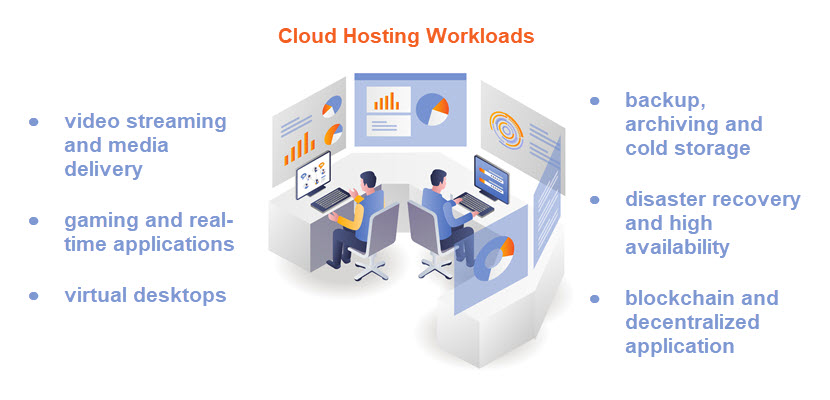
Cloud hosting workloads range from simple websites to complex, distributed systems.

Typical workloads include web and application servers, APIs, and microservices that scale horizontally behind load balancers; databases and data warehouses that rely on high-performance storage and replication; and analytics, ETL, and big data pipelines that process large volumes of streaming or batch data. Cloud platforms also commonly host CI/CD pipelines, test environments, and ephemeral dev sandboxes that spin up and down automatically as part of the software delivery process.
cloud hosting workloads

More advanced workloads include containerized applications orchestrated by Kubernetes, event-driven serverless functions, AI/ML training and inference jobs, and IoT backends that ingest telemetry from millions of devices.

All these workloads benefit from the cloud’s ability to rapidly provision resources, isolate environments, and integrate with managed services for logging, monitoring, security, and messaging.

Types of Cloud Hosting

Types of cloud hosting describe how infrastructure is owned, isolated, and managed. Understanding cloud deployment models helps you choose the right balance of control, flexibility, cost, and compliance for your environment.

Public Cloud Hosting

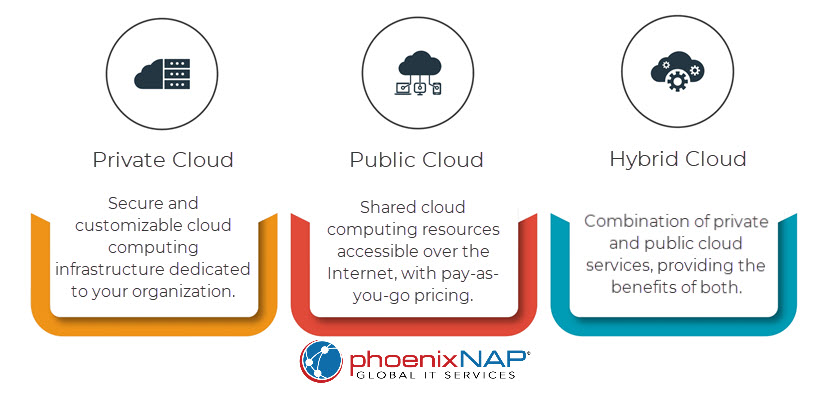
Public cloud hosting runs your workloads on shared infrastructure owned and operated by a cloud provider. Compute, storage, and networking resources are logically isolated per tenant but physically shared with other customers. You provision virtual machines, containers, and managed services inside your own logically isolated environment (e.g., VPC). At the same time, the provider manages the underlying hardware, data centers, and core networking. Capacity is effectively elastic, and you can deploy resources in multiple regions. This helps you achieve global reach without owning any physical infrastructure.

The public cloud model is particularly attractive for variable or unpredictable workloads and greenfield applications. It supports rapid experimentation, DevOps practices, and modern architectures like microservices and serverless. The main trade-offs are reduced control over the physical layer, dependence on the provider’s platform and SLAs, and the need to design carefully for security, data sovereignty, and cost governance.

Private Cloud Hosting

Private cloud hosting provides cloud-like capabilities, such as self-service provisioning, virtualization, and automation on infrastructure dedicated to a single organization. This can be on-premises in your own data center or in a provider’s facility using dedicated hardware. In both cases, the data center does not share hardware resources with other customers. You still get abstraction, APIs, and orchestration, but with tighter control. This control relays to configurations, network topology, and integration with existing enterprise systems.

Private cloud is often suitable for organizations with strict compliance, data locality, or security requirements that make multi-tenant public cloud less suitable. It also helps large enterprises consolidate fragmented virtualized environments into a more standardized, automated platform. The trade-off is higher responsibility. Namely, you bear a greater operational burden and face higher fixed costs than in a purely public cloud environment.

Hybrid Cloud Hosting

Hybrid cloud hosting combines public and private cloud environments, allowing workloads and data to flow between them based on business or technical requirements. A typical pattern is to keep sensitive systems of record or latency-critical applications in a private cloud or on-premises, while using public cloud resources for burst capacity, analytics, or customer-facing services. Connectivity is via VPNs or dedicated links, and identity, networking, and security policies apply across environments.

The hybrid model aims to balance control and agility: you keep tight control over critical workloads while exploiting public cloud elasticity and services where appropriate. However, hybrid architecture adds complexity in areas such as network design, security policy enforcement, observability, and data replication. Successful hybrid deployments rely on consistent management and automation across both sides (for example, common tooling for IaC, CI/CD, monitoring, and access control) to avoid creating two disconnected operational silos.

Multi-Cloud Hosting

Multi-cloud hosting uses services from two or more public cloud providers simultaneously. This can be a deliberate strategy to avoid vendor lock-in, to leverage best-of-breed services from different providers (e.g., a specific AI platform or database), or to meet regulatory and residency requirements in different regions. A multi-cloud setup can spread an application across multiple clouds for redundancy, or different components may live in different providers based on cost and capabilities.

While multi-cloud can increase resilience and negotiation leverage, it introduces additional operational and architectural complexity. You must manage multiple sets of APIs, IAM models, networking constructs, and billing systems. To make multi-cloud manageable, organizations often introduce an abstraction layer, such as Kubernetes, service meshes, or multi-cloud management platforms, and standardize their practices around portable tooling (Terraform, cross-cloud monitoring, centralized identity). Even then, true workload portability requires discipline in avoiding provider-specific lock-in at the application layer.

Learn more about how to deploy and manage your multi-cloud environments with our comprehensive list of tool options.

Managed Cloud Hosting

Managed cloud hosting is a service model where a provider (or MSP) builds and operates your cloud environment on top of a public or private cloud platform. You still benefit from cloud characteristics, such as elasticity, pay-as-you-go resources, and global reach, but offload much of the day-to-day operational work. The managed provider typically handles architecture design, provisioning, patching, security hardening, backups, monitoring, incident response, and sometimes cost optimization, while you focus on applications and business logic.

This model is attractive for teams that lack in-house cloud expertise or don’t want to run a large operations function. It can accelerate cloud adoption, reduce misconfigurations, and provide access to specialized skills (e.g., Kubernetes operations, security engineering). The trade-offs include higher recurring service costs and some loss of direct control. Furthermore, changes often go through the managed provider’s processes and SLAs. Clear division of responsibilities, transparent monitoring, and well-defined runbooks are critical to making managed cloud hosting effective and predictable.

Managed Cloud Services
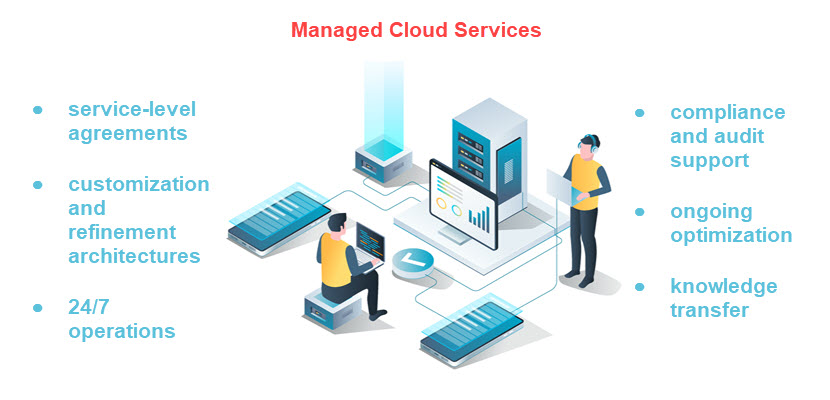
managed cloud services

Managed cloud services are layers of operational support and automation built on top of cloud infrastructure. Instead of your team configuring and maintaining every component, a provider designs, runs, and optimizes parts of your stack so you can focus more on applications and business logic.

Managed Infrastructure (Compute, Storage, Network)

Managed infrastructure services handle provisioning, configuration, patching, and lifecycle management of virtual machines, storage volumes, and virtual networks. The provider designs the baseline architecture (VPCs, subnets, security groups, routing), sets up standardized images and templates, applies OS updates and hardening, and ensures capacity is available when you need it. You still control what runs on the instances, but the underlying infrastructure management should adhere to best practices and SLAs.

Managed Databases

Managed database services offload the operational burden of running relational or NoSQL databases. The provider handles installation, patching, backups, replication, automatic failover, point-in-time recovery, and often routine performance tuning. You interact with the database via endpoints and connection strings, define schema and queries, and tune indexes when needed, while the platform ensures high availability, encryption, monitoring, and scaling (vertical or horizontal, depending on the engine).

Managed Kubernetes and Containers

Managed Kubernetes (or managed container platforms) provide a fully operated control plane and standardized worker node lifecycle. The provider sets up and maintains clusters, upgrades Kubernetes versions, patches node OSes, integrates cluster logging and metrics, and exposes APIs for deploying containers. This lets teams focus on building containerized applications and defining manifests or Helm charts, rather than worrying about etcd health, control-plane HA, node provisioning, or CNI/CNI plugin management.

Managed Security Services

Managed security services cover continuous security configuration, monitoring, and incident response around your cloud workloads. Offerings can include managed firewalls, WAFs, intrusion detection/prevention, vulnerability scanning, SIEM/SOAR integration, and 24/7 security operations center (SOC) coverage. The provider tunes rules, triages alerts, responds to incidents according to runbooks, and supplies compliance-ready reports, while you remain responsible for application-level security and access policies.

Managed Backup and Disaster Recovery

Managed backup and DR services automate data protection and recovery workflows across your cloud environment. The provider designs retention policies, configures snapshot schedules, replicates data across regions or sites, and regularly test restore procedures and failover plans. In an outage or data loss event, they coordinate restoring systems to a known-good state or failing over to a secondary environment, reducing RPO and RTO without your team having to script and maintain all the backup logic.

Managed Monitoring and Observability

Managed monitoring and observability services centralize metrics, logs, and traces from your infrastructure and applications, and maintain the underlying tooling. The provider deploys agents, configures dashboards and alerts, manages data retention, and tunes thresholds to reduce noise. They may also provide SRE-style support: capacity recommendations, SLA/SLO tracking, and incident reviews. You consume the insights and dashboards, while the provider ensures that telemetry pipelines and observability platforms stay healthy and up to date.

Managed Identity and Access Management (IAM)

Managed IAM services focus on designing, implementing, and maintaining secure identity and access controls in the cloud. This includes user and role management, SSO integration, MFA enforcement, least-privilege role design, and periodic access reviews. The provider builds and maintains the IAM policies, maps them to your organizational structure, and helps respond to access-related incidents or audits, while you define who should have access to what from a business perspective.

Managed DevOps and CI/CD

Managed DevOps services build and operate your CI/CD pipelines and supporting tooling (source control integrations, artifact repositories, runners, and deployment workflows). The provider sets up standardized pipelines for build, test, security scanning, and deployment; maintains the underlying runners and agents; and enforces release processes and approvals. This lets engineering teams ship changes quickly and reliably without dedicating significant internal resources to pipeline plumbing and infrastructure.

Cloud Hosting Benefits

Cloud hosting offers a combination of flexibility, automation, and resilience that’s difficult to achieve with traditional single-server setups. The main benefits revolve around how cloud computing resources are provisioned, scaled, secured, and paid for, and they include:

Overall, these benefits make cloud hosting a flexible, resilient, and cost-effective foundation for running modern digital services at any scale.

Cloud Hosting Challenges

Cloud hosting also introduces complexities and risks that organizations must account for when designing and operating workloads in the cloud. These challenges typically stem from shared responsibility, distributed systems design, and rapidly changing cloud ecosystems:

Organizations can mitigate risks while still capturing the full value of cloud hosting by understanding these challenges early and planning accordingly.

Cloud vs. Other Types of Hosting Solutions

Choosing the right hosting model depends on how much control you need, how your workloads scale, and how quickly your infrastructure must adapt to change. Comparing cloud hosting with traditional alternatives helps clarify where cloud delivers the most value and where other solutions may still be a better fit.

Cloud vs. Traditional Web Hosting

Traditional web hosting differs from cloud hosting primarily in how it provisions, isolates, and scales resources. In traditional hosting models, such as shared, VPS, or single dedicated servers, you’re tied to a fixed amount of CPU, RAM, and storage on a single physical machine (or a small cluster), and scaling usually requires manual upgrades or migrations.

Cloud hosting, by contrast, runs workloads on virtualized infrastructure across many physical servers. It exposes pooled resources via APIs and allows near-instant scaling up or down based on demand. High availability in traditional hosting often requires custom failover setups. Meanwhile, cloud platforms natively support multi-AZ deployments, load balancing, and automated recovery. Operationally, traditional hosting is simpler but less flexible, while cloud hosting introduces more architectural complexity.

Cloud vs. Shared Hosting

Cloud hosting and shared hosting mainly differ in isolation, scalability, and reliability. In shared hosting, many customers’ websites run on the same physical server and OS instance, sharing CPU, RAM, disk, and IP. If one tenant spikes resource usage or gets compromised, others can be affected. Performance tuning and scaling options are limited, and you typically get a fixed plan with minimal control over the environment.

In cloud hosting, workloads run on virtualized resources with stronger isolation, and you can scale horizontally or vertically, often automatically, based on demand. You also benefit from higher availability through redundant infrastructure, richer networking and security controls, and pay-as-you-go pricing, at the cost of more configuration responsibility and a steeper learning curve than simple shared hosting plans.

Cloud vs. VPS

Cloud hosting and VPS (Virtual Private Server) hosting both use virtualization, but they differ significantly in architecture, scalability, and resilience. A VPS typically runs on a single physical server where multiple virtual machines share resources (CPU, RAM, storage); if that host fails, it affects all VPS instances on it.

Cloud hosting, by contrast, draws from a cluster of servers and storage, so you can distribute workloads across multiple hosts with built-in redundancy and autoscaling. This makes the cloud better suited for variable or high-growth workloads that need rapid scaling, multi-zone deployments, and integration with managed services.

VPS hosting usually offers more predictable, fixed monthly pricing and can be a good fit for smaller, steady workloads that don’t require advanced automation or high availability, but it lacks the elasticity and fault tolerance inherent to cloud-native platforms.

Cloud vs. Dedicated Server

Cloud hosting runs workloads on virtualized resources spread across many physical servers. This gives you elastic scalability, pay-as-you-go pricing, and access to a wide range of managed services. However, you have less direct control over the underlying hardware. A dedicated server gives you exclusive use of a single physical machine with fixed CPU, RAM, and storage, offering predictable performance, strong isolation, and full control over OS and hardware configuration. However, scaling usually means provisioning additional servers manually and committing to longer-term contracts.

In practice, the cloud is better for variable or rapidly growing workloads that benefit from automation and on-demand capacity. Dedicated servers suit stable, performance-sensitive, or licensing-constrained workloads that require consistent resources and low-level tuning.

Cloud Hosting Security

Cloud hosting security includes a shared responsibility model. This model entails the provider securing the underlying infrastructure, while you secure your workloads, identities, and data. Providers harden data centers, manage physical access, and protect core services like compute, storage, and networking with isolation mechanisms (hypervisors, VPCs, security groups) and continuous patching. They also supply native tools for encryption at rest and in transit, identity and access management (IAM), key management services (KMS), and logging, giving you a robust defense-in-depth strategy.

On your side, strong security depends on how you configure and use these building blocks. This includes enforcing least-privilege access through well-designed IAM roles, enabling MFA and SSO, segmenting networks with subnets and firewalls, and encrypting sensitive data with properly managed keys. You also need end-to-end observability, including centralized logs, metrics, and alerts to detect misconfigurations, suspicious behavior, and policy violations in real time. Regular security reviews, automated compliance checks, and infrastructure-as-code scanning help prevent drift and configuration errors, which are among the most common causes of cloud security risks.

Who Should Use Cloud Hosting Solutions?

Cloud hosting solutions are a strong fit for organizations that need to scale quickly, iterate fast, and avoid the overhead of owning and operating physical infrastructure, such as SaaS providers, ecommerce platforms, digital agencies, startups, and enterprises modernizing legacy systems. Teams building microservices, CI/CD-driven environments, or data-intensive analytics pipelines benefit from on-demand capacity, managed services, and global reach.

At the same time, workloads that require consistent high performance, strict isolation, or specific licensing (for example large databases, high-traffic APIs, or latency-sensitive backend services) can combine classic cloud hosting with bare metal cloud. This lets you mix virtualized instances and bare metal in one architecture, using each where it makes the most technical and economic sense.

Migrating to Cloud Hosting

Migrating to cloud hosting starts with a clear assessment of your existing workloads. This includes applications, databases, dependencies, and network flows. The assessment helps you decide which components to lift-and-shift, which to replatform, and which to refactor for cloud-native architectures.

From there, you design target environments (VPCs, subnets, security groups, IAM roles). Then, you can choose appropriate services (VMs, containers, managed databases), and plan data migration strategies. Aim to minimize downtime, such as replication, phased cutovers, or blue-green deployments.

Successful migrations also align backup, monitoring, and incident response with cloud tooling, update security and compliance controls to the shared responsibility model, and introduce cost governance (tagging, budgets, rightsizing). Finally, running pilot migrations, load tests, and rollback drills before full cutover helps validate performance and reliability, reducing the risk of surprises in production.

Cloud Hosting Trends

A prominent cloud hosting trend is mass hybrid and multi-cloud strategy adoption. These strategies combine public cloud, private cloud, and edge resources to optimize performance and improve resilience.

At the same time, the integration of AI/ML services into cloud platforms is increasing. Cloud providers are offering specialized infrastructure for training and serving models. This makes it easier for organizations to build data-driven and intelligent applications without owning expensive hardware.

Edge computing, which includes blending cloud with geographically distributed edge nodes. is growing in importance. This is evident in workloads that require low latency or real-time processing, such as IoT, AR/VR, and real-time analytics. Meanwhile, as cloud usage balloons, so does cost pressure. This is driving demand for better cost governance practices (often called “FinOps”). Subsequently, automated resource management and sustainable cloud operations balance performance with environmental and economic efficiency.

The Road Ahead for Cloud-Powered Infrastructure

Cloud hosting has become a foundational approach for delivering scalable, resilient, and globally accessible digital services. By leveraging virtualized infrastructure and automation, organizations can focus on innovation and delivering value rather than maintaining hardware.

While cloud architecture comes with shared responsibility and operational complexity, the benefits still make it the preferred model. As trends like hybrid cloud and AI-driven operations reshape the landscape, cloud hosting remains central to businesses.
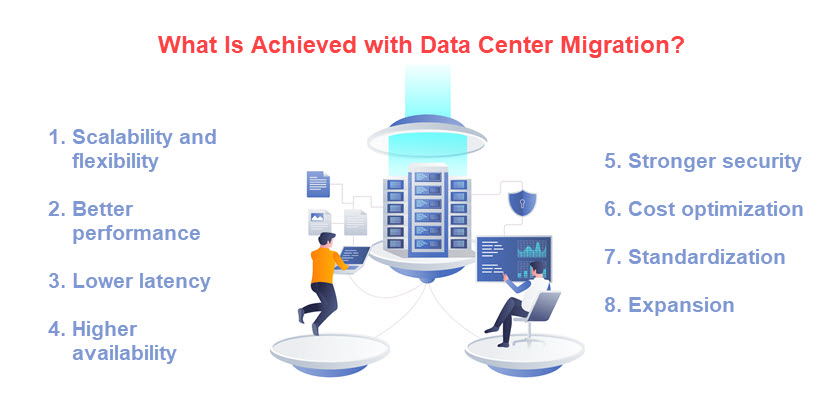
Data Center Migration: Benefits, Checklist, Best Practices

Data center migration is the process of transferring an organization’s digital assets, such as servers, storage systems, applications, and network infrastructure from one environment to another.

Whether prompted by hardware aging, cloud adoption, consolidation, or compliance demands, such projects require meticulous planning to avoid data loss, downtime, and service disruption. When properly executed, migration enhances scalability, efficiency, and resilience while preserving business continuity.

This article explains data center migration, its types, and benefits, and answers the most common questions about its implementation.

what is data center migration

What Is Data Center Migration?

Data center migration involves relocating compute, storage, networking, and security workloads from one hosting environment to another between on-premises facilities, colocation sites, private clouds, public clouds, or hybrid combinations. The process covers both physical moves and logical transitions: servers may be rehosted as virtual machines or containers, data sets replicated or re-sequenced, and networks re-addressed or extended to preserve connectivity and policies. Migration reshapes not only where systems reside but also how they are provisioned, monitored, secured, and cost-managed.

Successful migration requires structured execution. It begins with discovery and dependency mapping to identify interconnections, followed by target-state design that accounts for performance, capacity, latency, and security. Data synchronization and controlled cutover procedures ensure integrity and minimize downtime. Governance, testing, rollback plans, and post-move optimization form the foundation for maintaining service levels, compliance, and operational stability.

To learn more about maintaining optimal operational levels in your data center, check out our article on data center energy efficiency.

Types of Data Center Migration

Data center migrations can take several forms depending on the starting environment, target architecture, and strategic goals. Each type presents its own technical challenges and considerations for data integrity, downtime tolerance, and operational continuity. Understanding the key differences helps organizations select the right migration model and tooling for their workloads.

Physical-to-Physical (P2P) Migration

A physical-to-physical migration involves moving servers, storage, and networking equipment from one data center facility to another. This often happens when an organization relocates to a new site, upgrades to a modernized facility, or consolidates multiple sites into a single, more efficient one. P2P migrations require precise logistics, such as planning rack layouts, power and cooling capacities, cabling, and timing to ensure that critical systems are shut down, transported, and reactivated with minimal service interruption.

The process demands careful dependency mapping, as even brief downtime in interconnected systems can cascade through applications. Teams often replicate or back up data before the move and perform a phased transition to avoid full outages.

While this migration preserves existing hardware configurations, it rarely improves scalability or automation capabilities. Its main advantage is control. Namely, organizations maintain ownership of their physical infrastructure while modernizing their facilities.

Physical-to-Virtual (P2V) Migration

Physical-to-virtual migration replaces legacy hardware with virtualized infrastructure, converting operating systems, applications, and data into virtual machines. It allows multiple workloads to run on shared hypervisors, reducing physical footprint and increasing flexibility. This approach typically uses P2V conversion tools to capture disk images, drivers, and configurations from physical hosts and replicate them in a virtual environment such as VMware vSphere, Hyper-V, or KVM.

The main goal of a P2V migration is to optimize resource utilization and simplify management. It also enables features like snapshots, high availability, and live migration that are impossible on bare metal. However, P2V projects require validation to ensure that hardware-dependent applications function correctly in a virtualized environment. Performance tuning, driver compatibility, and software licensing must all be addressed before decommissioning the original hardware.

Virtual-to-Virtual (V2V) Migration

A virtual-to-virtual migration transfers workloads between virtualization platforms or hypervisors, such as moving from VMware to KVM or from on-premises hypervisors to a cloud-based virtualization layer. This process is common when organizations adopt open-source alternatives, transition to managed services, or align infrastructure with vendor ecosystems. It also occurs during mergers and acquisitions, when different virtualization technologies must be unified.

V2V migration focuses on maintaining application performance and compatibility across differing hypervisor architectures. Conversion utilities are used to reformat disk images, adjust virtual hardware definitions, and update guest OS drivers. Although less disruptive than hardware moves, V2V transitions require rigorous testing to validate bootability, network connectivity, and system dependencies in the new environment.

Virtual-to-Cloud (V2C) or Cloud Migration

Virtual-to-cloud migration involves relocating virtual machines, applications, and data to a public or private cloud environment. This approach leverages cloud-native benefits such as scalability, on-demand resources, and global reach. Workloads may be “lifted and shifted” as-is, rehosted using migration services, or refactored into containerized or serverless architectures. The goal is to reduce capital expenditure, improve agility, and access advanced services for analytics, AI, and automation.

Cloud migrations introduce new variables such as latency, security posture, compliance requirements, and cost management. Network architecture, identity federation, and observability must be redesigned for distributed operations. A successful V2C migration relies on hybrid connectivity, encrypted data transfer, and a well-defined rollback plan to maintain business continuity throughout the transition.

Cloud-to-Cloud (C2C) Migration

Cloud-to-cloud migration transfers workloads and data between cloud providers or between regions within the same provider. Organizations typically pursue C2C migrations to optimize costs, comply with data residency laws, or improve performance through multi-cloud or edge strategies. The process may include migrating VMs, storage buckets, databases, and APIs, while reconfiguring authentication, networking, and monitoring.

Because cloud platforms differ in architecture and services, C2C migration often involves refactoring workloads and reconfiguring dependencies to maintain compatibility. Data transfer methods such as replication, snapshot export, or cross-cloud pipelines are used to minimize downtime. Proper planning ensures that service-level agreements remain intact and that operational metrics, such as latency and throughput, meet post-migration benchmarks.

Optimization of data center migration starts with timely and accurate planning. Read more about it in our article on data center capacity planning.

Reasons for Data Center Migration

data center migration reasons

Organizations migrate data centers to reduce risk, improve performance, and align infrastructure with business goals. Here are the main reasons for data center migration:

Data Center Migration Steps and Best Practices

A successful migration follows a structured sequence that balances precision with operational safety. Each step pairs with a proven best practice:

  1. Discovery and assessment - Document and validate dependencies early. Catalog all assets, dependencies, and data flows using automated discovery tools to eliminate blind spots.
  2. Strategy and planning - Align goals with business priorities. Define scope, budget, and success metrics. Match migration methods (rehost, replatform, refactor) to organizational objectives.
  3. Design of target environment - Build for scalability and resilience. Architect the new data center or cloud environment with redundancy, automation, and segmentation for high availability.
  4. Data and application preparation - Ensure consistency and compatibility. Back up, cleanse, and test data and applications. Validate OS and version compatibility before cutover.
  5. Migration execution - Minimize downtime through phased cutover. Start with non-critical workloads, use replication for incremental syncs, and maintain rollback readiness.
  6. Validation and testing - Verify functionality before decommissioning. Test performance, security, and connectivity using baseline metrics and automated health checks.
  7. Optimization and documentation - Refine configurations post-move. Fine-tune for cost and efficiency, update runbooks, and record lessons learned for future migrations.

By following these steps and applying best practices consistently, organizations minimize disruption, safeguard data integrity, and ensure a smooth, predictable transition to their new environment.

Data Center Migration Checklist

A well-structured checklist helps keep a data center migration organized, reduces risks, and ensures nothing is overlooked during the move. The steps below cover the essential actions, from planning to post-migration verification:

  1. Define project goals and scope. Identify what needs to be moved, why the migration is happening, and what success looks like.
  2. Assemble the migration team. Assign roles for project management, networking, storage, applications, and testing.
  3. Create a complete asset inventory. List all servers, applications, databases, and dependencies that will be affected.
  4. Assess risks and plan for downtime. Estimate impact on operations and prepare rollback or recovery options.
  5. Design the target environment. Plan the new data center layout or cloud architecture with proper capacity, networking, and security.
  6. Back up all data. Ensure complete and verified backups exist before any migration begins.
  7. Test connectivity and compatibility. Check network routes, system dependencies, and software versions in the new environment.
  8. Plan and communicate the migration schedule. Inform stakeholders of maintenance windows, expected outages, and milestones.
  9. Run a pilot migration. Test a small subset of workloads to validate tools, timing, and procedures.
  10. Perform the migration. Move data and workloads according to the plan, monitoring for errors or delays.
  11. Verify systems after cutover. Confirm all applications, services, and data are operational and intact.
  12. Monitor and optimize. Track performance in the new environment and adjust resources as needed.
  13. Document results and lessons learned. Record what worked, what didn’t, and recommendations for future migrations.

A well-structured checklist not only streamlines the migration process but also serves as a safeguard. It helps teams stay organized, minimize errors, and ensure a smooth transition from planning to post-migration optimization.

Data Center Migration Tools

Data center migration tools streamline discovery, replication, and orchestration while safeguarding performance and compliance. Key categories include:

Together, these tools form an integrated ecosystem that streamlines every phase of migration, from initial discovery and replication to cutover validation. It ensures data integrity, operational continuity, and faster time to stabilization.

Data Center Migration Challenges

Even well-planned migrations face risks that can derail timelines, inflate costs, or impact availability. The challenges below are the most common and the ones worth managing explicitly from day one:

By anticipating these challenges early and addressing them through careful planning, automation, and thorough testing, organizations can significantly reduce migration risks and ensure a smooth, predictable transition to their new environment.

Data Center Migration FAQ

Here are the answers to the most commonly asked questions about data center migration.

How Long Does Data Center Migration Take?

Timelines vary widely with scope and method: a small rehost of a few VMs can be completed in weeks, while multi-site programs with hundreds of apps typically take 6–18 months. Duration depends on discovery quality, data volume and change rate (TB/PB and CDC needs), network latency and bandwidth, maintenance-window constraints, compliance/security work, and whether you rehost, replatform, or refactor.

Typical phases, such as assessment and planning, target build-out, replication/pilots, wave-based cutovers, and stabilization often overlap to compress time, but tight RTO/RPO targets, complex interdependencies, and vendor/lease lead times can lengthen schedules. Using bulk-transfer devices for initial loads, automating environment build with IaC, and migrating in waves during predefined windows helps keep the calendar under control.

Learn more about how to achieve data center compliance in our blog article.

What Is “Lift and Shift” Data Center Migration?

“Lift and shift” is a rehosting approach where you move applications and data to a new environment, often from on-prem or colo to cloud or a new virtual platform without changing the app’s code or architecture. You replicate disks and configurations, stand up equivalent compute, storage, and network constructs, update DNS and integrations, and cut over once data is synchronized. Tooling typically includes block-level replication, VM conversion, and orchestration services, aiming to preserve behavior and minimize refactoring risk.

How Do You Minimize Downtime During Data Center Migration?

Use continuous replication (block- or CDC-based) to keep target data nearly in sync, rehearse cutovers in a pilot, and migrate in waves, starting with low-risk systems. Schedule a short freeze window to quiesce writes, take a final incremental sync, and switch DNS/routing with low TTLs for quick propagation. Keep runbooks versioned, pre-stage infrastructure with IaC, and validate health checks immediately after cutover. Always have a tested failback plan so you can revert fast if KPIs or user journeys regress.

Moving Infrastructure Without Downtime

Data center migration is a complex but essential step in modernizing IT operations. Whether driven by aging infrastructure, regulatory pressure, or the need for scalability, a well-executed migration strengthens performance, resilience, and long-term agility. Success depends on disciplined planning, detailed discovery, and the use of automation to reduce human error and downtime. By combining the right tools, well-tested processes, and clear communication between teams, organizations can move workloads securely and efficiently, transforming their infrastructure into a more flexible foundation for future growth.

Data Center Selection: Key Requirements of a Data Center

Managing an in-house data center requires time, IT expertise, and a high budget, which is why businesses typically prefer to run operations from a third-party facility. While colocation may be a natural choice for many companies, choosing the right provider is not simple.

This article is a guide on how a business should approach data center selection. We outline the key factors to consider when choosing a colocation facility and offer guidance on finding a partner that meets your business needs.

Data center site selection selection

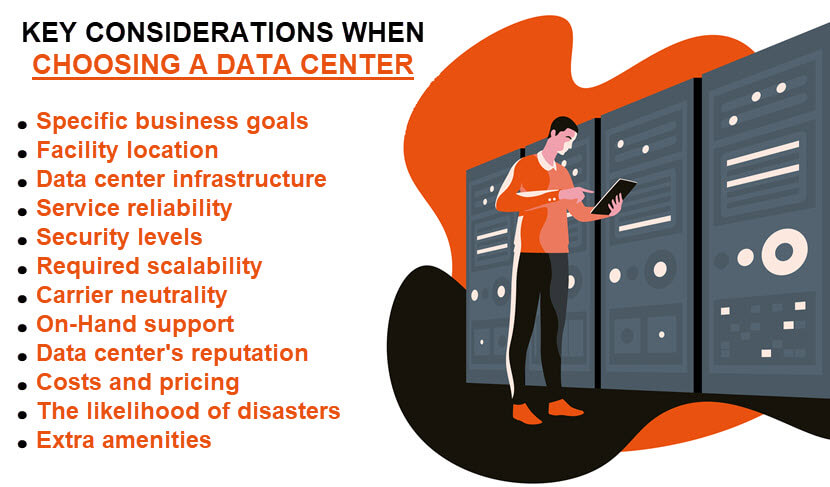
12 Key Considerations When Choosing a Data Center

There are many benefits to setting up your equipment in a colocation facility:

Despite these advantages, the benefits of colocation depend on your ability to assess business needs and select the right partner. The data center selection factors below will help you assess your options and make an informed decision.

Main factors for choosing a data center

Our article on colocation hosting offers an in-depth look at how this hosting type works and what benefits it offers when compared to an in-house data center.

Your Goals and Needs

Clarify your goals and objectives by partnering with a third-party data center. Consult every relevant team in your company, as different departments have varying needs and expectations. Discuss data center needs with your:

Advising with different stakeholders provides a complete picture of your data center requirements. For instance, upper management may not know about problems technicians face, such as insufficient monitoring or alerting. On the other hand, technicians may not be privy to some long-term business objectives.

Once you consult with different stakeholders, prioritize the requirements, and create a list of long-term, high-level goals of partnering with a data center, such as:

Once you know your goals, consider the size of your budget. Decide how much you can spend on colocation services and how long a contract term you can handle.

Facility Location

Facility location is vital to the reliability and safety of your IT equipment. Here are the primary location-related considerations you need to account for when searching for a data center:

Although you could save money by signing up with a center that is further away, setting up your equipment in a nearby facility is typically a better business move.

Learn about edge computing, a tech that brings data processing closer to the network's edge and removes the need for nearby data centers.

Data Center Infrastructure

The infrastructure includes physical and hardware-based resources that comprise a data center, including all IT devices, equipment, and technologies. Here are several key infrastructure factors when choosing a provider:

Be cautious when data centers operate on outdated tech. As no governing body forces businesses to keep their tech up to date, make sure you do not end up paying 2020s prices for 2000s tech.

Colocation center selection

Service Reliability

Keeping your business up and running is a vital aspect of a data center. All providers have SLAs (Service Level Agreements) that provide assurances in terms of:

Data centers measure reliability in terms of guaranteed uptime, a metric outlined within the SLA. All data centers have a rating based on how many redundant systems the facility has. This classification system works on a scale of 1 to 4:

When choosing a specific tier, remember that a Tier IV is not always the best option. While the lack of downtime is excellent, a Tier III data center selection provides enough uptime and allows you to spend the difference in cost on improving your company.

Examine the SLA in detail before you side with a data center. Besides basic uptime guarantees, you should also check for bandwidth limits and burst costs. Your data center should also have disaster recovery plans in place for natural emergencies, mishaps, power failures, acts of terror, etc.

Our Disaster-Recovery-as-a-Service (DRaaS) offering grants the ability to quickly recover from incidents and ensure business continuity in all scenarios.

Data Center Security

A single data breach can cripple a business, so a center requires robust security to keep client setups and info safe. In terms of physical security, a data center should have:

Your data center must also have a comprehensive suite of cyber security solutions that include:

Assessing a center's levels of security is challenging as all sales teams will boost about high levels of protection. Good tactics to realistically gauge the safety of a data center is to:

High cyber and physical security levels are a notable benefit of setting up equipment at a third-party facility. You would have to invest heavily in your IT setup and capable staff to reach the same levels of monitoring and protection as in a colocation center.

Continue learning about how careful business owners keep their facilities safe by checking out our article on data center security.

Levels of Scalability

If your company has varying requirements, finding a data center that can keep up with your demands is vital. If your business doubles in size or you decide to take on additional projects, your data center partner needs to allow you to scale the operation.

The main questions to answer when considering scalability are:

Your partner should also allow you to scale down in certain circumstances to optimize usage and control costs.

Do you know that IT advancements are so rapidly pushing the average rack density up that it is disrupting traditional practices in data centers? Learn more about it!

Carrier Neutrality

Your data center should be carrier-neutral. Neutrality gives a high degree of agility as the facility can switch between providers if one has an issue. Look for a data center with a wide range of:

Access to different networks and operators is vital. A variety of cloud options and connectivity enable you to set up hybrid and multi-cloud infrastructures without risking vendor lock-in.

Choosing a data center provider

On-Hand Support

Different data centers offer varying degrees of support. You may need help with the setup or migration of your equipment. Once set up, your IT infrastructure will require monitoring and maintenance as your in-house staff will not be on-site to manage all alerts and events.

The primary data center selection factors in terms of support are:

Our guide to data center migration outlines the best practices that enable you to organize an error-free move to a new facility.

Data Center's Reputation

Like with any other investment, you should do your research and examine the provider's reputation when making a data center selection. You can:

While no data center will have a perfect record, examining the provider's reputation gives insight into how the center handles issues. You will spot red flags early on and narrow the list of potential providers.

Costs and Pricing

You need to understand what you are paying for and why. On average, a monthly colocation fee ranges between $45 and $300 per unit. The set amount of bandwidth and IP addresses dictate the price, but operational costs (power, cooling, etc.) can also rack up the expenses.

Keep in mind that colocation services come with higher upfront costs than a cloud computing hosting solution. You need to invest in hardware instead of just migrating data to the provider's cloud and relying on VMs.

Our guide to colocation pricing ensures you understand your monthly bills and know how to estimate data center expenses accurately.

Avoiding Natural and Man-Made Disasters

A data center that is not prone to natural or human-caused incidents is vital to keeping your setup safe. Here are a few considerations:

Also, investigate if the data center is planning any major expansions. While a growing center is not a concern, construction can cause power outages, rack damages, and tons of dust that can harm your equipment.

Extra Amenities

How big a factor are amenities in your data center selection? While typically not the main concern, an extra commodity or two can push you towards a particular provider. Some data centers offer:

While other factors may be more important, a data center with the right mix of amenities can lead to a more comfortable and productive colocation experience.

Do Your Research and Make the Correct Data Center Selection

Choosing the wrong data center can lead to issues with connectivity, limited scaling, security breaches, and a ton of headaches. Evaluating provider reliability, network performance, and compliance standards can help prevent these problems.

Use the factors we listed above to narrow the list of potential providers and find a colocation partner that meets all your IT and business requirements. Making an informed choice ensures long-term operational efficiency and scalability.

IoT Edge Computing: What It Is and How It Works

In a classic IoT architecture, smart devices send collected data to the cloud or a remote data center for analysis. High amounts of data traveling from and to a device can cause bottlenecks that make this approach ineffective in any latency-sensitive use case.

IoT edge computing solves this issue by bringing data processing closer to IoT devices. This strategy shortens the data route and enables the system to perform near-instant on-site data analysis.

This article is an intro to IoT edge computing and the benefits of taking action on data as close to its source as possible. Read on to learn why edge computing is a critical enabler for IoT use cases in which the system must capture and analyze massive amounts of data in real-time.

Internet of Things and edge computing

What Is IoT Edge Computing?

IoT edge computing is the practice of using data processing at the network's edge to speed up the performance of an IoT system. Instead of sending data to a remote server, edge computing enables a smart device to process raw IoT data at a close-by edge server.

Data processing close to or at the point of origin results in zero latency. This feature can make or break the functionality of an IoT device that runs time-sensitive tasks.

Moving data processing physically closer to IoT devices offers a line of benefits to enterprise IT, such as:

IoT edge computing is a vital enabler for IoT as this strategy allows you to run a low-latency app on an IoT device reliably. Edge processing is an ideal option for any IoT use case that:

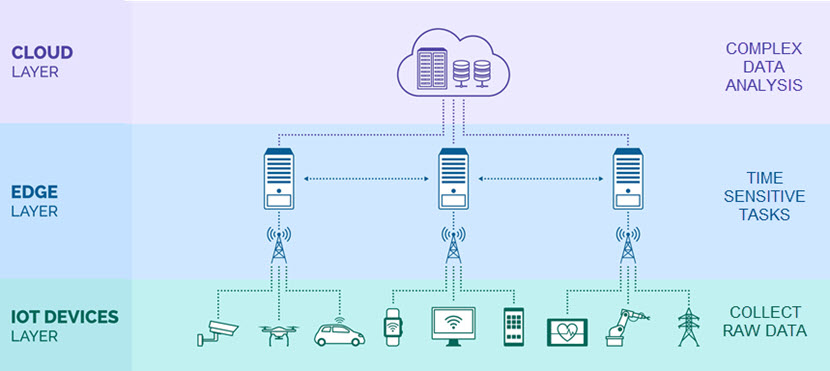
Cloud and edge computing are not mutually exclusive. The two computing paradigms are an excellent fit as an edge server (either in the same region or on the same premises) can handle time-sensitive tasks while sending filtered data to the cloud for further, more time-consuming analysis.

Cloud, edge, and IoT layers

Edge Devices vs. IoT Devices

IoT edge computing relies on the combined use of both edge and IoT devices:

In some cases, the terms edge and IoT devices can be interchangeable. An IoT device can also be an edge device if it has enough compute resources to make low-latency decisions and process data. Also, an edge device can be a part of IoT if it has a sensor that generates raw data.

However, creating devices with both IoT and edge capabilities is not cost-effective. A better option is to deploy multiple cheaper IoT devices that generate data and connect all of them to a single edge server capable of processing data.

Stay a step ahead of competitors with pNAP's edge servers and ensure zero latency for IoT-driven systems regardless of where you set them up.

How Do IoT and Edge Computing Work Together?

Edge computing provides an IoT system with a local source of data processing, storage, and computing. The IoT device gathers data and sends it to the edge server. Meanwhile, the server analyzes data at the edge of the local network, enabling faster, more readily scalable data processing.

When compared to the usual design that involves sending data to a central server for analysis, an IoT edge computing system has:

Edge computing is an efficient, cost-effective way to use the Internet of Things at scale without risking network overloads. A business relying on IoT edge also lowers the impact of a potential data breach. If someone breaches an edge device, the intruder will only have access to local raw data (unlike what happens if someone hacks a central server).

The same "smaller blast radius" logic applies to accidental data leaks and similar threats to data integrity.

Additionally, edge computing offers a layer of redundancy for mission-critical IoT tasks. If a single local unit goes down, other edge servers and IoT devices can go on operating without issues. There are no single points of failure that can bring all operations down to a halt.

Deploying to the edge is on the rise across all verticals of enterprise IT. Learn what other strategies are currently making an impact in our article on cloud computing trends.

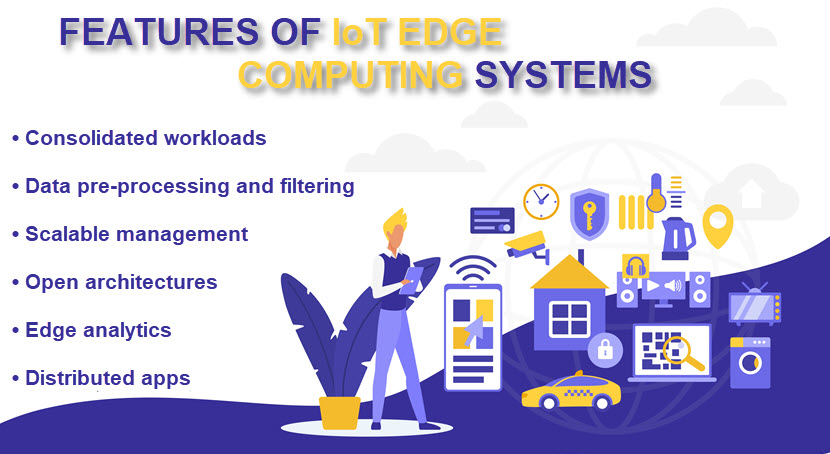
IoT Edge Computing Features

While each IoT edge computing system has unique traits, all deployments share several characteristics. Below is a list of 6 features you can find in all IoT edge computing use cases.

IoT edge computing features

Consolidated Workloads

An older edge device typically runs proprietary apps on top of a proprietary RTOS (real-time operating system). A cutting-edge IoT edge system has a hypervisor that abstracts the OS and app layers from the underlying hardware.

Using a hypervisor enables a single edge computing device to run multiple OSes, which:

As a result, the price of deploying to the edge is far lower than what you once had to pay to set up a top-tier edge computing system.

Pre-Processing and Data Filtering

Earlier edge systems typically worked by having the remote server request a value from the edge regardless of whether there were any recent changes. An IoT edge commuting system can pre-process data at the edge (usually via an edge agent) and only send the relevant info to the cloud. This approach:

PhoenixNAP's Bare Metal Cloud enables you to reduce data transfer costs with our bandwidth packages. Monthly bandwidth reservations are a cost-optimal option for high-workload use cases, such as high-traffic websites, streaming services, or IoT edge devices.

Scalable Management

Older edge resources often used serial communication protocols that were difficult to update and manage at scale. A business can now connect IoT edge computing resources to local or wide area networks (LAN or WAN), enabling central management.

Edge management platforms are also increasing in popularity as providers look even further to streamline tasks associated with large-scale edge deployments.

Open Architecture

Proprietary protocols and closed architectures were common in edge environments for years. Unfortunately, these features often lead to high integration and switching costs due to vendor lock-ins, which is why modern edge computing relies on an open architecture with:

Open architecture reduces integration costs and increases vendor interoperability, two critical factors for the viability of IoT edge computing.

Want to learn more about system architectures? Check out our in-depth articles on cloud computing architecture, hybrid cloud architecture, and cloud-native architecture.

Edge Analytics 

Earlier versions of edge devices had limited processing power and could typically perform a single task, such as ingesting data.

Nowadays, an IoT edge computing system has more powerful processing capabilities for analyzing data at the edge. This feature is vital to low-latency and high data throughput use cases traditional edge computing could not reliably handle.

Distributed Apps

Intelligent IoT edge computing resources de-couple apps from the underlying hardware. This feature enables a flexible architecture in which an app can move between compute resources both:

A business can deploy an edge app in three types of architectures:

Learn how to securely connect distributed apps and see how you can make the most out of this modern approach to IT.

IoT edge computing use cases

IoT Edge Computing Use Cases

Edge computing can play a vital role in any IoT design that requires low latency or local data storage. Here are a few interesting use cases:

Edge computing is still a relatively novel concept, so it is natural that some companies are having a hard time deploying the technology. Our article on edge computing challenges explains the most common roadblocks and, more importantly, how to overcome them.

IoT Edge Computing: A Game-Changer for Enterprise IT

Today, the IoT sector operates across numerous scenarios without edge computing. However, as the number of connected devices grows and businesses explore new use cases, the ability to retrieve and process data faster will become a decisive factor. Expect IoT edge computing to play a major role in years to come as more and more companies start pursuing the benefits of zero-latency data processing.

Software Composition Analysis (SCA) Explained

Gone are the days of building software from scratch. Most development teams use open-source software (OSS) to speed up work and reduce time to market (TTM). Programmers use ready-made OSS components and write custom code to stitch everything together into a functioning piece of software.

While beneficial in terms of time and costs, using OSS as building blocks can introduce critical vulnerabilities or flaws to an application. This inherent risk is why software composition analysis is a must for any app that relies on open-source code.

This article is an intro to software composition analysis (SCA), a software engineering practice that enables teams to manage open-source components within apps. Read on to see how SCA helps identify, evaluate, and remove OSS-related risks.

Software composition analysis (SCA) explained

What Is Software Composition Analysis?

Software composition analysis is a security methodology that tracks and analyzes open-source packages within a codebase. SCA is vital when you consider the following figures:

Software composition analysis has two primary goals:

SCA procedures rely on an "inventory, analyze, control" framework to give teams a full view of OSS usage.

Here's an overview of how this framework works:

Reports generated from SCA go to the security personnel responsible for mitigating detected issues. In some CI/CD pipelines, an SCA-identified problem may block new commits to the codebase. Here's an overview of what issues SCA detects:

SCA is a standard part of DevSecOps, a development practice that integrates security into every phase of the software development lifecycle (SDLC). SCA enables OSS checks in the early stages of development before issues reach the build stage.

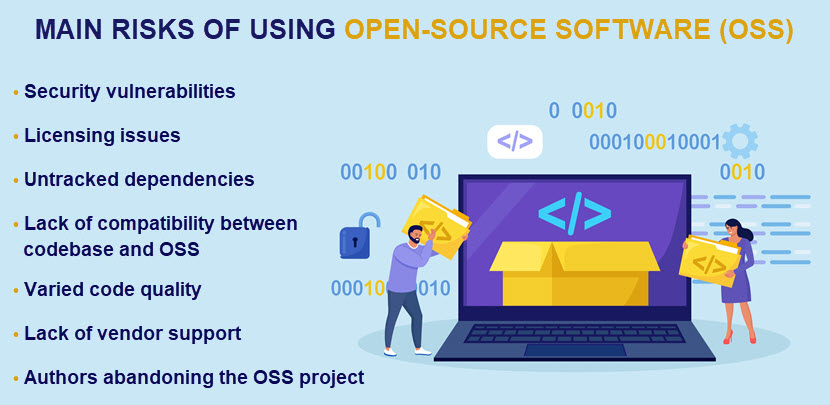
Open-source software vulnerabilities

Why Is Software Composition Analysis Important?

Software composition analysis ensures the security, compliance, and reliability of open-source components within software. Here's an overview of all the benefits of adopting SCA:

Concerned about high IT expenses? Check out our article on IT cost reduction to see 12 tried-and-tested strategies for lowering IT expenses.

Challenges of Software Composition Analysis

While software composition analysis is valuable when managing third-party software components, SCA has a few must-know drawbacks. Here are the usual challenges companies face once they adopt SCA:

Deploying SCA to a large codebase often reveals a sizable code debt. Learn more about this issue and the most effective ways to deal with it in our article on technical debt.

What Are Software Composition Analysis Tools?

Software composition analysis tools help organizations identify, analyze, and manage third-party components and open-source software used in their apps. These tools are crucial in addressing potential vulnerabilities, licensing issues, and other risks of using external code.

Here are a few of the most popular SCA tools currently on the market with an overview of their main selling points:

Here are the five different types of SCA tools based on their functionalities:

Many software composition analysis tools provide features from two or more of these categories. Others are more specialized, so adopters often combine several tools to ensure well-rounded SCA capabilities.

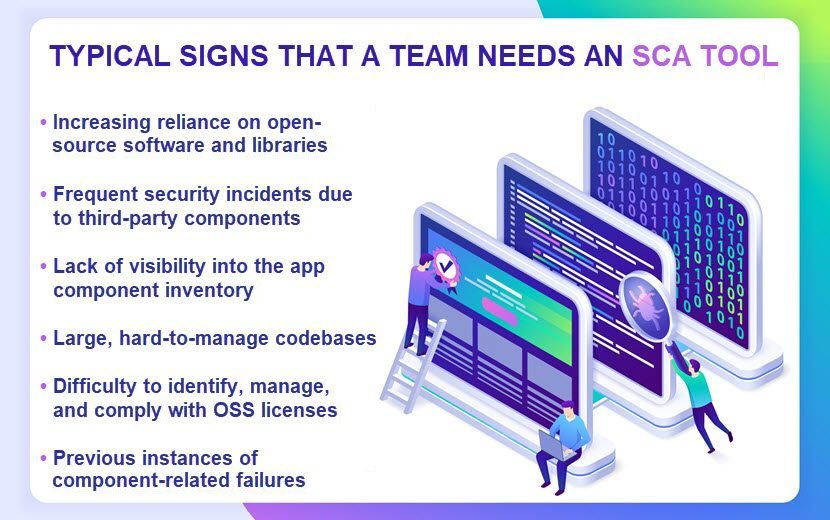
Signs that a team needs an SCA tool

How SCA Tools Work?

SCA tools integrate seamlessly into development workflows and CI/CD pipelines. Once integrated, the tool automatically scans the code for issues and provides real-time feedback.

Here's an overview of how SCA tools work:

Learn about vulnerability assessments and see why a proactive search for flaws should be at the top of any security team's to-do list.

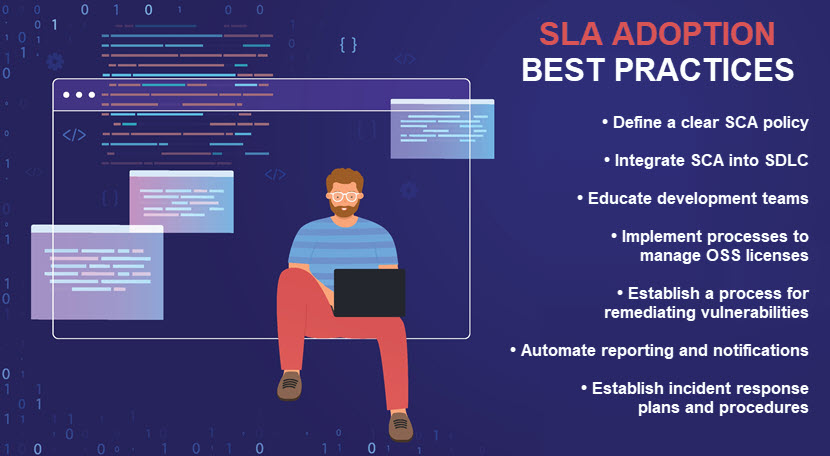
Software composition analysis best practices

What to Consider When Choosing a Software Composition Analysis Tool?

Here are a few considerations to keep in mind when choosing an SCA tool:

Remember that SCA must not interrupt the development process or force teams into steep learning curves. Seamless integration with both systems and personnel is vital for maximizing the benefits of an SCA tool.

An Absolute Must for Any OSS-Based App

The growing adoption of OSS has made SCA vital to application security. Software composition analysis enables teams to use open-source packages without exposing companies to unnecessary vulnerabilities or legal issues. Use SCA to pre-empt risks and grant your developers the freedom to safely use OSS as building blocks when creating software.

TDD vs. BDD: Differences and Use Cases Explained

Test-Driven Development (TDD) and Behavior-Driven Development (BDD) are development methodologies that enhance software reliability and quality. Both approaches guide developers through the process of writing and testing code, but they focus on slightly different aspects of software development. Understanding the nuances will help you choose the right approach for your projects.

This article compares TDD and BDD, explaining their core principles, advantages, disadvantages, and use cases.

TDD vs. BDD.

What Is Test-driven Development (TDD)?

Test-driven development emphasizes the creation and execution of automated tests before the development of the actual software code. This methodology revolves around a short, repeatable development cycle to ensure the codebase remains error-free and robust.

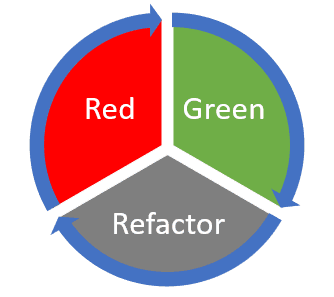
TDD operates under a simple but strict mantra: "Red, Green, Refactor." This cycle involves the following steps:

Example of the refactor cycle with red and green.

TDD Features

Test-driven development (TDD) is structured around several fundamental principles that guide the coding and testing process:

TDD Advantages

The goal of TDD is to write cleaner, bug-free code from the outset. This leads to several key outcomes:

TDD Disadvantages

Here are the challenges of test-driven development:

TDD Use Cases

Here are the cases where the use of TDD is particularly compelling:

Unsure which software testing methodologies are right for your project? Our article explores different approaches to ensure high-quality software that meets user needs.

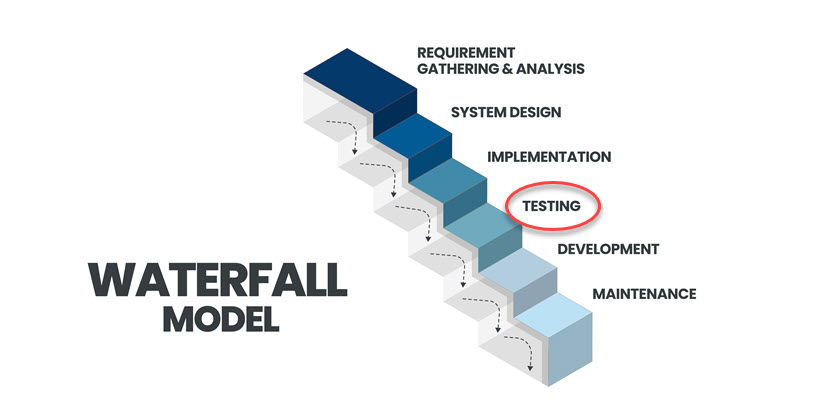
Waterfall development model.

What Is Behavior-Driven Development (BDD)?

Behavior-driven development is a development practice that extends the principles of TDD by focusing more explicitly on software behavioral specification. This approach is fundamentally user-centric, emphasizing the creation of software that meets the business and user requirements by encouraging collaboration and understanding among all stakeholders involved in a project.

BDD aims to shift the focus of software development from merely writing functional code to ensuring that the software behaves exactly as the stakeholders expect. To achieve this, BDD uses simple, domain-specific language to describe the outcomes and behaviors of the system. Stakeholders create these descriptions collaboratively and express them clearly to technical and non-technical participants.

Here is how BDD works in practice:

TDD vs. BDD divider image.

BDD Features

Behavior-driven development (BDD) incorporates several distinctive features that streamline communication among project stakeholders:

BDD Advantages

BDD offers a range of advantages that contribute to a more efficient and effective development process:

BDD Disadvantages

Despite its benefits, BDD also presents several challenges:

BDD Use Cases

BDD is particularly effective in scenarios where clear understanding and communication are crucial:

Our article on DevOps vs. Agile unpacks the strengths of each approach to help you choose the right path for your software development.

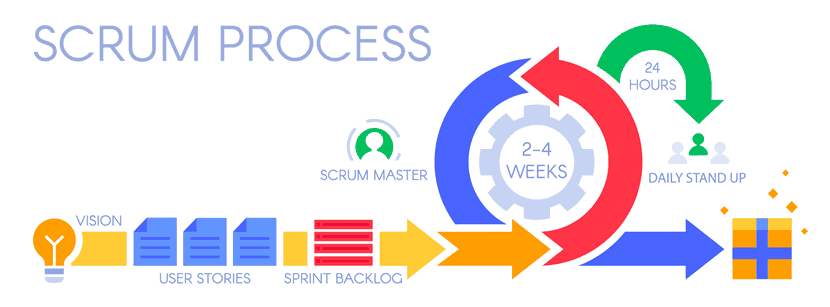
Scrum process.

TDD vs. BDD: Comparison

Here is a detailed comparison table between TDD and BDD, highlighting their distinct aspects.

 Test-Driven Development (TDD)Behavior-Driven Development (BDD)
Primary focusFocuses on the implementation of functionality through a test-first approach.Focuses on collaboration and understanding the behavior of the system from the user's perspective.
Language and readabilityUtilizes code-specific terminology in test cases.Employs natural language (often Gherkin) in scenarios, making it accessible to both technical and non-technical team members.
Collaboration and communicationPrimarily involves developers and testers.Encourages collaboration among developers, testers, and business stakeholders to define and validate behaviors.
Level of abstractionConcentrates on low-level unit tests to verify individual code units.Emphasizes higher-level tests simulating user interactions or end-to-end scenarios.
Test organizationOrganized according to code structure, often following a hierarchical or modular approach.Organized around user-desired behaviors, generally grouped by specific features or functionalities.
PurposeAims to ensure code correctness through automated tests.Promotes a shared understanding and validation of system behavior, improving communication.
Development workflowInvolves writing tests before coding the corresponding functionality.Begins with collaborative scenario definitions, followed by coding. Often incorporates TDD principles within BDD.
Test scopeNarrow, focusing on individual code units.Broad, encompassing multiple units to verify complete system operations.
Test case styleTechnical and focused on code implementation details.User-focused, emphasizing behavior and outcomes.
Test granularityFine-grained, with tests targeting specific code units in isolation.Coarser-grained, targeting overall system behavior and integration.
Iterative refinement and feedbackIterative code refinement driven by test results and modifications.Iterative development shaped by ongoing collaboration and feedback on behavior specifications.
TDD vs. BDD divider image.

Choosing the Right Development Methodology for Your Project

TDD and BDD are robust frameworks for software development, each with unique benefits and use cases.

TDD is particularly effective in projects where code correctness and reliability are vital. Its test-first approach ensures that every piece of code is backed by tests, leading to fewer bugs and a more maintainable codebase.

On the other hand, BDD extends the principles of TDD by focusing on the system's overall behavior and involving non-technical stakeholders in the development process. This collaborative approach emphasizes the importance of every team member's role, enhancing communication between developers, testers, and business stakeholders. BDD is particularly beneficial for complex projects where understanding user interactions and achieving a common understanding across a diverse team are critical.

The choice between TDD and BDD should be guided by the project's specific needs, the team's workflow, and the desired level of stakeholder involvement. While TDD is centered around technical correctness, BDD aims at broader collaboration and validating user-focused outcomes.

Ultimately, both TDD and BDD aim to enhance development efficiency, reduce misunderstandings, and deliver high-quality software that meets user expectations and business goals. Development teams may find it beneficial to combine elements of both methodologies to leverage their advantages.

What Is DevSecOps? Benefits, Workflow, Best Practices

Companies wishing to deliver secure software to their users can no longer afford to treat security as an afterthought. In today’s digital landscape, security must be an inherent feature of every software solution.

Enter DevSecOps, an approach that integrates security measures and practices at every step of the software development lifecycle (SDLC), from planning and coding to testing, deployment, and monitoring.

In this article, we will examine the principles, practices, and benefits of DevSecOps, demonstrating how this approach helps businesses deliver robust and secure software solutions efficiently and quickly.

What Is DevSecOps?

DevSecOps (short for Development, Security, and Operations) is a software development practice that integrates security into every phase of the software development lifecycle. With DevSecOps, security is embedded into the software as it is developed rather than added later.

In the past, security practices and features were only considered at later stages in the software development lifecycle and were typically dealt with by a separate security team. However, rapidly evolving cybersecurity threats have necessitated the practice of integrating security from the very start and maintaining it throughout the CI/CD pipeline.

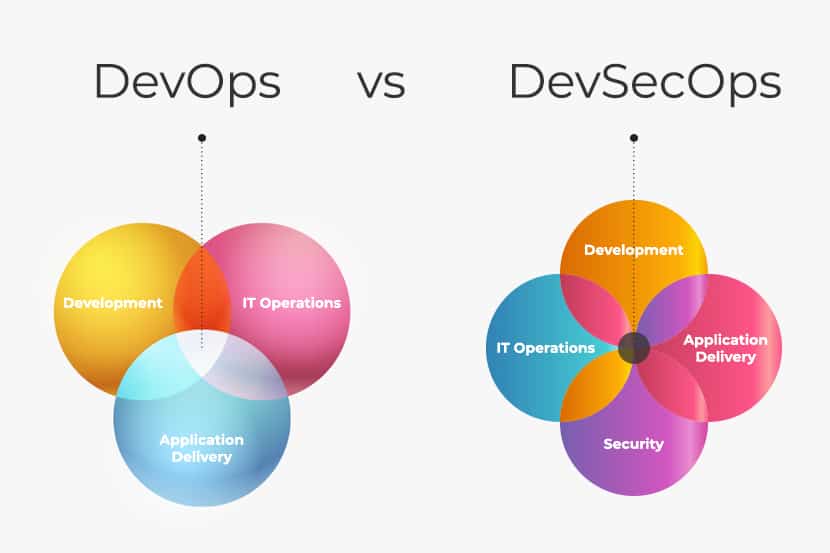
DevSecOps vs. DevOps

The DevSecOps and DevOps approach both aim to streamline and accelerate software development and delivery by enhancing collaboration between development and operations teams and automating repetitive tasks. The difference between the two is that DevSecOps places security concerns at the forefront during all phases of the software development lifecycle.

While DevOps remains fast and efficient, DevSecOps is more likely to identify and mitigate potential security vulnerabilities, thereby reducing the risk of data breaches and leaks.

DevSecOps vs DevOps comparison diagram.

DevSecOps Components

To achieve its security goals, DevSecOps involves various components and practices:

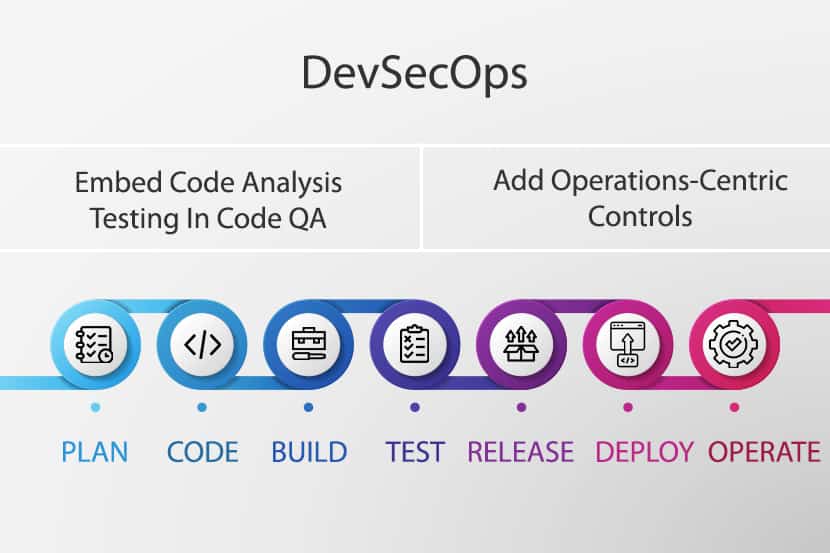
DevSecOps model.

What Does a DevSecOps Workflow Look Like?

A DevSecOps workflow emphasizes collaboration, automation, and the proactive implementation of security measures at every stage of the SDLC. While specific workflows vary depending on the organization’s tools and needs, a general DevSecOps workflow might include the following:

  1. Planning. Involves defining the security requirements and objectives, identifying potential threats and vulnerabilities, and conducting threat modeling. From these activities, developers and architects can design security controls directly into the application’s architecture.
  2. Coding and development. Developers write code following secure coding practices, the code is peer reviewed, and automated static application security tools (SAST) analyze the source code for vulnerabilities.
  3. Continuous integration (CI). Changes introduced to the code trigger automated building and testing and developers receive immediate feedback if security issues are detected.
  4. Continuous deployment (CD). Container images are scanned for vulnerabilities in the staging environment before deployment to container orchestration platforms via automated dynamic application security testing (DAST) tools.
  5. Operations and monitoring. Applications and infrastructure are monitored in production for security anomalies and threats; automated cyber incident detection and response are implemented to mitigate potential security issues and breaches.
  6. Remediation and feedback. Vulnerabilities and weaknesses are remediated according to priority, and their root causes are analyzed and addressed. All parties involved receive feedback that helps them to improve security practices.
  7. Education and sharing knowledge. Security awareness programs and training are ongoing practices, and teams are encouraged to share knowledge and collaborate around a common goal.
  8. Compliance. Automated compliance checks ensure that all processes adhere to security standards as well as industry regulations (PCI DSS, GDPR, HIPAA, etc.).
  9. Reporting. Compliance checks, alerts, and test results are collated into reports that are shared with stakeholders and used for auditing purposes.

DevSecOps Benefits

By using the DevSecOps approach and integrating security practices into their software development and delivery process, organizations reap numerous benefits, including:

DevSecOps Challenges

While it offers numerous benefits, DevSecOps also comes with a set of challenges:

DevSecOps best practices.

DevSecOps Best Practices

Organizations wishing to effectively implement DevSecOps throughout the SDLC should follow these best practices:

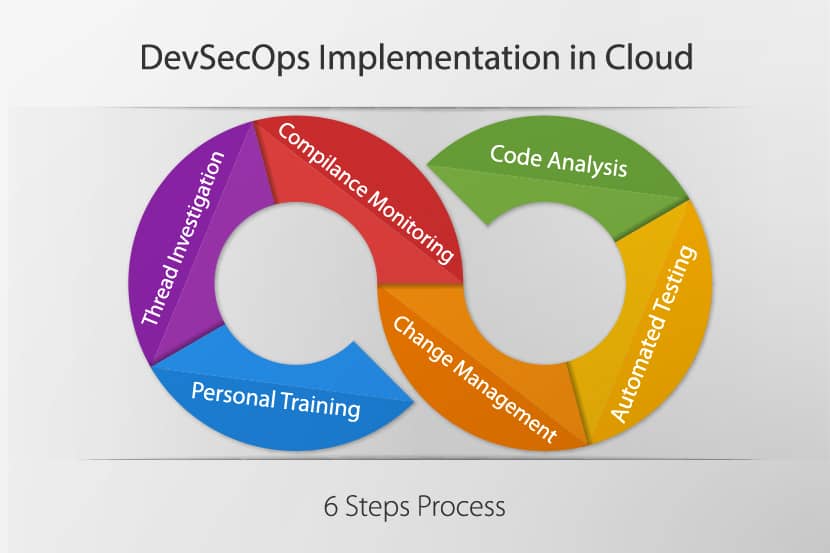
DevSecOps implementation in cloud.

20 DevSecOps Tools to Consider

The following list contains some of the more widely recognized and comprehensive DevSecOps tools:

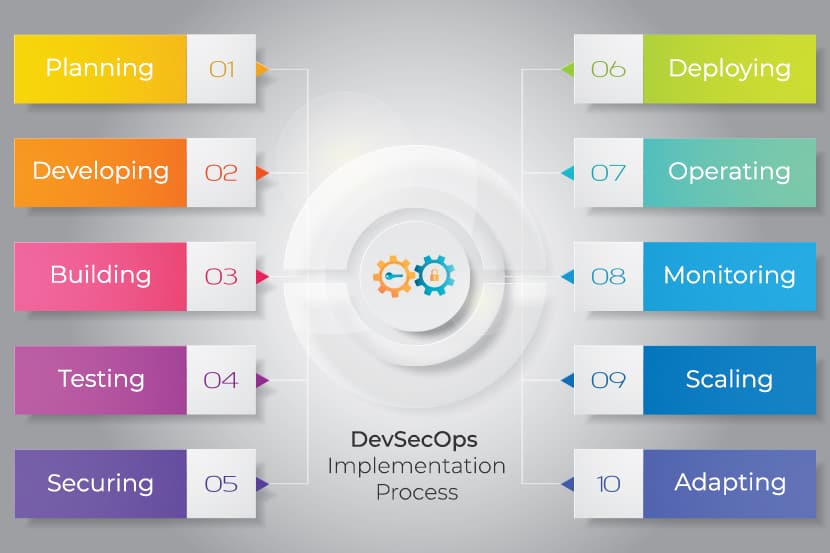
DevSecOps implementation.

DevSecOps: Where Innovation Meets Security

DevSecOps represents a cultural shift in the world of software development. This holistic approach gives security paramount importance while fostering collaboration and communication, whereby development, security, and operations teams work together to achieve common security goals.

By incorporating security practices at every stage of the SDLC, organizations proactively identify and remedy vulnerabilities in their applications, reducing the risk of breaches while delivering innovative software faster and more reliably. DevSecOps is the natural response to a continually evolving digital landscape, where safety and efficiency must go hand in hand.

Penetration Testing: Types, Tools, and Best Practices

Identifying and eliminating vulnerabilities in systems and applications is a priority in cybersecurity. Organizations use various techniques to uncover software flaws, but penetration testing is the most realistic and comprehensive method for analyzing security weaknesses. By simulating real-world cyber attacks, penetration testing assesses the effectiveness of security measures and exposes vulnerabilities that might otherwise remain undetected. Understanding how penetration testing works and how organizations leverage these tests to prevent costly and damaging breaches is essential for strengthening cybersecurity defenses.
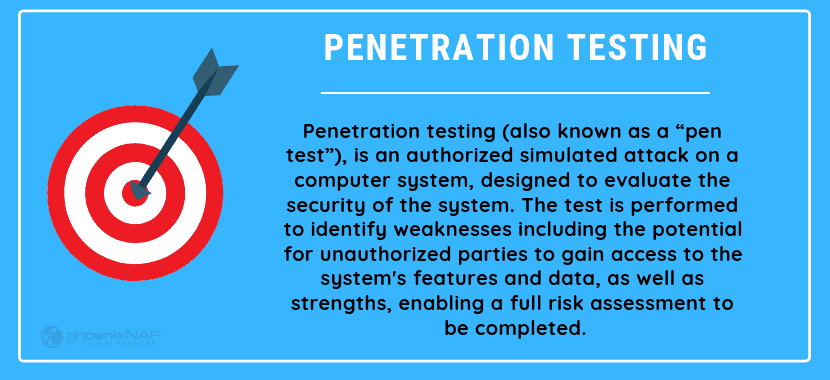
This article provides an in-depth introduction to penetration testing, its methodologies, stages, tools, and its vital role in protecting digital assets.

What is penetration testing.

What Is Penetration Testing?

Penetration testing is a systematic attempt to evaluate the security of an IT infrastructure by safely exploiting vulnerabilities. These vulnerabilities may exist in operating systems, services, applications, improper configurations, or risky end-user behavior. The primary goal of penetration testing is to identify security weaknesses before malicious actors can exploit them, thereby preventing data breaches, financial losses, and damage to an organization's reputation.

Penetration testers, often called ethical hackers, use the same tools, techniques, and processes as attackers to find and demonstrate the business impacts of weaknesses in a system. By simulating real-world attacks, penetration testing provides a realistic assessment of an organization's security posture, enabling stakeholders to prioritize remediation efforts effectively.

Types of penetration tests.

Types of Penetration Testing

Penetration testing is classified into various types based on the scope, objectives, and the amount of information shared with the testers.

Black Box Penetration Testing

In black box penetration testing, the tester has no prior knowledge of the target system's internal workings. The tester approaches the assessment as an uninformed cybercriminal would, relying solely on publicly available information and the tester's skills to identify vulnerabilities.

This method provides a realistic simulation of external threats but requires more time due to the extensive reconnaissance involved.

White Box Penetration Testing

White box penetration testing provides the tester with comprehensive information about the target system, including network diagrams, source code, credentials, and architecture details.

This approach allows for an in-depth examination of the security posture, focusing on internal vulnerabilities such as insecure coding practices and system misconfigurations. White box testing is efficient and thorough but may not accurately represent an external attacker's perspective.

Read our in-depth comparison of white and black box testing, the two most common setups for a penetration test.

Grey Box Penetration Testing

Grey box penetration testing is a hybrid approach where the tester has partial knowledge of the target system. This knowledge could include limited access credentials or partial architectural information. Grey box testing aims to simulate an attack by an insider or a hacker who has gained unauthorized access to an organization's network.

This method balances the depth of white box testing with the realism of black box testing.

External Penetration Testing

External penetration testing evaluates the security of an organization's external-facing assets, such as web applications, websites, email servers, and network infrastructure accessible from the Internet. The objective is to identify vulnerabilities external attackers could exploit to gain unauthorized access to internal systems and data.

Internal Penetration Testing

Internal penetration testing simulates an attack from within the organization's network. This type of testing assesses the potential impact of an insider threat, such as a disgruntled employee or an attacker who has breached the external defenses and gained access to internal systems. Internal testing evaluates the effectiveness of internal security controls and policies.

Targeted Testing

Targeted testing involves collaboration between the organization's IT team and penetration testers. Both parties know about the testing activities, allowing for real-time feedback and adjustments. This approach is often used to test specific aspects of the security infrastructure or to train the internal security team.

Blind Testing

In blind testing, the penetration tester is provided with limited information, typically only the organization's name. The security team is aware that a test is occurring but does not have details about the tester's methodologies. Blind testing evaluates the organization's security monitoring and incident response capabilities.

Double-Blind Testing

Double-blind testing extends the blind testing approach by keeping both the penetration tester and the security team unaware of specific details. Only a few individuals within the organization are aware of the test. This method provides the most realistic simulation of a real-world attack, assessing both detection and response mechanisms without prior knowledge.

Penetration testing types.

Penetration Testing Methodologies

Organizations typically rely on one of the five main standardized penetration testing methods:

OWASP (Open Web Application Security Project)

The OWASP Testing Guide is a widely recognized framework focusing on web application security. It outlines techniques for identifying and mitigating common vulnerabilities such as:

OWASP provides tools like OWASP ZAP and resources such as the OWASP Top Ten to assist in improving software security through a community-driven approach.

OSSTMM (Open-Source Security Testing Methodology Manual)

OSSTMM offers a scientific and methodological approach to security testing, emphasizing quantitative metrics to measure operational security. It provides guidelines for testing various domains, including information systems, telecommunications, physical security, and social engineering.

Key features of OSSTMM include:

ISSAF (Information System Security Assessment Framework)

ISSAF is a broad framework for assessing information system security. It is beneficial for complex environments that require meticulous documentation. The framework covers both technical aspects (e.g., network security, application security) and non-technical aspects (e.g., policies, procedures, and organizational culture), ensuring a holistic evaluation of the security posture.

ISSAF also encourages using a variety of tools and methods to ensure thoroughness, including both automated and manual testing techniques.

PTES (Penetration Testing Execution Standard)

PTES defines a standard for penetration testing by outlining seven main sections to promote consistency and comprehensiveness:

  1. Pre-engagement interactions. Establishing scope, goals, and legal considerations.
  2. Intelligence gathering. Collecting information about the target organization.
  3. Threat modeling. Identifying potential threats and vulnerabilities.
  4. Vulnerability analysis. Scanning and analyzing systems for weaknesses.
  5. Exploitation. Attempting to exploit identified vulnerabilities.
  6. Post-exploitation. Assessing the impact and extent of access gained.
  7. Reporting. Documenting findings and providing remediation recommendations.

NIST (National Institute of Standards and Technology)

NIST provides cybersecurity guidelines and best practices through its Special Publications. In particular, NIST SP 800-115 offers a technical guide to information security testing and assessment, covering comprehensive procedures for planning, execution, analysis, and reporting.

This framework is popular within high-danger industries like banking, communications, and energy. Compliance with NIST standards is often required for U.S. federal agencies, organizations handling government data, and American businesses in general.

Each standardized methodology offers a unique approach to penetration testing:
OWASP focuses on web application security with techniques for common vulnerabilities.
OSSTMM emphasizes a quantitative, scientific approach across multiple security domains for repeatable results.
ISSAF provides detailed processes suitable for complex environments needing meticulous documentation.
PTES ensures consistency by outlining all phases of the penetration testing process.
NIST offers guidelines aligned with regulatory compliance, especially for government-related organizations.

Penetration testing stages.

What Are the Stages of Penetration Testing?

Penetration testing follows a structured process consisting of the following stages:

Planning and Reconnaissance

The planning and reconnaissance stage involves the initial preparation and information gathering required to conduct a successful penetration test. This phase sets the foundation by establishing clear objectives and collecting essential data about the target systems.

Defining Scope and Objectives

In this phase, the penetration tester collaborates with the organization to define the scope, objectives, and rules of engagement for the test. Clear communication ensures that both parties understand what will be tested and the desired outcomes. Key activities include:

Information Gathering

After defining the scope and objectives, the tester begins collecting as much information as possible about the target environment. This information is crucial for identifying potential attack vectors and planning effective testing strategies. Activities include:

Scanning and Enumeration

The scanning and enumeration stage involves a deeper analysis of the target systems to identify vulnerabilities and gather detailed information that could be exploited. Scanning and enumeration involve these activities:

Understanding the difference between vulnerability scanning and penetration testing will enable you to create a comprehensive security testing strategy.

Exploitation

The exploitation phase involves actively attempting to breach the security of the target systems by exploiting identified vulnerabilities. This stage demonstrates the potential impact of a successful attack. During the exploitation phase, testers perform the following actions:

Post-Exploitation

Following successful exploitation, testers assess the extent of their access and the potential impact on the organization. This stage helps in understanding the risks associated with a security breach. Key activities during this stage include:

Reporting

Comprehensive reporting is essential to communicate the penetration test findings to stakeholders effectively. The report provides a detailed account of vulnerabilities discovered and recommendations for remediation. Key components of the reporting phase include:

Remediation and Retesting

After receiving the penetration test report, the organization addresses the identified vulnerabilities. Remediation and retesting ensure that security weaknesses are effectively mitigated. This stage involves:

Penetration testing tools.

Penetration Testing Tools

Below is a list of essential tools commonly used in penetration testing:

Read our article on the best penetration testing tools for an in-depth exploration of the latest security software on the market.

Advantages and disadvantages of penetration testing.

Advantages and Disadvantages of Penetration Testing

You must understand both the benefits and limitations of penetration testing to make informed decisions about its implementation.

Advantages of Penetration Testing

Penetration testing offers the following benefits:

Disadvantages of Penetration Testing

Penetration testing presents the following challenges and risks:

Penetration testing FAQ.

Penetration Testing FAQ

Below are answers to frequently asked questions about penetration testing.

Who Performs Penetration Testing?

Penetration testing is conducted by skilled professionals known as penetration testers or ethical hackers. These individuals possess in-depth knowledge of cybersecurity principles, attack methodologies, and defensive strategies. They are proficient in various programming languages, networking concepts, and security tools.

Penetration testers often hold industry-recognized certifications, such as:

Organizations may employ in-house penetration testers or engage external security firms specializing in penetration testing services.

Can I Do My Own Penetration Testing?

While organizations can perform basic security assessments internally, conducting comprehensive penetration testing requires specialized skills and experience. Attempting to perform penetration testing without proper expertise often leads to incomplete assessments or unintended consequences, such as system disruptions, downtime, or legal issues.

Employing professional penetration testers ensures that the testing is thorough, legally compliant, and aligned with cybersecurity best practices. External testers also provide an objective evaluation and may identify vulnerabilities that internal teams might overlook due to familiarity or bias.

When to Perform Penetration Testing?

You should conduct penetration testing proactively to identify and address vulnerabilities before attackers exploit them. Key scenarios when penetration testing is essential include:

How Often Do You Perform Penetration Testing?

The frequency of penetration testing depends on factors such as the organization's size, industry, regulatory obligations, and risk tolerance. General recommendations include:

Does Penetration Testing Require Coding?

Penetration testing frequently demands proficiency in coding and scripting languages, enabling testers to develop custom exploits by creating or modifying code to target specific vulnerabilities. Coding skills are also essential for automating repetitive tasks, such as scanning and data collection, making the testing process more efficient. Additionally, penetration testers analyze source code to identify security flaws within applications, while understanding application behavior allows them to interpret software functions and uncover logical vulnerabilities.

Proficiency in languages such as Python, Ruby, Perl, JavaScript, or C/C++ enhances a tester's ability to conduct comprehensive assessments.

Is Penetration Testing Legal?

Penetration testing is legal only when conducted with explicit authorization from system owners, with legal considerations including written consent that outlines the scope and limitations of testing activities. Testers must also comply with local, national, and international data protection regulations to ensure adherence to legal standards. Additionally, ethical conduct is paramount, as testers are expected to follow professional codes of conduct, avoiding unauthorized access or harm to systems and data beyond the agreed-upon scope.

Definition of penetration testing.

Unauthorized penetration testing, or hacking without consent, is illegal and results in criminal charges and civil lawsuits.

What Happens After Penetration Testing?

After a penetration test, organizations must take the following steps:

How Much Does Penetration Testing Cost?

The cost of penetration testing varies based on the following factors:

On average, penetration testing services range from $4,000 to over $100,000. Small businesses might spend around $4,000 to $20,000, while larger companies could incur costs exceeding $50,000 for extensive assessments.

Strengthening cybersecurity with penetration testing.

Read our article on IT cost reduction to learn how to optimize your IT budget without causing turmoil.

Strengthening Cybersecurity with Penetration Testing

Penetration testing is a vital component of strengthening an organization's cybersecurity defenses. Simulating real-world attacks uncovers hidden vulnerabilities that malicious actors could exploit. Despite its limitations, such as higher costs and the potential for system disruptions, the insights gained from penetration testing are precious.

In an era of increasingly sophisticated and common cyber attacks, penetration testing is essential for any organization committed to maintaining strong cybersecurity.

Rack Density Increasing: Trends and Implications

Average rack density (the amount of power the equipment within a rack uses) has gradually been increasing over the past decade. While the rise was slow and steady, IT advancements are now rapidly pushing the average rack density up and threatening to disrupt traditional practices in data centers.

This article explains the reasons behind the recent increase in density per rack. Read on to learn what is causing this trend and what steps data centers will have to make to remain competitive.

Why density per rack is going up

A Steady Rise in Rack Density

For years, data centers housed equipment in racks that required 2 to 5kW of power on average. These setups were easy to accommodate with single-phase power and blown-in air for cooling.

However, recent IT advancements are increasing the demand for compute-intensive workloads that require more power. Some of these rapidly developing technologies are:

These technologies require high processing power and high-density racks that go beyond the traditional 2 to 5kW average. As a result, enterprise and on-premises data centers are increasing the average density, a concern that was once unique to high-performance computing servers and hyperscale centers. As data centers look to meet the growing demand, the average server rack (computer rack) density jumped to 8.4 kW per rack in 2020, up from 7.3 kW in 2019. Analytics and surveys run by the Uptime Institute report the following split:

A closer look at the top 16% reveals the following densities:

As an additional indicator of the trend, over 45% of data centers expect their average rack density to be over 11 kW in the near future.

Most common rack densities in 2020

Our article on data center power infrastructure provides an in-depth look at how data center facilities manage power consumption.

What Is Driving the Rise in Rack Density?

Data consumption is on the rise as the use of cloud services increases and new technologies gain ground. The demand for compute processing is also growing as companies increasingly rely on power-hungry workloads such as:

AI and ML are at the top of the causes behind the recent increase in average density. While AI and ML are still in relatively early stages, they already require high amounts of power.

AI/ML systems ingest large datasets, learn from them, and draw conclusions when they get new data. These systems require high levels of processing and are often coupled tightly with a single shared memory pool. As a result, 1kW/rack unit is the current standard for AI servers. A rack can have over 30 units, so setups typically run in the 20 to 40kW per rack range. Similarly, it is not uncommon for HPC deployments to reach the 50kW/rack mark.

Alongside AI data-crunching, there is an increase in advanced modeling and data analytics, which is another factor causing the need for higher-density racks. Other drivers of the trend are:

Server rack density statistics

PhoenixNAP's flagship data center in Phoenix, AZ provides a high-density design, 100% environment stability, SOC type-2 compliance and HIPAA-ready colocation services.

IT Equipment Is Also Pushing Rack Density Up

In response to the growing demand for processing power, manufacturers are increaseing the power of chips.

In the early to mid-2010s, mainstream server processors used under 100W, while dual-processor servers consumed about 200W at full load. Nowadays, Intel server chips (which are in more than 90% of server processors) go past the 200W barrier and bring the total average server consumption close to 500W.

Specialized chips are becoming even more power-hungry due to complex analytics and multimedia elements. The new types of chips must support capabilities such as:

These accelerator chips include graphics processing units (GPUs), field-programmable grid arrays (FPGAs), and custom application-specific integrated circuits (ASICs). These components require higher energy per chip than a standard CPU. For example, a GPU card can now draw about 300W, so each setup with three cards per rack unit draws as much as 1kW/rack unit.

Server racks

A Challenge for Legacy Data Centers

Besides the increase in power-hungry processes, modern data centers are also accelerating the move towards higher rack density. Colocation providers see the trend as an opportunity to optimize resources as raising the density bar allows a data center to:

While some data centers embrace the change, some facilities will be under pressure to improve cooling and deploy new technologies. Changing operating strategies is a challenge, especially if a business with legacy equipment hopes to make a smooth, efficient transition at scale.

During the transition period, some data centers will likely offer higher density as an added service. This strategy will help offset the costs and provide extra time to remodel the equipment.

Read about data center security and learn what measures colocation providers deploy to ensure their facilities remain safe.

Planning for rack density

Key Business Planning Takeaways

Current rack density averages do not suggest an immediate need for technical overhauls, but data centers should prepare for evolving consumer demands. Here are the key factors to consider during business planning:

Our article on colocation pricing explains how facilities calculate prices and helps better understand your data center bills.

Average Rack Density Is Going Nowhere but Up

We expect rack densities to keep rising as data centers look to meet new customer demands.

The change will not happen overnight, but the industry is currently evolving in ways that favor higher-density racks. While there is still no immediate pressure, forward-thinking organizations are planning accordingly.

Software Testing Methodologies and Models

Perfect software does not exist, and every program has potential failure points. Software testing is a software development lifecycle stage during which the team discovers unwanted errors in a program or system.

Different testing methodologies help pinpoint several types of software errors. Knowing how each software testing model works is essential to building, deploying, and maintaining a high-quality testing strategy and software.

software testing methodologies and models.

Why Is Testing Important in SDLC?

The testing phase is a critical stage in the software development lifecycle. It comes after software implementation, and testing aims to discover and fix software errors.

SDLC testing phase.

Software testing is crucial because the product goes into production after testing. Every software development team must deliver quality software for two reasons:

A software testing team performs various checks for different issues separately from developers. This approach aids in having a team solely focused on discovering problems and allows for implementing continual development.

Software Testing Methodologies

Software testing is a formal process performed by a testing team to help confirm a program is logically correct and valuable. Testing requires using specific test procedures and creating test cases.

Software testing is performed in two stages:

Software testing uses several methodologies and models to answer these two questions.

Black Box Testing

In the black box testing methodology, a program is a closed (black) box with unknown details. The only visible components to a tester are the program inputs and outputs.

A tester can determine whether a program is functional by observing the resulting outputs for various inputs. Black box testing does not consider a program’s specifications or code, only the expected behavior for different test cases. Black box testers do not necessarily have to be very skilled since they do not interact with any code.

Black box testing.

Black box testing comes with both benefits and drawbacks. The critical advantage of black box testing is there is no requirement to work with code and programming logic. However, testing for all input combinations is impossible.

Three types of tests are based on the black box testing methodology: functional testing, non-functional testing, and regression testing.

Functional Testing

Functional testing checks whether the software performs a specific function without considering which component within the system is responsible for the operation.

The testing team checks functionalities for both good and bad inputs. An example function is a user login page behavior. A functional test checks whether a user can log in with the correct credentials or not log in with incorrect credentials.

As the software’s complexity increases, so does the number of functions within the software. The order of testing functions is crucial for an efficient and functional testing strategy. As functionalities are often nested, the behavior of the software depends on the order of steps a person takes when using the software.

The main benefit of functional testing is that the testing team can check individual functionalities before all software components are completed. The probability of detecting errors in functional testing is exceptionally high, as it shows problems when using software from a user's perspective.

Non-Functional Testing

The non-functional testing method verifies software aspects apart from functionalities and features. This testing method focuses on how a program performs certain actions under specific conditions.

Non-functional testing helps uncover if a program is usable from a user's perspective. The method checks for usability issues, such as cross-compatibility across different devices, browsers, or operating systems.

Regression Testing

Regression testing is a software testing method that ensures all new code changes do not cause issues in previously tested components and negatively affect system stability. The testing method repeats tests from previous iterations, ensuring that the latest changes do not cause unwanted effects on existing code.

Regression testing is necessary after any program action that results in changes to the original code, such as:

If software changes often, the best approach is to use automated testing tools and create reusable tests for multiple iterations and cycles of regression testing.

White Box Testing

The white box testing method is the opposite of black box testing. In this method, the program is an open (white) box whose inner workings are known to the tester.

White box testing.

White box testing analyzes the source code and requires the following skillset:

Testers form a plan based on the program's structure. For example, white box testing can include creating scripted tests that go through the whole code and run every function. Specific tests can check whether there are infinite loops or cases where the code does not run.

The main drawback of white box testing is the number of test iterations, which increases as the application becomes more complex. The method requires creating a strategy where recursions or loops execute fewer times for carefully chosen and representative values.

Three types of tests are based on the white box testing methodology: statement testing, path testing, and branch testing.

Statement Testing

Statement testing is a testing technique within white box testing. The method assesses all executable statements in the code at least once. For example, if a code block contains several conditional statements, the statement testing technique involves going through all input iterations to ensure all parts of the code execute.

The statement testing technique discovers unused parts of code, missing referenced statements, and leftover code from previous revisions. As a result, statement testing helps clean up the existing code and reduces redundant code or adds missing components.

Path Testing

Path testing creates independent linear paths throughout the code. The testing team creates a control flow diagram of the code, which aids in designing unit tests to evaluate all code paths.

Analyzing different paths helps discover an application’s inefficient, broken, or redundant flows.

Branch Testing

Branch testing maps conditional statements in the code and identifies the branches for unit testing. The branch types are:

For example, the following code contains several nested statements:

if condition 1:
    W
else if condition 2:
    X
    Y
else:
    Z

A tester identifies all conditional branches. In the example code, conditional branches are W, X, and Z because the statements only run under a specific condition. On the other hand, Y is an unconditional branch because it always executes after the X statement.

Branch testing aims to execute as many branches as possible and test for all branching conditions.

Note: Check out our article on Black Box Testing vs. White Box Testing to learn more about the differences between these two testing methodologies.

Functional Testing

Functional testing is a subtype of black box testing that considers the software specifications for a given function or program. The testing method provides various inputs and analyzes the outputs without considering the internal software structure.

Functional testing involves 4 distinct steps that start from more minor parts of the code and branch out into evaluating the entire system. The model aims to analyze a component or the program's compliance and check whether a system does what it is supposed to do according to specifications.

Step 1: Unit Testing

Unit testing is a software testing methodology that validates individual parts of source code. A unit test helps determine the functionality of a particular module (unit), and the process isolates individual parts to decide whether they function correctly.

A unit is an individual function, procedure, or object-oriented programming class. Typically, unit testing helps validate the front-end interface.

The main benefit of unit testing is early problem discovery in the development lifecycle. In test-driven development, such as scrum or extreme programming, testers create unit tests before any code exists.

The main drawback when applying unit testing is the need to evaluate complex execution paths in a program. Unit tests are localized and incompatible for discovering integration or system-wide errors.

Step 2: Integration Testing

Integration testing is a phase that comes after unit testing. The method combines previously assessed individual program units (modules) into larger groups and performs tests on the aggregates.

There are several different approaches to integration testing:

Integration testing validates the connections between the front-end interface and an application's back end.

Step 3: System Testing

System testing performs tests on a completely integrated system. The step analyzes the behavior and compares it to expected requirements (Quality Assurance), validating a fully integrated software.

System testing aims to discover issues missed by integration and unit testing and to provide a comprehensive overview of whether the software is ready for release. The different testing approaches in system testing consider how well the software works in various environments and how usable the software is.

The main challenge of system testing is designing a strategy that fits within the available time and resource constraints while providing a comprehensive analysis of the entire system after integration.

Note: To easily scale out for testing purposes, we recommend using Kubernetes on BMC. It provides on-demand production-ready cloud-native environments.

Step 4: Acceptance Testing

The final part of functional testing is the acceptance test. The testing method aims to assess the approval of the application's end-user. The approach engages end-users in the testing process, gathering user feedback to identify potential usability issues or errors that may have been missed during previous testing phases.

Acceptance testing falls into one of the two following categories:

After acceptance testing, the software is ready for production if the results meet the acceptance criteria. Otherwise, the software gets pushed back into previous development and testing phases if the testing does not pass the threshold.

Non-Functional Testing

Non-functional testing evaluates the software from the users’ perspective, focusing on the user experience. The testing methodology aims to catch issues unrelated to a software's functionality but essential to the user's experience.

Non-functional testing considers parameters such as:

The focus of non-functional testing is on how a product operates rather than how it behaves in specific use cases. This testing model is conducted through performance testing, security testing, usability testing, and compatibility testing.

Performance Testing

Performance testing checks the speed, scalability, and stability of the software. Several different performance testing subtypes exist, such as:

Performance testing.

All performance tests aim to catch and fix low latency and performance problems that degrade a user's experience.

Security Testing

Security testing checks for any security issues in software and is one of the most critical software testing methodologies. The method checks for any vulnerabilities within the system and possibilities of cyber attacks.

Methods such as penetration testing and vulnerability scanning help discover and lower security risks within the software, and there are also numerous penetration testing tools to automate the testing process.

Usability Testing

Usability testing evaluates how user-friendly and convenient software is to a user. The tests highlight how quickly an unguided user can do something in the program or application. The usability test results show how quickly a new user can learn to use the software and whether any interface improvements are necessary.

Compatibility Testing

Compatibility testing shows a system's behavior in various environments and with other software. The method focuses on integration with existing solutions and technologies.

Software Testing Models

The testing phase in the software development lifecycle is not the only place where errors can be identified and fixed. All development stages benefit from including software tests.

Continuous software development also requires continuous software testing. Software development should work with the testing team to discover potential problems early on or to determine places where testing is impossible. Early discovery is better, and as the steps progress, the cost of finding and fixing errors increases. According to the IBM System Science Institute, the relative cost of discovering and repairing defects in the maintenance phase is around six times higher.

Therefore, it is crucial to see how testing integrates into various software development processes and methodologies. Below is an overview of well-known software development models and how testing integrates into each method.

Note: Learn more about about continous software development, integration and testing in our article on CI/CD.

Waterfall Model

The waterfall model is a software development method divided into sequential steps or stages. The team progresses to the following stage only after finishing the previous phase.

The testing team starts creating a test plan and strategy during the requirements phase in the waterfall model. Once the software goes through the implementation phase, testers verify if the software works correctly and according to specifications.

Waterfall model testing phase.

The main benefit of the waterfall method in software testing is that the requirements are well-defined and easily applied in the testing phase. The model is unsuitable for projects with frequently changing conditions and unplanned events.

Advantages

Disadvantages

V Model

The V model is an extension and improvement of the waterfall model. The model is divided into sequential steps, with additional testing steps for each development phase. The V model goes through all the stages in functional testing to verify and validate the software.

V model testing phases.

The shape of the V model shows the corresponding test phases to the development life cycle phases. When viewed left to right, the model demonstrates the order of steps as time progresses, while viewing from top to bottom reveals the abstraction level.

Advantages

Disadvantages

Agile Model

The agile methodology is a fast and iterative approach to developing software that follows the principles defined in the Agile Manifesto. It breaks down software development into small increments and multiple iterations. The agile model allows constant interaction with end users, and requirements change constantly.

Agile testing phase.

Testing in the agile model happens in every iteration. Software testing in this environment requires continual testing throughout the CI/CD pipeline via automated testing tools and frameworks.

Advantages

Disadvantages

Scrum Model

The scrum model is a project management approach that uses principles from the agile model. The model is goal-oriented and time-constrained into iterations known as sprints. Every sprint consists of meetings, milestones, and events managed by a scrum master.

The scrum model does not feature a testing team, and developers are responsible for constructing and implementing unit tests. The software is also often tested by the end user in each sprint.

Some scrum teams do feature testers, in which case testers must provide time estimations for every testing session during scrum meetings.

Advantages

Disadvantages

DevOps Model

The DevOps model combines continuous testing into every development stage, while also having a dedicated testing role in the team. The goal of testing in the DevOps pipeline focuses on software quality and risk assessment.

Automated testing and test-driven development improve code reliability, which helps minimize the likelihood of new builds breaking existing code.

Advantages

Disadvantages

Learn how to set up a test sandbox environment you can easily scale for production workloads.

Iterative Development

Iterative development divides software development steps into subsystems based on functions. The method is incremental, and each increment delivers a completed system. Every new iteration improves existing processes within every subsystem.

Iterative development testing phases.

Early releases provide a primitive version of the software, while every following release improves the quality of the existing functionalities. Testing is simpler in early phases and increases in complexity as iterations progress.

Advantages

Disadvantages

Spiral Model

The spiral model is an agile model with a focus on risk assessment. The model combines the best qualities of the top-down and bottom-up development methods. The method uses the waterfall model phases as increasingly complex prototypes.

As risk analysis is the focus of every step, the spiral model enables the early discovery of faults and vulnerabilities. The model performs an early assessment of issues, which makes security testing less costly in the long run.

Advantages

Disadvantages

Note: Learn more about the Automated Security Testing Best Practices.

RAD Model

The RAD (Rapid Application Development) model is an agile methodology that combines prototyping with iterative development. The method focuses on gathering user requirements, while the rest of the development process has no specific plan or steps.

RAD is a fast-paced technique that focuses on creating reusable components that serve as templates for future projects or prototypes. The testing team assesses all prototypes in every iteration and immediately integrates the components into the final product.

Advantages

Disadvantages

Extreme Programming

Extreme programming (XP) is an agile method for developing software best suited for small to medium-sized teams (6-20 members). The technique focuses on test-driven development and short iterations that provide users with direct results.

XP has no strict methodology for the development team to follow. Instead, the method provides a flexible framework where procedures or the sequence of steps changes depending on the activity. The Agile Manifesto principles, and techniques like pair programming, are vital components in XP.

Advantages

Disadvantages

Conclusion

High-quality software testing is what differentiates between quality software and a lackluster project. The importance of software testing is crucial to development, which is why there are so many testing methodologies and approaches. Development teams should follow trends in software testing and be ready to fundamentally change their approach to profit from new software testing methodologies and models.

Next, check out how automated testing frameworks help streamline the testing process and improve testing speeds during the testing phase.

Hybrid Cloud Adoption Benefits and Strategies

Modern organizations must balance innovation and agility with security and control. Traditional IT infrastructures often struggle to meet these demands and accommodate rapidly changing workloads.

A hybrid cloud solves this issue by seamlessly integrating the public cloud's flexibility and scalability with the private cloud's security and control. By combining these two solutions, businesses can overcome their limitations and achieve optimal performance.

This article explores hybrid cloud adoption, outlines implementation strategies, and highlights the benefits of this method.

What Is Hybrid Cloud Adoption?

Hybrid cloud adoption involves integrating public and private cloud services with on-premises infrastructure to create a cohesive IT system. This approach enables organizations to distribute workloads across different environments based on their requirements for security, compliance, performance, and cost.

Types of clouds.

Components of Hybrid Cloud

The components below work together to create a hybrid environment.

Hybrid cloud adoption.

Hybrid Cloud Adoption Strategies

Here is a detailed roadmap to guide your hybrid cloud adoption process:

1. Assess Current Infrastructure

Before starting your hybrid cloud journey, you must understand your existing IT infrastructure. This assessment will help identify strengths, weaknesses, and areas for improvement.

Inventory Existing Systems

The first step in assessing the current infrastructure is conducting a thorough inventory of existing systems.

Evaluate Performance

Identify areas for improvement.

Identify Gaps

Determine where you need improvements and how a hybrid cloud strategy could address these gaps.

2. Define Business Objectives

Aligning your hybrid cloud strategy with your organization's goals and objectives is crucial for driving overall success.

Engage Stakeholders

Engaging stakeholders is the first step in aligning your hybrid cloud strategy.

Define Risk Tolerance

Defining your organization's risk tolerance is essential for balancing the benefits of hybrid cloud adoption with potential risks.

Prioritize Needs

Focus on the most critical aspects of hybrid cloud adoption that will deliver the greatest business impact.

3. Conduct a Cost-Benefit Analysis

A thorough cost-benefit analysis will help justify the investment and ensure the benefits outweigh the costs.

Calculate Costs

Estimate the costs associated with migrating workloads to the hybrid cloud environment.

Identify Benefits

Quantify potential cost savings from reduced capital expenditure, improved efficiency, and optimized resource utilization.

Hybrid cloud adoption best practices.

4. Develop a Migration Plan

A well-structured migration should outline the steps, timelines, and resources required for the migration.

Phased Approach

Breaking down the process into manageable stages to minimizes disruption and ensures a smooth transition.

Pilot Projects

Test the hybrid cloud environment and gather insights to inform subsequent migration phases.

5. Ensure Security and Compliance

Security and compliance are critical to any hybrid cloud adoption strategy.

Data Protection

Implement robust security measures to protect sensitive information and ensure only authorized users can access data.

Compliance Requirements

Ensure the hybrid cloud environment meets all relevant regulatory requirements, such as GDPR, HIPAA, or PCI-DSS.

6. Implement a Governance Framework

A robust governance framework should include policies, procedures, and controls to ensure compliance with security and regulatory requirements.

Policy Development

Create policies for data management, access control, and incident response to ensure the security and compliance of the hybrid cloud.

Monitoring and Auditing

Implement tools and processes to continuously monitor the hybrid cloud environment for security threats and performance issues.

Hybrid cloud adoption challenges.

7. Select the Right Cloud Providers

The right cloud providers must meet the organization's technical, security, and compliance requirements.

Vendor Evaluation

Assess potential cloud providers based on their capabilities, security measures, and service level agreements.

Integration

The selected cloud providers should seamlessly integrate with existing systems and applications.

phoenixNAP’s hybrid cloud solutions deliver scalable infrastructure, top-tier security, and seamless integration. With robust SLAs and extensive API support, we are the perfect partner for your cloud journey. Contact us to learn more.

8. Train and Educate Staff

Ensuring staff members have the necessary skills and knowledge to manage the hybrid cloud is crucial for its success.

Skills Development

Encourage staff to enhance their skills in hybrid cloud technologies.

Change Management

Change management involves the following steps:

9. Optimize Workload Placement

Placing workloads in the most suitable environment enhances performance, security, and cost-efficiency.

Workload Analysis

Assess workloads to determine their requirements and place them in the most suitable environment.

Performance Monitoring

Implement monitoring tools to continuously track the performance of workloads across the hybrid cloud environment.

10. Implement Disaster Recovery and Business Continuity

Disaster recovery and business continuity solutions are essential for the availability and resilience of the hybrid cloud. You should design them to minimize downtime and data loss in the event of a failure.

Backup Solutions

Develop a backup strategy to ensure that all critical data is regularly backed up.

Redundancy

Implement redundant systems to ensure that critical workloads continue to operate in the event of a failure.

11. Leverage Automation and Orchestration

Automation and orchestration tools significantly enhance the efficiency of managing a hybrid cloud. These tools streamline workflows, reduce manual effort, and improve performance.

Automation Tools

Use Infrastructure as Code tools to automate the provisioning and management of hybrid cloud infrastructure.

Orchestration

Implement workflow orchestration tools to manage complex workflows across the hybrid cloud.

Automation is a powerful tool for streamlining operations and eliminating repetitive tasks. However, implementing automation in complex IT environments often requires orchestration.
Discover how orchestration and automation can transform your IT operations by reading our in-depth article.

12. Continuous Improvement

Regularly reviewing and refining the hybrid cloud strategy maximizes its benefits and addresses emerging challenges.

Feedback Loop

Establish mechanisms to gather feedback from users on the performance and usability of the hybrid cloud environment.

Iterative Improvement

Collect and analyze performance data to identify trends, patterns, and areas for improvement.

Benefits of hybrid cloud adoption.

What Are the Benefits of Hybrid Cloud Adoption?

Here are some the key advantages of adopting a hybrid cloud strategy:

Cost Optimization

Hybrid cloud reduces capital expenditure by leveraging public cloud services. Instead of investing heavily in on-premises hardware, organizations can leverage the scalable resources public cloud providers provide. This approach allows businesses to avoid the significant upfront costs of purchasing and maintaining physical infrastructure.

Also, the hybrid cloud offers pay-as-you-go pricing models that align costs with actual usage. This model allows organizations to only pay for the resources they consume, which can lead to substantial cost savings. During periods of low demand, businesses can scale down their cloud usage and reduce costs. Conversely, during peak periods, they can scale up to meet increased demand without incurring the high costs of maintaining excess capacity.

For example, an ecommerce platform can automatically scale its web servers during a holiday sale to handle increased traffic and then scale back down once the sale ends.

Scalability

One of the most compelling advantages of a hybrid cloud is its elasticity. Organizations can handle peak loads by leveraging public cloud services without needing extensive on-premises infrastructure. This scalability is crucial for businesses that experience fluctuating demand.

A hybrid cloud also offers the flexibility to adapt to changing business needs by quickly provisioning or de-provisioning resources. This agility allows organizations to respond swiftly to market conditions, new opportunities, or unexpected challenges.

For instance, a startup can quickly scale its IT infrastructure to support rapid growth without significant upfront investments in hardware.

Flexibility

A hybrid cloud allows optimal workload placement, enabling organizations to choose the best environment for each workload based on specific requirements. For example, mission-critical applications that require high availability and low latency can be hosted in a private cloud. In contrast, less critical applications can be hosted in the public cloud to take advantage of cost savings.

Moreover, the hybrid cloud enables the customization of private cloud environments to meet specific business requirements. Organizations can tailor their private cloud infrastructure to support unique workloads, compliance needs, or security protocols.

For instance, a healthcare provider can design its private cloud to meet stringent data privacy regulations while benefiting from the scalability and cost advantages of the public cloud for non-sensitive workloads.

Legacy System Integration

Hybrid clouds can accommodate legacy systems that may not be suitable for migration to the public cloud. Many organizations have critical applications and systems that have been used for years and are deeply integrated into their operations. These legacy systems often require specific hardware or software configurations that are not easily replicated in a public cloud environment. Organizations can use a hybrid cloud to keep these legacy systems on-premises while benefiting from the public cloud's scalability and flexibility for other workloads.

For example, a financial institution can maintain its legacy mainframe systems on-premises while using the public cloud for newer, more flexible applications.

Mastering hybrid cloud adoption.

Hybrid Cloud: The Best of Both Worlds

Organizations can achieve a more agile, cost-effective, and secure IT infrastructure that supports their business goals and operational needs by adopting a hybrid cloud strategy. The hybrid cloud model enables businesses to leverage the strengths of different computing environments to meet their specific requirements for security, compliance, performance, and cost.

Server Management: Tools, Benefits, and Best Practices

Servers are essential to most IT functions, including data storage, web hosting, emails, and app functionalities. Due to their pivotal role, servers require continual management and maintenance to ensure longevity, efficiency, and adequate security.

This article is a decision-maker’s guide to server management. Read on to learn about the main aspects of server management and see how SMBs and enterprises keep their data storage healthy and efficient.

Server management

Server Management Definition

Server management is the process of administering a server to ensure optimal and safe performance. The main objective of this IT activity is to keep the server and its associated systems in a desired, consistent state.

Managing a server requires various administrative and maintenance tasks. The staff needs to:

Depending on the size of the IT setup, server management can be the task of a single admin or an entire team. While an admin can operate on an in-house level, companies often opt to outsource server management. Different providers offer different services, so choose a vendor that meets your requirements.

Want to take the operational burden off your team? Our managed services offer the most well-rounded and flexible server management on the market.

Both servers within data centers and in the cloud require some form of management. The most common types of servers a team can manage are:

Our comparison of web and application servers outlines the differences and similarities between the two common server types.

Server Management Tasks

The goal of server management is to improve efficiency and performance while ensuring the safety of IT operations. Below are the main tasks the server management team needs to perform.

Server manager tasks

Setup and Configuration

Setting up the server and configuring software, add-ons, and functionalities is a core aspect of server management.

The setup process varies for different server types. An admin must know how to set up a server with physical components and one running on a VM in a third-party cloud.

The configuration also varies across different server types and use cases. For example, a server that hosts a blog needs a different platform than one providing e-commerce services. Configuring a typical Linux server requires an admin to go through the following steps:

Business needs dictate server configuration. An admin must review all business, hosting, and server requirements to determine the correct settings and specifications.

Precise capacity planning is vital to server management. When setting up hardware, an admin must carefully consider the required specifications. Excess storage and processing ensure good performance but can also lead to unnecessary upfront costs and energy usage.

Hardware Management

Keeping hardware in good health is a vital aspect of in-house server management. Without reliable hardware, all systems and operations that rely on the server can run into issues. A server admin must monitor three primary hardware components:

Monitoring the server’s temperature also falls under hardware management. Admins typically rely on wired thermometers and cooling fans to prevent devices from overheating.

If you host your servers in the cloud, you don't need to worry about hardware maintenance. The only exception is if you host a server on a VM running on an in-house private cloud. In that case, you need an admin to keep the dedicated hardware in good shape.

Server admins

Software Management

Just like hardware, server software requires regular monitoring and maintenance. An admin must:

Most companies use Linux servers as this open-source platform is the most economical and secure OS for servers. Companies that rely on Windows servers typically have apps that only work on that operating system. Whatever the OS, the admin needs to keep the system up to date with the latest patches to prevent cyber attacks.

Unsure what OS to use on your server? Our head-to-head comparison of Linux and Windows servers outlines the factors you need to consider to make an informed decision.

Server Monitoring

Constant monitoring helps an admin keep servers safe and working at peak performance. Metric tracking and analysis allow the team to identify and prevent issues before they affect business-critical systems.

Monitoring hardware is vital. An admin needs live data evaluation that provides real-time feedback in terms of:

Hardware monitoring aside, an admin should monitor processes running on the server and track how much resources each process consumes. The team must also keep track of the following parameters to guarantee top performance:

Robust server management also requires reviewing access logs, unusual traffic spikes, and unauthorized login attempts. Odd logins and traffic behavior are clear signs of possible intrusion attempts.

Alerts are a mandatory aspect of robust server monitoring. An admin typically sets benchmarks for heavy traffic, poor disk usage, or overheating. If the server breaches a specific threshold, a notification via SMS or email alerts the staff.

Our article about server monitoring tools analyzes the best options on the market and helps you pick the right tool for your IT team.

Server Security

Maintaining a secure network also falls under server management. While security policies and requirements differ between industries, an average admin needs to:

Our article about server security teaches simple and effective ways to boost your server’s safety.

Backup and Recovery

Regular data backups are essential to the security of servers and the information they host. Backups can either run on an in-house physical infrastructure or in the cloud. In both scenarios, an admin should use an immutable backup to ensure data remains safe even if intruders breach the server.

Besides using an immutable backup, other good practices when setting up server backups is to:

The server’s power supply also needs a backup. A reserve power supply ensures you do not lose data or experience downtime in case of a power outage.

Who Needs Server Management?

Every business that owns or relies on a server requires server management. From one-person operations to large enterprises with stacked data centers, server management is not optional. The only question is if you can self-manage your equipment or hire a third party to do the job.

If you have the personnel with the proper skill set, managing servers in-house offers total control over the environment. When the team lacks experience, outsourcing server management makes more sense than investing in training and new employees.

If you choose the in-house option, you need a server management tool to automate processes and provide insights into the equipment. Not all solutions offer the same features, however, so consider the following factors when looking for the right tool:

Some companies choose to rely on a mix of in-house management and outsourcing. A popular option is to have the in-house staff handle software and hardware management while an outsourced expert works on server security and backups.

Learn about server automation, how to achieve it and how your business can benefit from it.

Advantages of Server Management Services

Benefits of server management

Choosing to hire a service provider to drive your server management has many benefits. Here are the most notable reasons why outsourcing a server admin is a good investment:

Not sure what type of server is the right fit for your use case? Our comparison of bare metal cloud and dedicated servers weighs the two popular options.

Server Management is Not Optional

Effective server management prevents downtime, security breaches, and performance issues. Failing to set up a proper strategy can lead to devastating consequences, so either train your team to perform server maintenance or hire experts to ensure your operations stay smooth and efficient.

Data Center Power Monitoring

Power-related issues were the direct cause of 52% of all data center outages in the last three years. Since around 54% of these incidents resulted in damages that exceeded $100,000 (16% led to losses of over $1 million), it's clear why facility owners see data center power monitoring as a top priority. 

Real-time power monitoring allows operators to identify and address power-related problems before they cause disruptions. This precaution prevents unexpected downtime, prolongs equipment lifespans, and ensures continuous service availability.

This article provides an in-depth guide to data center power monitoring. Jump in to learn about the ins and outs of tracking power consumption at data centers and see how seasoned facility managers avoid costly power disruptions.

Data center power monitoring explained

Check out our article on data center power designs for a detailed look at how organizations ensure their facilities have reliable access to stable power sources.

What Is Data Center Power Monitoring?

Data center power monitoring is the practice of continuously tracking and analyzing power consumption and performance within a data center. The main goal of this type of monitoring is to ensure efficient, reliable, and continuous power delivery across the facility while minimizing downtime and optimizing energy usage. 

Data center managers can track power-related metrics of individual IT devices, specific power components, individual racks and cabinets, server rooms, or entire facilities.

Here's an overview of what metrics operators most commonly track:

Of all the components within a data center, cooling equipment actually uses the most power (often more than 50% of the facility's total consumption). Our article on data center cooling explains why keeping hardware at optimal temperatures is one of the most expensive and challenging aspects of running a data center. 

Most common causes of power-related problems at data centers

Why Is Data Center Power Monitoring Important?

Data center power monitoring is crucial to maintaining efficient and stable operations. Here's an overview of why this type of monitoring is so vital to facilities of all tiers:

Power monitoring also plays an indirect role in data center security. Sudden power outages and voltage fluctuations often cause equipment shutdowns, which can create opportunities for threat actors to exploit system vulnerabilities.

Power Components Monitored in a Data Center

The table below provides an overview of the most notable power components that require round-the-clock monitoring:

Component Role Within the Data CenterBenefits of Monitoring This Component
Main Electrical FeedBrings external power from the utility grid into the data center.Detects voltage fluctuations that could lead to equipment damage or service interruptions.
Backup GeneratorsProvide emergency power during grid outages.Ensure reliable operation during grid failures.
Uninterruptible Power Supply (UPS)Provides emergency power until the backup generator becomes operational.Guarantees seamless transition from the grid to the backup generator.
Automatic Transfer Switches (ATS)Switch power load to backup sources during grid failure.Ensure uninterrupted transitions between power sources.
Power Distribution Units (PDUs)  Distribute electricity from the primary power source to equipment.Prevent overloads and ensure balanced power distribution.
Remote Power Panels (RPPs)Distribute power from PDUs to specific racks and equipment.Maintain balanced distribution and avoid localized overloads.
TransformersStep down high voltage from the utility grid.Prevent overheating and failures due to excessive loads.
Circuit Breakers  Protect electrical circuits from overloads.Prevent electrical damage by detecting overloads and faults.
Busbars and SwitchgearDistribute electricity across circuits and manage switching between power sources.Ensure proper load distribution and detect system inefficiencies.
Fuse PanelsProtect circuits from excessive current by disconnecting in case of overload.Maintain circuit safety and prevent damage from excessive current.
Cooling System Power ComponentsPower the systems that regulate facility temperatures.Ensure consistent and cost-effective power delivery to cooling equipment.
Voltage RegulatorsMaintain a constant voltage level to stop fluctuations.Prevent equipment damage caused by voltage instability.
CapacitorsStore electrical energy and smooth out fluctuations.Ensure stable power flow and prevent fluctuations from impacting performance.
Power BuswaysProvide modular power distribution to equipment.Improve load management and identify faults before they cause failures.

Prefer not having to worry about all these components? Consider offloading that responsibility by renting servers from or collocating hosting equipment at a third-party data center.

How Is Power Monitored in a Data Center?

Data center operators monitor power by using a combination of hardware and software to measure the electrical consumption and distribution throughout the facility. To do that, staff members use various power monitoring devices that continuously gather real-time data on:

Devices log and store monitored data for future analysis, which helps teams track trends, identify recurring issues, and plan for capacity upgrades. Most operators also use monitoring devices to set predefined thresholds for:

Many data center operators use monitoring software to automate responses if a system exceeds a certain threshold. Common automated responses to power-related problems include:

Many data centers use Data Center Infrastructure Management (DCIM) software to centralize and streamline power monitoring. DCIM systems integrate data from all monitoring devices to provide a centralized view of power usage across the facility. DCIM tools also generate detailed reports on energy usage and efficiency, which helps make informed decisions when optimizing power consumption.

Best practices for data center power monitoring

Data Center Power Monitoring Solutions

Data center power monitoring solutions are specialized tools designed to provide comprehensive visibility and control over power consumption. These solutions help facility managers optimize energy efficiency and prevent power-related failures.

There are four different types of power monitoring solutions:

Most data centers rely on third-party solutions, as creating a custom tool takes a lot of skill, resources, and time. Here's an overview of some of the market's top data center power monitoring solutions:

Want to improve your IT monitoring? Check out our articles on the best server and cloud monitoring tools to see what solutions you can add to your toolchain.

Data Center Power Monitoring Cost

The cost of monitoring power at a data center depends on several factors. Here's what primarily determines the cost:

Implementing a power monitoring system involves significant upfront costs. The initial cost ranges from a few thousand to several hundred thousand dollars, depending on the scale and sophistication of the monitoring system. Here are the main factors that determine the upfront cost of setting up a power monitoring system:

Data center power monitoring also involves considerable ongoing costs. Facilities require regular maintenance of monitoring equipment to ensure accuracy and reliability. This process commonly involves routine calibration (typically done quarterly), software updates to add new features or security patches, and technical support.

Monitoring electricity usage

An Essential Aspect of Data Center Management

Regardless of whether you run just a few on-site servers or are in charge of a full-blown hyperscale data center, your IT staff must keep a close watch over power usage. Proactive power monitoring will help you avoid costly disruptions, keep critical infrastructure in good health, and meet your uptime goals.

What Is Hybrid Cloud? Definition, Benefits, and Use Cases

When it comes to cloud environments, businesses today search for efficiency, agility, and flexibility of resources. The hybrid cloud is an excellent option for businesses with evolving IT infrastructures that focus on efficiency, scalability, and data security.

This article explains everything you need to know about the hybrid cloud and its infrastructure, how it works, and its benefits.

hybrid cloud

What Is Hybrid Cloud?

A hybrid cloud combines the elements of public and private cloud environments into an aggregated solution. It allows organizations to host sensitive data and applications in the private cloud while simultaneously utilizing the resources of the public cloud. This helps them optimize the IT infrastructure through the scalability, cost-effectiveness, and agility this combination offers.

Learn about the phoenixNAP hybrid computing solutions and choose the right one for your organization.

How Does Hybrid Cloud Work?

A hybrid cloud allows data and applications to move seamlessly between the public and private environment based on the changing business needs and workloads. The public cloud is suitable in cases of sudden spikes in demand for resources or when testing during development phases. While doing so, sensitive data can reside in the private cloud for additional security.

Hybrid Cloud Components

Two components of a hybrid cloud are public and private.

Hybrid Cloud Infrastructure

The hybrid cloud infrastructure combines physical and virtual components of private and public clouds by using dedicated lines, virtual private networks (VPNs), or software-defined networking (SDN) technologies.

In the private cloud, organizations either invest in personal data centers or outsource data center services (such as colocation or data center as a service) to set up their infrastructure. They decide how many resources they need for their data and applications and may choose to ensure on-premises maintenance and management or opt for managed private cloud services provided by third-party vendors.

On the other hand, in the public cloud, the infrastructure is managed solely by the cloud service provider. The data centers exist in all parts of the world, allowing remote access to resources to all users, no matter their location. Organizations utilize these resources based on the pay-as-you-go method, which saves money and allows easy scalability when needed.

Learn about the differences between the multi-cloud and the public cloud to choose your best option.

Hybrid Cloud Benefits

hybrid cloud benefits

Hybrid cloud offers many advantages for your business. The section below provides a list of the most prominent hybrid cloud benefits.

For more information, refer to our guide to hybrid cloud security.

Challenges of Hybrid Cloud Implementation

However, implementing a hybrid cloud also brings some challenges:

Note: Businesses planning on choosing phoenixNAP solutions can predict their hybrid cloud costs using our cloud pricing calculator.
Regardless of your cloud provider, simplify cloud cost management efforts and optimize your spending with these 14 hand-picked cloud cost management tools.

Who Should Use a Hybrid Cloud Solution?

A hybrid cloud is a suitable solution for businesses that wish to utilize the best of both worlds in cloud hosting. Organizations with limited budgets benefit from hybrid clouds due to their cost-effectiveness.

Global companies that require remote access to data centers all around the world find hybrid cloud a smart solution for their business, especially if their industry includes strict regulatory and compliance demands. A hybrid cloud is also suitable for fast disaster recovery and an uninterrupted business operation.

Striking the Perfect Balance

A hybrid cloud is a dynamic solution for organizations that wish to combine the scalability, agility, and flexibility of public and private clouds. The hybrid cloud architecture has huge potential to bring out the best in organizations from all industries, so keep this in mind when choosing your cloud service provider and cloud hosting environment.

Strong Password Ideas For Greater Protection

Weak and easy-to-guess passwords make even the soundest cybersecurity strategy easy to bypass. If a hacker guesses or cracks a password, the intruder can access your account or system without raising the alarm and compromise assets you kept safe behind a password.

The guide below provides 11 strong password ideas that will help you stay a step ahead of hackers. We also explain the difference between sound and weak passphrases, provide tips on improving current passwords, and show the main methods hackers rely on to crack credentials.

How to create strong passwords

How to Create a Strong Password (with Examples)

A strong password is a unique word or phrase that a hacker cannot easily guess or crack. Here are the main traits of a reliable, secure password:

While complexity improves password security, length is the key characteristic. The best way to make a password strong is to make it long. For example, look at these two passwords:

While 89&^598 is entirely random, the first password is less secure than the second one. A password-cracking program could guess the 89&^598 in about 44 hours, while cracking ILoveMyCatLordStewart would require 7 years of constant processing.

However, even the 7-year mark is not enough to call a password safe, which is why all strong password ideas below lead to phrases that take significantly longer to crack.

Note: Use phoenixNAP password generator tool to securely generate strong and complex passwords .

The 4 Random Words Method

One of the simplest yet most effective strong password ideas is to combine 4 or more seemingly random words together. Just make sure that:

Some examples of these passwords (and how to remember them) include:

The time needed to crack the Phoenix Drive Cafe Office password: 2 million years

Use an Entire Phrase

If you do not want to remember a random sequence of words, you can make a password out of a custom phrase. Words within a phrase flow together better than random words and are easier to remember, but you should not rely on a famous saying or a quote.

You can decide whether to include spaces between the words (if the website accepts spaces within passwords). Here are a few good examples of custom phrases:

The time needed to crack the You can actually use spaces in your password! password: 4 hundred trillion years

Use a Custom Acronym

You can use an acronym to create a memorable yet effective password. For example, you can choose the phrase "My son was born at a Liverpool hospital in 2002" and take the first letter of each word (Mswb@aLhi2002) to create a solid and easy-to-remember password.

If you choose this method, ensure you are not basing the password on a common expression (such as Tb,on2b,titq). Here are some good ideas:

The time needed to crack the IoaBMW,wa5782p. password: 42 million years

Use the Keyboard Layout

Using the keyboard layout to create a custom pattern is another strong password idea. For example, you can remember something simple as a name (e.g., Jane Austen) and then use the keys above and to the right of the letters (Iwj4 W8e64j). Some good examples are:

The time needed to crack the P05r 0t 6u4 %9jye password: 698 million trillion years

Make a Simple Formula

You can make up a custom formula to create a reliable password. For example, you can take any phrase and replace every letter with the next one in the alphabet:

You can also take the first letter of every word from the chorus of your favorite song:

These examples may seem like gibberish, but that is exactly what you want to achieve.

Vowel Switching

Take any phrase and replace one vowel with another (for example, A with E). As always, have at least 12 characters and use a random phrase for max protection:

The time needed to crack the Every Mondey, I wish it wes Fridey : ( password: 307 million trillion years

Strong password ideas

Shorten Each Word

Pick a memorable phrase and remove the first three letters of every word (do not worry if the process deletes the entire word):

The time needed to crack the kdays k, kends tball! password: 184 billion years

The Sentence Method (Bruce Schneier Method)

Think of a random sentence and transform it into a password by taking the first two letters of every word. For example:

The time needed to crack the IwiIhamotitothofbepa... password: 1 billion years

Mix the ISO Codes of Favorite Countries

This fun yet strong password idea requires you to list the ISO codes of your favorite countries or countries you have visited (that way, you can update your password every time you visit a new nation). You will get something like this:

The time needed to crack the "can mex fra deu jpn" password: 424 trillion years

The Math Method

You can use mathematical symbols and equations to create a strong password. These passwords are typically long and full of different symbols, making them an ideal passphrase choice. Some examples are:

The time needed to crack the MyDog+MyCat=8legs password: 9 million years

Use a Deliberate Misspelling

You can intentionally misspell words to create unique and secure passwords, such as:

The time needed to crack the SuperrmenHatseCryptos password: 119 million years

If you decide to use this method, be careful not to use common misspellings (such as "acommodate"). Hackers feed cracking programs with password lists with all the usual wording errors, so the more obscure your password is, the better.

Safe passwords are just the beginning of a sound security strategy. Learn what else you need to account for by referring to our article on the most common types of cyber attacks.

How to Improve an Existing Password

If you have a favorite password that you already find easy to remember, you do not have to substitute it with a new passphrase. Instead, you can improve the current weak password by:

Slight changes to a password are also helpful when creating unique passphrases for several accounts. Rather than creating a new password from scratch, you can add a different code to your existing password for each online account (e.g. {Andrew,77}EBAY for your eBay profile and {Andrew,77}PPAL for the PayPal account).

How to improve current passwords

What to Avoid when Choosing a Password

You should follow a strict set of rules when choosing passwords to avoid weaknesses that a hacker can exploit. A strong password should never:

Examples of poor passphrases that may look like strong password ideas are:

It is also wise to stay clear of any passwords that other people widely use. Hackers always start the cracking process by trying the most popular passphrases, such as:

You can use the Have I Been Pwned? website to test how unique your password is and ensure your passphrase was not part of any prior data breach.

Additional Security Options to Secure Your Passwords

Besides strong password ideas, you can also rely on other security practices to ensure a password remains safe. The suggestions below are helpful both for securing personal credentials and protecting passwords on a company-wide level.

Multi-Factor Authentication (MFA)

Even if someone steals your password, you can still prevent the intruder from accessing your account. Multi-factor authentication (MFA) adds an extra layer of security to your account by requiring the user to provide the following during login:

This two or three-step verification process makes it difficult for cybercriminals to gain access and steal your identity.

If you wish to protect your business from stolen identities and passwords, you can implement MFA via a specialized app that your employees install on their smartphones. Google's Authenticator and Authy are two great free options, both of which generate a one-time PIN that serves as an additional factor during login.

Refer to our cybersecurity best practices article for more ideas and advice on protecting your business from cyber threats and check out our Biometrics vs. Passwords article to learn about the differences between these two security options.

Virtual Private Networks (VPNs)

You (and your employees) should always use a VPN when typing in or exchanging passwords on public Wi-Fi. A VPN ensures no one is intercepting your username and password when you log into your account.

Besides various other benefits, our Bare Metal Cloud offering also enables you to quickly and easily set up a remote access VPN.

General Password Protection Best Practices

Even the world's toughest password becomes pointless if you do not know how to use and protect it. Be careful with your passphrase by following these best practices:

You should also not allow browsers to save your password. While convenient, this feature means that a single data leak instantly compromises all your accounts.

Password Managers

A password manager keeps track of all your passwords and does the remembering for you. All you remember is the master password which grants access to the management program (which is, hopefully, a strong password protected with MFA).

Password managers keep passphrases safe with encryption. If someone successfully hacks the manager, password hashes would be useless without the decryption key, which is why sound key management is vital for these apps.

You can use a password management program to keep personal credentials safe or as a means of streamlining and securing the way your employees create, store, and use passwords. ​

Check out the best enterprise password management solutions on the market and see which one is the best fit for your workforce.

What Are the Common Techniques Used by Hackers to Crack Your Password?

Hackers use numerous techniques to crack passwords. Below is a list of the most common methods a cybercriminal can use to compromise your credentials.

How hackers steal passwords

Brute Force Attacks

A brute force attack is a simple process in which a program automatically cycles through different possible combinations until it guesses the target password. These programs can easily crack simple and medium passwords.

An average brute force program can try over 15 million key attempts per second, so 9 minutes is enough to crack most seven-character passphrases. Brute force attacks are the main reason why we insist on a 12-character minimum for passwords.

Learn how to prevent brute force attacks with 8 effective yet easy-to-implement tactics and precautions.

Dictionary Attacks

Whereas a brute force attack tries every possible combination of symbols, numbers, and letters, a dictionary attack tries to crack the password via a prearranged list of words. This attack typically starts with common categories of words, such as:

A dictionary attack also tries substituting letters with symbols, such as 1 for an I or @ for an A. This cyberattack is the main reason why no security-aware person should use common words in their password.

Phishing Attacks

A phishing attack happens when a criminal tries to trick or pressure you into unwittingly sharing credentials. This social engineering threat often relies on emails: hackers send an email pretending to be someone else and refer users to fake login pages.

For example, you (or one of your employees) can receive an email detailing a problem with your credit card account. The email directs to a link that leads to a login page on a phony website resembling your credit card company. If the victim falls for the trick, the hacker who created the false website receives the credentials on a silver platter.

Eavesdropping

A hacker can intercept credentials when victims exchange passwords via unsecured network communications (without VPN and in-transit encryption). Also known as sniffing or snooping, eavesdropping allows a hacker to steal a password without the victim noticing something is wrong.

Keylogging Viruses

A keylogging virus watches every keyboard press you make, enabling a hacker to record your passwords (among other activities).

Dridex and Zeus are the two most common keylogging viruses. Both malicious programs spread through infected email attachments and primarily look for banking login details. To avoid these viruses, you should:

Think Dridex and Zeus are bad? Wait until you read about the most dangerous ransomware examples and their impact on businesses around the globe.

Credential Recycling

Credential recycling is a less targeted attack, but still dangerous to people without a strong password. This tactic uses usernames and passwords collected in other breaches and tries them on as many random platforms and websites as possible.

Hackers typically gather tens of thousands of different credentials leaked from another hack. Unfortunately, as many people use the same simple passwords, this method is very effective. Another name for credential recycling is password spraying.

Do Not Take Any Chances with Your Passwords

If someone steals or guesses your password, that person can easily bypass all other security measures protecting your data. The strong password ideas in this article can help keep you safe and ensure your passphrases never end up in the wrong hands.

5 Test Automation Frameworks: Overview and Use Cases

Test automation frameworks provide valuable resources (libraries, guidelines, coding standards, etc.) that teams rely on to perform and manage automated software testing. Frameworks help developers and testers create highly effective testing strategies while enabling companies to boost the ROI of their QA departments.

This article takes you through five different test automation frameworks that make automated testing faster and more reliable. We provide high-level overviews of every framework, explain its main pros and cons, and offer advice on picking a framework that best fits your team's priorities and IT needs.

Guide to test automation frameworks

Already familiar with the basics of automation frameworks and want to read about specific platforms? Check out our article on the market's top automation testing tools.

What Are Test Automation Frameworks?

A test automation framework is a set of guidelines and resources that help design, implement, and execute automated test scripts. A framework makes it easier to create tests by providing teams with the following:

Here's an overview of the essential components you'll find in most platforms that enable you to implement a test automation framework:

Test automation frameworks provide various benefits that help develop and execute test scripts. Here are the most notable advantages of these frameworks:

The popularity of test automation frameworks grew alongside the rise of the DevOps culture. A common DevOps principle is to run tests as early and as often as possible within the CI/CD pipeline. This task becomes significantly easier with a framework that helps organize, execute, and keep tests consistent.

Recent reports reveal that the global test automation market will reach $28.8 billion by 2025 (up from $12.6 billion in 2020, which is a CAGR of 18.0%). The most significant factor driving this growth is the increased adoption of DevOps and agile testing practices.

Types of Test Automation Frameworks

Below is a list of the five test automation frameworks companies use to make testing faster and more reliable. Read on to see which one makes the most sense for your testing requirements.

List of test automation frameworks

Linear Automation Test Framework

Linear automation is the most straightforward of all test automation frameworks. The team must:

Testers write a single program in sequential steps without any modularity. For example, if you want to verify that the creation of a new Gmail account works correctly, you'd write a script with the following steps:

  1. Open gmail.com.
  2. Click on "Create Account."
  3. Enter details.
  4. Verify details.
  5. Create an account.

Linear frameworks offer simplicity and clear test coverage for individual functionalities, making them a go-to strategy for testing simple features.

Main pros of the linear automation framework:

Main cons of the linear automation framework:

Modular-Based Testing Framework

The modular-based testing framework breaks up the tested software into multiple isolated components (i.e., modules) with separate test scripts. Each module focuses on a specific functionality or feature.

Once testers break down the application into modules, they write a test script for each component. Then, testers combine individual scripts to build larger test cases hierarchically.

All testers who rely on modular-based frameworks build an abstraction layer to ensure changes in individual sections do not affect the overarching module. Another go-to strategy is to use design patterns such as Page Object Model (POM) or Model-View-Controller (MVC).

Main pros of the modular-based testing framework:

Main cons of the modular-based testing framework:

How often do companies run automated tests

Data-Driven Test Framework

The data-driven test framework separates test data from script logic:

That way, testers get to test the same feature or function multiple times with different data sets. The team instructs scripts to read and populate the necessary data when needed.

You store test data in an external database (Excel spreadsheet, text file, CSV file, SQL tables, ODBC repository, etc.) with key-value pairs, enabling testers to create reusable test scripts or cases for testing different data sets. There is also no need to hard-code data into the script itself (unlike the linear or modular-based testing framework).

Main pros of the data-driven test framework:

Main cons of the data-driven test framework:

Keyword-Driven Test Framework

The keyword-driven test framework (also known as the table-driven or action-driven framework) separates human-readable instructions (i.e., keywords) from the underlying test automation logic. A tester creates a set of keywords that represent necessary test actions or operations, such as:

The framework maps keywords to corresponding functions that carry out the actual actions on the app. You store keywords in a step-by-step fashion with an associated object, like in this example:

Step numberDescriptionKeywordObject
Step 1Click on the login button on the Home Pageclicklink  Login button  
Step 2Enter usernameinputdataLogin username field
Step 3Enter password  inputdataLogin password field
Step 4Verify user login infoverifyloginSubmit button

With this framework, testers create scripts by simply specifying the sequence of keywords and associated test data.

Main pros of the keyword-driven test framework:

Main cons of the keyword-driven test framework:

Hybrid Test Automation Framework

The hybrid approach combines elements of multiple test automation frameworks to create a custom strategy that suits your specific testing requirements. Here are a few common examples:

The exact implementation of the hybrid model varies depending on the project and the organization's needs.

Main pros of the hybrid test automation framework:

Main cons of the hybrid test automation framework:

Concerned about how a test automation framework will impact your security? Consider implementing SecOps (a security-first approach to software development) to boost the overall safety of your entire pipeline.

Which Automation Testing Framework Should You Use?

Start by thoroughly evaluating your project and testing requirements. Consider the following factors:

Once you thoroughly understand your project, determine what framework features you require. A few common capabilities and traits companies typically look for are:

Next, assess the team's expertise and preference by gathering input from all relevant stakeholders (developers, testers, and project managers). Determine the staff's familiarity with different frameworks, programming languages, and automation tools. Choosing a framework that your team has prior experience in ensures a smoother adoption process and fewer issues during testing.

Here are a few general pointers to keep in mind when choosing a framework:

Always conduct one or more proof of concept (POC) projects before making the final decision. Try several frameworks on a few small test scenarios to assess how they align with your needs. Only go "all-in" on a framework if it performs well during these pilot tests.

Make Full Use of Test Automation

Choosing the right test automation framework limits the number of bugs in production, increases overall test accuracy, and turns apps into more reliable products. Additionally, automated tests boost the cost-effectiveness of QA processes, so select a framework that fits your SDLC and start making full use of test automation.

DevOps Pipeline: What It Is and How to Build One

The era when developers had years to create and launch new software products is a thing of the past. Today, users expect their favorite applications to feature the latest updates and enhancements at unprecedented speeds.

Software development companies must implement effective DevOps pipelines to meet these high expectations. They are essential for staying ahead of customer demands and maintaining a competitive edge.

This article explains the fundamental concepts of a DevOps pipeline and how it operates in a DevOps environment. It also outlines the various stages that code undergoes before it is deployed to production.

What is a DevOps pipeline?

What Is DevOps Pipeline?

A DevOps pipeline is a structured set of practices that development (Dev) and operations (Ops) teams use to build, test, and deploy software more efficiently and reliably. Its purpose is to streamline the software development process, ensuring it remains organized, focused, and capable of delivering high-quality products rapidly.

Types of DevOps Pipeline

DevOps pipelines come in various forms, each tailored to specific needs. Here are the primary types:

Continuous Integration (CI) Pipeline

Continuous integration is a practice where developers frequently merge their code changes into a central repository. Each merge triggers an automated build and testing process to ensure the new code integrates smoothly with the existing codebase. The key benefits of CI pipelines include:

Continuous Delivery (CD) Pipeline

Continuous delivery extends the CI pipeline by automating the deployment process to staging environments. In a CD pipeline, code changes that pass the automated tests are automatically prepared for a release to production. This approach allows organizations to:

Continuous Deployment Pipeline

Continuous deployment takes continuous delivery further by automating the entire release process. Any code change that passes all pipeline stages, including production-like testing, is automatically deployed to production without manual intervention. This type of pipeline offers:

Learn more about the differences between continuous integration, delivery, and deployment to see how each practice optimizes stages in the development pipeline.

Microservices Pipeline

Microservices architectures require specialized pipelines to handle the deployment of individual services independently. A microservices pipeline ensures that each microservice can be built, tested, and deployed separately, allowing for:

Infrastructure as Code (IaC) Pipeline

Infrastructure as Code pipelines automate the provisioning and management of infrastructure through code. This type of pipeline allows teams to define and manage infrastructure using version-controlled configuration files. Key advantages include:

Security Integration Pipeline

Also known as DevSecOps, this pipeline type integrates security practices into the DevOps workflow. Security integration pipelines automate security checks and compliance validations at every stage of the development process. Benefits include:

DevOps pipeline components.

DevOps Pipeline Components

Here are the core components of a DevOps pipeline:

DevOps infinity loop.

DevOps Pipeline Stages

Here are the stages of a typical DevOps pipeline:

1. Source Code Management (SCM)

Source code management involves using a centralized version control system to manage the source code. This stage allows multiple developers to work on the codebase simultaneously, ensuring that all changes are tracked and conflicts are minimized. Developers use branching strategies like feature branches to work on individual tasks. Code changes are merged back into the main branch through pull requests or merge requests after review and approval. The repository maintains a history of all changes, enabling rollback if needed.

If you are using Git, you may find the following guides useful:

2. Continuous Integration (CI)

Continuous integration (CI) is the practice of frequently integrating code changes from multiple developers into a shared repository. Each integration triggers an automated build process, compiling the latest code and executing unit tests. This process ensures that code changes integrate smoothly and helps detect issues early in the development cycle.

3. Automated Testing

Automated testing includes executing a suite of tests to validate the code's functionality, performance, and security. These tests can be categorized into:

Check out our article on the best automation testing tools.

4. Artifact Management

Artifact management involves storing build artifacts, such as binaries, libraries, and Docker images, in a repository. This ensures that artifacts are versioned and available for deployment to different environments. Artifact repositories provide a single source of truth for built components, making retrieving and deploying the correct version easy.

5. Continuous Delivery (CD)

Continuous delivery automates code deployment to a staging environment after it passes all tests. This stage ensures the code is always deployable and can be released anytime. The CD process includes:

6. Staging Deployment

Staging deployment involves deploying the application to a staging environment that closely mimics the production environment. This stage allows for final testing and validation before the release. The staging environment is used for end-to-end testing, user acceptance testing (UAT), and performance testing. This stage ensures that the application performs as expected under real-world conditions.

7. Performance and Security Testing

Performance and security testing are critical to ensuring the application can handle expected loads and is secure from vulnerabilities. These tests evaluate the application's responsiveness and stability under load, and scan for security risks. This stage ensures the application is robust and secure before deployment to production.

8. Continuous Deployment

Continuous deployment automates the process of deploying code changes to the production environment. The application is automatically deployed to production after passing all tests in the staging environment. This stage ensures that new features and updates reach users quickly and reliably. Continuous deployment minimizes manual intervention, reducing the time and effort required for releases.

9. Monitoring and Feedback

Monitoring and feedback involve continuously observing the application's performance and collecting user feedback. This stage uses monitoring tools to track key performance metrics, logs, and error rates. Real-time insights are provided into the application's health and performance, enabling rapid response to issues. User feedback is also collected to inform future development.

DevOps pipeline steps.

How to Build a DevOps Pipeline?

Building an effective DevOps pipeline starts with a clear vision of your objectives and requirements. Identify your goals, such as speeding up deployments, improving code quality, and reducing manual errors. These objectives will shape the tools and processes you adopt, guiding your team toward a seamless and efficient workflow.

Begin by establishing a robust version control system. This system will be the backbone of your development process, allowing multiple developers to collaborate without conflicts. A well-defined branching strategy and consistent commit guidelines will help maintain an organized and traceable codebase, which is essential for smooth integration and continuous development.

Automation is the heart of a successful DevOps pipeline. By automating the build process, you ensure that code is consistently compiled and tested, reducing the risk of errors. Integrate automated testing to verify your code's functionality, performance, and security at every stage. This continuous feedback loop is crucial for maintaining quality standards. Centralizing build artifacts in a repository also ensures they are versioned and ready for deployment, streamlining the transition from development to production.

Implementing continuous delivery practices will automate code deployment to staging environments, allowing for thorough testing and validation before reaching production. This step reduces the time and effort required to release new features and updates, ensuring they are reliable and ready for end-users.

Finally, robust monitoring and feedback mechanisms should monitor application performance and gather user insights. This real-time data is invaluable for rapid issue resolution and ongoing improvements, ensuring your pipeline evolves with your needs and continues to deliver value.

Read our article on DevOps roles and responsibilities to learn how different roles and responsibilities influence the pipeline.

Devops pipeline tools.

DevOps Pipeline Tools

Here is a comprehensive list of essential DevOps pipeline tools categorized by their functionality:

Source Code Management Tools

SCM tools are used for version control, collaboration, and tracking changes in the source code.

Continuous Integration Tools

CI tools automate the process of frequently integrating and testing code changes from multiple contributors.

Build Automation Tools

Build automation tools compile and build the code into executable artifacts.

Automated Testing Tools

Automated testing tools ensure that code meets quality standards and functions as expected.

Artifact Management Tools

Artifact management tools store and manage build artifacts, such as binaries and libraries.

Configuration Management Tools

Configuration management tools automate the provisioning and configuration of infrastructure.

Containerization and Orchestration Tools

Containerization tools package applications and their dependencies into containers, while orchestration tools manage these containers' deployment, scaling, and operation.

Continuous Deployment (CD) Tools

CD tools automate the deployment process, releasing code changes quickly and reliably.

Monitoring and Logging Tools

Monitoring and logging tools provide real-time insights into application performance and behavior.

For more information, read our in-depth comparison of the best CI/CD tools.

Best CI/CD tools.

What Are the Benefits of Building a DevOps Pipeline?

A DevOps pipeline significantly improves your software development and deployment process. Here are the key benefits:

Increased Deployment Speed and Frequency

A well-structured DevOps pipeline automates many aspects of the software development lifecycle, allowing faster and more frequent deployments. This agility enables you to:

Improved Collaboration and Communication

DevOps pipelines promote collaboration between development and operations by breaking down silos and promoting a culture of shared responsibility. This results in:

Higher Quality Code

Automated testing and continuous integration ensure that code is consistently tested and validated throughout development. This leads to:

Reduced Risk and Improved Stability

By automating the deployment process and incorporating continuous testing, DevOps pipelines reduce the risk of errors and improve the stability of software releases. This results in:

Enhanced Security

DevOps pipelines can integrate security practices into every stage of the development process, leading to:

Continuous Improvement and Feedback

DevOps pipelines facilitate continuous monitoring and feedback, allowing teams to learn from each deployment and improve their processes. This continuous improvement cycle leads to the following:
Greater Efficiency and Productivity

Automation of repetitive tasks reduces the time and effort required from development and operations teams, leading to:

Better Resource Management

DevOps pipelines optimize the use of resources, ensuring that infrastructure is used efficiently and cost-effectively. This includes:

Our article on the nine crucial DevOps principles will help your organization get the most out of DevOps.

DevOps cost.

DevOps Pipeline Cost

Here's a breakdown of the various cost components associated with building and maintaining a DevOps pipeline:

Whether you're starting from scratch or trying to refine your existing processes, our 9-step DevOps implementation plan will equip you with the knowledge and tools to successfully apply DevOps.

Maximizing Efficiency: The DevOps Pipeline Advantage

A DevOps pipeline is a strategic investment that can transform how you develop, test, and deploy software. It streamlines collaboration, accelerates release cycles, and ensures code quality, greatly boosting efficiency and productivity.

While implementing a DevOps pipeline requires significant upfront investments in tools, infrastructure, personnel, and security, the returns are substantial. Faster time-to-market, optimized resource utilization, and continuous improvement are just some benefits.

By embracing DevOps, organizations gain a competitive edge, deliver exceptional software, and drive business growth.

Hybrid Cloud Security: Challenges and Best Practices

Hybrid clouds are highly advantageous but challenging to keep safe. Continuous data movement and tight integration between on-prem and cloud computing components create ample room for vulnerabilities. Organizations require a proactive security mindset and various precautions to protect their hybrid clouds reliably.

This article covers the essentials of hybrid cloud security and ensures you're ready to take on the task of protecting your IT environment. We discuss the most common challenges companies face when securing a hybrid cloud and present 10 tried-and-tested methods for improving hybrid cloud security.

Hybrid cloud security explained

Learn about the main >benefits and >challenges of hybrid clouds to evaluate whether this deployment model is the right choice for your business.

What Is Hybrid Cloud Security?

Hybrid cloud security is an umbrella term for various measures and practices designed to protect data, applications, and infrastructure within a hybrid cloud. The main goal is to ensure resource confidentiality, integrity, and availability across integrated on-prem and cloud environments.

Hybrid clouds pose unique security challenges because they combine concerns of on-site systems and cloud services. Organizations must secure each component of the hybrid model individually and ensure that the system is safe at the junctions between different IT environments.

High levels of security are essential to the success of the hybrid cloud deployment model. Here's what organizations get by boosting hybrid cloud security:

Proactively planning for security is one of the essential initial steps when creating a well-rounded >hybrid cloud strategy.

What Are Hybrid Cloud Security Challenges?

Hybrid clouds pose unique security challenges due to the complexity and diverse nature of these IT environments. Below are the most common challenges of hybrid cloud security.

Data-Related Concerns

Adopters of hybrid clouds must decide which data sets belong within private data centers and which should reside in public or private clouds. Choosing the correct placement for each data set and deciding how to keep it safe is a major challenge of hybrid cloud security.

Continuous data transfers further complicate this issue. Data within a hybrid cloud must move between on-prem servers and cloud environments for processing, storage, backup, or disaster recovery purposes.
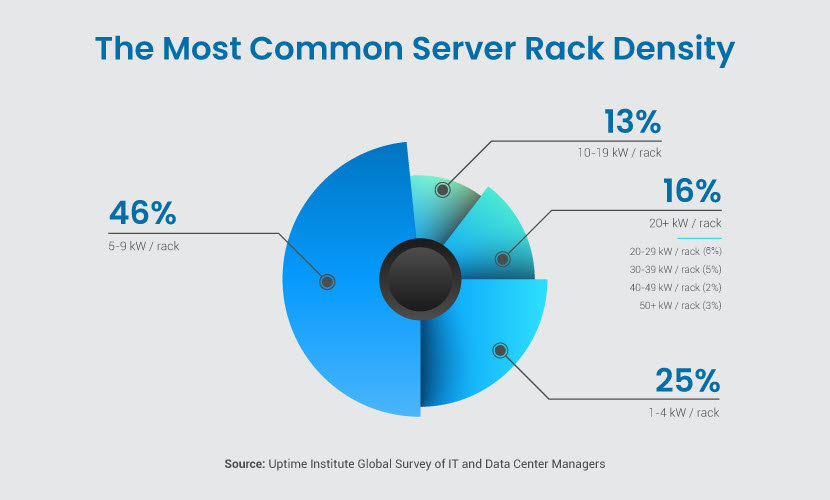
When data is in transit between on-prem and cloud systems, files are vulnerable to:

Security aside, adopters must also deal with the challenges of data synchronization, version control, and data validation. Additionally, organizations operating in regulated industries must adhere to specific data storage and movement compliance requirements.

Hybrid cloud security risks

Interoperability Issues

Interoperability challenges arise due to a hybrid cloud's need to integrate and operate seamlessly across diverse IT environments. Efficient and safe operations require smooth interoperability between on-site infrastructure and cloud-based services.
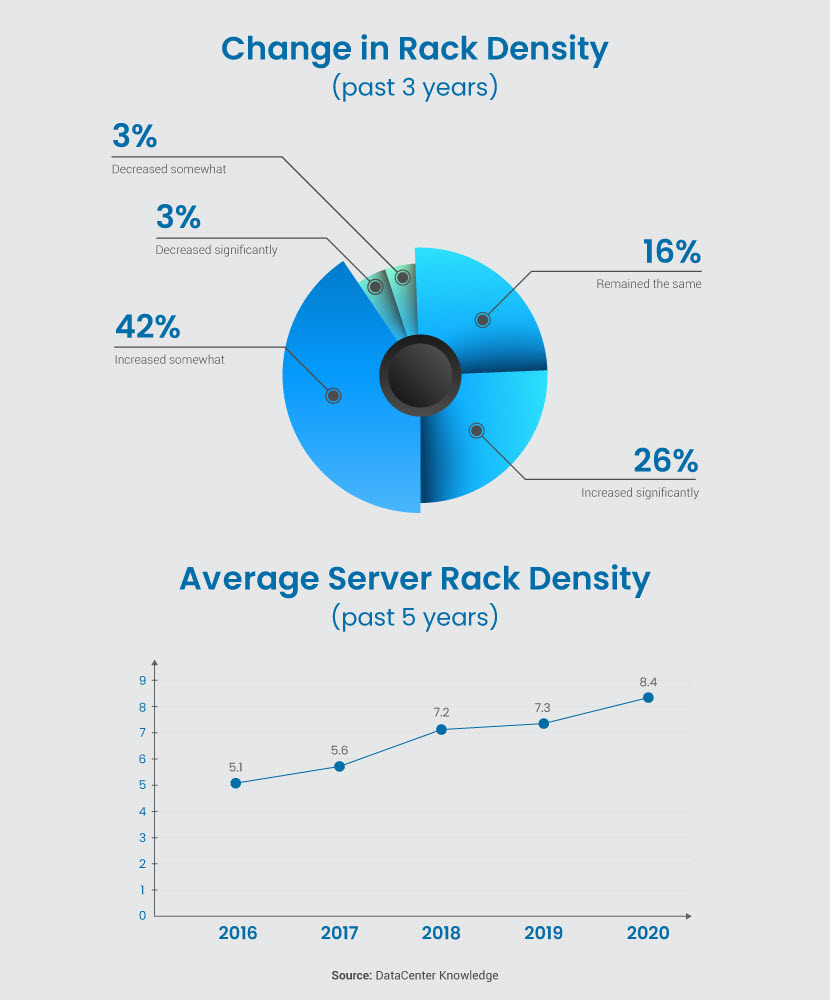
Hybrid cloud strategies often combine multiple types of public cloud services (IaaS, PaaS, and SaaS), frequently belonging to multiple providers. Each vendor has its own:
The lack of standardized protocols complicates security efforts. Organizations often need to develop custom solutions to facilitate communication and data exchange between on-premises servers and the cloud. Divergent models and controls introduce vulnerabilities if not correctly aligned.
As an extra issue, interoperability problems often impact the overall performance of hybrid cloud environments. Delays in data exchange, increased latency, and reduced efficiency are common problems.

Increased Attack Surface

Hybrid clouds have an amplified attack surface due to the combination of public clouds, on-prem infrastructure, and private clouds. Security admins must deal with numerous entryways through which a malicious actor can gain access or launch a cyber attack.

Each environment in a hybrid cloud has different settings and configurations. This diversity introduces multiple vectors attackers can target. Here are a few vulnerabilities commonly found in hybrid clouds:

The interconnected nature of hybrid cloud environments also amplifies the potential impact of a security incident (the so-called blast radius).

While closely related, attack surface and vectors are not synonymous terms. Learn the difference between these two vital security concepts in our >attack vector vs. surface article.

Diverse Security Models

Variations in security requirements in a hybrid cloud architecture present a major challenge. A hybrid cloud strategy must account for and unify the following security elements:

Each environment in a hybrid cloud requires unique security controls, policies, mechanisms, and practices. Admins must secure components individually and integrate security models to create a safe hybrid environment.

For example, on-prem systems may rely on the traditional LDAP or a domain controller, while public clouds often use cloud-specific IAM solutions. Coordinating and ensuring consistency across these different mechanisms is vital for security.

Visibility Challenges

Monitoring in a hybrid cloud environment is often challenging due to the complex and dynamic nature of the infrastructure. Visibility challenges impact the ability to detect and respond to incidents promptly.

Several factors contribute to the difficulty of effective monitoring in a hybrid cloud, including:

All major cloud providers offer native monitoring, but integrating these tools with on-prem solutions is complex. Achieving a unified and holistic view of the entire infrastructure is a typical hybrid cloud security challenge.

Check out pNAP's >hybrid cloud solutions and see how we help companies deal with the challenges of hybrid cloud adoption.

Hybrid Cloud Security Best Practices

Securing a hybrid cloud involves a combination of different precautions, policies, and technologies. Below are 10 best practices for ensuring high levels of hybrid cloud security.

Hybrid cloud security best practices

Invest in Network Security Controls

Network security controls are crucial for protecting data in a hybrid cloud. These precautions protect communication channels, prevent unauthorized access, and detect potential threats.

Here's what you can use to improve network security in a hybrid cloud setup:

As an extra precaution, consider segmenting your network to limit the lateral movement of threats. Segmentation helps contain and isolate incidents, reducing the impact of breaches and enhancing overall network security. Boosting endpoint protection is another impactful way to improve network safety.

Implement a Robust IAM Strategy

An Identity and Access Management (IAM) strategy is vital for hybrid cloud security. IAM involves managing and controlling access to resources, systems, and data based on user identities and assigned roles.

Hybrid cloud adopters require a unified approach to identity and access management across the hybrid environment. Most cloud service providers offer native IAM solutions that integrate with on-prem systems. This process typically involves unifying on-prem directories with cloud-based identity services.

Once you create a centralized identity management system, set up the following features and precautions:

Use dynamic access policies that adapt based on contextual factors (e.g., user location, device type, or time of access). Dynamic policies add an extra layer of protection by tailoring access controls to specific conditions.

Consider integrating IAM logs with SIEM tools to correlate and analyze security events across the hybrid environment. SIEM tools detect patterns indicative of threats and are a must-have for most cloud security strategies.

Use Encryption Throughout the Data Lifecycle

Encrypting data throughout its lifecycle is a fundamental practice in hybrid cloud security. Encryption safeguards sensitive info from unauthorized access and lowers the threat of data leaks.

Use at-rest encryption to protect data hosted on on-prem servers. You should also encrypt your cloud storage with cloud-native encryption mechanisms provided by the cloud service provider (either through server-side encryption (SSE) or client-side encryption).

In-transit encryption is vital to keep traffic moving throughout your hybrid cloud safe. Use this type of encryption to protect the following data flows:

Consider also using encryption in use to enable systems to process data without the need for decryption during computation. This precaution provides an extra layer of security for sensitive computations.

All three encryption strategies require careful key management to be effective. Follow key management best practices to ensure safe operations.

Our all-in-one >EMP enables you to centralize encryption efforts and control all keys from a single pane of glass.

Regularly Patch Systems

Establish a patch management policy that outlines procedures for identifying, testing, and applying patches in both on-prem and cloud environments. Your patch management policy must address challenges specific to patching in a hybrid cloud environment, such as:

Regular updates and patches address known vulnerabilities, minimizing the risk of exploits by cyber criminals. Careful patch management also reduces the risk of disparities between on-prem and cloud components, mitigating potential security gaps.

Consider using automated patch management tools that seamlessly integrate with both on-prem and cloud platforms. Automation streamlines the deployment of updates and reduces the time it takes to address vulnerabilities.

Back Up On-Prem and Cloud-Based Data

Data loss can occur for various reasons, including accidental deletion, hardware failures, software glitches, or malicious activity. Data backups provide a safety net, allowing an organization to recover lost or corrupted data in the event of issues with the original files.

Here's what you must do to effectively implement a data backup strategy in a hybrid cloud setting:

Data backups also reduce the risk of hybrid cloud service outages or disruptions caused by missing data. Backups provide an alternative source of critical info if something happens to the original data set.

Check out pNAP's >backup and restore solutions to see how we ensure our clients never experience permanent data losses.

Implement Zero Trust and PoLP

Zero Trust security and the principle of least privilege (PoLP) are vital to hybrid cloud environments. These strategies minimize the attack surface, limit the impact of incidents, and enhance overall security posture.

The Zero Trust security model is based on the "never trust, always verify" principle. A Zero Trust environment requires verification from everyone, whether inside or outside the network. Here are the key elements of zero trust security:

PoLP is a natural fit for any Zero Trust strategy. PoLP grants users and systems the minimum level of access required to perform their specific tasks. This precaution limits the potential damage an intruder can do with a compromised account or device.

Guide to keeping hybrid clouds safe

Educate and Train Employees

Provide employees with a contextual understanding of the hybrid cloud model, emphasizing the shared responsibility for security. Organize regular security awareness training that covers the following areas:

Tailor training programs based on employees' roles and responsibilities. Different teams have unique security considerations, so targeted training addresses specific needs. Also, consider running regular simulation exercises to check how prepared employees are to identify and thwart incidents.

Set Up Real-Time Monitoring

The goal of monitoring in hybrid cloud security is to provide an organization with real-time visibility into its security posture. Monitor user activities, network traffic, and system logs to detect security incidents in a timely manner.

Continuous monitoring enables organizations to detect:

Monitoring activities must encompass the entire hybrid landscape, including data movement between on-site servers and the cloud. Set up robust logging mechanisms and real-time log analysis to promptly identify any irregularities.

Our article on >cloud monitoring tools presents 30 solutions that help ensure visibility across your cloud environments.

Establish Incident Response Plans

Incident response plans ensure a coordinated and swift reaction to security threats in times of crisis. Outline the most likely and impactful incidents that could occur within your hybrid cloud and prepare how teams should deal with these events.

Most hybrid cloud adopters prepare incident response plans for the following scenarios:

Be as detailed as possible in your incident response plans. Set KPIs, calculate optimal RTOs and RPOs, outline clear priorities, and define go-to personnel.

Another good practice is to invest in disaster recovery, either by preparing a DR plan in-house or going with DRaaS. Sound DR ensures you experience little to no downtime once you deal with whatever went wrong within your hybrid cloud.

Our >disaster recovery checklist explains how to create an effective DR plan, plus provides a handy questionnaire to ensure you do not miss anything vital during planning.

Perform Regular Security Assessments

Run vulnerability assessments to identify potential weaknesses in configurations, software, and access controls across the hybrid cloud infrastructure. Perform these audits regularly, and also whenever the team makes any significant tech or infrastructure updates.

Insights gained from vulnerability assessments inform an organization about potential risks, areas for improvement, and adherence to security policies. If relevant to your business, also conduct compliance audits to verify that security measures align with industry regulations.

Another worthwhile way to check your hybrid cloud security is to run periodic penetration tests. These realistic simulations of real-world attacks assess the following areas:

If running tests in-house is not an option, engage third-party security experts for independent testing. External assessments provide an unbiased, fresh-eyed perspective and bring seasoned specialists to the evaluation process.

Once you make a plan on how to adopt the best practices discussed above, outline all strategies in a >cloud security policy. A policy standardizes procedures, minimizes security gaps, and ensures a cohesive defense strategy.

Take Zero Chances with Hybrid Cloud Security

The hybrid cloud enables you to leverage the advantages of both on-site and cloud-based systems, but the model comes with a few must-know security challenges. Understanding data flow, access controls, and integration points can help mitigate these risks.

Use what you learned in this article to ensure your organization uses a hybrid cloud without any needless risks to security. Applying best practices also strengthens overall security posture and reduces the likelihood of breaches.