Kubernetes is a platform for deploying and managing containerized applications. As environments grow, manual infrastructure and resource management become more difficult. There is a need for a consistent way to create clusters, deploy applications, and maintain configuration across environments.
Terraform addresses these challenges through Infrastructure as Code (IaC). It defines infrastructure and Kubernetes resources in reusable configuration files.
This guide will explain how Terraform integrates with Kubernetes, how to manage infrastructure and Kubernetes resources, and how to apply Terraform effectively in Kubernetes environments.
Prerequisites
- A Linux system (this tutorial uses Ubuntu 26.04).
- Access to a Kubernetes environment.
- Basic familiarity with how Kubernetes works.
- Terraform installed.
- kubectl installed.
Why Use Terraform with Kubernetes?
Kubernetes simplifies container orchestration, but it does not provide a complete solution for infrastructure provisioning and lifecycle management. Instead, it complements Kubernetes with IaC.
Rather than creating and modifying resources manually, teams define infrastructure and Kubernetes resources in configuration files. This approach improves consistency, supports automation, and makes environments easier to reproduce and maintain.
The benefits of using Terraform with Kubernetes are:
- Infrastructure as Code (IaC). Terraform stores infrastructure definitions in code, which makes deployments repeatable and easier to manage.
- Consistency across environments. The same configuration files provision resources in development, staging, and production environments.
- Automation. Terraform automates resource creation and updates, which reduces manual configuration tasks.
- Version control. Infrastructure definitions are stored in source control systems, which provide change tracking and collaboration capabilities.
- Scalability. Terraform supports large and complex Kubernetes environments through reusable configurations and modules.
- Reduced configuration drift. The tool compares the desired state with the actual environment and helps identify unexpected changes.
- Multi-platform support. The same Terraform workflow manages Kubernetes resources, cloud infrastructure, and supporting services.
Terraform and Kubernetes provide a consistent way to provision infrastructure and manage Kubernetes resources throughout the application lifecycle.
The following use cases highlight common Terraform and Kubernetes deployments:
- Kubernetes cluster provisioning. Creating and managing Kubernetes clusters on cloud platforms or self-managed infrastructure.
- Application deployment. Defining and deploying Kubernetes resources such as namespaces, deployments, services, and ingress resources.
- Multi-environment management. Maintaining separate development, testing, and production environments with shared configuration patterns.
- Managed Kubernetes services. Provisioning and managing platforms such as Amazon EKS, Azure AKS, and Google GKE.
- Multi-cluster operations. Managing resources across multiple Kubernetes clusters from a unified workflow.
- Platform standardization. Applying consistent infrastructure and deployment practices across teams and environments.
Getting Started with Terraform and Kubernetes
Terraform manages Kubernetes resources through the Kubernetes provider. The provider enables Terraform to communicate with the Kubernetes API and create, update, or remove resources based on the configuration files you define.
Before Terraform can manage Kubernetes resources, it needs access to a Kubernetes cluster. A cluster is a group of nodes that run and manage containerized workloads. This connection often relies on a kubeconfig file, which contains cluster information, authentication details, and context settings.
The following diagram illustrates how Terraform interacts with Kubernetes:
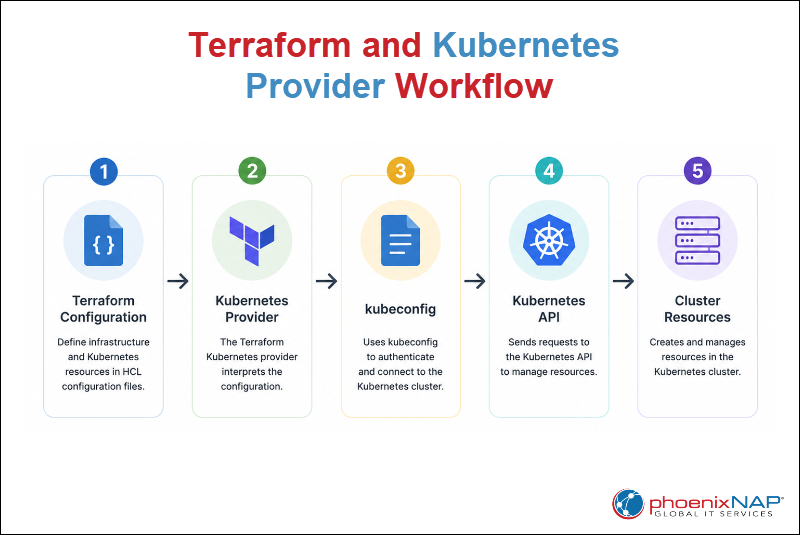
Terraform follows this two-step workflow:
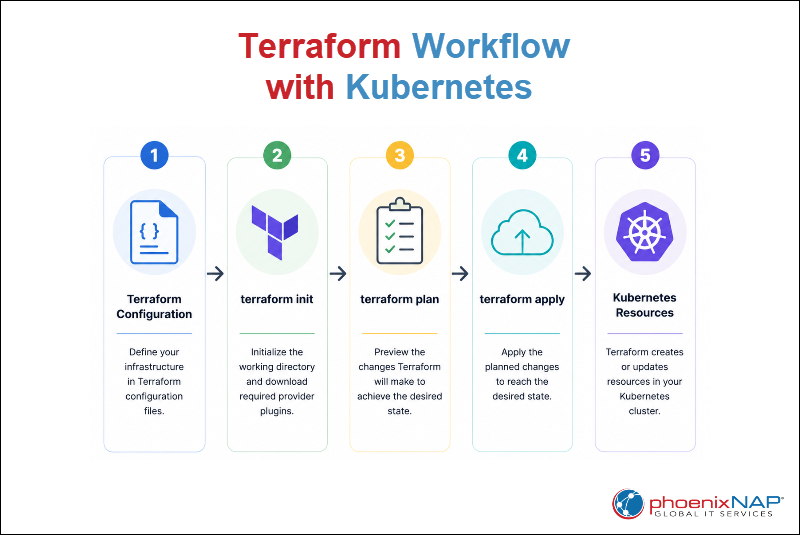
1. Users define the desired infrastructure state in configuration files, initialize the project, review the proposed changes, and then apply the configuration.
2. Terraform compares the desired state with the current environment and determines the actions required to reach the target state.
The following diagram shows the Terraform workflow used with Kubernetes:
Terraform Providers Used with Kubernetes
Terraform uses providers to create, modify, and remove resources without requiring direct interaction with platform-specific tools or APIs. Each provider acts as an interface between Terraform and the target environment.
In Kubernetes environments, different providers serve different purposes. Some manage Kubernetes resources directly, while others deploy applications or provision the infrastructure that hosts Kubernetes clusters. Together, they enable Terraform to manage both the Kubernetes platform and the resources that run on it.
The following sections show providers commonly used with Kubernetes.
Kubernetes Provider
The Kubernetes provider enables Terraform to manage Kubernetes resources directly through the Kubernetes API. It is the primary provider for creating, modifying, and removing resources within a Kubernetes cluster.
The Kubernetes provider manages the following resources:
- Namespaces. Creates and organizes resources within a Kubernetes cluster.
- Deployments. Defines and manages application workloads.
- Services. Controls network access to applications and workloads.
- ConfigMaps. Stores non-sensitive configuration data.
- Secrets. Stores sensitive information such as credentials and API keys.
- Persistent storage resources. Manages PersistentVolumes (PVs), PersistentVolumeClaims (PVCs), and StorageClasses.
Helm Provider
The Helm provider enables Terraform to manage Helm releases within Kubernetes environments. It extends Terraform beyond infrastructure and resource management by simplifying application deployment through Helm charts.
The Helm provider performs the following tasks:
- Deploys Helm charts. Installs applications packaged as Helm charts.
- Manages chart versions. Controls application versions across environments.
- Updates releases. Applies configuration changes and chart updates.
- Removes releases. Uninstalls applications and related resources.
- Standardizes deployments. Maintains consistent application deployments across clusters.
Cloud Providers
Cloud providers extend Terraform beyond Kubernetes resource management. They provision and manage the infrastructure that hosts Kubernetes clusters.
The following cloud providers are commonly used with Kubernetes:
- Bare Metal Cloud Provider (BMC). Provisions and manages Bare Metal Cloud infrastructure that can host Kubernetes clusters and supporting services.
- AWS Provider (EKS). Provisions Amazon Elastic Kubernetes Service (EKS) clusters and related AWS infrastructure.
- Azure Provider (AKS). Provisions Azure Kubernetes Service (AKS) clusters and supporting Azure resources.
- Google Provider (GKE). Provisions Google Kubernetes Engine (GKE) clusters and related Google Cloud infrastructure.
Core Terraform Concepts for Kubernetes
Terraform uses several core concepts to manage infrastructure and Kubernetes resources consistently. These concepts help define the environment, track deployed resources, and identify differences between the expected and actual configuration.
The following sections explain Terraform state management, infrastructure drift, and declarative infrastructure principles.
Terraform State Management
Terraform state is a record of the resources Terraform manages. It stores information about existing infrastructure and Kubernetes resources, which allows Terraform to determine the current state of an environment and compare it with the desired configuration.
State management is a core Terraform concept. Without a state file, Terraform cannot track resources, identify configuration changes, or determine which actions are required during future deployments. It updates whenever Terraform creates, modifies, or removes resources.
This information enables Terraform to generate execution plans, detect infrastructure drift, and avoid unnecessary changes.
The following command displays the resources currently tracked in the Terraform state file:
terraform state list
The output lists all resources Terraform currently manages. In this example, the state file contains the kubernetes_namespace_v1.terraform_demo resource, which represents a Kubernetes namespace managed by Terraform.
Infrastructure Drift
Infrastructure drift occurs when the actual state of an environment differs from the state defined in Terraform configuration files. This situation often arises when resources are created, modified, or deleted outside of Terraform.
Infrastructure drift reduces consistency and makes infrastructure more difficult to manage. Therefore, Terraform regularly compares the current environment with the desired configuration and identifies any differences.
The following example demonstrates infrastructure drift by manually deleting a Kubernetes namespace that Terraform manages:
kubectl delete namespace terraform-created
After the namespace is deleted, run the following command to compare the current environment with the Terraform configuration:
terraform plan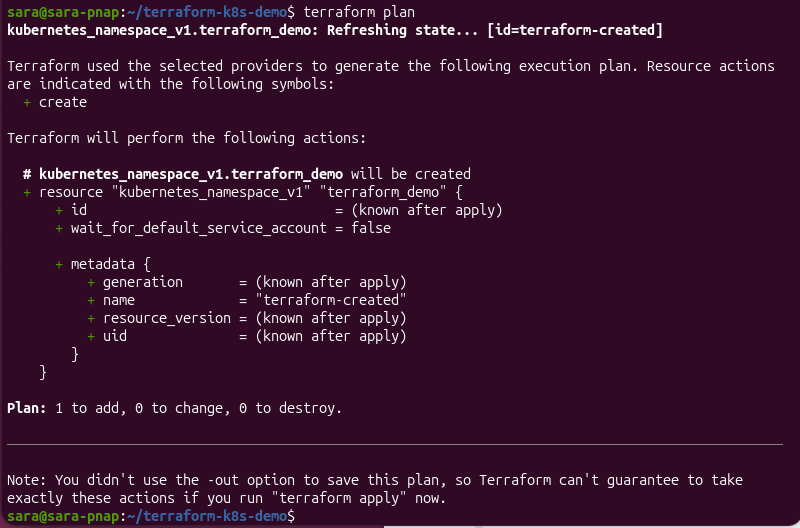
Terraform detects that the namespace no longer exists and plans to recreate it. This behavior helps identify infrastructure drift and restore the environment to the state defined in the Terraform configuration files.
Declarative Infrastructure Principles
Terraform follows a declarative approach to infrastructure management. Instead of defining the steps required to create resources, users define the desired end state in configuration files. Terraform then determines the actions needed to reach that state.
This approach simplifies infrastructure management and improves consistency across environments.
The following command reviews the changes Terraform plans to make before modifying any resources:
terraform plan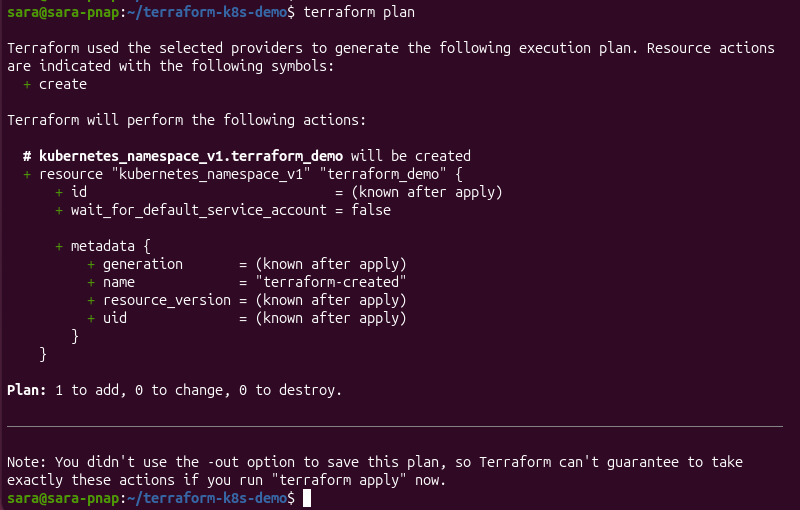
The execution plan outlines the actions Terraform intends to perform to align the current environment with the desired configuration.
After reviewing the plan, apply the configuration with the following command:
terraform apply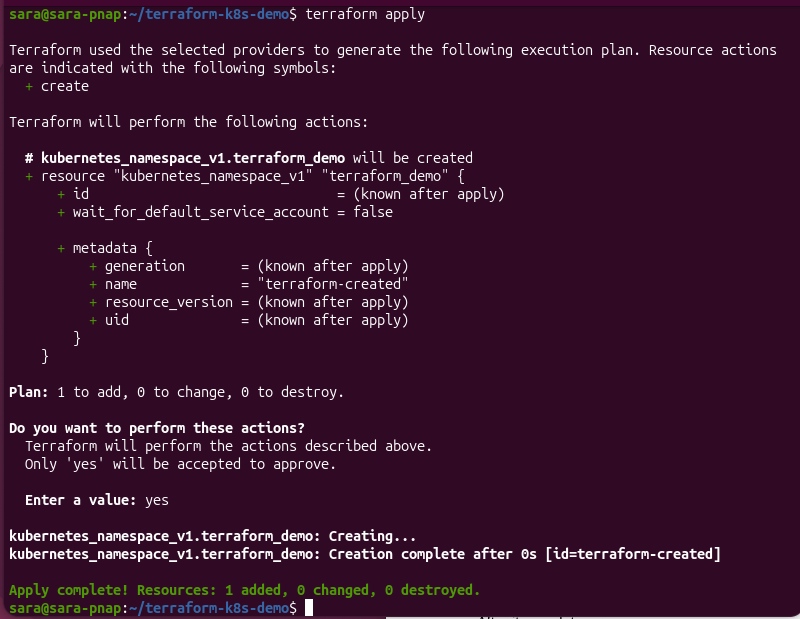
Terraform then performs the required actions and updates the environment to match the configuration defined in the Terraform files.
Terraform vs. kubectl
kubectl and Terraform create, modify, and remove Kubernetes resources, but they use different management approaches.
Terraform manages resources declaratively through Infrastructure as Code (IaC) configurations, while kubectl interacts directly with Kubernetes clusters through command-line operations and Kubernetes configuration files.
The following table highlights the key differences between Terraform and kubectl:
| Feature | Terraform | kubectl |
|---|---|---|
| Management approach | Declarative Infrastructure as Code (IaC). | Direct cluster interaction through commands. |
| Configuration method | Terraform configuration files written in HCL. | Command-line operations and Kubernetes configuration files. |
| Resource tracking | Maintains resource state through Terraform state files. | Relies on the current state stored in the Kubernetes cluster. |
| Change visibility | Supports change previews before deployment. | Changes are typically applied directly to the cluster. |
| Resource scope | Infrastructure resources and Kubernetes objects. | Kubernetes resources only. |
| Reusability | Supports reusable modules and variables. | Reusability typically relies on configuration files, templates, and scripting. |
| Common use cases | Infrastructure provisioning, environment management, and repeatable deployments. | Cluster administration, troubleshooting, resource inspection, and operational tasks. |
Provisioning Kubernetes Clusters with Terraform
Terraform provisions Kubernetes clusters by defining infrastructure in configuration files and deploying it through supported providers. This approach automates cluster creation, promotes consistency across environments, and reduces the need for manual configuration.
Organizations use Terraform to deploy both managed and self-managed Kubernetes environments. The choice depends on factors such as operational requirements, infrastructure preferences, scalability goals, and the level of control required over the underlying platform.
The following sections explain common approaches to provisioning Kubernetes clusters with Terraform.
Creating Managed Kubernetes Clusters
Managed Kubernetes services move control plane management to a cloud provider to simplify cluster deployment. This way, organizations reduce administrative overhead while still benefiting from Kubernetes' orchestration capabilities.
Terraform integrates with managed Kubernetes platforms through cloud provider plugins. Integration allows organizations to define cluster infrastructure in configuration files and deploy consistent environments across multiple regions and environments.
Common managed Kubernetes platforms include Amazon EKS, Azure AKS, and Google GKE, all of which can be provisioned and managed through Terraform.
Managed Kubernetes services offer the following benefits:
- Reduced operational overhead. The cloud provider manages the Kubernetes control plane.
- Simplified maintenance. Cluster updates, patches, and maintenance tasks require less manual effort.
- Built-in scalability. Clusters can scale to accommodate changing workload requirements.
- Cloud service integration. Kubernetes clusters integrate with networking, storage, monitoring, and security services offered by the cloud provider.
- Faster deployment. Organizations provision production-ready Kubernetes environments more quickly than with self-managed infrastructure.
Self-Managed Kubernetes Infrastructure
Self-managed Kubernetes infrastructure gives organizations full control over cluster deployment, configuration, and maintenance. Administrators do not rely on a managed service but deploy and operate Kubernetes on their own infrastructure.
Self-managed clusters can run on virtual machines, dedicated servers, or on-premises environments. This offers greater flexibility and customization options but also increases operational responsibilities.
Self-managed Kubernetes infrastructure offers the following benefits:
- Greater control. Organizations customize cluster configuration, networking, and storage according to their requirements.
- Infrastructure flexibility. Kubernetes runs on virtual machines, bare-metal servers, or hybrid environments.
- Hardware control. Organizations can select and manage the underlying hardware resources.
- Custom integrations. Self-managed deployments support specialized networking, storage, and security configurations.
Self-managed Kubernetes environments also introduce additional operational responsibilities.
Administrators are responsible for cluster deployment, maintenance, security management, monitoring, and version upgrades. Therefore, self-managed deployments require more expertise and ongoing effort than managed Kubernetes services.
Node Groups and Autoscaling
A Kubernetes cluster consists of one or more nodes that provide the computing resources required to run workloads. In larger environments, nodes are often organized into node groups, which simplify cluster management and scaling.
Terraform provisions and manages node groups as part of the cluster infrastructure. This way, organizations define node configurations, instance types, and scaling parameters alongside the rest of their infrastructure.
Automatic scaling helps Kubernetes adapt to changing workload demands by adjusting available resources. Depending on the platform and configuration, autoscaling adjusts the number of nodes based on resource utilization and application requirements.
Node groups and autoscaling provide the following advantages:
- Improved scalability. Clusters adjust to changing workload demands without manual intervention.
- Resource optimization. Resources are added or removed based on usage requirements.
- Cost efficiency. Unused capacity can be reduced to lower infrastructure costs.
- Consistent infrastructure management. Scaling configurations remain part of the Terraform-managed infrastructure.
Managing Kubernetes Resources with Terraform
Terraform manages Kubernetes resources in the same way it manages infrastructure. Resources are defined in configuration files, tracked through the Terraform state file, and deployed using Terraform workflows.
Terraform supports a wide range of Kubernetes resources, including namespaces, deployments, services, configuration data, and storage components.
The following sections demonstrate how Terraform manages common Kubernetes resources and how these resources support application deployment and cluster operations.
Managing Namespaces
Namespaces provide logical separation within a Kubernetes cluster. They help organize resources, isolate workloads, and simplify administration in environments that host multiple applications, teams, or environments.
Terraform creates and manages namespaces, which keep them under version control and ensure they remain consistent across deployments.
The following steps demonstrate how Terraform creates and manages a Kubernetes namespace.
1. Review the changes Terraform plans to make before creating a namespace:
terraform plan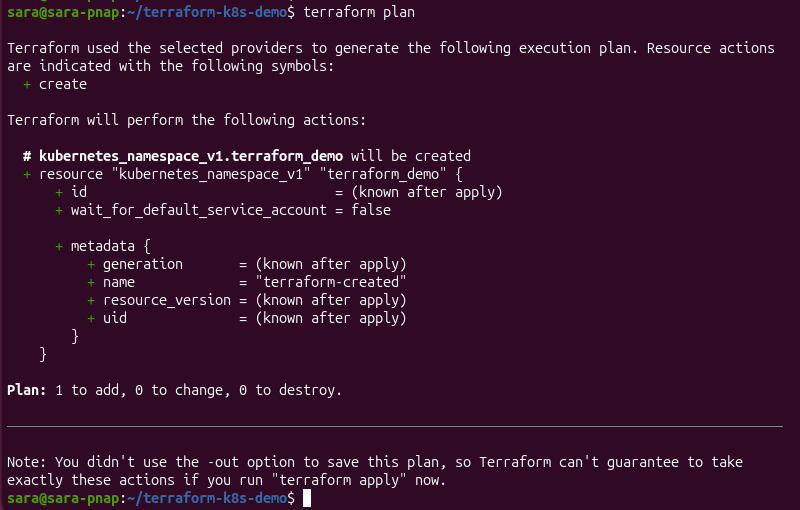
The output shows Terraform plans to create the kubernetes_namespace_v1.terraform_demo resource. This resource creates a Kubernetes namespace named terraform-created. No changes are applied to the cluster.
2. Apply the configuration after reviewing the plan:
terraform apply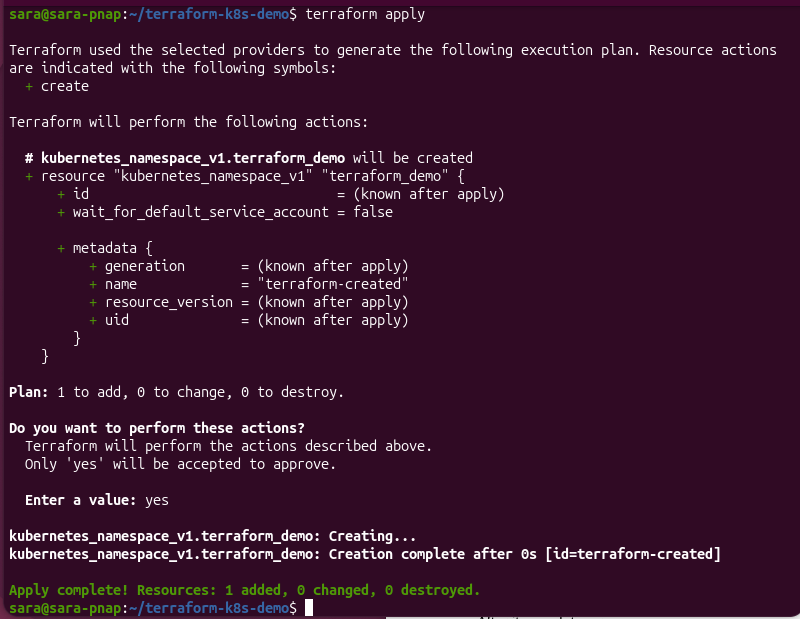
The output confirms Terraform successfully created the namespace and updated the state file to track the new resource.
3. Verify the namespace exists:
kubectl get namespaces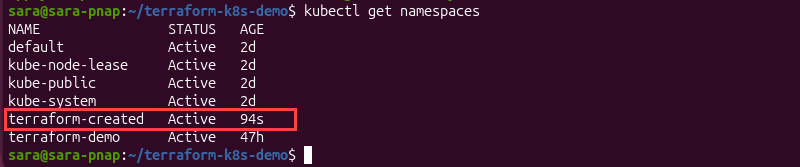
The output lists all namespaces in the cluster, including terraform-created. This confirms Terraform successfully created the namespace, and Kubernetes recognizes the resource within the cluster.
Managing Deployments
Deployments define how many application instances should run, which container images to use, and how updates are applied in Kubernetes.
They create and manage pods, which are the smallest deployable units in Kubernetes and the components that run application containers. Deployments also manage replica counts, which determine how many identical pod instances Kubernetes should maintain. For example, a deployment configured with two replicas runs two pods that provide the same application workload.
Deployments automatically replace failed pods to help maintain application availability.
The following steps demonstrate how Terraform creates and manages a Kubernetes deployment.
1. Review the changes Terraform plans to make before creating a deployment:
terraform plan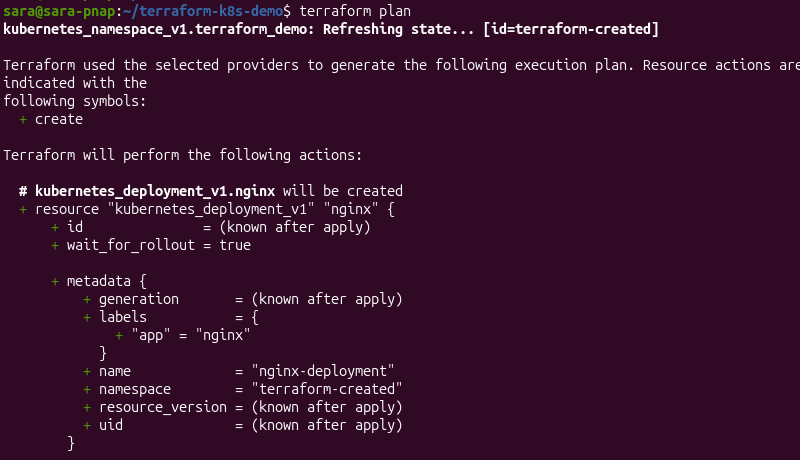
The output shows Terraform plans to create the kubernetes_deployment_v1.nginx resource. The deployment defines two Nginx replicas that will run in the terraform-created namespace.
2. Apply the configuration:
terraform apply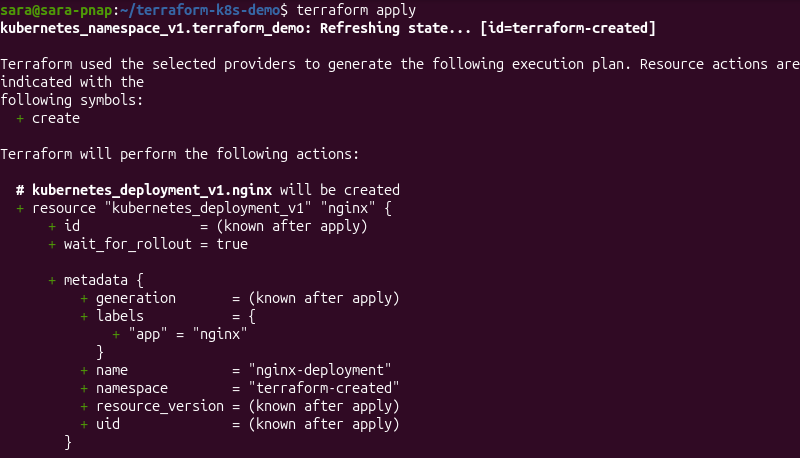
The output confirms that Terraform successfully created the deployment and updated the Terraform state file to track the new resource.
3. Verify the deployment exists with:
kubectl get deployments -n terraform-created
The output shows the nginx-deployment resource. The 2/2 value in the READY column indicates that both deployment replicas are available and running.
4. Verify the deployment pods are running with:
kubectl get pods -n terraform-created
The output lists the pods created by the deployment. Both pods have a Running status, which confirms Kubernetes successfully deployed the application workload. Because the deployment is configured with two replicas, Kubernetes created two pods to run the application.
Managing Services and Ingress
Services and Ingress resources provide network access to applications running in Kubernetes. A Service exposes one or more pods through a stable network endpoint, while an Ingress manages external HTTP and HTTPS access to services within a cluster.
Terraform can create and manage both resource types through configuration files. The following steps demonstrate how to accomplish that.
1. Apply the configuration that creates the service:
terraform apply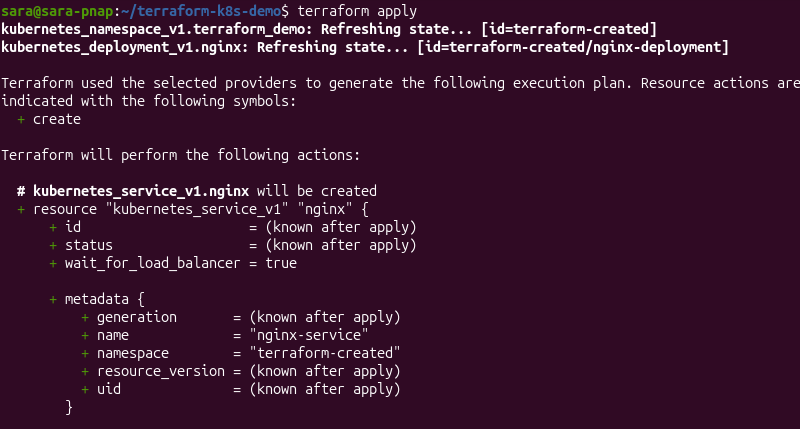
The output confirms Terraform created the kubernetes_service_v1.nginx resource. The service is configured to expose the Nginx deployment running in the terraform-created namespace.
2. Verify the service exists:
kubectl get services -n terraform-created
The output shows the nginx-service resource and its assigned cluster IP address. The ClusterIP type indicates the service is accessible from within the Kubernetes cluster and routes traffic to the pods managed by the deployment.
While Services provide connectivity to applications, Ingress resources manage external access and traffic routing.
Ingress can expose multiple services through a single entry point, and supports features such as host-based routing, path-based routing, and TLS termination. Terraform can manage Ingress resources in the same way as other Kubernetes objects, which helps maintain consistent network configuration across environments.
Managing ConfigMaps and Secrets
Applications often require configuration data and sensitive information. Kubernetes stores this information using objects such as ConfigMaps and Secrets, which Terraform manages as part of the infrastructure configuration.
ConfigMaps store non-sensitive configuration data such as application settings, environment variables, and configuration files. They allow applications to consume configuration without embedding configuration values directly in container images.
Secrets store sensitive information such as passwords, API keys, certificates, and access tokens. Kubernetes treats Secrets differently from standard configuration data and provides mechanisms to help protect sensitive values.
Managing Persistent Storage
Containers are designed to be temporary, which means data stored inside a container can be lost when the container stops or is replaced. Kubernetes provides persistent storage resources that allow applications to retain data beyond the lifecycle of individual pods.
Terraform manages Kubernetes and keeps storage definitions consistent with the rest of the environment, which simplifies deployment across multiple clusters and environments.
Kubernetes persistent storage commonly relies on the following resources:
- Persistent Volumes (PVs). Storage resources available to a Kubernetes cluster.
- Persistent Volume Claims (PVCs). Storage requests made by applications and workloads.
- Storage Classes. Definitions that control how storage is provisioned and managed.
Persistent storage is commonly used for databases, application data, log files, and other workloads that require data retention.
Using Helm with Terraform
Helm simplifies application deployment in Kubernetes by packaging resources into reusable units called charts. A chart contains the Kubernetes objects, configuration settings, and templates required to deploy an application.
Terraform integrates with Helm via the Helm provider, enabling Helm releases to be managed as part of the infrastructure configuration. This approach enables organizations to deploy and update applications using the same workflow they use to provision infrastructure and Kubernetes resources.
Using Helm with Terraform offers several benefits:
- Simplified application deployment. Helm charts package Kubernetes resources into reusable application definitions.
- Consistent environments. The same chart configuration can be deployed across development, testing, and production environments.
- Centralized management. Infrastructure, Kubernetes resources, and Helm releases can be managed through Terraform configuration files.
- Version control. Helm release definitions remain part of the Terraform-managed infrastructure and can be tracked through source control systems.
- Automation. Application deployments can be incorporated into existing Terraform workflows and CI/CD pipelines.
These two tools are often used together because they address different aspects of Kubernetes management. Helm simplifies application packaging and deployment, while Terraform focuses on infrastructure provisioning and resource management.
Terraform vs. Helm
Terraform and Helm are not competing tools in most Kubernetes environments. Instead, they are often used together. Terraform provisions infrastructure and Kubernetes resources, while Helm simplifies the deployment and lifecycle management of applications running on Kubernetes.
The following table highlights the key differences between Terraform and Helm:
| Feature | Terraform | Helm |
|---|---|---|
| Primary purpose | Infrastructure provisioning and resource management. | Application packaging and deployment. |
| Configuration format | HashiCorp Configuration Language (HCL). | Helm charts and YAML templates. |
| Resource scope | Infrastructure, cloud resources, and Kubernetes objects. | Kubernetes applications and related resources. |
| State management | Maintains resource state through Terraform state files. | Relies on Kubernetes and Helm release metadata. |
| Change planning | Supports change previews with Terraform plan. | No equivalent planning workflow. |
| Dependency management | Supports modules and provider integrations. | Supports chart dependencies. |
| Typical use cases | Infrastructure provisioning, cluster management, and Kubernetes resource management. | Application installation, upgrades, and release management. |
Terraform Variables, Outputs, and Modules with Kubernetes
As Terraform configurations grow, managing resources through hardcoded values becomes increasingly difficult. Terraform provides variables, outputs, and modules to improve configuration flexibility, reusability, and maintainability.
These features are useful in Kubernetes environments, where the same infrastructure patterns are often deployed across multiple environments, clusters, and applications. By reusing standardized components, organizations simplify Kubernetes management and reduce configuration duplication.
The following sections explain how variables, outputs, and modules improve Terraform-based Kubernetes deployments.
Using Variables
Variables are named values that Terraform references throughout a configuration. They allow configuration settings to be defined in one place and reused across multiple resources.
Without variables, Terraform configurations often rely on hardcoded values. For example, a deployment might specify that Kubernetes should always run two application replicas:
replicas = 2Replicas determine how many identical pod instances Kubernetes should maintain for an application workload.
This approach works for a single deployment, but it is complicated to manage as the infrastructure grows. If different environments require different replica counts, the value must be updated directly in the resource definition each time.
Variables separate configuration values from resource definitions. Instead of hardcoding the replica count, a variable defines the value:
variable "replica_count" {
  default = 2
}
The deployment then references the variable:
replicas = var.replica_countIn this example, Terraform reads the value stored in replica_count and uses it when creating the deployment. Changing the variable updates the deployment configuration without changes to the deployment resource itself.
Variables are used for namespace names, replica counts, container image versions, resource limits, and other settings that vary between environments.
Using variables provides the following benefits:
- Improved flexibility. Modification of configuration values without changing resource definitions.
- Environment consistency. Reuse of the same Terraform configuration across development, testing, and production environments.
- Reduced duplication. Defining common values once and referencing them throughout the configuration.
- Simplified maintenance. Configuration changes are applied more efficiently as infrastructure grows.
Using Outputs
Outputs allow Terraform to display information after a successful deployment, making resource information available without additional commands.
For example, after creating a Kubernetes service, Terraform can expose the service name through an output:
output "service_name" {
  value = kubernetes_service_v1.nginx.metadata[0].name
}
After a successful terraform apply operation, Terraform displays output values in the terminal.
service_name = nginx-serviceIn this example, Terraform retrieves the Kubernetes service name and displays it after deployment.
Other Terraform configurations, automation tools, and CI/CD pipelines also use output values to reference resources created during deployment.
In Kubernetes environments, outputs expose cluster details, service endpoints, namespace names, resource identifiers, and other values generated during deployment.
Using outputs provides the following benefits:
- Improved visibility. Important deployment information is available after Terraform applies the configuration.
- Automation support. CI/CD pipelines and other tools automatically consume output values.
- Simplified integration. Resources and configurations share deployment information without manual intervention.
- Reduced configuration errors. Terraform retrieves values directly from managed resources instead of relying on manually entered information.
Using Modules
Modules are reusable collections of Terraform resources that simplify infrastructure deployment and management by grouping related configurations into a single component.
For example, an organization that deploys multiple Kubernetes clusters may use a module to standardize namespace creation, networking configuration, storage resources, and application deployments. Teams can then reuse the same module across development, testing, and production environments without duplicating configuration files.
Modules separate infrastructure logic from environment-specific settings. A module defines how resources are created, while variables provide the values used in each deployment.
Using modules provides the following benefits:
- Configuration reuse. Common infrastructure patterns are deployed without duplicating resource definitions.
- Consistency across environments. Standardized configurations reduce differences between development, testing, and production deployments.
- Simplified maintenance. Changes applied to a module and reused across multiple deployments.
- Improved scalability. Large Kubernetes environments become easier to manage through modular infrastructure design.
- Better collaboration. Teams share and maintain approved infrastructure components through reusable modules.
Secrets Management and Security Considerations
Terraform configurations often interact with infrastructure, Kubernetes resources, and deployment workflows that contain sensitive information. While Terraform can manage secure resources such as Kubernetes Secrets, organizations must also protect Terraform state files, credentials, access permissions, and automation pipelines.
Security plays a significant role throughout the Terraform lifecycle. A misconfigured state file, exposed credentials, or overly permissive access policy can affect both infrastructure and Kubernetes environments.
The following sections outline key security considerations when using Terraform with Kubernetes.
Securing Terraform State Files
Terraform stores information about managed infrastructure in a state file. This file allows Terraform to track resources, detect changes, and determine the actions required to reach the desired state.
Because state files may contain infrastructure details and sensitive information, they require the same level of protection as other critical infrastructure assets. Unauthorized access to a state file exposes configuration data and increases security risks.
The following practices help secure Terraform state files:
- Restrict access. Limit access to the state file to authorized users, systems, and automation tools.
- Use remote state storage. Store state files on centralized backends rather than on local systems when working in team environments.
- Enable encryption. Protect state data at rest and in transit.
- Maintain backups. Create secure backups to support recovery and disaster planning.
- Monitor access. Audit state file access and modifications whenever possible.
Managing Sensitive Data
Infrastructure deployments often require sensitive information such as credentials, API keys, certificates, and access tokens. Exposing this information in Terraform configuration files or source code repositories increases the risk of unauthorized access and accidental disclosure.
When working with Terraform and Kubernetes, sensitive information should remain separate from infrastructure definitions whenever possible. This approach reduces exposure and simplifies credential management across environments.
The following practices help protect sensitive data:
- Avoid hardcoded credentials. Do not store passwords, API keys, or access tokens directly in Terraform configuration files.
- Use Kubernetes Secrets. Store application credentials and other sensitive information in Kubernetes Secrets instead of embedding them in resource definitions.
- Separate configuration and secrets. Keep sensitive values separate from reusable infrastructure code.
- Use dedicated secret-management solutions. Centralized secret-management platforms provide additional security controls, auditing, and access management capabilities.
- Rotate credentials regularly. Periodically replace credentials and access tokens to reduce the impact of potential exposure.
Proper secret management helps reduce security risks and supports more secure Terraform and Kubernetes deployments.
Access Control and Security Best Practices
Access control helps ensure that users and systems receive only the permissions required to perform their tasks. Limiting access reduces the risk of unauthorized changes and helps protect both Terraform-managed infrastructure and Kubernetes resources.
Security policies should apply throughout the infrastructure lifecycle, from development and deployment to ongoing operations and maintenance.
The following practices help strengthen Terraform and Kubernetes security:
- Apply the principle of least privilege. Grant only the permissions required to perform specific tasks.
- Use role-based access control (RBAC). Restrict access to Kubernetes resources based on user and service account roles.
- Protect credentials. Secure provider credentials, API keys, authentication tokens, and service account information.
- Enable auditing and monitoring. Track infrastructure activity and configuration changes to support troubleshooting and compliance requirements.
- Secure source code repositories. Prevent sensitive information from being stored in version control systems and limit repository access to authorized users.
- Review permissions regularly. Periodically evaluate user access and remove unnecessary privileges.
Implementing strong access controls and security practices helps reduce operational risks and improve the overall security posture of Terraform and Kubernetes environments.
Terraform and Kubernetes in CI/CD Pipelines
Continuous Integration and Continuous Delivery/Deployment (CI/CD) is a software development practice that automates application testing, building, and deployment. CI/CD pipelines help organizations deliver changes more frequently, reduce manual tasks, and improve deployment consistency.
Terraform and Kubernetes are commonly integrated into CI/CD pipelines to automate infrastructure provisioning, application deployment, and configuration management.
Terraform provisions and updates infrastructure resources, while Kubernetes manages application workloads throughout the deployment lifecycle. Together, they support automated workflows that reduce manual intervention and simplify environment management.
The following sections outline common CI/CD workflows, deployment strategies, integration approaches, and example deployment pipelines used with Terraform and Kubernetes.
Automation Workflows
Automation workflows reduce manual infrastructure and deployment tasks by incorporating Terraform and Kubernetes into CI/CD pipelines.
In a typical workflow, Terraform provisions or updates infrastructure resources, while Kubernetes deploys and manages application workloads. This approach ensures infrastructure and application changes remain synchronized throughout the deployment process.
Automation workflows provide several benefits:
- Consistent deployments. Infrastructure and application changes follow the same repeatable process.
- Reduced manual intervention. Automated workflows minimize repetitive deployment tasks.
- Faster delivery. Changes move through development, testing, and production environments more efficiently.
- Improved reliability. Automated validation and deployment steps help reduce configuration errors.
CI/CD Deployment Strategies
CI/CD pipelines often use deployment strategies that reduce application downtime and minimize the risk of failed releases. Kubernetes supports several deployment approaches that allow organizations to roll out changes in a controlled manner.
Common deployment strategies include:
- Rolling updates. Gradually replace existing application instances with new versions. This approach minimizes downtime and is the default deployment strategy for many Kubernetes workloads.
- Blue-green deployments. Maintain two separate environments and switch traffic from the current version to the new version after validation. This approach simplifies rollback if issues occur.
- Canary deployments. Release a new application version to a small subset of users before expanding the rollout to the entire environment. This approach helps identify issues before a full deployment.
The choice of deployment strategy depends on application requirements, risk tolerance, and operational goals. Kubernetes provides flexibility in implementing different deployment approaches, while CI/CD pipelines automate the release process and help maintain deployment consistency.
Common CI/CD Integrations
Terraform and Kubernetes integrate with a wide range of CI/CD platforms. These tools automate infrastructure provisioning, application deployment, testing, and validation within a unified workflow.
Common CI/CD integrations include:
- GitHub Actions. Automates infrastructure and application deployments directly from GitHub repositories.
- GitLab CI/CD. Provides built-in CI/CD capabilities for Terraform workflows, Kubernetes deployments, and infrastructure automation.
- Jenkins. Supports customizable deployment pipelines through an extensive plugin ecosystem.
- Azure DevOps. Combines source control, CI/CD automation, testing, and deployment management within a single platform.
- CircleCI. Automates infrastructure and application delivery through cloud-based CI/CD pipelines.
The following example illustrates how Terraform and Kubernetes can be integrated into a CI/CD pipeline to automate infrastructure provisioning and application deployment.
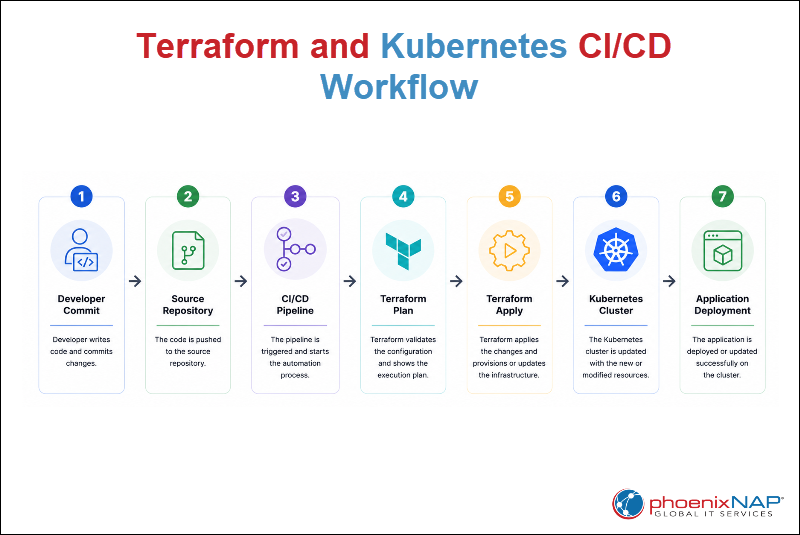
In this workflow, a developer commits code changes to a source code repository. The CI/CD pipeline validates the changes and executes Terraform commands to provision or update infrastructure resources. Once the infrastructure is ready, Kubernetes deploys or updates the application workload.
Best Practices for Terraform and Kubernetes
Successful Terraform and Kubernetes deployments depend on consistent configuration management, secure operational practices, and standardized deployment workflows.
The following practices help organizations manage Terraform and Kubernetes environments more effectively:
- Use variables and modules. Reduce configuration duplication and improve reusability across environments.
- Store configurations in version control. Track changes, support collaboration, and maintain configuration history.
- Review changes before deployment. Use
terraform planand code reviews to validate infrastructure modifications. - Secure Terraform state files. Restrict access, enable encryption, and use secure remote backends when appropriate.
- Apply least-privilege access controls. Limit permissions for users, service accounts, and automation tools.
- Standardize naming conventions. Use consistent naming schemes for resources, namespaces, and environments.
- Automate deployments. Integrate Terraform and Kubernetes into CI/CD pipelines to reduce manual tasks and improve consistency.
- Test changes before production deployment. Validate configurations in development or testing environments before applying them to production systems.
Terraform and Kubernetes Challenges and Limitations
Terraform and Kubernetes provide powerful capabilities for infrastructure, but they also introduce operational and technical challenges.
As environments grow, organizations must manage infrastructure state, coordinate deployments across multiple teams, maintain configuration consistency, and address the complexity associated with large-scale Kubernetes operations.
The following challenges and limitations are commonly encountered when using Terraform with Kubernetes:
- Infrastructure drift. Manual changes made outside Terraform cause the environment to differ from the desired configuration.
- State file management. Terraform relies on state files to track resources, which introduces additional operational and security considerations.
- Steep learning curve. Teams must understand Terraform, Kubernetes, and related tools such as Helm and CI/CD platforms.
- Multi-environment complexity. Managing development, testing, and production environments becomes difficult without standardized workflows and configuration practices.
- Provider limitations. New Kubernetes features may not be immediately available through Terraform providers.
- Troubleshooting challenges. Diagnosing issues often requires knowledge of multiple tools, platforms, and deployment layers.
- Tooling overlap. Terraform, Helm, and kubectl perform similar tasks, which can complicate operational workflows if responsibilities are not clearly defined.
Terraform and Kubernetes: Advanced Concepts
Both Terraform and Kubernetes support a wide range of advanced deployment and management scenarios beyond basic infrastructure provisioning and application deployment.
Terraform helps implement these advanced approaches through Infrastructure as Code (IaC), reusable configurations, provider integrations, and automation workflows.
The following sections highlight several advanced concepts commonly used in large-scale Kubernetes environments.
Multi-Cluster Management
Many organizations operate multiple Kubernetes clusters to separate development, testing, and production environments, support regional deployments, or improve application resilience.
Terraform provides a centralized approach to infrastructure provisioning and configuration management.
Teams can use reusable configurations, modules, and variables to maintain consistency across clusters while accommodating environment-specific requirements. This approach helps reduce configuration drift and simplifies large-scale Kubernetes administration.
Multi-Cloud Kubernetes
Multi-cloud environments allow applications and services to run across different infrastructure platforms while maintaining operational flexibility. Kubernetes workloads are often deployed across multiple cloud providers to improve availability, meet regulatory requirements, or reduce dependence on a single vendor.
Terraform supports multi-cloud Kubernetes deployments through provider integrations for major cloud platforms and infrastructure services.
By using a consistent Infrastructure as Code approach, organizations can provision and manage Kubernetes resources across different environments while maintaining standardized deployment workflows and configuration practices.
Service Mesh Integration
Service meshes provide a dedicated infrastructure layer that handles service-to-service communication, traffic routing, observability, and security.
Popular service mesh solutions such as Istio and Linkerd extend Kubernetes networking capabilities by providing traffic management, encryption, load balancing, and service monitoring. Terraform helps provision and manage the supporting infrastructure required for service mesh deployments, which enables organizations to incorporate advanced networking capabilities into Kubernetes environments.
Policy as Code
Policy as Code applies software development principles to infrastructure governance and compliance management. Instead of enforcing policies manually, organizations define security, operational, and compliance requirements as code that can be version-controlled, reviewed, and automated.
In Kubernetes environments, Policy as Code helps enforce standards related to security, resource usage, access controls, and deployment practices. Tools such as Open Policy Agent (OPA) and Gatekeeper enable automated policy enforcement, while Terraform helps maintain consistent infrastructure configurations.
Learning Path for Using Terraform with Kubernetes
Terraform and Kubernetes are extensive technologies with many features and integrations.
Building expertise typically involves progressing from foundational concepts to more advanced topics such as automation, security, governance, and large-scale cluster management.
The following learning path can help guide continued learning:
1. Learn Terraform fundamentals and Infrastructure as Code (IaC) principles. Understand how Terraform uses declarative configurations, providers, and state management to provision and manage infrastructure.
2. Understand Kubernetes architecture and core resources. Learn how components such as pods, deployments, services, and namespaces work together within a Kubernetes cluster.
3. Practice provisioning and managing Kubernetes resources with Terraform. Gain hands-on experience creating and maintaining Kubernetes resources through Infrastructure as Code workflows.
4. Explore Terraform variables, outputs, modules, and state management. Learn how these features improve configuration reusability, maintainability, and scalability across environments.
5. Integrate Helm and CI/CD workflows. Automate application deployments and infrastructure changes through repeatable deployment pipelines and package management tools.
6. Implement security and governance practices. Focus on access control, secrets management, policy enforcement, and secure operational procedures.
7. Advance to large-scale Kubernetes environments. Explore topics such as multi-cluster management, multi-cloud Kubernetes deployments, service mesh integration, and Policy as Code.
Conclusion
This tutorial explained why you should use Terraform with Kubernetes and how to get started. It also elaborated on different elements of Terraform with Kubernetes, such as the providers used, core concepts, variables, outputs, modules, and how provisioning, resources, secrets, and sensitive data management work.
Next, learn how Terraform and Kubernetes compare to Docker, another important DevOps technology.