


Maintaining consistency across local development, staging, and production environments is a frequent challenge in DevOps. Manually typing Docker commands can lead to human error, environmental drift, and unrepeatable configurations. Terraform provides a declarative model to solve these problems.
This technical guide will explore pairing HashiCorp Terraform with Docker and demonstrate how declarative configuration manages containerized environments.
Prerequisites
- Linux (Ubuntu 22.04 LTS or later recommended), macOS, or Windows 11 with Windows Subsystem for Linux (WSL2) enabled.
- Docker installed on the host.
- Non-root user privileges for Docker.
- HashiCorp Terraform binary version 1.5.0 or later installed.
Why Use Terraform with Docker?
Combining infrastructure provisioning frameworks with containerization runtimes offers advantages over traditional scripting paradigms. This section analyzes the benefits and business use cases that justify pairing Terraform with Docker.
Declarative Lifecycle Management
Traditional container management often relies on shell scripts consisting of docker run, docker network create, and docker volume create commands. Imperative scripts specify how to build the infrastructure, making them prone to failure if an intermediate step fails or if resources already exist.
Terraform uses a declarative approach in which engineers define the what, i.e., the final desired state of the network layout and container topology. Terraform handles dependency graphs, order of operations, and state reconciliation automatically.
Instead of writing imperative shell scripts or executing ad-hoc CLI commands, engineers define the target state of Docker resources in configuration files. Terraform executes only the necessary API actions to achieve the desired state. This approach brings version control, reproducibility, and automation to container management.
Single Tooling Interface
As organizations scale, infrastructure requirements can evolve to span multiple clouds, bare-metal servers, and hybrid environments. Terraform acts as a unified abstraction layer that allows teams to use the same syntax and workflow to provision a local Docker container, an AWS EC2 instance, or a Google Cloud storage bucket.
Organizations rarely run containers in complete isolation from other infrastructure components. A typical application stack requires cloud storage buckets, DNS entries, managed databases, and virtual private networks alongside the containerized application.
Using Terraform for Docker allows infrastructure teams to manage the entire ecosystem with a single configuration. A single execution plan can provision an AWS RDS instance, inject the database connection string into a local Docker container environment variable, and update a Cloudflare DNS record.
State Tracking and Auditing
Terraform maintains a cryptographic ledger of every managed asset inside a state file. This file links the logical resources defined in the configuration code to the physical IDs within the Docker engine.
When a team member changes a container parameter, Terraform detects the difference by comparing the code against the state file and the active Docker engine. This tracking capability guarantees visibility and prevents silent infrastructure modifications.
Use Cases
- Local development replication. Engineering teams use the Docker provider to spin up local replicas of complex cloud topologies. Terraform ensures developers write code against infrastructure configurations identical to those in production.
- Ephemeral testing environments. CI pipelines execute Terraform manifests to provision isolated, multi-container staging grounds for integration testing. The entire environment is destroyed upon test completion.
- Edge and bare-metal deployment. Operators deploy Terraform configurations on remote servers running standalone Docker engines. This ensures consistent configuration across distributed retail locations or edge nodes.
Note: Check out phoenixNAP's Bare Metal Cloud offering. Deployed in as little as 60 seconds and consumed as cloud.
Terraform vs. Docker Compose
This section compares when to deploy Terraform and Docker Compose in a modern engineering pipeline.
| Docker Compose | Terraform with Docker | |
|---|---|---|
| Primary scope | Multi-container applications on a single host. | Multi-provider infrastructure lifecycle orchestration. |
| Configuration language | YAML | HashiCorp Configuration Language (HCL) |
| State management | None (inspects active daemon state directly). | State file tracking (.tfstate) tracking real-world IDs. |
| Cross-provider dependency | Limited to Docker native resources. | Extends to cloud providers, SaaS, DNS, and databases. |
| Execution planning | No planning phase; applies changes immediately. | Explicit plan generation (Terraform plan) prior to applying. |
| Resource destruction | Removes all items defined in the local file. | Selectively destroys or updates based on state changes. |
Docker Compose focuses exclusively on the local Docker domain. It excels at defining application stacks comprising web frontends, API backends, and caching layers that run on a single engine instance. The YAML structure is simple and highly optimized for developer workflows in which external infrastructure dependencies either do not exist or remain static.
Choose Docker Compose when:
- The project boundary ends at the local Docker daemon socket.
- Simple application stack replication is required.
Terraform addresses a broader structural perimeter. It treats Docker as one of thousands of potential infrastructure targets. While Docker Compose cannot provision an upstream hardware firewall or a managed cloud database, Terraform handles these external systems concurrently with the Docker containers.
Terraform introduces strict ordering guarantees by computing exact execution graphs. For example, it ensures that a network volume mounts only after the underlying block storage initializes.
Choose Terraform when:
- The deployment architecture requires coordination between Docker containers and external cloud components.
- The team mandates strict execution planning and state verification.
How Terraform Works with Docker
The internal communication path between config files and the container engine relies on the Terraform provider ecosystem. Providers function as translation proxies between the core Terraform engine binary and the target system APIs.
The path starts at the HashiCorp core engine, which performs the following actions:
- Reading the HCL config files.
- Building an internal Directed Acyclic Graph (DAG) of all resources.
- Calculating dependencies.
- Issuing Remote Procedure Calls (RPC) to the Docker provider plugin.
The Docker provider then translates these RPCs into concrete HTTP payloads compatible with the Docker Engine API. For example, when the HCL code declares a docker_container resource:
1. The provider processes the parameters and submits a POST /containers/create request to the Docker daemon.
2. The daemon executes the instruction locally and returns a JSON payload containing the container metadata and unique SHA-256 ID.
3. The provider sends this data back to the core engine for writing to the state file.
This mechanism requires explicit access to the Docker API socket. By default, on Linux systems, this communication occurs over the local UNIX socket located at /var/run/docker.sock.
For remote configurations, the provider wraps requests in TLS certificates and sends them over a secure TCP socket (typically port 2376) to a remote Docker daemon.
What Terraform Can Manage in Docker
Terraform controls the complete lifecycle of core compute units, network topologies, storage backends, and cryptographic access elements within the target Docker engine. Its main management actions include:
- Monitoring runtime parameters.
- Restarting containers upon config shifts.
- Dynamically changing underlying configurations.
Terraform can also interact directly with Docker image registries and:
- Track upstream image tag updates.
- Pull down fresh layer signatures.
- Trigger cascading container replacements when an underlying base image changes.
When it comes to access control policies and secrets, Terraform performs the following actions:
- Configuring environment variables.
- Injecting configuration files securely via bind mounts.
- Establishes isolated network boundaries to enforce zero-trust segmentation between container groups.
Docker Resources Terraform Supports
The table below outlines the primary Docker resources exposed through the official HashiCorp registry provider.
| Resource | Description |
|---|---|
docker_image | Manages the lifecycle of container images, handling image pulls from remote registries (Docker Hub, GitHub Packages, AWS ECR) or tracking local builds. |
docker_container | Configures and controls individual container runtimes, including environment variables, resource constraints (CPU/Memory limits), entrypoints, and health checks. |
docker_network | Establishes virtual network topologies, managing drivers (bridge, overlay, macvlan), subnet allocations, IPAM configurations, and internal DNS routing. |
docker_volume | Provisions persistent storage allocations, configuring driver options, host mount bindings, and labels to preserve state across container lifetimes. |
docker_config | Manages non-sensitive configuration data blocks accessible to services, enabling externalized configuration injection. |
docker_secret | Secures sensitive payload data within Docker Swarm environments, ensuring encrypted distribution of passwords, keys, and certificates. |
docker_registry_image | Tracks the state of images stored specifically within external private registries, managing remote tag pushes and manifest verifications. |
docker_plugin | Installs, configures, and monitors third-party engine plugins, such as custom logging drivers or specialized storage volume systems. |
Core Terraform Concepts for Docker
This section explores fundamental architectural concepts governing state stability and structural updates when managing containers with Terraform.
Terraform State Files
The state file acts as the single source of truth for the managed container environment. It maps abstract HCL code definitions to real-world Docker engine resource IDs.
When Terraform spins up a container, the Docker daemon assigns a random 64-character hexadecimal ID to that instance. Terraform writes this ID, along with active IP addresses, host port mappings, and runtime states, into its .tfstate file.
Infrastructure Drift
Infrastructure drift occurs when external factors modify the infrastructure outside of the Terraform workflow. An example includes an engineer logging in to the host via SSH and manually executing a docker stop command or altering a port mapping using the Docker CLI.
During each execution phase, Terraform performs a refresh operation by querying the Docker API directly to inspect resource configurations. If it detects a discrepancy between the real-world state and the code template, it generates a remediation plan to restore the environment to the declared specification.
Immutable Infrastructure Principles
Running components are never modified in place. Instead, they are destroyed and replaced entirely. If an operator changes an environment variable or modifies an underlying image tag in the HCL file, Terraform cannot patch the running container due to Docker API limitations.
Instead, the dependency engine:
- Stops the existing container.
- Unlinks associated networks.
- Deletes the runtime instance.
Once the existing container is removed, Terraform provisions a new container using the updated specs.
Core Terraform with Docker Architecture
Terraform with Docker introduces structural decoupling:
- The control workstation hosts the configuration definitions and the immutable state engine, keeping the execution logic independent of the infrastructure target. The local Terraform Core compiles the required graph, while the Docker Provider Plugin manages connection lifecycles across boundaries.
- On the target host, the Docker Daemon acts as a centralized supervisor. It receives instructions over the access socket and maps them to Linux kernel primitives such as cgroups for resource limitation and namespaces for network isolation.
The following diagram illustrates how Terraform and Docker work together.
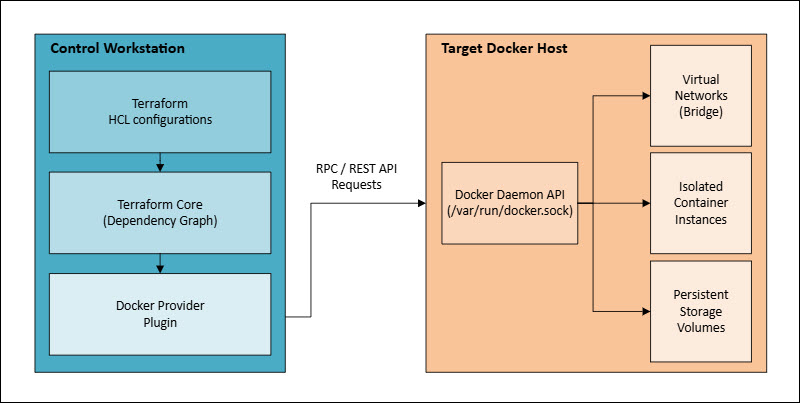
Terraform ensures that networks and volumes are provisioned before containers initialize, avoiding race conditions or mounting failures during startup.
Getting Started with Terraform and Docker
Setting up the first configuration requires defining initial provider locks and establishing communications with the target daemon. Follow the steps below to create a complete initialization script template and bootstrap a managed container environment:
1. Create a file named providers.tf in a blank directory on the development machine.
2. Paste the following code:
terraform {
  required_version = ">= 1.5.0"
  required_providers {
    docker = {
      source  = "kreuzwerker/docker"
      version = "~> 3.0.2"
    }
  }
}

provider "docker" {
  host = "unix:///var/run/docker.sock"
}
This configuration establishes the explicit source paths and version parameters for the Docker plugin from the official HashiCorp registry. Adjust the version numbers as necessary.
3. Execute the initialization command within the directory to fetch the provider plugin binary and establish the working directories:
terraform initThe system output confirms successful initialization, verifying that the core engine discovered the kreuzwerker/docker provider and generated the local structural lockfiles (.terraform.lock.hcl). The environment is now prepared to accept structural component definitions.
Managing Docker Resources with Terraform
Orchestrating container ecosystems requires declaring detailed resource blocks for each fundamental primitive. This section provides HCL block examples demonstrating how to build a unified system of images, networks, volumes, and containers.
Managing Docker Images with Terraform
Images serve as the foundational, immutable, blueprinted file systems for all execution layers. The following configuration instructs the provider to fetch an official Nginx image digest from Docker Hub:
resource "docker_image" "nginx_base" {
  name         = "nginx:1.25.3-alpine"
  keep_locally = false
}
Managing Docker Networks with Terraform
Isolated network topologies ensure security boundaries between distinct application layers. The code below provisions a custom private bridge network equipped with defined IPAM subnet spacing:
resource "docker_network" "private_app_net" {
  name   = "production_application_network"
  driver = "bridge"

  ipam_config {
    subnet  = "10.50.0.0/16"
    gateway = "10.50.0.1"
  }
}
Managing Docker Volumes with Terraform
Persistent volumes decouple state from volatile runtime lifecycles. The following code creates a dedicated storage allocation on the host machine disk:
resource "docker_volume" "database_storage" {
  name = "production_postgres_data"
}
Managing Docker Containers with Terraform
The resource block below links the image, network, and volume primitives together into a running operational container instance:
resource "docker_container" "web_server" {
  name  = "production_web_frontend"
  image = docker_image.nginx_base.image_id

  ports {
    internal = 80
    external = 8080
    ip       = "127.0.0.1"
  }

  networks_advanced {
    name         = docker_network.private_app_net.name
    ipv4_address = "10.50.0.10"
  }

  volumes {
    volume_name    = docker_volume.database_storage.name
    container_path = "/usr/share/nginx/html"
  }

  restart = "unless-stopped"
}
Building Docker Images with Terraform
Terraform can manage image builds natively using the docker_image resource block, bypassing manual docker build commands. The configuration monitors a designated build context directory for changes to files, configurations, or dependencies and automatically rebuilds the image whenever updates are detected.
The code below is an example of using HCL to build Docker images:
resource "docker_image" "custom_api" {
  name = "internal-api:v1.0.0"
  build {
    context    = "${path.module}/app_source"
    dockerfile = "Dockerfile"
    build_args = {
      ENVIRONMENT = "production"
      GO_VERSION  = "1.21"
    }
    label = {
      maintainer = "infrastructure-team"
      managed_by = "terraform"
    }
    no_cache = false
    remove   = true
  }
}
The system evaluates the files within ${path.module}/app_source. If a user updates an application source file, Terraform creates a fresh image layer stack via the daemon and updates the state file tracking signatures. This workflow ensures that containers track application updates automatically during the execution plan.
Docker Image Management with Terraform
When orchestrating containers across multiple environments, pinning abstract mutable tags like :latest introduces significant operational risk. The :latest tag can change upstream without warning, causing drift where different hosts run different code versions despite having identical HCL declarations.
Terraform addresses this risk by locking onto unique image digests:
data "docker_registry_image" "upstream_redis" {
  name = "redis:7.2-alpine"
}

resource "docker_image" "pinned_redis" {
  name          = data.docker_registry_image.upstream_redis.name
  pull_triggers = [data.docker_registry_image.upstream_redis.sha256_digest]
}
Using the docker_registry_image data source allows Terraform to query the remote registry API for the exact SHA-256 cryptographic digest of the target tag during the planning phase. If the remote maintainers push a security update to that tag, the pull_triggers attribute detects the altered SHA-256 signature, causing Terraform to pull the new layers and replace active container instances.
Using Terraform Variables, Outputs, and Modules with Docker
Structuring code bases into reusable, generic blocks prevents duplicate blocks and enforces design patterns. This section demonstrates how to implement input variables, outputs, and modules within container environments.
Input Variables (variables.tf)
Variables allow operators to parameterize configurations. This enables the reuse of the same manifest file across development, staging, and production environments.
Variables are defined using parameters such as type, description, and default:
variable "container_instances" {
  type        = number
  description = "Number of application container runtimes to deploy"
  default     = 3
}

variable "external_port_start" {
  type        = number
  description = "Base external port mapping for host bindings"
  default     = 9000
}
Note: Learn more with our guide to Terraform variables.
Resource Manifest (main.tf)
Use Terraform count loops to dynamically scale container instances based on input variables:
resource "docker_image" "app_runtime" {
  name = "node:20-alpine"
}

resource "docker_container" "scaled_app" {
  count = var.container_instances
  name  = "application-node-${count.index + 1}"
  image = docker_image.app_runtime.image_id

  ports {
    internal = 3000
    external = var.external_port_start + count.index
  }
}
Outputs Configuration (outputs.tf)
Simplify integration with other automated workflows by exposing critical runtime attributes to the console or upstream configurations:
output "container_network_mappings" {
  value = [
    for c in docker_container.scaled_app : {
      name = c.name
      ip   = c.ip_address
      port = c.ports[0].external
    }
  ]
  description = "Matrix of generated container host access locations"
}
Managing Secrets and Environment Variables
Hardcoding sensitive credentials into HCL files creates severe security vulnerabilities. Terraform provides patterns for passing sensitive configuration parameters by combining external variables and secure environment variables within container runtime blocks.
For example:
variable "database_private_key" {
  type      = string
  sensitive = true
}

resource "docker_container" "secure_backend" {
  name  = "backend_application_processor"
  image = "backend-service:latest"

  env = [
    "APP_ENVIRONMENT=production",
    "DB_SECRET_KEY=${var.database_private_key}"
  ]
}
Marking a variable as sensitive = true instructs Terraform to redact its value from standard console output during execution phases. When injected into the env array, the values pass into the container's memory space via the Docker API, shielding the secret payload.
In production clusters, teams should combine this approach with external secret engines such as HashiCorp Vault or AWS Secrets Manager to retrieve keys dynamically at runtime.
Managing Remote Docker Hosts
This section establishes connection mechanisms and structural use cases for the secure control of remote Docker engines.
Connecting Terraform to Remote Docker Engines
Controlling a remote Docker engine requires configuring the provider to use a secure TCP socket wrapper instead of the local UNIX socket file descriptor. This setup requires valid TLS certificates to encrypt communication between the control workstation and the remote host.
The following example shows how to supply Terraform with the certificates for remote connection:
provider "docker" {
  host     = "tcp://192.168.100.50:2376"
  ca_material   = file("${path.module}/certs/ca.pem")
  cert_material = file("${path.module}/certs/client.pem")
  key_material  = file("${path.module}/certs/client-key.pem")
}
Use Cases for Remote Docker Management
The main use cases for managing Docker remotely include:
- Hybrid cloud topology consolidation. Operators can deploy containers to compute instances hosted in distinct cloud availability zones using a single consolidated Terraform workspace.
- Edge orchestration. A central automation pipeline can sequentially connect to remote edge daemons at different physical retail locations, ensuring uniform software distributions.
- Development sandbox provisioning. Automation workflows can spin up remote bare-metal staging boxes for engineers, keeping heavy resource processing loads off developer laptops.
Terraform and Docker in CI/CD Pipelines
Integrating Terraform with Docker inside CI/CD pipelines requires formal stage validation. The orchestration pipeline uses GitHub Actions, GitLab CI, or Jenkins to enforce linting, check execution plans, and run automated testing suites before modifying the target environment.
The diagram below illustrates a common CI/CD pipeline flow:
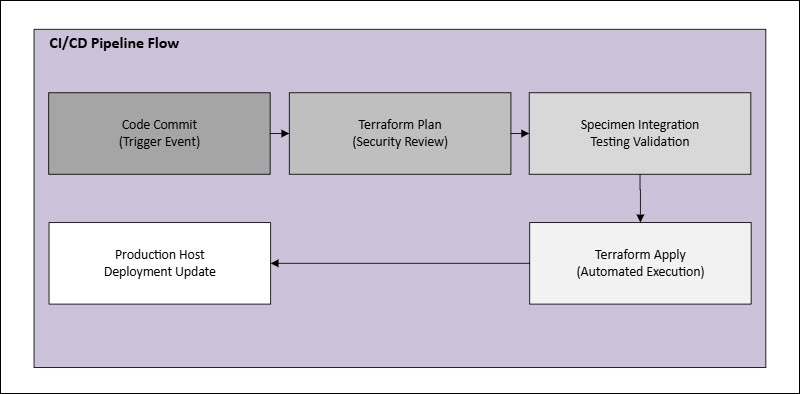
Below is a complete declarative GitHub Actions workflow configuration file (.github/workflows/deploy.yml) that validates code structure, generates an execution plan, and applies changes directly to a target remote host upon a main branch merge:
name: "Automated Infrastructure Deployment"

on:
  push:
    branches:
      - main
  pull_request:

jobs:
  terraform_orchestration:
    name: "Execute Terraform Workflow"
    runs-on: ubuntu-latest
    env:
      TF_VAR_database_private_key: ${{ secrets.PROD_DB_KEY }}

    steps:
      - name: "Checkout Source Code Repository"
        uses: actions/checkout@v4

      - name: "Setup HashiCorp Terraform CLI Interface"
        uses: hashicorp/setup-terraform@v3
        with:
          terraform_version: 1.7.0

      - name: "Verify Configuration Syntax and Formatting"
        run: terraform fmt -check

      - name: "Initialize Provider Plugins and Working Environment"
        run: terraform init

      - name: "Generate Dry-Run Structural Execution Plan"
        run: terraform plan -input=false

      - name: "Apply Infrastructure Changes to Production Target"
        if: github.ref == 'refs/heads/main' && github.event_name == 'push'
        run: terraform apply -auto-approve -input=false
Best Practices for Using Terraform with Docker
Enforcing rigorous development patterns guarantees cluster stability and protects sensitive resources over long-term operations.
The list below establishes core architectural design standards for production environments:
- Implement remote state locking. Store state files in highly available shared backends like AWS S3 or HCP Terraform with active DynamoDB locking enabled. This step prevents state corruption when multiple engineers or automated pipelines execute commands simultaneously.
- Pin exact module and provider versions. Declare precise version bounds for the kreuzwerker/docker provider plugin within the configuration blocks. This pattern isolates configurations from unexpected breaking changes in upstream provider releases.
- Isolate stateful resource lifecycles. Protect volumes and persistent databases from accidental destruction by applying the
prevent_destroylifecycle flag to critical resources:
lifecycle {
  prevent_destroy = true
}- Enforce container health checks. Declare detailed health check parameter blocks for all
docker_containerresources. This configuration enables the engine to verify that dependencies are initialized and operational before routing live traffic to new containers. - Minimize local storage assets. Ensure the
keep_locallyproperty ondocker_imageresources balances network bandwidth usage with disk space constraints on the target host.
Terraform with Docker Limitations and Challenges
Terraform assumes complete ownership over its declared infrastructure targets. If users combine Terraform-managed resources with manual Docker CLI commands and ad hoc Compose files, the state file will drift continuously, leading to configuration conflicts.
The tool operates via a sequential execution design. While Docker Swarm or Kubernetes adjust replica counts dynamically using real-world metrics like CPU utilization, Terraform requires a manual change to an input variable and a full execution cycle to scale resources.
Finally, managing deep orchestrations on a single host can introduce race conditions when attaching to networks or volumes. If a container stops responding or fails to release a network port within the standard API timeout window, the underlying provider plugin may fail. Therefore, it leaves the state file partially written, which requires manual state reconciliation.
Using Terraform and Docker with Kubernetes
While Terraform effectively orchestrates individual Docker engines, managing hundreds of distinct hosts introduces operational complexity. Kubernetes addresses this scale by abstracting groups of physical or virtual machines into a single compute cluster. It manages scheduling, automated scaling, self-healing, and service discovery across multiple nodes.
The following diagram shows the most common enterprise orchestration topology.
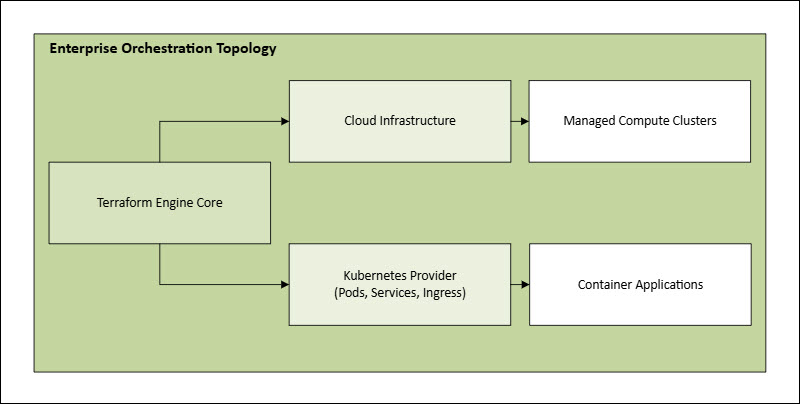
Terraform does not manage individual Docker containers directly. Instead, it shifts upstream to provision the cloud infrastructure, such as Amazon EKS clusters, networking subnets, and IAM security profiles.
Once the cluster is active, the Terraform Kubernetes provider deploys native objects such as Pods, Deployments, Services, and Ingress controllers. This allows Kubernetes to handle the low-level container runtime lifecycle.
Using Terraform with Docker Compose
Many engineering teams have existing projects configured with Docker Compose files. Migrating these assets directly to Terraform requires translating YAML service blocks into equivalent HCL resource definitions.
When a complete code rewrite is not immediately feasible, teams can choose a hybrid approach using the docker_compose_v2_stack technical resource wrapper. This capability allows the Terraform engine to reference an existing docker-compose.yml file directly, treating the declared services as a single aggregated structural element within the state graph.
The code below illustrates the usage of docker_compose_v2_stack:
resource "docker_compose_v2_stack" "local_stack" {
  name        = "development_application_stack"
  config_path = "${path.module}/app/docker-compose.yml"

  env = {
    PROJECT_MODE = "testing"
    SYSTEM_PORT  = "8080"
  }
}
This model provides a practical migration path for legacy projects. Users can continue using familiar Compose workflows locally, while operations teams use the Terraform wrapper to embed those application definitions into broader staging and production pipelines alongside external cloud infrastructure.
Learning Path for Using Terraform with Docker
Building expertise in declarative infrastructure management requires a structured approach to learning. The checklist below outlines a systematic path to master the tools:
Step 1: Local Mastery
Install Terraform and Docker locally on a development machine. Practice provisioning isolated bridge networks, creating persistent volumes, and mounting simple static web applications onto host interfaces.
Step 2: State and Drift Analysis
Manually destroy running containers using the standard Docker CLI. Execute execution plans (terraform plan) to study how the state engine detects and remediates infrastructure drift.
Step 3: Deep Parameterization
Build reusable modules that accept complex configurations. Use count and for-each loops to scale container environments dynamically based on variable files.
Step 4: Remote and Secure Implementation
Configure a remote, standalone Linux host. Enable TLS communication paths and orchestrate the environment securely without requiring local sockets.
Step 5: Full Automation Integration
Create automated pipelines in GitHub Actions or GitLab CI. Use them to lint configurations, generate plans, and apply infrastructure updates automatically upon code check-ins.
Conclusion
After reading this guide, you should know how to create a predictable, repeatable management workflow by combining Terraform with the Docker Engine API. This article also explained how the system works under the hood, how to build its core components, and how to securely pass secret data to containers.
Next, learn how to leverage a custom-built Terraform provider to quickly deploy BMC servers.