Infrastructure as Code (IaC) often extends beyond the resources Terraform creates and manages. Many environments already contain virtual networks, resource groups, secrets, operating system images, and other infrastructure components new deployments reference rather than recreate. Terraform data sources allow users to retrieve this existing information and use it in a configuration.
This article explains how to use data sources to build Infrastructure as Code that is flexible and easy to maintain.
What Are Terraform Data Sources?
Terraform data sources allow configurations to retrieve information from infrastructure or external services without managing those resources directly. They provide read-only access to existing objects, metadata, configuration values, and provider-specific information that Terraform can use to plan and apply changes.
Unlike resources, data sources do not create, update, or delete infrastructure. Instead, Terraform queries the provider during execution and makes the returned values available to resources, variables, outputs, and expressions. This allows a configuration to integrate with existing infrastructure or to obtain information that changes over time, such as available images or network identifiers.
Data sources are available in most Terraform providers, including cloud platforms, DNS providers, secret management systems, and infrastructure services.
Data Sources vs. Terraform Resources
Resources and data sources both interact with infrastructure providers, but they have different roles. Most deployments use them together. For example, a configuration can retrieve an existing virtual network through a data source and then provision new virtual machines inside that network using Terraform resources.
The following table compares the two according to key features:
| Terraform Resources | Terraform Data Sources |
|---|---|
| Create, modify, or delete infrastructure. | Read existing infrastructure and metadata. |
| Managed by Terraform state. | Recorded in state but not managed as infrastructure resources. |
| Can change infrastructure during terraform apply. | Read-only; they do not create, update, or delete infrastructure. |
| Require lifecycle management. | Only retrieve information for use by other resources. |
Anatomy of a Data Block
Terraform defines data sources with the data block. Each block identifies the provider-specific data source, specifies how Terraform should locate the requested object, and exposes attributes that other resources can reference.
If you understand each component of a data block, it becomes easier to work with different providers. The structure stays the same, even though the supported arguments and exported attributes may change.
data "<DATA_SOURCE_TYPE>" "<LOCAL_NAME>" {
  argument = value

  filter {
    name   = "..."
    values = ["..."]
  }
}
All Terraform data sources follow the same basic structure. The provider determines which arguments, optional filters, and exported attributes are available for each data source. Some require only a single identifying argument, while others support additional configuration options to refine the query.
The following sections explain each part of the data block and how Terraform uses it during the planning phase.
Provider Type
The provider type specifies which provider and data source Terraform should query.
In the example above, <DATA_SOURCE_TYPE> represents the provider-specific data source Terraform queries. This value depends on the provider you are using.
For example:
data "pnap_private_network" "production"The provider determines which arguments the data source accepts and which attributes are available after Terraform retrieves the requested information.
Local Labels
The second identifier is a local label. It gives the data source a unique name within the current Terraform configuration.
For example:
data "pnap_private_network" "production"Here, production is the local label. Terraform uses this identifier when other resources or expressions reference the data source.
For example, the following expression references the ID of the production data source:
data.pnap_private_network.production.idUse descriptive labels that reflect the purpose of the retrieved resource. Clear naming conventions make code easier to read, especially in large configurations when you have many data sources of the same type.
Argument Configurations
Arguments define which object Terraform should retrieve. Depending on the provider, arguments may include names, IDs, regions, locations, tags, or other identifying properties.
For example:
data "pnap_private_network" "production" {
  name = "production-network"
}
In this example, the name argument tells Terraform which existing private network to retrieve. Other providers may use different arguments, such as resource IDs, regions, or tags, depending on the type of data source.
Terraform validates the supplied arguments before it queries the provider.
Filters
Some providers, including many AWS data sources, support dedicated filter blocks. Others expose provider-specific lookup arguments such as names, resource groups, or labels.
For example:
filter {
  name   = "..."
  values = ["..."]
}
When available, filters make configurations more flexible because they continue to work even when resource identifiers differ between environments.
Not all providers implement filters in the same way. Some, such as AWS, Azure, and Google Cloud, support filter blocks, while others primarily identify resources using arguments such as names or IDs. Check your provider's documentation to see which lookup methods are supported.
Whenever possible, use the provider's native resource lookup mechanisms instead of hardcoded identifiers. This makes your Terraform setup easier to move and maintain.
Attributes
After Terraform retrieves a data source, it exposes a set of attributes that other configuration blocks can reference.
For example:
data.pnap_private_network.production.idThe example above references the ID attribute of the retrieved private network. Depending on the provider and data source, Terraform may expose additional attributes such as names, IP addresses, associated servers, locations, tags, and other configuration settings.
These attributes can be referenced by resources, variables, outputs, local values, and expressions throughout the Terraform configuration.
How Does Terraform Evaluate Data Sources?
Terraform usually evaluates data sources during the planning stage, before creating or modifying managed resources. It queries the provider, retrieves the requested information, and makes the returned values available throughout the execution plan.
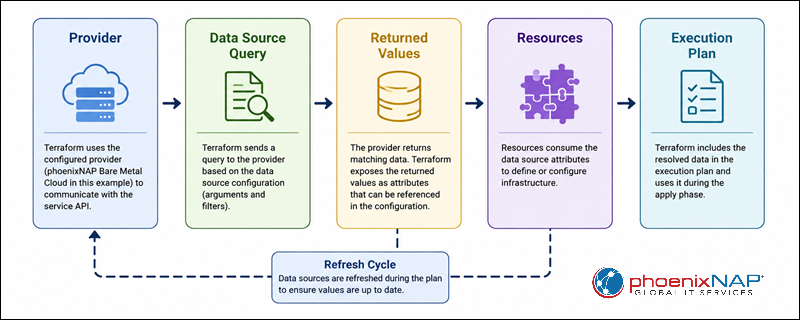
Because Terraform resolves data sources before it creates dependent resources, infrastructure can automatically adapt to changes in the provider environment. For example, if a deployment selects the latest operating system image using filters, Terraform retrieves the current image before generating the execution plan.
Note: If a resource depends on another resource created during the same execution, Terraform may postpone reading the data source until the required dependency becomes available.
Using Data Sources for Better Infrastructure as Code
Terraform data sources do more than just fetch existing resources. They help create reusable configurations, integrate with infrastructure managed outside the current project, and reduce the need for hardcoded values that require manual updates.
The following sections describe common scenarios where data sources make Terraform deployments more secure and easier to maintain.
Note: If you're building automated infrastructure deployments, learn how phoenixNAP Bare Metal Cloud supports Infrastructure as Code using Terraform and other automation tools.
Querying Infrastructure Provider Metadata and Options
Many providers expose metadata through data sources, including available machine images, instance types, regions, availability zones, and supported operating systems.
Instead of hardcoding these values, configurations can dynamically query the provider. This means less maintenance, because deployments automatically use up-to-date provider info. It also makes Terraform modules more portable, as they can adapt to different environments without requiring configuration changes.
For example, you can have a deployment pull the latest supported operating system image, instead of referencing an image ID that might become outdated.
Integrating with Pre-Existing Network and Server Resources
Most organizations do not build all their infrastructure from scratch. They often use existing networks, subnets, security groups, storage volumes, and resource groups as a base for new deployments.
Data sources allow Terraform to retrieve these existing resources and connect new infrastructure without importing them into Terraform state. This approach is useful when another team manages shared infrastructure or when resources were provisioned outside the current Terraform configuration.
Sharing State Across Configurations via Remote State
In large environments, infrastructure is often split into several Terraform projects. For example, one configuration may provision network resources, while another deploys application servers that depend on those resources.
The terraform_remote_state data source allows one configuration to read outputs from another Terraform state file. This way, teams can reuse information such as VPC IDs, subnet IDs, and load balancer addresses without duplicating configuration.
Since remote state files may contain sensitive information, restrict access and share only the outputs downstream configurations require.
Managing Sensitive Data and API Keys Safely
Applications need credentials like API keys, database passwords, certificates, or authentication tokens. Instead of storing these values directly in Terraform variables or configuration files, data sources can retrieve them from dedicated secret management services.
Common examples include:
- API keys.
- Database passwords.
- TLS certificates.
- Authentication tokens.
A centralized secrets manager improves security and makes it easier to rotate credentials, because you can update secrets without modifying the Terraform configuration.
Sensitive values from data sources may still end up in the Terraform state file. Protect the state using appropriate access controls and encryption.
Creating Dynamic Configurations with Filters
Filters allow Terraform to locate resources based on their properties instead of fixed identifiers.
This makes your setup more portable, since deployments still work even if resource IDs differ between development, staging, and production. It also reduces maintenance, as Terraform can select resources dynamically based on tags, names, or other attributes.
For example, a deployment can locate the latest Ubuntu image or select a subnet tagged for a specific environment, instead of using hardcoded values.
Managing Resource Dependencies
Data sources often supply input values that Terraform resources need during deployment.
For example, a virtual machine may depend on:
- An existing subnet.
- A security group.
- A resource group.
- A storage account.
By retrieving these resources first, Terraform can provision dependent infrastructure without someone needing to supply their IDs manually. This keeps relationships between existing and newly created infrastructure components consistent.
Validating Input Data
Data sources can also help validate input data before Terraform creates infrastructure.
If Terraform cannot locate the requested resource, the planning phase fails before any infrastructure changes occur. This allows admins to spot missing resources, incorrect configuration values, or provider access issues early on.
Catching problems early lowers the risk of incomplete deployments and makes troubleshooting easier, because you can identify problems before Terraform starts creating resources.
Cross-Referencing
Many Terraform deployments rely on several existing infrastructure components that must work together. Data sources allow you to retrieve information from several resources and combine their attributes within a single configuration.
For example, a deployment may retrieve:
- A network.
- A DNS zone.
- A TLS certificate.
- A storage bucket.
Terraform can then use these values to provision new infrastructure that works with existing services, keeping the configuration organized and easy to manage.
Terraform Data Source Examples
Instead of building every infrastructure component from scratch, you can use data sources to retrieve existing resources, access external information, and use the returned values to provision dependent infrastructure. Unless stated otherwise, the examples use the phoenixNAP Terraform provider.
Reading an Existing Infrastructure Resource Group
Lots of organizations provision servers on existing private networks. Instead of creating a new network for each deployment, Terraform can reuse an existing private network when provisioning additional infrastructure.
The following example retrieves an existing private network from phoenixNAP Bare Metal Cloud:
data "pnap_private_network" "production" {
  name = "production-network"
}
Terraform reads the private network's properties during the planning phase and makes them available to other resources in the configuration, but it does not take control of the network itself.
Fetching Secrets from a Secure Cloud Vault
Infrastructure deployments often need sensitive information such as database passwords, API keys, or certificates. Instead of storing these values directly in Terraform variables or configuration files, you can get them from a dedicated secrets management service at deployment.
The following example shows how to get a database password from a secrets management service using the AWS provider:
data "aws_secretsmanager_secret_version" "database" {
  secret_id = "database-password"
}
This method keeps secret management in one place and lets Terraform use those values during deployment. Even with a secure vault, sensitive values may still end up in the Terraform state file, so make sure to protect it.
Utilizing Data Outputs to Provision Dependent Infrastructure
One of the primary purposes of data sources is to give other resources the information they need. Instead of copying resource identifiers between configurations, Terraform can reference attributes returned by a data source automatically when provisioning infrastructure.
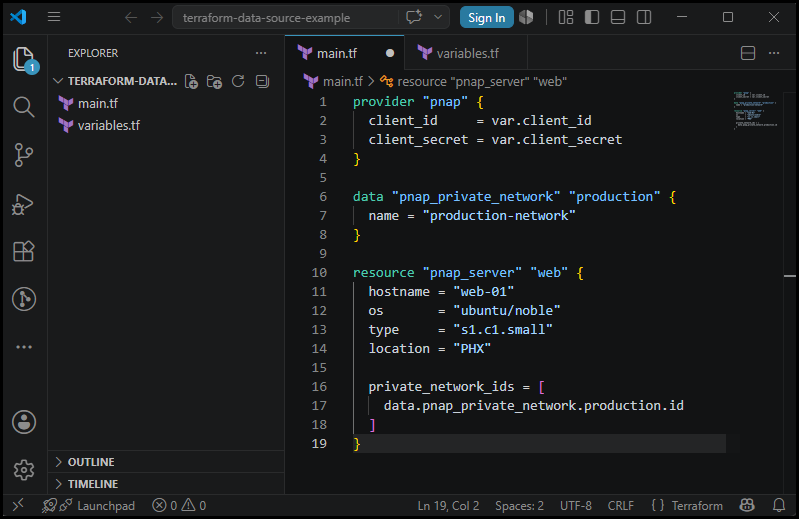
This example references the ID of an existing private network retrieved through a data source:
resource "pnap_server" "web" {
  hostname = "web-01"
  os       = "ubuntu/noble"
  type     = "s1.c1.small"
  location = "PHX"

  private_network_ids = [
    data.pnap_private_network.production.id
  ]
}
During the planning phase, Terraform retrieves the private network information and uses its ID to provision the server. This way, you do not have to hardcode resource IDs, and the same configuration works across multiple environments.
The screenshot below shows a Terraform plan that uses attributes from data sources:
How Terraform Refreshes Data Sources
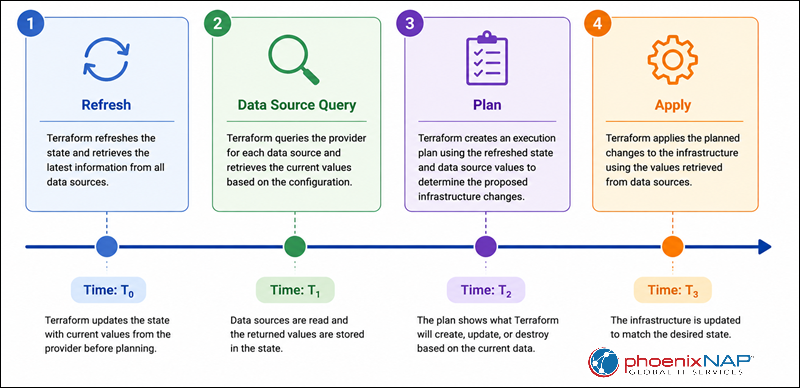
Terraform refreshes data sources to match the current state of your infrastructure before it generates an execution plan. Since data sources represent information managed outside the current configuration, Terraform usually refreshes them by querying the provider. This way your configuration always uses the most recent information.
Knowing when data sources are refreshed explains why you might see changes to existing infrastructure during the planning phase, even if Terraform does not manage those resources directly.
Evaluation During the Plan Phase
Terraform checks and updates data sources during the planning phase. Every time you run a plan, Terraform asks the provider for the latest information before figuring out what changes are needed. Unlike managed resources, data sources are not updated just from the Terraform state. Instead, Terraform gets their current values straight from the provider when it can, so any resources that depend on them use the latest information.
Handling Data Sources that Change Frequently
Some data sources return information that changes often, such as the latest operating system image, available software versions, or provider metadata.
Dynamic queries help keep deployments up to date, but they can also lead to different execution plans over time. For example, if a configuration always retrieves the latest operating system image, Terraform may suggest changes whenever a new image is released.
If you care more about keeping deployments consistent than always using the newest resource, try setting a fixed version or using stricter filters to avoid unexpected changes.
Managing Drift Detection and Non-Managed Infrastructure
Data sources enable Terraform to detect changes to referenced infrastructure by checking the current object during evaluation. But unlike managed resources, Terraform does not track or fix drift for infrastructure that is only referenced through data sources.
For example, if an administrator deletes, renames, or modifies a resource outside Terraform, the next plan may fail because the data source cannot find the expected object. This helps admins detect missing or changed dependencies before Terraform tries to provision new infrastructure.
Terraform cannot automatically fix changes made to resources it does not manage, but refreshing data sources makes sure deployment decisions use the current state of your infrastructure.
Using Terraform Data Sources with Bare Metal Cloud
Terraform data sources can help you provision infrastructure on phoenixNAP Bare Metal Cloud because they enable deployments to integrate with existing infrastructure instead of using fixed configuration values. This is especially useful when several Terraform projects share network resources or when you deploy infrastructure across different environments.
Data sources work well with the phoenixNAP provider because they let your Terraform configuration reference existing infrastructure while still adding new servers with the pnap_server resource.
Note: phoenixNAP Bare Metal Cloud provides native Terraform support through the phoenixNAP provider, making it easier to provision and manage physical infrastructure as code.
Referencing Existing Network Resources
Most production environments already have private networks that support multiple applications and servers. Instead of recreating these networks, data sources allow Terraform to retrieve information about the existing infrastructure and use it when provisioning additional resources.
This method keeps your network setup consistent. It is especially useful when networking resources are managed separately from compute infrastructure or shared across multiple Terraform projects.
Reusing Existing Public IP Blocks
Organizations often reserve public IP blocks for use with different servers or applications. Instead of copying network information manually between Terraform configurations, data sources can retrieve existing IP allocations and use them for new infrastructure.
Using existing networking resources makes it easier to manage IP addresses and keeps your network settings consistent in different environments.
Creating Reusable Server Deployment Modules
The pnap_server resource requires several configuration values, like the operating system, server type, deployment location, and pricing model. Instead of hardcoding these values directly into every Terraform file, you can combine data sources with variables, local values, or outputs to create reusable deployment modules.
This method cuts down on repeated work and helps you standardize server deployments for development, testing, and production environments.
When you create reusable server modules, do not put provider credentials in the Terraform configuration. Authenticate using environment variables or a configuration file to avoid exposing sensitive information.
Sharing Infrastructure Information Between Terraform Projects
As infrastructure grows, organizations often separate networking, security, and compute resources into different Terraform configurations. The terraform_remote_state data source allows one project to consume outputs generated by another project.
For example, one Terraform project can provision shared networking resources, and another can pull the exported network information when deploying Bare Metal Cloud servers. This makes your setup more modular and lets teams manage different parts of the infrastructure independently.
Use terraform_remote_state only when you want your configurations to share state. For more independent systems, provider APIs or dedicated service discovery tools might work better.
Note: Before you apply the configuration, check the pricing_model. If you do not set reservation-based pricing, your deployments may use hourly billing instead.
Common Mistakes When Working with Data Sources
Terraform data sources are generally easy to use, but configuration errors can cause deployments to fail or behave in unexpected ways.
Missing Resources
A data source can retrieve a resource only if it already exists. If Terraform cannot find the requested object, the planning phase fails before any changes are applied.
This problem often happens if a resource has been deleted, renamed, moved to another region (or is in a different account or subscription than the provider is configured to access). You may also see similar errors if your permissions are not set up correctly, as |Terraform will not be able to read the resource.
To avoid these issues, check that the resource exists, confirm your provider is set ot the right environment, and ensure the credentials have permission to read the resource before running terraform plan.
Filtering Errors
Filters make Terraform configurations more flexible, but if you set them up incorrectly, you can get unexpected results. Filters that are too broad may return multiple matching resources, while filters that are too narrow might not return any.
When you can, use combinations of tags, names, or other unique attributes that identify a single resource. Test filters before using them in production to avoid deployment failures caused by ambiguous or missing results.
If the provider documentation says a data source must return exactly one resource, double-check your filters to make sure they point to the right object.
Cycle Errors
Terraform builds a dependency graph before planning and applying infrastructure changes. If a data source depends on a resource that also depends on the same data source, Terraform will not know which one to process first.
These circular dependencies cause cycle errors during planning. To fix them, you usually need to change your configuration so resources and data sources have a clear order and do not refer back to each other.
If you can, keep resource creation and resource lookups separate. This makes your dependencies simpler and easier to manage.
Dependency Deadlocks
Some data sources need values that are not known until another resource is created. In these cases, Terraform may wait to read the data source until the apply phase. If several resources depend on each other indirectly, the dependency graph can become difficult to resolve.
To avoid these problems, keep your Terraform configurations modular and do not add unnecessary dependencies between resources and data sources. Only add explicit dependencies if Terraform cannot determine the correct evaluation order on its own.
Simpler dependency chains also make your Terraform plans easier to read and reduce the chance of deployment failures caused by complicated resource links.
Sensitive Data Leaks in Outputs and State Files
Data sources often pull in sensitive information such as passwords, API keys, certificates, and authentication tokens. While Terraform lets you mark outputs as sensitive, this only hides them from console output. The actual data may still be stored in the Terraform state file.
Protect state files by using secure remote backends, encrypting stored state, and limiting access to authorized users. Try not to show sensitive values in outputs unless another Terraform configuration really needs them.
Best Practices for Using Terraform Data Sources
The tips explain how to use fewer hardcoded values, make code easier to read, and keep sensitive information safe when working with data sources.
Prefer Native Filters Over Hardcoded Identifiers
If you filter by provider-supported tags, names, or other resource attributes instead of fixed resource IDs, your configuration is easier to reuse in different environments. It also means less maintenance, since Terraform can find resources dynamically, even if their IDs are different in each environment.
Secure Data Handling for Outputs
Only expose sensitive data if you really need to. Mark outputs with confidential information as sensitive, and make sure access to Terraform state files is restricted. The state file can contain secret values, even if they do not show up in the console.
If you can, use a secure remote backend with encryption and access controls to keep sensitive state data safe.
Combine Data Sources with Local Values
Local values make your code easier to read, especially when several resources use the same data source attributes.
Rather than repeating long expressions in the configuration, assign values you use often into local variables and reference those locals throughout the deployment. This makes configurations easier to read and simplifies future updates if the underlying data source changes later.
Conclusion
This article explained how Terraform data sources work, how they differ from resources, and how to use them to build more dynamic, reusable, and maintainable Infrastructure as Code. It also covered practical examples, common mistakes, and best practices for integrating existing infrastructure into Terraform deployments.
Next, see how Terraform providers work or how to organize reusable Terraform code into modules to simplify infrastructure management.