HashiCorp Configuration Language (HCL) is the primary language used by Terraform to define infrastructure as code (IaC). All Terraform configurations, modules, variables, and resource definitions are written using HCL. Understanding it is essential for creating, managing, and maintaining infrastructure as code in Terraform environments.
This article will explain what HCL is, how it works, its core syntax and data types, and the language features used to build reusable and scalable Terraform configurations.
What Is HashiCorp Configuration Language (HCL)?
HashiCorp Configuration Language (HCL) is a domain-specific language developed by HashiCorp for defining infrastructure and application configuration. It is primarily used in HashiCorp products such as Terraform, Vault, and Nomad to describe resources, settings, and dependencies in a structured and predictable way.
Note: Before diving into HCL, learn the fundamentals of Infrastructure as Code (IaC) and discover how phoenixNAP Bare Metal Cloud supports IaC-driven workflows through integrations with widely used automation tools.
HCL is most commonly associated with Terraform, where it is used to define the desired state of infrastructure. Administrators and developers can use HCL files to provision and manage resources such as virtual machines, networks, storage services, and security configurations, rather than creating them manually.
As a language designed specifically for infrastructure and configuration management, HCL provides a consistent way to define, organize, and maintain infrastructure as code across different environments and cloud platforms.
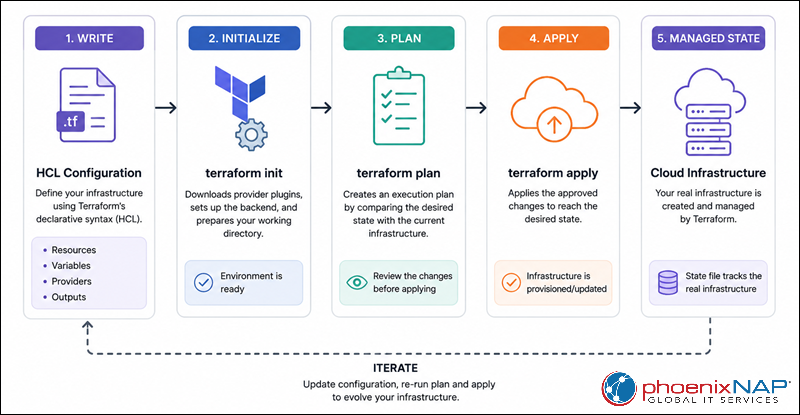
The following diagram illustrates the Terraform workflow:
Why Is HCL Preferred for Infrastructure as Code?
HCL is widely used for infrastructure as code because it provides a consistent way to define and manage infrastructure across different environments and platforms. By storing infrastructure definitions in code, teams can version, review, and reuse configurations just like application code.
The language is closely associated with Terraform, which has become one of the most widely adopted infrastructure-as-code tools for managing resources across cloud providers and on-premises environments. Using HCL, organizations can define infrastructure once, and then deploy it to platforms such as AWS, Microsoft Azure, and Google Cloud through Terraform providers.
HCL also supports automation at scale. Terraform can analyze resource dependencies and provision independent resources in parallel, helping reduce deployment times and improve operational efficiency. Combined with Terraform's extensive provider ecosystem, HCL enables teams to manage cloud services, networking, security, monitoring, and other infrastructure components through a unified configuration language.
HCL Design
HCL was designed to balance human readability with machine processing. Its syntax allows infrastructure definitions to remain easy to write and maintain while providing a structured format that tools such as Terraform can reliably parse and evaluate.
The language follows a declarative approach, prioritizes readability, and supports JSON interoperability. These design principles make HCL suitable for both manually written configurations and automatically generated infrastructure definitions.
Declarative vs. Imperative Models
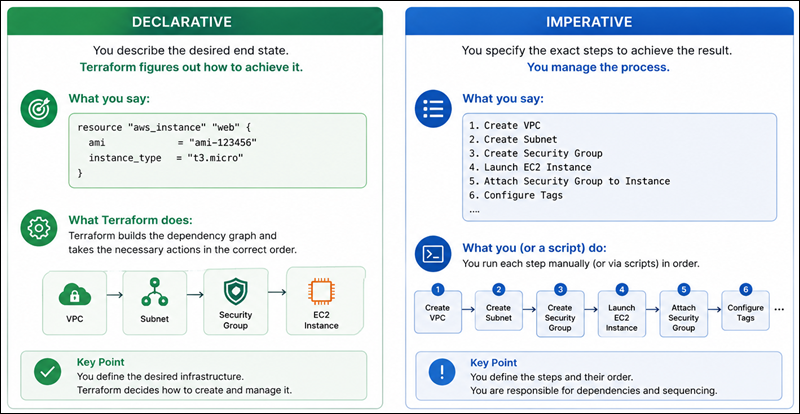
HCL follows a declarative model, which means configurations describe the desired end state rather than the specific steps required to achieve it. Users define what infrastructure should exist, while Terraform determines the actions needed to create, modify, or remove resources.
For example, the following configuration declares that an AWS instance should exist:
resource "aws_instance" "web" {
  ami           = "ami-123456"
  instance_type = "t2.micro"
}
This configuration does not specify how to create the virtual machine. Instead, Terraform analyzes the configuration, compares it to the current infrastructure state, and performs the necessary operations to reach the desired state.
By contrast, imperative approaches require users to define each action in sequence, such as creating a server, configuring networking, and applying settings through individual commands or scripts.
The following diagram compares the two approaches:
Human-Readable Design and Readability vs. Serialization
One of HCL's primary design goals is readability. The language uses a concise syntax that is easy to write, review, and maintain, even as configurations grow in size and complexity.
For example, the following resource definition is written in native HCL syntax on the left and in JSON on the right:
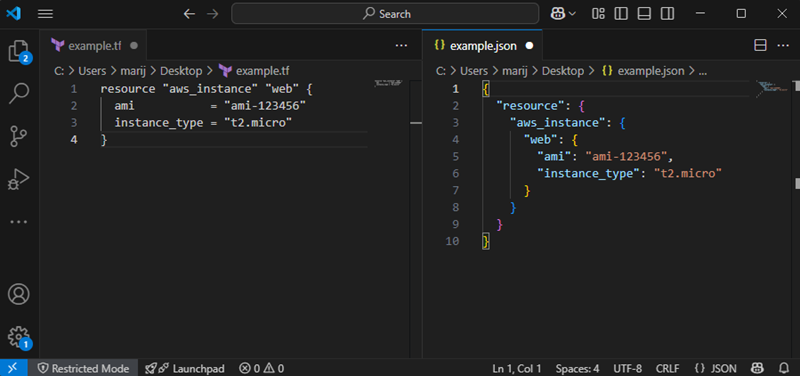
Although both formats describe the same resource, HCL is generally easier for humans to read and edit. It uses less punctuation, supports comments, and provides a structure that more clearly reflects infrastructure definitions.
Machine-Friendliness and JSON Interoperability (HCL-JSON)
While HCL is optimized for human readability, it is also designed to be machine-friendly. Terraform and other HashiCorp tools parse HCL into structured data that can be validated, evaluated, and processed programmatically.
To support automation and tool integration, HCL configurations can also be expressed as JSON, often referred to as HCL-JSON. This allows external systems, scripts, and applications to generate Terraform configurations automatically.
For example, the following JSON configuration defines a variable:
{
  "variable": {
    "region": {
      "default": "us-east-1"
    }
  }
}
Terraform can process both native HCL and HCL-JSON representations of a configuration. In practice, HCL is typically written by humans, while JSON is commonly used when configurations are generated programmatically.
Core Foundations of HCL Syntax
HCL configurations consist of a small set of fundamental syntax elements. Understanding how files are encoded, how blocks and arguments are structured, and how comments work provides the foundation for reading and writing Terraform configurations.
Character Encoding and Line Endings
Terraform configuration files use the UTF-8 character encoding to ensure consistent interpretation of configuration files across different operating systems and environments.
HCL accepts both Unix-style line endings (LF) and Windows-style line endings (CRLF). While Terraform can process either format, teams often standardize on a single line-ending style through editor settings or version control policies to maintain consistency.
Anatomy of a Block (Types, Labels, and Bodies)
Blocks are the primary structural elements of HCL. They define configuration objects such as resources, variables, outputs, providers, and modules.
A block consists of:
- A block type that identifies the kind of object being defined.
- One or more labels that provide names or identifiers.
- A body enclosed in braces
{}that contains arguments and nested blocks.
For example:
resource "aws_instance" "web" {
  ami           = "ami-123456"
  instance_type = "t2.micro"
}
In this example:
resourceis the block type."aws_instance"is the first label."web"is the second label.- The content inside the braces forms the block body.
Different block types may require different numbers of labels depending on their purpose.
Anatomy of an Argument (Identifiers and Expressions)
Arguments define configuration settings within a block. Each argument consists of an identifier followed by an expression assigned using the equals sign =.
The basic syntax is:
identifier = expressionFor example:
instance_type = "t2.micro"In this argument:
instance_typeis the identifier."t2.micro"is the expression.
Expressions can contain literal values, references to other resources, function calls, calculations, and conditional logic.
The following example assigns a value using a variable reference:
instance_type = var.instance_sizeTerraform evaluates expressions during configuration processing, planning, and apply operations as values become known.
Code Commenting Mechanics (#, //, and /* */)
Comments allow you to document configurations and provide context without affecting Terraform's behavior. Terraform ignores comments during parsing and execution.
HCL supports three comment styles:
- Use the hash symbol
#for single-line comments:
# Create a web server instance
instance_type = "t2.micro"- For single-line comments, you can also use double forward slashes
//:
// Create a web server instance
instance_type = "t2.micro"- Use slash-asterisk
/* */syntax for multi-line comments:
/*
This resource creates
a web server instance
for the production environment.
*/
resource "aws_instance" "web" {
  instance_type = "t2.micro"
}
The hash # style is the most common convention in Terraform configurations, although all three comment formats are supported.
Native Data Types and Value Models
Every value in HCL belongs to a specific data type. Terraform uses these types when evaluating expressions, processing variables, generating outputs, and configuring resources.
HCL supports both primitive and complex data types, allowing configurations to represent simple values such as strings and numbers, as well as structured collections of related data.
Primitive Type Mechanics (string, number, bool)
Primitive types represent individual values and form the foundation of all HCL configurations. These types are used throughout Terraform configurations to define resource settings, variable values, outputs, and expression results.
The string type stores text values:
name = "web-server"The number type stores numeric values, including integers and floating-point numbers:
port = 8080The bool type stores Boolean values represented by true or false:
enabled = trueThese primitive types are commonly used for resource settings, variable definitions, conditions, and function arguments.
Complex Structural Types (object, tuple)
Structural types allow multiple values to be grouped into a single structure. They are useful when related values need to be organized as a single unit while preserving a specific structure or schema.
An object contains named attributes, where each attribute can have its own data type:
server = {
  name = "web-01"
  cpu  = 4
}
In this example, the object contains both a string value (name) and a number value (cpu).
A tuple stores an ordered sequence of values. Unlike lists, tuple elements can have different data types:
server_info = ["web-01", 4, true]This tuple contains a string, a number, and a Boolean value. Tuples are typically used when the order of elements is important, and each position represents a specific data type.
Complex Collection Types (list, map, set)
Collection types store multiple values of the same type and are commonly used when managing groups of resources or configuration settings. These types make it easier to work with repeated values, iterate over data, and organize configuration information in a predictable format.
A list stores an ordered collection of values:
availability_zones = [
  "us-east-1a",
  "us-east-1b",
  "us-east-1c"
]
Lists preserve element order and can contain duplicate values.
A map stores key-value pairs:
tags = {
  Environment = "Production"
  Team        = "Platform"
}
Maps are commonly used for tags, labels, and configuration settings identified by a unique key.
A set stores an unordered collection of unique values:
allowed_ports = toset([80, 443, 8080])Unlike lists, sets do not preserve order and automatically remove duplicate entries.
Type Constraints and Null Handling (null)
Terraform allows configurations to enforce expected data types through type constraints. Type constraints improve configuration reliability by ensuring that input values match the expected format before Terraform attempts to create or modify resources.
For example, the following variable only accepts numeric values:
variable "instance_count" {
  type = number
}
Terraform validates values against the specified type during planning and execution.
HCL also supports the special null value, which represents the absence of a value. This allows configurations to conditionally omit arguments or defer to default behavior when a value is not provided.
instance_type = nullDepending on the context, assigning null may cause Terraform to omit the argument entirely or use a default value if one is available. This behavior makes null useful for creating flexible, reusable configurations that adapt to different deployment scenarios.
Evaluating Expressions and Operators
Expressions allow HCL configurations to calculate values, reference existing data, and make decisions based on conditions. Terraform evaluates expressions during planning and execution to determine the final values assigned to variables, resource arguments, outputs, and other configuration elements.
HCL supports a variety of operators and expression types that make configurations more dynamic and reusable.
Arithmetic, Logical, and Equality Operators
Operators perform calculations, comparisons, and logical evaluations within expressions. They can be used to derive values, validate conditions, and control configuration behavior.
Arithmetic operators work with numeric values:
total_instances = 2 + 3Terraform supports common arithmetic operations such as addition +, subtraction -, multiplication *, division /, and modulo %.
Equality operators compare values and return a Boolean result:
is_production = var.environment == "production"The equality operator == returns true when both values match, while the inequality operator != returns true when the values differ.
Logical operators combine multiple Boolean expressions:
create_resource = var.enabled && var.environment == "production"Terraform supports logical AND &&, logical OR ||, and logical NOT ! operators.
String Interpolation and Heredoc Formatting (<<EOT)
String expressions allow values to be dynamically constructed using variables, resource attributes, and function results. This makes it possible to generate descriptive names, configuration files, and command strings without hardcoding values.
String interpolation inserts expression results directly into a string:
name = "web-${var.environment}"If var.environment is set to production, the resulting value becomes web-production.
For larger blocks of text, HCL supports heredoc syntax. Heredocs allow multi-line strings to be defined without escaping line breaks or quotation marks. For example:
user_data = <<EOT
#!/bin/bash
echo "Server initialized"
systemctl start nginx
EOT
Heredocs are commonly used for startup scripts, configuration files, policy definitions, and other multi-line content.
Conditional Expressions (Ternary Operator)
Conditional expressions allow Terraform to choose between two values based on a Boolean condition. They provide a concise way to implement simple decision-making logic within a configuration.
The syntax follows the format:
condition ? true_value : false_valueFor example:
instance_type = var.environment == "production" ? "t3.large" : "t3.micro"In the example above, if the environment is set to production, Terraform assigns t3.large. Otherwise, it assigns t3.micro.
Conditional expressions are commonly used to adjust resource settings, select configuration values, and customize deployments for different environments without duplicating code.
Control Flow Patterns and Meta-Arguments
Terraform does not provide traditional programming constructs such as loops and control statements. Instead, it uses meta-arguments, expressions, and collection functions to dynamically create resources, iterate over data, and transform configuration values.
These features allow a single configuration to adapt to different environments and deployment requirements while reducing code duplication and improving maintainability.
Conditional Block Evaluation via count
The count meta-argument controls how many instances of a resource or module Terraform creates. It is commonly used for conditional resource creation when a resource should only exist under specific conditions.
The following example creates a resource only when the create_instance variable is set to true:
resource "aws_instance" "web" {
  count = var.create_instance ? 1 : 0

  ami           = "ami-123456"
  instance_type = "t2.micro"
}
If var.create_instance evaluates to true, Terraform creates one instance of the resource. If it evaluates to false, Terraform creates no instances and effectively omits the resource from the deployment.
The count meta-argument is also commonly used to create multiple identical resource instances by specifying a numeric value greater than one.
Resource Iteration using for_each
The for_each meta-argument creates multiple resource instances based on a collection of values. Unlike count, which relies on numeric indexes, for_each assigns a unique key to each resource instance.
The following example creates an S3 bucket for each environment:
resource "aws_s3_bucket" "bucket" {
  for_each = toset(["dev", "test", "prod"])

  bucket = "company-${each.key}"
}
Terraform creates three separate bucket resources using the values from the set. Within the block, each.key provides access to the current collection element.
Because resources are identified by keys rather than indexes, for_each is often preferred when working with named resources that may be added, removed, or modified over time.
Comprehensive Iteration with for Expressions
for expressions generate new values by iterating over existing collections. They are commonly used to transform, reshape, or extract data without creating additional resources.
The following example converts a list of names to uppercase:
locals {
  upper_names = [
    for name in var.names :
    upper(name)
  ]
}
If the input contains:
["web", "api", "db"]
The resulting value becomes:
["WEB", "API", "DB"]Unlike for_each, which creates resource instances, for expressions create new values that can be assigned to variables, locals, outputs, or resource arguments.
Slicing, Filtering, and Transforming Data Structures
Terraform provides functions and expressions that enable filtering collections, extracting subsets of data, and combining values into new structures. These techniques are commonly used when working with complex variables, resource outputs, and dynamically generated configurations.
The following example filters a collection and returns only production servers:
locals {
  production_servers = [
    for server in var.servers :
    server
    if server.environment == "production"
  ]
}
Terraform can also extract a portion of a collection using the slice() function:
locals {
  first_two = slice(var.subnets, 0, 2)
}
Collection functions can be used to transform and combine data structures. For example, the merge() function combines multiple maps into a single value:
locals {
  tags = merge(
    local.common_tags,
    {
      Environment = "Production"
    }
  )
}
These filtering, slicing, and transformation techniques allow Terraform configurations to remain concise while dynamically generating values from existing data structures.
Built-in HCL Functions and Logic
Terraform includes a large collection of built-in functions that can be used within expressions to transform values, perform calculations, format data, and generate dynamic configuration values. These functions help reduce duplication and make configurations more flexible and reusable.
Functions are called using a function name followed by one or more arguments enclosed in parentheses.
Terraform evaluates the function and returns a result that can be assigned to variables, resource arguments, outputs, or local values.
String Manipulation and Formatting Functions
String functions modify, combine, and format text values. They are commonly used to generate resource names, construct identifiers, and standardize input values across environments.
The upper() and lower() functions convert text to uppercase or lowercase:
upper("production")
The format() function creates formatted strings using placeholders:
format("%s-%s", "production", "web")
The join() function combines list elements into a single string:
join(", ", ["web", "api", "db"])
These functions are frequently used when building naming conventions, tags, and dynamically generated configuration values.
Collection Manipulation and List/Map Evaluation
Collection functions simplify working with lists, maps, and sets. They can combine collections, extract values, and reshape data for use in resource definitions.
The length() function returns the number of elements in a collection:
length(["web", "api", "db"])
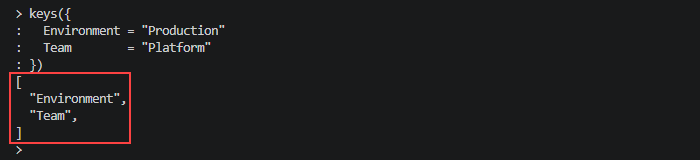
To return all keys from a map, use the keys() function:
keys({
  Environment = "Production"
  Team        = "Platform"
})
The merge() function combines multiple maps into a single map. For example:
merge(
  { Environment = "Production" },
  { Team = "Platform" }
)
Collection functions are commonly used when processing variables, generating tags, and creating dynamic resource configurations.
Numeric and Encoding/Decoding Operations
Numeric functions perform mathematical calculations, while encoding functions convert data into formats suitable for APIs, templates, and external systems.
The max() function returns the largest value:
max(2, 5, 10)
The min() function returns the smallest value:
min(2, 5, 10)
Terraform also provides encoding functions such as jsonencode():
jsonencode({
  environment = "production"
  enabled     = true
})
An example output is:
{"environment":"production","enabled":true}Encoding functions are commonly used when generating JSON policies, API payloads, configuration files, and other structured data formats.
Type Conversion and IP Network Calculations
Terraform provides type conversion functions that explicitly convert values between supported data types. These functions help ensure compatibility when values originate from different sources or collection types.
The tostring() function converts a value to a string. For example, the following command outputs "8080":
tostring(8080)
The tolist() function converts compatible collections into a list:
tolist(toset(["web", "api"]))
Terraform also includes IP networking functions that simplify subnet calculations and address planning.
The cidrsubnet() function calculates a subnet within an existing network range:
cidrsubnet("10.0.0.0/16", 8, 1)
Functions such as cidrsubnet() are commonly used when building virtual networks, allocating subnets, and automating network address management across cloud environments.
Essential Top-Level HCL Blocks in Terraform
Terraform configurations are organized into blocks that define infrastructure resources, providers, variables, outputs, and other configuration elements. Each block serves a specific purpose and helps structure infrastructure code in a predictable and maintainable way.
While Terraform supports many block types, a small set of top-level blocks forms the foundation of most configurations. Understanding these blocks is essential for building, organizing, and managing infrastructure as code.
terraform Block
The terraform block configures Terraform itself. It is commonly used to define the required Terraform version, provider requirements, and backend settings for state storage.
For example:
terraform {
  required_version = ">= 1.6.0"

  required_providers {
    aws = {
      source  = "hashicorp/aws"
      version = "~> 5.0"
    }
  }
}
Terraform evaluates this block before processing the rest of the configuration.
provider Block
The provider block configures the platform or service that Terraform manages. Providers act as the interface between Terraform and external systems such as AWS, Azure, Google Cloud, Kubernetes, or GitHub.
The following example configures the AWS provider:
provider "aws" {
  region = "us-east-1"
}
Resources associated with the provider use these settings when Terraform creates or manages infrastructure.
variable Block
The variable block defines input values that allow configurations to be customized without modifying the underlying code. Variables make configurations more flexible and reusable across environments.
For example:
variable "instance_type" {
  type    = string
  default = "t3.micro"
}
Variables can be assigned different values during deployment while keeping the configuration itself unchanged.
output Block
The output block exposes values after Terraform applies a configuration. Outputs are commonly used to display resource information or pass values between modules.
The following example exposes a resource's public IP address:
output "public_ip" {
  value = aws_instance.web.public_ip
}
Terraform displays output values after a successful deployment, making them available to other configurations and automation workflows.
local Block
The locals block defines local values that can be reused throughout a configuration. Local values help eliminate duplicate expressions and improve readability.
For example:
locals {
  common_tags = {
    Environment = "Production"
    Team        = "Platform"
  }
}
Local values are referenced using the local object and are evaluated only within the current module.
resource Block
The resource block is the core building block of Terraform. It defines the infrastructure objects that Terraform creates, modifies, and removes.
The following example creates an EC2 instance:
resource "aws_instance" "web" {
  ami           = "ami-123456"
  instance_type = "t3.micro"
}
Each resource block describes the desired state of a specific infrastructure component.
data Block
The data block retrieves information from existing infrastructure without creating or modifying resources. Data sources allow configurations to reference existing external information.
For example:
data "aws_ami" "ubuntu" {
  most_recent = true

  owners = ["099720109477"]
}
Terraform queries the provider for the requested information and makes the results available to other resources and expressions within the configuration.
Modular Code Organization in HCL
As Terraform configurations grow, maintaining a single file for all resources becomes difficult. Modules provide a way to organize infrastructure into reusable, self-contained components that can be shared across projects and environments.
Terraform modules help reduce duplication, improve consistency, and simplify the management of complex infrastructure deployments.
module Block
The module block imports and uses another Terraform module within the current configuration. Modules can be stored locally, downloaded from a registry, or retrieved from version control repositories.
The following example uses a local module:
module "network" {
  source = "./modules/network"
}
When Terraform processes this configuration, it loads the referenced module and evaluates its resources as part of the deployment.
Modules are commonly used to encapsulate infrastructure components such as networks, virtual machines, Kubernetes clusters, or application platforms.
Module Inputs, Outputs, and Source Attributes
Modules communicate with the rest of a configuration through inputs and outputs. Inputs allow values to be passed into a module, while outputs expose values generated by the module.
The following example passes values into a module:
module "network" {
  source = "./modules/network"

  vpc_name   = "production-vpc"
  cidr_block = "10.0.0.0/16"
}
Within the module, these values are typically defined using variable blocks.
Modules can also expose values through output blocks. For example, a networking module might return a VPC ID that other resources can reference:
module.network.vpc_idThe source attribute is required in every module block and specifies where Terraform can locate the module. Sources can reference local directories, Terraform Registry modules, Git repositories, or other supported module locations.
Flat Directory Parsing vs. Nested Hierarchies
Terraform treats each module directory as a separate configuration boundary. When Terraform loads a module, it automatically evaluates all .tf files located within that directory.
For example, the following files belong to the same module:
- main.tf
- variables.tf
- outputs.tf
- network.tf
Terraform merges these files into a single configuration regardless of the file names. However, Terraform does not automatically parse subdirectories. Take a look at the following structure that contains a separate module:
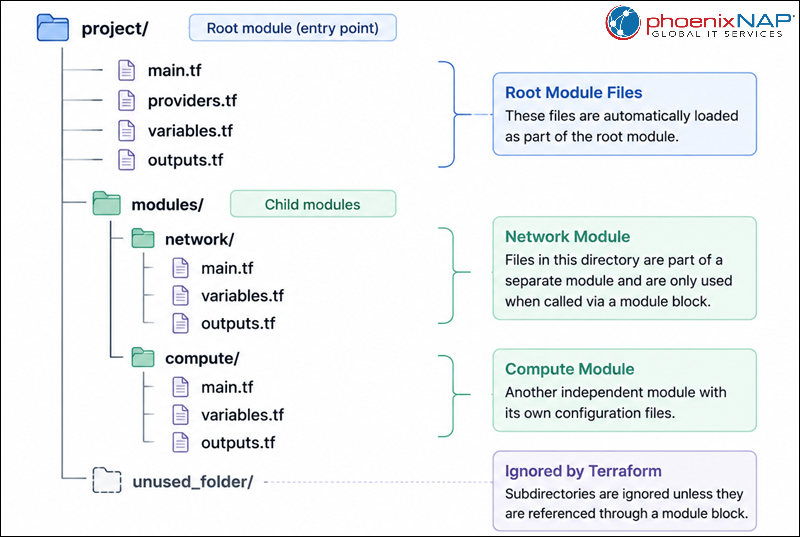
The files in the network directory are ignored unless explicitly referenced via a module block.
This flat-directory model allows teams to split large configurations into multiple files and use modules to create clear, reusable configuration hierarchies.
Dynamic Block Architecture
Terraform resources often contain nested configuration blocks that may vary between deployments. Dynamic blocks allow these nested structures to be generated programmatically rather than written manually.
By combining iteration with block generation, dynamic blocks help reduce duplication and simplify the management of complex resource configurations.
Inline Iteration with Dynamic Blocks
A dynamic block generates one or more nested blocks by iterating over a collection. This makes it possible to create configuration elements dynamically while keeping resource definitions concise.
The following example generates multiple ingress rules within a security group:
resource "aws_security_group" "web" {
  name = "web-sg"

  dynamic "ingress" {
    for_each = [80, 443]

    content {
      from_port = ingress.value
      to_port   = ingress.value
      protocol  = "tcp"
      cidr_blocks = ["0.0.0.0/0"]
    }
  }
}
Terraform creates an ingress block for each value in the collection. The current element is accessed through the iterator object, which is available as ingress.value in this example.
Dynamic blocks are useful when the number of nested blocks is unknown until deployment time.
Managing Content Elements within Dynamic Structures
Every dynamic block contains a content block that defines the configuration generated during each iteration. The content block serves as a template that Terraform uses to construct the final configuration.
For example:
dynamic "tag" {
  for_each = var.tags

  content {
    key   = tag.key
    value = tag.value
  }
}
During evaluation, Terraform replaces the dynamic block with one generated block for each collection element.
The content block can reference iterator values, variables, local values, functions, and expressions just like any other Terraform configuration block.
Nested Complex Configuration Generation
Dynamic blocks can also generate deeply nested configuration structures. This is particularly useful when providers require multiple levels of repeated configuration blocks.
The following example generates nested listener actions for a load balancer configuration:
dynamic "default_action" {
  for_each = var.actions

  content {
    type = default_action.value.type

    dynamic "redirect" {
      for_each = default_action.value.redirect != null ? [default_action.value.redirect] : []

      content {
        port        = redirect.value.port
        protocol    = redirect.value.protocol
        status_code = redirect.value.status_code
      }
    }
  }
}
This approach allows Terraform to construct complex configuration hierarchies from structured input data rather than requiring every nested block to be written manually.
While dynamic blocks provide significant flexibility, they should be used only when repeated nested blocks cannot be expressed more clearly through standard configuration syntax. Excessive use of dynamic blocks can make configurations more difficult to read and maintain.
Advanced Validation and Code Interdependence
As Terraform configurations grow in complexity, validating inputs and managing dependencies becomes increasingly important.
Terraform provides several mechanisms that help enforce configuration requirements, prevent invalid deployments, and ensure resources are created in the correct order.
Custom Variable Validation Rules (validation and precondition)
Variable validation rules allow configurations to verify user-provided values before Terraform attempts to create infrastructure. This helps catch invalid input early and provides clear feedback to users.
The following example ensures that the instance count is greater than zero:
variable "instance_count" {
  type = number

  validation {
    condition     = var.instance_count > 0
    error_message = "The instance count must be greater than zero."
  }
}
Terraform evaluates the validation rule during planning and displays the specified error message if the condition fails.
Terraform also supports preconditions, which validate assumptions before a resource, data source, or output is processed:
lifecycle {
  precondition {
    condition     = var.instance_count > 0
    error_message = "The instance count must be greater than zero."
  }
}
Validation rules and preconditions help enforce configuration requirements and reduce the risk of deployment failures caused by invalid input values.
Inter-Resource Dependencies (depends_on Meta-Argument)
Terraform automatically determines dependencies when one resource references another. In some situations, however, explicit dependency management is required.
The depends_on meta-argument instructs Terraform to complete one resource before processing another:
resource "aws_instance" "web" {
  depends_on = [aws_vpc.main]

  ami           = "ami-123456"
  instance_type = "t3.micro"
}
In this example, Terraform ensures that the VPC is fully created before provisioning the EC2 instance.
Explicit dependencies should be used sparingly, as Terraform's automatic dependency graph is usually sufficient. They are most useful when resources depend on actions that are not directly expressed through resource references.
Custom Preconditions and Postconditions (lifecycle Blocks)
Preconditions and postconditions provide additional validation capabilities beyond variable inputs. They allow configurations to verify assumptions before an operation occurs and validate results after Terraform evaluates a resource.
The following example defines a postcondition:
lifecycle {
  postcondition {
    condition     = self.public_ip != ""
    error_message = "The instance must have a public IP address."
  }
}
Terraform evaluates the condition after processing the resource and reports an error if the condition is not satisfied.
Preconditions and postconditions help enforce infrastructure requirements and ensure resources meet expected criteria throughout the deployment lifecycle.
Developer Tooling and Quality Controls
Terraform includes built-in tools that help maintain code quality, improve consistency, and identify configuration issues before infrastructure changes are applied.
These tools are commonly integrated into development workflows and CI/CD pipelines.
Code Standardization via terraform fmt
The terraform fmt command automatically formats Terraform configuration files in accordance with HashiCorp's recommended style conventions.
Run the following command to format all configuration files in the current directory:
terraform fmtAutomatic formatting improves readability, reduces style inconsistencies, and helps teams maintain a standardized codebase.
Syntactic Verification via terraform validate
The terraform validate command checks whether a configuration is syntactically valid and internally consistent.
The following command validates the current configuration:
terraform validateTerraform reports syntax errors, invalid references, and configuration problems without making changes to infrastructure. Running validation before deployment helps identify issues early in the development process.
Language Server Protocol (LSP) and IDE Extensions
Modern code editors provide Terraform-specific features through the Terraform Language Server and related IDE extensions. These tools improve the development experience by providing real-time feedback as you write HCL.
Common features include:
- Syntax highlighting.
- Code completion.
- Error diagnostics.
- Hover documentation.
- Reference navigation.
Using an editor with Terraform language support can significantly improve productivity and reduce configuration errors.
HCL Architecture Common Mistakes
Even well-structured Terraform configurations can become difficult to maintain if common design mistakes are not addressed. Following established HCL patterns helps improve readability, reusability, and long-term maintainability.
Hardcoding Environment Values instead of Using Variables
Hardcoding values directly into resources reduces flexibility and often leads to duplicated configurations across environments.
For example:
instance_type = "t3.large"A more maintainable approach uses variables:
instance_type = var.instance_typeThis allows different environments to provide their own values without modifying the configuration itself.
Overcomplicating Logic with Nested for_each and Ternaries
Terraform supports powerful expression and iteration features, but excessive nesting can make configurations difficult to understand and maintain.
For example:
instance_type = var.environment == "production" ? (
  var.large_instances ? "t3.large" : "t3.medium"
) : "t3.micro"
When logic becomes difficult to read, consider simplifying expressions, using local values, or splitting functionality into separate modules.
Omitting Explicit Variable Type Declarations
Variables without type constraints can accept unexpected values, making configurations more difficult to validate.
For example:
variable "instance_count" {}A better approach explicitly defines the expected type:
variable "instance_count" {
  type = number
}
Type constraints improve validation and make configuration intent clearer.
Neglecting Sensitive Flagging on Secret Inputs
Sensitive values such as passwords, API tokens, and access keys should be marked as sensitive to reduce the risk of accidental exposure in Terraform output.
For example:
variable "db_password" {
  type      = string
  sensitive = true
}
Appropriately marking sensitive values helps protect confidential information throughout the deployment process.
HCL Configuration Best Practices
Following established HCL practices improves consistency, maintainability, and collaboration across Terraform projects. These recommendations help create configurations that are easier to understand, reuse, and troubleshoot.
Enforcing Strict Version Constraints for Providers and Modules
Version constraints help ensure predictable behavior by preventing unexpected changes introduced by provider or module updates.
For example:
terraform {
  required_providers {
    aws = {
      source  = "hashicorp/aws"
      version = "~> 5.0"
    }
  }
}
Defining version constraints helps maintain compatibility and reduces the risk of deployment issues caused by breaking changes.
Standardizing File Splitting Conventions (main, variables, outputs)
Terraform automatically loads all .tf files within a module directory. Adopting consistent file naming conventions makes configurations easier to navigate and maintain.
A common structure includes:
- main.tf
- variables.tf
- outputs.tf
- locals.tf
- providers.tf
Although Terraform does not require specific file names, following common conventions improves readability and onboarding for new team members.
Prioritizing Descriptive Local Blocks Over Duplicate Expressions
Repeated expressions can make configurations difficult to maintain and increase the likelihood of inconsistencies.
For example, instead of repeating a complex expression throughout a configuration:
tags = merge(
  var.common_tags,
  {
    Environment = var.environment
  }
)
Define the value once in a local block:
locals {
  standard_tags = merge(
    var.common_tags,
    {
      Environment = var.environment
    }
  )
}
The local value can then be reused wherever needed:
tags = local.standard_tagsThis approach improves readability and simplifies future updates.
Writing Meaningful descriptions and validation Contexts
Variables, outputs, and validation rules should include descriptive text that explains their purpose and expected behavior.
For example:
variable "instance_count" {
  description = "Number of application instances to create."
  type        = number
}
Clear descriptions and validation messages improve usability, simplify troubleshooting, and make configurations easier for other team members to understand and maintain.
Conclusion
This article explored HCL fundamentals, including syntax, data types, developer tooling, common mistakes, and configuration best practices. By combining readability, flexibility, and strong integration with Terraform's infrastructure automation capabilities, HCL provides an effective way to build scalable, maintainable, and reusable infrastructure configurations across diverse environments.
Next, learn everything about Terraform backends.