This tutorial is the first in a series of articles that focus on Kubernetes and container deployment. Kubernetes is a tool for managing clusters of containerized applications. In computing, this process is often called orchestration.
The analogy with a music orchestra is, in many ways, fitting. Much as a conductor would, Kubernetes coordinates lots of microservices that together form a useful application. Kubernetes automatically and continuously monitors the cluster and adjusts its components.
Understanding Kubernetes architecture is crucial for deploying and maintaining containerized applications.
What Is Kubernetes?
Kubernetes, or k8s for short, is a system for automating application deployment. Modern applications are dispersed across clouds, virtual machines, and servers. Administering apps manually is no longer a viable option.
K8s transforms virtual and physical machines into a unified API surface. A developer can then use the Kubernetes API to deploy, scale, and manage containerized applications.
Its architecture also provides a flexible framework for distributed systems. K8s automatically orchestrates scaling and failovers for your applications and provides deployment patterns.
It helps manage containers that run the applications and ensures there is no downtime in a production environment. For example, if a container goes down, another container automatically takes its place without the end-user ever noticing.
Kubernetes is not only an orchestration system. It is a set of independent, interconnected control processes. Its role is to continuously improve the current state and move processes in the desired direction.
Check out our article on What is Kubernetes if you want to learn more about container orchestration.
Kubernetes Architecture and Components
Kubernetes has a decentralized architecture that does not handle tasks sequentially. It functions based on a declarative model and implements the concept of a ‘desired state.’ These steps illustrate the basic Kubernetes process:
- An administrator creates and places the desired state of an application into a manifest file.
- The file is provided to the Kubernetes API Server using a CLI or UI. Kubernetes's default command-line tool is called kubectl. In case you need a comprehensive list of kubectl commands, check out our Kubectl Cheat Sheet.
- Kubernetes stores the file (an application’s desired state) in a database called the Key-Value Store (etcd).
- Kubernetes then implements the desired state across all relevant applications in the cluster.
- Kubernetes continuously monitors the cluster's components to ensure the application's current state does not deviate from its desired state.
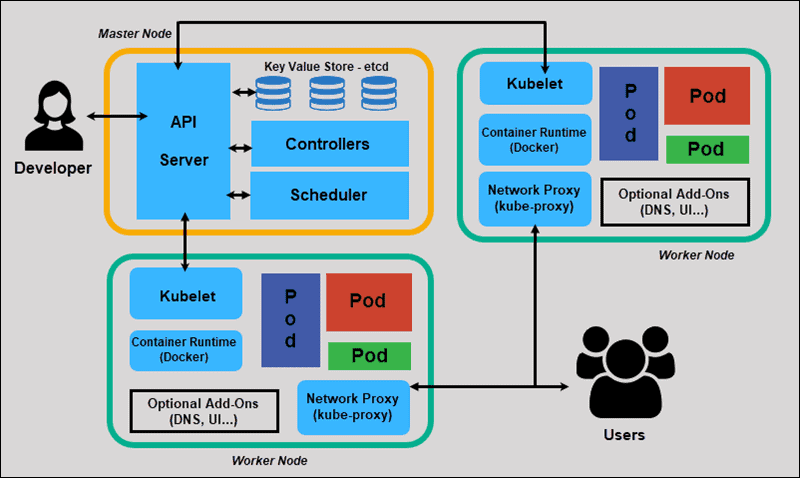
We will now explore the individual components of a standard Kubernetes cluster to understand the process in greater detail.
What Is Master Node in Kubernetes Architecture?
The Kubernetes Master (Master Node) receives input from a CLI (Command-Line Interface) or UI (User Interface) via an API. These are the commands you provide to Kubernetes.
You define pods, replica sets, and services that you want Kubernetes to maintain. For example, which container image to use, which ports to expose, and how many pod replicas to run.
You also specify the desired state parameters for the application(s) running on that cluster.
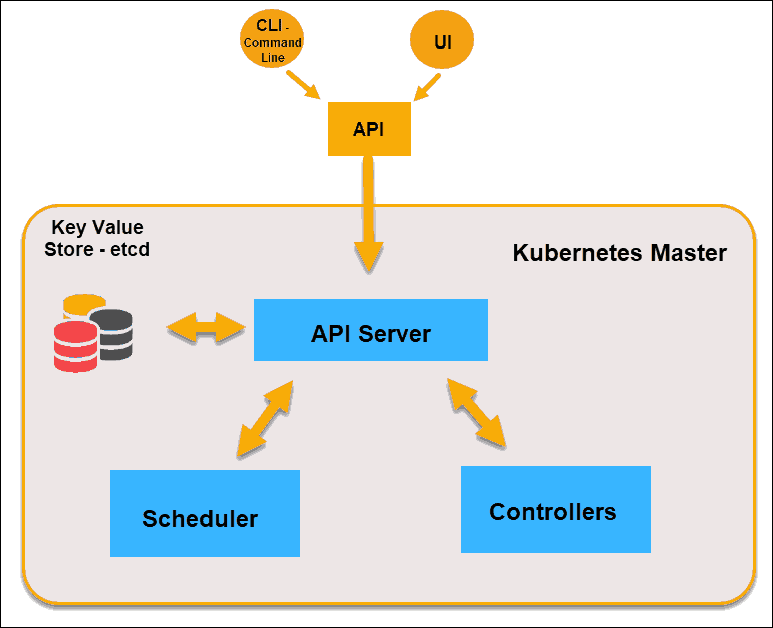
Kubernetes Master Node
Note: The Kubernetes policy that controls the maximum number of pod replicas is called the Pod Disruption Budget (PDB).
API Server
The API Server is the front-end of the control plane and the only component we interact with directly. Internal system components and external user components communicate via the same API.
Key-Value Store (etcd)
The Key-Value Store, also known as etcd, is a database that Kubernetes uses to back up all cluster data. It stores the entire configuration and state of the cluster. The Master node queries etcd to retrieve parameters for the state of the nodes, pods, and containers.
Controller
The Controller's role is to obtain the desired state from the API Server. It checks the current state of the nodes it is tasked to control, determines if there are any differences, and resolves them, if any.
Scheduler
A Scheduler watches for new requests coming from the API Server and assigns them to healthy nodes. It ranks node quality and deploys pods to the best-suited node. If no suitable nodes are available, the pods are put in a pending state until a suitable node becomes available.
Note: It is considered good Kubernetes practice not to run user applications on a Master node. This setup allows the Kubernetes Master to concentrate entirely on managing the cluster.
What Is Worker Node in Kubernetes Architecture?
Worker nodes listen to the API Server for new work assignments; they execute them and then report the results back to the Kubernetes Master node.
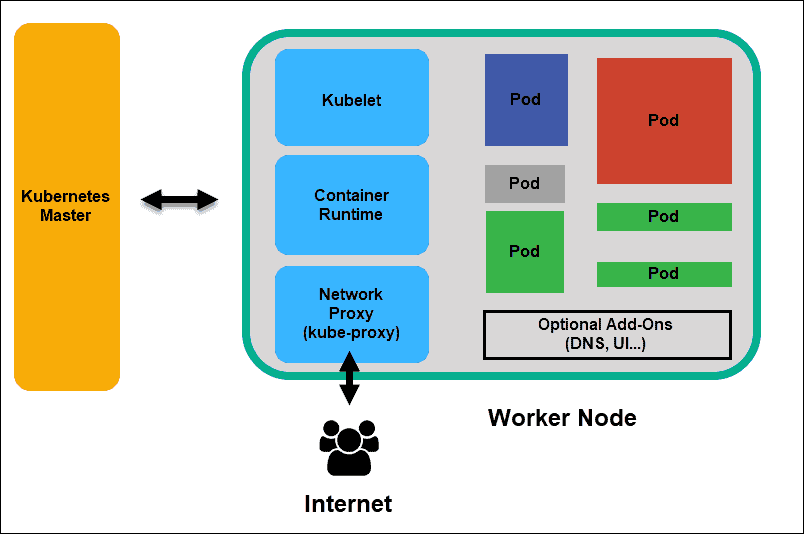
Kubernetes Worker Node
Kubelet
The kubelet runs on every node in the cluster. It is the principal Kubernetes agent. By installing kubelet, the node’s CPU, RAM, and storage become part of the broader cluster. It watches for tasks sent by the API Server, executes them, and reports back to the Master. It also monitors pods and reports back to the control panel if a pod is not fully functional. Based on that information, the Master can then decide how to allocate tasks and resources to reach the desired state.
Container Runtime
The container runtime pulls images from a container image registry and starts and stops containers. A 3rd party software or plugin, such as Docker, usually performs this function.
Kube-proxy
The kube-proxy ensures that each node gets its IP address and implements local iptables rules to handle routing and traffic load balancing.
Pod
A pod is the smallest element of scheduling in Kubernetes. Without it, a container cannot be part of a cluster. If you need to scale your app, you can only do so by adding or removing pods.
The pod serves as a ‘wrapper’ for a single container with the application code. Based on resource availability, the Master schedules the pod to a specific node and coordinates with the container runtime to launch the container.
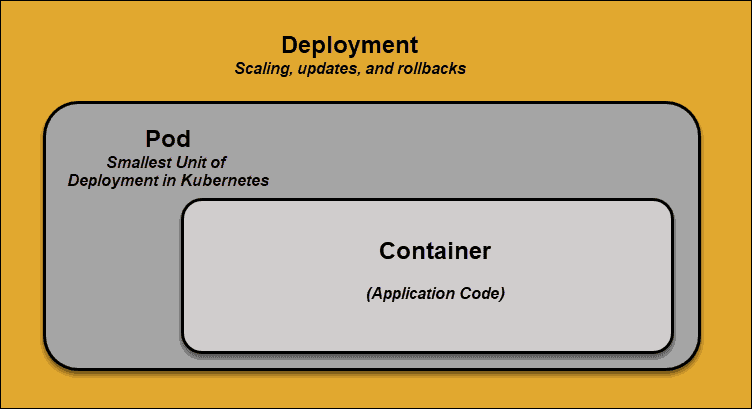
When pods unexpectedly fail to perform their tasks, Kubernetes does not attempt to fix them. Instead, it creates a new pod and starts it in its place. This new Kubernetes pod is a replica, except for the DNS and IP address. This feature has had a profound impact on how developers design applications.
Due to the flexible nature of the Kubernetes architecture, applications no longer need to be tied to a specific pod instance. Instead, applications need to be designed so that an entirely new pod, created anywhere within the cluster, can seamlessly take its place. To assist with this process, Kubernetes uses services.
Kubernetes Services
Pods are not constant. One of the best features Kubernetes offers is that non-functional pods are automatically replaced with new ones.
However, these new pods have different IP addresses. It can lead to processing issues and IP churn as the IPs no longer match. If left unattended, this property would make pods highly unreliable.
Services are introduced to provide reliable networking by bringing stable IP addresses and DNS names to the unstable world of pods.
By controlling traffic to and from the pod, a Kubernetes service provides a stable networking endpoint – a fixed IP address, DNS name, and port. Through a service, any pod can be added or removed without the fear that basic network information would change in any way.
How Do Kubernetes Services Work?
Pods are associated with services through key-value pairs called labels and selectors. A service automatically discovers a new pod that matches the selector's labels.
This process seamlessly adds new pods to the service while removing terminated pods from the cluster.
For example, if the desired state includes three replicas of a pod and a node running one replica fails, the current state is reduced to two pods. Kubernetes observes that the desired state is three pods. It then schedules a new replica to replace the failed pod and assigns it to another node in the cluster.
The same would apply when updating or scaling the application by adding or removing pods. Once we update the desired state, Kubernetes notices the discrepancy and adds or removes pods to match the manifest file. The Kubernetes control panel records, implements, and runs background reconciliation loops that continuously check whether the environment meets user-defined requirements.
Note: Learn how to delete Kubernetes Pods via kubectl.
What is Container Deployment?
To fully understand how and what Kubernetes orchestrates, we need to explore container deployment.
Traditional Deployment
Initially, developers deployed applications on individual physical servers. This type of deployment posed several challenges. The sharing of physical resources meant that one application could take up most of the processing power, limiting the performance of other applications on the same machine.
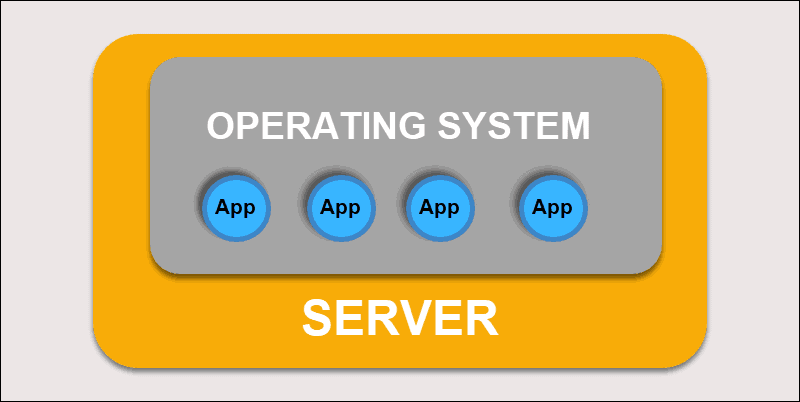
Traditional Deployment
Expanding hardware capacity takes a long time, which in turn increases costs. To resolve hardware limitations, organizations began virtualizing physical machines.
Virtualized Deployment
Virtualized deployment allows you to create isolated virtual environments, Virtual Machines (VM), on a single physical server. This solution isolates applications within a VM, limits resource usage, and enhances security. An application can no longer freely access the information processed by another application.
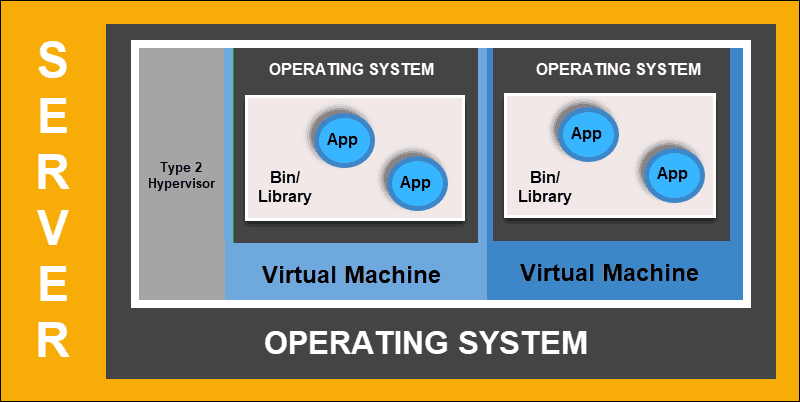
Virtualized Deployment
Virtualized deployments allow you to scale quickly and spread the resources of a single physical server, update at will, and keep hardware costs in check. Each VM has its own operating system and can run all necessary systems on top of the virtualized hardware.
Container Deployment
Container Deployment is the next step in the drive to create a more flexible and efficient model. Much like VMs, containers have individual memory, system files, and processing space. However, strict isolation is no longer a limiting factor.
Multiple applications can now share the same underlying operating system. This feature makes containers much more efficient than full-blown VMs. They are portable across clouds, different devices, and almost any OS distribution.
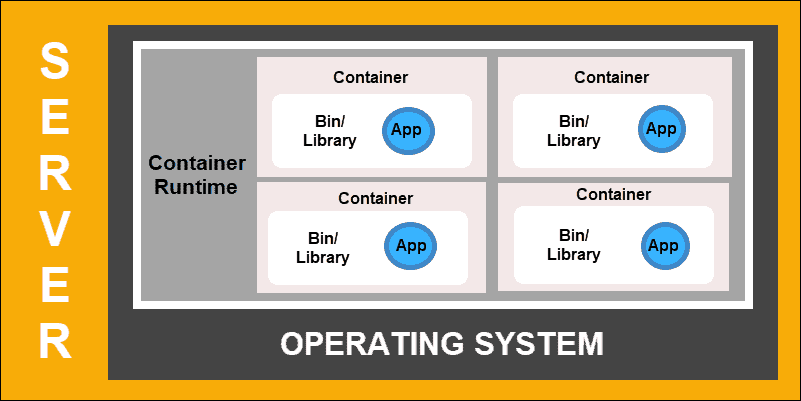
Container Deployment
The container structure also allows for applications to run as smaller, independent parts. These parts can then be dynamically deployed and managed across multiple machines. The elaborate structure and task segmentation are too complex to manage manually.
An automation solution, such as Kubernetes, is required to effectively manage all the moving parts involved in this process.
Conclusion
Kubernetes operates using a very simple model. We input how we would like our system to function – Kubernetes compares the desired state to the current state within a cluster. Its service then works to align the two states and achieve and maintain the desired state.
You should now have a better understanding of Kubernetes architecture and can proceed with the practical task of creating and maintaining your clusters.