Cloud hosting is a modern approach to deploying and managing websites, applications, and data using virtualized computing resources spread across multiple servers in the cloud. The model allows businesses to quickly adjust their resource usage based on real-time demand, avoid infrastructure limitations, and pay only for what they consume. As a result, cloud hosting provides the flexibility and reliability needed to support today’s dynamic online services and fast-growing digital ecosystems.
This article explains cloud hosting and its key features, types, and the benefits of implementing cloud hosting architectures into your daily operations.
What Is Cloud Hosting?
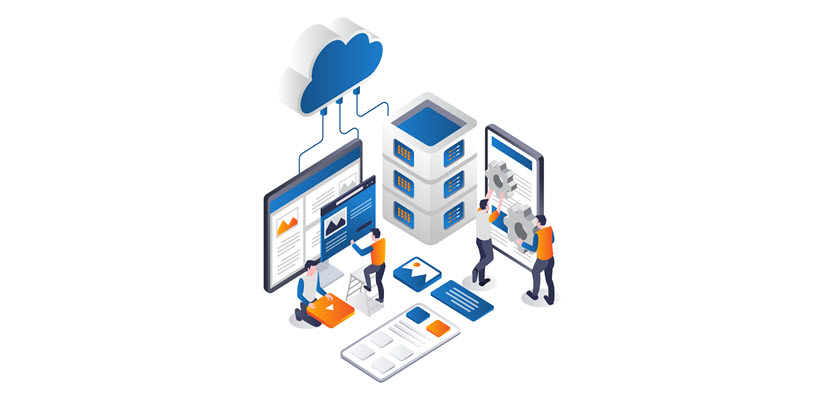
Cloud hosting enables websites, applications, and services to run on virtual servers that draw their resources from a large pool of physical machines in a cloud provider’s data centers. Instead of renting a single physical server, you consume compute, memory, storage, and networking as abstracted resources, typically delivered via virtualization or containers.
Customers usually pay per hour or per second of compute, per GB of storage, and per GB of data transfer, rather than fixed monthly server rentals. This makes cloud hosting well-suited for variable or unpredictable workloads. The workloads include CI/CD-driven deployments, microservices architectures, and global applications that need to be close to users in multiple regions.
To ensure the best option for hosting your business operations, check out our article that compares colocation and cloud hosting.
How Does Cloud Hosting Work?
Cloud hosting abstracts physical infrastructure into flexible, on-demand services that you consume as compute, storage, and networking. Here is a detailed step-by-step explanation:
- Infrastructure virtualization. Cloud providers start by virtualizing their physical servers using hypervisors or container orchestration platforms. This splits large physical machines into many isolated virtual machines (VMs) or containers.
- Resource pooling and abstraction. These VMs, storage devices, and network components are grouped into large resource pools. You no longer see individual servers. Instead, you see abstract units like vCPUs, GBs of RAM, storage volumes, and virtual networks.
- Resource provisioning. Through a web portal, CLI, or API, you request compute instances, storage, or networking. The cloud control plane translates your requests into actions on the underlying infrastructure. The control plane provisions the underlying infrastructure by creating VMs, attaching disks, assigning IPs, and configuring security groups.
- Workload deployment. Once instances and storage are ready, you deploy your applications (web servers, databases, microservices) onto them. Load balancers, DNS, and virtual networks are configured so that traffic routes correctly between components and out to end users.
- Traffic distribution and performance management. Incoming requests are distributed across multiple instances using load balancers and autoscaling policies. As demand rises, new instances can be launched; as it falls, unnecessary instances are terminated.
- Monitoring and automation. Metrics and logs (CPU, memory, latency, error rates) are continuously collected. Based on these signals, automated rules can restart failed instances, scale the environment, or trigger alerts. Backups, snapshots, and replication further protect data and enable quick recovery.
- Usage tracking. Throughout this process, the cloud platform measures your consumption of compute time, storage capacity, and data transfer. Instead of paying for fixed hardware, you are billed for what you actually use.
Cloud hosting fundamentally shifts how organizations think about infrastructure. Instead of purchasing and operating hardware, teams focus on application logic and business outcomes while the cloud handles elasticity, reliability, and operational complexity behind the scenes. This model not only accelerates deployment cycles but also enables experimentation. Resources can be provisioned in minutes and retired just as quickly if they are no longer needed.
Key Features of Cloud Hosting
Cloud hosting comes with a set of core capabilities that distinguish it from traditional single-server hosting models. These features are built to handle dynamic workloads, improve resilience, and simplify infrastructure management:
- Elastic scalability. Resources (CPU, RAM, storage) can be scaled up or down quickly based on load, often automatically through autoscaling policies. This prevents overprovisioning while maintaining stable performance during traffic spikes.
- High availability and redundancy. Workloads run across multiple physical servers and often multiple availability zones. If one host fails, traffic is routed to healthy instances, reducing downtime and improving service continuity.
- Resource pooling and multi-tenancy. Compute, storage, and network resources are pooled and shared across many customers, with logical isolation enforced by virtualization or containers. This maximizes hardware utilization and keeps tenant environments secure.
- Pay-as-you-go pricing. Billing is typically based on actual usage (e.g., per vCPU-hour, GB of storage, and GB of data transfer). This model aligns costs with real demand and reduces upfront capital expenditure on hardware.
- Programmable infrastructure (APIs and IaC). Most cloud platforms expose APIs for provisioning and managing resources. Combined with Infrastructure as Code (IaC) tools (e.g., Terraform, CloudFormation), this enables reproducible, automated deployments and environment consistency.
- Global reach and regional deployments. Providers operate data centers in multiple geographic regions. You can place workloads closer to end users to reduce latency, meet data residency requirements, and implement geo-redundant architectures.
- Integrated security and compliance tooling. Built-in features like network security groups, identity and access management (IAM), encryption services, and logging help enforce least privilege, protect data, and support compliance with industry standards.
- Managed services ecosystem. Databases, queues, caches, object storage, analytics, and other services are available as fully managed offerings. Offloading these building blocks reduces operational overhead and accelerates application development.
Together, these features make cloud hosting a flexible, resilient, and automation-friendly foundation for modern applications and services.
Cloud Hosting Architecture
Cloud hosting architecture is typically organized into layered components that separate how infrastructure is managed from how applications run.
At the bottom is the physical layer, which includes servers, storage arrays, and networking gear in multiple data centers. The provider builds a virtual infrastructure layer over them using hypervisors and software-defined networking (SDN).
Above that sits the control plane. This layer exposes management consoles, CLIs, and APIs for provisioning and configuring resources. The data plane actually processes user traffic and application workloads.
Cloud environments are usually segmented into regions and availability zones. Each zone consists of one or more isolated data centers. This layout lets you design applications that survive localized failures by distributing components across zones and, when needed, across regions.
On top of the core infrastructure, cloud hosting adds service layers that further shape the architecture of deployed workloads. At the IaaS layer, you work directly with virtual machines, block and object storage, and virtual networks. At higher layers, managed databases, Kubernetes clusters, serverless functions, and message queues abstract away more of the operational complexity.
Multi-tenancy is enforced through strong isolation boundaries, such as VPCs, subnets, security groups, IAM policies, and sometimes dedicated hosts for stricter compliance needs. Observability is built into the architecture via centralized logging, metrics collection, and tracing services that integrate with both infrastructure and applications.
Together, these elements create a modular architecture, where each piece (compute, storage, networking, identity, and observability) can be composed and scaled independently to support diverse cloud-hosted workloads.
Cloud Hosting Workloads
Cloud hosting workloads range from simple websites to complex, distributed systems.
Typical workloads include web and application servers, APIs, and microservices that scale horizontally behind load balancers; databases and data warehouses that rely on high-performance storage and replication; and analytics, ETL, and big data pipelines that process large volumes of streaming or batch data. Cloud platforms also commonly host CI/CD pipelines, test environments, and ephemeral dev sandboxes that spin up and down automatically as part of the software delivery process.
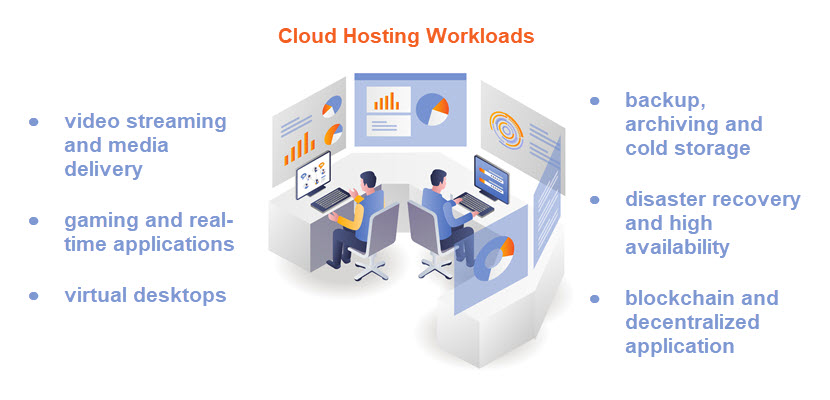
More advanced workloads include containerized applications orchestrated by Kubernetes, event-driven serverless functions, AI/ML training and inference jobs, and IoT backends that ingest telemetry from millions of devices.
All these workloads benefit from the cloud’s ability to rapidly provision resources, isolate environments, and integrate with managed services for logging, monitoring, security, and messaging.
Types of Cloud Hosting
Types of cloud hosting describe how infrastructure is owned, isolated, and managed. Understanding cloud deployment models helps you choose the right balance of control, flexibility, cost, and compliance for your environment.
Public Cloud Hosting
Public cloud hosting runs your workloads on shared infrastructure owned and operated by a cloud provider. Compute, storage, and networking resources are logically isolated per tenant but physically shared with other customers. You provision virtual machines, containers, and managed services inside your own logically isolated environment (e.g., VPC). At the same time, the provider manages the underlying hardware, data centers, and core networking. Capacity is effectively elastic, and you can deploy resources in multiple regions. This helps you achieve global reach without owning any physical infrastructure.
The public cloud model is particularly attractive for variable or unpredictable workloads and greenfield applications. It supports rapid experimentation, DevOps practices, and modern architectures like microservices and serverless. The main trade-offs are reduced control over the physical layer, dependence on the provider’s platform and SLAs, and the need to design carefully for security, data sovereignty, and cost governance.
Private Cloud Hosting
Private cloud hosting provides cloud-like capabilities, such as self-service provisioning, virtualization, and automation on infrastructure dedicated to a single organization. This can be on-premises in your own data center or in a provider’s facility using dedicated hardware. In both cases, the data center does not share hardware resources with other customers. You still get abstraction, APIs, and orchestration, but with tighter control. This control relays to configurations, network topology, and integration with existing enterprise systems.
Private cloud is often suitable for organizations with strict compliance, data locality, or security requirements that make multi-tenant public cloud less suitable. It also helps large enterprises consolidate fragmented virtualized environments into a more standardized, automated platform. The trade-off is higher responsibility. Namely, you bear a greater operational burden and face higher fixed costs than in a purely public cloud environment.
Hybrid Cloud Hosting
Hybrid cloud hosting combines public and private cloud environments, allowing workloads and data to flow between them based on business or technical requirements. A typical pattern is to keep sensitive systems of record or latency-critical applications in a private cloud or on-premises, while using public cloud resources for burst capacity, analytics, or customer-facing services. Connectivity is via VPNs or dedicated links, and identity, networking, and security policies apply across environments.
The hybrid model aims to balance control and agility: you keep tight control over critical workloads while exploiting public cloud elasticity and services where appropriate. However, hybrid architecture adds complexity in areas such as network design, security policy enforcement, observability, and data replication. Successful hybrid deployments rely on consistent management and automation across both sides (for example, common tooling for IaC, CI/CD, monitoring, and access control) to avoid creating two disconnected operational silos.
Multi-Cloud Hosting
Multi-cloud hosting uses services from two or more public cloud providers simultaneously. This can be a deliberate strategy to avoid vendor lock-in, to leverage best-of-breed services from different providers (e.g., a specific AI platform or database), or to meet regulatory and residency requirements in different regions. A multi-cloud setup can spread an application across multiple clouds for redundancy, or different components may live in different providers based on cost and capabilities.
While multi-cloud can increase resilience and negotiation leverage, it introduces additional operational and architectural complexity. You must manage multiple sets of APIs, IAM models, networking constructs, and billing systems. To make multi-cloud manageable, organizations often introduce an abstraction layer, such as Kubernetes, service meshes, or multi-cloud management platforms, and standardize their practices around portable tooling (Terraform, cross-cloud monitoring, centralized identity). Even then, true workload portability requires discipline in avoiding provider-specific lock-in at the application layer.
Learn more about how to deploy and manage your multi-cloud environments with our comprehensive list of tool options.
Managed Cloud Hosting
Managed cloud hosting is a service model where a provider (or MSP) builds and operates your cloud environment on top of a public or private cloud platform. You still benefit from cloud characteristics, such as elasticity, pay-as-you-go resources, and global reach, but offload much of the day-to-day operational work. The managed provider typically handles architecture design, provisioning, patching, security hardening, backups, monitoring, incident response, and sometimes cost optimization, while you focus on applications and business logic.
This model is attractive for teams that lack in-house cloud expertise or don’t want to run a large operations function. It can accelerate cloud adoption, reduce misconfigurations, and provide access to specialized skills (e.g., Kubernetes operations, security engineering). The trade-offs include higher recurring service costs and some loss of direct control. Furthermore, changes often go through the managed provider’s processes and SLAs. Clear division of responsibilities, transparent monitoring, and well-defined runbooks are critical to making managed cloud hosting effective and predictable.
Managed Cloud Services
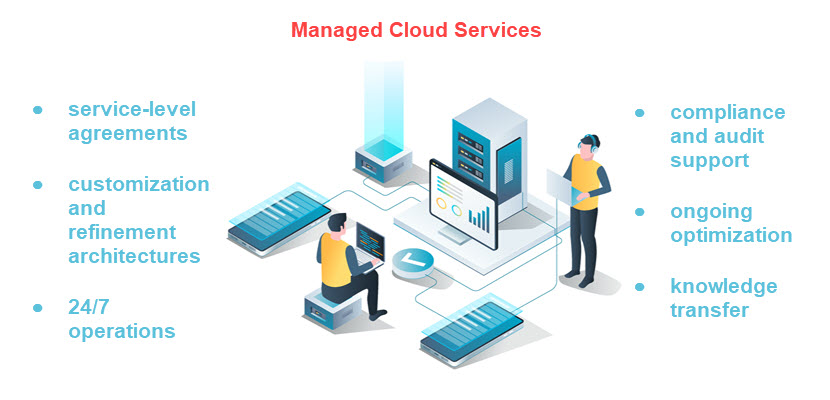
Managed cloud services are layers of operational support and automation built on top of cloud infrastructure. Instead of your team configuring and maintaining every component, a provider designs, runs, and optimizes parts of your stack so you can focus more on applications and business logic.
Managed Infrastructure (Compute, Storage, Network)
Managed infrastructure services handle provisioning, configuration, patching, and lifecycle management of virtual machines, storage volumes, and virtual networks. The provider designs the baseline architecture (VPCs, subnets, security groups, routing), sets up standardized images and templates, applies OS updates and hardening, and ensures capacity is available when you need it. You still control what runs on the instances, but the underlying infrastructure management should adhere to best practices and SLAs.
Managed Databases
Managed database services offload the operational burden of running relational or NoSQL databases. The provider handles installation, patching, backups, replication, automatic failover, point-in-time recovery, and often routine performance tuning. You interact with the database via endpoints and connection strings, define schema and queries, and tune indexes when needed, while the platform ensures high availability, encryption, monitoring, and scaling (vertical or horizontal, depending on the engine).
Managed Kubernetes and Containers
Managed Kubernetes (or managed container platforms) provide a fully operated control plane and standardized worker node lifecycle. The provider sets up and maintains clusters, upgrades Kubernetes versions, patches node OSes, integrates cluster logging and metrics, and exposes APIs for deploying containers. This lets teams focus on building containerized applications and defining manifests or Helm charts, rather than worrying about etcd health, control-plane HA, node provisioning, or CNI/CNI plugin management.
Managed Security Services
Managed security services cover continuous security configuration, monitoring, and incident response around your cloud workloads. Offerings can include managed firewalls, WAFs, intrusion detection/prevention, vulnerability scanning, SIEM/SOAR integration, and 24/7 security operations center (SOC) coverage. The provider tunes rules, triages alerts, responds to incidents according to runbooks, and supplies compliance-ready reports, while you remain responsible for application-level security and access policies.
Managed Backup and Disaster Recovery
Managed backup and DR services automate data protection and recovery workflows across your cloud environment. The provider designs retention policies, configures snapshot schedules, replicates data across regions or sites, and regularly test restore procedures and failover plans. In an outage or data loss event, they coordinate restoring systems to a known-good state or failing over to a secondary environment, reducing RPO and RTO without your team having to script and maintain all the backup logic.
Managed Monitoring and Observability
Managed monitoring and observability services centralize metrics, logs, and traces from your infrastructure and applications, and maintain the underlying tooling. The provider deploys agents, configures dashboards and alerts, manages data retention, and tunes thresholds to reduce noise. They may also provide SRE-style support: capacity recommendations, SLA/SLO tracking, and incident reviews. You consume the insights and dashboards, while the provider ensures that telemetry pipelines and observability platforms stay healthy and up to date.
Managed Identity and Access Management (IAM)
Managed IAM services focus on designing, implementing, and maintaining secure identity and access controls in the cloud. This includes user and role management, SSO integration, MFA enforcement, least-privilege role design, and periodic access reviews. The provider builds and maintains the IAM policies, maps them to your organizational structure, and helps respond to access-related incidents or audits, while you define who should have access to what from a business perspective.
Managed DevOps and CI/CD
Managed DevOps services build and operate your CI/CD pipelines and supporting tooling (source control integrations, artifact repositories, runners, and deployment workflows). The provider sets up standardized pipelines for build, test, security scanning, and deployment; maintains the underlying runners and agents; and enforces release processes and approvals. This lets engineering teams ship changes quickly and reliably without dedicating significant internal resources to pipeline plumbing and infrastructure.
Cloud Hosting Benefits
Cloud hosting offers a combination of flexibility, automation, and resilience that’s difficult to achieve with traditional single-server setups. The main benefits revolve around how cloud computing resources are provisioned, scaled, secured, and paid for, and they include:
- Elastic scalability. CPU, RAM, and storage can be quickly scaled up or down based on load, often automatically via autoscaling policies, so you can handle traffic spikes without overprovisioning.
- High availability and fault tolerance. Workloads are distributed across multiple servers and availability zones, reducing single points of failure and improving uptime when hardware or components fail.
- Performance optimization. Different instance types, storage tiers, and networking options (e.g., SSD-backed volumes, low-latency networks, edge locations) help you align performance with specific workload requirements.
- Cost efficiency and OpEx model. Large upfront hardware purchases are replaced with pay-as-you-go billing, so you pay only for the compute, storage, and bandwidth you actually consume.
- Faster provisioning and time-to-market. Environments are spun up in minutes via portals, APIs, or IaC templates, rather than waiting for hardware procurement, racking, and manual configuration.
- Operational offload. The undifferentiated heavy lifting, hardware maintenance, power, cooling, base networking, and often managed services like databases or Kubernetes are offloaded to the provider.
- Global reach and lower latency. Workloads are deployed in multiple geographic regions and edge locations to serve users closer to where they are, reducing latency and improving user experience.
- Built-in security and compliance tooling. Integrated IAM, encryption, network segmentation, logging, and compliance enable least-privilege access, protect data, and support regulatory requirements.
Overall, these benefits make cloud hosting a flexible, resilient, and cost-effective foundation for running modern digital services at any scale.
Cloud Hosting Challenges
Cloud hosting also introduces complexities and risks that organizations must account for when designing and operating workloads in the cloud. These challenges typically stem from shared responsibility, distributed systems design, and rapidly changing cloud ecosystems:
- Cost management and sprawl. Usage-based billing can lead to unexpected expenses if resources aren’t monitored and governed. Idle instances, overprovisioning, and inefficient architectures can quickly inflate monthly costs.
- Security and shared responsibility. While providers secure the infrastructure, customers must secure access controls, data, and workload configurations. Misconfigured IAM, open storage buckets, or weak network rules remain common risks.
- Increased operational complexity. Distributed cloud environments require robust automation, monitoring, and incident response. Teams must adopt new operational models (DevOps/SRE) and ensure observability across many moving parts.
- Vendor lock-in and portability limitations. Relying heavily on proprietary services can make it difficult to switch providers. Also, it is challenging to run workloads elsewhere without major refactoring or migration efforts.
- Compliance and data residency. Organizations in regulated industries must ensure workloads meet jurisdictional requirements. They must maintain audit trails and control where sensitive data is stored and processed.
- Skill gaps and training requirements. Cloud-native architectures demand specialized knowledge of Kubernetes, automation, and security tooling. Many teams must learn it or hire for it, which increases onboarding and transformation timelines.
Organizations can mitigate risks while still capturing the full value of cloud hosting by understanding these challenges early and planning accordingly.
Cloud vs. Other Types of Hosting Solutions
Choosing the right hosting model depends on how much control you need, how your workloads scale, and how quickly your infrastructure must adapt to change. Comparing cloud hosting with traditional alternatives helps clarify where cloud delivers the most value and where other solutions may still be a better fit.
Cloud vs. Traditional Web Hosting
Traditional web hosting differs from cloud hosting primarily in how it provisions, isolates, and scales resources. In traditional hosting models, such as shared, VPS, or single dedicated servers, you’re tied to a fixed amount of CPU, RAM, and storage on a single physical machine (or a small cluster), and scaling usually requires manual upgrades or migrations.
Cloud hosting, by contrast, runs workloads on virtualized infrastructure across many physical servers. It exposes pooled resources via APIs and allows near-instant scaling up or down based on demand. High availability in traditional hosting often requires custom failover setups. Meanwhile, cloud platforms natively support multi-AZ deployments, load balancing, and automated recovery. Operationally, traditional hosting is simpler but less flexible, while cloud hosting introduces more architectural complexity.
Cloud vs. Shared Hosting
Cloud hosting and shared hosting mainly differ in isolation, scalability, and reliability. In shared hosting, many customers’ websites run on the same physical server and OS instance, sharing CPU, RAM, disk, and IP. If one tenant spikes resource usage or gets compromised, others can be affected. Performance tuning and scaling options are limited, and you typically get a fixed plan with minimal control over the environment.
In cloud hosting, workloads run on virtualized resources with stronger isolation, and you can scale horizontally or vertically, often automatically, based on demand. You also benefit from higher availability through redundant infrastructure, richer networking and security controls, and pay-as-you-go pricing, at the cost of more configuration responsibility and a steeper learning curve than simple shared hosting plans.
Cloud vs. VPS
Cloud hosting and VPS (Virtual Private Server) hosting both use virtualization, but they differ significantly in architecture, scalability, and resilience. A VPS typically runs on a single physical server where multiple virtual machines share resources (CPU, RAM, storage); if that host fails, it affects all VPS instances on it.
Cloud hosting, by contrast, draws from a cluster of servers and storage, so you can distribute workloads across multiple hosts with built-in redundancy and autoscaling. This makes the cloud better suited for variable or high-growth workloads that need rapid scaling, multi-zone deployments, and integration with managed services.
VPS hosting usually offers more predictable, fixed monthly pricing and can be a good fit for smaller, steady workloads that don’t require advanced automation or high availability, but it lacks the elasticity and fault tolerance inherent to cloud-native platforms.
Cloud vs. Dedicated Server
Cloud hosting runs workloads on virtualized resources spread across many physical servers. This gives you elastic scalability, pay-as-you-go pricing, and access to a wide range of managed services. However, you have less direct control over the underlying hardware. A dedicated server gives you exclusive use of a single physical machine with fixed CPU, RAM, and storage, offering predictable performance, strong isolation, and full control over OS and hardware configuration. However, scaling usually means provisioning additional servers manually and committing to longer-term contracts.
In practice, the cloud is better for variable or rapidly growing workloads that benefit from automation and on-demand capacity. Dedicated servers suit stable, performance-sensitive, or licensing-constrained workloads that require consistent resources and low-level tuning.
Read more about the differences between cloud servers and dedicated servers.
Cloud Hosting Security
Cloud hosting security includes a shared responsibility model. This model entails the provider securing the underlying infrastructure, while you secure your workloads, identities, and data. Providers harden data centers, manage physical access, and protect core services like compute, storage, and networking with isolation mechanisms (hypervisors, VPCs, security groups) and continuous patching. They also supply native tools for encryption at rest and in transit, identity and access management (IAM), key management services (KMS), and logging, giving you a robust defense-in-depth strategy.
On your side, strong security depends on how you configure and use these building blocks. This includes enforcing least-privilege access through well-designed IAM roles, enabling MFA and SSO, segmenting networks with subnets and firewalls, and encrypting sensitive data with properly managed keys. You also need end-to-end observability, including centralized logs, metrics, and alerts to detect misconfigurations, suspicious behavior, and policy violations in real time. Regular security reviews, automated compliance checks, and infrastructure-as-code scanning help prevent drift and configuration errors, which are among the most common causes of cloud security risks.
Who Should Use Cloud Hosting Solutions?
Cloud hosting solutions are a strong fit for organizations that need to scale quickly, iterate fast, and avoid the overhead of owning and operating physical infrastructure, such as SaaS providers, ecommerce platforms, digital agencies, startups, and enterprises modernizing legacy systems. Teams building microservices, CI/CD-driven environments, or data-intensive analytics pipelines benefit from on-demand capacity, managed services, and global reach.
At the same time, workloads that require consistent high performance, strict isolation, or specific licensing (for example large databases, high-traffic APIs, or latency-sensitive backend services) can combine classic cloud hosting with bare metal cloud. This lets you mix virtualized instances and bare metal in one architecture, using each where it makes the most technical and economic sense.
Migrating to Cloud Hosting
Migrating to cloud hosting starts with a clear assessment of your existing workloads. This includes applications, databases, dependencies, and network flows. The assessment helps you decide which components to lift-and-shift, which to replatform, and which to refactor for cloud-native architectures.
From there, you design target environments (VPCs, subnets, security groups, IAM roles). Then, you can choose appropriate services (VMs, containers, managed databases), and plan data migration strategies. Aim to minimize downtime, such as replication, phased cutovers, or blue-green deployments.
Successful migrations also align backup, monitoring, and incident response with cloud tooling, update security and compliance controls to the shared responsibility model, and introduce cost governance (tagging, budgets, rightsizing). Finally, running pilot migrations, load tests, and rollback drills before full cutover helps validate performance and reliability, reducing the risk of surprises in production.
Learn more about data center migration and database migration.
Cloud Hosting Trends
A prominent cloud hosting trend is mass hybrid and multi-cloud strategy adoption. These strategies combine public cloud, private cloud, and edge resources to optimize performance and improve resilience.
At the same time, the integration of AI/ML services into cloud platforms is increasing. Cloud providers are offering specialized infrastructure for training and serving models. This makes it easier for organizations to build data-driven and intelligent applications without owning expensive hardware.
Edge computing, which includes blending cloud with geographically distributed edge nodes. is growing in importance. This is evident in workloads that require low latency or real-time processing, such as IoT, AR/VR, and real-time analytics. Meanwhile, as cloud usage balloons, so does cost pressure. This is driving demand for better cost governance practices (often called “FinOps”). Subsequently, automated resource management and sustainable cloud operations balance performance with environmental and economic efficiency.
The Road Ahead for Cloud-Powered Infrastructure
Cloud hosting has become a foundational approach for delivering scalable, resilient, and globally accessible digital services. By leveraging virtualized infrastructure and automation, organizations can focus on innovation and delivering value rather than maintaining hardware.
While cloud architecture comes with shared responsibility and operational complexity, the benefits still make it the preferred model. As trends like hybrid cloud and AI-driven operations reshape the landscape, cloud hosting remains central to businesses.