When building an office network or migrating to the cloud, it is always tempting to go online as quickly as possible. However, the way you connect devices, enable systems to communicate, and protect data matters in the long run.
Fixing early design mistakes later can be expensive and highly disruptive to daily operations.
In this guide, you will learn the basics of network architecture and apply them from day one to build a reliable and secure setup.
What Is Network Architecture?
Network architecture is a plan for designing and organizing a network. This plan usually defines:
- The devices that make up the network, such as routers, switches, servers, and computers.
- How those devices are connected, whether through network cables, wireless access points, or internet links.
- How devices communicate with each other, and access shared resources like file servers, databases, or cloud services.
- Core network services such as DNS, IP address assignment, and time synchronization.
- Authentication and access control rules for who can access the network and what resources they can use.
- Firewall rules, traffic filtering, and other security measures that control access to and within the network.
Instead of starting from scratch, you can follow existing patterns already used in offices, data centers, and cloud environments. These patterns are based on years of best practices, security recommendations, and real-world experience.
In most cases, you only need to adjust these designs to fit your environment, for example, the size of your office, the expected number of users, and budget constraints.
Network Architecture Types
There are two ways to think about network architecture: how the network is physically organized, called the infrastructure model, and how devices and services communicate, called the service model.
In practice, most business networks combine these two models based on the network's size, purpose, and security needs:
| Organization Type | Infrastructure Model | Service Model |
|---|---|---|
| Temporary lab | Flat (Two-Tier) | Peer-to-peer |
| Home office | Flat (Two-Tier) | Client-server (cloud-based) |
| Small office | Flat (Two-Tier) | Client-server |
| Growing business | Transitioning to Three-Tier | Client-server |
| Large business | Three-Tier | Client-server |
| Modern cloud setup | Three-Tier with hybrid cloud connectivity | Client-server |
Note: If you are looking into a hybrid cloud setup but aren't sure where to begin, PNAP's hybrid cloud solutions can help you plan and deploy an environment that fits your needs.
Infrastructure Model
You can organize the physical network infrastructure in two main ways. A simple flat (two-tier) architecture or by using a more structured three-tier architecture.
Flat (Two-Tier) Architecture
A flat network is the simplest form of network infrastructure and is very common in home offices and small businesses because:
- It is easy to set up and manage.
- You are likely to use only one or two switches.
- All wired and wireless connections are in one physical location.
- One router connects the entire setup to the internet.
However, as you add more devices, it becomes harder to control traffic between them or separate them into secure groups. If you decide to expand the network later, you will likely need to redesign parts of it.
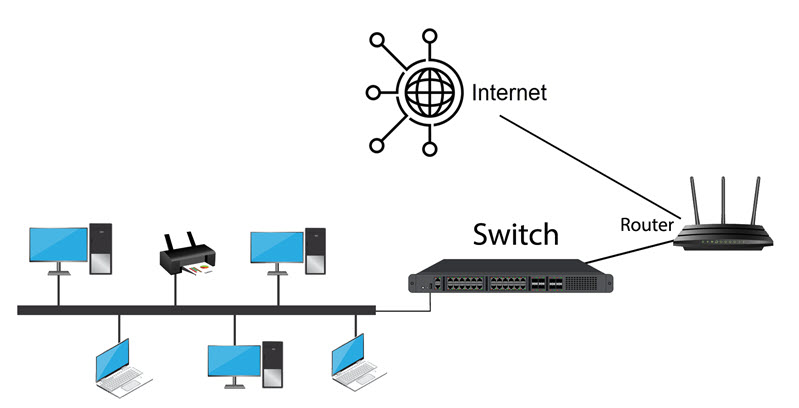
Use a flat architecture if your network is small, unlikely to grow, and you want to keep the setup simple and expenses under control.
Three-Tier Architecture
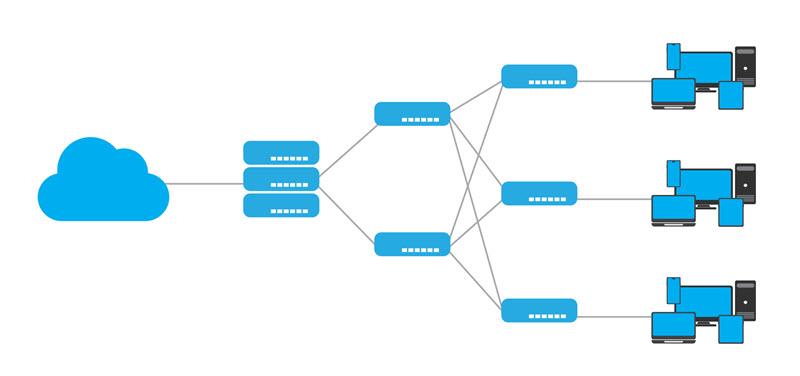
In a hierarchical three-tier architecture, the network is organized into three abstract layers. Each layer has a specific role:
- Core layer. It moves large volumes of data quickly between different parts of the network. For example, this layer connects distribution switches, data center equipment, or server racks using high-speed links that help reduce latency.
- Distribution layer. This is where routing decisions, security rules, and network policies are applied. This layer enables you to configure virtual LAN routing, apply firewall rules, and control traffic flows between network segments.
- Access layer. End devices connect to the network in this layer. For example, office switches and wireless access points plug into this layer so that computers, phones, and Wi-Fi devices can access the network.
Use a three-tier architecture when your network has many users, devices, or locations. It allows you to divide the network into logical groups, apply rules and security policies from a single console, and expand the network more easily over time.
Service Model
The service model defines how devices and services communicate within a network. Based on the service model, you can design two types of networks: peer-to-peer and client-server.
Peer-to-Peer
In a peer-to-peer network, each device (peer or node) can act as both a client and a server. Devices share resources directly, and users control who can access their data and files.
This model is very rarely used in modern business networks. Even small home offices typically rely on the client-server model through cloud services.
Peer-to-peer networks can work for:
- Small home networks.
- Very small teams.
- Test environments.
- Temporary development setups.
Because there is no centralized control of users and permissions, security and organization are weak. As the number of devices grows, peer-to-peer networks can become increasingly difficult to manage and maintain.
It is very unlikely that you will encounter this service model in production environments.
Client-Server
In a client-server architecture, dedicated servers (physical, virtual, or cloud-based) accept client requests, process them, and send responses.
This model is widely used in modern business environments because:
- Control over data and users is centralized. Files, applications, and accounts are stored in one place rather than scattered across individual computers. Changes made on the server apply to all devices and users on the network.
- Security is easier to manage. Security rules, permissions, and access policies are applied on the server side. You can configure or disable access to all services for one or more users from a single interface.
- It scales well. You can add new users or devices without affecting current settings. Simply connect the new device to the network and grant it access to the server or cloud services.
- It works on-premises and in the cloud. It does not matter if the server is in your office or hosted by a cloud provider; the communication model is the same. Devices still request services from the central system that coordinates and manages service requests.
Examples of a client-server model include:
- File servers where employees store and share documents.
- Email servers or services like Microsoft Exchange or Google Workspace.
- Dedicated servers hosting different enterprise application software.
- Database servers that store product or customer data and allow client devices to read and update it.
- Print servers that manage office printers.
Regardless of whether you use a flat or a three-tier infrastructure model, you will almost certainly use the client-server service model.
Network Architecture Design
After selecting the infrastructure and service model, apply it to your network design. Where you host systems, how devices connect, and how you control and secure traffic affect the specifics of network design.
The major design decisions you need to make include:
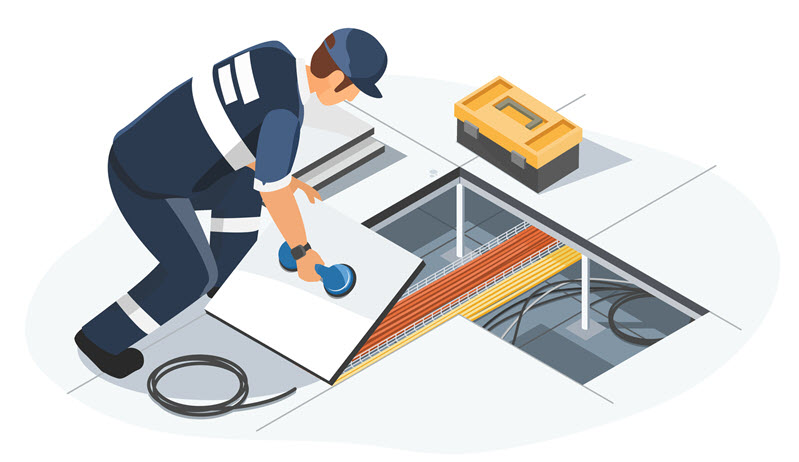
- Where to place switches. Proper cabling and switch placement are especially important when hosting servers on-premises. Try to place switches near the server equipment in a central, accessible location, and if possible, keep cable runs under 100 meters to reduce latency.
- How to segment the network. To strengthen performance and security, group devices by function. For example, create one VLAN for workstations, one for servers, one for printers, and another for smart devices.
- Which IP address scheme to use. Define how devices are addressed on the network. For example, allocate a dedicated IP range to each VLAN to make devices easier to identify and manage.
- Where to place firewalls. Administrators usually position firewalls between the internal network and the Internet. If you have a large network, you can also use firewalls to control and filter traffic between internal VLANs.
- How many Wi-Fi access points to install. Calculate how many access points you need and where to place them. One access point can cover up to 80-120m2 or 20-30 active devices. Add 20-30% more access points than the initial estimate to avoid creating Wi-Fi dead zones.
- How to connect to cloud services or data centers. If using a cloud or dedicated server provider, decide how your office network will connect to those services. Some of the more common methods include site-to-site connections, VPN tunnels, or secure gateways.
- Who can access what on the network. For example, employees may have access to file servers and applications but not network equipment, while network administrators require broader access for management and maintenance.
- Whether to isolate smart devices. IoT devices such as surveillance cameras, sensors, and conference room equipment often lack security features. Place them in their own segment with limited access to the rest of the network.
Key Components of Network Architecture Design
Network architecture is a broad concept because it encompasses an organization's entire IT infrastructure. It can be divided into several functional areas, each with a specific role, as explained in the sections below.
Network Devices
Network devices are hardware components that move data between devices within a network and between the network and the internet.
Common examples include:
| Component | Description |
|---|---|
| Switch | Connects devices within a local network. In most offices, every wired device is connected to a switch. |
| Router | Connects your internal network to other networks such as the internet, cloud providers, or branch offices. |
| Wireless access point | Connects computers, phones, laptops, and other wireless devices to the network over Wi-Fi. |
| Network cabling and wireless signals | The paths data travels through. These can be physical, such as Ethernet cables or fiber-optic lines, or wireless, such as Wi-Fi signals. |
Note: Learn about the different network protocols devices use to communicate with each other.
End Devices
People and systems use end devices to access the network and its services. These include office equipment as well as devices used by remote users, such as:
| Component | Description |
|---|---|
| Servers | On-premises or cloud servers deliver applications, storage, and other resources to devices on the network. |
| Computers and laptops | Employee workstations that access network resources, including company email, business apps, and shared printers. |
| Smart devices | Mobile devices that connect through Wi-Fi or secure remote access. This can include phones, smartwatches, payment terminals, and similar equipment. |
| Shared devices | Devices that can be accessed by multiple users over the network. Office examples include printers, network-attached storage (NAS), or conference room video systems. |
Note: Hybrid work has become a standard practice in many companies. Most remote employees use VPN or VDI to access their workstations securely.
Core Network Services
Core network services enable devices to recognize each other, communicate without issues, and apply the correct network settings on the network and the internet.
Some of the essential services include:
| Component | Description |
|---|---|
| DNS | Translates device and service names into IP addresses. |
| DHCP | Automatically assigns IP addresses and other network settings to devices when they connect to a network. |
| NTP | Keeps time synchronized across devices, which is essential for authentication, backups, automated tasks, and accurate security and error logs. |
| Directory and identity services | These services manage users, logins, and permissions. They control who can access devices, files, and applications on the network. |
Note: If you need help setting up a DNS server, learn how to configure DNS on Windows, macOS, or Linux.
Security Controls
Security controls are built into the network design. They limit who can connect to the network, what they can access, and monitor system and user activity.
Security controls include:
| Component | Description |
|---|---|
| Firewall rules | Firewalls filter both internal and external traffic and allow you to block data flows. You can configure firewall rules on the router, a dedicated firewall device, or a cloud-hosted firewall service. |
| Access rules | Access rules are managed through user accounts, passwords, and permissions in directory or identity services. Use them to define which users and devices can access specific resources. |
| VPN (Virtual Private Network) | VPNs create an encrypted connection to the main network over the internet. For example, you can configure a VPN on the firewall to provide secure access for remote workers and branch offices. |
| Monitoring and logging | Logs are records of system and network activity that help detect unusual behavior, troubleshoot issues, and investigate security incidents. You can monitor your network using firewall and server logs, as well as network monitoring tools. |
Note: If you run into network issues, follow our practical network troubleshooting guide to resolve them quickly.
Network Layout
When organizing your network, you need to decide how devices and services are arranged so the network remains secure, easy to manage, and as efficient as possible.
Important layout decisions include:
| Component | Description |
|---|---|
| Segmentation | Group devices based on their function. Use virtual local area networks (VLANs) and subnetting to separate groups of devices, even if they are connected to the same switches and cables. |
| Wired vs wireless design | Some devices, like servers, switches, and desktops, are best connected with cables for reliability and speed. Others, such as laptops and phones, can connect via Wi-Fi. |
| On-premises, cloud, or hybrid design | This decision determines where your servers and services are located. They can run in your office, in the cloud, or across both locations. Ensure the network layout supports secure and reliable connections between them. |
Note: Explore the different types of network topology to understand how nodes, connections, and devices are arranged in practice.
Securing Network Architecture: Best Practices
Instead of focusing only on specific devices or rules, design your network with overall infrastructure security in mind.
Best practices include:
- Dividing the network into smaller segments. If your workstations, servers, printers, and IoT devices share a network, a potential threat can spread much faster. Separate devices into VLANs or subnets based on their role to limit risk and control traffic more effectively.
- Deploying firewalls at strategic points. Use hardware, software, or cloud-based firewalls to protect your internal network from the Internet. You can also use them to control traffic between sensitive internal segments. This is especially important in cloud-based or hybrid environments.
- Implementing IDS and IPS solutions. Intrusion Detection and Intrusion Prevention Systems monitor network traffic for suspicious activity. They can alert you to potential security threats and automatically block them when necessary.
- Using secure protocols for remote access. Avoid exposing internal services directly to the internet. Remote users should only be able to access your internal network through secure connections, such as VPN, SSH, or HTTPS.
- Securing your SSID. Change the default SSID so it does not reveal your router's brand or model. You can also disable the SSID broadcasting to hide Wi-Fi network names and reduce casual discovery, especially for internal or administrative wireless networks.
- Implementing strong authentication mechanisms. Always use strong passwords and enable multi-factor authentication to control access to network devices and services.
- Keeping systems updated. Apply security patches and updates to all devices and applications on the network to protect against known vulnerabilities. You can use vulnerability assessment tools to discover potential security flaws.
- Providing regular security awareness training. People can make mistakes that lead to security incidents. Employees should learn to recognize suspicious links, phishing attempts, and other risky behavior.
Conclusion
Now that you have covered the basics of network architecture, map out your environment and decide how devices should connect and where services should run.
If you are considering a cloud server for your business, learn how they work and which solutions offer the best value.