Django and Flask are both Python frameworks, but they follow different ideas about how web applications should be built. The choice depends on the type of project you are building and how much built-in structure you want from a framework.
This guide will compare Django and Flask features and explain what it's like to use each one in practice.
Django vs. Flask: Overview
The following table provides a quick comparison of Django and Flask:
| DJANGO | FLASK | |
|---|---|---|
| Design Philosophy | A full framework with a defined project structure and conventions, including all necessary features. | A minimal core with no enforced structure. You design how the project is organized. |
| Learning Curve | Slow to get into, but becomes much easier as the project grows due to the integrated features. | Very easy on day one, but it gets harder as you keep adding extensions and wiring them together. |
| Project Setup | startproject and startapp generate a ready-to-use structure with apps, patterns, and settings. | You need to build the project layout from scratch. |
| Built-in Features | Includes an admin panel, ORM, user authentication, forms, and security features. | The core is small, and most functionality is added through extensions, such as Flask-Login, SQLAlchemy, WTForms, etc. |
| Admin Panel | Generated automatically based on your data models. | Not available unless you build it or add a package. |
| ORM | Built-in Django ORM | No ORM included. SQLAlchemy is often used as an add-on. |
| Template Engine | Django Templates are structured and safe, but can also be restrictive. | Flask uses Jinja2. It is more Python-like and very flexible. |
| Security | Protections from cyberattacks, such as CSRF and XSS, are included by default. | Security depends on installed extensions and their configuration. |
| Scalability | Consistent architecture proven to work at a very large scale. | Scales just as well as Django, but the architecture quality depends on developer decisions. |
| Typical Use Cases | Large database-driven websites, content platforms, e-commerce stores, etc. | APIs, microservices, small apps, and learning how web components fit together. |
| Best For | Building large production apps, team collaboration, and long-term projects that need structure. | Developers who want full control, small services, or to understand how integrating components works. |
Note: If you've already decided to use Flask, learn how to install Flask on Linux, Windows, and macOS.
Django vs. Flask: In-Depth Comparison
This detailed comparison of Django and Flask features shows how each framework fits into real development projects, ranging from small APIs to full web applications.
Design Philosophy
Django is a full-stack web development framework that provides a ready-made structure. Features like an admin panel, authentication, and a security system are included by default.
You can still customize and extend Django, but you are expected to build applications by following its predefined conventions and patterns. This deliberate design choice keeps large projects consistent throughout the development process and makes them easier to scale over time.

Flask is a much smaller framework. It starts with a minimal core that handles routing and request processing. You can then add the components you need. If the project requires a database, forms, or an admin interface, you have to add those features through extensions or custom code.
Learning Curve
Both frameworks are easy to start with. The real difference becomes apparent a few weeks into a development project.
In Django, many features are available from the get-go. As a result, you will likely spend more time early on learning what Django offers and how to use it properly. Once you grasp these features, building apps becomes easier because the tools you need are already included and designed to work together.
Note: For a closer look at relational databases, see our PostgreSQL vs. MySQL comparison.
Flask feels simpler because there is less to learn in the beginning. You start with a small core, but as the project grows and requires data storage, user input forms, and server-side rendering, you need to add separate packages for each.
You have more freedom in choosing components, but it can take longer to set everything up and integrate all the moving parts.
Project Structure
Django projects are usually started from the command line using:
python -m django startproject supercoolappYou automatically get a preconfigured project structure and a clear way to build your application. This makes it much easier for beginners who are unsure where to start, and for teams that need to keep things consistent and organized.
Flask is very much a do-it-yourself tool that lets you build the project skeleton from scratch. You need to make a lot more decisions, for example, how to organize files, which tools to use, and how everything connects.
Note: Learn the basics of object-oriented programming (OOP) to better understand how Django and Flask applications are organized.
This approach is ideal if you want to learn how web applications work at a basic level, for example, by building small services or a simple API.
Built-in Features vs. Extensions
When you install Django, several features are available out of the box:
- An Object-Relational Mapper (ORM) to interact with databases using Python code instead of raw SQL.
- An admin interface to manage application data through a web browser.
- A template engine for rendering dynamic pages from reusable HTML files.
- A system for authenticating users and permissions to control access to certain parts of your website.
- Tools to validate the data users enter into forms.
- Built-in security protocols to block potential attacks.
Note: Learn about the most common threats website owners face and how to improve website security.
Many developers use Flask because they do not need all of Django's features and prefer full control over how everything is put together. To achieve a similar level of functionality in Flask, you often need to add extensions such as:
- Flask-SQLAlchemy for working with databases.
- Flask-Login for handling user logins and sessions.
- Flask-WTF for creating and validating forms.
- Flask-Admin for building an admin interface.
- Jinja2 for templates (included with Flask by default).
Flask's template engine, Jinja2, is more flexible and closer to regular Python syntax than Django's template system, which some devs find easier to work with.
Admin Panel
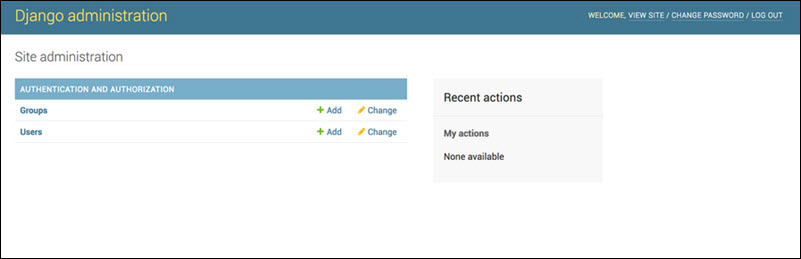
Django automatically generates an admin panel based on your data models. After logging in to the web interface, you can:
- Manage users, groups, and their permissions.
- Add, edit, and delete data.
- Manage relationships between data.
- Search and filter records.
The admin panel is tightly integrated with the rest of the framework. Many developers use it to run the entire application backend without writing additional code.
Flask does not include an admin panel by default. To create one, you must install the Flask-Admin extension and manually connect it to your database and authentication system.
While Flask-Admin is highly customizable, it is not automatically connected to the rest of your project like Django's admin panel is. You are responsible for making all the pieces work together.
ORM
When you create a project in Django, it already includes an Object-Relational Mapper (ORM). The ORM lets you describe your database structure as Python classes called models. Each model becomes a table, with class attributes as columns. Instead of writing SQL queries, you can now interact with the database using standard Python code.
Flask does not include an ORM, and if your application requires a database, you must install one separately.
SQLAlchemy is one of the most popular choices. With the Flask-SQLAlchemy extension, you can:
- Query databases using Python.
- Perform basic create, read, update, and delete data (CRUD) operations.
- Manage relationships between data (one-to-many, many-to-many).
- Connect to different databases (SQLite, PostgreSQL, MySQL, and others).
Note: Django and Flask can work with many database systems. See our list of the 14 best open-source databases.
You still need to configure and connect the extension to other parts of your application, such as the admin interface.
Security
Django includes several protections that are enabled by default and require no additional setup:
- CSRF tokens are embedded in forms to stop attackers from submitting requests on behalf of a user.
- User-generated content is escaped before it's displayed in the browser, which helps prevent cross-site scripting (XSS).
- The ORM handles database queries without SQL, which stops potential SQL injection attacks.
- Security headers are set to prevent the website from being embedded in malicious pages (clickjacking).
- Password storage, authentication, and permission controls are built in.

Flask only includes basic request handling. For additional security, you must use extensions or set up protections, such as:
- Flask-WTF for CSRF token protection.
- Flask-Login for managing user sessions and authentication.
- Libraries to validate input and prevent unsafe data from being processed.
- Manually configuring security headers and other protections.
Flask can be just as secure as Django, but the responsibility falls more on the developer to ensure all necessary protections are in place.
Scalability
When building an application, it is often difficult to predict how well it will handle increasing volumes of data, traffic, and users over time. Django, with its consistent project structure and built-in tools, is designed for large-scale database applications.
This approach makes it easier for teams to maintain and expand a project as it grows. Django has a strong track record with some of the largest platforms, such as Instagram, proving that the framework can support data-intensive applications with high traffic.
Flask can also handle heavy workloads despite being very lightweight. However, the scalability of a Flask project depends a lot on how the developer designs the application.
Because Flask does not enforce a structure, two Flask projects can look quite different. Everything hinges on how well the project is designed, organized, and documented, which can be challenging for teams to maintain in the long term.
Choosing Between Django and Flask
Django can speed up development and reduce the need to connect many separate tools. Django is a strong choice for:
- Beginners who want a predefined structure to show them how to organize a web application.
- Websites that rely on relational databases to display or modify user data, product catalogs, or dashboards.
- Content management systems (CMS) that need a rich admin panel and clear user roles.
- Large projects that benefit from a consistent long-term structure to simplify teamwork, maintenance, and scaling.
- E-commerce platforms that include payment solutions, product management, order fulfilment, and user management.

Beginners often choose Flask because it feels simple and lightweight. It is an excellent choice for:
- Developers who want to learn how to build web applications from the ground up.
- Applications with only a few routes or endpoints, where a full framework is unnecessary overhead.
- Microservices that are part of a larger system.
- APIs and web services that only need to send and receive data without a full website.
- Developers who prefer to design their own project structure and personally choose every tool and library.
- Users who prefer the flexibility of Jinja2 templates and do not need all of the features Django provides.
Many developers end up using both frameworks: Flask for small, focused services and Django for larger, feature-rich applications.
Conclusion
Despite their differences, Django and Flask are both strong choices for building web applications with Python. The proper framework depends on the type of project you are working on and how you prefer to build applications.
Next, learn how to connect Python to MySQL and start working with real data in your applications.