Pandas can read data from various sources, such as relational databases and CSV files, and convert it into DataFrames. A DataFrame is a Python object that is similar to a table in a spreadsheet. Each row is one entry in the dataset, while each column stores a variable that describes those entries.
In this guide, you will learn how to use the Pandas merge() function to join two DataFrames into a single table.

Prerequisites
- Python 3 (learn how to install Python on Ubuntu, Windows, macOS, and Rocky Linux).
- Pandas installed in the Python environment.
Note: The Pandas examples in this tutorial are presented using Jupyter Notebook, but you can also run them in other Python IDEs, code editors, or in the Python shell in your terminal.
Pandas merge() Syntax
merge() joins two tables (DataFrames) together based on a shared column. The basic syntax for merging two DataFrames is:
dframe1.merge(
    dframe2,
on="column_name")dframe1is the first DataFrame (left table).dframe2is the second DataFrame (right table).- The
merge()function returns a new DataFrame that contains the joined data from both tables. - The
onparameter tells Pandas which shared column name to use as the key for the merge.
If both DataFrames have columns with the same name, Pandas will automatically use those shared columns to match rows. However, using the on parameter makes the merge easier to read and manage.
For example, in a data center database, the servers table lists details about each server, and the hardware table shows the hardware specs for those servers. Both DataFrames have the server_id column.
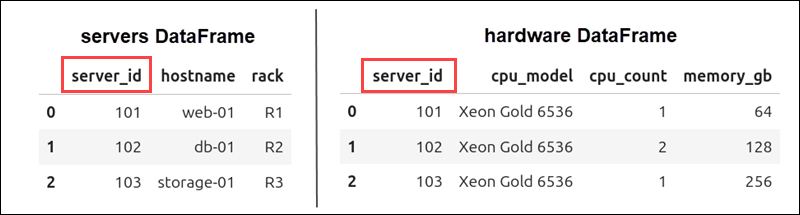
You can use the following command to merge these two DataFrames:
servers.merge(
    hardware,
    on="server_id")
Pandas matches rows using the server_id column as the key and creates a new DataFrame that combines information from both tables.
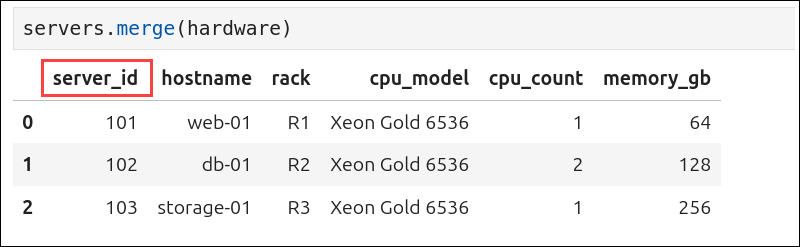
If you want more control over how the tables are merged, like choosing which columns to use as keys or deciding how to combine rows, you can add additional merge() parameters inside the parentheses.
Pandas merge() Parameters
merge() parameters are added inside the parentheses after the right DataFrame name to control how a merge works. They determine which columns are used to match rows and how rows from both DataFrames are combined.
Using the previous servers/hardware example, the following code shows the merge() syntax with all parameters and their default values:
servers.merge(
    hardware,
    how="inner",
    on="column_name",
    left_on=None,
    right_on=None,
    left_index=False,
    right_index=False,
    sort=False,
    suffixes=("_x", "_y"),
    copy=True,
    indicator=False,
    validate=None
)
Most of these arguments are optional, and in practice, you usually only need to specify one or two of them. The only required argument is the name of the right DataFrame (hardware).
Quick Parameter Reference
The following table lists all available parameters and their possible values:
| Parameter | Value | Default | Description |
|---|---|---|---|
| right | DataFrame | Required | The second DataFrame you want to merge with the left DataFrame. In the example above, hardware is passed as the right parameter. |
| how | inner, left, right, outer, cross | inner | Use it to define how rows from both DataFrames are joined together. |
| on | Column name or list of column names. | None | Column(s) that exist in both DataFrames and are used to match rows. |
| left_on | Column name or list of column names. | None | Column(s) from the left DataFrame used to match rows. |
| right_on | Column name or list of column names. | None | Column(s) from the right DataFrame used to match rows. |
| left_index | True or False | False | Use the index of the left DataFrame as the join key. |
| right_index | True or False | False | Use the index of the right DataFrame as the join key. |
| sort | True or False | False | Sort the resulting DataFrame by the join keys. |
| suffixes | Two suffix strings. | ('_x', '_y') | If both DataFrames have columns with the same name (that are not used as the merge key), suffixes are added to identify them in the merged result. |
| copy | True or False | True | Use to decide if the merged DataFrame should contain copies of the data. |
| indicator | True, False, or column name. | False | Add a column that shows whether each row came from the left DataFrame, the right DataFrame, or both. |
| validate | Validation rule string. | None | Use to check if the merge follows a rule you defined in the string, like one-to-one or one-to-many. |
Note: Many Pandas parameters use Python Boolean values (True or False). If you are new to Python, take some time to learn how Booleans affect the way your code works.
merge() vs. concat()
Beginners often confuse the merge() and concat() functions because they are both used to combine DataFrames. However, they solve different problems.
Use merge() when you need to join two DataFrames into one new DataFrame based on matching column values.
Use concat() to combine DataFrames along rows and columns, even if they do not share the same keys. For example, you can stack tables on top of each other or place them side by side.
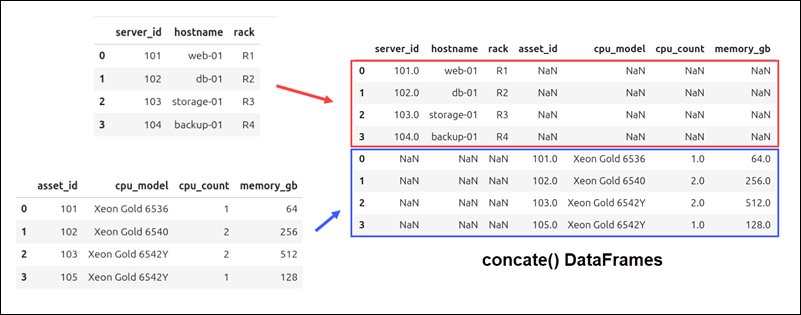
Here are the main differences between the merge() and concat() functions in Pandas:
| merge() | concat() | |
|---|---|---|
| When to use | Joins two DataFrames based on shared column values. | Combines DataFrames along any axis (rows or columns). Does not rely on shared columns. |
| Joins | Supports five types of joins: inner, outer, left, right, and cross. | Supports two types of joins: outer and inner. |
| on | Uses the on parameter to specify the column used to match rows. | Does not support the on parameter. |
| axis | Does not use an axis parameter. | Uses the axis parameter, where axis=0 combines rows and axis=1 combines columns. |
Note: If you are interested in machine learning and AI, check out which Python libraries can help you build and train ML models.
Pandas merge() Examples
When you merge DataFrames, you usually use the on, left_on, and right_on parameters to choose which columns to use as the merge key. The how argument lets you define the join type, like inner, left, right, or outer.
As in the earlier example, two DataFrames are used. The servers table lists the servers in a data center, and the hardware table is an inventory of their technical specifications.
Copy and run this code in your Python environment to create the example DataFrames:
import pandas as pd

servers = pd.DataFrame({
    "server_id": [101, 102, 103, 104],
    "hostname": ["web-01", "db-01", "storage-01", "backup-01"],
    "rack": ["R1", "R2", "R3", "R4"]
})

hardware = pd.DataFrame({
    "asset_id": [101, 102, 103, 105],
    "cpu_model": ["Xeon Gold 6536", "Xeon Gold 6540", "Xeon Gold 6542Y", "Xeon Gold 6542Y"],
    "cpu_count": [1, 2, 2, 1],
    "memory_gb": [64, 256, 512, 128]
})
After creating the DataFrames, you can control how they are combined using the code examples below.
Merge DataFrames Using left_on and right_on
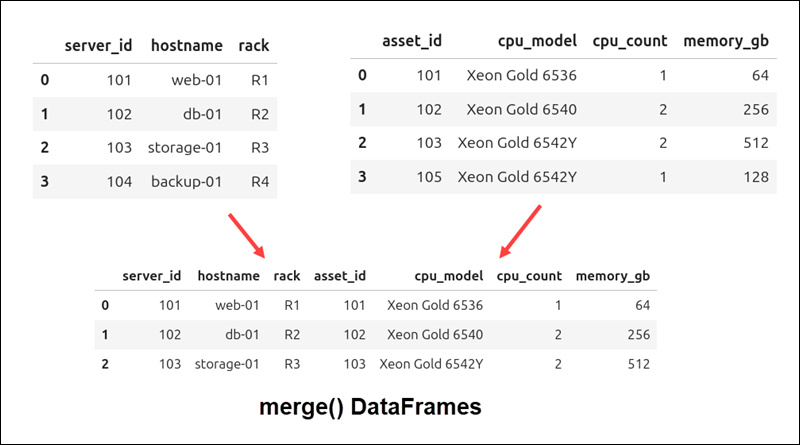
You can use the on parameter only when both DataFrames share the same column name. If the key columns have different names, use left_on and right_on to tell Pandas which columns to match.
The following command merges the servers and hardware DataFrames using the server_id and asset_id columns:
servers.merge(
       hardware,
       left_on="server_id",
       right_on="asset_id"
)
Pandas matches the rows where the server_id value in servers is the same as the asset.id value in hardware.
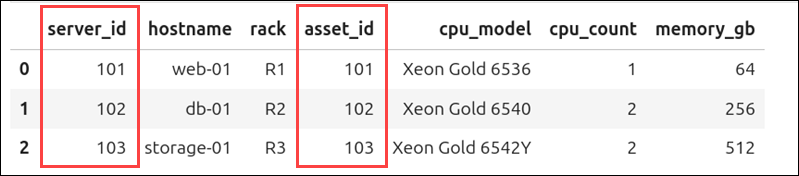
Two rows, server_id 104 in the servers DataFrame, and asset_id 105 in the hardware DataFrame, do not have matching keys. Because Pandas uses an inner join by default, they were excluded from the new DataFrame.
Merge DataFrames Using how
The how argument specifies how rows from the two DataFrames are merged. There are five types of joins you can use.
Inner Join of DataFrames
If you do not set the how argument, Pandas uses an inner join by default, as shown in the previous example. Here, the join type is set explicitly using how="inner":
servers.merge(
       hardware,
       how="inner",
       left_on="server_id",
       right_on="asset_id"
)
The resulting DataFrame is identical to that in the previous section. An inner join only keeps rows where the merge keys exist in both DataFrames. Rows that do not have matching keys are excluded from the result.
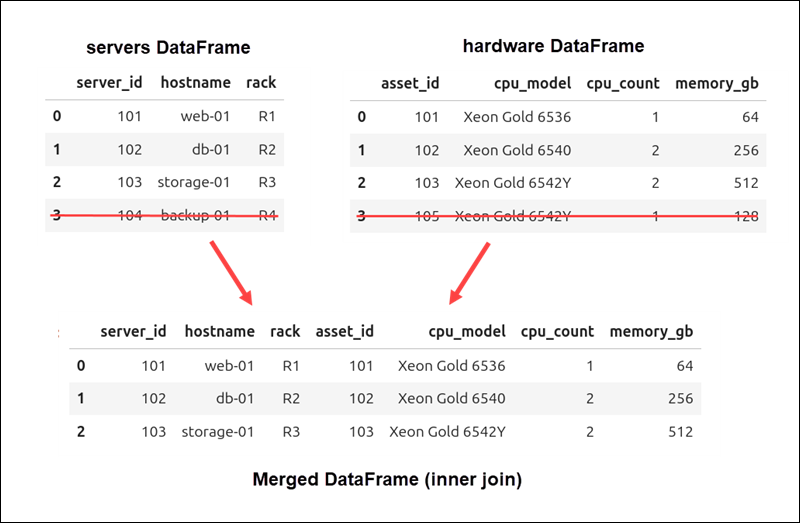
Rows with server_id 104 and asset_id 105 are not in the merged DataFrame because they do not have matching keys.
Left Join of DataFrames
Use a left join when you want to include all rows from the left DataFrame in the result. If there is no matching key in the right DataFrame, the missing values will show up as NaN (Not a Number).
Enter and run the following command:
servers.merge(
       hardware,
       how="left",
       left_on="server_id",
       right_on="asset_id"
)
The row with asset_id 105 does not appear in the merged DataFrame because it only exists in the hardware DataFrame.
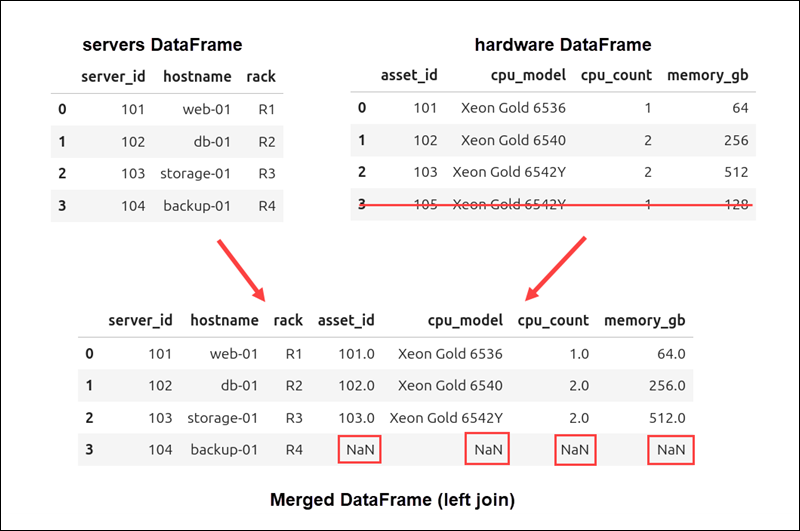
However, the row with server_id 104 is included in the result, and since there is no matching asset_id in the hardware DataFrame, the columns from the right table contain NaN values.
Note: When NaN values are present, Pandas converts integer columns to floating-point numbers. This is why values like 256 may appear as 256.0.
Right Join of DataFrames
A right join is similar to a left join, except that all rows from the right DataFrame are kept in the result.
This code example performs a right join on the servers and hardware DataFrames:
servers.merge(
       hardware,
       how="right",
       left_on="server_id",
       right_on="asset_id"
)
The merged DataFrame does not include the row with server_id 104 because it only appears in the left servers DataFrame.
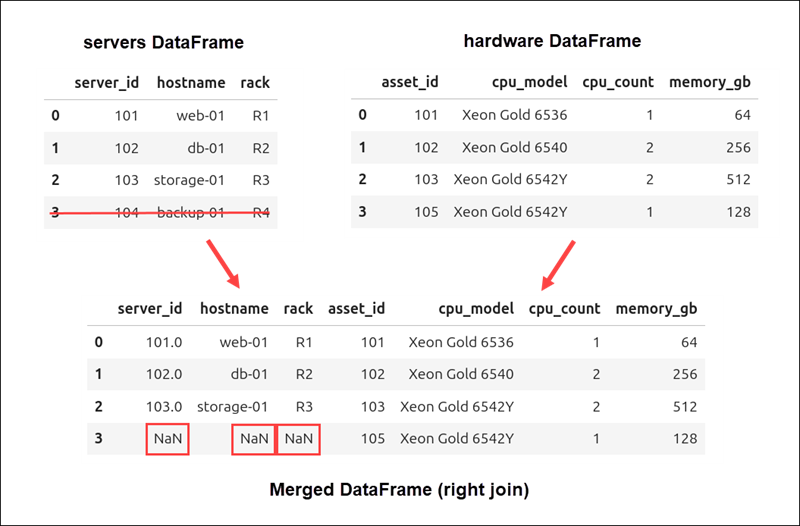
The row with asset_id 105 from the right DataFrame is included, and any missing values from the left table are marked with NaN.
Outer Join of DataFrames
An outer join combines all rows from both the servers and hardware DataFrames. If a row does not have a match in the other DataFrame, the missing values are filled with NaN.
Use the following command to merge the servers and hardware DataFrames with an outer join:
servers.merge(
       hardware,
       how="outer",
       left_on="server_id",
       right_on="asset_id"
)
The result contains every row from both DataFrames, even if some rows do not match.
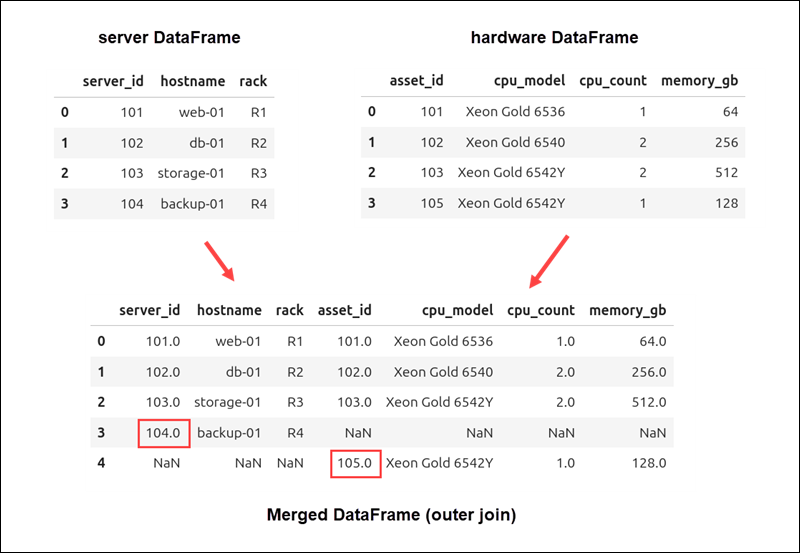
In this example, server_id 104 from the servers DataFrame and asset_id 105 from the hardware DataFrame are both included. Columns without matching values contain NaN.
Cross Join of DataFrames
A cross join makes every possible pairing of rows from two DataFrames. This is known as a Cartesian product. Each row in the first DataFrame is matched with every row in the second DataFrame.
To show how this join works, create an image_os DataFrame that lists images for server operating systems:
import pandas as pd

image_os = pd.DataFrame({
    "os": [
        "Ubuntu 24.04",
        "Rocky Linux 9",
        "Windows Server 2025"
    ]
})
Run the following command to perform a cross join between the servers and image_os DataFrames:
servers.merge(
    image_os,
    how="cross"
)
Since a cross join does not use keys, you do not need the left_on or right_on parameters.
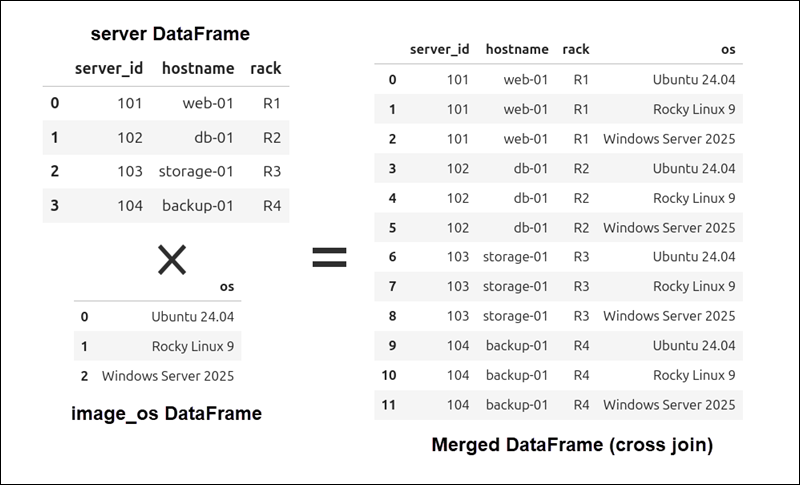
The result will show every possible combination of rows from the servers and image_os DataFrames.
Conclusion
This guide showed you how to use the Pandas merge() function to combine DataFrames, create new tables, and match rows from related datasets.
When you merge datasets in Pandas, the resulting DataFrame often contains missing values (NaNs). Learn how to handle missing data in Python.