Making code understandable is an essential part of writing quality software. As projects grow, even simple functions can become difficult to interpret without clear explanations of intent and usage.
Docstrings are a built-in way to document Python code directly within the source. They help explain what a module, class, function, or method does without relying on external comments or documentation.
This tutorial shows what Python docstrings are and why they matter. It provides writing tips and explains how to follow the conventions and formats used in real-world projects.
Prerequisites
- Python 3 (install Python on Ubuntu, Windows, macOS, and Rocky Linux).
- Command-line access.
What Is a Python Docstring?
A Python docstring is a string literal used to document code. It appears as the first statement inside a module, class, function, or method, and describes what that piece of code does.
In the following example, the function greet takes a name as input and returns a formatted greeting message. The triple-quoted string directly below the function definition is the docstring, and it explains the function's purpose:
def greet(name):
    """Return a greeting message for the given name."""
    return f"Hello, {name}!"
Unlike regular comments, Python stores docstrings as metadata. This means they can be accessed at runtime using built-in tools like the __doc__ attribute or the help() function.
For example, retrieve the docstring from the example above with:
print(greet.__doc__)
Why Use Docstrings in Python?
Docstrings play a key role in making Python code easier to read and maintain over time. When revisiting code after a while, or when working in a team, clear documentation helps reduce the need to reverse-engineer logic.
Docstrings also integrate directly with Python's tooling ecosystem. IDEs, documentation generators, and built-in utilities rely on docstrings to automatically display useful information. In practice, docstrings help turn your code into a self-documenting system that scales better as complexity increases.
The key benefits include:
- Improved code readability.
- Built-in documentation.
- Automatic documentation generation.
- IDE hints and tooltips.
- Support for introspection via
help()and__doc__.
Types of Python Docstrings
Each docstring type serves a specific purpose and provides context at a different level of abstraction. Instead of placing all explanations in a single place, users can logically distribute them across modules, classes, and functions.
The sections below cover the most common docstring types used in Python code.
Module Docstrings
A module docstring describes the purpose and usage of an entire Python file. It typically provides a high-level overview of the module's contents and explains how to use it.
This is especially useful in larger projects where modules group related functionality. A good module docstring helps other developers quickly understand the file's role without having to read its entire contents.
The following example shows a module docstring and provides a brief overview of the module:
"""
Utility functions for string manipulation.

This module provides helper functions for cleaning and formatting text data.
"""
Function and Method Docstrings
Function and method docstrings explain what a specific piece of logic does. They typically include details about parameters, return values, and possible exceptions.
These docstrings are the most common and often the most detailed. They are essential for understanding how to call a function correctly without inspecting its implementation.
The following example shows a function docstring. It comes immediately after the function definition and describes what the function does, along with its inputs and outputs:
def add(a, b):
    """
    Add two numbers.

    Args:
        a (int): First number
        b (int): Second number

    Returns:
        int: Sum of a and b
    """
    return a + b
Class Docstrings
A class docstring provides an overview of what the class represents and how to use it. It may also describe important attributes or relationships between methods.
This is particularly helpful when working with object-oriented code, where behavior is distributed across multiple methods. A well-written class docstring gives a clear mental model of the object.
The following example shows a class docstring. It comes immediately after the class definition and describes the role of the class as a whole:
class Calculator:
    """A simple calculator for basic arithmetic operations."""

    def multiply(self, a, b):
        """Return the product of two numbers."""
        return a * b
Package Docstrings
A package docstring definition is in the __init__.py file and it describes the package as a whole. It provides context about how modules within the package are organized and how they relate to one another.
This is useful in larger codebases, where packages group multiple modules into logical units. A clear package docstring helps users navigate the structure more efficiently.
The following example shows a package docstring. It stands at the very top of the __init__.py file, before any imports or initialization code:
"""
Math utilities package.

Includes modules for arithmetic, algebra, and statistics.
"""
Python Docstring Conventions
Python docstrings follow a set of conventions defined in PEP 257. The interpreter does not enforce these guidelines, but they are widely adopted to ensure consistency and readability.
Following these conventions makes the code easier for other users to understand. It also ensures compatibility with tools that parse docstrings for documentation generation.
In general, the goal is to keep docstrings clear, concise, and structurally predictable.
The following are the key guidelines from PEP 257:
- Use triple double quotes (
"""). - Start with a one-line summary.
- Use imperative mood (e.g., "
Return the result"). - Leave a blank line after the summary for longer descriptions.
- Keep lines reasonably short (typically 72–79 characters).
For example:
def square(number):
    """
    Return the square of a number.

    This function takes an integer or float and returns its square value.
    """
    return number ** 2
Python Docstring Formats
While PEP 257 defines general conventions, it does not enforce a specific structure for documenting parameters or return values. To address this issue, several docstring formats have emerged in the Python ecosystem.
These formats provide a consistent way to organize information within docstrings. They are especially useful when generating documentation automatically using tools like Sphinx. Choosing a format depends on your project or team standards, but consistency is more important than the specific format used.
Google Style
The Google style format is readable and simple, using clear section headers like Args, Returns, and Raises. This makes the docstrings easy to scan.
This format is widely used in industry projects, and it works well for both small utilities and larger codebases with many contributors.
The following example shows a docstring written in Google style. It resides inside a function and organizes information into labeled sections for parameters, return values, and exceptions:
def divide(a, b):
    """
    Divide two numbers.

    Args:
        a (float): Numerator
        b (float): Denominator

    Returns:
        float: Result of division

    Raises:
        ValueError: If b is zero
    """
    if b == 0:
        raise ValueError("Cannot divide by zero")
    return a / b
NumPy / SciPy Style
The NumPy style format is common in scientific computing and data analysis projects. It uses clearly separated sections with headers and emphasizes structured, detailed documentation.
Compared to Google style, it is slightly more verbose but provides a consistent layout that works well for complex functions. This makes it a popular choice in libraries like NumPy, SciPy, and pandas.
The following example shows a docstring written in NumPy style. It is placed inside a function and organizes information into sections such as Parameters and Returns:
def mean(values):
    """
    Calculate the mean of a list of numbers.

    Parameters
    ----------
    values : list of float
        Input numbers

    Returns
    -------
    float
        The mean value
    """
    return sum(values) / len(values)
reStructuredText (Sphinx) Style
The reStructuredText (reST) style is common when generating detailed documentation websites with Sphinx. It uses explicit field lists like :param: and :return: to describe function inputs and outputs.
This format is more formal and supports advanced features such as cross-referencing and type annotations. It is often used in larger or documentation-heavy projects where generating structured docs is a priority.
The following example shows a docstring written in reStructuredText style. It resides inside a function and uses field directives to describe parameters and return values:
def power(base, exponent):
    """
    Raise a number to a given power.

    :param base: The base number
    :type base: int
    :param exponent: The exponent
    :type exponent: int
    :return: Result of exponentiation
    :rtype: int
    """
    return base ** exponent
Additional Formats
Not all projects use structured formats. In some cases, simple descriptive docstrings are sufficient, especially for small scripts or internal tools.
There are also older formats like Epydoc, but modern Python developments rarely use them. Most teams today standardize on Google or NumPy style.
The key is to choose a format and apply it consistently across the codebase.
Tools That Use Python Docstrings
Tools throughout the Python ecosystem actively use docstrings. They rely on docstrings to automatically extract and display useful information.
This tight integration makes docstrings a powerful part of the development workflow. Instead of writing separate documentation, generate it directly from your code.
Understanding which tools use docstrings helps to understand their practical value beyond readability. Common tools include:
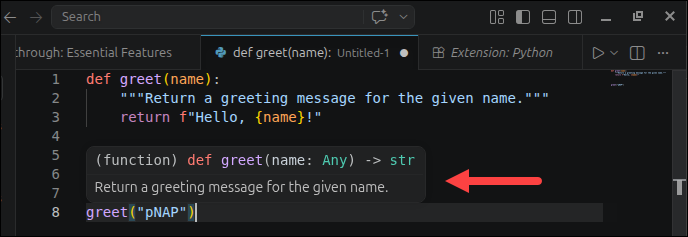
help()- built-in interactive documentation.- IDEs (such as VS Code and PyCharm) - show docstrings as tooltips.
- Sphinx - generates full documentation websites.
- pdoc - simple automatic documentation generator.
- MkDocs (with plugins) - modern documentation sites.
In the example below, the docstring is shown as a tooltip in VS Code when hovering over the function:
Python Docstrings: Common Mistakes and Troubleshooting
Even though docstrings are simple to write, poorly written docstrings can be just as unhelpful as missing ones. Recognizing common mistakes can help you avoid them early. This is especially important in collaborative projects where consistency matters.
Troubleshooting docstrings usually involves checking formatting, clarity, and completeness.
Common mistakes include:
- Missing docstrings for public functions or classes.
- Writing vague descriptions ("
Does something"). - Not documenting parameters or return values.
- Using inconsistent formats across the project.
- Treating docstrings like inline comments.
Troubleshooting tips:
- Use
help(function_name)to verify formatting. - Keep a consistent style (e.g., Google or NumPy).
- Add docstrings early, not as an afterthought.
- Review docstrings during code reviews.
Python Docstrings: Best Practices
Writing effective docstrings is a skill that improves with practice. Good docstrings strike a balance between clarity and brevity, providing enough detail without overwhelming the reader.
They should focus on how to use the code rather than on its implementation. This helps users understand intent without needing to read the source.
Consistency across the codebase is one of the most important factors in maintaining high-quality documentation.
Follow these best practices:
- Write docstrings for all public APIs.
- Start with a clear one-line summary.
- Explain why something exists, not just what it does.
- Document parameters, return values, and exceptions.
- Keep formatting consistent across the project.
- Update docstrings on code changes.
Conclusion
This article showed how to use Python docstrings effectively, from understanding where they are applied to structuring them using common conventions and formats. By writing clear, consistent docstrings, you make your code easier to use, maintain, and integrate with tools that depend on structured documentation.
Next, learn how to use comments in Python.