Verifying whether a file exists before performing read or write operations helps prevent runtime errors and ensures scripts behave predictably. Python provides multiple ways to check if a file exists and whether it contains data.
This tutorial will show you how to check if a file exists and has content using different methods.
Prerequisites
- Python 3 installed (learn how to install Python on Ubuntu, Windows, macOS, and Rocky Linux).
- Access to the terminal.
Check if a File Exists and Has Content Using Python
Before interacting with a file, it is recommended to confirm that it exists and is not empty.
The sections below demonstrate how to perform these checks in Python using different approaches.
pathlib
The pathlib module is a built-in Python library that provides an object-oriented interface for working with filesystem paths, and it is the recommended modern approach in Python. It simplifies common file operations by replacing string-based approaches with intuitive path objects and methods. pathlib is available by default in the Python standard library since Python 3.4.
Use the Path class to check if a file exists and retrieve its size. Open the Python interpreter or paste the following code in a script and run it:
from pathlib import Path

file_path = Path("example.txt")

if file_path.exists() and file_path.stat().st_size > 0:
    print("File exists and has content.")
else:
print("File does not exist or is empty.")exists()checks whether the file is present.stat().st_sizereturns the file size in bytes.- A size greater than 0 indicates the file is not empty.
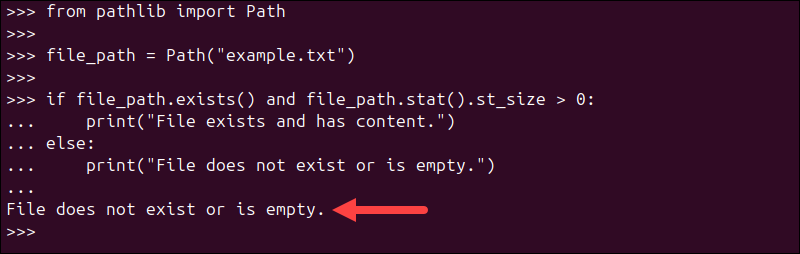
In our case, the file does not exist.
os module
The os module is a built-in Python library that provides functions for interacting with the operating system, including file and directory operations. It is a more traditional, function-based approach to file handling compared to pathlib. Since it is part of the Python standard library, the os module is available by default and does not require installation.
Use os.path.exists() to verify existence and os.path.getsize() to check file size. Run the code below in the Python interpreter or paste it into a script and run:
import os

file_path = "example.txt"

if os.path.exists(file_path) and os.path.getsize(file_path) > 0:
    print("File exists and has content.")
else:
print("File does not exist or is empty.")os.path.exists()returnsTrueif the file exists.os.path.getsize()returns the file size in bytes.
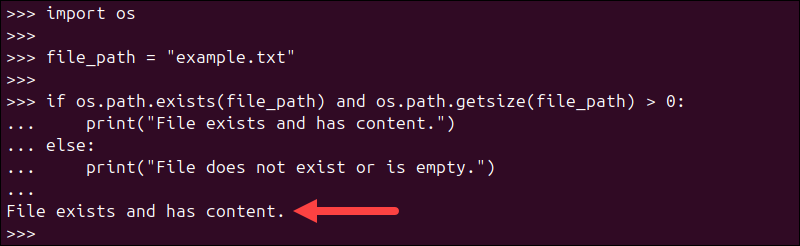
In the example above, the file exists and has content.
try-except Block + open()
Using a try-except block with the built-in open() function is a common Python approach based on exception handling. Instead of checking if a file exists in advance, this method attempts to open the file and handles errors if it is missing. This method follows the "Easier to Ask Forgiveness than Permission" (EAFP) principle in Python.
Both open() and exception handling are core Python features, so this approach works out of the box without any additional imports.
Run the code below in the Python interpreter or save it in a script and run:
file_path = "example.txt"

try:
    with open(file_path, "r") as file:
        content = file.read()
        if content:
            print("File exists and has content.")
        else:
            print("File is empty.")
except FileNotFoundError:
print("File does not exist.")- open() attempts to open the file.
- If the file does not exist, a FileNotFoundError is raised.
- Reading the file lets you check whether it contains data.
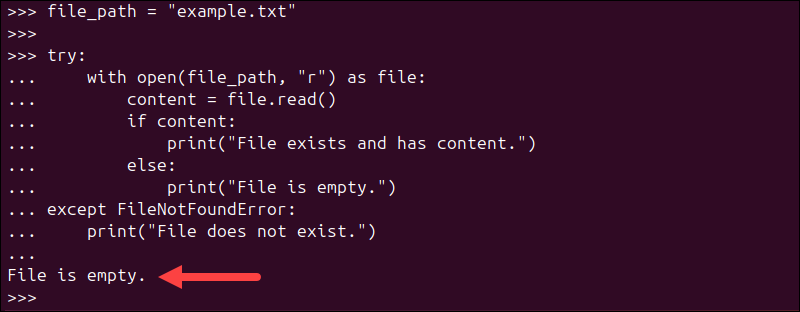
In the example above, the file exists, but it is empty, so the command prints the appropriate message.
Conclusion
This tutorial showed how to check if a file exists using different Python methods. Ensuring the file exists and has contents is crucial to avoiding runtime or scripting errors. Use these methods to avoid errors and write more reliable scripts when working with files.
Next, learn how to use the Python randint() method.