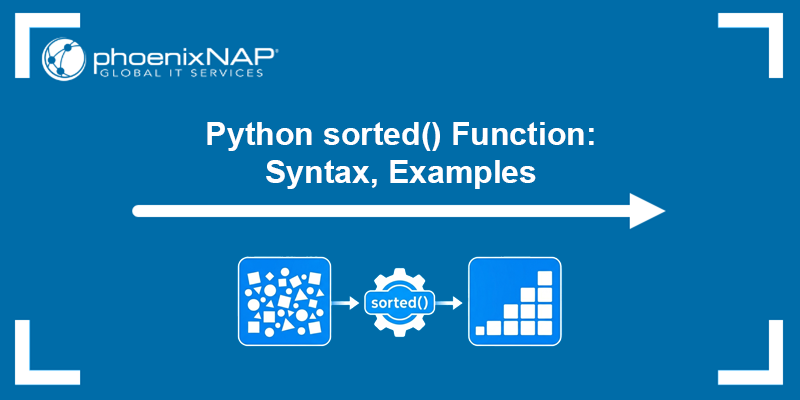
The sorted() function is a built-in Python utility that sorts elements from any iterable, such as lists, tuples, strings, or sets. It returns a new, sorted list without modifying the original data. This makes the function safe to use when you need to preserve the initial structure.
This tutorial will explain the sorted() syntax, its parameters, and how to use it in common sorting scenarios.
Prerequisites
- Python 3 (learn how to install Python on Ubuntu, Windows, macOS, or Rocky Linux).
- Access to the terminal.
Python sorted() Syntax
The sorted() function provides a flexible syntax that supports both simple and advanced sorting scenarios. It accepts an iterable and optional arguments that modify how elements are compared and ordered.
The basic syntax is:
sorted(iterable, key=None, reverse=False)This structure allows you to sort basic data types directly or apply custom rules when working with more complex data.
Python sorted() parameters
Each parameter in sorted() controls a specific part of the sorting process, and understanding them helps you adapt sorting behavior to different use cases. The parameters are:
iterable. The collection of elements to sort (for example, a list, tuple, string, or set). This parameter is required.key (optional). A function that extracts a value from each element for comparison. Instead of comparing elements directly, Python compares the values returned by this function.reverse (optional). A boolean value that determines the sorting order. It can beFalse(ascending order, default) orTrue(descending order).
Regardless of the input type, sorted() always returns a new list containing the sorted elements. Python's sorted() function is stable, meaning that when multiple elements have equal keys, their original order is preserved. This is useful when performing multiple sorting operations in sequence.
Note: sorted() vs. list.sort() - sorted() returns a new list and works with any iterable without modifying the original data. In contrast, list.sort() sorts a list in place and does not return a new list. Use sorted() to preserve the original data. Use .sort() for in-place sorting of lists.
Python sorted() Examples
The following examples demonstrate how sorted() behaves in common scenarios. Each example shows how different parameters affect the final result.
To test the examples below, save the code in a Python script and run it, or run it directly in a Python interpreter.
Sort in Ascending Order
By default, sorted() arranges elements in ascending order, meaning from smallest to largest. This works for numbers, strings, and other comparable data types.
In this example, we sort a list of integers without using any optional parameters:
numbers = [4, 1, 3, 2]
result = sorted(numbers)
print(result)
The function processes each element, compares the values, and builds a new list in increasing order:

Sort in Descending Order
To change the sorting direction, you can use the reverse parameter. Setting it to True reverses the default ascending order.
Refer to the example below:
numbers = [4, 1, 3, 2]
result = sorted(numbers, reverse=True)
print(result)
Here, sorted() performs the same comparisons but reverses the final order before returning the result:

Sort Using key Parameter
The key parameter allows you to define custom sorting logic. Instead of comparing elements directly, Python applies the key function to each element and sorts based on the returned values.
This example sorts a list of strings by their length instead of alphabetical order:
words = ["apple", "banana", "kiwi"]
result = sorted(words, key=len)
print(result)
The len function is applied to each word, and sorting is performed based on the resulting lengths:

Sort a List of Dictionaries
When working with structured data such as dictionaries, you can use the key parameter to sort based on a specific field. This is common when processing JSON data or database results.
students = [
    {"name": "Anna", "grade": 85},
    {"name": "Mark", "grade": 92},
    {"name": "Joy", "grade": 78}
]

result = sorted(students, key=lambda x: x["grade"])
print(result)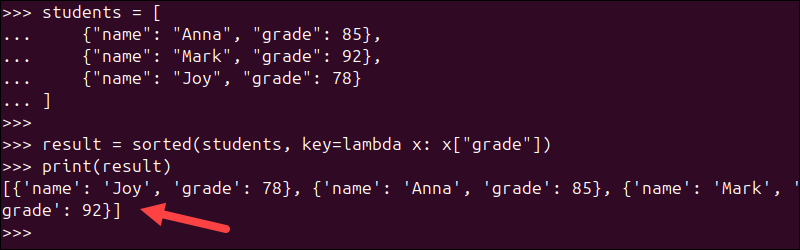
In this example, the function sorts the list by the grade value in each dictionary.
Sort a List of Tuples
You can also sort tuples by a specific position using the key parameter. This is useful when working with paired data such as coordinates or key-value structures.
Refer to the example below:
pairs = [(1, 3), (2, 1), (4, 2)]

result = sorted(pairs, key=lambda x: x[1])
print(result)
Here, sorting is performed based on the second element of each tuple.
Conclusion
This tutorial showed how to use the sorted() function to organize data in Python using default and customized sorting behavior. The function works with any iterable, preserves the original data, and provides flexibility through the key and reverse parameters, making it suitable for both simple and advanced sorting tasks.
Next, see how to use the Python randint() method.