Generating random numbers is a fundamental part of many Python programs, ranging from games and simulations to testing and random identifiers. The randint() function from Python's built-in random module returns a random integer between two specified bounds.
This guide will show how the randint() function works, what parameters it takes, and how to use it in practical examples.

Prerequisites
- Python 3 (learn how to install Python on Ubuntu, Windows, macOS, and Rocky Linux).
- Access to the terminal.
randint() Syntax
The randint() function lets your program pick a whole number randomly from a defined range. This is useful when you need unpredictable choices, e.g., choosing a random quiz question, picking a random index, or simulating dice rolls.
The general function syntax is:
random.randint(a, b)Where:
ais the lower bound (inclusive).bis the upper bound (inclusive).
This means the result will always be between a and b, including both.
randint() Parameter Values
To use randint() correctly, you must supply two integer values. The first value must be less than or equal to the second value. Otherwise, Python raises a ValueError.
The parameter values are:
- a (int): The smallest number
randint()can return. - b (int): The largest number
randint()can return.
If you pass incompatible data types (like strings), Python raises a TypeError. If you pass non-integer numeric values (like floats), Python raises a ValueError. The examples in the sections below show this in action.
randint() Examples
The sections below test randint() in practical examples. Each example walks you through creating a file, adding code, and running it to see the behavior directly.
This approach helps you understand both normal usage and common errors.
Use randint() Multiple Times
Real-world programs often need more than one random value. For example, games may generate multiple random moves, simulations may run repeated trials, and testing scripts may require batches of unpredictable values. Calling randint() inside a loop allows you to generate multiple random integers efficiently and cleanly.
Follow the steps below:
1. Create a new Python script using a text editor. We will use nano:
nano multiple_randint.py2. Paste the following code:
import random

print("Generating 5 random integers between 1 and 10:")
for _ in range(5):
    print(random.randint(1, 10))
3. Save the file and exit.
4. Run the script:
python3 multiple_randint.py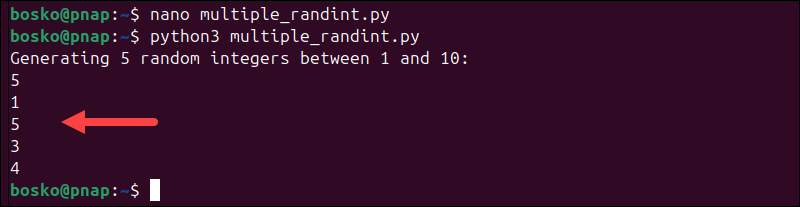
The for loop calls randint() multiple times, and each iteration prints a new random integer from 1 to 10. Run the script several times to see different outputs each time.
Program randint() to Demonstrate the ValueError
A ValueError occurs when a function receives valid data types but inappropriate values. With randint(), this error happens if the lower bound is greater than the upper bound. Python cannot generate a number from an invalid range, so it raises an exception.
Follow these steps to demonstrate the ValueError:
1. Create a new script:
nano value_error_example.py2. Paste the following code:
import random

# This will cause a ValueError
print(random.randint(10, 5))
3. Save and exit the file.
4. Run the script:
python3 value_error_example.py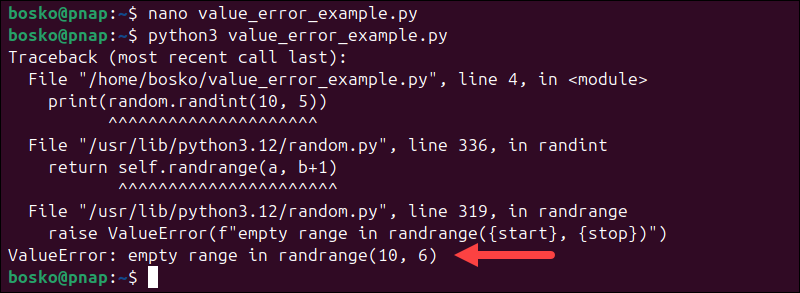
Python throws the error because 10 is greater than 5, creating an invalid range. To fix the issue, ensure the first argument is less than or equal to the second:
print(random.randint(5, 10))Program randint() to Demonstrate the TypeError
A TypeError happens when an operation is performed on an inappropriate data type. The randint() function strictly requires integer arguments. If you pass strings, floats, or other incompatible types, Python raises a TypeError.
Follow these steps:
1. Create a new script:
nano type_error_example.py2. Paste the following code:
import random

# This will cause a TypeError
print(random.randint("1", "10"))
Note: Comments in Python (starting with #) are a good practice and they explain code without affecting how the program runs.
3. Save and exit.
4. Run the script:
python3 type_error_example.py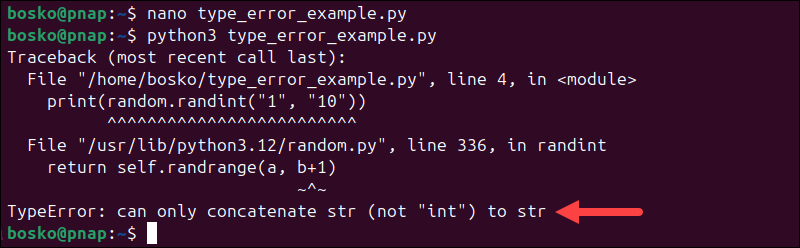
The error occurs because "1" and "10" are strings, not integers. Always pass integer values. For example:
print(random.randint(1, 10))Use randint() to Create Random Password Generator
Randomness is frequently used in security-related tasks, such as generating temporary passwords or unique tokens. While Python provides higher-level tools for secure randomness, this example demonstrates how randint() can be used to construct a simple random password by selecting characters from a defined set.
Important: This method is NOT cryptographically secure. The random module uses the Mersenne Twister PRNG, which is deterministic and predictable. Use our free random password generator to create a secure, strong password with customizable length and complexity.
Follow the steps below:
1. Create a new script:
nano password_generator.py2. Paste the following code:
import random
import string

length = 8
chars = string.ascii_letters + string.digits + string.punctuation

password = ""

for _ in range(length):
    index = random.randint(0, len(chars) - 1)
    password += chars[index]

print("Your random password:", password)
3. Save and exit.
4. Run the script:
python3 password_generator.py
The script builds a password by randomly selecting characters from letters, digits, and punctuation. Each run generates a different result because randint() selects a new index during every loop iteration.
Conclusion
This tutorial explained how the Python randint() method works, covered its syntax and parameter rules, and demonstrated practical examples. The randint() function is useful because it makes it simple to generate random integers within a defined range for games, simulations, testing, and general-purpose scripting.
Next, learn about the Python numpy.where() method, or see how to make a calculator with Python.