Errors are common in Python, especially when you need to handle user input or convert data between types. Some errors occur because the code is written incorrectly, while others happen when valid code receives invalid data.
One of the most common exceptions that occur at runtime is ValueError. It occurs when a function receives an argument of the correct type but an inappropriate value. Understanding how this exception works helps identify input-related issues and build more reliable programs.
This guide will explain what ValueError is, why it occurs, and how to handle and raise it in Python.

What Is Python ValueError?
In Python, a ValueError is a built-in exception that occurs when a function receives an argument of the correct type, but the value itself is not acceptable. This means the operation is valid in relation to the data type, but the actual data does not meet the function's requirements.
Unlike type-related errors, where the data type is incorrect, ValueError indicates the value is inappropriate for the operation being performed.
Why Does ValueError Occur in Python?
ValueError occurs when a function receives a value that does not meet its expected constraints, even though the data type is correct. These situations are common when working with user input, parsing data, or performing mathematical operations.
Common causes include:
- Invalid numeric conversion. When you convert a string that does not represent a number using functions like
int()orfloat(), it results in aValueError. - Out-of-range values. Some functions expect values within a specific range. Passing a value outside that range triggers a
ValueError. - Incorrect format. Functions that parse structured data, such as dates or numbers, present
ValueErrorwhen the format does not match expectations. - Empty or missing values. Providing empty strings or missing data to functions that require valid input often results in a
ValueError. - Manual validation in code. Developers sometimes explicitly raise
ValueErrorwhen the input does not meet the defined conditions.
Python ValueError Examples
ValueError exceptions appear in real-world scenarios when data looks valid but does not meet the requirements of a function or operation. These issues are common when users work with user input, read files, process external data, or convert values between formats.
The following examples demonstrate common situations where ValueError occurs and show how Python responds.
Invalid Numeric Conversion
ValueError often occurs when you try to convert a string to a number if the string does not contain a valid numeric value.
Follow these steps to reproduce this behavior:
1. Create a Python script using nano:
nano value_error_example1.py2. Add the following code and save and exit the editor:
number = int("hello")
print(number)
3. Run the script using python3:
python3 value_error_example1.py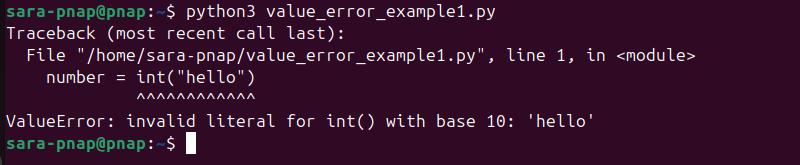
In this case, the input is a string, which is a valid type for the int() function. However, the value "hello" cannot be interpreted as a number, so Python raises a ValueError.
Note: Learn how to convert string to float in Python.
Out of Range Values
A ValueError occurs when a function receives a value outside the allowed range.
Follow these steps to recreate this error:
1. Create a Python script:
nano value_error_example2.py2. Add the following code:
import math

result = math.sqrt(-9)

print(result)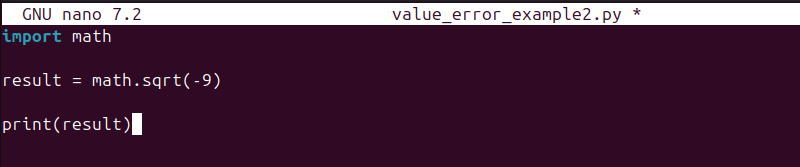
3. Run the script using python3:
python3 value_error_example2.py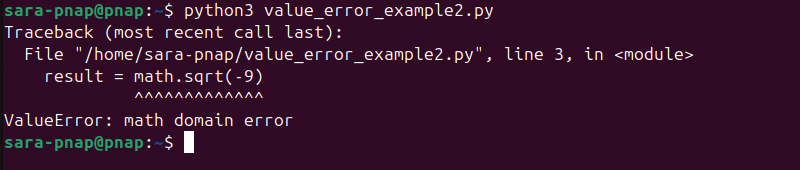
In this example, the value -9 is a valid number, but it falls outside the acceptable domain for the sqrt() function. Since square roots of negative numbers are not defined for real numbers in this context, Python raises a ValueError.
Incorrect Data Format
A ValueError occurs when a function expects data in a specific format or within a valid range, but the provided value does not meet those requirements.
Follow these steps to replicate this error:
1. Make a Python script:
nano value_error_example3.py2. Add the following code:
from datetime import datetime

date = datetime.strptime("2026-29-04", "%Y-%m-%d")

print(date)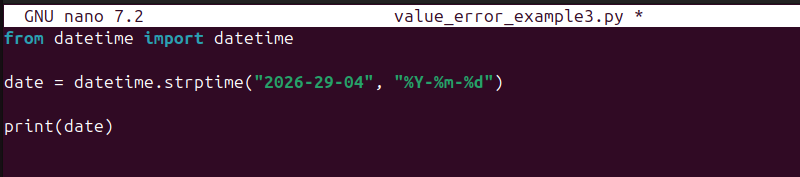
3. Run the script using python3:
python3 value_error_example3.py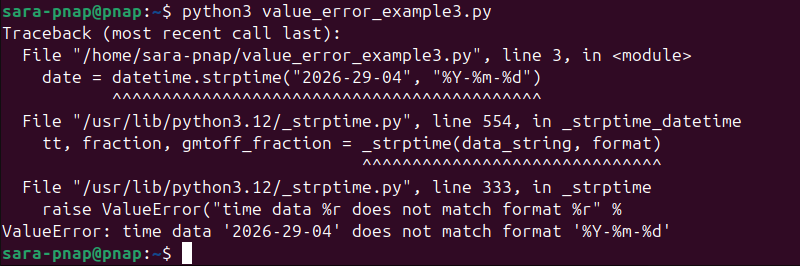
In this example, the string follows a date-like structure, but it does not match the expected date value. The function expects a valid date in the year-month-day format, but the provided value contains an invalid month, which results in a ValueError.
Empty Input Handling
A ValueError occurs when a function receives an empty value where a valid input is required.
Take these steps to see this error:
1. Create a Python script:
nano value_error_example4.py2. Add the following code:
user_input = ""

number = int(user_input)

print(number)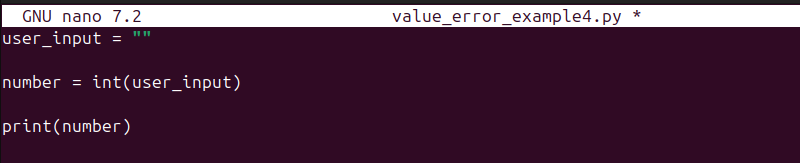
3. Run the script with python3:
python3 value_error_example4.py
In this example, the input is an empty string. Although the type is valid, the value contains no numeric data, so Python raises a ValueError.
Handling ValueError Exception
A ValueError exception is handled using the <strong>try</strong> and <strong>except</strong> statements. This allows the program to catch the error and control what happens next, rather than terminating unexpectedly.
The try block contains code that raises an exception, while the except block defines how the program responds when that exception occurs.
Handling errors is important when working with user input or external data, where invalid values are common. Instead of stopping execution, the program can display a clear message or take corrective action.
Follow these steps to handle a ValueError:
1. Create a Python script:
nano value_error_example5.py2. Add the following code:
user_input = "abc"
try:
    number = int(user_input)
    print(number)
except ValueError:
    print("Invalid input. Please enter a numeric value.")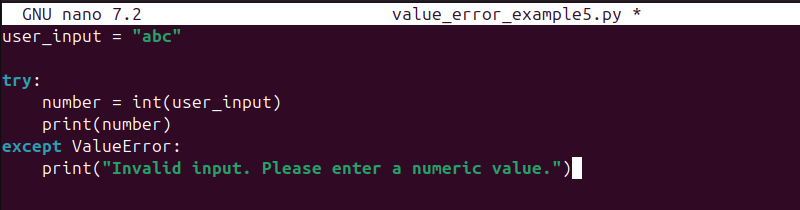
3. Run the script using python3:
python3 value_error_example5.py
In this example, the code attempts to convert a string to an integer. When the conversion fails, the except block catches the ValueError and prints a user-friendly message.
Raising ValueError in Functions
Another way to raise ValueError manually is with the raise statement when a function receives an invalid value. This is used to enforce input validation and prevent incorrect data from being processed.
The raise statement allows you to stop execution and return a clear error message when specific conditions are not met. This approach helps make functions more predictable and easier to debug.
Follow these steps to raise a ValueError in a function:
1. Make a Python script:
nano value_error_example6.py2. Add the following code:
def check_positive(number):
    if number < 0:
        raise ValueError("Number must be positive")
    return number

result = check_positive(-5)

print(result)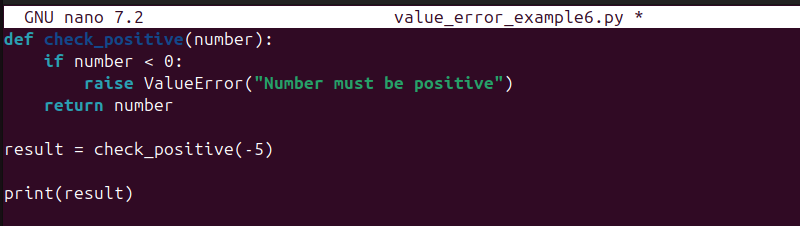
3. Run the script:
python3 value_error_example6.py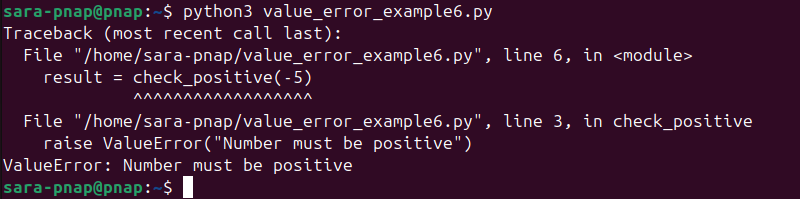
In this example, the function checks whether the input value is negative. If the condition is met, it raises a ValueError with a custom message, which stops execution and clearly indicates what went wrong.
Conclusion
This tutorial explained what Python ValueError is and why it occurs. It also elaborated on how the error appears using practical examples. The guide also showed how to handle the error and raise it in functions.
Next, learn how to fix the ModuleNotFoundError error in Python.