ModuleNotFoundError is common when managing external libraries or local project structures. This error means that Python could not find the requested module while running the script.
This article will help you troubleshoot and fix the ModuleNotFoundError in Python.

What Is ModuleNotFoundError in Python?
ModuleNotFoundError indicates that the Python interpreter cannot locate the file or package referenced in an import statement. This error is a specific type of ImportError that points to a missing module, not an issue within a found module.
The error appears in the command output and provides the name of the module that the interpreter cannot find:

What Causes ModuleNotFoundError?
The following environmental and syntax-related issues cause ModuleNotFoundError at runtime:
- Missing installation. The requested third-party library does not exist in the current environment.
- Typographical errors. Misspellings or incorrect character casing in the import statement prevent a match.
- Incorrect file path. The module resides in a directory outside the standard search path.
- Missing the init.py file. Older Python versions require this file to recognize a directory as a package.
- Virtual environment mismatch. The code executes in an environment where the dependency is not installed.
- Circular dependencies. Two modules attempt to import each other simultaneously, confusing the resolution process.
How to Fix ModuleNotFoundError?
Resolution strategies for ModuleNotFoundError range from simple syntax corrections to environment reconfigurations. Troubleshooting involves ensuring the interpreter can successfully map the import name to a physical file location.
Read the sections below for potential ModuleNotFoundError fixes.
Install the Missing Package
The most common solution is to fetch the package from the Python Package Index (PyPI). Execute the following command in the terminal to install the latest version of the module and resolve missing dependencies:
pip install [module_name]Alternatively, install all project dependencies at once by including them in a requirements.txt file and passing the file to pip install:
pip install -r requirements.txtUse sys.executable for Pip
Running pip install in a terminal may target a different Python version than the one the script is running under. Use the built-in sys.executable attribute to force the package manager to install the module for the specific interpreter currently running the code.
The following code installs the module specifically for the current running interpreter:
import sys
import subprocess

subprocess.run([sys.executable, "-m", "pip", "install", "module_name"])
Verify Module Name and Case
Identifiers in Python are case-sensitive, i.e., NumPy and numpy represent different entities. Review the import statement to verify the name matches the official documentation exactly.
Configure the src Layout
Python best practices often recommend placing source code in a src/ directory to separate it from configuration files. If the interpreter fails to find code within this structure, ensure the installation tool (like Poetry or Setuptools) is configured to look in the src directory.
Furthermore, attempting a relative import (using from .. import module syntax) that goes beyond the top-level package defined by the project root may also cause the error.
Note: Always run the project from the root directory (e.g., python -m my_package.main) rather than navigating into subfolders to execute individual files.
Resolve Circular Imports
A circular import occurs when Module A attempts to import Module B, while Module B simultaneously tries to import Module A. This confuses the interpreter, often resulting in a ModuleNotFoundError or ImportError because the modules are partially initialized.
To prevent the problem, move the import statement inside a function or method so it executes only when the function or method is called. Another option is to create a third module to house common code that both modules need.
Inspect the Python Path
The interpreter searches a specific list of directories stored in sys.path to find modules. Adding a custom directory to this list manually allows Python to locate local modules in non-standard directories:
import sys
sys.path.append('[path_to_module]')
import [module_name]
The example below shows sys.path.append being used to access the module hidden located in the /home/marko/testdir directory.
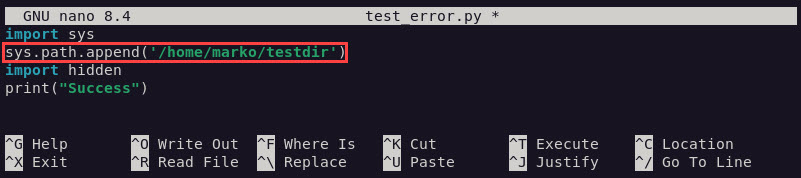
The interpreter finds the module and executes the program.

Check Virtual Environment Activation
Global installations differ from those within a virtual environment. Confirm that the active terminal session points to the correct environment by checking the output of which python or where python.
Update Version Compatibility
Legacy modules sometimes fail to load if the Python version is too new or too old. Upgrading the package or updating Python itself can resolve internal compatibility conflicts.
How to Prevent ModuleNotFound Error in the Future?
Consistent project management habits minimize the risk of import failures. Adopting standard workflows ensures dependencies remain portable and accessible across different machines.
Best practices for avoiding ModuleNotFoundError include:
- Utilizing virtual environments. Isolate project dependencies using venv or conda to avoid global version conflicts.
- Maintaining requirements files. Record all dependencies in a requirements.txt or pyproject.toml file for easy replication.
- Using relative imports. Employ dot notation (e.g.,
from . importutils) for internal package modules to maintain structural integrity. - Implementing try-except blocks. Wrap imports in error-handling blocks to provide fallback options or clearer error messages.
- Verifying sys.path early. Log the contents of
sys.pathduring initialization to debug pathing issues before they trigger failures.
Conclusion
After reading this guide, you will be able to troubleshoot ModuleNotFoundError in Python. The article showed how to verify installations, ensure correct naming conventions, and manage environment paths to maintain a stable, functional codebase.
Next, learn about Python ValueError exception handling.