Dictionaries are one of the most commonly used data structures in Python. They store data as key-value pairs and are widely used for configuration, data processing, and API responses.
In many real-world scenarios, you may need to combine two dictionaries into one. This process is often referred to as appending a dictionary, although the more accurate term is merging.
This article will explain what it means to append one dictionary to another, and show several ways to merge dictionaries in Python.
Prerequisites
- Python 3 (see how to install Python on Ubuntu, Windows, macOS, and Rocky Linux).
- Access to the terminal.
What Does It Mean to Append Dictionary to Dictionary in Python?
Appending a dictionary to another dictionary means to combine their key-value pairs into a single dictionary. Unlike lists, dictionaries do not support an append() method. Instead, you merge dictionaries by adding or updating key-value pairs.
When merging dictionaries:
- The keys must be unique.
- If the same key exists in both dictionaries, the value from the second dictionary overwrites the first.
Why Append Dictionary to Dictionary in Python?
Merging dictionaries is useful when working with dynamic or structured data. It allows users to consolidate information from multiple sources into a single object. Doing so makes your code easier to manage, especially when dealing with layered configurations or incremental data updates.
Common use cases include:
- Combining configuration settings from different files.
- Merging API responses.
- Updating default values with user-provided input.
- Aggregating data during processing.
Merge dictionaries to simplify data handling and avoid managing multiple separate structures.
How to Append (Merge) Dictionary to Dictionary in Python
There are several ways to merge dictionaries in Python. Each method has slightly different behavior, especially regarding whether it modifies the original dictionary.
Refer to the sections below for detailed explanations of each method. Each example can be run in a Python interpreter or in a script.
Note: See how to create a Python dictionary in one line using Python dictionary comprehension.
Use the update() Method
The update() method modifies the original dictionary by adding key-value pairs from another dictionary. If keys overlap, existing values are overwritten. This method is useful when you want to update an existing dictionary in place.
For example:
dict1 = {"a": 1, "b": 2}
dict2 = {"b": 3, "c": 4}

dict1.update(dict2)
print(dict1)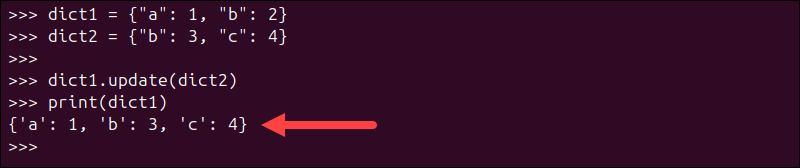
In the code above, the update() method adds all key-value pairs from dict2 into dict1, overwriting the value of "b" and adding the new key "c".
Use Dictionary Unpacking (**)
Dictionary unpacking creates a new dictionary by combining multiple dictionaries. It does not modify the originals. This approach is clean and especially useful when you want to combine dictionaries without modifying the originals.
For example:
dict1 = {"a": 1, "b": 2}
dict2 = {"b": 3, "c": 4}

result = {**dict1, **dict2}
print(result)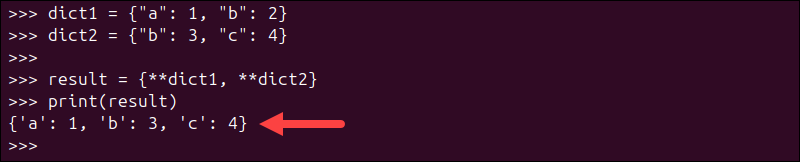
In the example above, dictionary unpacking (**) combines dict1 and dict2 into a new dictionary, where the value of "b" from dict2 overwrites the one in dict1.
Use the | Operator
Python version 3.9 introduced the merge (|) operator for dictionaries. It returns a new dictionary with combined key-value pairs. This method is concise and expressive, especially when merging multiple dictionaries.
Use the code below:
dict1 = {"a": 1, "b": 2}
dict2 = {"b": 3, "c": 4}

result = dict1 | dict2
print(result)
The | operator merges dict1 and dict2 into a new dictionary, where the value of "b" from dict2 overwrites the one in dict1. If you want to update in place, use the |= operator:
dict1 |= dict2Use a Loop
To manually merge dictionaries, iterate over key-value pairs. This gives you full control over how conflicts are handled. This approach is useful when you need conditional logic, such as skipping certain keys or transforming values during the merge.
Run the code below:
dict1 = {"a": 1, "b": 2}
dict2 = {"b": 3, "c": 4}

for key, value in dict2.items():
    dict1[key] = value

print(dict1)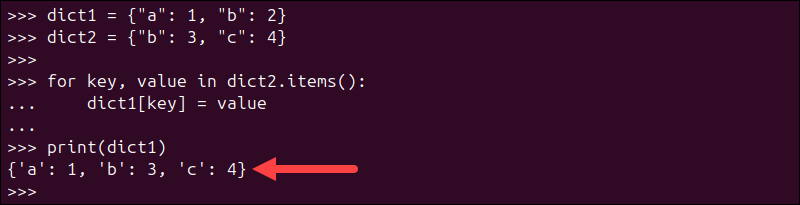
In the code above, the loop iterates over each key-value pair in dict2 and assigns them to dict1, overwriting the value of "b" and adding the new key "c".
Appending a Nested Dictionary in Python
A nested dictionary is a dictionary whose values are themselves dictionaries. When working with nested dictionaries, a simple merge only affects the top level, which means inner dictionaries are replaced entirely rather than merged recursively.
Standard merge methods are shallow, which means they only operate at the top level. Consider the following example:
dict1 = {
    "user": {"name": "Alice", "age": 25}
}

dict2 = {
    "user": {"age": 30}
}

result = dict1 | dict2
print(result)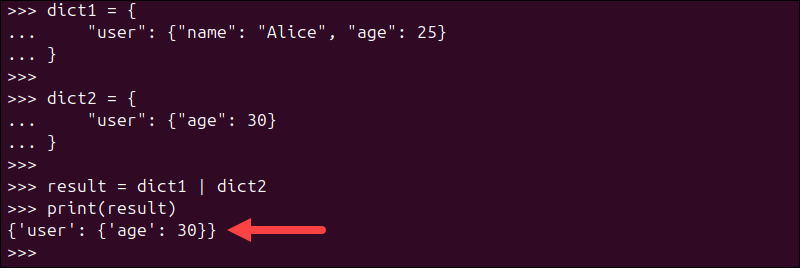
In this example, the entire "user" dictionary from dict1 is replaced. To merge nested dictionaries, you need a custom recursive function. For example:
def merge_nested(d1, d2):
    for key, value in d2.items():
        if (
            key in d1
            and isinstance(d1[key], dict)
            and isinstance(value, dict)
        ):
            merge_nested(d1[key], value)
        else:
            d1[key] = value
    return d1

dict1 = {
    "user": {"name": "Alice", "age": 25}
}

dict2 = {
    "user": {"age": 30}
}

result = merge_nested(dict1, dict2)
print(result)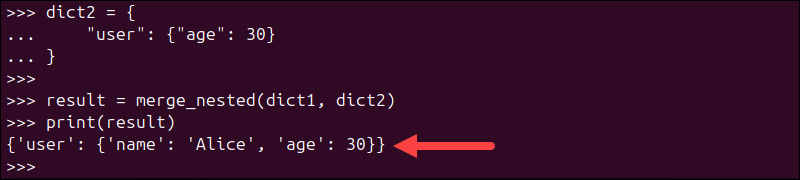
This approach preserves existing nested values while updating only the specified keys.
Conclusion
This tutorial showed how to append (merge) one dictionary into another in Python using different methods, including update(), dictionary unpacking, the | operator, and custom logic for nested structures. Append dictionaries to combine and manage data from multiple sources efficiently, making your code more flexible, scalable, and easier to maintain.
Next, see how to add items to a dictionary in Python.