The max() function is one of the most commonly used built-ins in Python. It allows you to quickly find the largest value in a collection or compare multiple values directly.
Understanding how max() behaves with different data types, iterables, and custom logic is essential for writing clean and efficient Python code.
This guide will break down the max() function's syntax, explore real-world examples, and highlight common mistakes to avoid.
Prerequisites
- Python version 3 (learn how to install Python on Ubuntu, Windows, macOS, or Rocky Linux).
- Access to the terminal.
What Is the Python max() Function?
The max() function returns the largest item from a set of values. If multiple items are equal under the comparison, max() returns the first encountered. It works in two ways: by comparing multiple arguments directly or by evaluating items inside an iterable such as a list, tuple, or dictionary.
By default, max() compares values using standard ordering rules (e.g., numeric comparison or lexicographical order for strings). However, you can customize how comparisons are performed using the key parameter.
Python max() Syntax
The behavior of max() depends on how you call it. Python supports two main forms, each designed for a different use case:
max(iterable, *, key=None, default=None)max(arg1, arg2, *args, key=None)iterable: A collection of items (list, tuple, etc.).arg1,arg2,*args: Multiple values passed directly.key: A function that defines comparison logic.default: A fallback value if the iterable is empty.
The following sections break down how these variations work in practice.
Note: The default parameter can only be used when passing a single iterable. It is not supported when using multiple positional arguments.
max() with Multiple Arguments
When you pass multiple arguments directly, max() compares them and returns the largest one. All arguments must be comparable. Mixing incompatible types (like int and str) will raise an error. This form is useful for quick comparisons without creating a collection.
For example:
result = max(4, 9, 1, 12)
print(result)
max() compares all provided values and returns the largest one, which is 12 in this case.
max() with Iterables
You can pass a single iterable to max() to evaluate all its elements. This is the most common usage in real-world code.
Take a look at the following example:
values = [3, 15, 7, 22]
print(max(values))
max() evaluates all elements in the list and returns the highest value, which is 22.
If the iterable is empty, Python raises a ValueError. You can prevent this by adding the default parameter:
print(max([], default=0))max() with Built-In Functions
The key parameter allows you to apply a transformation before comparison. This is often used with built-in functions like len().
In the following example, max() compares the lengths of the strings instead of the strings themselves:
words = ["apple", "banana", "kiwi"]
print(max(words, key=len))
max() applies len() to each string and returns the longest one, which is "banana".
max() with Lambda Functions
Lambda functions provide a quick way to define custom comparison logic inline. This is especially useful when working with structured data.
In the following example, max() selects the tuple with the largest second element:
pairs = [(1, 5), (2, 3), (4, 2)]
print(max(pairs, key=lambda x: x[1]))
max() uses the lambda function to compare the second element of each tuple and returns (1, 5).
max() with Custom Functions
For more complex logic, you can define a named function and pass it as the key to improve readability when the transformation is non-trivial. This approach is ideal when your comparison logic needs to be reused or tested separately.
Refer to the example below:
def score(item):
    return item["points"] * 2

data = [
    {"name": "A", "points": 10},
    {"name": "B", "points": 15}
]

print(max(data, key=score))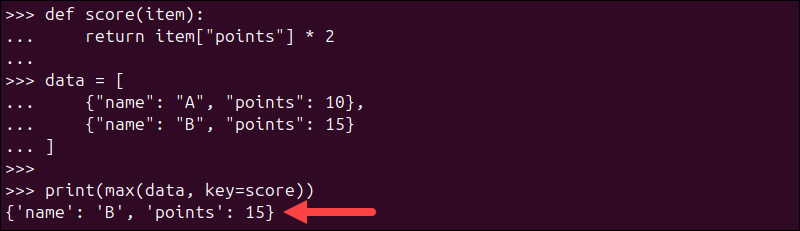
max() applies the score() function to each dictionary and returns the item with the highest computed value, which is {'name': 'B', 'points': 15}.
max() with Custom Objects
In real-world applications, you often work with objects rather than simple data types. The max() function can evaluate these objects using the key parameter to define how they are compared.
This approach is useful when working with structured data, such as users, products, or records, where comparisons depend on a specific attribute.
Consider the following example:
class User:
    def __init__(self, name, score):
        self.name = name
        self.score = score

users = [
    User("Alice", 85),
    User("Bob", 92),
    User("Charlie", 78)
]

top_user = max(users, key=lambda user: user.score)
print(top_user.name)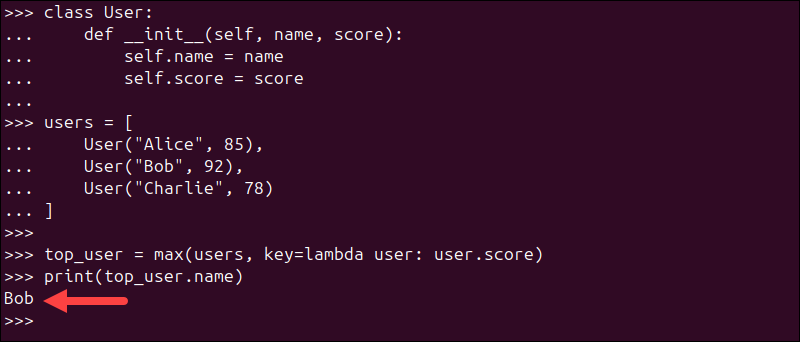
In this example, max() does not compare the User objects directly. Instead, it uses the score attribute to determine which object has the highest value.
The function returns the User object with the highest score, which is "Bob" in this case.
Python max() Function Examples
The following examples demonstrate how max() behaves in real-world scenarios. Each example focuses on a specific use case, showing when you would use it and what kind of result to expect.
You can save the code in a Python script and run it, or you can run it directly in a Python interpreter.
Note: Check out our list of best Python IDEs and code editors.
Find Maximum Number in a List
This example shows the most basic use of max() - finding the largest number in a list. The typical use of this function is in numeric datasets, such as user input, calculations, or aggregated values. The function returns the highest number in the list.
Use the code below:
numbers = [8, 3, 12, 5]
print(max(numbers))
max() iterates through the list and returns the largest value, which is 12.
Find Longest String
This example demonstrates how to use the key parameter to change the comparison logic. Instead of comparing strings alphabetically, it compares them by length. This approach is useful when analyzing text data or selecting the longest label, name, or word.
Run the following:
words = ["cat", "elephant", "dog"]
print(max(words, key=len))
Here, max() uses len() to evaluate each string and returns the one with the greatest length.
Get the Maximum Value in a Dictionary
By default, max() evaluates dictionary keys. However, in many cases, you want to find the key associated with the highest value. This pattern is commonly used when working with mappings like scores, counts, or metrics.
Look at the following code:
data = {"a": 10, "b": 25, "c": 5}
print(max(data, key=data.get))
max() applies data.get to each key, compares the values, and returns the key ("b") with the highest value (25).
Note: See how to initialize a dictionary in Python.
Find Maximum Based on a Condition
This example shows how to customize comparison logic using a lambda function. Use this approach when ranking values based on conditions, such as prioritizing certain elements or applying dynamic rules.
Use the code below:
numbers = [1, 4, 7, 10]
result = max(numbers, key=lambda x: -x if x % 2 == 0 else x)
print(result)
In this case, even numbers are penalized by negating them, so max() favors odd numbers. As a result, 7 is returned as the highest-ranked value under this custom logic.
Python max(): Common Pitfalls
Although max() is straightforward to use, certain edge cases can lead to errors or unexpected results. These pitfalls often appear when working with mixed data types, empty collections, or misunderstood parameters.
The following sections highlight the most common issues and explain how to avoid them.
Mixing Incompatible Types
max() requires all elements to be comparable. If you pass values of different types that cannot be compared directly, Python raises a TypeError. This typically happens when combining numbers and strings or other incompatible objects.
For example:
print(max(10, "20"))
Python does not automatically convert types during comparison. To avoid this error, ensure all values are of the same type or explicitly cast them before calling max().
Empty Iterables Without default
When you pass an empty iterable to max(), Python raises a ValueError because there is no maximum value to return. This often occurs when working with filtered data or dynamically generated lists.
For example:
print(max([]))
To handle this error safely, use the default parameter:
print(max([], default=0))Specifying the default parameter returns 0 instead of raising an error, and makes your code more robust when dealing with uncertain input.
Confusing key with Filtering
The key parameter does not filter elements, but transforms them for comparison. A common mistake is assuming that key can be used to exclude values that do not meet a condition.
Look at the following code:
print(max([1, 2, 3], key=lambda x: x > 1))
The lambda function returns True or False, which Python treats as 1 or 0. Both 2 and 3 evaluate to True, so max() returns the first occurrence (2), not the largest number greater than 1.
If you need filtering, apply it before calling max():
filtered = [x for x in [1, 2, 3] if x > 1]
print(max(filtered))
Unexpected String Comparisons
When working with strings, max() compares values lexicographically (based on character order), not by length or meaning. This can lead to results that seem unintuitive if you expect length-based comparison.
Use the code below:
print(max("apple", "zoo"))
Even though "apple" is longer, "zoo" is returned because it is lexicographically greater (the letter "z" comes after "a").
To compare strings by length, use the key parameter:
print(max("apple", "zoo", key=len))
This ensures the comparison is based on string length instead.
Python max() Alternatives
While max() is the most direct way to find the largest value, there are situations where alternative approaches are more appropriate. This usually depends on whether you need additional data (like sorting), multiple results, or full control over the comparison logic.
The following alternatives show when max() might not be the best fit and what to use instead.
Using sorted()
Use sorted() when you need the maximum value and a fully ordered sequence. This is helpful if you plan to reuse the sorted data rather than just extract a single value.
Run the following:
numbers = [3, 1, 4]
result = sorted(numbers)[-1]
print(result)
sorted() arranges the list in ascending order, and [-1] selects the last (largest) element. However, this approach is less efficient than max() because it processes the entire list.
Using heapq.nlargest()
Use heapq.nlargest() when you need the top N largest elements instead of just one. This is especially useful for large datasets where performance matters.
Look at the following code:
import heapq

numbers = [10, 20, 5, 30]
result = heapq.nlargest(1, numbers)
print(result)
heapq.nlargest() returns a list of the largest elements. Even when requesting one value, it still returns a list ([30]), which you may need to unpack.
Note: For finding a single maximum value, max() is usually more efficient. Use heapq.nlargest() when you need multiple top elements.
Manual Comparison
Use manual comparison when you need complete control over how values are evaluated. This is useful for highly customized logic that cannot be expressed cleanly with the key parameter.
Use the code below:
numbers = [3, 9, 2]
largest = numbers[0]

for num in numbers:
    if num > largest:
        largest = num

print(largest)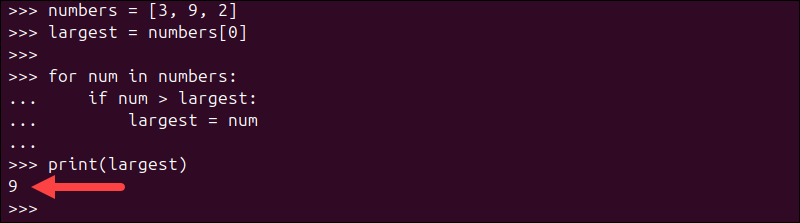
This approach iterates through each element and updates the maximum value manually. While flexible, it is more verbose and less efficient than using max() in most cases.
Conclusion
This tutorial showed how to use the max() function in Python to find the largest value across different data types. With support for custom comparison through the key parameter, max() can adapt to a wide range of scenarios, from basic lists to more complex data structures.
Next, check out our tutorial for the Python dict() function.