The Ansible core version is free to use, and many individuals and businesses rely on it to automate server management tasks. Red Hat, the company behind Ansible, also offers a paid option called Red Hat Ansible Automation Platform.
The paid version adds enterprise features, such as a web interface, access control, analytics, and official Red Hat support, depending on the subscription you choose.
In this article, you will find out if free Ansible can support your workloads, or if you need the extra features included in the paid version.
Ansible Free vs. Paid: Overview
The following table shows the main differences between free Ansible and Red Hat Ansible Automation Platform:
| Free Ansible (Community Ansible) | Paid Ansible (Red Hat Ansible Automation Platform) | |
|---|---|---|
| Automation Engine | Includes all the core Ansible tools to run playbooks from the command line. | Provides the same automation engine as free Ansible, but adds enterprise features for managing automation across larger teams and more complex environments. |
| Management and UI | Playbooks are usually stored as YAML files. Users run them manually from the control node or through custom scripts. | Has a centralized web interface where teams can manage and organize systems, control who can run automation, schedule tasks, and track progress. |
| Security | Uses SSH to securely connect to managed systems and includes Ansible Vault to encrypt sensitive data. However, you manage users, permissions, updates, and implement security practices yourself. | Provides enterprise-level security features, like role-based access control (RBAC), centralized authentication, supported updates, and certified automation content. |
| Scaling | A good fit for simpler automation tasks by individuals and small teams. Larger setups usually require custom solutions for scheduling, team access, and managing credentials. | Designed for large teams and complex environments where you need to manage many users, systems, and automation jobs from one location. |
| Content | Works with open-source tools and community projects, but your team needs to choose, install, and maintain each tool separately. | Combines multiple automation tools into one platform and integrates with other Red Hat products and third-party partner solutions. |
| Compliance | Does not provide a built-in compliance framework. You need to set up your own processes for approvals and logging, and make sure teams follow them in daily operations. | Ideal for regulated environments because it centralizes records, job activity, supports policy enforcement, and gives teams more control over who can run specific tasks. |
| Analytics | Only shows basic results in the terminal after a playbook runs. For a detailed report, you would need to integrate a third-party logging or dashboard tool. | Includes dashboards and in-depth visual analytics so you can track results, performance, and usage. |
| Support | Community support only. Your team handles troubleshooting, upgrades, compatibility issues, and security responses. | Comes with Red Hat subscription support, access to supported content, enterprise lifecycle guidance, and help for platform issues backed by a service level agreement (SLA). |
Ansible Free vs. Paid: In-Depth Comparison
With free Ansible, you get the core tools you need to run automation. By comparing these tools with the paid Red Hat Ansible Automation Platform in the sections below, you can decide if the extra features are worth the investment.
Automation Engine
Ansible's automation engine reads your playbooks, connects to your servers, and carries out the tasks you define. You can use it to install packages, manage services, modify configuration files, and keep managed systems up to date.
In the free version, the engine comes from ansible-core and tools like ansible-playbook. With these, you can run automation from the control node's command line, use modules for specific actions, and reuse automation through roles and collections.
Note: Ansible modules are small units of code that handle specific tasks on managed systems. They can install packages, run commands, or check file details. For example, the shell module and stat module come with ansible-core by default.
The paid version of Ansible uses the same core automation engine as the free version. You still write playbooks, define tasks, and use modules in much the same way. What sets Red Hat Ansible Automation Platform apart is that it adds extra tools around the engine to make automation more consistent and easier to manage at scale.
For example, it uses execution environments, which are container images that include the tools, dependencies, and content Ansible needs to run jobs reliably before connecting to managed systems and applying changes. You can choose from prebuilt Red Hat images or build custom ones for your team's automation needs.
Management and UI
Free Ansible is managed through the command line. Since there is no central dashboard, teams usually interact with Ansible by:
- Using command-line tools, such as
ansibleandansible-playbook, to run one-off commands or execute full playbooks. - Writing playbook files in YAML to define the automation tasks Ansible should perform.
- Creating inventory files to list systems that Ansible manages.
- Using scripts to automate and standardize how playbooks are started.
Free web UI or API tools are available from the Ansible community. However, if you decide to use them, your team will be responsible for installing, maintaining, updating, and supporting these tools.
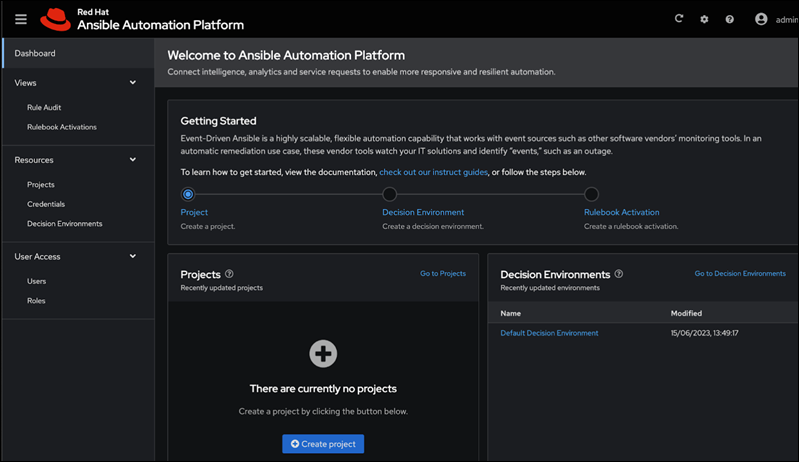
The paid version of Ansible provides several additional ways to manage automation, including:
- A web UI where you can run and manage tasks from one place.
- A REST API to connect Ansible with other tools or CI/CD pipelines.
- Workflow tools and scheduling features to connect multiple jobs and run them at set times.
- Inventory management to help you organize the systems you manage and make them easier to find and target.
- Job tracking so you can see what ran, when it ran, who started it, and whether it was successful.
Note: To see how this works in a real infrastructure setup, read our guide on how to install the phoenixNAP BMC Ansible module and use playbooks to manage Bare Metal Cloud resources.
Security
Ansible uses SSH to connect to the systems it manages. You can also use Ansible Vault to encrypt sensitive data, such as passwords, API keys, and tokens, so they are not visible as plain text in playbooks.
Other security choices are mostly your team's responsibility. You need to handle user access, SSH keys, permissions, and updates. Ansible playbooks can automatically apply security settings or integrate third-party tools on managed systems, but the free version of Ansible does not include a centralized security layer to manage access controls and policies across your environment.
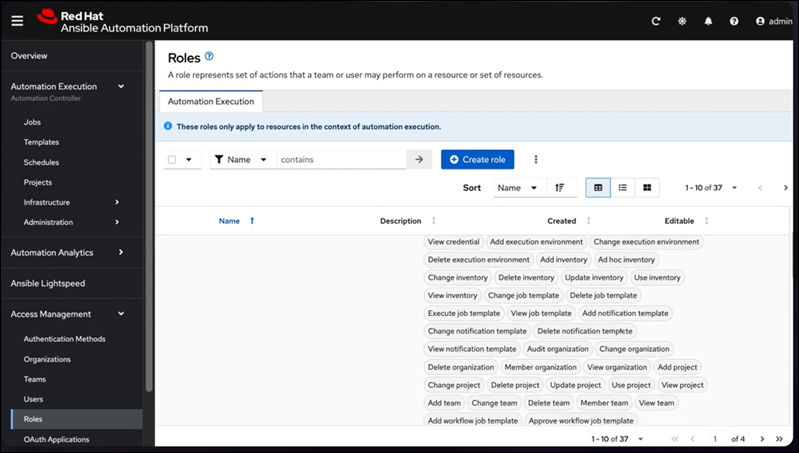
Red Hat Ansible Automation Platform includes security features designed for enterprises. With these built-in tools, teams can control who uses automation and how content is managed, instead of handling each security process separately.
Some of the key benefits include:
- A centralized authentication system that lets users sign in with the organization's existing login system, such as single sign-on (SSO) or Active Directory. This means you do not need to manage separate Ansible accounts.
- Teams can use role-based access control to manage who can access, edit, or run automation.
- Your setup receives regular, tested fixes and security patches from Red Hat.
- You get security hardening guidance from Red Hat's documentation and support services.
- A private automation hub that allows you to store and manage content within the organization.
- Lots of certified content that is tested, verified, and supported by Red Hat and its partners.
Note: If you use Ansible in your CI/CD workflows, you also need to secure your software delivery pipeline. Learn about the best practices for securing CI/CD pipelines.
Scaling
The free version of Ansible works well for small automation setups with a limited number of nodes and users. As your environment grows, though, you may need to set up job scheduling, handle credentials at scale, and keep track of inventories and logs.
A lot of organizations start with the free version, but as they add more users, systems, and playbooks, the workload becomes more difficult to manage. Eventually, the time and effort spent managing everything in-house can end up costing more than using a platform that already includes centralized management, scheduling, and support.
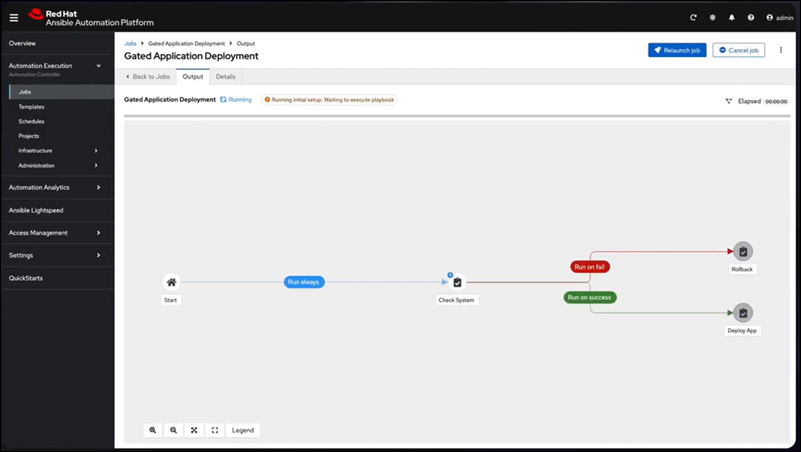
Red Hat Ansible Automation Platform is designed for bigger teams and large enterprises. It provides the tools you need to organize workloads, distribute automation jobs, and manage automation across multiple locations.
Organizations often move to the paid version when their automation needs grow beyond what they can handle manually. With the paid platform, teams can scale automation across thousands of nodes and manage them from a centralized web UI.
Note: Scaling Ansible often goes hand in hand with scaling infrastructure. Read our guide on horizontal vs. vertical scaling to learn when to add more machines and when to upgrade existing ones.
Content
With free Ansible, you can use community content from Ansible Galaxy, a public platform where users publish and share Ansible roles and collections. This gives you access to ready-made automation for system administration, cloud services, and container environments like Kubernetes.
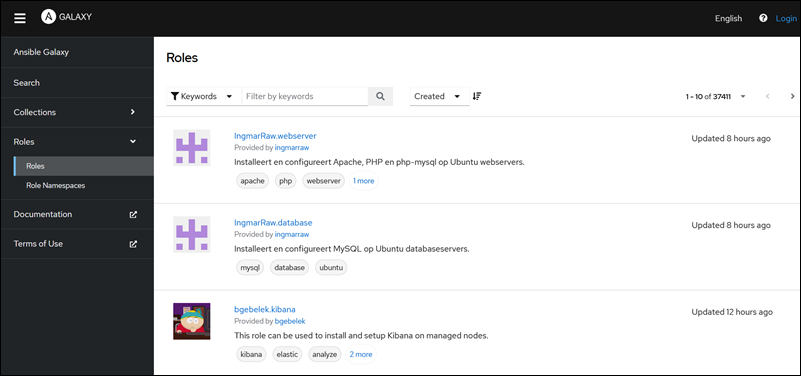
The quality and support for this content depend on who publishes and maintains each collection. It's important to review and test community content before using it in production.
Red Hat Ansible Automation Platform gives users access to certified content from Red Hat and its partners. It also includes a private automation hub, where teams can store and manage approved automation content within their organization. This is useful for companies that need a more controlled way to use, share, and maintain content.
Compliance
Meeting compliance requirements in regulated industries can be challenging without the right tools, processes, and expertise. This is often the case for small and medium-sized businesses with fewer technical specialists. While free Ansible can still be used in compliant environments, teams usually need to create their own audit trails, approval processes, and policy checks.
For these businesses, relying only on free Ansible may not be the best choice. It introduces another system that must be controlled, documented, and monitored, which can make compliance work more complex.
Managing compliance is simpler when automation is tied to systems that already have access control, approvals, and reporting, like the Ansible Automation Platform. It does not make an organization compliant by itself, but it gives teams a better framework for meeting requirements.
With features like role-based access control, delegated access, centralized credentials, and policy enforcement, teams can follow internal security and compliance rules more consistently.
Analytics
When you run playbooks from the command line, Ansible shows a basic summary of completed, skipped, and failed tasks. This is useful for quick checks, but it does not provide analytics by default. To gain more insight into what happened on managed nodes, you would have to collect and review logs from each node separately.
You can connect the free version of Ansible to third-party logging tools, dashboards, or custom reporting scripts. However, your team would need to set up, maintain, and test these tools themselves.
The paid Ansible version offers analytics through web UI dashboards.
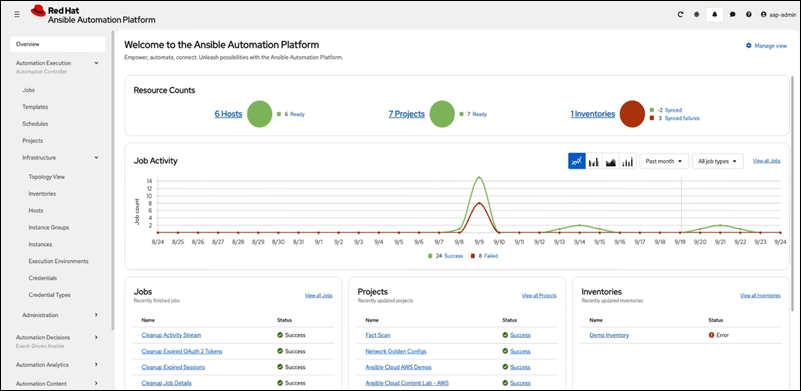
Using these dashboards, you can:
- See which jobs succeeded or failed and how they affected the managed systems.
- Review system-wide activity to see how often automation runs and where it is used.
- Review statistics to find areas that may need attention.
- Check to see which teams, playbooks, or automation workflows are used most often.
Note: If you plan to use external monitoring with Ansible, read our guide on cloud monitoring tools to compare best available options.
Support
The free version of Ansible does not include official Red Hat support. You can get help from community forums, documentation, and other online resources, but the response time and quality may not always be consistent. This can be a risk if you use Ansible in production.
As an alternative to dealing with troubleshooting, compatibility, or security issues by yourself, you can consider hiring a third-party company that provides paid support for open-source Ansible.

The paid version of Ansible includes official Red Hat support through different subscription levels. These plans mainly differ in the level of coverage, and not the quality of support. For example, the Standard plan gives you support during business hours, while the Premium plan offers 24/7 support.
With a paid subscription, Red Hat customers also get supported updates, enterprise lifecycle guidance, and help with platform issues, all backed by service-level agreements (SLAs). These features can be very valuable to organizations that use Ansible in production or regulated environments.
What Affects Ansible Pricing?
Red Hat Ansible Automation Platform pricing depends on the size and type of your deployment. For smaller setups with around 100 managed nodes, prices can range from $10,000 to $20,000 per year. For deployments with thousands of managed nodes, the yearly costs can reach several hundred thousand dollars. The factors that can influence the final price include:
- Number of managed nodes. Pricing primarily depends on the number of managed nodes you have. A managed node can be a physical server, virtual machine, container, application, or any other system that Ansible manages directly or indirectly.
- Support level. If you require more support, you will need a higher subscription plan. For example, the Standard plan includes support during business hours. But if you need around-the-clock support, you will need the more expensive Premium plan.
- Deployment model. Pricing also depends on how you run Red Hat Ansible Automation Platform. Costs may vary depending on whether you choose a self-managed deployment, a managed service, a managed application, or a cloud marketplace.
- Usage-based metering. If you use Ansible Automation Platform in the cloud, you might pay monthly fees and be charged based on usage. For example, Red Hat's Azure documentation explains that managed active nodes are counted against a set monthly limit, and you pay extra if you go over that limit.
Other features, like certified content, analytics, and centralized access control, can influence which subscription or deployment option you choose. However, these features are usually included in the plan and not sold separately.
Choosing an Ansible Solution
If your team has strong technical skills and you only need the Ansible automation platform and engine, the free version should meet almost all your automation needs.
Choose free Ansible if you:
- Want to avoid high initial costs.
- Manage a small environment and do not plan to scale the number of nodes significantly in the near future.
- Are comfortable with working from the command line.
- Have the skills to manage playbooks and inventories and to implement strong security practices.
- Do not need vendor support or built-in analytics.
If your company operates in a regulated environment and you need to focus on uptime, reliability, and security, the paid Ansible platform might save you money compared to developing or integrating third-party solutions.
Choose the Ansible Automation Platform if your organization:
- Needs to manage automation across hundreds or thousands of nodes.
- Has several teams that need to access automation from a single location.
- Operates in a heavily regulated industry that handles sensitive data, such as healthcare, finance, or government.
- Requires strong access control and centralized security features.
- Needs 24/7 official Red Hat support with clear SLAs.
A smaller organization can start with the free version of Ansible and switch to the paid platform later if their environment grows too large or complex to manage manually. Large organizations with thousands of nodes usually need centralized management, official support, and a clear SLA, so they should use the paid platform.
Conclusion
This article explained the differences between the free and paid versions of Ansible, the factors that affect pricing, and how to pick the best option for your environment.
To test free Ansible before making a final decision, learn how to install Ansible on Ubuntu or Windows.