Automation simplifies Kubernetes management by replacing manual kubectl commands with repeatable, programmable processes. While manual maintenance is usually sufficient for small-scale development and testing, production environments require automation to handle networking, storage, and container lifecycles.
This guide will examine the fundamental concepts, essential tools, and planning required to implement effective automation in Kubernetes.
Prerequisites
- A Kubernetes environment, such as Minikube, Kind, or a managed cloud service (EKS, AKS, GKE).
- kubectl installed.
- Understanding of Docker or Podman for image creation and registry management.
- Knowledge of IP, DNS, and HTTP/S protocols for service communication management.
What Is Kubernetes Automation?
Kubernetes automation is the use of software tools and scripts to automate repetitive operational tasks without human intervention. The system operates through a control loop that continuously compares the current state of the cluster with the desired state defined in configuration files.
When the system detects a state change, such as a container failure or a node going offline, the automation components trigger corrective actions to restore the system. This self-healing capability extends to scaling workloads, managing updates, and distributing network traffic across available resources.
Infrastructure vs. Development Automation in Kubernetes
Automation in the Kubernetes ecosystem generally falls into two categories: infrastructure management and application development.
Infrastructure automation focuses on managing cluster nodes, control planes, and supporting cloud resources. To achieve this, a good automation strategy focuses on the following essential functions:
- Cluster provisioning. Using tools to create virtual machines and install Kubernetes components.
- Node scaling. Automatically adding or removing hardware based on total cluster load.
- Upgrades. Performing rolling updates of the Kubernetes version on master and worker nodes.
Development automation covers the build, test, and deployment phases of the software development lifecycle (SDLC). Primary development automation workflows involve:
- CI/CD pipelines. Automating the flow from code commit to container deployment.
- GitOps. Synchronizing cluster state with a Git repo to ensure the live environment matches version-controlled code.
- Automated testing. Running integration tests before promoting code to production.

Benefits of Kubernetes Automation
Switching to automation makes Kubernetes systems faster and more reliable. By removing manual tasks, companies reduce the risk of human error, which remains a primary cause of system instability.
Automation optimizes resource utilization by dynamically adjusting capacity to match real-time demand. This responsiveness ensures that applications remain available during traffic spikes while minimizing costs during periods of low activity.
By standardizing the processes, organizations achieve several essential operational advantages:
- Operational consistency. Every deployment follows a predefined path, eliminating "snowflake" configurations.
- Faster time-to-market. Automated pipelines reduce the interval between code completion and production release.
- Enhanced self-healing. The system detects and fixes issues (such as crashed pods) in milliseconds without manual oversight.
- Improved security. Automated scanning and policy enforcement ensure that only authorized, secure containers run in the cluster.
- Scalability. Teams manage hundreds of clusters as easily as one, thanks to centralized automation logic.
Kubernetes Automation Tools
The Kubernetes ecosystem offers both native and third-party automation solutions. The right set of tools depends on the requirements and the existing technical stack.
Native Kubernetes Automation Tools
Native tools are part of the Kubernetes project or operate as standard extensions of the core API. The following tools are fundamental blocks for building any strategy:
- kubectl. The primary command-line tool for interacting with the Kubernetes API and applying manifests.
- Horizontal Pod Autoscaler (HPA). Adjusts the number of pod replicas based on CPU or memory utilization.
- Vertical Pod Autoscaler (VPA). Recommends or sets resource limits and requests for individual containers.
- Cluster Autoscaler. Modifies the size of the underlying node pool to accommodate pending pods.
- Kustomize. A template-free tool for customizing Kubernetes resource configurations through overlays.
- Admission controllers. Plugins that intercept requests to the API server to enforce policies or modify objects.
- CronJobs. Manages time-based jobs for repetitive tasks, such as backups or report generation.
Note: Before letting an automation tool make live changes, perform a dry run. Dry runs let you preview what the automation will do without affecting your cluster, helping prevent accidental outages caused by configuration errors.
Third-Party Tools for Kubernetes Automation
Third-party solutions bridge the gap between core Kubernetes functionality and complex enterprise requirements. These tools specialize in areas such as GitOps, package management, and multi-cluster orchestration.
The most popular third-party automation tools include:
- Helm. A package manager that uses charts to define, install, and upgrade complex Kubernetes applications.
- Argo CD. A declarative GitOps continuous delivery tool that syncs Git state with the cluster.
- Flux CD. A GitOps operator that automates updates to the cluster based on repo changes.
- Terraform. An infrastructure-as-code tool used to provision the underlying cloud resources and Kubernetes clusters.
- Ansible. A configuration management tool capable of automating cluster installation and OS-level tasks.
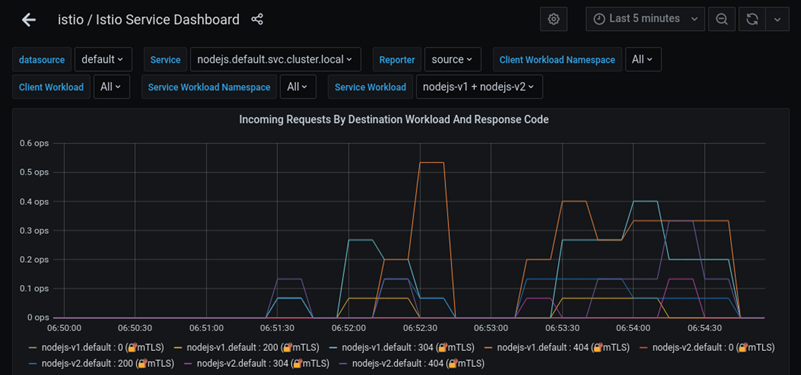
- Prometheus and Grafana. Monitoring and visualization tools used to trigger alerts based on defined metrics.
- Crossplane. An extension that allows Kubernetes to manage external cloud services using the Kubernetes API.
- Tekton. A cloud-native framework for creating CI/CD systems that run natively on Kubernetes.
- Kyverno. A policy engine designed specifically for Kubernetes to validate and mutate configurations.
The image below shows an example of a Grafana monitoring panel.
Kubernetes Automation Planning
Effective automation planning involves assessing the current state, defining objectives, and selecting tools that align with the team's expertise.
The following sections contain steps for building a sustainable automation framework.
Assess Current Workloads and Infrastructure
Focus on auditing existing applications and their environments. This assessment identifies which tasks are currently manual and which provide the highest benefit if automated. Documenting resource usage patterns and deployment frequency helps prioritize automation goals.
Define Success Metrics
Establish clear KPIs to measure the effectiveness of automation efforts. Metrics might include reduced deployment time, fewer manual interventions, or improved cluster uptime. Defining these goals early ensures that the chosen tools and processes deliver value that can easily be measured.
Select Automation Stack
Choose tools based on the specific needs identified during the assessment phase. Organizations often start with Helm for package management and Argo CD for GitOps. Ensure that the selected tools have strong community support and integrate well with existing security and monitoring systems.
Design GitOps Workflow
Create a structure for how configuration files and application code will move from development to production. This operation includes defining:
- Branch strategies. Defined patterns for code updates within a version control system. They ensure that new features, bug fixes, and stable releases are kept separate.
- Pull request approvals. A formal review process in which code changes must be reviewed and authorized by team members before being merged.
- Repository and manifest relationships. The structural link between the app source code and the config files that define the Kubernetes environment.
A well-defined workflow prevents configuration drift and ensures a single source of truth.
Implement Security and Governance
Integrate security into the automation pipeline from the start. This involves setting up:
- Role-Based Access Control (RBAC). Restricts system access to authorized users and assigns specific permissions based on a user's defined role. It ensures that individuals can access only the resources necessary for their tasks.
- Secrets management (e.g., HashiCorp Vault). Securely stores and manages sensitive data, such as passwords and API keys, and prevents exposure in source code.
- Automated image scan. Identifies and blocks insecure software before it is deployed to the production environment.
Execute Phased Rollout
Begin automation with non-critical workloads or development environments to validate the logic. Use this period to refine scripts, adjust autoscaling thresholds, and train the team on the new tools. Gradually promote the automation to production only after demonstrating stability and reliability in lower environments.
Conclusion
This article provided an introduction to Kubernetes automation for those looking to start automating their clusters. It explained the benefits of automating cluster processes, introduced the key tools, and offered planning tips.
Next, read about best practices for building efficient Kubernetes clusters.