The numpy.where() function is a versatile tool for conditional selection and element replacement in arrays. It allows users to locate elements meeting a condition and optionally replace them or combine multiple arrays based on logical expressions.
This tutorial will explain how to use numpy.where() for efficient array manipulation in Python.
Prerequisites
- Python 3 installed and added to PATH.
- NumPy installed.
numpy.where() Syntax
Before using numpy.where(), it is important to understand how the function is structured. Its behavior depends on whether you provide only a condition or include replacement values.
The general syntax is:
numpy.where(condition, [x, y, ]/)The function operates in two modes:
- If only the condition is provided, it returns a tuple of index arrays, one for each dimension, indicating where the condition is
True. - If
xandyare provided, it performs conditional selection.
numpy.where() Arguments
Each argument (parameter) plays a specific role in how the function evaluates and returns results. All provided arrays must be broadcastable to the same shape.
The table below shows which arguments numpy.where() accepts, and their descriptions:
| Argument | Description |
|---|---|
condition | A boolean array or expression. It determines which elements are selected. If the condition is True, elements are selected from x (if provided). Otherwise, elements are selected from y. If only the condition is provided, numpy.where() returns the indices where the condition is True. |
x | Returned where the condition evaluates to True. Can be a scalar or array-like. |
y | Returned where the condition evaluates to False. Can be a scalar or array-like. |
numpy.where() Examples
The sections below demonstrate practical use cases of numpy.where().
Each example shows a scenario where numpy.where() simplifies array manipulation.
Replace Elements with numpy.where()
Elements are typically replaced during cleaning or data transformation. For example, you might want to mask invalid values, normalize data, or remove unwanted entries without modifying the original array manually.
In this example, we replace even numbers with 0. Follow the steps below:
1. Create a new script using a text editor. We will use nano:
nano replace_example.py2. Paste the following code:
import numpy as np

arr = np.array([1, 2, 3, 4, 5])

new_arr = np.where(arr % 2 == 0, 0, arr)

print("Original:", arr)
print("Modified:", new_arr)
3. Save and exit the editor.
4. Run the script:
python3 replace_example.py
Even numbers are replaced with 0, while other elements remain unchanged.
Use numpy.where() with a Single Condition
Sometimes, instead of replacing values, you must find where certain values occur. This is useful for indexing, filtering, or debugging datasets.
In this example, we locate values greater than 25. Follow the steps below:
1. Create a new script:
nano single_condition.py2. Paste the following code:
import numpy as np

arr = np.array([10, 20, 30, 40, 50])

indices = np.where(arr > 25)

print("Indices:", indices)
print("Values:", arr[indices])
3. Run the script:
python3 single_condition.py
Because the array is one-dimensional, NumPy returns a tuple containing one index array.
Use numpy.where() with Multiple Conditions
In real-world datasets, decisions often depend on multiple criteria. For example, selecting values within a specific range.
In this example, we replace numbers between 10 and 40 with 100. Follow the steps below:
1. Create a new script:
nano multiple_conditions.py2. Paste the following code:
import numpy as np

arr = np.array([5, 15, 25, 35, 45])

result = np.where((arr > 10) & (arr < 40), 100, arr)

print("Original:", arr)
print("Modified:", result)
3. Run the script:
python3 multiple_conditions.py
The logical operator & combines both conditions.
Use numpy.where() with Two Arrays
Sometimes you need to merge two datasets conditionally. For example, selecting fallback values when primary values do not meet criteria.
In this example, values are selected from two different arrays.
1. Create a new script:
nano two_arrays.py2. Paste the following code:
import numpy as np

a = np.array([1, 2, 3, 4])
b = np.array([10, 20, 30, 40])

result = np.where(a % 2 == 0, a, b)

print("Array a:", a)
print("Array b:", b)
print("Result:", result)
3. Run the script:
python3 two_arrays.py
Even values from a are selected. Otherwise, values from b are used.
Use numpy.where() with Arithmetic Operations
You may need to apply transformations based on conditions. For example, scaling some values while adjusting others differently.
1. Create a new script:
nano arithmetic_example.py2. Paste the following code:
import numpy as np

arr = np.array([1, 2, 3, 4, 5])

result = np.where(arr % 2 == 0, arr * 10, arr + 100)

print("Original:", arr)
print("Transformed:", result)
3. Execute the script:
python3 arithmetic_example.py
Different arithmetic operations are applied depending on the condition.
Use numpy.where() with Multidimensional Arrays
Multidimensional arrays (2D or higher) are commonly used in image processing, scientific simulations, and machine learning.
numpy.where() works element-wise, meaning it evaluates every position independently.
1. Create a new script:
nano multidimensional.py2. Paste the following code:
import numpy as np

arr = np.array([[1, 2],
                [3, 4]])

result = np.where(arr > 2, arr * 2, arr)

print("Original array:")
print(arr)

print("Modified array:")
print(result)
3. Run the script:
python3 multidimensional.py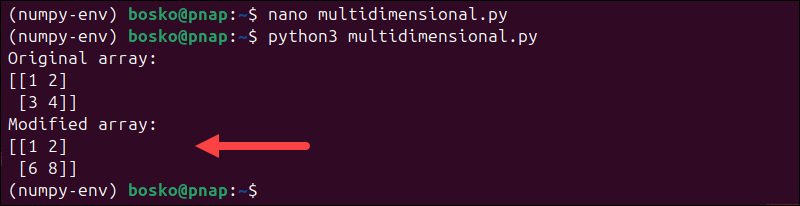
Each element is evaluated independently, regardless of array shape.
Conclusion
This tutorial demonstrated how numpy.where() performs conditional selection, element replacement, and array merging in fully vectorized NumPy workflows. By understanding its conditional selection patterns, you can write cleaner, fully vectorized code without relying on explicit loops.
Next, see how to add elements to a Python array or repeat a string in Python.