Python has several built-in data types for storing collections of data, such as lists, dictionaries, and sets.
A set is a collection of unique items that are not stored in any particular order. You can use sets to check if a value exists, remove duplicate values, or compare large groups of data.
This guide will explain how sets work and show when to use them in your code.

What Is a Set in Python?
A set in Python is a data structure that stores multiple items in a single variable. Sets are similar to lists, but with two important differences: they only store unique values (no duplicates), and they do not keep items in a specific order.
Because of this, sets are often faster than other data types when you need to filter data or confirm a value exists.
When to Use Sets in Python?
Use sets in Python when you need to:
- Remove duplicate values. Sets automatically remove duplicate values. For example, when gathering data from user input, logs, or configuration files, you often end up with duplicate entries. By converting the data into a set, you ensure that each value shows up only once.
- Check if a value exists. Sets are great for fast lookups. Unlike lists, they do not need to check every item one by one to find a match. Python can jump directly to where the value should be, which is especially useful when working with large datasets.
- Compare groups of data. You can use set operations to compare datasets. This helps you find which values are shared, missing, or different between two groups of data. For example, comparing the lengths of a list and a set lets you determine whether the list has duplicates and how many.
- Filter data. Sets are often used as a quick cleanup step before further processing. You can remove duplicates, isolate specific values, and filter out entries you do not need.
How to Use Sets in Python?
Python has several methods and operations for filtering sets and comparing them with other datasets. The next section shows how to test them in practice.
The examples use Python scripts run in an Ubuntu terminal, but you can use the same code in any IDE or editor, such as Jupyter Notebook.
How to Create a Set?
To create a set, use curly braces {} and separate each item with a comma. In this example, the server_os set contains several Linux distributions.
1. Open a text editor, like Nano, and create a new Python file in your terminal:
nano example_set.py2. Paste the following code:
server_os = {
    "ubuntu-24.04",
    "debian-12",
    "ubuntu-24.04",  # duplicate entry
    "almalinux-9",
    "opensuse-leap-15.5",
    "rhel-9"
}

print(server_os)
Save the changes and exit the file.
3. Enter the following command to run the script:
python3 example_set.pyPython automatically removes duplicate values, and the output shows only unique items.

Notice how ubuntu-24.04 appears twice in the dataset but only once in the output.
Add Items to a Set
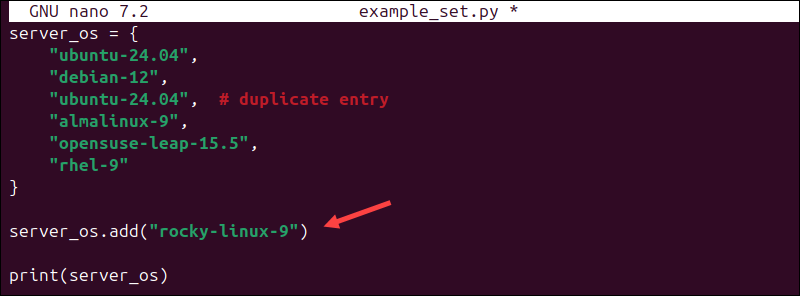
To add new values to a set, use the add() method.
1. Open the example_set.py file and place the following line right after the set definition:
server_os.add("rocky-linux-9")The updated script should look like this:
2. Save and exit the file, then run the script:
python3 example_set.py
The output will now show the new item, rocky-linux-9.
Update a Set
Adding items one by one is not very efficient. Instead, you can use the update() method to add multiple values at once.
1. Open the example_set.py file.
2. Add the following line below the existing code:
server_os.update(["oracle-linux-9", "almalinux-9"])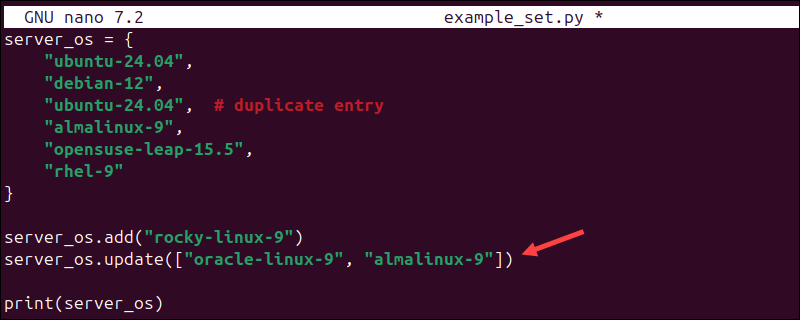
3. Run the script:
python3 example_set.py
The output shows the new item, oracle-linux-9. However, almalinux-9 is not added again because it is already in the set.
Remove an Item From a Set
Use the remove() method to remove a specific item from a set. For example:
1. Open the example_set.py file.
2. Add the following line:
server_os.remove("rhel-9")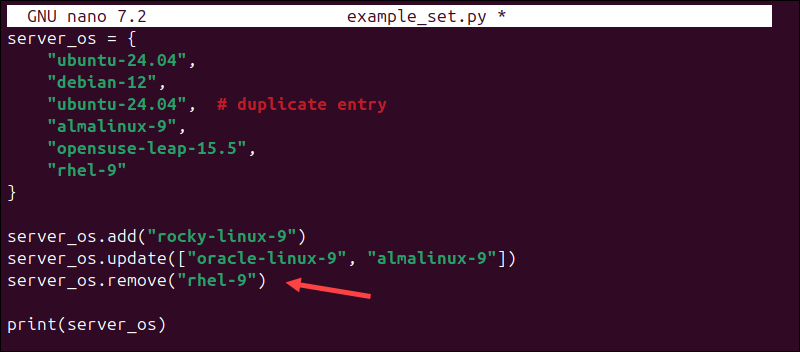
3. Run the script:
python3 example_set.py
After running the script, Python will remove rhel-9 from the set.
Check if an Item Exists in a Set
A set is different from a list because it does not maintain order, and you cannot use an index to access elements. To check if a specific item is in a set, use the in operator.
1. Open the example_set.py file.
2. Remove the print(server_os) line.
3. Add the following two lines:
print("ubuntu-24.04" in server_os)
print("centos-7" in server_os)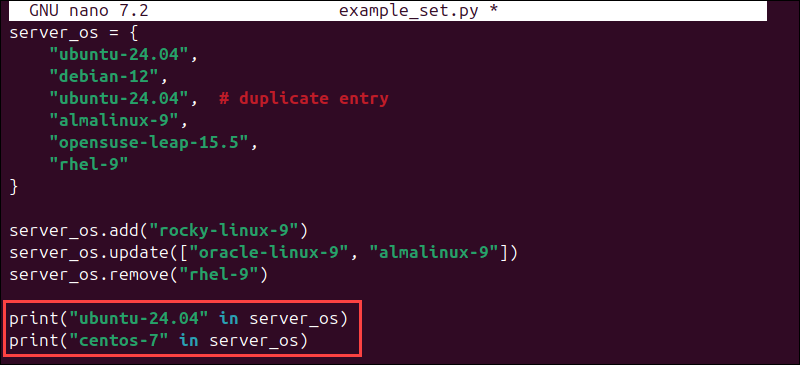
4. Use the following command to run the script:
python3 example_set.py
The output shows True for items in the set and False for items that are not.
Note: Find out how Booleans in Python work, and use them to build decisions into your code.
Find Number of Set Elements
One of the most common ways to use a set is to compare its length to another data type, such as a list. Sets remove duplicates, and this helps you see if a list has any duplicate values. To count the number of items in a set, use the len() function:
1. Open the example_set.py file.
2. Remove the lines added in the previous step and replace them with the following line:
print(len(server_os))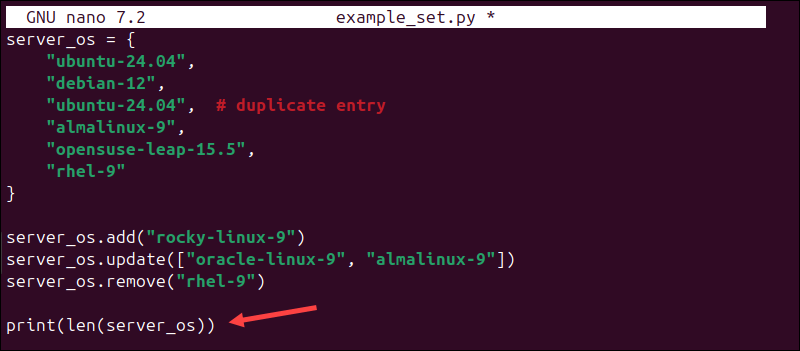
3. Enter the following command to run the script:
python3 example_set.py
This shows that there are 6 unique items in the set. The len() function also works with other Python data types, including lists.
Iterate Over a Set
By default, sets do not maintain order, but you can loop through each item using a for loop. This is useful when you need to process items, apply logic, or perform actions on them.
1. Open the example_set.py script.
2. Remove the print(len(server_os)) line added in the previous section.
3. Add the following lines instead:
for os in server_os:
    print(os)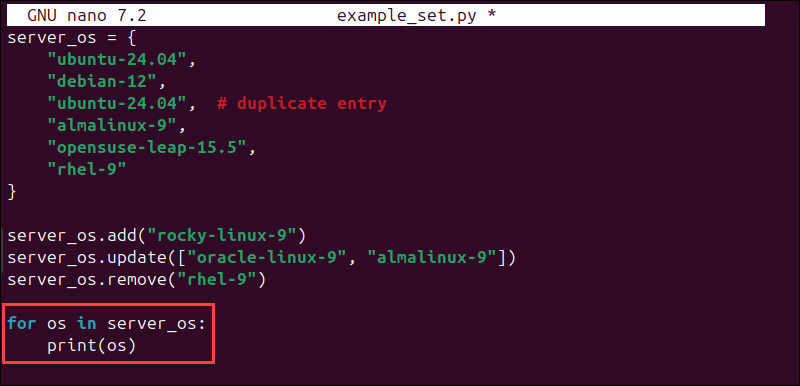
4. Run the script:
python3 example_set.pyThe script will print every item in the set.
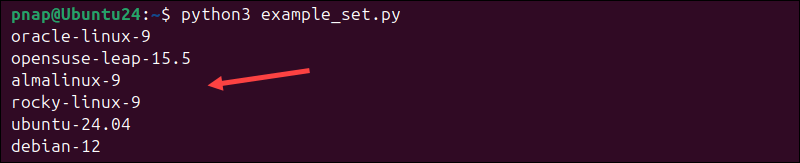
Because sets are unordered, the items may appear in a different order each time you run the script.
Check if Two Sets are Equal
You can use the == operator to check if two sets contain the same values. To compare two sets:
1. Open the existing example_set.py file.
2. Append the following lines to the existing code:
os_copy = {
    "ubuntu-24.04",
    "debian-12",
    "almalinux-9",
    "opensuse-leap-15.5",
    "rocky-linux-9",
    "oracle-linux-9"
}

print(server_os == os_copy)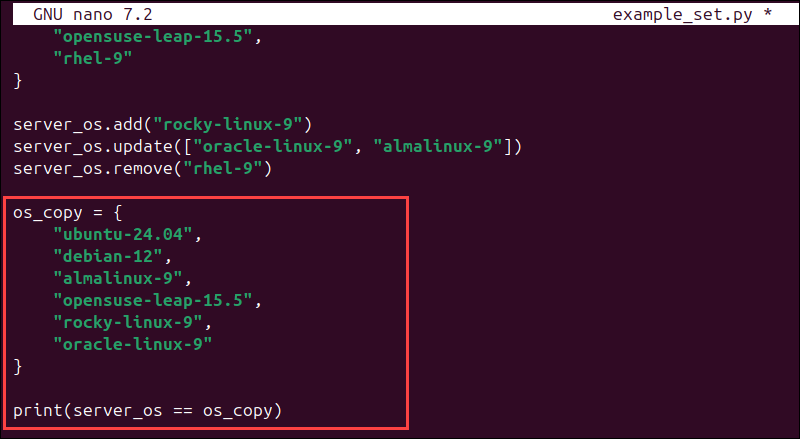
3. Use the following command to run the script:
python3 example_set.py
If the two sets are identical, the command will return True, like in this example. Otherwise, the result will be False.
Convert a List to a Set and Vice Versa
The set() function enables you to convert other data types into a set. In this example, a list (represented by square brackets []) is converted to a set.
1. Create a new file:
nano list_set.py2. Paste the following code:
os_list = [
    "ubuntu-24.04",
    "debian-12",
    "ubuntu-24.04",  # duplicate entry
    "almalinux-9",
    "opensuse-leap-15.5",
    "rhel-9"
]

server_os = set(os_list)
print(server_os)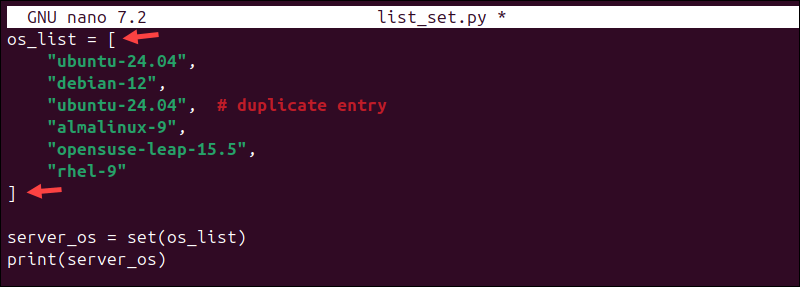
3. Use the following command to run the code:
python3 list_set.pyPython creates a set from the list, which automatically removes duplicate values.

People often turn a list into a set to remove duplicates, then change it back to a list for further processing.
To convert the set back to a list:
1. Open the same list_set.py file.
2. Replace the print(server_os) line with the following two lines:
back_to_list = list(server_os)

print(back_to_list)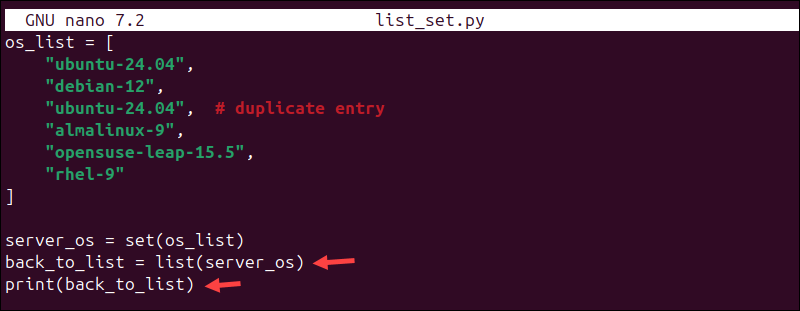
3. Run the code once again:
python3 list_set.py
This step converts the set back to a list, minus the duplicate values.
Create a Set Using Set Comprehension
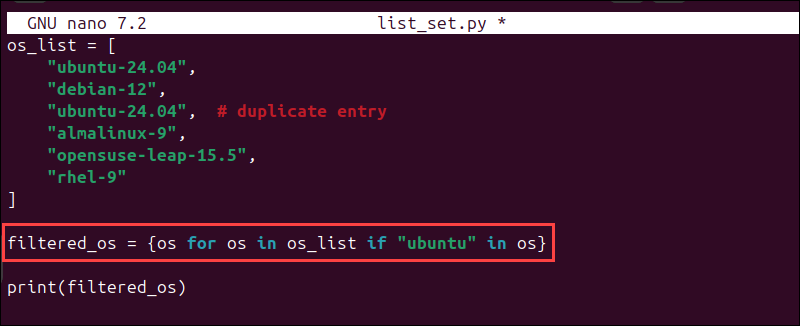
You can create sets dynamically based on a condition using set comprehension. In this example, set comprehension is used to filter specific values from a list.
1. Create a new Python file:
nano list_set2.py2. Paste the following code:
os_list = [
    "ubuntu-24.04",
    "debian-12",
    "ubuntu-24.04",  # duplicate entry
    "almalinux-9",
    "opensuse-leap-15.5",
    "rhel-9"
]

filtered_os = {os for os in os_list if "ubuntu" in os}

print(filtered_os)
In this expression, for os in os_list loops through each item in the list, and if "ubuntu" in os checks if the value contains ubuntu.
3. Run the code:
python3 list_set.pyPython creates a new set that only includes the values that match the condition.

In this case, only the entries that contain ubuntu are added to the set.
Python Set Operations
Python set operations are used to compare two sets of data and create a new set. The main operators are | for union, - for difference, ^ for symmetric difference, and & for intersection.
1. First, create a new Python file to work with set operations:
nano set_operations.py2. Add two sets to run operations on in the file. For this example, one set will be for production servers and the other for development servers, using Linux distributions:
prod_os = {
    "ubuntu-24.04",
    "debian-12",
    "rhel-9",
    "almalinux-9",
    "opensuse-leap-15.5"
}

dev_os = {
    "ubuntu-24.04",
    "rocky-linux-9",
    "almalinux-9",
    "arch-linux",
    "fedora-39"
}
3. Append the following set operations in the same file:
# Union - returns all unique values from both sets
print("Union:", prod_os | dev_os)

# Intersection - only returns the values shared by both sets
print("Intersection:", prod_os & dev_os)

# Difference - only returns values that exist in the first set
print("Difference:", prod_os - dev_os)

# Symmetric Difference - returns values unique to each set
print("Symmetric Difference:", prod_os ^ dev_os)
4. Run the file to see the results:
python3 set_operations.pyPython returns a set for each operation, and they are printed one after another.

Running several operations in a script can help you troubleshoot or test your code by showing what data is shared, missing, or different between two sets. In production scripts, though, you typically use only the operation you need.
Real-Life Use Cases for Sets in Python: Examples
Sets are used in many practical scenarios for processing and comparing data. They are especially useful when working with large or dynamic datasets because they automatically remove duplicate values and enable faster lookups.
Here are a few examples of how sets are used in everyday business settings.
Count Unique Website Visitors
Businesses measure their online presence by tracking website visits and clicks. Rather than just counting total visits, companies want to know how many unique visitors their website had.
Most of the time, data is collected automatically from web server logs or analytics platforms. Python is often used in the data processing pipeline to clean and transform the data, for example, to remove duplicate values.
In the example below, the list contains duplicate IP addresses. Since sets automatically remove duplicates, you can use them to filter out repeat visitors.
You can convert the list into a set with the set() function, and then use len() to count the number of unique visitors:
visitor_ips = [
    "192.168.1.10",
    "192.168.1.11",
    "192.168.1.10",  # duplicate visitor
    "192.168.1.12"
]

unique_visitors = set(visitor_ips)

print(len(unique_visitors))
After cleaning the data, you can pass it to downstream systems, such as databases, analytics tools, or dashboards, to store, analyze, or show in charts.
Track Unique Items in a Shopping Cart
When a customer selects products in an online store, they are usually redirected to a shopping cart to review their purchase and confirm the order.
A shopping cart does more than just list products; it also tracks quantities and prices, and checks if the selected items are available. By first extracting a list of unique products, you can speed up these processing steps.

You can use sets to remove duplicate product entries. For example, a system may log every time a user adds an item to their cart:
cart_events = [
          "shirt",
          "jeans",
          "shoes",
          "jacket",
          "shoes",
          "shoes"
]
Before generating a cart summary, you can identify which products are in the cart without duplicates:
unique_items = set(cart_events)
print(unique_items)
This gives you a set of unique products. Usually, this is just one part of a larger workflow. The system would then:
- count how many times each item appears.
- retrieve product details from a database.
- calculate totals and prices.
Sets are useful in this case because they let you quickly identify unique items before moving on to the next steps.
Track User Roles
In role-based access control systems, users are usually assigned admin, editor, or viewer roles. Since multiple users can have the same role, you may need to extract a list of all unique roles and validate them to make sure permissions are set up correctly.
For example, a system may store users and their roles in a list:
users = [
    {"username": "mike", "role": "admin"},
    {"username": "dustin", "role": "editor"},
    {"username": "will", "role": "viewer"},
    {"username": "lucas", "role": "editor"},
    {"username": "eleven", "role": "admni"},  # typo
    {"username": "max", "role": "viewer"}
]
You can use a set to extract all unique roles:
unique_roles = {user["role"] for user in users}
print("Unique roles:", unique_roles)
Next, you can validate these roles against a set of allowed values:
allowed_roles = {"admin", "editor", "viewer"}

invalid_roles = unique_roles - allowed_roles

print("Invalid roles:", invalid_roles)
This prints all unique roles in the system.

It also highlights any invalid values, such as admni in this example.
Python Set Methods
The following table lists built-in Python set methods that allow you to modify existing sets or create new ones:
| Method | Description |
|---|---|
add() | Add one new value to an existing set. |
update() | Add multiple items from another set or list to an existing set. |
remove() | Remove a specific item from the set. If the item is not found, this method will raise an error. |
discard() | Remove a specific item from the set if it exists. If the item is missing, this method will not raise an error. |
pop() | Remove and return a random item from the set. Use this method when you need to process and remove items one at a time. |
clear() | Remove all items from the set. Use this method if you need to clear a set in your script and start over. |
copy() | Creates a shallow copy of the set. Use this method when you want to work with the same data without modifying the original set. |
union() | Returns a new set containing all unique items from both sets. Use this method when you need to combine datasets. It is equivalent to the | operator. |
intersection() | Returns a new set with items that exist in both sets. Use it to find shared values. It is equivalent to the & operator. |
difference() | Returns items that are in the first set but not in the second. This method helps you identify missing or extra values. It is equivalent to the - operator. |
symmetric_difference() | Returns items that exist in either set, but not in both. Use this method when you need to identify differences between datasets. It is equivalent to the ^ operator. |
issubset() | Checks if all items in one set exist in another set. Use this method to validate data or confirm that one set is a subset of another. |
issuperset() | Checks if one set includes every item from another set. |
isdisjoint() | Checks whether two sets share any items. Use this method to confirm that datasets do not overlap. |
Conclusion
The steps in this guide helped you create a set, and you learned how to perform basic tasks, such as removing duplicates, cleaning data, and comparing datasets. Use the table of set methods as a quick reference to apply these concepts in your own code.
Next, learn how to handle missing data in Python.