Running your own servers is expensive, especially if they are under-utilized or unable to handle sudden surges in demand. Cloud servers provide the one feature small businesses value most: flexibility.
Deciding to outsource IT infrastructure is a big step, and this article will help you avoid common pitfalls while providing practical, easy-to-understand information about cloud servers.
In this article, we will show how cloud servers work, why they are ideal for small businesses, and which solutions deliver the best value.
What Is a Cloud Server?
A cloud server is a virtualized computing environment hosted on third-party infrastructure. In simple terms, it's all the hardware and software you need to run a server, just hosted in a remote data center instead of your own building.
Note: Server virtualization is at the core of cloud services. Multiple cloud servers can run on the same physical machine, but each one functions as an isolated, independent system.
You do not need to hire technicians, pay for electricity and cooling, or worry about physical security and uptime. The provider is responsible for maintaining stable operations, redundancy, and routine hardware upgrades. These services are billed through either a subscription-based or pay-as-you-go model.
By offloading technical and administrative tasks to the provider, you free up time to focus on core business activities. Essentially, you are shifting your entire IT infrastructure from a CapEx investment to an OpEx expense.
How Does a Cloud Server Work?
This general overview explains how cloud providers operate to support organizations of all types and sizes:
1. Cloud providers own or lease physical server hardware in large-scale data centers that have state-of-the-art power supply, cooling, networking, and security systems.
2. They use virtualization technologies like KVM, VMware, or Hyper-V to split that hardware into multiple virtual servers. Each server behaves like an independent machine.
3. Management software and server automation tools are added or developed to allow clients to deploy, configure, and monitor these virtual servers remotely.
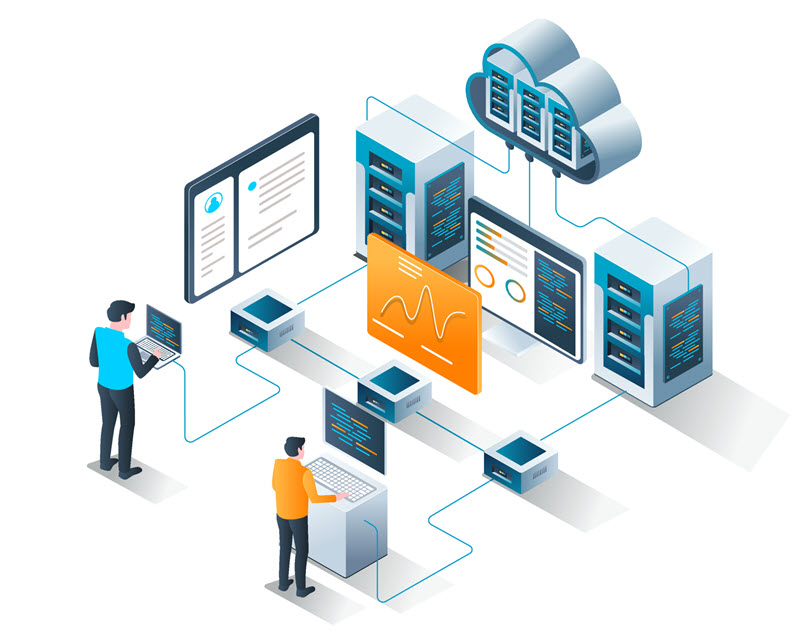
4. Clients choose the resources they need, like CPU, RAM, storage, and network capacity, and agree to the provider's pricing model.
5. Clients interact with their servers through a control panel, API, or CLI, where they can adjust settings, track system performance, and scale their resources up and down as needed.
6. Providers bill clients on a subscription or pay-as-you-go basis, depending on how much processing power, storage, and bandwidth they consume.
7. When the service terms end, clients can continue, upgrade, or cancel their usage instantly, as there is no physical hardware to return or maintain.
Based on deployment and ownership models, cloud servers are broadly categorized as:
| Cloud Deployment Type | Description |
|---|---|
| Public Cloud | The infrastructure is shared among many clients, with multiple virtual servers running on the same physical hardware. |
| Private Cloud | A dedicated physical machine (or cluster) is virtualized and configured for use by a single organisation with full isolation. |
| Hybrid Cloud | Part of the infrastructure runs in a private cloud, while other services run in a public cloud. Workloads are distributed between both environments. |
| Dedicated Cloud Server | A physical or virtual server reserved for a single client to improve isolation and avoid resource sharing. |
Note: Cloud servers are just part of the border cloud computing ecosystem that powers much of what we do online. For a deeper look at how cloud computing developed and why it is so widely used, see our dedicated cloud computing guide.
Cloud Server Use Cases
Cloud servers are flexible enough to support almost any type of small business. Some of the most common use cases include:
- Hosting a website or online store. Cloud providers build redundancy into their infrastructure, which minimizes downtime and keeps your website accessible during traffic spikes or hardware failures. This is especially important for businesses that need a constant and reliable public presence, such as e-commerce stores, booking platforms, or customer support portals.
- Running business applications. Small businesses often rely on third-party tools that they can integrate directly into their workflows. Applications such as content management systems (CMS), CRM software, and ERP platforms depend heavily on integrations and are an excellent fit for cloud deployment.

- Data storage and backup. With built-in redundancy and multiple backup options, the cloud is one of the most reliable places to store data. Important files, databases, and documents always remain safe and accessible, depending on the service type you selected.
- Remote access and collaboration. Cloud servers can host tools for remote teams, shared files, project management apps, and internal dashboards. They can also run virtual desktop infrastructure (VDI) to allow employees to log in to a secure, cloud-hosted desktop from anywhere.
- Software development and testing. Small development teams often need temporary, isolated server environments where they can build, test, and run their code. Cloud servers make it possible to deploy these environments quickly and cheaply.
- Disaster recovery and business continuity. You do not need to run your primary systems in the cloud to benefit from reliable disaster recovery protection. Use the cloud exclusively for off-site backup and failover, and keep operating during outages, hardware failures, or other disruptions.
Note: If you are planning to migrate to the cloud, you also need a strategy to address potential cloud security risks.
Cloud Server Benefits for Small Businesses
Small businesses benefit from cloud servers because:
- There are no upfront hardware costs. Small businesses gain access to enterprise-grade servers, SSD storage, and advanced networking equipment they would otherwise not be able to afford or maintain on their own.
- Costs are manageable and predictable. A monthly subscription or usage-based fee helps you control expenses and avoid unexpected costs. For example, if a piece of equipment fails, the cloud provider is responsible for providing the replacement.
- There is no need to hire in-house IT professionals. Since the cloud provider manages every aspect of the physical environment, you can reduce payroll costs and redirect resources towards other roles or invest in training for existing employees.
- Employees can work from any location. Cloud-hosted data and applications are accessible from any device or location. Employees have full access to the tools they need, whether they are working remotely, in the office, or out in the field.

- Improved data and equipment security. Providers include built-in firewalls, encryption, redundancy, and 24/7 monitoring, services that would be too expensive for a small business to maintain on its own.
- You can scale as you grow. There is no need to purchase new hardware or wait for the delivery, installation, and configuration of new equipment. If you upgrade your plan, cloud providers can scale your server resources almost instantly.
- Power, cooling, or physical space are not a concern. The data center handles power, climate control, and physical security, eliminating hidden costs and operational risks.
- Uptime and availability matter. Cloud servers often come with built-in redundancy and failover systems that keep your business running even if hardware fails.
Note: Because the hardware, networking layer, and most of the supporting software are controlled by the provider, you have limited influence over how the environment is configured. One way to avoid a potential vendor lock-in is to implement a multi-cloud strategy.
How to Choose a Cloud Server for a Small Business?
When choosing a cloud provider, a small business owner should:
- Compare monthly subscription and pay-as-you-go pricing based on your expected usage. The goal is to keep expenses predictable and avoid surprises. If a provider has a complicated or unclear billing structure, it is usually a red flag.
- Review each service carefully, as providers often bundle extra features you may not need, while basic packages can sometimes lack essential features. It is easy to add new features to a cloud server later, but removing services can be difficult due to contract terms and service dependencies.
- Choose a service that integrates with existing workflows, CRM platforms, invoicing systems, payment processing solutions, or any other application your team relies on.
- Pick a solution that your existing staff can learn to use, so you can avoid hiring additional IT personnel. Assess your employees' technical expertise to determine if you need a simple control panel, detailed documentation, and strong 24/7 customer support.
- Take seasonal fluctuations into account. If your business has peak periods, such as tourism, retail, or holiday spikes, choose a provider that allows easy scaling so you can add or remove resources without penalties.
- Make sure essential security services are included in the basic package rather than sold as expensive add-ons. Security is one of the biggest advantages cloud servers offer to small businesses, so choose a provider that includes features like firewalls, encryption, backups, and DDoS protection by default.
- Choose providers with strong service-level agreements (SLAs), built-in redundancy, and solid disaster recovery options to ensure high availability.
- Ensure the provider meets your legal needs if you operate in healthcare, finance, or e-commerce. Different regions apply different data protection laws and regulations, for example, GDPR in Europe and the CCPA in the United States.
Best Cloud Servers for Small Businesses
Many hosting companies use virtualization and automated server provisioning to offer cloud-like services. The following section lists prominent cloud providers geared towards small businesses.
phoenixNAP
phoenixNAP is a global Infrastructure as a Service (IaaS) provider that offers versatile and scalable cloud solutions. It's a strong fit for small businesses with growing IT needs or anyone who wants more control and customization than typical VPS providers offer.

Benefits for small businesses include:
- Flexible billing. phoenixNAP offers hourly billing for short-term or seasonal projects and discounts on long-term reservations (12, 24, or 36 months).
- High-performance hardware. Servers run on the latest CPUs and SSD storage, with a 99.99% uptime guarantee, resulting in fast, reliable websites and applications.
- 24/7/365 expert support. Free global account and server support by phone, email, and chat with a 20-minute first-response guarantee.
- Built-in security. Every server includes firewalls, free DDoS protection, and automated backups to protect data from disruptions and attacks.
- Compliance-ready. Data centers meet HIPAA, SOC 2, PCI DSS, and GDPR requirements, which are essential for businesses handling payment data, medical records, or other sensitive information.
- Global infrastructure. 18 data centers and 11 network locations worldwide, including cloud servers in Europe, help keep apps fast and responsive for customers and employees everywhere.
- Backup and disaster recovery. Multiple cloud-based disaster-recovery-as-a-service (DRaaS) solutions with redundant DR locations ensure your business can keep running even during unexpected outages.
phoenixNAP offers a wide range of hybrid cloud solutions, but Bare Metal Cloud (BMC) is its flagship product. BMC is well-suited for small businesses in software development, digital design, media production, or other resource-intensive fields.
You get the speed and power of a dedicated server, with the flexibility to scale up or down without dealing with equipment.
Note: Use the phoenixNAP cloud pricing calculator to estimate costs and configure a setup that fits your business.
HostGator
HostGator is one of the most beginner-friendly hosting providers on the market. It offers affordable cloud-based VPS and dedicated servers. It's a good fit for small businesses that just need a reliable server environment without hiring IT staff.

Benefits for small businesses include:
- Easy management tools. A familiar cPanel interface and guided setup that allows non-technical users to manage servers more comfortably.
- Free website and app migration. HostGator staff handle migration tasks to reduce downtime and stress during setup.
- Free website security basics. SSL certificates are included in all plans to keep visitor data safe, which is ideal for small websites, online stores, and blogs with growing traffic.
- One-click installation for CMS platforms. One-click installation for WordPress and other popular applications means you can get online quickly.
- Flexible hosting options. HostGator offers shared, VPS, and dedicated hosting, allowing small businesses to move to more powerful server types as they grow.
- 24/7 customer support. Assistance is available by phone, chat, and email whenever you run into issues.
HostGator VPS solutions are inexpensive, easy to maintain, and can grow on demand. They are a strong fit for web hosting, e-commerce sites, and small businesses that rely heavily on online applications or email services.
DigitalOcean
DigitalOcean specializes in simple and affordable cloud hosting for developers, startups, and small businesses that want reliable infrastructure without a complex setup.

The advantages for small businesses include:
- Clear and predictable pricing. Transparent monthly billing keeps expenses under control, which is great for small teams with tight budgets.
- One-click scaling and deployment. Virtual machines (Droplets) are ready in minutes through an intuitive dashboard.
- Optional managed services. DigitalOcean can fully manage databases and other components for you, reducing the need for dedicated IT staff.
- Excellent documentation and learning resources. DigitalOcean is known for its beginner-friendly guides and tutorials. They include troubleshooting tips and step-by-step instructions for deploying popular apps and services, helping small teams get up and running quickly.
- Good global coverage. DigitalOcean operates 13 data centers across major global regions for low-latency hosting.
DigitalOcean is a good fit for small businesses with limited IT resources, especially those building web applications, internal tools, or cloud-hosted services that may need to scale over time.
GreenGeeks
GreenGeeks offers an eco-friendly managed VPS hosting platform for small businesses that want sustainability to be part of their technology strategy. It may not be the most advanced cloud platform on the list, but it is probably one of the most environmentally responsible.

Advantages for small businesses include:
- Environmentally conscious cloud hosting. GreenGeeks offsets its energy consumption by generating three times as much renewable energy as it consumes and feeding it back into the grid.
- Managed cloud services. Automated updates, backups, and monitoring systems reduce the need for in-house IT staff.
- Simple website and app management. An easy-to-use control panel and one-click installs make deploying websites and applications easy, even for non-technical staff.
- Security built in. Free SSL certificates, nightly backups, malware scanning, and proactive protection help protect business and user data.
- Responsive support. 24/7 assistance is available through live chat and phone support.
GreenGeeks is a contender for eco-minded small businesses, such as wellness brands, consulting firms, or nonprofits, seeking cloud hosting that aligns with their environmental values.
Akamai Cloud (Linode)
Akamai Cloud (formerly Linode) offers affordable and simple cloud hosting with small businesses in mind. It is known for its flexible virtual machine options, straightforward pricing, and a strong developer-focused ecosystem.

The main benefits for small businesses include:
- Budget-friendly pricing. Flat-rate VPS plans keep monthly costs predictable, making cloud adoption more manageable for small businesses.
- Optional managed hosting. For a fixed monthly fee, Akamai can handle monitoring, software updates, and backups, reducing the need for in-house technical expertise.
- Global footprint. Akamai runs an extensive network of global data centers and edge locations that deliver responsive applications and websites to customers in different regions.
- Straightforward control panel. An intuitive dashboard makes deploying servers and managing resources simple, even for users with technical skills.
- Comprehensive documentation. Step-by-step guides to help users troubleshoot issues and build solutions without paying for extra support.
Akamai provides a variety of cloud server options, especially for hosting websites, SaaS applications, and internal tools.
Vultr
Vultr provides high-performance cloud instances and bare-metal servers for small businesses that want scalable infrastructure with extensive customization options.

Key benefits for small businesses include:
- Low-cost VPS plans. You can host websites, business apps, and internal tools while keeping monthly spending under control.
- Bare metal performance options. Dedicated single-tenant servers deliver more reliable computing power than standard VPS hosting and can support resource-intensive applications.
- Flexible pay-as-you-go pricing. You only pay for what you use, which is ideal for seasonal businesses or companies with fluctuating workloads.
- Large global footprint. With 32 data centers worldwide, Vultr provides excellent coverage for businesses serving customers in multiple regions.
- Developer-friendly tools. Simple APIs, Kubernetes support, automation tools, and CI/CD pipeline integration make it suitable for teams using modern DevOps practices.
Vultr is a good fit for small businesses that want predictable pricing, room to scale, and cloud infrastructure designed to support modern applications.
IONOS
IONOS is a well-established cloud and hosting provider with a strong presence in Europe. It offers competitive pricing with many essential features included in entry-level plans.

Some of IONOS' strong points include:
- Very low starting prices. VPS and cloud plans are budget-friendly, making it easy for new or cost-conscious businesses to adopt cloud infrastructure.
- Strong European infrastructure. With data centers across Europe, IONOS ensures reliable performance and helps businesses meet regional data sovereignty and compliance requirements.
- Scalable on demand. CPU, RAM, and storage can be upgraded instantly as business needs grow.
- Free essentials included. Many plans include a free domain name, SSL certificates, and email hosting.
- Easy website setup. A simple control panel and one-click deployments for popular platforms like WordPress let teams get online quickly and stress-free.
IONOS is ideal for small service-based businesses, such as real estate agencies, consulting firms, or local retail that want affordable cloud hosting and good European coverage.
InMotion Hosting
InMotion Hosting provides cloud-based VPS and dedicated servers for small businesses operating primarily in the United States.

Advantages of using InMotion Hosting include:
- US-based infrastructure. Great performance for American companies serving customers and remote staff across the country.
- Fully managed cloud servers. The provider handles setup, monitoring, maintenance, and ongoing technical support. No internal IT teams are required.
- Risk-free trial period. A 90-day money-back guarantee gives small businesses extra confidence as they get set up.
- Reliable performance. All servers use SSD storage to ensure fast loading times for websites, business applications, and database-driven tools.
- Built-in security. Free SSL certificates, DDoS protection, and automated backups provide essential safeguards from day one.
Professional service firms, such as accounting offices, medical practices, and local retailers, that want to outsource server management are a good fit for InMotion Hosting's cloud servers.
Liquid Web
Liquid Web provides premium managed cloud hosting designed for small businesses that want decent performance and hands-off technical management.

Benefits for small businesses include:
- Fully managed cloud servers. Liquid Web can handle server configuration, updates, backups, and security completely.
- E-commerce and WordPress expertise. Specialized support for WooCommerce and WordPress makes Liquid Web ideal for online shops and content-driven businesses.
- High-performance and reliability. Optimized cloud infrastructure with SSD storage, advanced caching, and a 99.99% uptime guarantee keeps websites and apps fast and dependable.
- Built-in security and compliance. Free SSL certificates, proactive threat detection, and compliance-ready infrastructure.
Liquid Web is a natural choice for small but growing e-commerce brands, digital agencies, and professional service firms.
Conclusion
In small businesses, the impact of a wrong decision is felt quickly and directly. This guide has introduced a range of cloud options and capabilities you may not have considered before, helping you choose a cloud solution that supports day-to-day operations and aligns with your core business goals.
Once you are ready to move forward, read our cloud migration checklist to ensure a smooth and secure transition.