Selecting an operating system requires evaluating hardware support, software requirements, and user preferences for performance and stability. Although they share Unix ancestry, Linux and macOS represent two design approaches and serve different types of users.
This article compares Linux and macOS operating systems. It examines the technical specifications, performance, and functional differences between these platforms.
What is Linux?
Linux is a family of open-source Unix-like operating systems based on the Linux kernel. It is the foundation of diverse distributions, ranging from server operating systems like Debian Server to desktop-oriented systems such as Ubuntu.
The platform relies on a monolithic kernel architecture that allows for modular extensions and broad hardware support. It powers the majority of global web servers, supercomputers, and embedded systems due to its efficiency and transparency.
Linux Features
The Linux kernel acts as the bridge between hardware and software using a monolithic design. This setup allows the system to run multiple programs simultaneously and manage resources across different hardware.
The essential features of Linux are:
- Monolithic kernel. Handles CPU scheduling, memory management, and device drivers within a single process space.
- Package management. Uses systems such as YUM or APT to manage software installation and dependencies.
- Multi-user architecture. Implements strict permission-based access control to protect system files.
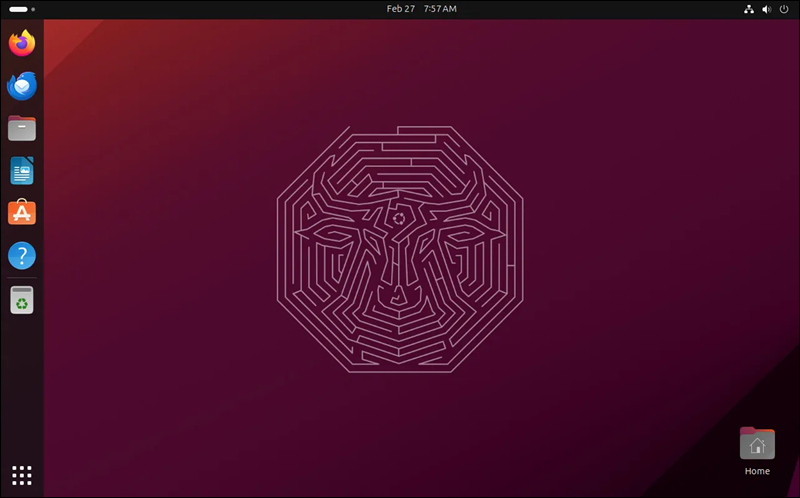
- Modular desktop environments. Offers choices such as GNOME or KDE Plasma to define the graphical interface.
Below is the GNOME interface on Ubuntu 24.04 LTS:
Linux Advantages
The primary benefit of Linux is the freedom it grants administrators to modify and distribute software. This freedom ensures that the system stays transparent and auditable for security purposes.
Other Linux advantages include:
- Cost efficiency. Most distributions remain free to download and use without licensing fees.
- Hardware longevity. Linux works well on older hardware by using lightweight window managers.
- System control. Grants the root user absolute administrative power for deep configuration.
Linux Disadvantages
The decentralized nature of Linux development results in fragmentation across different distributions and package formats. This lack of a single standard is a reason why linux often lacks native versions of professional creative application suites. Inconsistent software delivery formats, such as DEB, Snap, or Flatpak, also create compatibility issues.
What is macOS?
macOS is a proprietary operating system developed by Apple Inc. exclusively for Mac hardware. It uses Darwin Core, which integrates the XNU kernel, a hybrid kernel combining the Mach microkernel and FreeBSD subsystems.
The system is part of a highly integrated environment in which hardware and software are developed in tandem. This vertical integration results in optimized performance for specific tasks, such as video editing and high-resolution display management.
macOS Features
The macOS architecture centers on the Cocoa framework and the graphical user interface to provide a consistent user experience. It leverages proprietary technologies to enable Continuity, i.e., interaction between different Apple devices.
The following are the main features of macOS:
- Hybrid XNU Kernel. Combines microkernel flexibility with monolithic performance for stable operation.
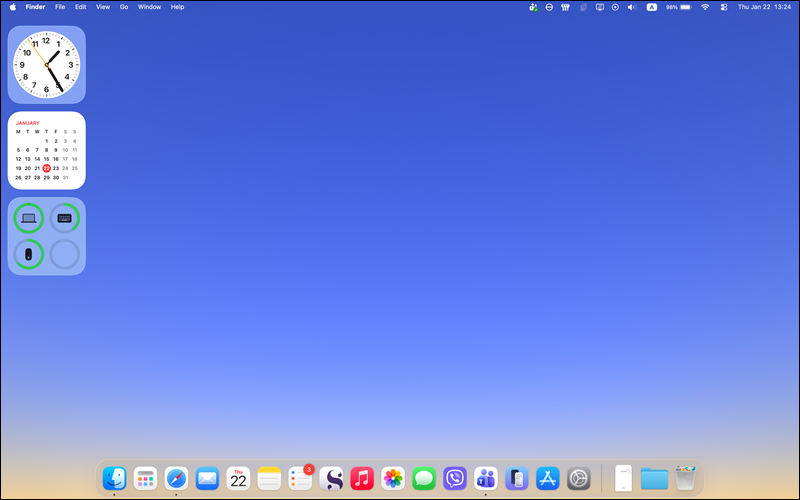
- User interface. Provides a consistent graphical design language across all system applications.
- Framework integration. Includes proprietary APIs like Metal for graphics and Core Audio for sound processing.
- APFS file system. APFS is optimized for SSD storage, with features such as snapshots and encryption.
Below is the UI of macOS Tahoe:
macOS Advantages
The integration of macOS with Apple Silicon delivers exceptional power and thermal efficiency. Users benefit from a curated ecosystem that ensures high software quality and hardware reliability.
Other advantages of macOS include:
- Ecosystem integration. Data synchronization with iPhone and iPad via iCloud.
- Professional software. Serves as the native platform for professional tools like Final Cut Pro and Logic Pro.
- Security architecture. Implements hardware-level security through the Secure Enclave and SIP.
macOS Disadvantages
The closed nature of the Apple ecosystem limits the hardware choices available to users. High entry costs and limited upgradeability represent significant barriers for those seeking modular computing solutions.
Linux vs. macOS: Comparison
Linux offers a modular, community-driven landscape with hundreds of variations. macOS focuses on a highly polished, vertically integrated experience controlled by Apple.
The following table summarizes the primary technical and commercial differences between these two platforms as of 2026:
| Linux | macOS | |
|---|---|---|
| Codebase | Monolithic kernel (open source). | Hybrid kernel (XNU/Darwin, proprietary). |
| Software Ecosystem | Open-source focus, decentralized. | Proprietary focus, Apple-integrated. |
| Customization | Unlimited (kernel, UI, system). | Limited (mostly UI). |
| Software Availability | High (open source), but lacks native versions of some popular commercial apps. | High (especially commercial software). |
| Hardware Compatibility | Any x86/ARM/RISC-V. | Exclusive to Apple Silicon/Intel Mac. |
| Security | Transparency, user permissions. | SIP, sandboxing. |
| UX and UI | Depends on the desktop environment. | Consistent. |
| Software distribution | Via package managers (APT, DNF, Pacman) and universal packaging formats (Snap, Flatpak). | App Store, and packaging formats such as DMG and PKG. |
| Pricing | Free, with some distributions offering paid support. | Included with hardware cost. |
| Support | Community forums, paid commercial support. | Community forums, Genius Bar, AppleCare, and enterprise. |
| Community | Global contributors, fragmented | Apple users, creative professionals |
Codebase
The Linux codebase consists of a monolithic kernel that runs all operating system services in kernel space. Developers contribute to the source code, which remains open for public inspection and modification under the GPL license.
macOS utilizes the XNU kernel, a hybrid architecture combining the Mach microkernel and components from FreeBSD. The base system, Darwin, is open source, but the graphical layers and core frameworks are proprietary and closed to the public.
Software Ecosystem
The Linux ecosystem functions on the principle of Free and Open Source Software (FOSS), with applications and tools often developed by the community for the community. Most software resides in centralized repositories managed by distribution maintainers, ensuring verified and secure installations.
macOS maintains a closed ecosystem designed to integrate tightly with services like iCloud, iMessage, and the App Store. This model prioritizes a walled-garden approach where applications must often adhere to strict design and security guidelines set by Apple.
Customization
Linux provides total control over every aspect of the operating environment, including the ability to swap the entire desktop interface or modify the kernel. Users choose between different desktop environments like GNOME for simplicity or KDE Plasma for extreme visual tweaking.
macOS restricts customization to preserve brand identity and system stability. Users may change wallpapers, accent colors, and dock positions, but the fundamental layout and system behaviors remain fixed by Apple’s design team.
Software Availability
Linux supports many available development tools, web servers, and scientific applications, but it lacks native versions of industry-standard creative suites. Users often rely on alternatives such as LibreOffice, Krita, or GIMP.
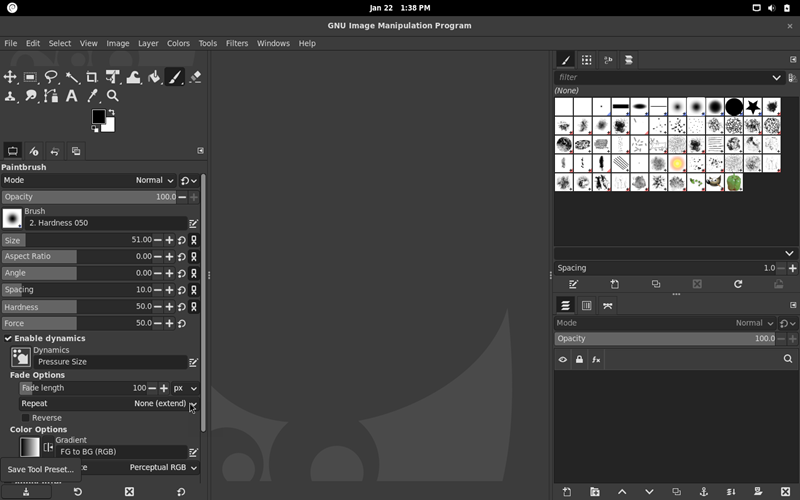
Linux gaming has reached its strongest position yet, with over 90% of the top Steam library titles being playable thanks to the maturity of Valve's Proton compatibility layer.
macOS serves as the primary platform for professional creative software, offering native support for the full Adobe suite and Microsoft Office. Additionally, Apple provides exclusive high-end tools such as Final Cut Pro and Logic Pro that are unavailable on other systems. macOS gaming support has historically lagged, but improvements have been made through the Game Porting Toolkit.
Hardware Compatibility
Linux runs on almost any hardware architecture, ranging from old laptops and modern PCs to supercomputers and embedded devices. Specific distributions such as Alpine Linux or Lubuntu target low-resource hardware to extend the lifespan of older machines.
macOS officially operates only on Apple-manufactured hardware, specifically Macs, MacBooks, iMacs, Mac Minis, and Mac Studios. This exclusivity allows Apple to optimize the software for specific silicon, but it prevents the OS from running on standard PC builds without complex workarounds.
Security
The Linux security model relies on transparency and a granular permission system that prevents unauthorized access to the root directory. Because the code is open, security vulnerabilities are often identified and patched rapidly by the global community.
macOS employs a multi-layered security strategy including System Integrity Protection (SIP) and Gatekeeper to prevent the execution of unverified code. Apple’s control over the hardware enables features such as FileVault encryption and Secure Enclave, which protect biometric data and encryption keys at the silicon level.
UX and UI
The Linux user experience varies significantly depending on the chosen distribution and desktop environment. Some interfaces mimic Windows or macOS, while others utilize tiling window managers designed for maximum efficiency through keyboard shortcuts.
macOS offers a consistent, aesthetically refined interface, known for its fluid animations and design language. This consistency ensures that the menu bar, shortcuts, and window behaviors remain identical across all native applications.
Software Distribution
Linux utilizes package managers such as APT, DNF, or Pacman to automate the installation, update, and removal of software. Modern formats like Flatpak, Snap, and AppImage allow developers to distribute applications that run across different distributions without compatibility issues.
macOS software installation typically involves finding the application on the Mac App Store.

Alternatives include manually placing .app files into the Applications directory or using Homebrew, a third-party package manager, to bring command-line tools and Linux-like software management to the platform.
Pricing
The majority of Linux distributions are available for free, allowing users to install and redistribute the software without licensing fees. This lack of cost makes Linux the most economical choice for both personal use and large-scale server deployments.
macOS is free in the sense that there is no separate license fee, but the cost is subsidized by the premium price of Apple hardware. Accessing the latest version of macOS requires purchasing a Mac, which often costs more than equivalent PC hardware.
Support
Support for Linux primarily comes from community forums, wikis, and documentation maintained by volunteers. For enterprise environments, companies like Red Hat and Canonical offer paid support contracts that include 24/7 technical assistance and long-term stability guarantees.
Apple provides comprehensive support for macOS through AppleCare, the Genius Bar, and online chat services.
Community
The Linux community is a decentralized network of hobbyists, developers, and corporations who collaborate on open-source projects. This environment encourages learning and tinkering, making it a hub for individuals who want to understand the inner workings of their computer.
The macOS community consists largely of creative professionals, developers, and general consumers who value reliability and ease of use. This community is less focused on the technical construction of the OS and more on the output achieved through the Apple ecosystem.
Linux vs. macOS: How to Choose?
Choosing between Linux and macOS requires an assessment of hardware preferences, required software, and the desired level of system control.
Use Cases for Linux
Linux is best for:
- Software development. The OS provides native access to compilers, containers, and server environments.
- Privacy-conscious computing. Linux offers total control over data telemetry and system updates.
- Older hardware. Machines that can no longer run modern Windows or macOS may still work well with Linux.
- Server management. Linux is an industry-standard platform for hosting web services and databases.
Use Cases for macOS
macOS is a better choice for:
- Creative industry. Mac computers are best for professional video editing, graphic design, and audio production.
- Ecosystem integration. macOS provides perfect integration with iPhones, iPads, and Apple Watches.
- iOS development. macOS is the only platform that can natively compile apps for Apple mobile devices.
- Corporate environments. Standardized Mac hardware and software require minimal setup and maintenance.
Conclusion
After reading this comparison article, you know the fundamental differences between Linux and macOS. Both systems offer high-performance, Unix-based foundations, so either choice will provide a modern, secure, and capable computing environment.
Next, learn how Linux and Windows Server compare in the server OS space.