Git is a free, open-source, distributed version control system that allows users to track file changes. Remote Git repositories facilitate collaborative source code development during software development.
HTTPS and SSH are two different ways of connecting to a remote GitHub repository via the command line.
In this article, you will learn the difference between using SSH and HTTPS for Git and how to choose the right authentication method.
SSH vs. HTTPS for Git: What is the Difference?
The basic SSH and HTTPS functionality is data encryption, as both protocols are secure cryptographic network protocols. Due to their security features, many Git servers, including GitHub and GitLab, use SSH and HTTPS to secure communication between clients and servers.
Note: Use phoenixNAP's Bare Metal Cloud GitHub Actions platform to automate tasks in your Git repository.
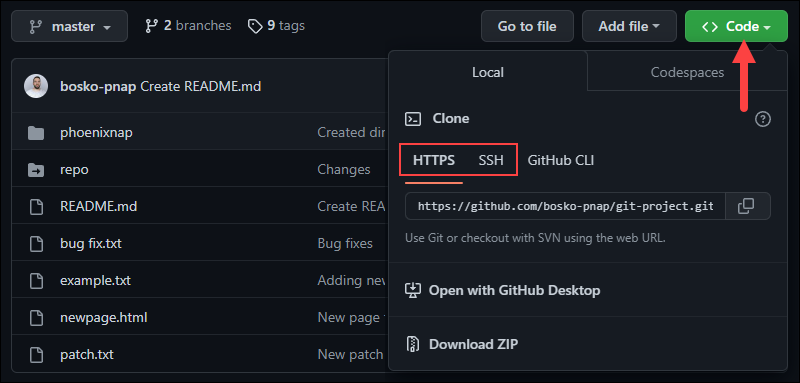
The authentication method depends on whether you select an HTTPS or SSH remote URL when cloning the Git repository, as shown in the image below:
The two protocols differ in complexity and security.
SSH
SSH (Secure Shell) is a public-key cryptography protocol that ensures no one can intercept or modify the data during transmission. Since it is more difficult to set up, it is not as widespread as HTTPS, but it offers greater data integrity and security.
However, firewalls on some systems may block SSH connections on the default port, further complicating the setup. Additionally, some operating systems don't have SSH clients installed by default.
Note: See how to change the default SSH port to improve security.
HTTPS
HTTPS (Hyper Text Transfer Protocol Secure) is a more widespread network protocol that uses SSL/TLS data encryption. Since it is easier to configure than SSH, HTTPS is more common, but it offers lower data security because it doesn't use public-key cryptography.
Git with HTTPS uses token-based authentication to establish connections on port 443 via the Public/Private Pair authentication mode. Port 443 is open in almost every firewall, whereas SSH isn’t.
The downside of using HTTPS is that every action, such as git fetch, git pull, or git push asks for your username and password.
Why Use HTTPS for Git?
The main purpose of HTTPS is to enable secure data transfer between the client and the server. HTTPS facilitates Git setup as there is no need to create SSH keys for each machine from which you want to access the repository.
Authentication is performed using a Personal Access Token, which serves as a unique password and allows users to further secure their account with 2FA.
The benefits of using HTTPS for Git are:
- Simple setup. HTTPS is easy to set up, requiring only the repo URL and the
clonecommand. - Availability. HTTPS is available on every operating system and has very few firewall restrictions.
- Portability. Access the repository from any machine by providing the username and password/token.
Why Use SSH for Git?
The purpose of establishing an SSH connection is to encrypt data exchanged between the client and the server. SSH connections are based on a key pair - a private key on a remote server and the corresponding public key on the local system.
Using SSH keys means there is no need to provide the username and password for each action, for example, pushing or pulling changes or signing commits.
Note: See how to generate SSH keys on Debian 10, Windows 10, CentOS 7, or Ubuntu.
The benefits of using SSH for Git are:
- One-time setup. For every action, SSH uses the key file on disk, which is created during repository cloning. Although the setup is more complex than HTTPS, it is a one-time effort.
- Improved security. SSH keys are more secure than any password or authentication token, making them almost impossible to crack.
- Time-saving. SSH doesn't require repetitive authentication for every repository action. This feature saves time and makes SSH one of the top reasons for choosing it over HTTPS.
Note: Some users can have issues connecting to Git via SSH because the firewall blocks the connection to the default SSH port. Resolve this issue in SSH settings to force the connections to go through port 443 (the default HTTPS port, which should be open). To do so, edit the ~/.ssh/config SSH configuration file and add the following lines:
Host github.com
Hostname ssh.github.com
Port 443
User git
Then, test the new configuration by running:
ssh -T -p 443 git@ssh.github.comWhy Does Git Change its Recommendation?
Git has changed its official documentation multiple times, alternating between recommending SSH and HTTPS. Currently, there is no recommendation for either, but the instructions focus mainly on SSH setup and troubleshooting.
Git probably changed its recommendation from SSH to HTTPS because HTTPS is more widely accessible. It is the easiest way to set up Git on a wide variety of networks and platforms.
Later, the focus shifted to security, so SSH became the preferred option because SSH keys don't grant access to your GitHub account. That means your account cannot be hijacked if anyone steals the key.
Which One Should You Use?
Choose between SSH and HTTPS based on your preferences, data sensitivity, and whether you prioritize simplicity or security. Use SSH for more secure operations and HTTPS for basic, password-based Git usage.
Since SSH is more secure than entering credentials over HTTPS, it is recommended for businesses dealing with sensitive and critical data. Once you generate the SSH keys, only the machines with the key file on disk can access the repository.
On the other hand, if you want to maximize accessibility and ease of use, use the HTTPS protocol for Git. After completing the login flow, the GitHub CLI later authenticates all operations with its own password tokens.
When collaborating on a project, consider your organization's policy and see which type of security is preferred.
Conclusion
This article showed the benefits of using HTTPS or SSH for Git. Both encrypt data sent between the user and remote repository, with SSH being the more secure option and HTTPS being easier to use.
Next, see how SSH works, learn how to use Git if you are a beginner, or see how to work with Git branches.