As more organizations move workloads to the cloud, security becomes an important part of daily operations. Cloud security best practices help businesses protect their data, applications, and systems from cyber threats. Without proper protection, cloud environments face risks such as data breaches, unauthorized access, malware, and service outages that put businesses and their customers at risk.
This article dives into best practices for cloud security that improve compliance, reduce risks, and keep cloud resources secure and reliable.
Cloud Security Best Practices for Governance and Responsibility
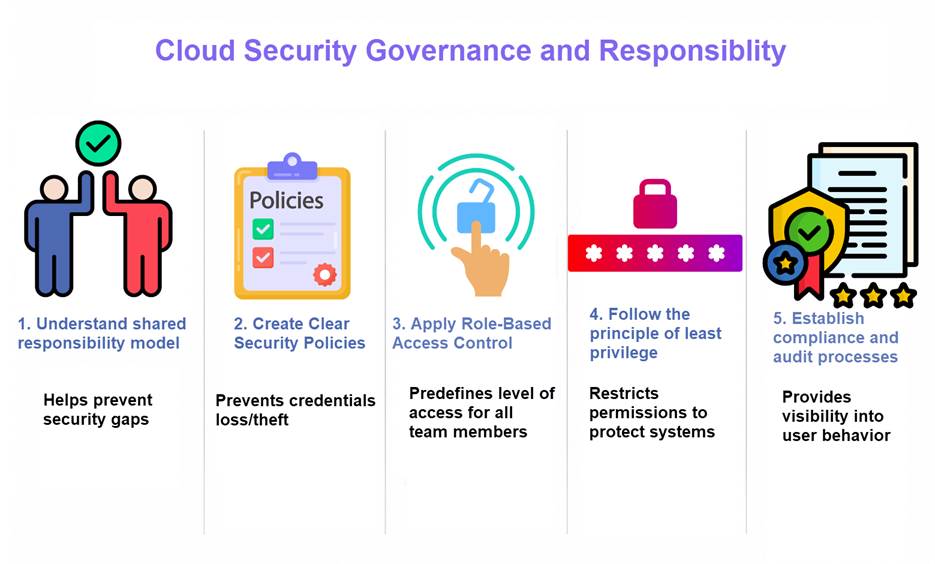
Strong cloud security starts with clear governance and shared responsibility. Businesses must define who manages security tasks, how policies are enforced, and how risks are monitored across the cloud environment. Governance helps organizations stay organized, maintain compliance, and reduce the chance of security mistakes. The following best practices help create a secure and well-managed cloud environment.
1. Understand the Shared Responsibility Model
Cloud security is shared between the cloud provider and the customer. The provider usually secures the physical infrastructure, networking, and hardware, while the customer is responsible for protecting data, applications, user accounts, and access settings. The exact responsibilities depend on the cloud service model being used, such as IaaS, PaaS, or SaaS.
Understanding the shared responsibility model helps prevent security gaps as many cloud security issues happen because businesses wrongly assume the provider handles everything. Organizations should clearly identify which security tasks belong to them, including access management, data protection, backups, and system configurations.
Protect critical business data with phoenixNAP Backup and Restore, designed to help organizations quickly recover from outages, ransomware attacks, and accidental data loss. The service provides automated backups, secure storage, and flexible recovery options to improve business continuity and reduce downtime across cloud and on-premises environments.
2. Create Clear Security Policies
Security policies define how cloud resources should be used and protected. These policies help employees follow consistent security practices across systems, applications, and teams. Common cloud security policies include:
- Password rules.
- Data handling instructions.
- Remote access management policies.
- Software updates.
- Incident response procedures.
Clear policies also improve accountability as employees and administrators understand their responsibilities and know what actions are allowed or restricted. Furthermore, regularly reviewing and updating policies helps organizations adapt to new threats, technologies, and compliance requirements.
3. Apply Role-Based Access Control (RBAC)
Role-based access control limits access based on a user’s job responsibilities. Instead of giving every user full access, organizations assign permissions only to the resources needed for specific tasks. This reduces the risk of accidental changes, insider threats, and unauthorized access.
RBAC also makes cloud environments easier to manage. Administrators can group permissions by roles such as developer, administrator, or auditor instead of configuring every user individually. To maintain security, it is necessary to regularly review roles and permissions to remove unnecessary access.
4. Follow the Principle of Least Privilege
The principle of least privilege means users, applications, and services should only have the minimum level of access required to perform their tasks. Restricting permissions reduces the number of systems and resources exposed if an account becomes compromised. Additionally, organizations should continuously monitor access rights and remove unused or outdated permissions to lower security risks.
This security strategy is implemented by:
- Regularly reviewing user accounts and permissions across all cloud services.
- Removing access for former employees, contractors, and inactive accounts immediately.
- Auditing privileged accounts to ensure elevated permissions are still necessary.
- Using role-based access control (RBAC) to simplify permission management.
- Reviewing temporary access permissions and removing them after projects are completed.
This practice is important for both human users and automated systems. Service accounts, APIs, and applications should receive broad permissions only if absolutely necessary.
5. Establish Compliance and Audit Processes
Many industries must follow security and privacy regulations such as GDPR, HIPAA, or PCI DSS. Organizations should create processes to monitor compliance requirements and ensure cloud systems meet security standards. This includes documenting policies, tracking changes, and maintaining secure configurations.
Regular audits help identify security gaps and policy violations before they become serious problems. Audit logs, access records, and security reports provide visibility into user activity and system behavior. Continuous monitoring and periodic reviews help maintain compliance and improve cloud security over time.
Learn how to protect your daily operations from cyber risks in our article on information security risk management.
Cloud Security Identity and Access Best Practices
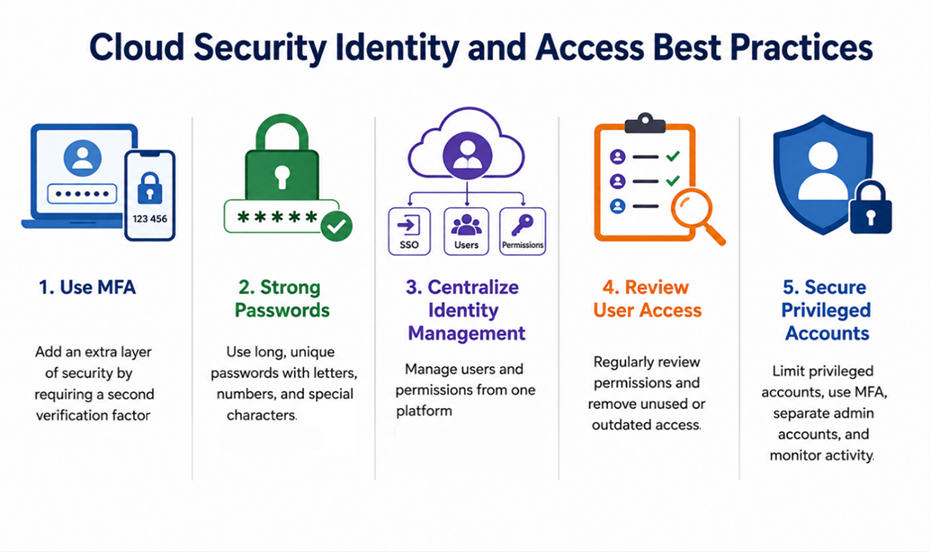
Identity and access management helps organizations control who can access cloud systems, applications, and data. Weak passwords, stolen credentials, and excessive permissions are some of the most common causes of cloud security breaches. Strong identity and access controls help businesses protect sensitive resources and reduce unauthorized access risks.
1. Use Multi-Factor Authentication (MFA)
Multi-factor authentication adds an extra layer of security to user accounts. Instead of relying only on a password, MFA requires users to verify their identity using another method, such as a mobile app, security key, or one-time code.
MFA helps protect accounts even if passwords are stolen or leaked. Attackers may gain access to login credentials through phishing or malware, but they still need the second verification factor to access the account.
2. Create Strong Password Policies
Strong password policies help reduce the risk of unauthorized access. Organizations should require long, unique passwords that combine letters, numbers, and special characters. Users should also avoid reusing passwords across multiple accounts or services.
Useful things to keep in mind when creating a unique password are:
- Avoid common words, simple patterns, or predictable sequences.
- Do not use personal information such as names, birthdays, or phone numbers.
- Use a unique password for every account and service.
- Avoid reusing old passwords.
- Consider using passphrases made from random words for easier memorization.
- Store passwords securely using a password manager.
Password policies should include regular password updates and restrictions against weak or commonly used passwords.
Use phoenixNAP’s free password generator to create a strong password of up to 50 characters.
3. Centralize Identity Management
Centralized identity management allows organizations to manage users and permissions from a single platform. This simplifies account administration across multiple cloud services and reduces the risk of inconsistent access controls.
Centralized systems also improve visibility and security monitoring. Administrators can quickly add, modify, or remove user access when employees change roles or leave the organization. Technologies such as single sign-on (SSO) also improve security while making access easier for users.
4. Regularly Review User Access
User permissions should be reviewed regularly to ensure employees only have access to the resources they still need. Over time, users may accumulate unnecessary permissions due to role changes, temporary projects, or outdated accounts.
Access reviews help organizations identify the following:
- Unauthorized or suspicious access rights.
- Outdated permissions from old roles or projects.
- Shared or improperly managed accounts.
- Former employees or contractors who still have access.
- Unnecessary access to sensitive data or systems.
- Temporary permissions that were never removed.
Removing unused accounts and outdated permissions lowers the attack surface and helps maintain a secure cloud environment.
5. Secure Privileged Accounts
Privileged accounts have elevated permissions that allow users to manage systems, security settings, and sensitive data. Because these accounts have broad access, they are often targeted by attackers.
Organizations should limit the number of privileged accounts and closely monitor their activity. Using separate administrator accounts, enabling MFA, and applying strict access controls help reduce the risk of privileged account compromise. Logging and auditing privileged actions also improve visibility and incident response.
Securing just user accounts is not enough to achieve security across the infrastructure, especially if internal communication and visibility are lacking. This is where extended detection and response comes in, tying together endpoints, networks, and systems for full security coverage.
Cloud Security Best Practices for Data Protection
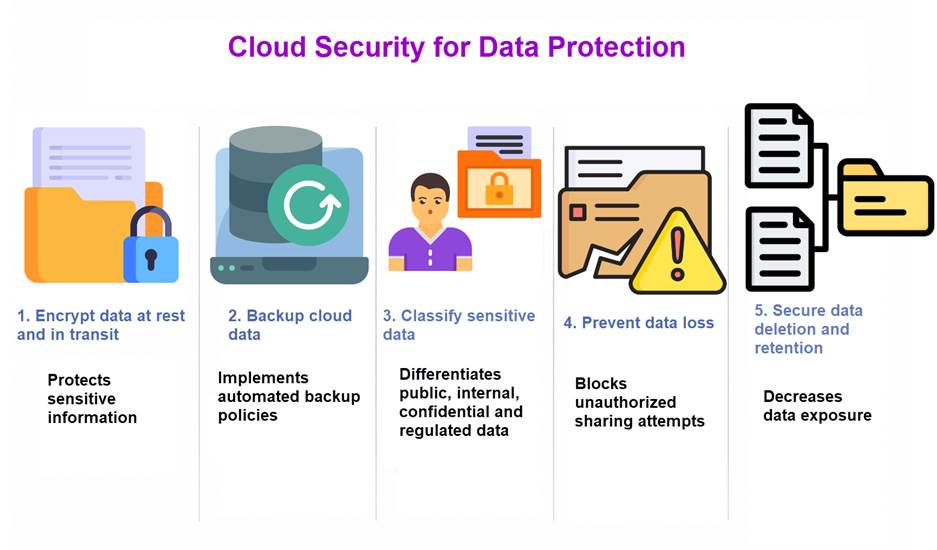
Data is one of the most valuable assets in a cloud environment as it’s the place where businesses store sensitive information such as customer records, financial data, applications, and backups. Without proper protection, data can be exposed through cyberattacks, accidental deletion, insider threats, or system failures. Strong data protection practices help organizations maintain security, privacy, and business continuity.
1. Encrypt Data at Rest and in Transit
Encryption secures data by transforming plaintext into ciphertext that can only be decrypted using authorized cryptographic keys. Organizations should encrypt data both at rest in cloud storage and in transit between users, applications, services, and network endpoints to protect sensitive information across the entire data lifecycle.
Encryption reduces the risk of unauthorized data exposure even if attackers gain access to compromised systems, storage environments, or intercepted network traffic. Businesses should implement strong encryption algorithms, enforce secure key management practices, and use centralized key management systems (KMS) or hardware security modules (HSMs) to maintain data confidentiality, integrity, and regulatory compliance.
2. Regularly Back Up Cloud Data
Backups provide data recovery and business continuity capabilities after incidents such as accidental deletion, hardware failures, ransomware infections, or system outages. Cloud environments should implement automated backup policies and scheduled backup workflows to ensure critical data, applications, and configurations are consistently protected and recoverable.
Backup data should be replicated and stored in isolated, secure locations to reduce the risk of corruption, compromise, or complete data loss. Organizations should also perform regular recovery testing and validation procedures to verify backup integrity, confirm recovery time objectives (RTOs), and ensure systems and data can be restored reliably during operational or security-related incidents.
3. Classify and Organize Sensitive Data
Data classification helps organizations identify which information is most sensitive and requires stronger security controls. Categorizing data based on sensitivity, business value, and regulatory requirements allows businesses to apply appropriate protection measures across cloud environments. Common data classification categories include:
- Public data. Information approved for public access that does not create security or compliance risks if exposed.
- Internal data. Business information intended for internal organizational use but not publicly shared.
- Confidential data. Sensitive business or customer information that requires restricted access and stronger protection controls.
- Regulated data. Data subject to legal, industry, or compliance requirements such as GDPR, HIPAA, or PCI DSS.
Proper classification improves security management by allowing organizations to apply different access controls, encryption policies, retention requirements, and monitoring rules based on data sensitivity. This approach also improves compliance management, reduces unnecessary exposure of critical information, and helps security teams prioritize protection efforts more effectively.
4. Prevent Data Loss and Unauthorized Sharing
Data loss prevention (DLP) measures help prevent sensitive information from being leaked, copied, transferred, or shared without authorization. Organizations can use DLP and cloud security tools to monitor file activity, detect suspicious behavior, inspect data transfers, and automatically block unauthorized sharing attempts. Controlling how data is accessed, transferred, and shared also strengthens cloud security.
Businesses should implement the following protections:
- Restrict public file sharing and anonymous access links.
- Limit external access to approved users, devices, and applications.
- Monitor cloud storage permissions and sharing configurations.
- Apply encryption to sensitive files during storage and transfer.
- Use role-based access control (RBAC) to restrict unnecessary access.
- Detect and alert on suspicious downloads, uploads, or transfers.
- Block unauthorized copying or movement of sensitive information.
These controls help reduce the risk of accidental exposure, insider threats, and data exfiltration across cloud environments.
5. Secure Data Deletion and Retention
Organizations should establish data retention and deletion policies that clearly define how long information is stored and when it must be securely removed. Retaining unnecessary or outdated data increases storage costs, expands the attack surface, and increases the amount of sensitive information exposed during a security incident or breach.
Secure data deletion ensures sensitive information cannot be recovered after removal. The process typically includes the following steps:
- Identify data for deletion. Determine which files, records, or datasets must be securely removed.
- Classify sensitive information. Identify confidential, regulated, or business-critical data before deletion.
- Verify retention requirements. Confirm that legal, compliance, or operational retention periods have been met.
- Preserve required backups. Back up critical data if future recovery or legal retention is still necessary.
- Permanently delete active data. Remove files from production systems, cloud storage, and active databases.
- Remove replicated copies. Delete data stored in backups, archives, snapshots, and replicated environments when appropriate.
Following secure data destruction standards and retention policies maintains compliance, protects sensitive information, and reduces long-term security risks.
Cloud Security Network and Infrastructure Best Practices
Cloud networks and infrastructure connect applications, users, storage, and services across the environment. If these systems are not properly secured, attackers may gain access to workloads, move between systems, or disrupt operations. Strong network and infrastructure security helps organizations protect cloud resources, reduce attack surfaces, and maintain reliable performance.
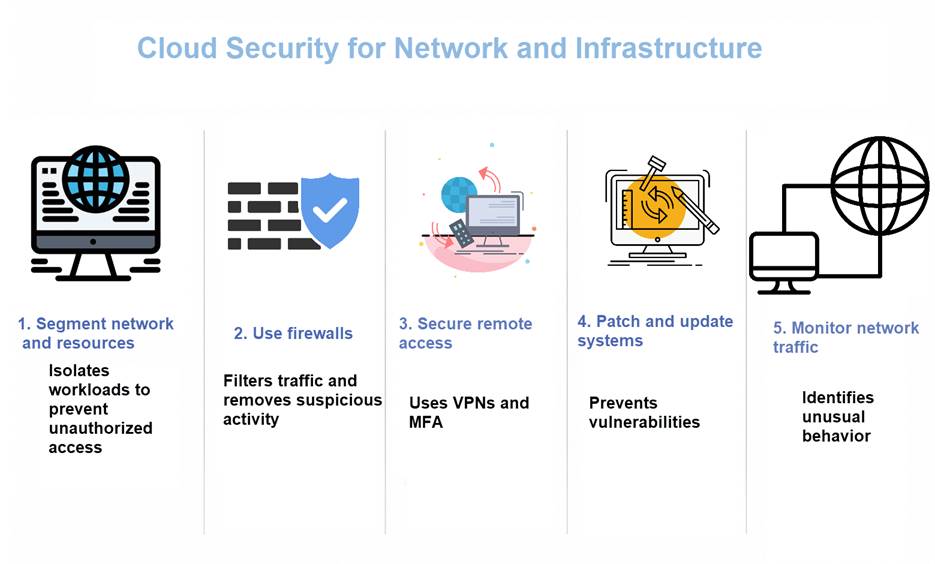
1. Segment Networks and Resources
Network segmentation isolates cloud infrastructure into separate logical or virtual network segments instead of operating all workloads within a flat network architecture. This containment strategy reduces lateral movement by restricting how far attackers can propagate across the environment if a system, workload, or endpoint becomes compromised.
Segmentation also improves traffic filtering, policy enforcement, and overall security management. Organizations can apply granular access controls and network security policies to databases, application tiers, development environments, and public-facing services independently. Technologies such as virtual private clouds (VPCs), subnets, network access control lists (ACLs), and security groups help enforce workload isolation, minimize unauthorized communication paths, and strengthen the overall cloud security posture.
phoenixNAP’s Bare Metal Cloud provides isolated, VPC-style networking that enables organizations to securely connect servers, applications, and workloads within private cloud environments. With automated deployment, advanced network control, and dedicated physical resources, Bare Metal Cloud combines the flexibility of cloud infrastructure with the performance and security of bare metal servers.
2. Use Firewalls and Security Groups
Firewalls and security groups enforce network-level access controls by filtering inbound and outbound traffic based on predefined security policies. These controls help prevent unauthorized connections while allowing approved communication between cloud workloads, applications, services, and users.
Organizations should implement granular firewall configurations that restrict access to only the ports, protocols, IP ranges, and services necessary for business operations. Regularly auditing, updating, and removing outdated or unnecessary firewall and security group rules helps reduce the attack surface, minimize unauthorized exposure, and strengthen the overall cloud network security posture.
3. Secure Remote Access Connections
Remote access enables employees, administrators, and third-party users to connect to cloud infrastructure and services from external locations and devices. Without strong security controls, remote access points can become attack vectors for credential theft, unauthorized access, malware infections, and lateral movement within cloud environments.
Organizations should secure remote access using the following technologies and controls:
- Virtual Private Networks (VPNs). Encrypt remote connections and securely tunnel traffic between users and cloud resources.
- Zero-trust access controls. Continuously verify user identity, device posture, and access permissions before granting access.
- Encrypted connections. Protect data in transit using secure communication protocols such as TLS or SSH.
- Multi-factor authentication (MFA). Require additional identity verification beyond passwords to reduce credential-based attacks.
Restricting privileged and administrative access to approved devices, trusted networks, and managed endpoints further reduces unauthorized access risks and strengthens the overall cloud security posture.
4. Regularly Patch and Update Systems
Cloud infrastructure, operating systems, applications, and platform components should be updated regularly to remediate known security vulnerabilities and reduce exposure to exploitation. Attackers frequently target outdated or unpatched software because publicly disclosed vulnerabilities are often accompanied by widely available exploit code, automated attack tools, or malware designed to take advantage of them.
Organizations should implement automated patch management and vulnerability remediation processes to ensure systems remain protected against newly identified threats and security flaws. Regular updates also improve system stability, application compatibility, operational performance, and overall infrastructure reliability across cloud environments.
5. Monitor Network Traffic and Infrastructure Activity
Continuous monitoring provides real-time visibility into cloud environments, allowing organizations to detect suspicious activity, operational anomalies, performance degradation, and potential security threats before they escalate into critical incidents. Monitoring platforms and security tools can continuously analyze the following activities and events:
- Network traffic. Monitoring inbound, outbound, and east-west traffic patterns for malicious or unauthorized communication.
- Login attempts. Detecting failed logins, brute-force attacks, unusual authentication activity, and unauthorized access attempts.
- System changes. Tracking configuration modifications, privilege changes, software updates, and infrastructure changes across cloud resources.
- Unusual behavior across cloud resources. Identifying anomalies such as abnormal user activity, unexpected data transfers, suspicious process execution, or unauthorized workload behavior.
Real-time monitoring and centralized visibility improve incident detection, threat investigation, and response efficiency by enabling security teams to quickly identify and contain security events. Logging and monitoring systems also support compliance auditing, forensic investigations, operational troubleshooting, and long-term security analysis across cloud environments.
Best Practices for Cloud Security Monitoring
Cloud security monitoring helps organizations detect threats, suspicious activity, and system issues in real time. Because cloud environments constantly change, businesses need continuous visibility into users, applications, networks, and infrastructure. Effective monitoring improves threat detection, supports faster incident response, and helps maintain a secure and stable cloud environment.
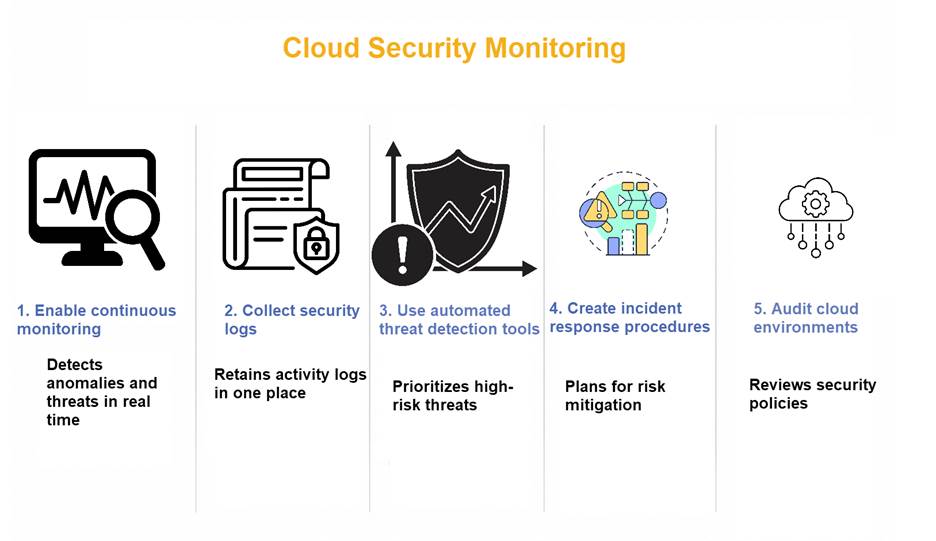
1. Enable Continuous Monitoring
Continuous monitoring provides ongoing visibility into cloud environments by continuously analyzing operational and security-related activity instead of relying solely on periodic assessments or manual security reviews. Monitoring platforms collect telemetry and log data related to user authentication, network traffic, application behavior, infrastructure performance, system events, and configuration changes across cloud resources and services.
Real-time monitoring enables security teams to rapidly identify anomalies and potential threats such as failed authentication attempts, abnormal traffic patterns, privilege escalation, suspicious workload behavior, or unauthorized configuration modifications. Early threat detection reduces dwell time, improves incident response efficiency, and helps prevent attackers from maintaining persistent or undetected access within cloud environments.
2. Collect and Store Security Logs
Security logs capture detailed operational and security-related events across cloud environments, including user activity, authentication requests, file access and modifications, API calls, configuration changes, and network events. These logs provide critical visibility for incident response, forensic investigations, threat detection, and understanding the sequence of events during security incidents.
Centralizing logs within a unified logging or SIEM platform improves visibility and simplifies security analysis by:
- Aggregating logs from multiple cloud services, systems, applications, and infrastructure components into a centralized repository.
- Providing security teams with a consolidated view of activity across the entire cloud environment.
- Improving detection of suspicious behavior, anomalies, and potential security threats.
- Simplifying troubleshooting, root cause analysis, and incident investigations.
- Enabling correlation of events across systems to identify attack patterns and security relationships.
- Reducing investigation time by eliminating the need to manually review separate log sources.
Organizations should securely retain logs for defined retention periods to support compliance requirements, audit readiness, forensic analysis, long-term threat monitoring, and historical security investigations.
3. Use Automated Threat Detection Tools
Automated security tools improve threat detection capabilities by continuously analyzing cloud environments for indicators of compromise, malicious activity, and security anomalies faster than manual monitoring processes alone. These platforms detect malware infections, suspicious user behavior, abnormal access patterns, privilege escalation attempts, misconfigurations, and known attack techniques across cloud infrastructure, applications, networks, and workloads.
Automation also improves operational efficiency by reducing manual analysis workloads and enabling faster incident prioritization and response. Security platforms can automatically generate alerts, correlate events, classify threat severity, and prioritize high-risk incidents for investigation.
Many organizations use technologies such as Security Information and Event Management (SIEM), Extended Detection and Response (XDR), Security Orchestration, Automation, and Response (SOAR), and cloud-native security monitoring solutions to improve visibility, accelerate threat detection, and strengthen incident response capabilities across cloud environments.
Learn how to mitigate the risks of data corruption in our article on detection, prevention and recovery amid data corruption.
4. Create Incident Response Procedures
Incident response procedures establish a structured framework for how organizations detect, contain, investigate, and recover from security incidents affecting cloud environments and infrastructure. Clearly defined response plans help security teams minimize operational disruption, reduce incident impact, accelerate threat containment, and restore affected systems and services more efficiently.
Comprehensive incident response plans should include the following components:
- Establish clear ownership and accountability for incident response activities across security, IT, legal, communications, and management teams.
- Define methods for identifying, validating, and classifying security incidents based on severity and impact.
- Outline steps for isolating affected systems, workloads, accounts, or network segments to prevent further compromise or lateral movement.
- Define internal and external communication procedures for security teams, executives, customers, vendors, regulators, and partners.
- Establish escalation paths for critical, high-impact, or compliance-related security incidents.
- Document procedures for securely collecting, preserving, and handling forensic evidence during investigations.
- Define processes for restoring systems, applications, services, and data after containment and remediation activities.
Regular incident response testing, tabletop exercises, and simulation scenarios help organizations validate response procedures, improve team coordination, strengthen operational readiness, and reduce recovery times during real-world security incidents.
5. Regularly Audit Cloud Environments
Security audits provide organizations with a structured process for evaluating cloud configurations, access controls, security policies, and system activity to identify vulnerabilities, misconfigurations, and compliance gaps.
Audits help organizations detect outdated configurations, excessive user privileges, inactive accounts, unsecured services, and improperly configured cloud resources that could increase security risks. Continuous security assessments, compliance reviews, and configuration audits help maintain strong security standards, improve governance, and ensure cloud environments remain secure as infrastructure, workloads, and business requirements evolve.
Cloud Security Best Practices for Operations and Resilience
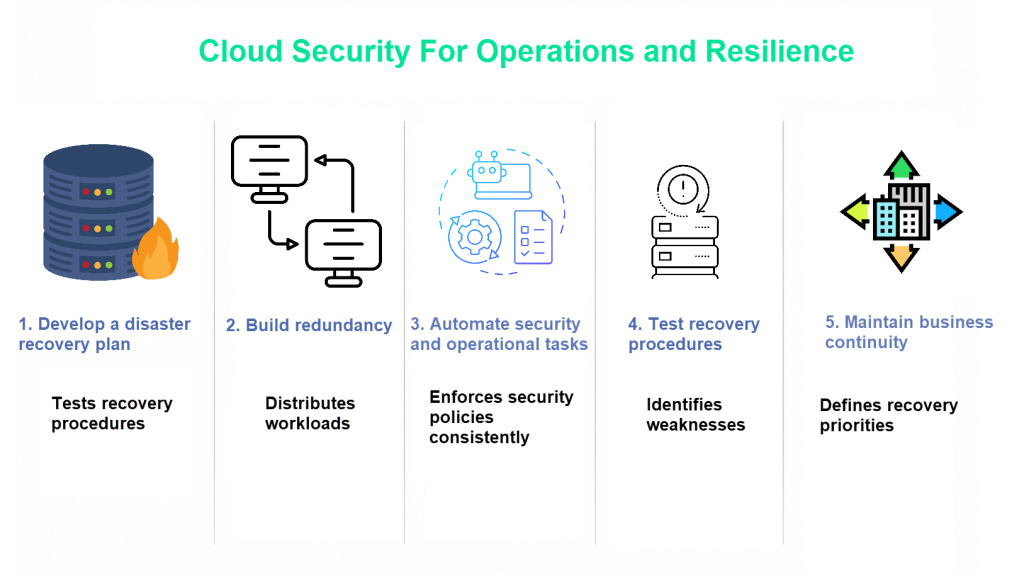
Cloud security is not only about preventing attacks. Organizations must also keep systems stable, available, and prepared for unexpected problems. Strong operational security and resilience practices help businesses maintain uptime, recover from incidents, and continue running critical services during outages or cyberattacks.
1. Develop a Disaster Recovery Plan
A disaster recovery (DR) plan defines the processes, technologies, and operational procedures required to restore cloud infrastructure, applications, services, and data after a major outage, cyberattack, hardware failure, natural disaster, or operational disruption. Effective disaster recovery planning helps organizations minimize downtime, reduce data loss, maintain business continuity, and accelerate system restoration during critical incidents.
Organizations should establish recovery priorities, backup strategies, and recovery objectives before incidents occur. Disaster recovery planning should do the following:
- Identify mission-critical applications and services.
- Prioritize revenue-generating and customer-facing systems.
- Ensure that redundant backup copies are maintained.
- Establish regular testing of recovery procedures.
- Define Recovery Time Objectives (RTOs).
- Define Recovery Point Objectives (RPOs).
Regular disaster recovery testing, failover simulations, and recovery validation exercises help organizations improve operational readiness, reduce recovery times, and ensure systems can be restored efficiently during emergency scenarios.
2. Build Redundancy Across Cloud Environments
Redundancy improves cloud availability and fault tolerance by distributing workloads, applications, and infrastructure components across multiple systems, regions, availability zones, or data centers. This architecture reduces single points of failure and helps ensure services remain operational if a server, network segment, storage platform, or cloud region experiences an outage or disruption.
Organizations commonly implement multi-region deployments, geographically distributed infrastructure, load balancing, replication, and redundant backup systems to improve resilience and minimize service interruptions. Redundant architecture strengthens reliability, supports high availability requirements, and helps maintain continuous access to applications, services, and data during hardware failures, maintenance operations, or large-scale infrastructure incidents.
Learn how to keep optimal redundancy levels in your data center in our article on data center redundancy.
3. Automate Security and Operational Tasks
Automation improves operational efficiency, scalability, and consistency by enabling organizations to manage cloud infrastructure and security processes through predefined workflows and automated orchestration tools. Cloud automation platforms can perform tasks such as patch management, backup scheduling, infrastructure provisioning, auto-scaling, configuration management, performance monitoring, and security policy enforcement with minimal manual intervention.
Reducing manual administration lowers the risk of configuration drift, operational inconsistencies, and human error while improving response times for security and operational events. Automation also enables organizations to manage large-scale, distributed cloud environments more effectively by enforcing standardized configurations, accelerating remediation processes, maintaining consistent security controls, and improving overall infrastructure reliability and resilience.
4. Test Security and Recovery Procedures
Security controls, disaster recovery procedures, and operational response plans should be tested regularly to validate their effectiveness and ensure they function as intended during real-world incidents. Organizations can perform vulnerability assessments, penetration testing, backup restoration testing, failover simulations, tabletop exercises, and incident response drills to identify security gaps, operational weaknesses, and recovery limitations across cloud environments.
Testing improves operational readiness and strengthens security processes before actual incidents occur by:
- Identifying weaknesses in security controls and response procedures.
- Revealing communication and escalation gaps.
- Improving cross-team coordination.
- Verifying backup and recovery functionality.
- Validating monitoring and alerting capabilities.
Regular testing and simulation exercises improve organizational resilience, increase confidence in recovery capabilities, and help ensure systems, personnel, and operational procedures can effectively respond to unexpected disruptions, outages, or security incidents.
5. Maintain Business Continuity Planning
Business continuity planning (BCP) focuses on maintaining critical business operations and service availability during disruptive events that affect cloud environments and infrastructure. These disruptions may include cyberattacks, service outages, hardware failures, natural disasters, supply chain instability, or other operational incidents that impact the availability of cloud systems, applications, or data.
Effective business continuity strategies require organizations to identify mission-critical systems, establish communication and escalation procedures, define recovery priorities, and implement alternative operational workflows to sustain essential services during disruptions. A well-designed continuity plan minimizes downtime, maintains operational resilience, protects customer trust, supports regulatory compliance, and ensures business operations can continue during emergency or high-impact events.
Creating a Secure and Resilient Cloud Infrastructure
Cloud security is an ongoing process that requires strong planning, clear policies, continuous monitoring, and reliable protection across the entire cloud environment. Businesses must secure user access, protect sensitive data, monitor systems for threats, and prepare for outages or cyberattacks. Following cloud security best practices helps reduce risks, improve compliance, and maintain stable and reliable operations.