In their efforts to protect themselves from increasingly sophisticated cyber threats, many companies use a variety of tools to safeguard their systems. However, these tools often don’t communicate with each other, making it easy for attackers to slip through the cracks.
Extended Detection and Response (XDR) is a security strategy designed to fix that problem. It brings together data from across your entire environment, such as endpoints, networks, and cloud systems, so you can detect and respond to threats faster and more effectively.
This article explains how extended detection and response works, its benefits, and most common use cases.

What Is Extended Detection and Response (XDR)?
Extended Detection and Response (XDR) is a cybersecurity approach that connects and combines multiple security tools into one system. Instead of working in isolation, tools that monitor endpoints, networks, servers, email, and cloud environments all share data with each other. This creates a single, unified view of what is happening across an entire IT environment, making it easier to spot suspicious activity that might otherwise go unnoticed.
Read all about the most common cyber threats lurking in the cloud in our article on cloud security risks, threats, and concerns.
XDR vs. EDR: What Are the Differences?
Extended Detection and Response (XDR) and Endpoint Detection and Response (EDR) both help detect and stop cyber threats, but they work at different levels.
EDR focuses only on the security of endpoints like laptops and servers, monitoring them for suspicious activity and helping respond to attacks on those devices. XDR goes further by connecting data from multiple sources, including endpoints, networks, email, and cloud systems, to give a broader view of what’s happening across the entire environment.
Because of this, XDR can spot more complex attacks that move between systems, while EDR is limited to what it can see on individual devices.
XDR vs. SIEM
Extended Detection and Response (XDR) and Security Information and Event Management (SIEM) both help organizations detect threats, but they work in different ways. SIEM collects and stores large amounts of log data from across systems, then helps security teams search, analyze, and investigate that data, often requiring manual effort to find and understand threats.
XDR, on the other hand, is more focused on active threat detection and response. It automatically connects data from key security layers like endpoints, networks, and cloud systems, then uses built-in analytics and automation to identify and respond to threats faster.
In simple terms, SIEM is like a central data hub for security events, while XDR is more like an intelligent system that not only sees threats but also helps stop them quickly.
XDR vs. MDR
Extended Detection and Response (XDR) and Managed Detection and Response (MDR) are closely related, but they are not the same thing.
XDR is a technology platform that integrates data from across environments and automates threat detection and response using analytics. MDR, on the other hand, is a service provided by a team of security experts that monitors your systems, investigates alerts, and responds to threats on your behalf.
Put simply, XDR is the tool, while MDR is the people and service using tools like XDR to protect your environment. Some organizations use XDR on their own, while others rely on MDR providers to manage security for them.
XDR vs. SOAR
Extended Detection and Response (XDR) and Security Orchestration, Automation, and Response (SOAR) both help improve how teams handle security incidents, but they play different roles.
XDR focuses on detecting threats by collecting and analyzing data from across systems such as endpoints, networks, and the cloud, then helping respond to those threats. SOAR is more about what happens after a threat is found. It automates response actions, uses predefined rulebooks to guide workflows, reduces response times, improves incident handling, and helps minimize human error.
In essence, XDR helps you find and understand threats, while SOAR helps you organize and automate how you respond to them.
How Does XDR Work?
XDR works by bringing together security data from across your environment and turning it into clear, actionable insights. Here is the step-by-step explanation:
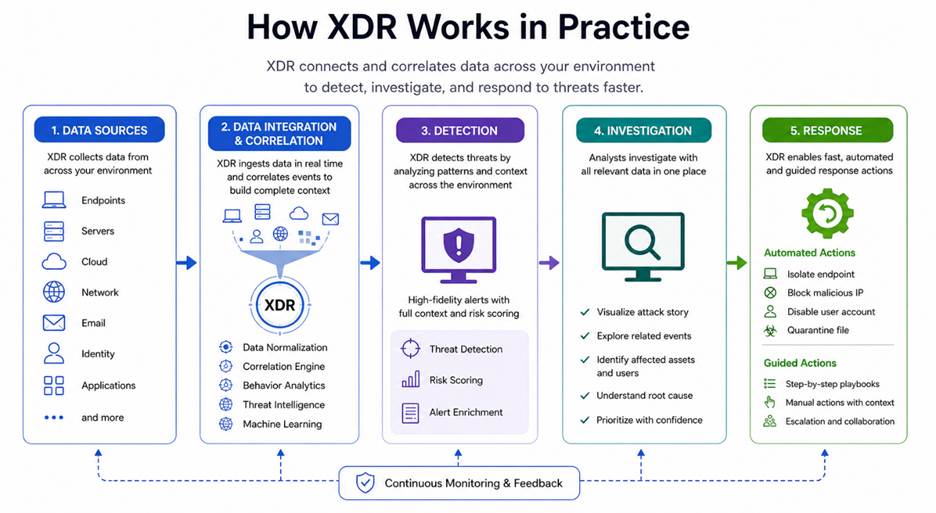
- Collecting data from multiple sources. XDR continuously gathers telemetry and log data from endpoints, networks, servers, email systems, identity providers, and cloud platforms. This creates a centralized stream of security information from across the environment.
- Normalizing and combining data. The platform converts data from different tools and vendors into a standardized format. This allows XDR to analyze events together, even when they originate from separate systems with different logging structures.
- Analyzing activity for threats. XDR uses behavioral analytics, machine learning, threat intelligence feeds, and detection rules to identify suspicious activity. It can detect indicators such as unusual login behavior, privilege escalation attempts, malware execution, or lateral movement inside a network.
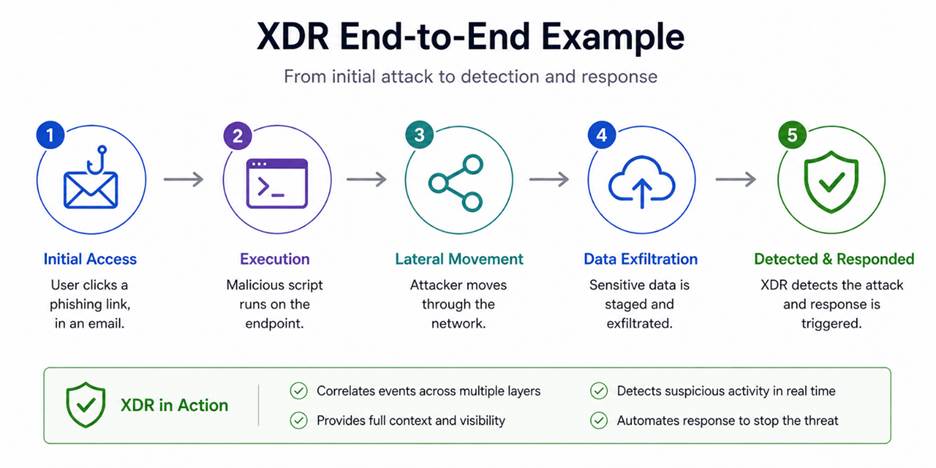
- Correlating events. Instead of treating alerts as isolated incidents, XDR connects related events from multiple sources into a single attack timeline. For example, it can link a phishing email, a compromised endpoint, and unusual network traffic to reveal a coordinated attack chain.
- Prioritizing alerts. XDR filters duplicate or low-priority alerts and highlights the incidents that pose the greatest risk. This helps security teams focus on meaningful threats instead of spending time investigating false positives.
- Automating response actions. Many XDR platforms can automatically respond to threats by isolating compromised devices, blocking malicious IP addresses, disabling accounts, quarantining files, or triggering workflows in connected security tools. This speeds up containment and reduces the impact of attacks.
By connecting data, reducing noise, and automating responses, XDR helps security teams detect threats faster and respond more effectively.
Types of XDR
XDR solutions come in different types based on how they collect and connect data across systems. Each type offers a different level of visibility, flexibility, and control, depending on how it is built and what tools it supports.
Here’s a simple side-by-side overview of the main XDR types:
| Type | Description | Integration Scope | Ease of Setup | Flexibility | Best for |
| Native XDR | Built by one vendor to work with its own security tools. | Limited to vendor ecosystem | Easy | Low | Organizations using a single vendor stack |
| Open XDR | Connects tools from multiple vendors using APIs and integrations. | Broad, multi-vendor support | Moderate | High | Organizations with diverse security tools |
| Hybrid XDR | Combines vendor-native tools with some third-party integrations. | Mixed (vendor + selected third-party) | Moderate | Medium | Organizations needing balance and scalability |
Native XDR
Native XDR is built by a single vendor and works best with that vendor’s own security tools. Because everything is designed to work together, setup is usually simpler and data flows smoothly between systems. This makes detection and response faster and more streamlined. However, it may be less flexible if tools from different vendors are already in place.
Open XDR
Open XDR is designed to work with security tools from many different vendors. It uses integrations and APIs to collect and combine data from across an environment, even if the tools come from different providers. This solution provides more flexibility and lets organizations keep their existing setup, but it may require more effort to configure and manage.
Hybrid XDR
Hybrid XDR combines elements of both native and open XDR. It works best with a vendor’s own tools but can also integrate with selected third-party solutions. This approach offers a balance between ease of use and flexibility, allowing organizations to expand their security stack without giving up the benefits of a tightly integrated system.
Network administrators leverage various methods to protect resources and operations. Learn more about them in our article on types of network security.
XDR Benefits
XDR helps organizations improve security by making it easier to detect, understand, and respond to threats across the entire environment. Its benefits include:
- Better visibility. XDR brings together data from endpoints, networks, cloud systems, and more, allowing security teams to monitor activity from a single interface.
- Faster threat detection. By connecting signals from different systems, XDR spots attacks earlier, even when they are spread across multiple areas.
- Reduced alert noise. It filters and groups security events, reducing alert fatigue.
- Quicker response times. XDR automates actions like isolating devices or blocking threats, helping stop attacks faster.
- Simplified security operations. With fewer tools to manage and a unified view, teams spend less time switching between systems.
- Improved threat investigation. XDR provides context by linking related events, making it easier to understand how an attack works.
Overall, XDR helps security teams work more efficiently while improving their ability to detect and stop threats before they cause serious damage.
XDR Challenges and Limitations
While XDR offers many advantages, it also comes with challenges that organizations need to consider before adopting it. They include:
- Complex setup in some cases. Open or hybrid XDR solutions may require time and effort to integrate with existing tools and configure properly.
- Vendor lock-in risk. Native XDR solutions often work best within one vendor’s ecosystem, which limits flexibility later on.
- Data quality issues. XDR depends on the data it collects; incomplete or poor-quality data reduces its effectiveness.
- Learning curve. Security teams may need training to understand how to use XDR tools and workflows effectively.
- Cost considerations. XDR platforms can be expensive, especially when combined with other security tools or services.
- Over-reliance on automation. While automation speeds up response, it can also lead to mistakes if rules are not set up correctly.
Overall, XDR can greatly improve security, but it requires careful planning, proper setup, and ongoing management to get the best results.Top of Form
XDR Use Cases
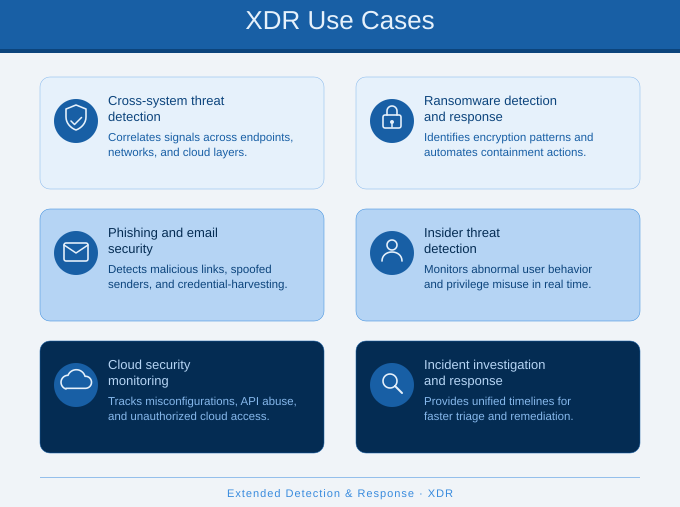
XDR can be used in many real-world scenarios to help organizations detect, investigate, and respond to different types of cyber threats more effectively.
Threat Detection Across Multiple Systems
XDR helps identify attacks that move across endpoints, networks, and cloud systems. Instead of seeing separate alerts, it connects them into a single story, making it easier to detect complex threats like multi-stage attacks.
Ransomware Detection and Response
XDR can spot early signs of ransomware, such as unusual file changes or suspicious processes, and quickly take action. It isolates infected devices and stops the spread before the attack causes major damage.
Phishing and Email Security
XDR monitors email activity and links it with user behavior and endpoint data. If a phishing email leads to suspicious actions, XDR can trace the activity and help stop the attack before it spreads.
Insider Threat Detection
XDR can detect unusual behavior from users, such as accessing sensitive data at odd times or from unexpected locations. By analyzing patterns across systems, it helps identify potential insider threats early.
Cloud Security Monitoring
XDR provides visibility into cloud environments, tracking user activity, configurations, and access patterns. This helps detect misconfigurations, unauthorized access, or suspicious behavior in cloud systems.
Incident Investigation and Response
XDR makes it easier to investigate security incidents by linking related events and showing the full attack path. Security teams can understand what happened, respond faster, and prevent similar incidents in the future.
When to Use XDR
XDR is not required in every environment, but it becomes increasingly valuable as security operations grow more complex and difficult to manage. It is typically recommended when organizations need broader visibility, faster threat detection, and more coordinated incident response across distributed systems and security tools. Examples of scenarios where XDR is beneficial are when:
- Multiple security tools are in place. If security tools operate in silos or lack integration, XDR can centralize data and provide a unified view of the environment.
- Alerts are overwhelming. If security teams face excessive alert noise, XDR helps filter and prioritize the most critical threats.
- Threats become more sophisticated. If attacks move laterally across endpoints, networks, and cloud systems, XDR helps track malicious activity across the entire attack chain.
- Faster incident response is required. XDR can automate actions, reducing the need for manual intervention and improving response times.
- Security resources are limited. XDR reduces manual work, helping smaller or overstretched teams to manage security more efficiently.
- Broader visibility across environments is required. In environments that include endpoints, cloud platforms, and networks, XDR helps consolidate visibility into a centralized platform.
In these situations, XDR helps simplify security operations while improving your ability to detect and respond to threats effectively.
How to Implement XDR
Implementing XDR requires more than just adding a new tool. It should be planned carefully so the platform connects the right systems, collects useful data, and supports your security team’s daily work. Here is how to implement it:
- Review your current security setup. Start by looking at the tools and systems you already use, such as endpoint protection, firewalls, email security, cloud platforms, and identity tools. This helps you understand what data XDR needs to collect and where visibility gaps exist.
- Define your security goals. Decide what you want XDR to improve. Common goals include faster threat detection, fewer false alerts, better incident response, or greater visibility across cloud and endpoint environments. Clear goals make it easier to choose the right solution.
- Choose the right XDR type. Select a native, open, or hybrid XDR solution based on your environment. A native XDR tool may work well if you already use one vendor’s products, while open or hybrid XDR may be better if your security stack includes tools from several providers.
- Connect key data sources. Integrate XDR with the systems that matter most, such as endpoints, networks, email, servers, identity systems, and cloud services. The more relevant data XDR can collect, the better it can connect events and detect threats.
- Configure detection and response rules. Set up rules, workflows, and automated actions based on your risk level and security policies. For example, XDR may isolate a device, block a suspicious IP address, or alert the security team when certain conditions are met.
- Train your security team. Make sure the team understands how to use the XDR platform, review alerts, investigate incidents, and manage automated responses. Training helps reduce mistakes and makes the tool more useful in daily operations.
- Test and improve over time. After deployment, test how well XDR detects and responds to threats. Review alerts, fine-tune rules, remove unnecessary noise, and update workflows as your environment changes. XDR works best when it is regularly adjusted and improved.
When done correctly, implementing XDR creates a strong, connected security system that helps organizations detect and respond to threats more quickly and effectively.
Simplifying Security with XDR
XDR helps organizations move from scattered security tools to a more connected and efficient approach. By bringing together data, reducing noise, and speeding up response, it makes it easier to detect and stop modern threats. While it takes planning and the right setup, XDR can greatly improve how teams manage security and protect their systems over time.