Red Hat started as one of the earliest open-source Linux distributions. Over the years, it has grown into a global provider of enterprise-grade software for governments, banks, hospitals, and Fortune 500 companies.
At the heart of this success is Red Hat Enterprise Linux (RHEL). A platform that turns open-source innovation into an environment for running modern applications and services at scale.
In this guide, you will learn how RHEL uses open-source technology to support day-to-day enterprise IT operations.

What Is RHEL?
RHEL is a Linux distribution built for businesses. It takes open-source components, tests and improves them, and packages them into a production-ready operating system for enterprise IT environments.
Even though RHEL is based on open-source software licensed under standard open-source terms, it is not free Linux for everyone. Instead, it's offered through a subscription model. In return, customers get a thoroughly tested platform with regular updates, security patches, and access to reliable support services.
In 2019, IBM acquired Red Hat, a move that solidified RHEL's position in data centers and high-performance computing (HPC).
RHEL Features
The RHEL ecosystem includes a wide range of built-in features and optional tools organizations can add based on their needs. Read more in the following sections.
Long-Term Kernel Stability
RHEL uses the Linux kernel, developed by a large open-source community. Red Hat takes the upstream kernel and tests it extensively to ensure it works reliably and securely in real-world business environments.
Instead of forcing you to jump to a new kernel version, Red Hat backports important improvements and security fixes into the kernel version it supports. This means companies can use newer hardware and run workloads without risking instability or breaking existing applications. Simply put, systems stay secure without needing to upgrade everything all the time.
Major RHEL releases are supported up to 10 years under standard lifecycle policies.
Note: Backporting refers to a fix or improvement from a new software release that is manually adapted to work with older software versions.
Built-in Security
RHEL has several built-in security features designed to protect systems in business environments. SELinux adds mandatory access controls (MAC) that enforce strict rules about what applications and users are allowed to do. Instead of relying on traditional Linux permissions, SELinux assigns security labels to processes and files and checks each action against policy rules.
RHEL also supports live kernel patching (kpatch). Certain security fixes can be applied without rebooting. You can keep systems secure without scheduling maintenance windows or interrupting running workloads on critical systems.
Scalability
RHEL supports everything from small single-node applications to large deployments across clusters and data centers. Businesses can run the same operating system on physical servers, virtual machines, public or private clouds, and edge devices, and can move workloads wherever they are needed.
It supports modern hardware architectures such as x86-64 and ARM64, allowing organizations to scale their systems vertically with more powerful hardware or horizontally across large fleets of servers.
RHEL remains consistent as environments grow. Teams do not need to switch platforms, rewrite applications, or retrain administrators. Instead, you can keep scaling operations using the same tools, rules, and security policies already in place.
Note: RHEL's scalability is becoming a key advantage as more companies adopt hybrid cloud or multi-cloud strategies.
Support Services
A RHEL subscription includes more than just the operating system. Red Hat support teams help troubleshoot issues and optimize deployments in complex Linux environments. The level of assistance available depends on the subscription tier.

As part of a Standard subscription plan, Red Hat provides:
- Certified software and hardware support.
- Security patches.
- Official updates to fix or improve a system after release.
- Help with system configurations.
- Access to the Red Hat Consumer Portal.
- Assistance with lifecycle and upgrade planning.
- Support for organizations migrating from other Linux distributions.
Premium subscriptions extend the support with 24/7 availability and faster response times.
Container Support
Red Hat includes native tools for creating and running containerized applications. Technologies like Podman and Buildah enable you to:
- Build container images from the command line.
- Deploy containers directly on RHEL without installing Docker.
- Manage and inspect images.
- Transfer and copy images between container registries.
RHEL also serves as the base for Red Hat OpenShift, which adds full Kubernetes orchestration for running containers at scale.
Advanced Developer Tools
RHEL's Advanced Developer Suite (ADS) provides a set of tools designed to help teams build and deliver modern applications more efficiently.
Development teams can use ADS to:
- Streamline development flows and deploy applications faster.
- Build and manage cloud-native and AI-enabled applications.
- Create standardized CI/CD pipelines.
- Secure and validate software supply chains.
- Onboard new developers quickly using preconfigured environments.
RHEL also includes Application Streams, a package delivery mechanism. This feature enables developers to install newer versions of tools and language runtimes independently of the core operating system. Teams can adopt modern software stacks without upgrading the entire OS, keeping production environments stable and predictable.
Examples of tools delivered through Application Streams include Python, Node.js, Ruby, and PostgreSQL.
Examples of RHEL Distributions
The following table lists popular RHEL-based or derived distributions:
| Distribution | Description | Used By |
|---|---|---|
| Rocky Linux | A community-driven replacement for CentOS, designed for full binary compatibility with RHEL. | Companies that want an open-source, RHEL-compatible OS, without a subscription. |
| AlmaLinux | An open-source rebuild of RHEL with long-term support. | Businesses that need a stable enterprise server OS. |
| Oracle Linux | An enterprise Linux distribution that includes Oracle's optional kernel. | Organizations running Oracle databases and applications that want a free baseline with optional paid support. |
| CentOS Stream | The development branch for future RHEL releases. Updates arrive before they land in RHEL. | Developers and testers who need early access to the next RHEL version (not recommended for production). |
| RHEL CoreOS (RHCOS) | A minimal container-optimized OS for container and Kubernetes clusters. | Used for cloud-native, containerised, or microservices workloads. |
Fedora is part of the RHEL family, but it is an upstream distribution. New features are introduced and tested in Fedora first, then hardened and later introduced in RHEL.
RHEL Use Cases and Industries
Due to its features, RHEL is used in a broad range of scenarios and industries, such as:
- Virtualization and Data Centers. RHEL provides a stable environment certified across major hardware vendors and supported with long-term maintenance. Because of this, it is widely used in enterprise data centers as the base OS for private clouds, virtual servers, and storage systems.
- High-Performance Computing (HPC). RHEL supports large compute clusters, specialized hardware architectures, and server automation. Organizations use it to run large-scale scientific simulations and AI/ML workloads that require high performance and scalability.
- Edge Computing. RHEL can also be deployed and run reliably outside data centers. For example, it can be used in retail stores, factories, and telecom sites, where latency and local processing matter. With Red Hat's centralized management tools, organizations can remotely deploy, update, and secure edge devices.

- Regulated industries. RHEL's security certifications, hardening tools, and lifecycle policies make it well-suited for environments with legal or compliance requirements. It is commonly used in payment processing, government systems, and healthcare.
- Mission-critical systems. Due to its predictable update cycles and long-term support, RHEL is used by airlines, utility companies, banks, and other institutions that cannot afford unexpected outages.
- Microsoft SQL Server. Microsoft officially supports its SQL Server on RHEL. Organizations can run their database workloads on Linux with help from both Microsoft and Red Hat if something goes wrong. This setup is especially common in financial systems and large business applications that depend on reliable SQL performance.
- SAP Systems. RHEL is certified for SAP HANA and other SAP applications. Many large enterprises use SAP as their primary ERP platform and choose RHEL for its lifecycle guarantees, high availability support, and hardware certifications.
RHEL Licensing Explained
RHEL is built from open-source software and licensed under open-source terms such as the GPL. The source code is publicly available and can be viewed or rebuilt by anyone. However, using RHEL in a supported, production-ready way requires a subscription.
The subscription provides access to:
- Tested and stabilized RHEL binaries.
- Continuous updates, patches, and fixes throughout the supported lifecycle of the RHEL release.
- Official support with defined service level agreements (SLA).
- Certification across supported hardware and vendor software platforms.
- Optional add-ons, which include software collections, development toolsets, high-availability, and extended support.
Organizations typically choose RHEL not just for the software, but also for its reliability, lifecycle guarantees, and support.
Different subscription plans are available and listed in the following table:
| Subscription | Description | Best For |
|---|---|---|
| RHEL Server Standard/Premium | Full support for servers, virtualization, and production workloads. | Data centers and large-scale enterprise systems. |
| RHEL Workstation | A GUI version designed for high-performance desktops with advanced graphics and compute workloads. | Engineering, R&D teams, and media production. |
| No-Cost Developer Subscription | Full RHEL for development and testing only for a limited number of systems. | Individuals, home labs, and learning environments. |
| Add-Ons | Adds high availability, extended lifecycle support, and specialized storage capabilities to an existing subscription. | Large server clusters and mission-critical services. |
RHEL Management Tools
Red Hat has a broad set of tools for managing RHEL systems. These tools simplify everyday tasks like installing updates, enforcing policies, and checking system health. Learn more about these tools in the sections below.
Red Hat Satellite
Red Hat Satellite is a core administration tool for managing RHEL systems across distributed environments.
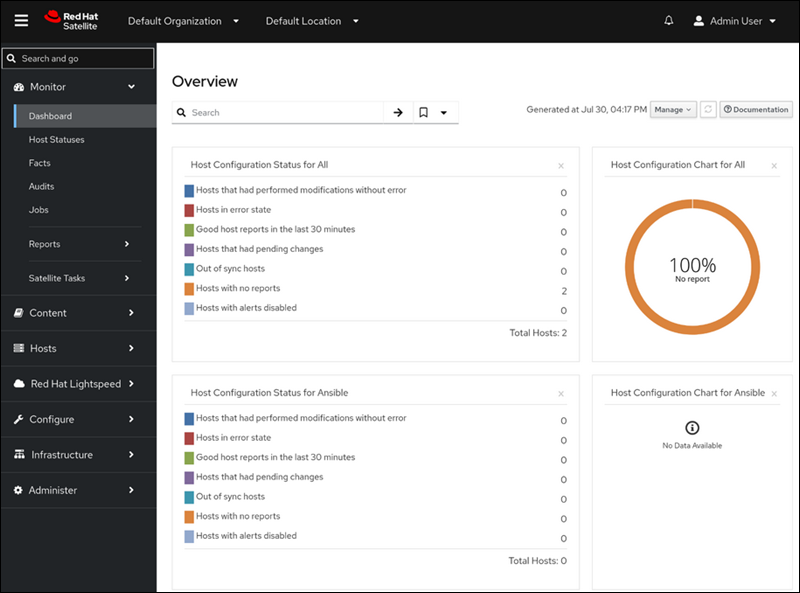
It allows administrators to:
- Monitor and manage all servers from a single interface.
- Install and update software.
- Provision new systems.
- Configure systems across server clusters.
- Automate routine maintenance tasks.
- Consistently apply security patches.
- Manage Red Hat subscriptions and entitlements.
One of its key features is content lifecycle management. It allows organizations to control how software updates move from development to testing and into production. Teams can identify potential issues early and prevent untested updates from reaching critical systems.
Ansible Automation Platform
In 2015, Red Hat expanded into hybrid cloud automation by acquiring Ansible, a popular IT automation and DevOps platform. Since then, Red Hat has continued to build on Ansible by adding new capabilities and integrating it more deeply into many of its products. Administrators can now automate RHEL, OpenShift, Satellite, and many other services using the same automation framework.
Ansible is designed to automate repetitive system administration tasks, such as:
- System and infrastructure configuration.
- Application deployments.
- Security and patching.
- CI/CD and automation workflows.
- Container and Kubernetes management with OpenShift.
With Ansible, automation architects and engineers can create repeatable workflows and enforce the same rules and settings across а server cluster.
Note: See which other DevOps tools can help you with different stages of the software development lifecycle.
Red Hat Lightspeed (formerly Red Hat Insights)
Red Hat Lightspeed is a system management platform that monitors RHEL systems, Red Hat Satellite deployments, OpenShift clusters, and Ansible Automation Platform environments. It looks for configuration risks, vulnerabilities, performance bottlenecks, and operational trends.
With the help of AI, LightSpeed can:
- Explain what a problem means.
- Recommend how to fix it.
- Point to relevant documentation.
- Provide additional information to address security or performance concerns.
The results are shown directly in the dashboard, so administrators can review findings without switching tools or leaving the console.
Note: Find out why AI-driven automation is a one of the top DevOps trends.
Web Console (Cockpit)
The RHEL Web Console, also known as Cockpit, is a simple web-based tool for managing individual RHEL servers. Cockpit is preinstalled on many systems and gives you an easy-to-use dashboard in your browser.
With it, you can check the system status, install updates, and monitor CPU and memory usage. You can also handle basic container and virtual machine tasks.
To open the Web Console, visit port 9090 in your browser, for example:
https://your_server_ip:9090The Web Console is useful in smaller deployments for admins who prefer a graphical interface over the command line.
Advantages and Disadvantages
For large companies with critical workloads, the advantage of RHEL often outweighs its disadvantages.
Advantages
The advantages of using RHEL include:
- Open-source code base. The code is transparent, audited by a large community, and benefits from upstream innovation.
- Extended lifecycle support. Major RHEL releases have a 10-year lifecycle and a commitment to preserving app stability with each minor update. This is a make-or-break feature for organizations that cannot frequently upgrade their systems.
- Support and security. Organizations get vendor-backed updates, security advisories, and technical assistance, which is important for critical workloads.
- Certified hardware. Many server vendors and hardware manufacturers now explicitly test their systems for compatibility with RHEL, so companies don't need to guess whether their hardware will work reliably.
- Certified software. RHEL is validated to work with major enterprise software providers such as SAP and SQL Server, ensuring compatibility and reducing deployment risks.
- Hybrid-cloud and container readiness. Works consistently across physical, virtual, and cloud environments. Built-in tools like Podman support containerized applications out of the box.
- Supports large-scale deployments. Supports multiple architectures, such as x86_64, ARM64, and IBM Power, and is widely used in data centers, HPC clusters, and cloud platforms.
Disadvantages
Companies sometimes decide against using RHEL, because:
- It's a paid solution. The OS is open source, but the fully supported product costs money. This may not suit organizations with limited budgets.
- Not ideal for bleeding-edge desktop users. Stability and long-term compatibility come first. This means software versions can lag behind faster-moving distributions like Fedora.
- Vendor lock-in concerns. Some organizations prefer free rebuilds, such as Rocky Linux or AlmaLinux, to avoid reliance on subscription renewals.
- It is more complex than consumer Linux distros. RHEL is designed for skilled administrators and not casual home users. It requires extensive Linux knowledge to operate effectively.
Future of RHEL
To stay relevant, infrastructure must handle larger, more distributed, and more dynamic workloads. Given Red Hat's open-source heritage and resources, it seems likely that RHEL and the broader Red Hat ecosystem will continue to adapt to meet these needs.
Red Hat has proven that its enterprise-ready model works. As companies adopt new technologies such as AI/ML, IoT edge computing, and container orchestration, RHEL is well-positioned to support them.
For example, managed Kubernetes via OpenShift and emerging AI efforts through Red Hat AI and OpenShift AI suggest the company is aiming to support next-generation workloads across data centers, the cloud, and the edge.
At the same time, this evolution may mean that more and more features and services will end up behind a paywall and require long-term subscriptions for managed or fully supported packages.
Conclusion
RHEL is a strong choice for organizations that need stable, secure infrastructure across data centers, cloud environments, and edge locations.
If you're a hobbyist or prefer bleeding-edge software, but still want something closely related to RHEL, consider Rocky Linux or AlmaLinux for a free, stable option, or Fedora for the latest features.