The Git "failed to push some refs to" error appears when a push is rejected by the remote repository. This usually happens because the remote branch contains commits that your local branch does not have. That way, Git prevents you from overwriting someone else's work.
Before you can push your changes, your local branch must be synchronized with the remote branch.
This guide will explain what the error means, what causes it, and how to fix it safely.

Prerequisites
- Git installed (learn how to install Git on Ubuntu, macOS, Windows, or FreeBSD).
- A Git repository.
What Is the "failed to push some refs to" Error in Git?
The "failed to push some refs to" error indicates that Git rejected your push because the remote branch has diverged from your local branch. That means your local history is no longer aligned with the remote history.
A typical error message looks like this:
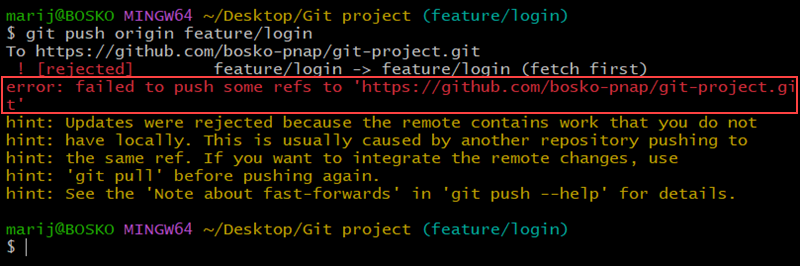
This protection mechanism prevents accidental overwrites. Git only allows fast-forward pushes by default. If the remote branch contains commits that are not part of your local history, pushing would erase them. Instead of risking data loss, Git blocks the push and requires you to integrate the remote changes first.
What Causes the "failed to push some refs to" Error in Git?
This error happens when Git detects that your local branch and the remote branch no longer share the same commit history. The remote contains commits that your local branch does not have, so pushing would overwrite existing work. To prevent data loss, Git rejects the push and forces you to reconcile the differences first.
Several common situations can cause your branch to fall behind the remote:
- Someone else pushed changes. If another contributor has pushed commits to the same branch, your local branch becomes outdated. When you try to push, Git rejects it to avoid losing those commits.
- You pushed changes from another machine. If you work across multiple devices, the remote repository may contain commits from a different environment that your current local clone does not have.
- You rewrote local history. Using commands like
git commit --amend,git rebase, or git reset changes the commit history. If the remote branch still contains the old history, Git detects a mismatch and blocks the push. - The branch was updated on the remote. Automated systems, CI pipelines, or protected branch workflows can also modify the remote branch, causing your local branch to fall behind.
Note: Some Git hosting platforms (GitHub, GitLab, Bitbucket) use protected branch rules. Even if your branch is synchronized, the server may reject pushes due to policy restrictions such as disabled force push, blocked direct pushes, or required pull request workflow. In these cases, you must create a pull request instead of pushing directly.
How to Fix the "failed to push some refs to" Git Error
To fix this error, you must synchronize your local branch with the remote branch. The safest approach is to pull the remote changes and merge or rebase them into your local work. For a quick, automated fix that synchronizes your branch and allows you to continue working, enter:
git pull --rebaseThe pull command fetches the latest changes and rebases your work on top of them. Doing so keeps the commit history linear. This tutorial uses manual fetch + rebase so you can see each step clearly.
If you prefer to fix the error manually with more control over the process, follow the instructions below:
Step 1: Fetch the Latest Changes
Start by downloading updates from the remote repository without modifying your working files:
git fetch origin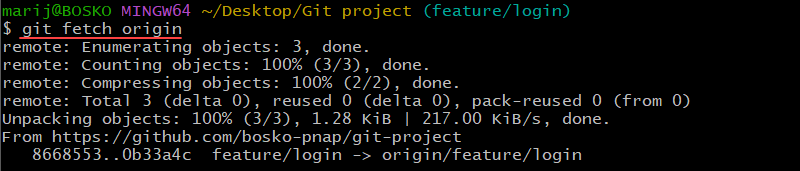
The command updates your remote tracking branches and lets you inspect what changed before integrating it.
Alternatively, you can run:
git pullgit pull combines fetch and merge in a single command.
Step 2: Integrate Remote Changes
Next, bring your branch up to date. After fetching the changes, you can either merge or rebase. Depending on your needs, select one of the two options:
Option 1: Merge
Merging creates a new commit that combines both histories. This approach is simple and safe for shared branches. Use the following syntax:
git merge [remote_name]/[branch_name]Option 2: Rebase
Rebasing rewrites your local commits on top of the updated remote branch. This produces a linear history but should be used carefully on shared branches.
Run the following command:
git rebase [remote_name]/[branch_name]For our tutorial, we will use rebase. Our remote repository is origin, and the branch name on which the error occurred is feature/login:
git rebase origin/feature/login
Resolve conflicts manually, if they occur, then continue the rebase with:
git rebase --continueStep 3: Push Changes
After your branch is synchronized, push your changes:
git push [remote_name] [branch_name]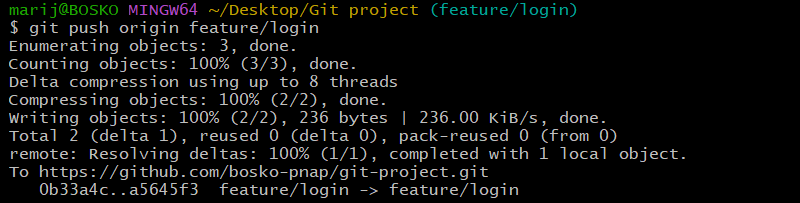
The push should now succeed because your local branch includes the remote commits.
Optional: Force Push (Use with Caution)
If you intentionally rewrote history and must overwrite the remote branch, use:
git push --force-with-leaseThis option is safer than --force. It prevents you from deleting commits that appeared on the remote after your last fetch. Force pushing replaces remote history and can delete other people's work. Only use it when you fully understand the consequences and the branch is safe to overwrite
Conclusion
This article explained the "failed to push some refs to" error in Git and showed how to fix the error and protect shared history. The error occurs when your local branch is out of sync with the remote branch. By keeping your branch updated regularly, you can avoid push rejections and maintain a clean workflow.
Next, see how to pull all branches in Git or list remote Git branches.