Network ports are the gateways through which devices communicate over the internet and private networks. Port 443 is one of the most important ports because it enables secure communication between clients and servers.
This article will explain how port 443 works, when it is used, security aspects, and how to configure it across major operating systems.

What Is Port 443?
Port 443 is a TCP port reserved for secure web traffic. It is the default HTTPS (Hypertext Transfer Protocol Secure) port, which is HTTP running over TLS/SSL encryption. Whenever you see a URL that starts with https://, your browser is communicating over port 443, unless otherwise specified.
How Does Port 443 Work?
Port 443 facilitates secure communication by acting as the default entry point for HTTPS traffic. Unlike plain HTTP connections, traffic sent through port 443 is encrypted using TLS (formerly SSL), which protects data from interception and tampering while in transit.
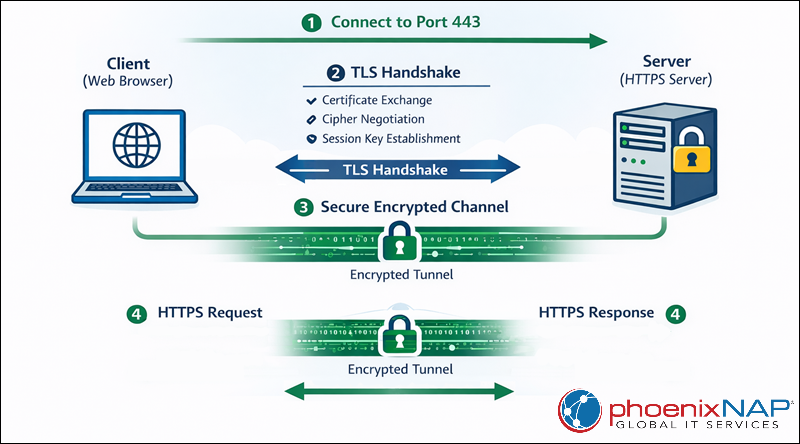
When a client initiates a connection to port 443, the process begins with a TLS handshake. During this exchange, the server presents its digital certificate, the client verifies its authenticity, and both sides agree on encryption parameters. Once the handshake completes, the client and server exchange HTTP requests and responses over an encrypted channel, ensuring confidentiality, integrity, and authentication throughout the session.
The diagram below illustrates how secure HTTPS communication works over port 443, from the initial connection to encrypted data exchange:
Port 443 Use Cases
Port 443 is a common choice for secure, encrypted communication. It supports both public-facing services and internal infrastructure that relies on HTTPS-based communication.
Common use cases include:
- Secure websites (HTTPS). Encrypts web traffic to protect user data such as credentials and form submissions.
- Web APIs and microservices. Enables secure communication between applications, services, and clients.
- Cloud platforms and SaaS services. Provides encrypted access to dashboards, management consoles, and endpoints.
- E-commerce and online payments. Protects sensitive data, such as payment details and personal information.
- Authentication and identity services. Supports login flows, OAuth, SSO, and token-based authentication.
- Mobile and desktop applications. Secures backend communication for apps using HTTPS-based APIs.
Port 443 vs. Port 80
While ports 443 and 80 both serve web traffic, they differ fundamentally in how they handle data security. Port 80 is traditionally used for HTTP, which transmits data in plain text, while port 443 is reserved for HTTPS.
Because modern browsers and security standards prioritize encryption, port 443 has largely replaced port 80 for most production web traffic. Most systems now use port 80 only to redirect traffic to HTTPS or to support legacy services.
The table below compares the two ports and their features:
| Feature | Port 443 | Port 80 |
|---|---|---|
| Default protocol | HTTPS | HTTP |
| Encryption | TLS/SSL | None |
| Data visibility | Encrypted | Plain text |
| Security level | High | Low |
| Modern usage | Standard for production | Redirects or legacy only |
What Protocols Does Port 443 Support?
Over time, port 443 has become the standard port for multiple protocols that rely on TLS to secure data in transit. This flexibility makes port 443 widely used and rarely blocked.
The most common protocols that operate over port 443 include:
- HTTPS (HTTP over TLS/SSL). The primary and most widely used protocol on port 443. It encrypts HTTP traffic to protect data exchanged between clients and servers.
- HTTP/2. An optimized version of HTTP that is effectively used only over encrypted TLS connections in modern browsers. It improves performance through multiplexing, header compression, and reduced latency.
- HTTP/3. The latest version of HTTP, built on top of QUIC. Although it uses UDP at the transport layer, it is still commonly associated with port 443 and provides faster connection establishment and improved performance on unreliable networks.
- TLS/SSL. The encryption protocols themselves, which establish secure sessions before application-layer data is transmitted.
- QUIC. A secure transport protocol designed to replace TCP for certain use cases. QUIC integrates encryption by default and is most commonly deployed via HTTP/3 on port 443.
By supporting these protocols, port 443 enables modern web applications to deliver secure, fast, and reliable communication across a wide range of devices and networks.
Port 443 and VPNs
Port 443 is commonly used by VPN services to maintain connectivity in environments where network traffic is restricted or closely monitored. Because this port is essential for HTTPS, it is typically allowed through firewalls and proxies.
How VPNs leverage port 443 depends on how traffic is encapsulated, inspected, and filtered by the network.
Disguising VPN Traffic as HTTPS
Many VPNs route their traffic through port 443 to mimic standard HTTPS traffic. Instead of using a dedicated VPN port, the VPN encapsulates its traffic inside a TLS tunnel that closely mimics normal web traffic.
This approach improves reliability because networks rarely block HTTPS traffic outright. To most networks, the VPN connection appears similar to a user accessing a secure website, allowing it to function even in restrictive environments such as corporate networks, public Wi-Fi, or hotel networks.
In corporate environments that limit outbound traffic to ports 80 and 443, VPN connections using nonstandard ports often fail, while VPNs using port 443 continue to function without additional firewall changes.
Firewalls and Deep Packet Inspection
Some networks deploy Deep Packet Inspection (DPI) to analyze traffic beyond simple port numbers. DPI attempts to identify applications or protocols based on traffic patterns, headers, or known signatures.
Because port 443 encrypts traffic, DPI systems have limited visibility into the actual payload. Although advanced firewalls may still detect certain VPN behaviors, properly implemented VPNs using port 443 are harder to distinguish from regular HTTPS traffic, especially when they use modern TLS configurations.
Enterprise firewalls performing SSL inspection may terminate and re-encrypt TLS traffic, allowing them to block known VPN signatures while still permitting normal HTTPS browsing.
Government Censorship
In countries with strict internet controls, VPN usage is often restricted or monitored. Completely blocking port 443 is not feasible, as it would disrupt access to secure websites, financial services, and cloud platforms.
As a result, VPNs often use port 443 to bypass censorship mechanisms. By blending in with standard HTTPS traffic, VPN connections are less likely to be blocked compared to those using uncommon ports or unencrypted protocols.
National firewalls often block or throttle common VPN ports while allowing HTTPS traffic, forcing VPN providers to tunnel connections over port 443 to maintain accessibility.
Blocked Content
Port 443 does not guarantee unrestricted access to content. Even when HTTPS traffic is allowed, networks may still block specific websites or services based on domain names, IP addresses, or certificate metadata.
In such cases, VPNs using port 443 can help bypass content restrictions by encrypting destination information and routing traffic through external servers. However, success depends on the sophistication of the filtering system and whether VPN endpoints themselves are blocked.
Organizations frequently block access to social media or streaming platforms while allowing HTTPS traffic, making VPN connections over port 443 a common workaround for accessing restricted content.
Port 443 and Security
Port 443 is widely associated with secure communication, but the security it provides depends entirely on how it is implemented and maintained. While HTTPS encrypts data in transit, misconfigurations, outdated software, or weak cryptographic settings can still expose systems to risk.
Understanding the common vulnerabilities associated with port 443 and the mechanisms used to secure it is essential for maintaining a strong security posture.
Port 443 Vulnerabilities
Port 443 is not inherently vulnerable, but services listening on this port can be exploited if they are improperly configured or outdated. Most security issues arise from weaknesses in TLS configurations, certificate management, or application-layer behavior.
Common vulnerabilities associated with services running on port 443 include:
- Outdated TLS/SSL protocols. Older versions, such as SSLv2, SSLv3, and early TLS implementations, are susceptible to known attacks and should be disabled.
- Weak or deprecated cipher suites. Using insecure ciphers can allow attackers to downgrade or decrypt traffic.
- Misconfigured or expired certificates. Invalid certificates can enable man-in-the-middle attacks or break trust validation.
- Vulnerable server software. Web servers and libraries may contain exploitable flaws (for example, buffer overflows or memory leaks).
- Application-layer attacks. Even with HTTPS enabled, services remain vulnerable to attacks like SQL injection, XSS, and authentication bypass.
Note: Using port 443 does not eliminate risk, it only protects data in transit when correctly configured.
How Is Port 443 Secured?
Security on port 443 is achieved through proper TLS configuration, certificate management, and ongoing maintenance of the services using the port. These measures ensure that encrypted communication remains resistant to interception and compromise.
Key practices for securing services on port 443 include:
- Use modern TLS versions. Enable TLS 1.2 or TLS 1.3 and explicitly disable obsolete protocols.
- Deploy trusted certificates. Obtain certificates from reputable Certificate Authorities and automate renewal to avoid expiration issues.
- Configure strong cipher suites. Prioritize ciphers that support forward secrecy and remove weak or legacy options.
- Enable HTTP security headers. Implement features such as HSTS to enforce encrypted connections.
- Keep server software up to date. Regularly patch web servers, TLS libraries, and dependencies to mitigate known vulnerabilities.
- Monitor and audit HTTPS traffic. Use logging, alerts, and security scans to detect misconfigurations or suspicious activity.
When these controls are in place, port 443 provides a robust foundation for secure web communication.
How to Use Port 443?
Using port 443 involves configuring a system to accept and handle HTTPS traffic. This has two core requirements: allowing inbound connections to port 443 at the firewall level and ensuring that an application or service (such as a web server) is actively listening on that port with TLS enabled.
The exact steps depend on the operating system and firewall tools in use, but the underlying principles remain the same across platforms.
How to Open Port 443 on Windows
On Windows systems, port 443 must be explicitly allowed through Windows Defender Firewall before HTTPS traffic can reach the application listening on that port. This is commonly required when hosting websites, APIs, or secure services using IIS or third-party web servers.
Follow the steps below to allow inbound HTTPS traffic:
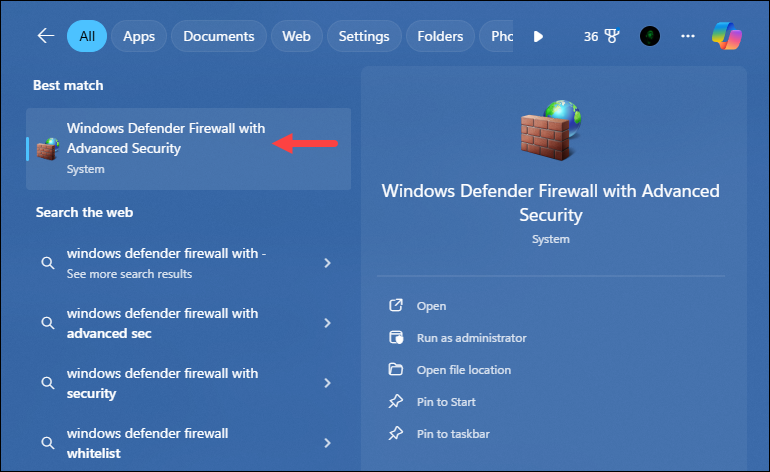
1. Press the Windows key, type Windows Defender Firewall with Advanced Security, and press Enter to open the settings:
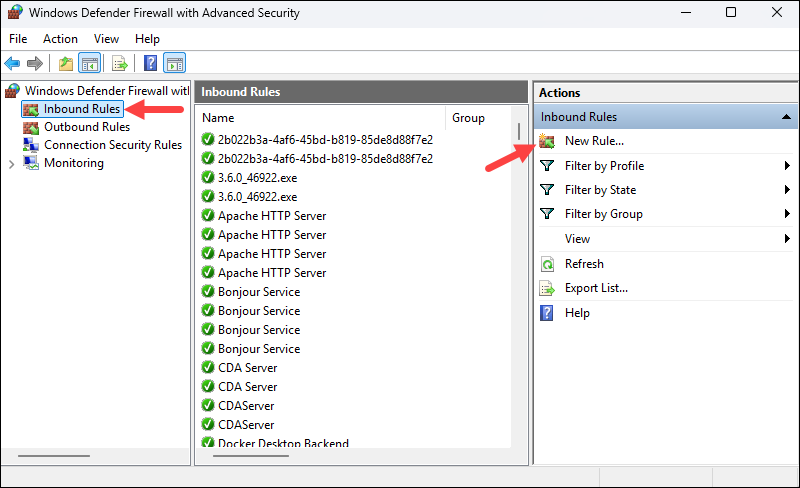
2. Select Inbound Rules and click New Rule.
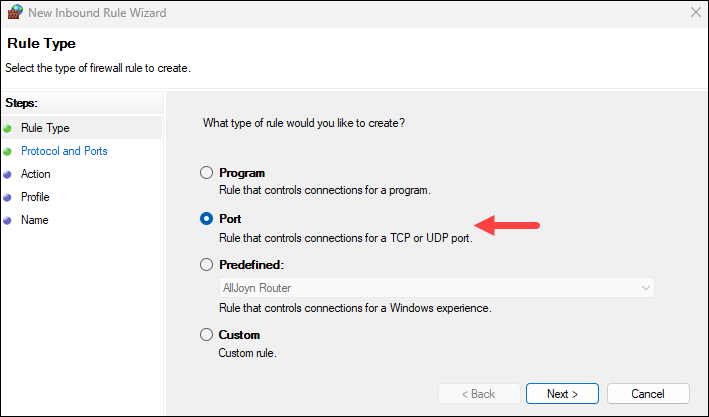
3. Choose Port as the rule type.
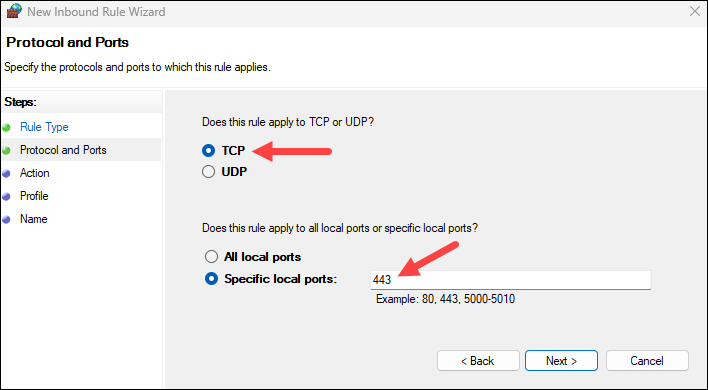
4. Select TCP and specify 443 as the local port.
5. Allow the connection and click Next.
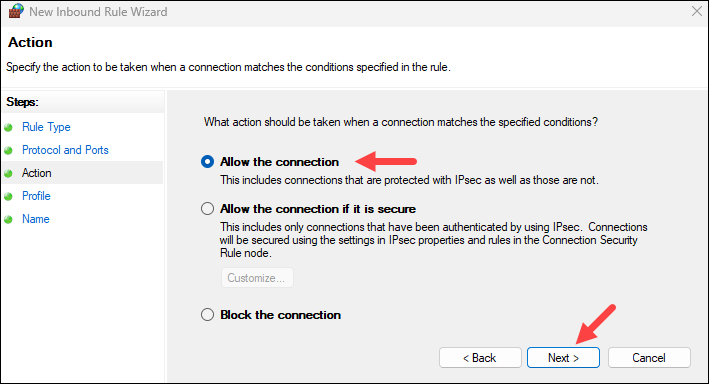
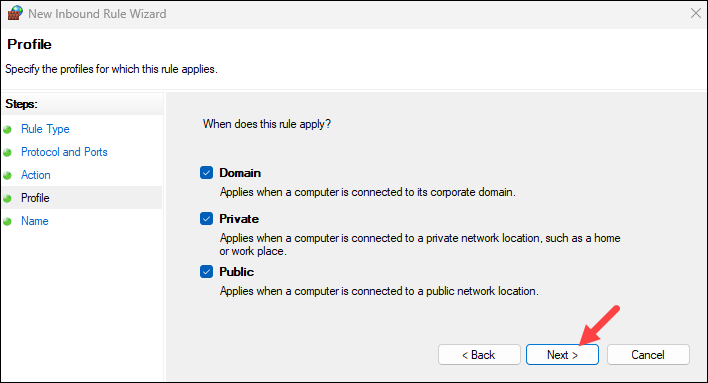
6. Apply the rule to the appropriate profiles (Domain, Private, Public).
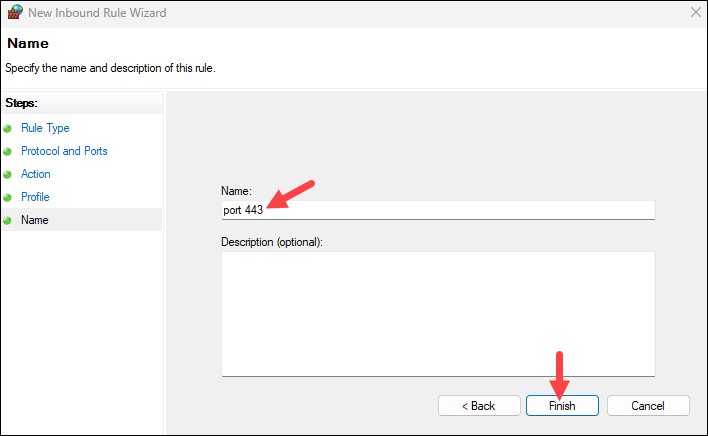
7. Name the rule and click Finish.
After opening the port, ensure that the web server is configured with a valid TLS certificate and is bound to port 443.
How to Open Port 443 on Linux
On Linux systems, opening port 443 requires modifying the system firewall to allow inbound TCP connections. Because Linux distributions use different firewall management tools, the steps vary depending on the firewall framework in place.
Before opening port 443, it's good practice to verify that it's not already in use by another service.
Check Whether Port 443 Is in Use
Use one of the following commands to confirm that no service is currently listening on port 443:
netstat -na | grep :443Or, on newer systems:
sudo ss -tulpn | grep :443If there is no output, the port is not currently in use and can be opened safely.
Ubuntu and UFW-Based Systems
Ubuntu and many Debian-based distributions use UFW (Uncomplicated Firewall) as a frontend for iptables.
Run the following command to allow HTTPS traffic:
sudo ufw allow 443/tcp
Reload the firewall to apply the changes:
sudo ufw reloadOnce applied, UFW permits incoming TCP connections on port 443.
Rocky Linux, CentOS, RHEL, and firewalld-Based Systems
Rocky Linux, CentOS, RHEL, and similar distributions use firewalld for firewall management.
To open port 443:
sudo firewall-cmd --add-port=443/tcpReload the firewall to apply the change:
sudo firewall-cmd --reloadTo make the rule persistent across reboots, add the --permanent flag before reloading.
Other Linux Distributions (iptables)
On systems that rely directly on iptables, port 443 must be explicitly allowed at the packet-filtering level.
Add the following rule:
sudo iptables -A INPUT -p tcp --dport 443 -j ACCEPTAfter adding the rule, save the iptables configuration so it persists after reboot.
After opening port 443, confirm that your web server or application is actively listening on the port and is configured properly with TLS certificates.
How to Open Port 443 on macOS
On macOS, port access is controlled through the built-in application firewall. This is most commonly relevant for local development environments or lightweight servers.
Follow the steps below to allow HTTPS traffic:
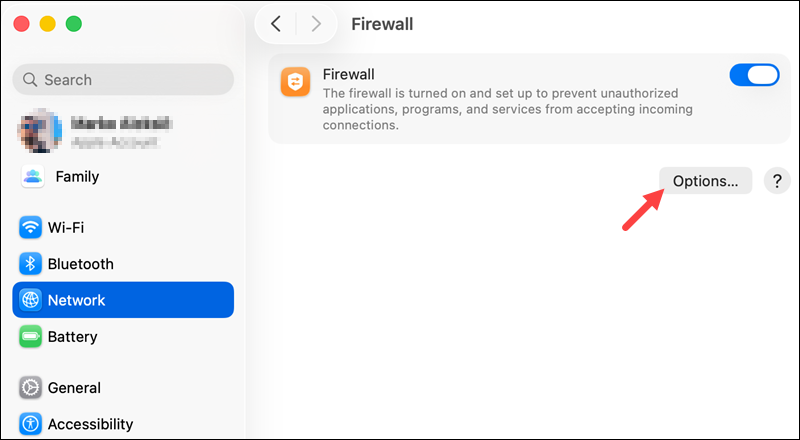
1. Open System Settings and navigate to Network > Firewall.
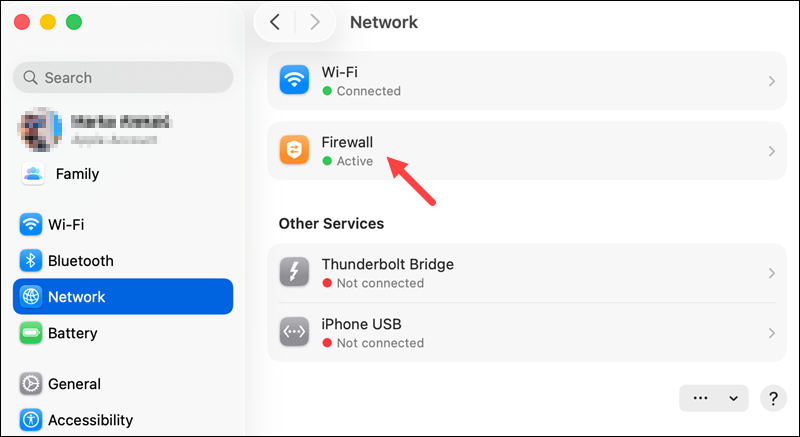
2. Enable the firewall if it is not already active.
3. Open Firewall Options.
4. Click Add Application (+) and select the application that listens on port 443 (for example, Apache, Nginx, or a custom server binary).
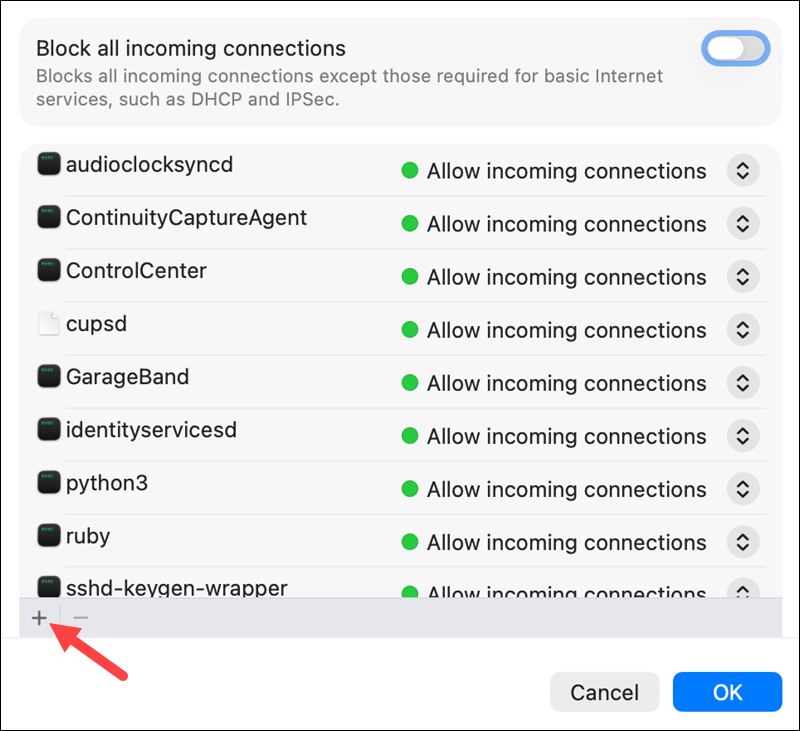
Note: The macOS application firewall does not support port-based rules. It allows or blocks traffic based on the application handling the connection.
5. Set the application to Allow incoming connections.
6. Apply and save the changes.
Once allowed, the selected application can accept incoming HTTPS connections on port 443.
Port 443 Best Practices
Using port 443 correctly goes beyond setting firewall rules. Following best practices ensures that HTTPS traffic remains secure, reliable, and compliant with modern standards.
- Use modern TLS versions. Always enable TLS 1.2 or TLS 1.3 and disable older versions like SSLv3 or TLS 1.0/1.1. Modern TLS versions provide stronger encryption, better performance, and support forward secrecy.
- Manage certificates properly. Use certificates from trusted Certificate Authorities and automate renewal to avoid expiration. Mismanaged or self-signed certificates can trigger browser warnings and expose users to man-in-the-middle attacks.
- Restrict access where needed. Even though port 443 is typically open to the internet, consider restricting access for administrative interfaces or internal services to trusted IP ranges. This reduces the attack surface while maintaining secure HTTPS availability.
- Monitor and audit traffic. Regularly monitor port 443 traffic for unusual patterns or failed connection attempts. Auditing logs helps detect misconfigurations, brute-force attacks, or attempts to exploit application vulnerabilities.
- Keep services updated. Patch web servers, TLS libraries, and any dependent software frequently. Security vulnerabilities often appear at the application layer, and keeping services updated ensures port 443 remains a secure entry point.
- Optimize performance. Enable HTTP/2 or HTTP/3 where possible to take advantage of multiplexing, header compression, and reduced latency. This improves both security and user experience without compromising encryption.
Conclusion
This tutorial explained how port 443 works, its use cases, security considerations, and how to configure it across different operating systems. By understanding how port 443 works and following best practices, administrators can deliver secure, reliable, and performant network services.
Next, learn about port 8443, an alternative to 443, or see how to ping a specific port number in Linux, Windows, and macOS.