In modern cloud and VPS environments, IP address flexibility is as important as compute power or storage. Services need to move, scale, fail over, and recover without breaking connectivity.
A floating IP resolves this issue by decoupling an IP address from a single server instance.
This article will explain what a floating IP is, how it works, common use cases, and how to manage it in practice.
What Is a Floating IP?
A floating IP is a public IP address that does not permanently bind to a single server or network interface. Instead, it exists independently of any specific instance, and you can dynamically assign, reassign, or transfer it between servers within the same cloud provider or data center.
The separation between the IP address and the server is what makes floating IPs valuable in cloud environments. Services can move or fail over without requiring DNS changes, client-side updates, or application reconfiguration. From the user's perspective, the service endpoint remains stable even if the infrastructure behind it changes.
The key characteristics of a floating IP are:
- It is usually public and Internet-routable, although some platforms also support floating IPs that are only routable within private or tenant networks.
- You can attach and detach it without reinstalling the server.
- The infrastructure or cloud provider manages the floating IP address, not the operating system.
How Does a Floating IP Work?
A floating IP works through provider-level routing rather than traditional IP configuration tied to a single machine. The cloud platform controls how it forwards traffic destined for the IP, allowing it to redirect traffic to different servers without changing the IP itself.
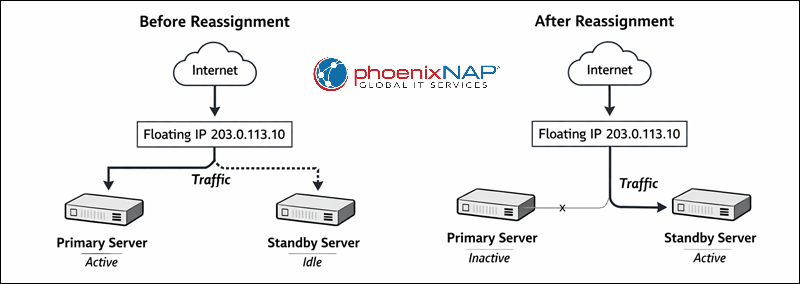
From an architectural standpoint, the floating IP exists in a virtual networking layer. When you assign it to a server, the provider updates its internal routing rules and delivers incoming traffic to the selected instance. If the assignment changes, the provider updates those rules again, often within seconds.
When a floating IP is assigned to a server:
- The provider updates its routing or virtual networking layer.
- The provider forwards incoming traffic to the floating IP to the target instance.
- The server may or may not need additional OS-level configuration, depending on the platform. In some environments, you must configure the IP on the interface or announce it via ARP.
When the IP is reassigned:
- The provider updates the routing again, often within seconds.
- Existing connections may drop, but new connections go to the new server.
From the outside, the service appears unchanged because the IP address stays the same. The following diagram illustrates how it works:
Floating IP Use Cases
Floating IPs are most useful in scenarios where service continuity and fast reaction time matter more than distributing traffic across multiple servers. Users commonly use this feature as a control mechanism for redirecting traffic rather than as a scaling tool.
Because the infrastructure handles reassignment, floating IPs allow operators to respond quickly to failures, deployments, or maintenance events without waiting for DNS propagation or client updates.
Typical floating IP use cases are:
- High availability and failover. Quickly move the IP to a standby server if the primary one fails.
- Service migration. Move services between servers without changing DNS or client configuration.
- Blue-green deployments. Switch traffic between old and new versions of an application instantly.
- Load balancer frontends. Use a floating IP as the public entry point that forwards traffic internally.
- Maintenance windows. Detach the IP during maintenance and reattach it afterward.
- Disaster recovery. Redirect traffic to a recovery environment during outages.
Note: Floating IPs are typically limited to a single region, availability zone, or data center. They are not suitable for cross-region or global failover without additional networking or traffic management layers.
How to Use Floating IPs?
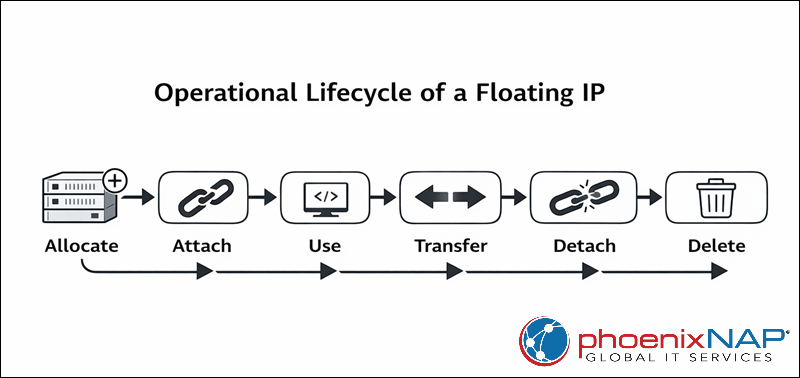
To use a floating IP, you need to manage it through your cloud provider's control panel, API, or CLI. While the exact workflow varies by platform, its overall lifecycle (allocation, assignment, transfer, and release) is largely the same across providers.
Operationally, operators treat floating IPs as independent resources. This means they can automate, monitor, and manage them separately from the servers to which they attach them. This feature is especially useful in high-availability or infrastructure-as-code setups.
How to Configure a Floating IP?
Configuring a floating IP is the first step toward making a service reachable through a stable, movable endpoint. While providers differ in UI and terminology, the configuration process follows the same logical sequence everywhere.
The goal is to allocate the IP, attach it correctly, and ensure the operating system and application are ready to accept traffic through it.
Follow the steps below to configure a floating IP:
Step 1: Allocate Floating IP
Start by reserving a floating IP from your provider's pool. This creates an IP resource that exists independently of any server. At this stage, no service can reach the IP, and the system does not route any traffic. However, note that billing may begin, depending on the provider.
Step 2: Assign Floating IP to Server
Next, attach the floating IP to the target server or network interface. This action establishes routing at the provider level. Once you assign it, the system forwards incoming traffic to the server, which acts as the active endpoint for that IP.
Step 3: Verify OS-level Networking
Depending on the platform, you may need to perform minimal OS-side checks to ensure the system properly accepts traffic. Verify that:
- The application or service is listening on the correct port.
- Firewall rules allow inbound traffic to that port.
- If required, add the floating IP as an alias to the network interface.
In many managed cloud environments, the system does not require you to manually configure the IP inside the OS.
Step 4: Test Connectivity
Finally, confirm that the floating IP works as expected. Access the service using the floating IP directly. You can check the application logs for incoming requests and verify that traffic is routed to the correct server.
Once you test the connectivity, the floating IP is ready for production use.
How to Transfer a Floating IP?
Transferring a floating IP enables failover, migrations, and zero-DNS-change deployments. The process is simple, but preparation is critical to avoid downtime beyond the reassignment itself.
Before starting, ensure that the target server is fully ready to accept production traffic.
Step 1: Prepare Target Server
The new server must be healthy and ready before the IP is moved.
Check that:
- The application or service is running.
- Configuration matches the current production setup.
- Firewall rules are in place.
- Required data is synchronized.
This step prevents avoidable outages once traffic switches over.
Step 2: Detach Floating IP from Current Server
Remove the floating IP from the active server using the provider's control panel, CLI, or API. At this moment, incoming traffic temporarily has no destination, and any existing connections may drop. However, this step is usually completed within seconds.
Step 3: Attach Floating IP to New Server
Immediately assign the floating IP to the prepared target server. After attachment, new connections are routed to the new server, and the floating IP becomes reachable again. Most providers apply this change almost instantly.
Note: Some providers implement reassignment as a single atomic operation rather than as a separate detach-and-attach step.
Step 4: Validate Traffic Flow
Confirm that the transfer was successful. You can send test requests to the floating IP, check logs on the new server, and monitor application health and error rates.
If everything is configured correctly, users should see minimal disruption.
How to Delete a Floating IP?
Deleting a floating IP is a cleanup operation that permanently releases the address back to the provider. This should only be done when you are certain the IP is no longer referenced by any service or client.
Since the system can reassign released IPs to other customers, you should handle deletion carefully.
Step 1: Detach Floating IP from Any Server
A floating IP must not be actively assigned before deletion. Detach it from the server via the provider interface, and confirm that no routing is in place for the IP address. At this point, the service using that IP becomes unreachable.
Step 2: Release or Delete Floating IP
Once detached, delete or release the IP resource. The system returns the IP to the provider's pool, and billing typically stops after you release it. Deleting the floating IP is usually irreversible.
Step 3: Update Dependent Configurations
After deletion, review and update any related components. The cleanup involves the following steps:
- Removing firewall rules referencing the IP.
- Updating monitoring and alerting.
- Cleaning up documentation or automation scripts.
Failing to do this can lead to confusion or broken tooling later.
Floating IPs Benefits and Drawbacks
Floating IPs offer clear operational advantages, particularly in environments where uptime and fast recovery are priorities. However, they also introduce design constraints that need to be understood before adopting them as a core networking mechanism.
Evaluating both benefits and drawbacks helps you determine whether a floating IP is sufficient on its own or whether you should combine it with other components such as load balancers, health checks, or orchestration tools.
Floating IPs Benefits
Floating IPs simplify infrastructure management and improve overall service resilience by removing the tight coupling between a service endpoint and a specific server. This makes them particularly effective in environments where availability and operational flexibility are critical.
The key benefits of floating IPs include:
- Fast failover. Traffic can be redirected to a standby server almost instantly, without waiting for DNS propagation or client-side cache expiration.
- Reduced downtime. You can perform maintenance tasks, upgrades, and incident response with minimal service interruption by moving the IP address rather than stopping the service.
- Flexible service migration. Applications can be relocated between servers or hosts without changing IP addresses, simplifying both planned migrations and emergency moves.
- Cleaner HA and DR architectures. Floating IPs provide a straightforward mechanism for implementing high-availability and disaster-recovery designs without complex networking logic.
- Predictable service endpoints. Clients, integrations, and external systems always connect to the same IP address, reducing configuration drift and operational overhead.
They are especially valuable for stateful services where DNS-based failover would be too slow or unreliable.
Floating IPs Drawbacks
Despite their usefulness, floating IPs also introduce limitations that should be considered during infrastructure design. Relying on them without understanding these constraints can lead to brittle or hard-to-scale setups.
Common drawbacks include:
- Provider dependency. Floating IP functionality is implemented differently across providers, which can reduce portability and complicate multi-cloud strategies.
- Limited scope. Providers usually restrict floating IPs to a single region, availability zone, or data center, which limits their usefulness for global redundancy.
- Connection drops. Reassigning floating IPs typically terminates active connections, which may impact users if applications do not handle reconnections gracefully.
- Additional cost. Some providers charge for floating IPs, especially when they are allocated but not actively attached to a server.
- Not a load balancer. A floating IP directs traffic to only one active server at a time and cannot distribute requests across multiple backends.
- Security. When using floating IPs, review firewall rules, security groups, and IP-based allowlists during reassignment. Moving an IP to a different server implicitly transfers its trust level.
To mitigate these drawbacks, combine floating IPs with proper monitoring, automation, and complementary infrastructure components.
Conclusion
This article explained the concept of floating IPs, how to use them, and the key advantages and disadvantages. By separating a public-facing IP address from the lifecycle of individual servers, floating IPs enable fast failover, predictable access points, and smoother maintenance workflows without relying on slow DNS propagation.
Next, learn the difference between a public and private IP address or see how to block an IP address.