Telnet and SSH are network protocols used to access and manage remote systems. But what is it that makes them different, and when is it better to use one over the other?
This tutorial covers what Telnet and SSH are, when they are used, and how they work.
Telnet vs. SSH: Definitions
Telnet (Telecommunications and Networks) and SSH (Secure SHell) are general-purpose client-server applications that allow users to interact with remote systems.
Telnet
Telnet is practically as old as the Internet itself. It was launched alongside the Internet in 1969 and is still used by purists today.
Telnet is an application protocol that helps users communicate with a remote system. It uses a text-based interface to create a virtual terminal, allowing administrators to access applications on other devices.
SSH
SSH serves the same primary function as Telnet, but does so in a more secure way. This protocol provides secure access even on unsecured networks, eliminating many of Telnet's vulnerabilities.
With SSH, administrators can log in to remote devices, execute commands, transfer files between devices, and more.
Note: Lear more in-depth about SSH in our article How Does SSH Work?
Telnet vs. SSH: Comparison Overview
Although Telnet and SSH have some similarities, there are many differences between the two. SSH is much more secure than Telnet, which has led to its near-complete replacement in everyday use.
Telnet and SSH use different default ports. While Telnet can only transfer data as plain text, SSH can encrypt traffic in both directions.
| Feature | Telnet | SSH |
| Operation | Uses TCP port 23 and works best with local area networks. | Uses TCP port 22 by default. Easy to change the port number. |
| Security | Less secure than SSH, with many vulnerabilities. Difficult to encrypt data. | Highly secure. |
| Authentication | No authentication mechanism. | Uses public key encryption. |
| Data Formats | Data is transferred as plain text. | Data is transferred in an encrypted format via a secure channel. |
| Operating Systems | Linux and Windows. | All popular operating systems. |
| Bandwidth Usage | Low. | High. |
Operation
Telnet
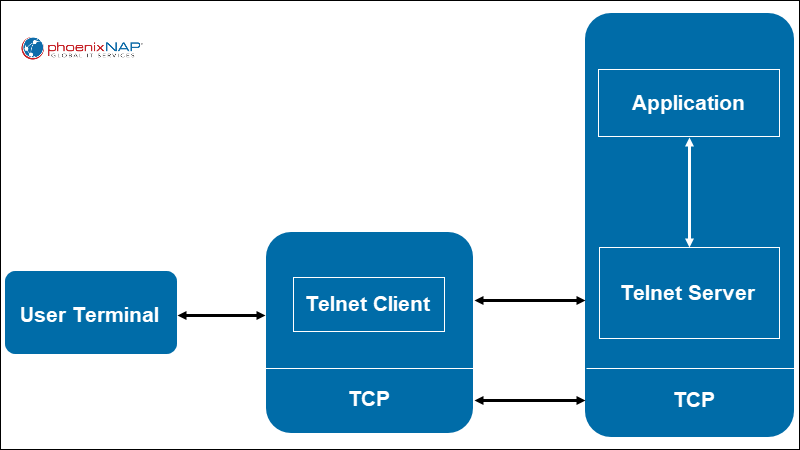
Telnet requires a server application on the remote system you want to manage, and the client application installed on the local machine.
Telnet uses TCP port 23 to establish a connection with a remote system. This system then acts as a Telnet server and can receive commands. Commands are sent using the NVT (Network Virtual Terminal) format, received and interpreted by the server, and sent to the appropriate application.
SSH
SSH establishes a secure connection to the server on port 22 (which you can change). With key-based authentication, after the client verifies the server, a session key is generated and sent to both the client and the server. This key encrypts the traffic for the ongoing session.
Finally, the server verifies the client using an SSH key pair generated by the client. Once the client is authenticated, an encrypted connection is established, and the two systems securely exchange data.
Note: If you are working with Windows, you need an SSH client, such as Putty, to use SSH.
Security
Telnet
Telnet doesn't use any security mechanisms or protocols when sending data. This makes it highly vulnerable unless it is used on private, trusted networks.
SSH
When SSD sessions use key pairs for authentication, it is extremely difficult to decrypt and read the exchanged data. This makes SSH a highly secure way of transferring data over unsecured networks.
Authentication
Telnet
Telnet doesn't use any authentication mechanisms when establishing a connection.
SSH
The most common and secure SSH authentication is public key authentication. When an SSH key pair is generated, the client holds the private key, while the public key is sent to a server. If a client tries to access a server via SSH, the server authenticates the client by comparing the public key to the private key. If the keys match, the two systems can establish a secure connection.
Note: Learn how to generate SSH keys by visiting one of our tutorials depending on the OS you are using:
Data Formats
Telnet
Telnet transfers data as plain text using the NVT format.
SSH
SSH uses an encrypted format to transfer data through a secure connection.
When to Use Telnet?
Since SSH is vastly more secure than Telnet, there are two cases when it is recommended to use Telnet over SSH:
- When working on trusted networks (such as LANs) that are not connected to the Internet.
- When working with devices that don't support SSH.
Telnet's lack of security stops being an issue in these cases, while lower bandwidth usage becomes a benefit.
When to Use SSH?
Because it is highly secure, you should use SSH whenever you want to connect to a remote system over the Internet.
SSH also offers more functionality than Telnet, such as secure file transfer and port forwarding.
Conclusion
After reading this tutorial, you should better understand the differences between Telnet and SSH, and the best way to use them.