Stored procedures in PostgreSQL allow users to bundle multiple SQL operations into a single, reusable routine that runs directly on the database server. Unlike functions, stored procedures manage their own transactions, making them suitable for multi-step workflows and controlled commit or rollback operations.
This article will explain stored procedures in PostgreSQL, how they work, their use cases, and how to use them.
Prerequisites
- PostgreSQL installed (version 11 or later to support the procedures).
- A user account with privileges to create and manage database objects.
- Access to psql or a PostgreSQL GUI client (such as pgAdmin).
What Is a Stored Procedure in PostgreSQL?
A stored procedure in PostgreSQL is a server-side routine that contains one or more SQL statements used to perform a specific task or a sequence of operations. Procedures run directly on the database server, helping centralize logic, improve performance, and reduce the number of queries sent from applications.
The key characteristics of stored procedures include:
- Centralized logic. Applications call a single routine instead of executing multiple queries.
- Server-side execution. Reduces network overhead and improves performance for complex workflows.
- Transaction control. Procedures can manage their own commits and rollbacks, unlike functions.
- Language flexibility. Support for PL/pgSQL and other procedural languages (e.g., PL/Python, PL/Perl).
- Ownership. The user who creates the procedure becomes its owner and controls permissions.
- Modular design. Encourages reusable, consistent logic inside the database.
Note: Unlike functions, procedures cannot return values directly. They are intended for actions, not data retrieval.
How Do Stored Procedures Work?
Stored procedures execute directly on the PostgreSQL server, running their SQL statements in the exact order defined in the procedure body. When a client issues a CALL command, PostgreSQL loads the procedure, processes each statement, and applies any transaction logic included inside it.
Unlike functions, procedures can control their own transactions, allowing users to start, commit, or roll back work within the routine itself. However, note that PostgreSQL does not automatically create a transaction for a procedure. If you want a procedure to run in its own isolated transaction, call it outside an explicit BEGIN/COMMIT block.
Because all logic runs on the server, stored procedures reduce network overhead and improve performance for multi-step operations. Additionally, it ensures consistent behavior across applications that call the same routine.
PostgreSQL Stored Procedures Use Cases
Stored procedures are useful whenever you need predictable, repeatable workflows that run directly on the database server. They help centralize logic, reduce client-side complexity, and streamline operations that require multiple SQL statements executed as a single routine.
Common use cases include:
- Multi-step operations. Execute several dependent SQL statements in one controlled workflow.
- Data validation. Enforce business rules before inserts, updates, or deletes.
- Batch processing tasks. Archive old data, clean up tables, or generate reports on a schedule.
- Transactional workflows. Perform operations that require coordinated commits or rollbacks.
- Cross-application consistency. Ensure multiple services follow the same logic for updates or calculations.
- Performance-sensitive operations. Reduce network round-trip times by processing logic entirely on the server.
How to Use Stored Procedures in PostgreSQL
Using stored procedures in PostgreSQL involves creating them, updating them when needed, and removing them when they are no longer required. PostgreSQL provides dedicated commands for each of these actions, allowing users to control how procedures are defined, maintained, and executed.
The following sections explain how to create, replace, and delete stored procedures, with examples that illustrate the exact syntax and workflow.
How to Create a Stored Procedure
Creating a stored procedure in PostgreSQL involves writing the procedure definition and executing it within your database environment. You can do this from the terminal using psql or through pgAdmin's query editor.
The steps below show how to access your database and run the procedure code.
Create a Stored Procedure Using the Terminal
To create a stored procedure using the terminal, follow these steps:
1. Open the terminal. On Windows, use PowerShell, Command Prompt, or psql. On Linux and macOS, use your system terminal.
2. Log in to PostgreSQL and enter your password when prompted.
3. Select the database where you want to create the procedure. For example:
\c your_database_name;4. Create the stored procedure. For example, use the SQL below to log user logins:
CREATE PROCEDURE log_user_login(IN username TEXT)
LANGUAGE plpgsql
AS $$
BEGIN
    INSERT INTO user_logins (user_name, login_time)
    VALUES (username, NOW());
END;
$$;
5. Call the procedure to test it:
CALL log_user_login('username');Replace username with the user name you want to log:

The CREATE PROCEDURE statement defines a new log_user_login procedure that inserts a username and the current timestamp into the user_logins table, centralizing the logic for logging user activity.
Create a Stored Procedure Using pgAdmin
To create a stored procedure using pgAdmin, follow these steps:
1. Open pgAdmin and connect to your PostgreSQL server.
2. In the left sidebar, navigate to Servers > Databases > your_database > Schemas > public.
3. Right-click Procedures and select Create > Procedure...
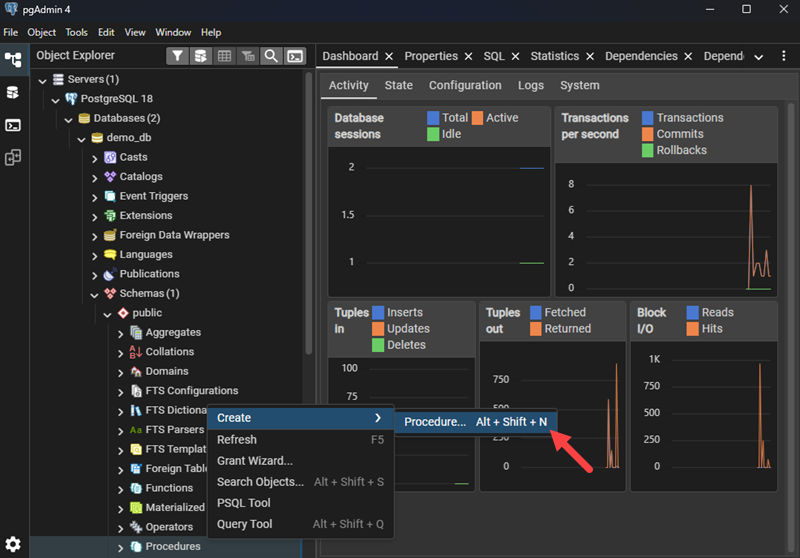
4. In the dialog:
- Enter a procedure Name (e.g.,
log_user_login). - Add parameters under the Definition tab.
- Select plpgsql as the language.
- In the Code tab, paste the procedure body:
BEGIN
    INSERT INTO user_logins (user_name, login_time)
    VALUES (username, NOW());
END;
5. Click Save.
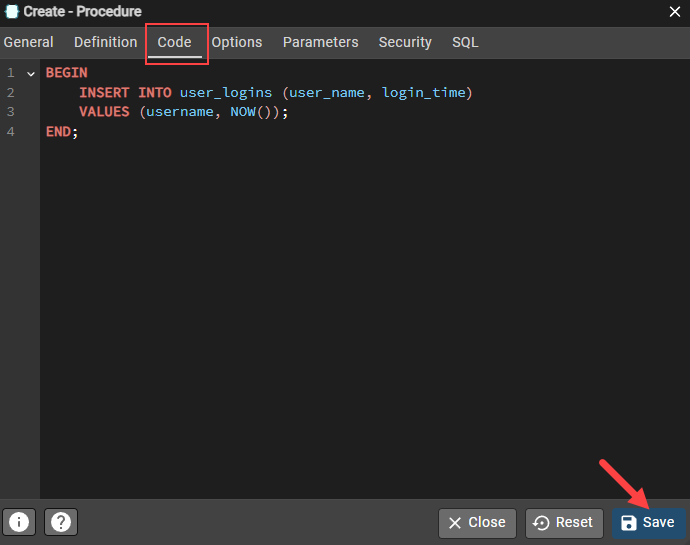
6. To execute it, right-click the procedure and select Execute, or open the Query Tool and run:
CALL log_user_login('alice');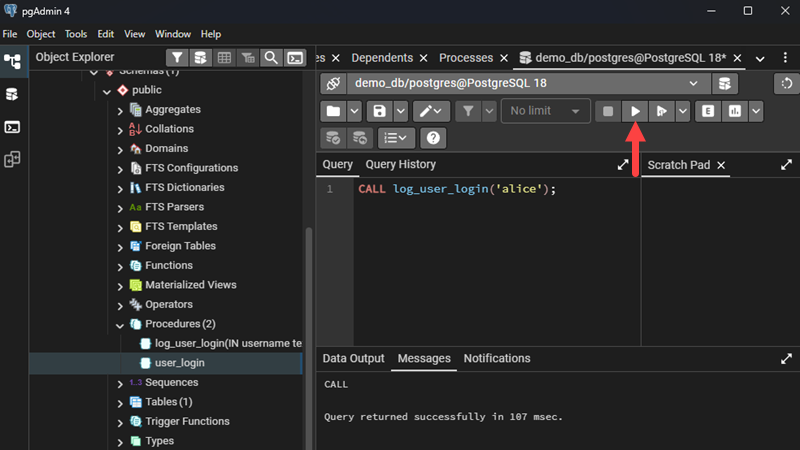
How to Replace a Stored Procedure
Replacing a stored procedure lets you update its logic without first dropping it. You must keep the same procedure name and parameter list.
Important: PostgreSQL does not allow replacing a procedure if the parameter list changes. If parameters must change, first DROP the procedure and then CREATE a new one.
You can run the replacement code in psql or pgAdmin.
Replace a Stored Procedure Using psql (Terminal)
Follow the steps below:
1. Open the terminal and log in to PostgreSQL.
\c your_database_name;4. Run CREATE OR REPLACE PROCEDURE:
CREATE OR REPLACE PROCEDURE log_user_login(IN username TEXT)
LANGUAGE plpgsql
AS $$
BEGIN
    INSERT INTO user_logins (user_name, login_time, source)
    VALUES (username, NOW(), 'web');
END;
$$;
5. Call the updated procedure to confirm it works:
CALL log_user_login('alice');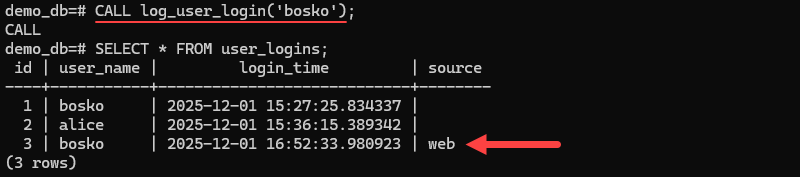
The CREATE OR REPLACE PROCEDURE statement updated the existing log_user_login procedure by adding a new source column to the insert operation. This allows each log entry to include a fixed web value, while keeping the rest of the procedure logic unchanged.
Replace a Stored Procedure Using pgAdmin
Follow the steps below to replace a stored procedure with pgAdmin:
1. Open pgAdmin and connect to your database.
2. In the Object Explorer, expand Procedures and select the procedure you want to modify.
3. Right-click the procedure and select Properties.
4. Update the code under the Definition tab.
5. Click Save to overwrite the existing procedure.
6. Test it using Query Tool with:
CALL log_user_login('ben');How to Delete a Stored Procedure
Deleting a stored procedure removes it permanently from the database. PostgreSQL requires you to specify the procedure name and parameter types.
Delete a Stored Procedure Using psql (Terminal)
Follow the steps below if you prefer using the CLI:
1. Open the terminal and log in to PostgreSQL.
2. Switch to your database:
\c your_database_name;3. Delete the stored procedure with:
DROP PROCEDURE log_user_login(TEXT);4. You can confirm removal by listing all functions (procedures appear under functions):
\df+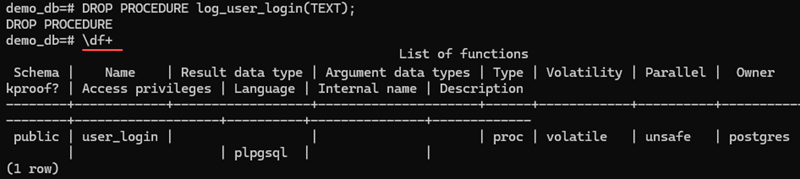
The log_user_login procedure does not appear in the list, which means it was successfully deleted.
Important: PostgreSQL does not drop the procedure if the parameter types do not match exactly (including order and IN/OUT).
Delete a Stored Procedure Using pgAdmin
If you prefer the GUI, follow the steps below:
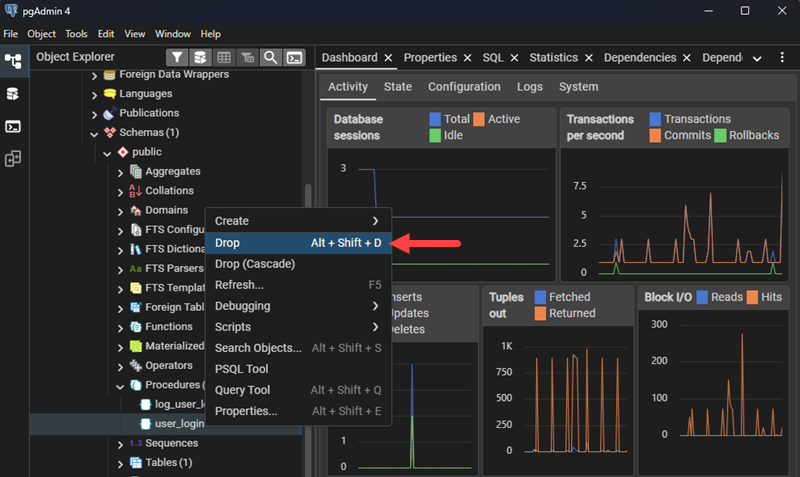
1. Open pgAdmin and navigate to your database. Expand Schemas > public > Procedures and right-click the procedure you want to delete.
2. Select the Drop option.
3. Confirm the action in the pop-up window.
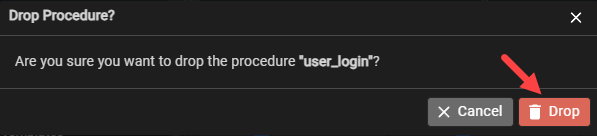
The procedure is removed from the list instantly.
PostgreSQL Stored Procedure Examples
The following examples show how stored procedures handle inserts, updates, and multi-step operations. Each procedure can be created and executed from the terminal using psql or through pgAdmin's query editor.
Use the examples below to understand how procedures work in real workflows.
Example 1: Insert a New Order Record
This procedure inserts a new order into the orders table and automatically timestamps the operation. It centralizes a common workflow and ensures every new order follows the same pattern.
The SQL statement is:
CREATE PROCEDURE add_order(IN customer_id INT, IN total_amount NUMERIC)
LANGUAGE plpgsql
AS $$
BEGIN
    INSERT INTO orders (customer_id, total_amount, created_at)
    VALUES (customer_id, total_amount, NOW());
END;
$$;
To run the statement in psql:
1. Open your terminal and log in to PostgreSQL.
2. Connect to your database:
\c your_database_name;3. Create the procedure by pasting the SQL statement above.
4. Call the procedure:
CALL add_order(12, 89.50);5. Confirm it worked with:
SELECT * FROM orders;
To run the statement in pgAdmin:
1. Open pgAdmin and connect to your server.
2. Go to Tools and select Query Tool.
3. Paste the SQL statement to create the procedure and click Execute.
4. Run:
CALL add_order(12, 89.50);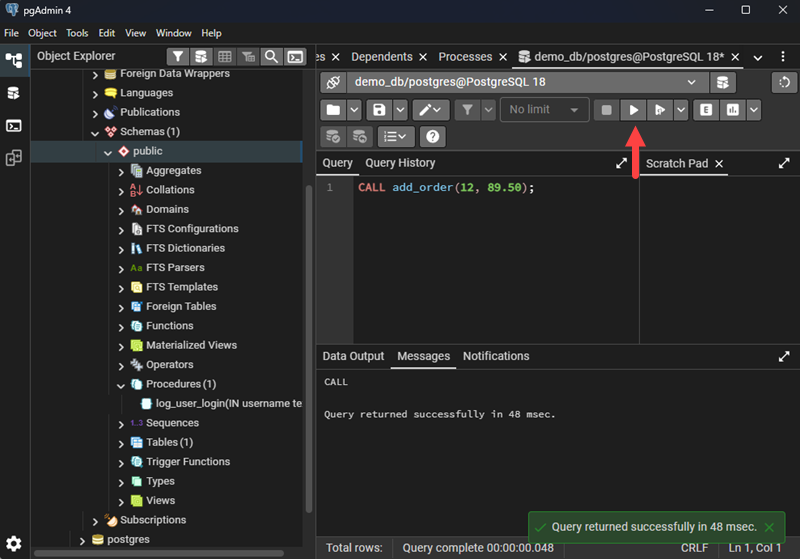
Example 2: Update Product Stock Levels
This procedure adjusts the product's stock value after a sale or restock. It helps maintain consistent inventory updates across different applications.
The SQL statement is:
CREATE PROCEDURE update_stock(IN product_id INT, IN quantity_change INT)
LANGUAGE plpgsql
AS $$
BEGIN
    UPDATE products
    SET stock = stock + quantity_change,
        updated_at = NOW()
    WHERE id = product_id;
END;
$$;
To run the statement in psql (Terminal)
1. Open the terminal and log in to psql.
2. Select your database:
\c your_database_name;3. Create the procedure using the SQL above.
4. Execute it:
CALL update_stock(1, -3);Verify that changes were made by running:
SELECT * FROM products;
The stock number decreased from 10 to 7, indicating that the changes were applied.
To run the statement in pgAdmin:
1. Open pgAdmin and launch Query Tool for your database.
2. Paste the SQL and execute it.
3. Run this query:
CALL update_stock(1, -3);Example 3: Archive Old Log Entries
This procedure moves log entries older than a given number of days into an archive table. It demonstrates a multi-step workflow done entirely inside the database.
The SQL statement is:
CREATE PROCEDURE archive_logs(IN days_old INT)
LANGUAGE plpgsql
AS $$
BEGIN
    INSERT INTO log_archive (log_id, message, created_at)
    SELECT id, message, created_at
    FROM logs
    WHERE created_at < NOW() - (days_old || ' days')::interval;

    DELETE FROM logs
    WHERE created_at < NOW() - (days_old || ' days')::interval;
END;
$$;
To run the statement in psql:
1. Open the terminal, log in, and connect to your database.
2. Create the procedure using the SQL above.
3. Run the archive operation:
CALL archive_logs(7);The command archives logs older than 7 days.
4. Verify archived logs and active logs with the following commands:
Check active logs:
SELECT * FROM logs;Check archived logs:
SELECT * FROM log_archive;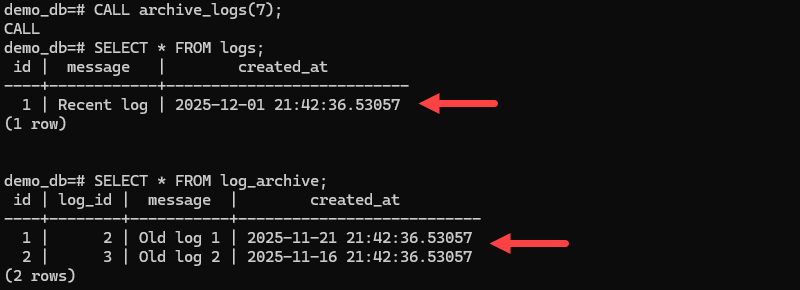
To run the statement in pgAdmin:
1. Start pgAdmin and open Query Tool.
2. Paste the SQL definition and execute it.
3. Call the procedure:
CALL archive_logs(30);PostgreSQL Stored Procedures Benefits and Drawbacks
Stored procedures offer clear advantages for managing multi-step operations inside the database, but they also come with limitations that affect maintainability and flexibility. Understanding both helps you decide when stored procedures are the right tool for your PostgreSQL workflows.
Benefits
Stored procedures in PostgreSQL provide several practical benefits:
- Transaction control. They allow explicit commits and rollbacks inside the procedure, enabling controlled multi-step operations.
- Performance optimization. Logic runs on the database server, reducing round-trip communication and improving execution speed.
- Reusability and consistency. Procedures package reusable routines that enforce the same rules and operations across applications.
- Reduced application complexity. Moving logic to the database reduces the amount of code needed at the application layer.
- Language flexibility. PostgreSQL supports multiple procedural languages besides PL/pgSQL, including PL/Python and PL/Perl.
Drawbacks
Stored procedures also have constraints that can affect long-term maintainability:
- Harder to version-control. Database-side logic is more difficult to track, review, and manage compared to application code.
- Limited debugging tools. Debugging PL/pgSQL procedures is less intuitive than debugging application code.
- Tighter coupling. Storing logic in the database can make applications dependent on PostgreSQL-specific behavior.
- Less flexibility for rapid iteration. Changing procedures requires database updates and sometimes coordinating changes across environments.
Conclusion
This article explained stored procedures, how they work, their most common use cases, and provided real-life examples to make it easier to understand them. They streamline complex workflows and improve performance in scenarios where data operations need to happen close to the source.
Next, learn about MySQL stored procedures or learn what a database schema is.