PostgreSQL relies on a powerful permission system that controls what each user can do inside a database. At the top of that system is the superuser, a role that bypasses all privilege checks and can perform any operation.
This article will explain what a PostgreSQL superuser is, why it exists, and how to safely create, modify, or revoke superuser status using SQL commands.
Prerequisites
- PostgreSQL installed (learn how to install it on Windows or Ubuntu).
- An account with superuser privileges (such as the default
postgresaccount).
What Is a PostgreSQL Superuser?
A PostgreSQL superuser is the most privileged role in the database. It has unrestricted access and can execute any action without needing explicit permissions.
A superuser can:
- Bypass all permission and ownership checks.
- Create, manage, or delete databases and roles.
- Modify system catalogs directly.
- Change configuration settings.
- Read, insert, update, or delete any data in any table.
Because there are no restrictions, a PostgreSQL superuser is equivalent to the Linux root. This makes the role essential for administration, but potentially risky if misused, which is why best practice is to use a regular role for daily work and reserve the superuser only for administrative tasks.
A fresh PostgreSQL installation creates one superuser automatically, usually named postgres. This role owns the initial database instance and is used to run administrative commands after installation.
How to Create a Superuser in PostgreSQL?
Creating a superuser requires access to an existing superuser account. This ensures that only trusted administrators can grant unrestricted privileges. Whether you want to create a new superuser or elevate an existing role, the process always starts by connecting to PostgreSQL with a superuser such as postgres.
The sections below show how to create, change, and revoke superuser status in PostgreSQL.
How to Create New Superusers?
You can create a new PostgreSQL superuser by running either CREATE USER or CREATE ROLE. Both commands achieve the same result but differ slightly in syntax and flexibility. Before executing them, you must log in as a current superuser.
The steps in the sections below show how to perform the entire process from the terminal.
Create a superuser using CREATE USER
Use this method when you want a straightforward SQL command that automatically grants login capability and sets a password.
Note: CREATE USER is an alias of CREATE ROLE, which means they are interchangeable. The difference is that CREATE USER implies LOGIN by default, whereas CREATE ROLE does not. Use CREATE ROLE ... LOGIN when you want explicit control.
Follow the steps below:
1. Open the terminal and connect to PostgreSQL as a superuser:
sudo -u postgres psqlThis opens the psql shell using the default postgres superuser.
If you are using a custom superuser, connect with:
psql -U [your_superuser_name]2. Create the new superuser with password authentication. Use the syntax below:
CREATE USER [username] WITH SUPERUSER PASSWORD 'your_password';Replace [username] with the username you want to use and replace your_password with the actual password for the new account. For example:

The output confirms that the new superuser has been created successfully.
3. Confirm the new role and its privileges with:
\du username
The role should be listed with the Superuser attribute assigned.
Create a superuser using CREATE ROLE
The CREATE ROLE method gives you more control over role attributes. Use it when you want to specify login capability explicitly.
Note: To run CREATE ROLE, you must be a superuser or hold CREATEROLE privilege. However, CREATEROLE does not permit creating superuser roles since only a current superuser can make another superuser.
Follow the steps below:
1. Open the terminal and connect as a superuser:sudo -u postgres psql
2. Create a new role with superuser privileges and login rights. Use the syntax below:
CREATE ROLE username SUPERUSER LOGIN PASSWORD 'your_password';For example:

The output message confirms the role was created.
3. Verify the role attributes with:
\du username
The output shows the new account with the Superuser attribute.
How to Change a User to Superuser?
If you already have a regular role that needs full administrative privileges, you can promote it using ALTER USER or ALTER ROLE. The procedure is nearly identical to creating a new superuser, but instead of creating a role, you modify the attributes of an existing role.
Granting an existing user superuser privileges is a common scenario when developers take on administrative responsibilities or when a service account needs elevated privileges temporarily.
Follow the steps below:
1. Open the terminal and connect to PostgreSQL as an existing superuser. For example:
sudo -u postgres psql2. Promote the existing user to superuser status with the following syntax:
ALTER USER [existing_user] WITH SUPERUSER;Replace [existing_user] with the username of the account whose privileges you want to elevate.
Note: The syntax is the same for ALTER USER and ALTER ROLE.
The output indicates that PostgreSQL successfully updated the user's attributes.
3. Run the following command to confirm that the role now has superuser privileges:
\du existing_user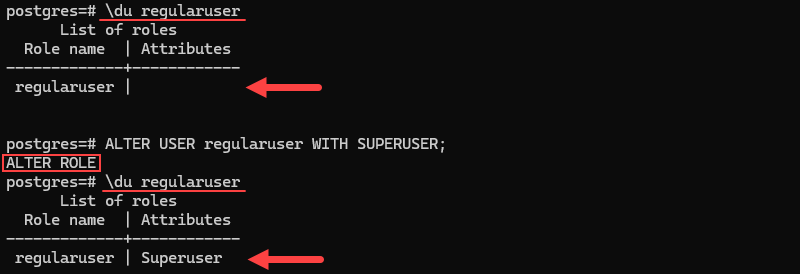
The output lists the role along with the Superuser attribute.
How to Revoke Superuser Status?
Removing superuser privileges helps enforce least-privilege access. When a user no longer needs full control, downgrade the account to an ordinary role. This prevents accidental or unauthorized changes to databases, roles, and configuration settings.
Only a superuser can revoke superuser rights.
Follow the steps below:
1. Connect to PostgreSQL as a superuser. For example:
sudo -u postgres psql2. Revoke the superuser attribute from the desired account with the following syntax:
ALTER USER username NOSUPERUSER;Replace [username] with the name of the account for which you want to remove superuser privileges.
Note: The syntax for ALTER ROLE is the same as for ALTER USER, and you can choose either one to revoke superuser rights.
The output confirms that the privilege change was applied.
3. Verify the updated role privileges with:
\du username
The Superuser attribute should no longer appear.
Conclusion
This tutorial explained what a PostgreSQL superuser is and how to create, change, or revoke a superuser role. A PostgreSQL superuser has unrestricted access to the entire database environment, making it essential for installation, configuration, and high-level maintenance tasks.
Next, see how to view, set, or change the default PostgreSQL password, or see how to deploy PostgreSQL on Kubernetes.