Administering a database requires removing user accounts when they are no longer needed. Deleting unnecessary Postgres users is an essential database security practice. This action also removes a potentially unnoticeable access point for hackers.
This tutorial explains how to drop a Postgres user in multiple ways.
Prerequisites
- Access to the command line or terminal with sudo privileges.
- Postgres installed, preferably the latest version.
- Postgres users to drop. Follow our tutorial to create Postgres users for testing purposes.
Delete a Postgres User
A PostgreSQL user has login privileges by default. There are two methods to remove a user, and both require access to the CREATEROLE rights. To drop a superuser, the SUPERUSER privilege is mandatory.
The postgres user created during installation has all the necessary privileges by default. The examples below use the postgres user to connect to PostgreSQL.
Method 1: Delete a Postgres User With dropuser Utility
Postgres offers a client utility for removing a user without connecting to the PSQL command-line interface.
To delete a user in Postgres with dropuser, run the following command in the terminal:
sudo -u postgres dropuser <user> -e
Note: The -e tag echoes the server's response, showing whether the command completes successfully. Without the tag, if the command is successful, the terminal does not output a message.
Alternatively, split the command into two steps:
1. Switch to the postgres user (or another user with the correct privileges):
sudo su - postgres2. Run the dropuser command:
dropuser <name> -e
In both cases, Postgres removes the user.
Method 2: Delete a Postgres User With DROP USER Statement
Another way to delete a user from a Postgres database is using a PSQL statement.
To delete a user, follow the steps below:
1. Connect to the PSQL client via terminal with the following command:
sudo -u postgres psql
The terminal changes to the PSQL console (postgres=#).
2. List all users and roles with:
\du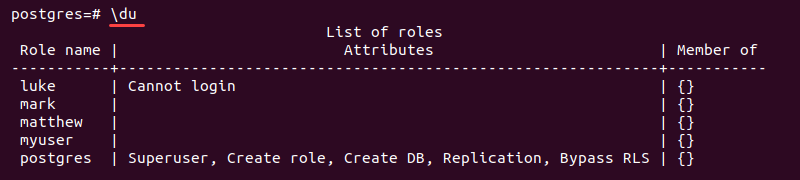
Locate the user to be removed and use their name in the next step.
3. Run the following query to delete a user:
DROP USER <name>;
Alternatively, to check if a user exists before dropping, enter:
DROP USER IF EXISTS <name>;
The client notifies if the role does not exist.
4. Display the user list again to confirm the user is gone:
\du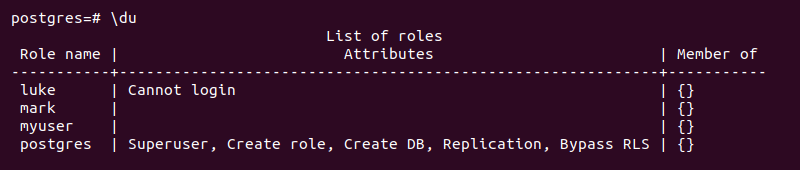
The user is no longer on the list of roles. This output indicates a successful deletion.
Delete Multiple Postgres Users
The PSQL client allows deleting multiple Postgres users at once. The instructions below explain how to connect to the PostgreSQL client and delete multiple users.
1. Connect to the PSQL client with:
sudo -u postgres psql2. List all users with:
\duLocate the users to delete and use their names in the next step.
3. Delete multiple Postgres users by separating individual users with a comma:
DROP USER [IF EXISTS] <name>, <name>, ... <name>;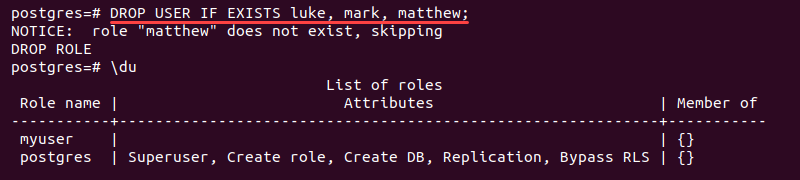
The command removes multiple roles at once. Add IF EXISTS to skip users who are not available.
4. Recheck the user list to confirm all the roles are deleted:
\duThe removed users are no longer on the list.
Delete a Postgres User with Dependencies
Attempting to remove a Postgres user with dependencies fails and shows an error.

To safely remove the user, do the following:
1. Assign the object ownership from the error detail to another user. For example, to transfer the objects owned by myuser to postgres, run:
REASSIGN OWNED BY myuser TO postgres;
The query changes the object ownership to the postgres user.
2. Remove the database object connections to the user with:
DROP OWNED BY myuser;
This step also removes any privileges the user has over the object.
3. At the moment, the user no longer has any dependencies. To drop the user, run:
DROP USER myuser;
Since there are no dependencies, the removal is successful.
Delete a Postgres Role
To delete a Postgres role, run the following command in the PSQL client:
DROP ROLE [IF EXISTS] <name>;The DROP USER statement is an alias for DROP ROLE. The Postgres users are roles with LOGIN permissions. Therefore, both DROP USER and DROP ROLE are interchangeable and work for both users and roles.
Conclusion
After following the steps from this guide, you know how to delete a Postgres user and multiple users securely.
Next, learn how to drop a database in PostgreSQL or learn how to create, replace, and delete stored procedures in PostgreSQL.