Docker and Docker Compose are closely related tools commonly used in containerized application development and deployment. Although they work together, they serve different purposes and solve different problems.
Understanding the differences between Docker and Docker Compose helps simplify container management, application deployment, and multi-container workflows.
This article will explain how Docker and Docker Compose differ, how they work together, and when to use each one.
What Is Docker?
Docker is an open-source platform for building, running, and managing applications in containers. Containers package applications together with their required libraries and dependencies, allowing them to run consistently across different environments.
The platform simplifies application development and deployment by providing lightweight, portable, and isolated environments. Docker is widely used in modern software development because it improves consistency, scalability, and deployment speed across local systems, servers, and cloud platforms.
Note: Follow our tutorials to install Docker on Ubuntu, Windows, macOS, Debian, or Rocky Linux/CentOS.
How Does Docker Work?
Docker works by packaging applications and their dependencies into isolated environments called containers. These containers run on top of the host operating system using Docker Engine, which manages container creation, execution, and communication.
Because containers include everything required to run an application, they behave consistently across different environments. Using containers makes it possible to run multiple isolated and lightweight environments simultaneously on the same system.
Docker Use Cases
Docker is commonly used to facilitate application development, deployment, scaling, and infrastructure management. Its lightweight and portable architecture makes it suitable for both development and production environments.
Common Docker use cases include:
- Fast and consistent application delivery. Docker helps standardize development environments by allowing developers to work with containers locally. This streamlines CI/CD workflows and ensures applications behave consistently during development, testing, and production deployment.
- Portable application deployment. Docker containers can run across different environments, including local systems, physical servers, virtual machines, and cloud platforms. This portability makes it easier to move applications between environments without additional configuration.
- Responsive scaling and workload management. Docker allows applications and services to scale up or down quickly based on workload demands. Users can rapidly deploy, replace, or remove containers, making infrastructure management more flexible.
- Efficient resource usage. Docker containers are lightweight and use fewer system resources than traditional virtual machines. This allows organizations to run more workloads on the same hardware while reducing infrastructure costs.
What is Docker Compose?
Docker Compose defines and manages multi-container applications. It allows users to configure application services, networks, and volumes in a single YAML file and manage the entire application stack using Docker Compose commands.
Docker Compose simplifies working with applications that require multiple containers, such as web servers, databases, caches, or message queues. Instead of running multiple docker run commands manually, you can define everything in one configuration file and start all services with a single command.
Modern Docker Compose is integrated into the Docker CLI as a plugin and is used via the docker compose command.
How Does Docker Compose Work?
Docker Compose reads configuration settings from a YAML file, usually compose.yaml or docker-compose.yml. This file defines the application services, container settings, networks, volumes, environment variables, and dependencies required for the application.
After defining the configuration, users can run commands such as docker compose up to create and start containers automatically. It also provides commands to stop services, rebuild containers, view logs, check service status, and run one-off commands.
Docker Compose is declarative, which means the configuration file defines the desired application state. After the user makes changes, Docker Compose compares the current state with the configuration file and recreates or only updates containers as needed.
The following example shows a Docker Compose YAML file:
services:
  web:
    image: nginx
    ports:
      - "80:80"

  db:
    image: mysql
Docker Compose Use Cases
Developers commonly use Docker Compose to simplify the development, testing, deployment, and management of multi-container applications.
Common Docker Compose use cases include:
- Managing multi-container applications. Docker Compose simplifies applications that require multiple services, such as web applications connected to databases, caches, or APIs. All services can be configured and managed from a single YAML file.
- Creating development environments. Developers can quickly create isolated environments with all required dependencies using a single command. This makes onboarding and environment setup faster and more consistent across teams.
- Automated testing workflows. Docker Compose helps create temporary testing environments for CI/CD pipelines and automated test suites. Users can start containers for testing and remove them after the process is complete.
- Simplifying collaboration. Teams can share Compose files through version control systems to use identical container configurations across development and testing environments.
- Single-host application deployments. Docker Compose can deploy and manage applications on a single Docker host while supporting environment-specific configurations for staging or production systems.
Note: Docker Compose is part of Docker Desktop and modern Docker Engine installations.
Docker vs. Docker Compose: Differences
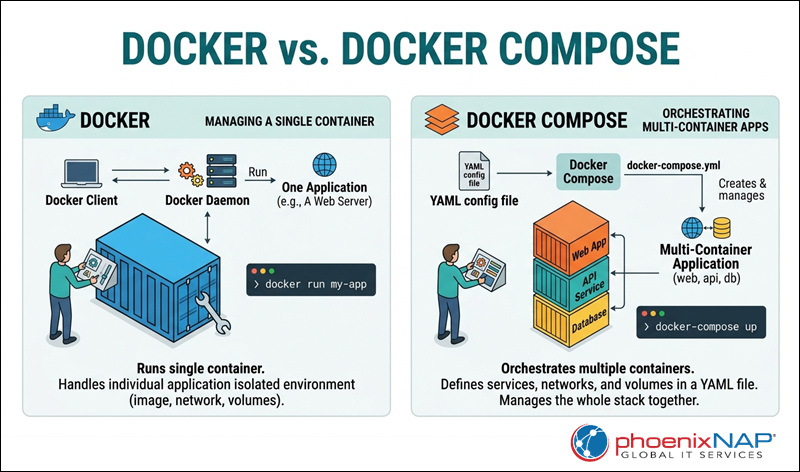
Although Docker and Docker Compose work together, they serve different purposes. Docker focuses on creating and managing containers, while Docker Compose simplifies managing multi-container applications.
The image below illustrates the key difference between Docker and Docker Compose:
To compare the two in detail, refer to the sections below.
Note: See how Docker compares to Terraform and make the best choice for your needs.
Architecture
Docker is a containerization platform built around Docker Engine, which is responsible for creating, running, and managing containers. It works primarily with individual containers and provides the core functionality required for containerized environments.
Docker Compose is a tool built on top of Docker that helps define and manage multiple related containers as a single application stack. It uses YAML configuration files to organize services, networks, volumes, and environment settings in a centralized configuration.
Container Management
Docker manages containers individually through Docker CLI commands, such as docker run, docker start, docker stop, and docker rm. This approach works well for simple applications or standalone containers.
Docker Compose manages multiple containers together using commands such as docker compose up and docker compose down. It automatically creates networks, connects services, and handles dependencies between containers, making multi-service applications easier to manage.
Configuration
Users typically configure Docker using command-line options and flags when creating or running containers. As applications become more complex, manually managing these configurations can become difficult.
Docker Compose stores application settings in a docker-compose.yml file. This file can include service definitions, port mappings, environment variables, volumes, and networking configurations, making setups easier to reuse, share, and maintain.
Ease of Use
Docker is suitable for managing simple workloads and individual containers. However, manually configuring and managing multiple interconnected containers often requires additional commands and scripting.
Docker Compose simplifies multi-container workflows by allowing developers to manage the entire application stack from a single configuration file. This reduces manual setup and helps create consistent development, testing, and staging environments.
Scalability and Deployment
Docker supports container-level deployment and scaling. You can start, stop, or replicate individual containers as needed.
Docker Compose simplifies scaling services within multi-container applications and supports environment-specific configurations for development, testing, and production. Developers commonly use it for local development environments, automated testing workflows, and single-host deployments.
Note: Docker Compose is primarily designed for managing containers on a single Docker host. Large-scale distributed deployments typically use orchestration platforms such as Kubernetes.
Workflow and Collaboration
Docker provides the core tools required for container creation, execution, and management.
Docker Compose improves collaboration by allowing teams to share standardized YAML configuration files through version control systems. This helps developers, testers, and operations teams work with consistent environments across different systems and stages of deployment.
Using Docker and Docker Compose Together
Docker and Docker Compose are commonly used together to simplify containerized application management. Docker provides the core platform for building and running containers, while Docker Compose helps organize and manage multiple containers as a single application.
For example, a web application may require several services, such as a frontend application, backend API, database, and cache server. Docker is responsible for creating and running the individual containers for these services. Docker Compose then defines how these containers work together, including networking, dependencies, environment variables, and startup configuration.
Instead of manually starting and connecting each container with multiple Docker commands, use Docker Compose to manage the entire application stack from a single YAML configuration file. This simplifies development workflows and helps maintain consistent environments across systems.
Why Use Docker and Docker Compose Together?
Docker and Docker Compose simplify application development, deployment, and management by providing consistent and portable containerized environments. Together, they help build, test, and deploy applications more efficiently across different systems.
Common benefits of using Docker and Docker Compose include:
- Consistency across environments. Docker ensures that applications run consistently across development, testing, and production systems. This helps reduce compatibility issues and the common "it works on my machine" problem.
- Application isolation. Each container runs in an isolated environment with its own dependencies and configuration. This prevents applications and services from interfering with one another.
- Simplified multi-container management. Docker Compose allows developers to define and manage multiple related services from a single YAML configuration file. This simplifies networking, service dependencies, and environment setup.
- Scalability. Docker and Docker Compose make it easier to scale applications by adding or removing containers based on workload requirements.
- Portability. You can move containers easily between local systems, testing environments, servers, and cloud platforms without major configuration changes.
- Faster development workflows. Docker Compose helps developers quickly create and recreate application environments, improving collaboration, testing, and CI/CD workflows.
Together, Docker and Docker Compose provide a flexible and efficient way to manage modern containerized applications, especially those built with multiple interconnected services.
Conclusion
This article explained the difference between Docker and Docker Compose, showed how to use them together, and covered the benefits of each tool. They provide a consistent, portable, and scalable approach to modern application development and deployment.
Next, check out and download our handy Docker commands cheat sheet.