Despite its purpose of maintaining consistency, a Dockerfile rarely stays unchanged. Base images receive patches and dependency updates, which makes unversioned deployments unpredictable. In complex microservice architectures, failing to track these iterations leads to breaking changes and configuration drift.
This article will discuss Dockerfile versioning and provide strategies and best practices for keeping deployments consistent and reliable.
What Is Dockerfile Versioning?
Dockerfile versioning is the systematic tracking of changes to the instructions that build a container image. The term includes two distinct operations:
- Versioning the Dockerfile source code in a Git repository.
- Tagging the resulting image in a Docker registry.
When a command or update changes the base image version, the change must be traceable. Versioning ensures that a specific version of an application always runs in the environment intended during development.
In a professional environment, versioning is a contract. The Dockerfile serves as the contract's manifest. If the manifest changes, the version must reflect that change to alert the rest of the stack.
This traceability enables teams to perform audits, roll back failed deployments, and understand the exact state of a system at any point in time. Without this history, it becomes difficult to understand why a specific package was upgraded or why a specific environment variable was added.
Dockerfile Versioning Approaches
Maintaining a consistent approach to container images ensures that environments remain reproducible and secure throughout the software development life cycle (SDLC).
The following approaches outline how to track changes, manage dependencies, and guarantee image integrity at scale.
Git-Based Versioning
The most fundamental approach is to keep the Dockerfile in the same repository as the application source code. Below is an example of a Git root directory containing a Dockerfile:
my-app/ (Git Repo)
├── .git/
├── .dockerignore
├── Dockerfile
├── src/
│   └── main.py
└── requirements.txt
Since Git tracks every line change, the Dockerfile inherits the project's commit history. Each commit that touches the Dockerfile receives a unique SHA file hash.
The infrastructure evolves alongside the feature code. Reverting a software version automatically reverts the environment configuration. This coupling ensures that the code always has the exact dependencies it needs to compile and run.
However, if multiple services share the same base configuration, Git-based versioning leads to duplication across repositories. If a security patch is needed for a common tool, every repository must be updated individually, which increases the surface area for human error.
Semantic Versioning (SemVer)
Semantic Versioning uses a MAJOR/MINOR/PATCH scheme for image tags:
- Major. Breaking changes in the environment, such as a language runtime upgrade (e.g., Python 3.9 to 3.11) or a shift in the underlying operating system.
- Minor. New tools or optimizations added without breaking existing workflows, like adding a debugging utility or a new environment variable.
- Patch. Security updates or minor bug fixes in the build logic that do not change the container's external interface.
Note: A change in the Dockerfile that breaks backward compatibility (such as switching from Debian to Alpine or removing a core utility) requires a major version bump.
SHA-256 Content Addressing
In environments that require absolute immutability, developers use the SHA-256 file hash of the image. Instead of referencing a tag like latest or v1.2, the deployment manifest points to the specific digest.
Docker generates a unique hash from the contents of the image layers. Even a single byte change in a configuration file results in a completely different hash. This guarantees the image used in production is bit-for-bit identical to the one tested in staging, regardless of whether a tag was overwritten in the registry.
Below is a code example of a Dockerfile containing a unique hash value as an image tag in the FROM directive:
FROM node@sha256:c13b26e7a602ef2f1074aefbc04efcc15de4392463ef1805562d9899380693a1

WORKDIR /app

COPY package*.json ./
RUN npm ci --only=production

COPY . .

USER node
CMD ["node", "index.js"]
This operation eliminates the risk of tag poisoning, where a malicious or accidental push overwrites an existing version tag. Content addressing is the gold standard for high-security environments.
Calendar Versioning (CalVer)
Some teams prefer tags based on the build date, such as 2026.03.17. This approach works well for base images or utility containers that receive frequent, incremental updates. It tells the team exactly how old an environment is at a glance.
CalVer provides an immediate sense of urgency for updates. If a developer sees a container running a 2023 version, they know it likely lacks recent security patches without needing to consult a complex versioning manifest.
Dockerfile Versioning: What to Avoid
Relying on latest or floating tags in Docker creates a moving target that leads to inconsistent environments and non-deterministic builds.
The following sections provide guidance on how to ensure production stability.
The latest Tag Trap
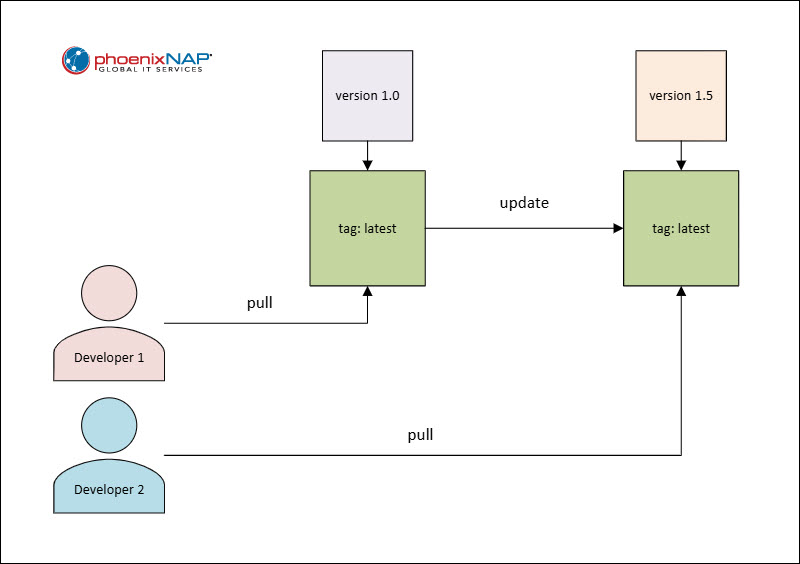
The latest tag is a pointer, not a version. It refers to the most recent image pushed to the registry. A background automated build might push a breaking change to latest, causing new nodes in a cluster to pull a different version than existing nodes.
Such incidents lead to configuration drift, where different instances of the same service run different code, making troubleshooting outages more difficult. It is the most common cause of silent failures in CI/CD pipelines.
Floating Tags
Using broad tags like python:3 or node:lts introduces risk, since these tags update whenever the language maintainers release a new minor version or patch.
Floating tags create non-deterministic builds that can be impossible to replicate six months later. If a production bug occurs, an engineer may find they cannot even rebuild the failing version because the floating base image has moved on.
Hardcoding Secrets
Versioning a Dockerfile with hardcoded API keys or passwords puts the entire history of those credentials into the Git log. Even if a later version removes the secret, it remains accessible in the repository history.
Once a secret is committed to a versioned Dockerfile, it must be considered compromised and rotated immediately. Use build arguments (ARG) or environment variables (ENV) passed at runtime, and never commit sensitive data to the Dockerfile itself.
Large Layer Counts
Every instruction in a Dockerfile creates a layer. Versioning a file with many RUN commands slows the build and makes the history hard to read.
While not strictly a versioning error, many layers complicate tracking meaningful changes, making diffs too noisy. Consolidating commands into logical blocks makes the version history easier to read, and the images are pulled faster over a network.
Dockerfile Versioning Best Practices
To achieve consistent, reproducible deployments, turn Dockerfiles from generic configurations to precise, immutable blueprints. The following sections contain best practices for achieving that goal.
Pin Base Images with Specificity
Always use the most specific tag available for the FROM instruction. Instead of FROM alpine, use FROM alpine:3.19.1.
For maximum security, include the digest to ensure the base image never changes unexpectedly. It prevents a scenario in which a library maintainer pushes a fix to a tag that inadvertently breaks the application's specific logic.
Use Multi-Stage Builds
Multi-stage builds allow separating the build environment from the runtime environment. This keeps the production image small and limits the versioning scope to only what is necessary for execution.
By separating the builder stage from the runner stage, you can update build tools (like moving from Go 1.20 to 1.21) without affecting the final production artifact's size or attack surface. It allows for cleaner versioning because the history of build-tool changes stays separate from the runtime environment requirements.
Standardize Metadata with Labels
Use the LABEL instruction to embed versioning data directly into the image metadata. This includes the Git commit hash, the build date, and the maintainer.
This practice makes the image self-documenting. If a container is running in production, an engineer can inspect it using docker inspect and find exactly which commit produced it. It bridges the gap between the running process and the source code.
Below is an example Dockerfile snippet illustrating the use of the LABEL instruction:
LABEL org.opencontainers.image.revision="${GIT_COMMIT_HASH}"
LABEL org.opencontainers.image.created="${BUILD_DATE}"
LABEL org.opencontainers.image.version="1.2.3"
Automate Tagging in CI/CD
Manual tagging leads to human error and inconsistency. Configure the CI/CD pipeline to tag images automatically based on Git tags or branch names.
A common pattern involves tagging with the short Git commit SHA. This creates a direct link between the deployed artifact and the code that produced it.
Automation ensures that every change is captured and tagged in accordance with the team's policy, without exception. This creates a reliable audit trail that requires no developer intervention.
Implement a Clean-Up Policy
Versioning generates many images, often several per day. Registries fill up quickly, increasing storage costs and cluttering search results. Establish a lifecycle policy to delete old images.
A typical policy might keep only the last 50 versions or images tagged within the last six months. This keeps the registry performant and cost-effective while maintaining enough history for emergency rollbacks.
Documentation and Ownership
Every Dockerfile should include comments explaining why specific dependency versions were chosen. If a version is pinned to avoid a known bug in a newer release, document that choice.
This prevents future developers from upgrading the Dockerfile and unknowingly reintroducing the bug. Ownership clarity ensures that if a base image version becomes deprecated or reaches end of life, a specific team is responsible for the migration.
Conclusion
After reading this article, you should be better acquainted with Dockerfile versioning. Treating the Dockerfile as a first-class citizen in the versioning process guarantees long-term stability and auditability.
Next, read what Docker Hub is and how to use it.