Ubuntu and Windows dominate personal and professional computing for many reasons. Windows powers mainstream desktops with broad software support and gaming performance, while Ubuntu delivers stability, control, and open-source flexibility for developers, sysadmins, and power users.
This article will compare the systems head-to-head to help you choose the better fit for your needs.
Ubuntu vs. Windows: Overview
Ubuntu and Windows are the most widely used operating systems, each driving distinct sides of personal and business computing. Windows defines the mainstream desktop environment, enterprise workstations, and commercial software compatibility. Ubuntu leads the Linux desktop space and is one of the most deployed Linux distributions on servers and cloud platforms.
Windows owes its dominance to OEM partnerships, native support for industry-standard applications, and a gaming ecosystem built on DirectX. Ubuntu's importance comes from open-source governance, system efficiency, and its role in powering developer machines, hosting stacks, automation workflows, and self-managed infrastructure.
The following table gives a side-by-side overview before we break each category down in detail in the next section:
| Factor | Ubuntu | Windows |
|---|---|---|
| Cost | Free. | Paid license. |
| Licensing | Open source. | Proprietary. |
| Performance | Fast on low-end hardware. | Higher system resource usage. |
| Customization | Full UI and system control. | Mostly cosmetic personalization. |
| Gaming | Strong via Proton, some title limits. | Best native support. |
| Updates | Centralized and transparent. | Varies by edition and OEM. |
| Hardware support | Excellent for servers, solid on desktop. | Industry-leading driver support. |
Ubuntu vs. Windows: In-Depth Comparison
Windows and Ubuntu approach system design, software ecosystems, and user control from opposite directions. Ubuntu prioritizes openness, modularity, and efficiency. Windows prioritizes mass compatibility, commercial software, and plug-and-play convenience.
The sections below compare the core factors of both systems in depth.
Cost and Licensing
Ubuntu is completely free to install and use, with no device or feature restrictions. Its open-source licensing allows modification, redistribution, and deployment in personal or business environments without extra fees. Optional commercial support is available for enterprises or professional users who want guaranteed assistance.
Windows requires a paid license, with costs scaling for Home, Pro, or Enterprise editions. Its proprietary licensing restricts system modifications and redistribution. Businesses often pay recurring fees for volume licensing or enterprise support, which can raise the total cost over time.
Performance and Hardware Efficiency
Ubuntu is lightweight and runs efficiently even on older or modest hardware. Users can choose between different desktop environments that match their performance needs:
- GNOME: modern and full-featured.
- KDE Plasma: highly customizable.
- XFCE/LXQt: minimal resource usage for low-end machines.
Boot times and responsiveness generally remain high, and background processes are minimal by default.
Note: Learn the difference between Gnome and KDE Plasma.
Windows performs well on modern hardware, but system overhead is higher due to background services, telemetry, and bundled components. Boot and application launch times can lag on low-end machines, and older PCs may struggle to maintain consistent performance over time.
Security and Privacy
Ubuntu's Linux Foundation enforces strict user permissions and signed repositories, reducing exposure to malware. Privacy is enhanced by the absence of forced telemetry, and security updates are frequent, transparent, and reversible. Firewall is available but not enabled by default.
Windows includes strong built-in protections, such as Windows Defender, SmartScreen, BitLocker (on Pro/Enterprise), Windows Hello, TPM, and VBS on Windows 11. However, its massive user base makes it a primary target for malware and ransomware. Privacy options exist but are fragmented across settings and editions.
- Ubuntu security highlights: package sandboxing (AppArmor), signed repositories, and granular update control.
- Windows security highlights: built-in antivirus, disk encryption, SmartScreen app reputation checks.
Customization and System Control
Ubuntu allows deep customization of nearly every OS aspect. Users can swap desktop environments, modify window managers, tweak system behavior, and automate tasks with scripts. This makes Ubuntu highly adaptable to specialized workflows or personal preferences.
Windows supports UI personalization and minor tweaks, but deeper system modifications are limited and often unsupported. Most customization focuses on visual aspects, while core system behavior remains largely fixed.
Software and Application Availability
Ubuntu relies on centralized repositories and package managers, offering thousands of free and open-source apps. Commercial or proprietary software can be run through Wine, virtualization, or containerization, but native options may be limited for some industries.
Windows offers the broadest native software support, covering productivity, creative, enterprise, and gaming applications. Drivers and OEM integrations ensure compatibility with almost all hardware.
- Ubuntu strengths: developer tools, cloud/server software, open-source apps.
- Windows strengths: commercial software, industry-standard apps, broad driver support.
Gaming Experience
Ubuntu gaming has improved significantly through Steam, Proton, and Vulkan, allowing many Windows titles to run on Linux. Some games still face compatibility issues, particularly those with anti-cheat mechanisms.
Windows remains the dominant gaming platform, with native DirectX support, full anti-cheat compatibility, and integration with Xbox Game Pass. Most games perform best on Windows without workarounds.
- Ubuntu gaming tools are: Steam Proton, DXVK, Vulkan, Mesa/Nvidia drivers.
- Windows gaming advantages: DirectX, full anti-cheat support, OEM GPU optimization.
How to Choose Between Ubuntu and Windows
Choosing between Ubuntu and Windows depends on your priorities, workflow, and the environment in which you plan to use your computer. Ubuntu is ideal for users who value open-source freedom, system efficiency, and deep customization, while Windows excels for those who need broad software compatibility, gaming support, and mainstream convenience.
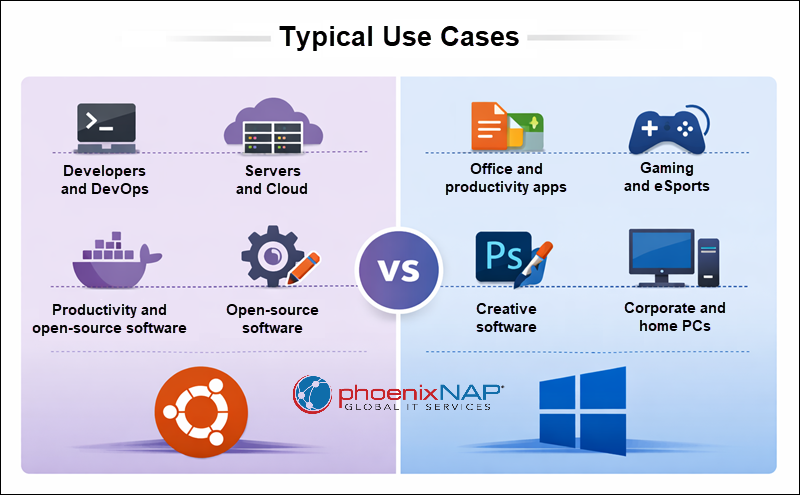
Consider these key decision points when evaluating which OS fits your needs:
Pick Ubuntu if you:
- Want a free and open-source system.
- Work with development tools, servers, or cloud infrastructure.
- Value privacy and security with minimal bloat.
- Enjoy customizing and automating your system.
Windows is better if you:
- Rely on commercial software or industry-standard apps.
- Play games requiring full DirectX and anti-cheat support.
- Need seamless driver and hardware compatibility.
- Prefer a familiar interface with plug-and-play convenience.
By reflecting on how you use your computer day to day, you can choose a solution that aligns with both your workflow requirements and long-term goals.
Conclusion
This article compared Ubuntu and Windows as two essential operating systems that serve the same user differently. Ubuntu leads in openness, cost, system efficiency, automation, and modularity, while Windows leads in commercial software support, drivers, and native gaming dominance.
Next, see how to run Windows apps on Linux or learn the difference between OpenSUSE and Ubuntu.