The Terraform count meta-argument creates multiple instances of the same resource, module, or data source from a single configuration block. Instead of duplicating code, you define one block and specify how many instances Terraform should create.
Using count reduces repetition, simplifies infrastructure scaling, and makes configurations easier to maintain. However, because count identifies resources by numeric indexes, it sometimes introduces unexpected behavior when infrastructure changes.
This guide will explain how the Terraform count meta-argument works, how to use it in different scenarios, its limitations, and when to use for_each instead.
Prerequisites
- A Linux system (this guide uses Ubuntu 26.04 LTS).
- Access to a terminal.
- Terraform installed.
- A user account with permission to run Terraform commands.
- A Terraform configuration with a configured provider and an initialized working directory (
terraform initcompleted).
What Is the Terraform count Meta-Argument?
Terraform classifies count as a meta-argument, a special type of argument that influences how Terraform processes a configuration block rather than configuring the resource itself. A configuration block is a section of a Terraform configuration that defines a Terraform object, such as a resource, data source, or module.
Unlike Terraform commands, which perform actions such as initializing or applying configurations, count is a language feature that changes how Terraform processes configuration blocks during the planning phase. It tells Terraform how many instances of a resource to create from a single configuration block.
The following sections explain how the count meta-argument works, where you can use it, how it compares to manual resource duplication, and when for_each is a better choice.
Streamlining Multi-Resource Provisioning Without Code Duplication
By default, Terraform creates one instance for each resource, module, or data source block. Adding the count meta-argument instructs Terraform to create multiple identical instances from the same block. Each instance receives a numeric index, which Terraform uses to distinguish and track individual resources.
This approach eliminates the need to duplicate nearly identical configuration blocks. Instead of maintaining multiple copies of the same resource definition, you update a single configuration and allow Terraform to create the required number of instances.
Supported Blocks: Resources, Data Sources, and Modules
The count meta-argument is supported in several Terraform block types, allowing you to create multiple instances without duplicating configuration.
Use count in the following blocks:
- Resource blocks to provision multiple infrastructure resources.
- Data source blocks to retrieve information from multiple existing resources.
- Module blocks to instantiate the same module multiple times with identical logic.
Terraform does not support count in provider blocks, variable declarations, output blocks, or other configuration blocks that do not create multiple instances.
terraform count vs. Manual Resource Duplication
Without count, you have to copy the same configuration block and change only the resource name or a few attributes if you want to create multiple identical resources. As the number of resources increases, this approach becomes more difficult to maintain.
The count meta-argument replaces duplicated configuration with a single reusable block.
Therefore, configurations become shorter, easier to maintain, and less prone to configuration drift caused by inconsistent updates.
The following table shows the main differences between these two approaches:
| Manual Duplication | count Meta-Argument |
| Requires a separate block for each resource. | Uses one block to create multiple instances. |
| Changes must be repeated across every block. | A single configuration change updates every instance. |
| More repetitive and harder to maintain. | Reduces duplication and improves consistency. |
| Better suited for resources with unique configurations. | Better suited for multiple identical resources. |
terraform count vs. for_each
Both count and for_each create multiple resource instances from a single configuration block. However, they identify and manage those instances differently.
Use count when every resource instance shares the same configuration and differs only by its numeric index. Use for_each when each resource requires its own identifier or configuration values.
The following table compares the two approaches:
| Feature | count | for_each |
|---|---|---|
| Resource identification | Numeric indexes ([0], [1], [2]). | Unique keys (["web"], ["db"]). |
| Best suited for | Homogeneous resources. | Heterogeneous resources. |
| Resource addressing | Index-based. | Key-based. |
| Behavior when an instance is removed | Remaining indexes can shift. | Other resources keep their original keys. |
| Preferred use case | Fixed-size groups of similar resources. | Resources with unique names or settings. |
Therefore, count offers a simple solution for provisioning multiple identical resources, while for_each provides greater flexibility for managing collections whose members have unique identities or configurations.
How Does the count Meta-Argument Work?
When Terraform encounters the count meta-argument, it creates multiple instances from a single configuration block instead of treating the block as a single resource. During the planning phase, Terraform evaluates the count value, determines how many instances to create, assigns each instance a unique index, and generates a separate resource address for every instance.
The following diagram summarizes this workflow.
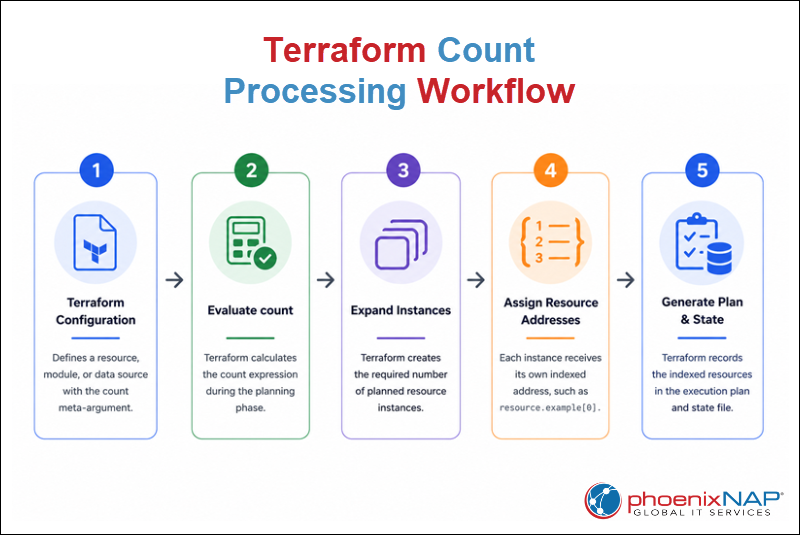
The following sections explain how Terraform evaluates the count meta-argument during planning, how the count.index object identifies each instance, and how indexed resources appear in plan output and state files.
Evaluation During the Configuration Planning Phase
Terraform evaluates the count meta-argument before creating or modifying infrastructure.
During the evaluation process, Terraform:
1. Reads the configuration block.
2. Evaluates the count expression.
3. Determines how many instances to create.
4. Expands the configuration block into the required number of instances.
5. Adds each instance to the execution plan.
Note: The count value must be known during the planning phase. Expressions that depend on resources created during the same operation cannot be evaluated because Terraform cannot determine how many instances to create.
The count.index Object: Tracking Iterations Legibly
Terraform assigns every instance created with the count meta-argument a numeric index that starts at 0. Access the current index through the count.index object to customize each instance and reuse the same configuration block.
The following table lists common uses for count.index:
| Use case | Example |
|---|---|
| Generates unique resource names. | edge-node-0, edge-node-1, edge-node-2 |
| Selects list elements. | Chooses a subnet or image from a list. |
| Assigns network settings. | Allocates different VLAN IDs. |
| Passes values to modules. | Provides an instance number or identifier. |
Terraform assigns indexes automatically, so you do not need to manage instance numbers manually.
Addressing Indexed Resources in State Files and Plan Outputs
Terraform assigns every instance created with the count meta-argument its own resource address by appending a numeric index to the resource name. These indexed addresses allow Terraform to distinguish and manage each instance independently, even though they all originate from the same configuration block.
The following diagram shows how Terraform expands a single configuration block into multiple indexed resource instances.
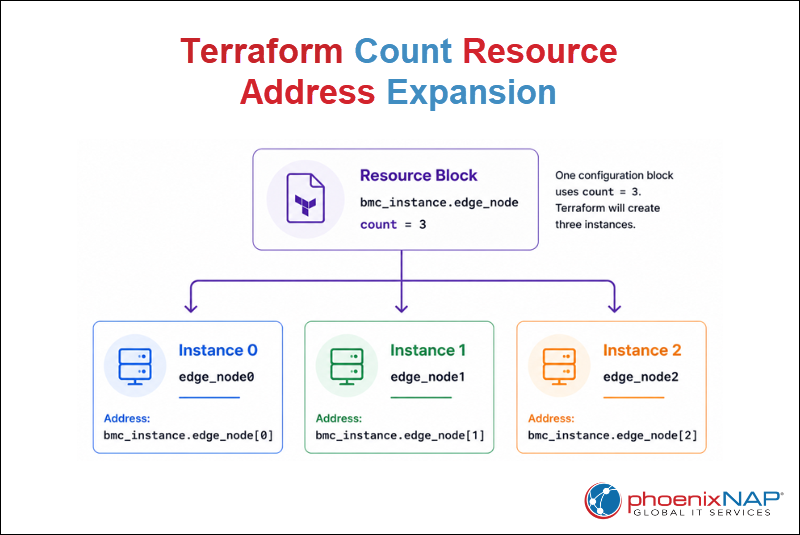
After expanding the configuration block, Terraform assigns each instance a unique resource address, such as bmc_instance.edge_node[0], bmc_instance.edge_node[1], and bmc_instance.edge_node[2]. These addresses appear in:
terraform planoutput.terraform applyoutput.- Terraform state file.
Terraform uses these addresses to determine which instance to create, update, or destroy during future operations.
Note: Because resource addresses depend on numeric indexes, when you add, remove, or reorder instances, it changes existing indexes. This behavior is one of the main limitations of the count meta-argument.
Terraform count Syntax
The following syntax shows the basic count structure:
resource "<PROVIDER>_<TYPE>" "<NAME>" {
  count = <EXPRESSION>

  ...
}
The syntax contains the following required elements:
resource. Declares a Terraform resource.PROVIDER_TYPE. Specifies the provider and resource type to create.NAME. Assigns a local name used to reference the resource elsewhere in the configuration.count. Specifies how many instances Terraform creates.EXPRESSION. Defines the value Terraform evaluates to determine the number of instances to create.
For count to function, you need to use all the arguments. However, if you omit count, Terraform uses its default behavior and creates a single resource instance. Therefore, the EXPRESSION value is no longer needed.
The following sections show progressively more flexible ways to define the count value, from fixed numbers to variables, conditional expressions, and dynamically calculated values.
They focus on the syntax of each approach rather than complete deployment scenarios.
Standard Numeric Assignment and Variable Constraints
The simplest way to use count is to assign it a fixed integer.
count = 3This configuration instructs Terraform to create three identical resource instances. Because the value is written directly in the configuration, it is considered hardcoded. Hardcoding means embedding a fixed value in the configuration instead of allowing it to change without modifying the code.
Hardcoded values work well when the number of instances never changes. However, many Terraform configurations use variables to make deployments more flexible.
count = var.instance_countIn this example, Terraform reads the value from the instance_count variable instead of using a fixed number. Therefore, you can create different numbers of instances by changing the variable value instead of editing the configuration.
The following table compares both approaches:
| Assignment | Best Used When |
|---|---|
count = 3 | The number of instances never changes. |
count = var.instance_count | The number of instances should be configurable without modifying the configuration. |
Regardless of how the value is provided, the expression must be a whole number.
Toggling Infrastructure with Conditional Logic
Instead of always creating the same number of instances, use a conditional expression to determine whether Terraform creates a resource.
count = var.enabled ? 1 : 0This expression checks whether the enabled variable is set to true or false. If it evaluates to true, Terraform creates one resource instance. Otherwise, Terraform skips the resource entirely.
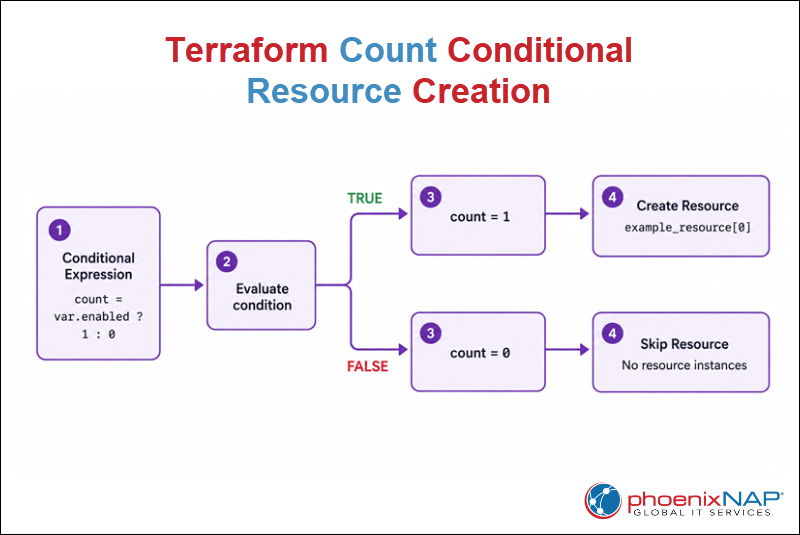
The diagram shows how Terraform evaluates the conditional expression before generating the execution plan. Depending on the result, Terraform assigns count a value of either 1 or 0, determining whether it creates a resource instance or skips the resource.
Dynamically Calculating Array Lengths with the length() Function
Instead of specifying a fixed value, calculate the count value from the number of items in a list.
count = length(var.servers)The length() function returns the number of elements in the servers list. Terraform then uses that value as the count, creating one resource instance for each list element.
The following table shows how different list sizes affect the number of resource instances Terraform creates.
| List | Count Value | Instances Created |
|---|---|---|
["web", "db"] | 2 | 2 |
["web", "db", "cache"] | 3 | 3 |
[] | 0 | 0 |
As the list grows or shrinks, Terraform automatically adjusts the number of resource instances. This behavior eliminates the need to manually update the count value whenever the list changes.
"Known Before Apply" Rule and Compute Limits
Terraform must determine the count value before generating an execution plan. If the value depends on information that becomes available only after new resources are created, Terraform cannot determine how many instances to include in the plan.
You can use count with values that Terraform can evaluate before applying changes, including:
- Fixed integers.
- Input variables.
- The
length()function when the list is already known. - Other expressions Terraform can evaluate before provisioning resources.
You cannot use count with values that depend on:
- Attributes of resources created during the same operation.
- Values Terraform cannot determine until after infrastructure is provisioned.
This requirement allows Terraform to generate a complete execution plan before making changes to your infrastructure.
Practical terraform count Examples
Practical Terraform count examples demonstrate how to apply the count meta-argument in infrastructure provisioning scenarios. Each example introduces a common use case while showing how count simplifies the creation, configuration, and management of multiple infrastructure resources.
The following examples build on the same Terraform configuration, progressively introducing additional count capabilities to model common infrastructure deployment tasks.
Note: The following examples demonstrate common infrastructure deployment workflows using the Terraform count meta-argument on phoenixNAP Bare Metal Cloud. Learn more about BMC Infrastructure as Code integration, and explore our automation tools page.
Scaling a Homogeneous Cluster of Bare Metal Edge Nodes
One of the most common uses of the count meta-argument is to provision multiple identical infrastructure resources. Instead of defining a separate resource block for each instance, count creates the required number of resources from a single configuration.
This example demonstrates the deployment of a small cluster of bare metal edge nodes.
Bare Metal Cloud (BMC) infrastructure provides dedicated servers with the flexibility of cloud provisioning. Edge nodes are physical or virtual servers that process workloads closer to end users to reduce latency and improve application performance.
In Bare Metal Cloud environments, Terraform provisions each server as a separate resource instance while automatically assigning a unique index that distinguishes individual resources.
To scale a homogeneous cluster of bare metal edge nodes using the Terraform count meta-argument, follow the steps below:
1. Create the variables.tf file in your text editor of choice. For example, in Nano:
nano variables.tf2. Add the following section to the file to define the number of edge nodes:
variable "node_count" {
  description = "Number of edge nodes to create."
  type        = number
  default     = 3
}
The variables.tf file defines the input variables used throughout the Terraform configuration. In this example, the node_count variable determines how many edge node instances Terraform creates. The default value of 3 instructs Terraform to provision three identical resources unless another value is provided.
3. Create the main.tf file the same way as the previous one and define the edge node resource:
resource "terraform_data" "edge_node" {
  count = var.node_count

  input = {
    hostname = "edge-node-${count.index + 1}"
    role     = "worker"
  }
}
The main.tf file contains the Terraform resources that make up the infrastructure configuration. The terraform_data resource stores infrastructure-related data without provisioning actual cloud resources, which makes it useful for demonstrating Terraform language features in a local environment.
The count meta-argument expands the resource block into multiple instances, while count.index generates a unique hostname for each edge node.
4. Create the outputs.tf file to display the generated hostnames after deployment:
output "edge_node_hostnames" {
  value = [
    for node in terraform_data.edge_node :
    node.input.hostname
  ]
}
The outputs.tf file defines values Terraform displays after applying the configuration. This collects the hostname assigned to each resource instance, which makes it easy to verify Terraform generated a unique name for every edge node.
5. Create the terraform.tfvars file and assign a value to the node_count variable:
node_count = 3The terraform.tfvars file assigns values to input variables without modifying the Terraform configuration. In this example, it sets node_count to 3, which instructs Terraform to create three edge node instances.
6. Review the execution plan:
terraform plan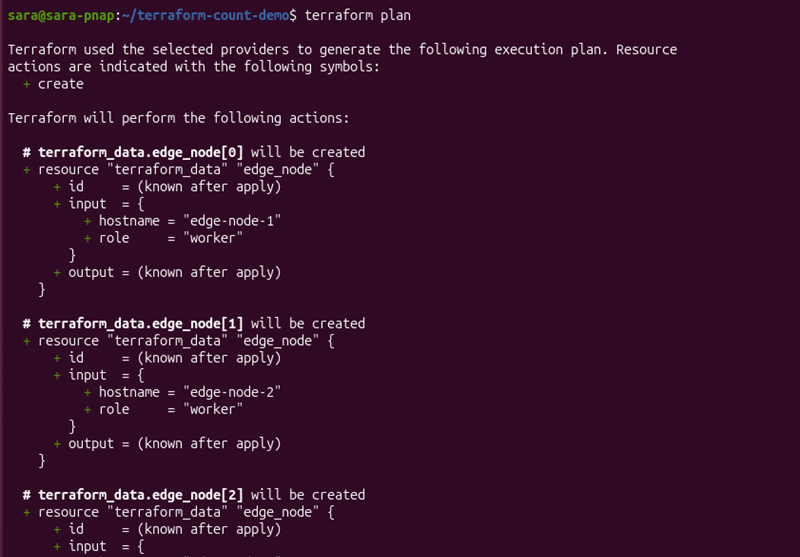
The terraform plan output shows Terraform expands the single terraform_data.edge_node resource into three separate instances. Each instance receives a unique resource address, while the output preview lists the hostnames Terraform will generate after applying the configuration.
7. Apply the configuration:
terraform apply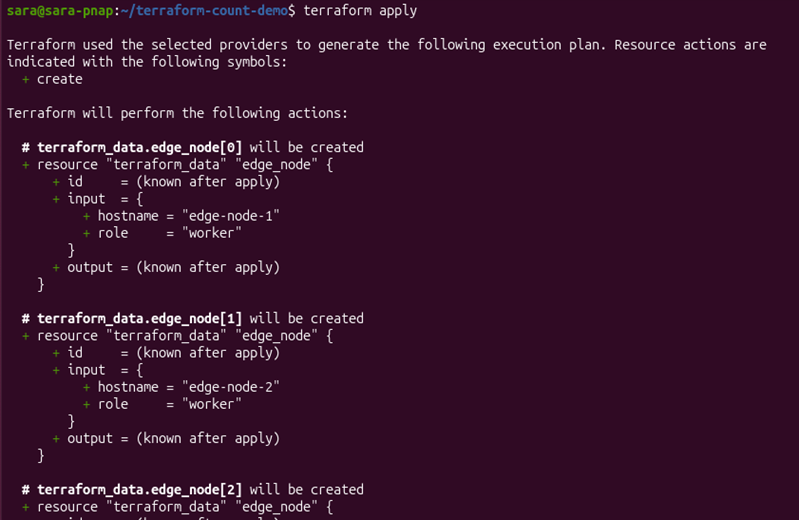
The terraform apply command creates the three edge node instances and displays the generated hostnames after the deployment completes.
Although the hostnames start at 1 for readability, Terraform continues to manage the resources using zero-based indexes.
8. Verify the resources in the Terraform state:
terraform state list
The terraform state list output confirms Terraform tracks each edge node as a separate resource in the state file. The indexed resource addresses demonstrate every instance is managed independently, even though all resources originate from a single configuration block.
Conditionally Deploying a Backup Storage Volume
After you deploy the edge nodes, you may need to provision additional infrastructure only when specific requirements are met. A common example is deploying a backup storage volume for environments that require scheduled backups or disaster recovery.
This example uses a conditional expression with the count meta-argument to create a backup storage volume only when backups are enabled. When the condition is set to false, Terraform skips the resource entirely.
To conditionally deploy a backup storage volume using the Terraform count meta-argument, follow the steps below:
1. Update the variables.tf file and add the following variable:
variable "enable_backup" {
  description = "Deploy a backup storage volume."
  type        = bool
  default     = true
}
The enable_backup variable controls whether Terraform creates the backup storage volume. Since it is a Boolean variable that accepts only the values true or false, it can be used directly in a conditional expression to determine whether the resource is deployed.
2. Update the main.tf file and add the following resource:
resource "terraform_data" "backup_volume" {
  count = var.enable_backup ? 1 : 0

  input = {
    name = "edge-backup-volume"
    size = "500 GB"
  }
}
The new resource uses a conditional expression to assign count a value of either 1 or 0. When enable_backup is true, Terraform creates one backup storage volume. When the variable is false, count evaluates to 0, and Terraform skips the resource.
3. Update the terraform.tfvars file and assign a value to the enable_backup variable:
enable_backup = trueThe terraform.tfvars file supplies the value for the enable_backup variable. Setting it to true instructs Terraform to create the backup storage volume during deployment.
4. Review the execution plan:
terraform plan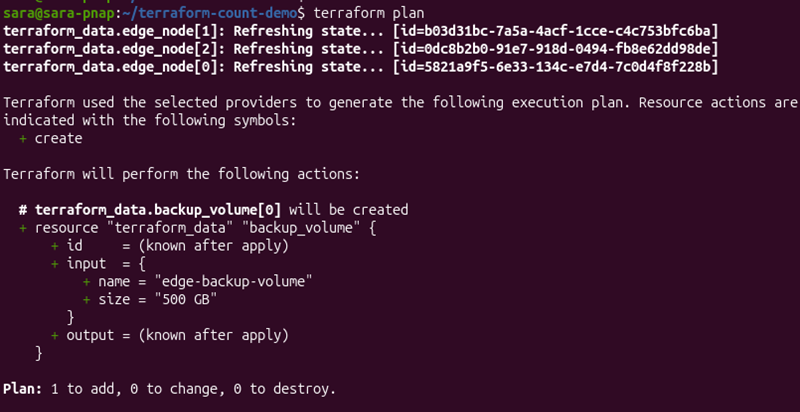
The terraform plan output shows Terraform refreshes the existing edge node resources and plans to create a single backup_volume resource. Because the conditional expression evaluates to true, Terraform assigns count a value of 1 and includes the resource in the execution plan.
5. Apply the updated configuration:
terraform apply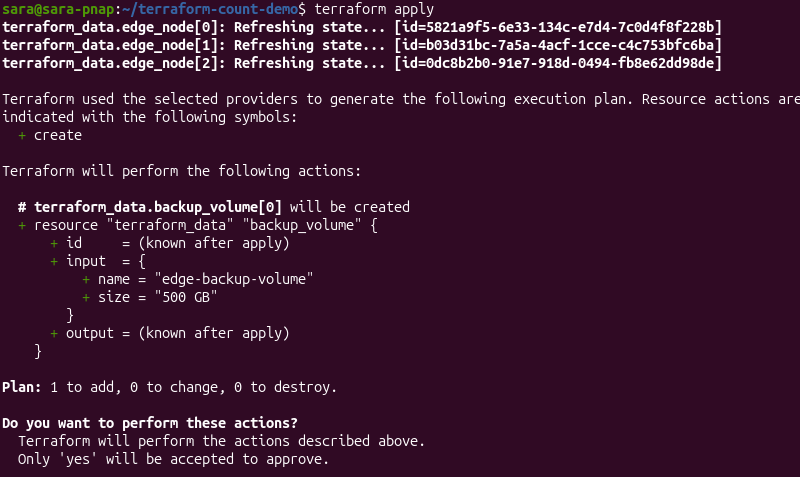
The terraform apply command creates the backup storage volume, but leaves the existing edge node resources unchanged. The output confirms Terraform added one new resource without modifying the previously deployed infrastructure.
6. Verify the Terraform state:
terraform state list
The terraform state list output shows the newly created terraform_data.backup_volume[0] resource together with the existing edge node resources. Since the backup volume uses count, Terraform assigns it an indexed resource address even though only one instance exists.
Distributing Incrementally Numbered VLANs
Deployments that include multiple servers often require each instance to use a different network configuration. For example, administrators frequently assign incrementally numbered VLAN IDs to servers connected to private networks to simplify network segmentation and management.
This example uses count.index to assign incrementally numbered VLAN IDs to each edge node. As the number of nodes changes, Terraform continues generating unique VLAN assignments without requiring manual configuration updates.
To distribute incrementally numbered VLAN IDs using the Terraform count meta-argument, follow the steps below:
1. Update the main.tf file by modifying the existing terraform_data.edge_node resource:
resource "terraform_data" "edge_node" {
  count = var.node_count

  input = {
    hostname = "edge-node-${count.index + 1}"
    role     = "worker"
    vlan_id  = 100 + count.index
  }
}
The vlan_id attribute uses count.index to generate a unique VLAN ID for each edge node. Since count.index starts at 0, adding 100 assigns VLAN IDs 100, 101, and 102 to the three resource instances.
2. Review the execution plan:
terraform plan
The terraform plan output shows Terraform updates each existing edge node by adding a vlan_id value. Each resource instance receives a different VLAN ID based on its index, demonstrating how count.index generates unique configuration values across multiple resources.
3. Apply the updated configuration:
terraform apply
The terraform apply command updates the existing edge node resources without creating additional instances. After the update completes, each node contains its assigned VLAN ID while preserving the original hostname and role attributes.
4. Inspect one of the updated resources:
terraform state show terraform_data.edge_node[1]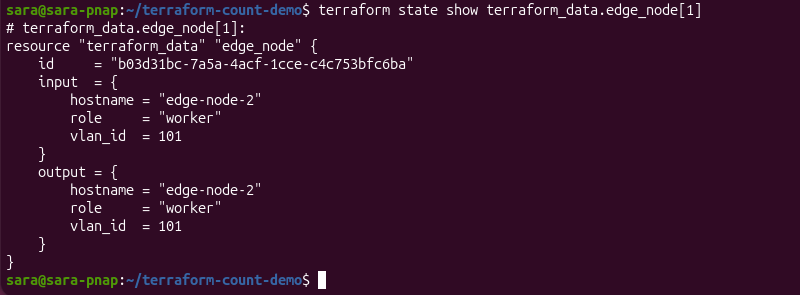
The show command output displays the stored attributes for the selected resource instance. In this example, the second edge node has the hostname edge-node-2, the role worker, and the VLAN ID 101, confirming Terraform generated the value by evaluating the count.index expression.
Injecting the Loop Index into BMC Provisioning Metadata
When Terraform creates multiple resource instances with the count meta-argument, it assigns each instance a loop index through the count.index object. The loop index is a zero-based number that uniquely identifies each iteration, which allows Terraform to generate different values for every resource instance during provisioning.
This example uses the loop index to generate unique provisioning metadata for each Bare Metal Cloud. Instead of manually defining different metadata values for every instance, Terraform derives them automatically during deployment.
To accomplish this, follow the steps below:
1. Update the input block of the existing terraform_data.edge_node resource in the main.tf file by adding the following line:
deployment_name = "bmc-edge-${count.index + 1}"The deployment_name attribute uses count.index to generate a unique name for each server during provisioning. As Terraform iterates through the resource instances, it appends the instance number to the bmc-edge prefix, producing values such as bmc-edge-1, bmc-edge-2, and bmc-edge-3.
2. Review the execution plan:
terraform plan
The terraform plan output shows Terraform updates each existing edge node by adding the deployment_name attribute. Because the value is derived from count.index, every resource instance receives a different deployment name without requiring separate configuration blocks.
3. Apply the updated configuration:
terraform apply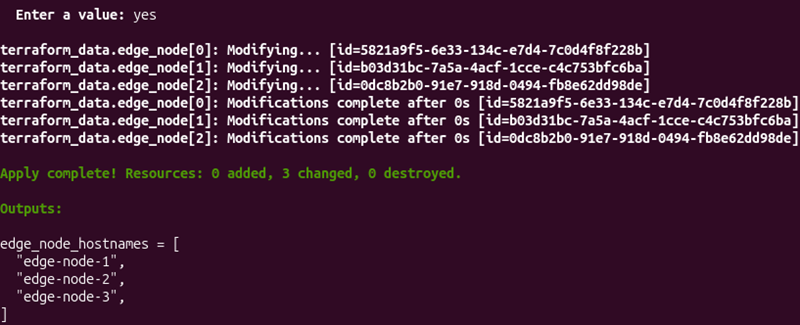
The terraform apply command updates the existing edge node resources by adding the generated deployment metadata while preserving the previously configured attributes. Each instance receives a deployment name that corresponds to its position in the resource collection.
4. Inspect one of the updated resources:
terraform state show terraform_data.edge_node[1]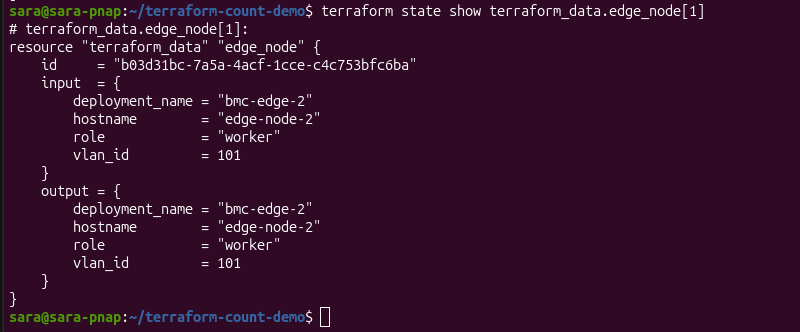
The terraform state show output displays the stored attributes for the selected resource instance. In this example, the second edge node has the deployment name bmc-edge-2, confirming Terraform generated the metadata automatically by evaluating the count.index expression while preserving the previously configured hostname, role, and VLAN ID.
Extracting Output Lists from Multiple Instances
Provisioning multiple resources often requires collecting information from every instance after deployment. Rather than referencing each resource individually, Terraform aggregates values into a single output.
This approach is useful when working with resources created using the count meta-argument, as well as modules created multiple times with count. In both cases, Terraform can collect values from every instance into a single output other Terraform configurations, modules, or automation workflows can consume.
This example uses a for expression to extract the deployment names from all edge nodes managed with the count meta-argument, which produces a consolidated output list.
To extract output lists from multiple instances managed with the Terraform count meta-argument, follow the steps below:
1. Update the existing outputs.tf file by adding the following output:
output "deployment_names" {
  value = [
    for node in terraform_data.edge_node :
    node.input.deployment_name
  ]
}
The deployment_names output uses a for expression to iterate over every terraform_data.edge_node instance and collect its deployment_name attribute. Terraform evaluates the expression after applying the configuration and returns the values as a single list.
2. Review the execution plan:
terraform plan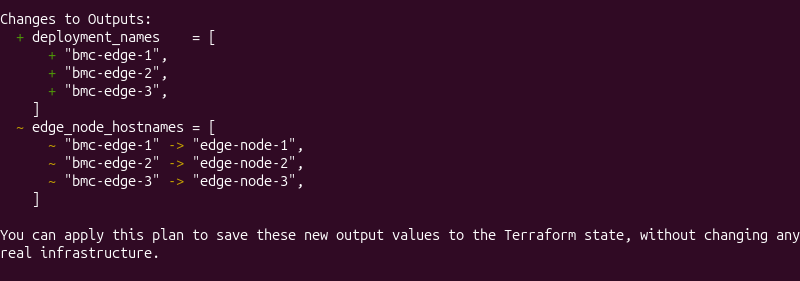
The terraform plan output shows Terraform adds the deployment_names output without modifying any infrastructure resources. The generated list contains the deployment name assigned to each edge node instance.
3. Apply the updated configuration:
terraform apply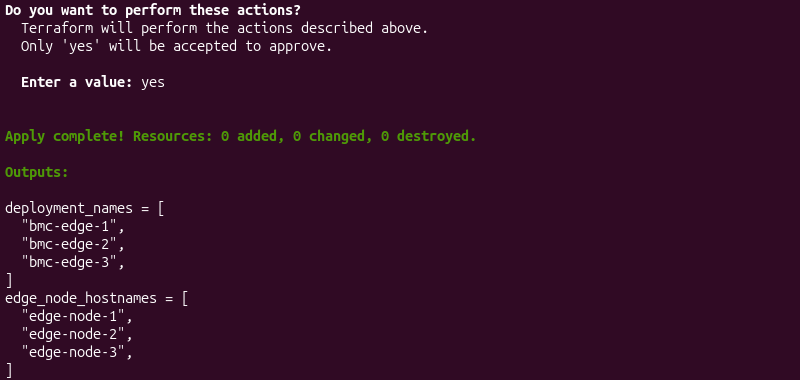
The terraform apply command stores the new output in the Terraform state. After the operation completes, both the original hostnames and the generated deployment names are available as separate outputs.
4. Display the generated output:
terraform output deployment_names
The terraform output command displays the deployment_names output as a single list. This approach provides a convenient way to retrieve values from all instances created with count, making them easier to reuse in other Terraform configurations, modules, or deployment workflows.
Limitations of Using the Terraform count Meta-Argument
Although the Terraform count meta-argument simplifies the creation of multiple similar resources, it is not suitable for every deployment scenario. As infrastructure configurations become larger or more dynamic, count introduces challenges related to resource identification, dependency evaluation, and scalability.
When you understand these limitations, it helps determine when count remains the appropriate choice and when an alternative, such as for_each, provides a more predictable way to manage infrastructure resources.
The following sections present the common count limitations.
The Index-Shifting Dilemma: Unintended Deletions When Removing Middle Elements
Terraform identifies resources created with the count meta-argument by their numeric index. As long as the number and order of instances remain unchanged, Terraform associates each resource with its corresponding state entry.
However, if you remove an element from the middle of a collection, it changes the indexes of all subsequent instances.
The following diagram shows how removing a resource from the middle of a count collection shifts the indexes of the remaining instances.
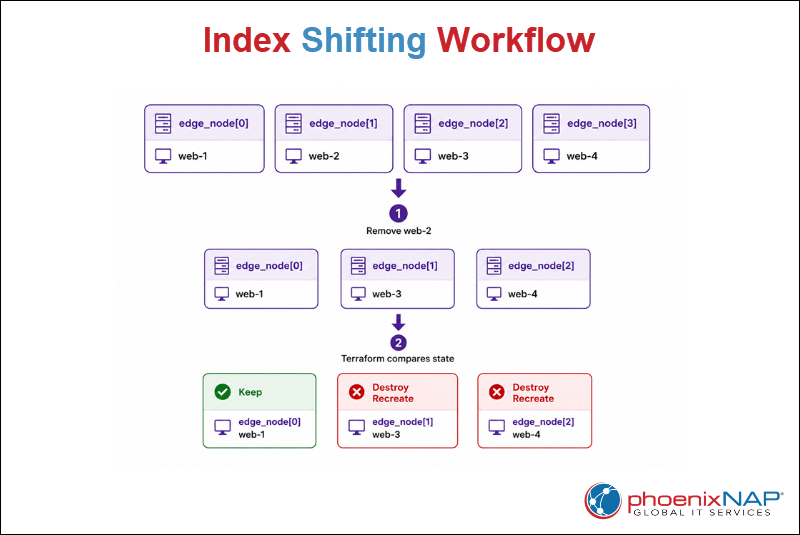
The diagram shows removing web-2 causes web-3 and web-4 to receive new numeric indexes.
Since Terraform tracks resources created with count by their index rather than by a unique identifier, it interprets the shifted indexes as different resource instances instead of the same resources in a new position.
Therefore, Terraform may destroy and recreate infrastructure that was not intended to change.
If resource identity must remain stable regardless of changes to the collection, for_each is a better choice because it tracks resources by unique keys instead of numeric indexes.
Referencing Dynamic Resource Attributes Not Known Until After Apply
Terraform evaluates the count meta-argument during the planning phase to determine how many resource instances it must create. Therefore, the expression assigned to count must resolve to a known integer before Terraform begins provisioning infrastructure.
Some resource attributes are unavailable during planning because Terraform cannot determine their values until the corresponding resources have been created. Terraform displays these attributes as (known after apply) in the execution plan. Since these values do not yet exist, they cannot be used to calculate the count value.
To recreate this limitation, the following example creates a random_pet resource, which generates a random identifier only during the apply phase.
The configuration then uses the generated random_pet.name.id value to calculate the count value for a terraform_data resource. Because the identifier does not exist during planning, Terraform cannot determine how many resource instances to create.
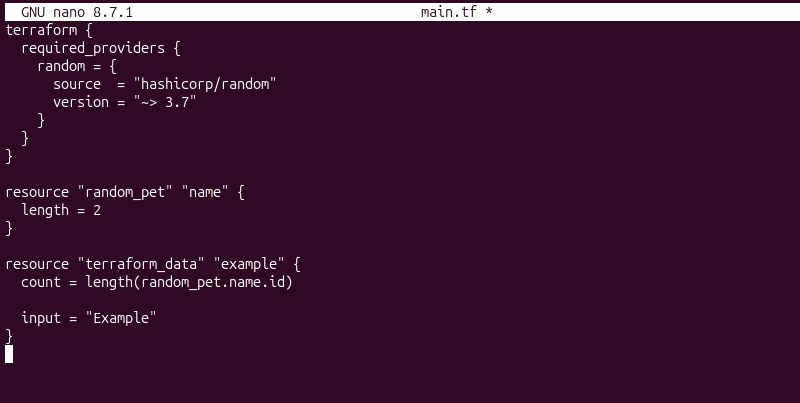
The configuration is syntactically valid, so Terraform accepts it without errors. However, the count expression references random_pet.name.id, a value Terraform cannot determine until the random_pet resource has been created during the apply phase.
The terraform init command initializes the working directory and downloads the providers required by the configuration.
terraform init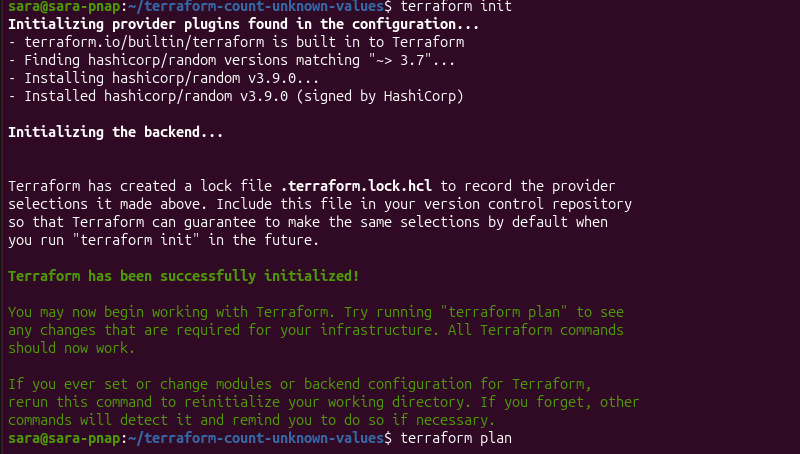
The command completes successfully because Terraform only initializes the working directory, installs the required providers, and configures the backend. At this stage, Terraform does not evaluate the count expression, so no error is reported.
During the planning phase, Terraform evaluates the count expression to determine how many terraform_data instances it should create with:
terraform plan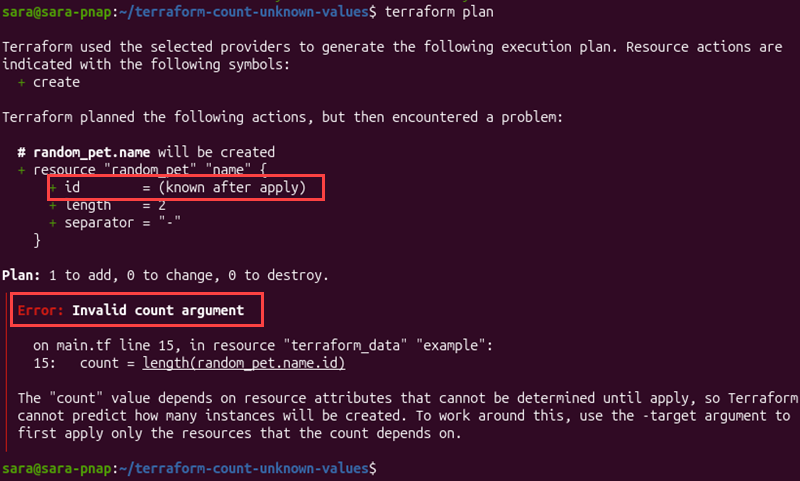
The execution plan first indicates that random_pet.name.id is (known after apply) because the resource has not yet been created. Terraform then attempts to evaluate the count expression and determines it depends on a value unavailable during planning. Therefore, Terraform cannot calculate the required number of terraform_data instances and stops with an Invalid count argument error.
To avoid this limitation, calculate the count value only from information Terraform can determine during the planning phase, such as variables, local values, or data source results that are already available.
Rigid Ordering Issues Compared to Keyed Map Collections
The count meta-argument identifies resource instances by their numeric position in a collection. Therefore, the order of the collection becomes part of each resource's identity. This approach works well for homogeneous resources that can be treated interchangeably, but it becomes less flexible when each resource represents a specific component with its own purpose.
Consider a deployment that manages three application components:
- web
- api
- database
When using count, Terraform assigns these resources the instance addresses resource[0], resource[1], and resource[2]. The numeric indexes distinguish the resources, but they do not describe their roles. As the deployment evolves, it’s increasingly difficult to maintain the intended relationship between each index and its corresponding component.
By comparison, for_each identifies resources using unique keys instead of numeric indexes. The same deployment can use the keys "web", "api", and "database", which allows each resource to retain its identity regardless of its position in the collection.
Therefore, count is best suited for creating multiple interchangeable resources, while for_each provides a more predictable approach when each resource represents a distinct object with its own identity.
Scaling Bottlenecks and Cloud API Throttling From Large Int Loops
The count meta-argument can create hundreds or even thousands of resource instances from a single configuration. While Terraform supports large count values, deployment performance depends on more than Terraform itself. As the number of resources grows, cloud providers, infrastructure complexity, and Terraform's internal processing can all affect execution time.
Factors that can affect deployments using very large count values include:
- Cloud provider API rate limits. Providers often limit the number of requests clients can make within a specific time period.
- Provider-imposed request throttling. When Terraform sends too many requests simultaneously, providers may temporarily delay or reject additional requests until the rate decreases.
- Longer plan and apply times. Terraform must evaluate, compare, and process every resource instance before creating or updating infrastructure.
- Larger Terraform state files. Managing a higher number of resources increases the amount of information Terraform stores in its state, which can slow state operations.
- More complex dependency graphs. Additional resources increase the number of relationships Terraform must analyze when determining the execution order.
Although Terraform supports large count values, deployment performance increasingly depends on provider capabilities and infrastructure complexity rather than the count meta-argument itself.
Best Practices for Using the Terraform count Meta-Argument
The count meta-argument provides a simple and efficient way to create multiple identical resource instances. However, as Terraform configurations grow, careful planning becomes increasingly important to keep infrastructure predictable and easy to maintain.
The following sections show a few best practices that help improve readability, reduce maintenance effort, and minimize the risk of unexpected infrastructure changes.
Prefer for_each for Complex, Heterogeneous Resource Management
The count meta-argument is best suited for creating multiple interchangeable resources that share the same configuration. When resources require different names, tags, network settings, or other unique attributes, managing them through numeric indexes becomes increasingly difficult.
In these situations, the for_each meta-argument provides a more maintainable approach by assigning each resource a stable key instead of a numeric index. This allows Terraform to preserve each resource's identity even as the configuration evolves.
As a guideline, use:
countwhen resources are largely identical and differ only by their instance number.for_eachwhen each resource represents a distinct object with its own configuration and identity.
Abstract Loop Values into Variables Instead of Hardcoding Counts
Instead of hardcoding numeric values directly into the count expression, store them in input variables. This makes configurations easier to reuse and allows different environments to deploy varying numbers of resources without modifying the Terraform code.
For example, instead of assigning a fixed value directly:
count = 5Define a variable and reference it from the count expression:
variable "instance_count" {
  type    = number
  default = 5
}

resource "terraform_data" "example" {
  count = var.instance_count
}
This approach improves flexibility, simplifies configuration management, and makes infrastructure easier to scale across development, testing, and production environments.
Combine Loops with Strict Boundary Checks to Avoid Accidental Destroy Actions
When variables control the count value, unexpected input changes increase or reduce the number of managed resources. Because Terraform continuously reconciles infrastructure with the current configuration, decreasing a count value may cause Terraform to destroy existing resource instances.
To reduce this risk:
- Validate numeric input before using it in a
countexpression. - Define appropriate minimum and maximum values for variables that control resource counts.
- Review the execution plan before applying infrastructure changes, especially after modifying
countvalues. - Confirm which resource instances Terraform plans to remove before approving a deployment.
Carefully validating input values and reviewing planned changes helps prevent unintended resource deletions while keeping large Terraform deployments predictable and easier to manage.
Conclusion
This tutorial explained the Terraform count meta-argument, including its syntax, behavior, and common use cases. It also demonstrated practical examples, explored its limitations, and presented best practices for building scalable and maintainable Terraform configurations.
Next, learn what Terraform backends are and how they work.