Terraform provides the terraform taint command to mark a managed resource for recreation when the resource becomes damaged, degraded, or otherwise needs to be replaced without a configuration change. Although the command remains available for compatibility, HashiCorp deprecated it in Terraform v0.15.2 in favor of the -replace option.
This article explains how terraform taint works, when to use it, how it affects Terraform state and dependent resources, and how to force resource recreation on phoenixNAP Bare Metal Cloud (BMC).
What Is the terraform taint Command?
The terraform taint command marks a specific resource as tainted in the Terraform state, indicating that the existing resource should be replaced. This is useful when a resource becomes damaged or degraded, but its configuration has not changed, so Terraform would not otherwise detect a reason to recreate it.
Running terraform taint does not immediately destroy the resource. Instead, it updates the state so that the next terraform plan or terraform apply proposes a replacement. The command accepts a resource address, such as pnap_server.node, to identify the target resource. Terraform v0.15.2 deprecated terraform taint in favor of the -replace option, which lets you request and review the replacement as part of the planning workflow.
How terraform taint Works
Terraform normally compares the desired configuration with the current state and the remote infrastructure before deciding whether resources require changes. If a resource is damaged or degraded without a corresponding configuration change, Terraform may have no reason to recreate it.
Running terraform taint changes this behavior by marking the resource as tainted in state, causing the next terraform plan or terraform apply operation to propose destroying and recreating that resource.
For example, the following command marks a BMC server for replacement:
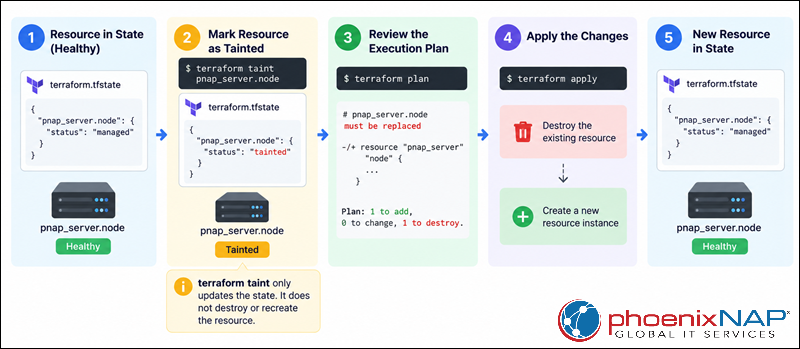
terraform taint pnap_server.nodeThe command does not immediately destroy or recreate the server. It changes the Terraform state so that a subsequent plan recognizes the resource as requiring replacement. HashiCorp recommends -replace instead because it avoids creating an intermediate tainted state and shows the replacement directly in the execution plan.
The following diagram illustrates the terraform taint lifecycle:
terraform taint vs. terraform apply -replace
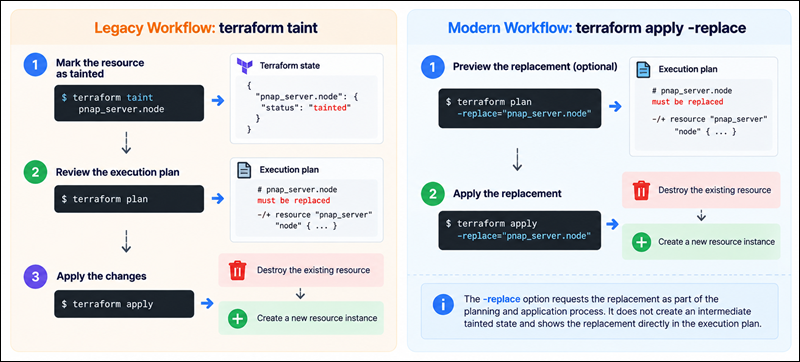
Both terraform taint and terraform apply -replace force Terraform to replace a resource even when no configuration change would otherwise require it. The key difference is how the replacement is introduced into the Terraform workflow.
terraform taint first modifies the state by marking the resource as tainted, after which a separate terraform plan or terraform apply operation performs the replacement. In contrast, terraform apply -replace requests the replacement as part of the current operation, allowing Terraform to include it directly in the generated execution plan.
For example, the modern approach is:
terraform apply -replace="pnap_server.node"You can preview the replacement without applying it:
terraform plan -replace="pnap_server.node"The following table compares the key features of both approaches:
| Feature | terraform taint | terraform apply -replace |
|---|---|---|
| Purpose | Marks a resource for replacement. | Requests a resource replacement. |
| State modification | Immediately marks the resource as tainted in state. | Does not create an intermediate tainted state. |
| Workflow | Taint → plan → apply. | Plan and apply the replacement in a single workflow. |
| Plan visibility | The replacement appears after the resource is tainted. | Replacement is included in the plan from the start. |
| Risk in shared environments | Another user or automation can apply the tainted state before you review it. | Replacement intent is tied to the current plan and apply operation. |
| Terraform status | Deprecated since v0.15.2. | Recommended approach for modern Terraform. |
| Example | terraform taint pnap_server.node | terraform apply -replace="pnap_server.node" |
For modern Terraform configurations, use terraform plan -replace="ADDRESS" when you want to review the proposed replacement first, or terraform apply -replace="ADDRESS" when you are ready to execute it. The -replace option makes the replacement explicit in the execution plan and avoids leaving a resource marked as tainted between Terraform operations.
The following diagram shows the difference in workflow between terraform taint and terraform apply -replace:
Why Mark Resources for Recreation in Terraform?
Terraform does not automatically recreate every remote object that becomes unhealthy. A resource can remain present and still match the declared configuration even when software, configuration, or another operational condition has degraded it.
Explicitly marking the resource for replacement tells Terraform to provision a new object using the existing configuration.
Resolving Drift and State Misalignments
Infrastructure drift occurs when the actual environment no longer corresponds to the configuration or state Terraform uses to manage it. Not every form of drift requires resource replacement, and you should generally handle ordinary configuration differences through the normal Terraform plan and apply workflow. However, when a resource remains present but is known to be unusable or incorrectly provisioned, replacement can be more reliable than attempting to repair the object manually.
For example, an external change may have affected a server in a way Terraform cannot represent through its resource attributes. Marking that resource for replacement lets Terraform discard the affected object and provision a new one according to the declared configuration. This supports the broader Infrastructure as Code model, where infrastructure is defined declaratively and can be reproduced consistently.
Recovering from Corrupted or Degraded Compute Instances
Terraform can manage the lifecycle of a compute resource without necessarily understanding whether the operating system or workload running inside it is healthy. A virtual machine can remain reachable from the provider while an application, filesystem, or operating system component is corrupted. The same principle applies to dedicated infrastructure: the provider may report that the server exists even though the workload has become unusable.
In these cases, replacement provides a clean recovery path. Terraform destroys the existing resource and provisions a new instance from the same configuration, rather than requiring the configuration itself to change. HashiCorp specifically identifies damaged or degraded remote objects as a use case for manual resource replacement.
Forcing Provisioner Execution and Cloud-Init Re-runs
Resource replacement can also be useful when provisioning logic must run again from a clean resource lifecycle. If a provisioning step or cloud-init configuration failed during the original deployment, changing unrelated Terraform arguments solely to trigger another provisioning cycle can make the configuration misleading.
Replacing the resource instead creates a new lifecycle and gives the provider another chance to run its creation-time configuration. This approach is especially relevant for infrastructure that uses initialization scripts or cloud-init data during server provisioning. However, replacement should be treated as a destructive operation because the existing resource and its associated runtime data may not survive recreation.
Key Concepts and Command Syntax
Understanding resource addresses, the Terraform state, and dependency relationships is essential before using terraform taint. This Terraform command operates on Terraform-managed objects identified by their state addresses rather than by cloud-provider hostnames, IP addresses, or other external identifiers.
Foundational Concepts in State Management
Terraform state maps configuration resources to real infrastructure objects and records information Terraform needs to manage those objects over time. A resource address identifies the configuration object Terraform operates on, while the state maintains the association between that address and the corresponding remote resource.
For phoenixNAP BMC infrastructure, for example, a pnap_server resource may appear in state as pnap_server.db_server. The provider-assigned server ID is stored separately and connects the Terraform resource to the actual BMC server.
Resource Address (type.name)
A basic resource address consists of the resource type and local resource name:
pnap_server.nodeIn this example, pnap_server is the resource type supplied by the phoenixNAP provider, while node is the local name defined in the Terraform configuration. The local name is a Terraform identifier and does not have to match the BMC server hostname.
For resources created with count or for_each, the address also includes the appropriate instance key, such as:
pnap_server.node[0]or:
pnap_server.node["worker-01"]Terraform uses these complete addresses to identify individual instances in state.
State Mutability and the tainted Status Flag
The tainted status is a state-level indication that Terraform should replace a resource during a subsequent operation. It does not modify the resource configuration in the .tf files and does not immediately change the remote object.
Once a resource is tainted, Terraform recognizes that the existing object should not be retained and plans a replacement. If the resource was marked incorrectly and should remain in place, terraform untaint removes the tainted status from state.
Execution Cycle (Plan, Taint, Apply)
The traditional taint workflow consists of three distinct stages. First, terraform taint marks the target resource in state. Next, terraform plan refreshes the relevant information and shows that Terraform intends to replace the tainted resource. Finally, terraform apply executes the approved replacement.
For example:
terraform taint pnap_server.node
terraform plan
terraform apply
The separation between tainting and applying is important because the terraform taint command itself does not perform the replacement. Terraform destroys and recreates resources only when it executes the resulting plan.
Cross-Resource Dependency Graphs and Cascade Effects
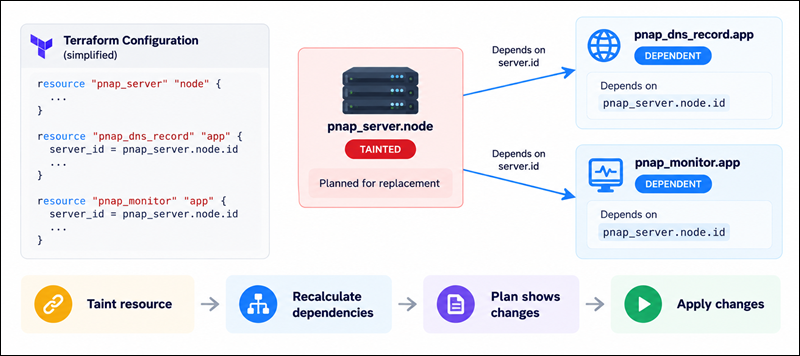
Terraform builds a dependency graph from resource references and configuration relationships. Replacing one resource can therefore affect resources that depend on its attributes or lifecycle. For example, if another resource receives a server ID, IP address, or network attribute from the replaced resource, Terraform may need to update or recreate that dependent resource depending on how the provider models the relationship.
The taint command therefore applies to one resource address, but its effects can extend beyond that resource through the dependency graph. Review the full execution plan before applying a replacement, especially when the target resource supports networking, storage, or application dependencies.
The following diagram illustrates how tainting a resource can affect dependent resources through Terraform's dependency graph and trigger additional planned changes:
Command Syntax and Common Arguments
The terraform taint command uses the following syntax:
terraform taint [options] ADDRESSThe ADDRESS argument is mandatory and identifies the resource instance to mark as tainted. The [options] portion is optional and modifies how Terraform executes the command. Most users don't need to specify an option when tainting a resource, but several options can help when working with different state configurations or controlling command output.
The following table shows the most commonly used terraform taint options and their descriptions:
| Option | Description |
|---|---|
-allow-missing | Allows the command to succeed even if the specified resource is not found in the state. |
-lock=false | Disables state locking during the operation. Use this only when you understand the risks of modifying shared state without locking. |
-lock-timeout=DURATION | Specifies how long Terraform waits to acquire the state lock before returning an error. |
-ignore-remote-version | Allows Terraform to ignore differences between the local Terraform version and the remote state version when using Terraform Cloud or HCP Terraform. |
-state=PATH | Specifies the path to a local state file when using local state. This option is intended for legacy workflows and is generally unnecessary with modern backends. |
The resource ADDRESS is the only required argument. For example, the following command uses the default options and marks pnap_server.node as tainted:
terraform taint pnap_server.nodeOptions can be combined with the resource address when additional control is required. For example, the following command waits up to 30 seconds to acquire the state lock:
terraform taint -lock-timeout=30s pnap_server.nodeBecause terraform taint is deprecated, these options are mainly relevant when maintaining existing workflows that still use the command. For new configurations, use terraform plan -replace or terraform apply -replace instead.
Tainting Specific Resource Instances
For a single resource without instance indexing, provide the resource address directly:
terraform taint pnap_server.nodeIf a resource is managed with count, specify the instance index:
terraform taint pnap_server.node[0]For a resource managed with for_each, specify the instance key:
terraform taint 'pnap_server.node["worker-01"]'Quoting the for_each address prevents the shell from interpreting characters such as brackets or quotation marks before Terraform receives the address.
Tainting Resources in Modules (module.module_name.type.name)
Resources inside child modules use a module-qualified address. For example, if a root module contains a child module named server and that module declares pnap_server.node, the resource address is:
module.server.pnap_server.nodeFor nested modules, Terraform adds another module.<name> segment for each module level. When a module creates multiple instances, the resource address also includes the relevant index or key.
Use terraform state list to retrieve the exact address before tainting a module resource rather than constructing a potentially incorrect address manually.
Untainting Resources (terraform untaint)
If a resource was tainted accidentally or the underlying problem has been resolved without replacement, use terraform untaint to remove the tainted status. For example:
terraform untaint pnap_server.nodeThe command changes Terraform state so the resource is considered available for normal management again. It does not repair the remote resource or reverse any replacement that Terraform has already performed. Therefore, untaint the resource only after you confirm the existing infrastructure is safe to retain.
Legacy Syntax vs. Modern Alternatives
The terraform taint command is a legacy workflow. HashiCorp deprecated the command in Terraform v0.15.2 and recommends using -replace with terraform plan or terraform apply instead.
For example, use the following command to inspect the replacement:
terraform plan -replace="pnap_server.node"Then, run the following when you are ready to execute it:
terraform apply -replace="pnap_server.node"This approach keeps the replacement request within the planning workflow and avoids leaving an intermediate tainted state that another Terraform operation could act upon.
How terraform taint Interacts with the IaC Lifecycle
The taint workflow fits into Terraform's normal configuration, state, planning, and apply cycle by changing how Terraform interprets one existing resource. It does not modify the HCL configuration or independently call the provider to destroy the resource.
Reading the Execution Plan for Tainted Resources
After a resource is tainted, terraform plan identifies it as requiring replacement. The plan normally displays the replacement with the -/+ marker and explains that the resource is tainted and therefore must be replaced. For example:
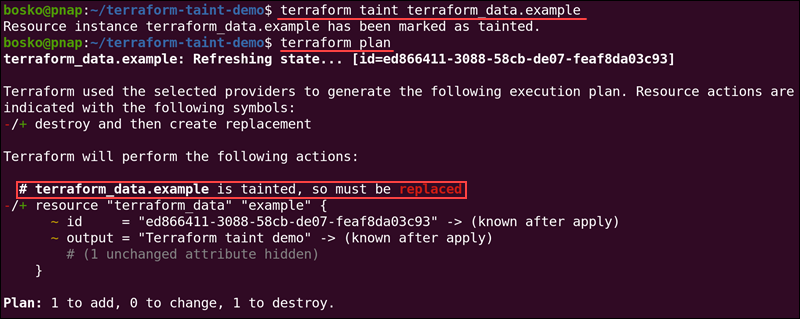
Review this output before applying the plan. The replacement can change provider-assigned values such as the server ID and IP addresses, and dependent resources may also require changes. HashiCorp recommends the -replace workflow partly because the plan shows the replacement request from the start.
State File Modifications (terraform.tfstate)
terraform taint changes Terraform's state rather than the Terraform configuration. In a local-state workflow, the resulting state is stored in terraform.tfstate. With a remote backend, Terraform stores the state according to the configured backend instead.
Because state maps Terraform resource addresses to real infrastructure, state modifications should be treated as operational changes. Avoid editing terraform.tfstate manually to simulate a tainted resource. Use Terraform's state-management commands so Terraform can maintain the expected state structure and locking behavior.
Impact on Dependent Downstream Resources
Replacing a resource can change values consumed by downstream resources. For example, a newly provisioned BMC server receives a new provider-assigned ID, and its networking or runtime attributes may also change. Any dependent configuration that references those values is therefore evaluated against the replacement resource.
Terraform normally uses its dependency graph to determine the correct operation order. Before applying a tainted resource replacement, inspect the complete plan for unexpected downstream changes rather than assuming that only the target resource will be affected.
Step-by-Step Guide: Forcing Resource Recreation
The following workflow demonstrates the legacy terraform taint process. For new Terraform configurations, use terraform plan -replace and terraform apply -replace instead.
Step 1: Identifying the Target Resource Address
Start by listing the resources Terraform manages in the current state:
terraform state listFind the resource that needs replacement and copy its complete address. For example:
pnap_server.nodeIf the resource uses count, for_each, or a module, make sure the address includes the correct instance index, key, or module path.
Step 2: Executing the terraform taint Command
Run terraform taint with the exact resource address:
terraform taint pnap_server.nodeTerraform updates the state and reports that the resource has been marked as tainted. The remote BMC server or other managed object is not replaced at this point.
Step 3: Verifying State Changes with terraform plan
Generate an execution plan to confirm that Terraform intends to replace the target resource:
terraform planLook for the target resource in the plan and verify that Terraform shows a replacement rather than an in-place update. Also inspect the rest of the plan for dependent changes that may result from the replacement.
Step 4: Applying Changes to Replace the Resource
Once the plan matches the expected result, apply it with:
terraform applyTerraform destroys the existing tainted object and provisions a replacement according to the current configuration. The exact provider operations depend on the resource type and provider implementation.
Step 5: Validating Post-Deployment Integrity
After the replacement completes, verify that Terraform reports a successful apply and that the resulting resource is available. For BMC infrastructure, confirm the new server status, operating system, network connectivity, assigned IP addresses, and any application-level services that depend on the server.
You can also use Terraform outputs or terraform state show to inspect the resource information stored in state. For BMC servers, the pnap_server resource exposes provider-generated information such as the server ID, status, and IP addresses.
Using terraform taint on Bare Metal Cloud (BMC)
phoenixNAP Bare Metal Cloud integrates with Terraform through the phoenixnap/pnap provider, allowing you to provision and manage BMC servers and related infrastructure through declarative configuration. Terraform represents a BMC server with the pnap_server resource, which defines properties such as the hostname, operating system, server type, and location.
Note: Infrastructure as Code provides more information about using Terraform and other IaC tools to automate Bare Metal Cloud infrastructure.
Forcing Physical Server Re-provisioning and OS Re-images
A BMC server is a dedicated physical server rather than a virtual machine, so replacing a pnap_server resource results in a new server provisioning lifecycle through the phoenixNAP provider. This makes resource replacement useful when the existing machine has reached a state where rebuilding the server is preferable to manual recovery.
For example, a Terraform configuration can define a BMC server as:
resource "pnap_server" "node" {
  hostname = "bmc-node-01"
  os       = "ubuntu/jammy"
  type     = "s1.c1.small"
  location = "PHX"
}
Marking pnap_server.node for replacement instructs Terraform to recreate the server from this configuration. The resulting server receives a new provider-side resource identity, so applications should not assume that the original server ID or other dynamically assigned attributes remain unchanged.
Re-triggering Cloud-Init and Post-Boot Startup Scripts
A new BMC server follows the provider's creation workflow again, making replacement useful when initialization failed and the server needs to be provisioned from a clean state. The pnap_server resource supports cloud-init configuration, which can provide user data during server creation.
For example:
resource "pnap_server" "node" {
  hostname = "bmc-node-01"
  os       = "ubuntu/jammy"
  type     = "s1.c1.small"
  location = "PHX"

  cloud_init {
    user_data = filebase64("cloud-init.yaml")
  }
}
Replacing the resource makes Terraform create a new server with the declared configuration, giving the initialization process another chance to complete successfully. This is particularly useful when the original provisioning failure resulted from a transient issue or a corrupted initial state.
Managing High-Performance Workloads Without Noisy Neighbor Contention
BMC provides single-tenant physical servers, so workloads run directly on dedicated hardware rather than sharing the underlying compute host with unrelated virtual machines. This predictable hardware model helps workloads that need consistent compute performance, dedicated resources, or direct hardware access.
Terraform adds an automation layer on top of that dedicated infrastructure. When a BMC server needs a clean rebuild, resource replacement can recreate the server from the same declarative configuration instead of requiring an administrator to manually reproduce the deployment.
Note: Explore phoenixNAP Bare Metal Cloud to learn more about dedicated BMC infrastructure and its Terraform integration.
Hands-On Examples: Tainting phoenixNAP Bare Metal Cloud Instances
The following examples use the pnap_server resource provided by the phoenixNAP Terraform provider. The same Terraform state and replacement concepts apply to BMC servers as to other provider-managed resources.
Tainting a Single BMC Server (bmc_server.node)
Given a BMC server defined as:
resource "pnap_server" "node" {
  hostname = "bmc-node-01"
  os       = "ubuntu/jammy"
  type     = "s1.c1.small"
  location = "PHX"
}
Mark the server for replacement with:
terraform taint pnap_server.nodeThen, inspect the replacement:
terraform planFor a modern Terraform workflow, replace both commands with:
terraform plan -replace="pnap_server.node"and apply the approved replacement with:
terraform apply -replace="pnap_server.node"Replacing an Entire BMC Cluster in a Module
When a reusable module creates several BMC servers, target the resource instances individually or use the appropriate resource addresses exposed by the module. For example, a module named cluster containing a pnap_server.node resource uses an address such as:
module.cluster.pnap_server.nodeIf the resource uses count or for_each, include the corresponding instance address:
module.cluster.pnap_server.node[0]or:
module.cluster.pnap_server.node["worker-01"]Taint only the instances that require replacement unless the entire cluster must be rebuilt. Replacing multiple physical servers can cause broader service disruption and may also change values other resources consume.
Recovering a BMC Instance from Provisioning Failures
If a BMC server exists but its initial provisioning process failed, first inspect the Terraform plan and the server's provider-side status to determine whether replacement is appropriate. When rebuilding the server is the intended recovery method, mark the resource for replacement:
terraform taint pnap_server.node
terraform plan
terraform apply
The replacement provisions a new BMC server using the configuration and initialization data currently declared in Terraform. After the apply completes, verify the server status and connectivity before considering the recovery complete.
Common Issues and Troubleshooting terraform taint
The most common problems with terraform taint involve resource addresses, dependencies, state management, and the destructive nature of replacement. Because the command changes Terraform state without immediately showing the full replacement plan, careful verification is particularly important.
Resource Destruction Failures and Orphaned Cloud Assets
A replacement destroys the existing object and creates a new one. If the provider cannot successfully delete the old resource, the replacement may stop partway through the operation. Provider-side failures can leave infrastructure in an intermediate state that requires additional investigation before Terraform can continue.
Do not manually remove resources from Terraform state simply because a provider operation failed. First determine whether the remote resource still exists and whether Terraform still manages it. For BMC resources, use the BMC portal or provider-supported information to confirm the actual server state before taking further state-management actions.
Unintended Cascading Recreations Across Dependencies
A tainted resource can cause more than one resource to change when other resources depend on it. For example, a BMC server replacement can change its server ID or IP addresses, which may affect resources that consume those attributes.
Always inspect the full plan after tainting a resource. If Terraform proposes additional replacements that are not expected, stop before applying the plan and investigate the dependency chain.
Accidental Tainting in Production State Files
Running terraform taint against the wrong workspace or resource can schedule a production resource for destruction and recreation. This risk matters most when multiple environments use similar resource names or shared automation workflows.
Before running the command, verify the active workspace, state backend, and exact resource address. Prefer terraform plan -replace for modern workflows because the replacement intent appears directly in the plan instead of first being stored as a tainted state condition.
Deprecation Warnings in Terraform v0.15+ and v1.0+
Terraform has deprecated terraform taint in favor of the -replace option since v0.15.2. The command may still work in current Terraform versions, but new automation should not depend on the legacy workflow.
Use:
terraform plan -replace="pnap_server.node"to preview a replacement and:
terraform apply -replace="pnap_server.node"to execute it. Modern Terraform releases support this approach and keep replacement decisions within the normal plan-and-apply lifecycle.
Best Practices for Managing Tainted Resources
Managing tainted resources carefully helps prevent unintended replacements and keeps Terraform state consistent with the actual infrastructure. Because terraform taint modifies the state before the replacement occurs, review the affected resource, dependencies, and execution plan before applying changes. Use the following practices to make resource replacement more predictable and reduce the risk of unnecessary downtime:
- Prefer
terraform plan -replaceandterraform apply -replacefor new workflows instead of the deprecatedterraform taintcommand. - Always review the execution plan before applying a replacement.
- Use the exact resource address to avoid tainting the wrong resource instance.
- Consider dependent resources before forcing a replacement, especially in production environments.
- Avoid manually modifying the Terraform state unless necessary, and you understand the consequences.
- Use state locking when working with shared or remote state to prevent concurrent operations from causing inconsistencies.
- Validate the replaced resource after deployment to confirm that configuration, dependencies, and application services work as expected.
Conclusion
This article explained what the terraform taint command does, how it marks resources for replacement, and how tainted resources affect Terraform plans, state, and dependent resources. Although terraform taint can force resource recreation, it is deprecated in modern Terraform versions, so use terraform plan -replace or terraform apply -replace for new workflows.
For more information about how Terraform tracks infrastructure and manages resource state, see Terraform State - Explanations and Practical Tips.