Kubernetes offers several mechanisms for influencing where workloads run within a cluster. Kubernetes taints and tolerations are a flexible way to control where Pods can run. Taints are applied to nodes and act as restrictions that repel Pods, while tolerations are applied to Pods and allow them to bypass specific taints.
This article will explain how taints and tolerations work, how to configure them, how Kubernetes evaluates them during scheduling, and common use cases and best practices for production clusters.
What Is Taint in Kubernetes?
A taint is a scheduling property applied to a Kubernetes node that restricts which Pods can run on that node. Instead of telling Kubernetes where a Pod should be placed, a taint tells Kubernetes which Pods should be kept away from a node unless they explicitly meet certain requirements.
Administrators commonly use taints to reserve nodes for specialized workloads, isolate critical infrastructure services, or prevent scheduling on nodes that require special handling. During scheduling, Kubernetes evaluates a node's taints before deciding whether a Pod is eligible to run on that node.
Kubernetes Taint Structure
Every taint consists of three components that define what the taint represents and how Kubernetes should enforce it. Understanding this structure is important because all taints follow the same format regardless of their purpose.
A taint's components are:
- Key. Identifies the taint.
- Value. Optional value associated with the key.
- Effect. Defines how Kubernetes handles Pods that do not tolerate the taint.
The syntax is:
key=value:effectFor example:
gpu=true:NoScheduleIn the example above, gpu is the key, true is the value, and NoSchedule is the effect. Together, they indicate that only Pods configured to tolerate this taint should be considered for placement on the node.
Kubernetes Taint Effects
The effect is the most important part of a taint because it determines how Kubernetes responds when a Pod does not tolerate it. Different effects provide different levels of enforcement, allowing administrators to choose the behavior that best fits their requirements.
The taint effects are:
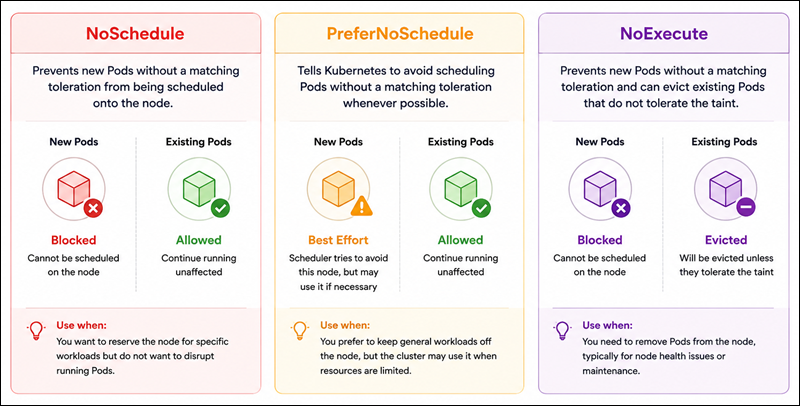
NoSchedule. Prevents new Pods without a matching toleration from being scheduled onto the node. It is the most commonly used effect because it provides a clear scheduling restriction without affecting workloads that are already running.PreferNoSchedule. Tells Kubernetes to avoid scheduling Pods without a matching toleration whenever possible. It is useful when you want Kubernetes to avoid a node but still allow scheduling if necessary.NoExecute. Prevents scheduling and can evict existing Pods that do not tolerate the taint. It is typically used for node health and maintenance scenarios because it can remove Pods that no longer meet scheduling requirements.
The following diagram compares the three effects:
Taints vs. Node Affinity vs. Node Selector
Kubernetes provides several mechanisms for influencing workload placement, and it is common to see taints compared with node selectors and node affinity. While they all affect scheduling decisions, they serve different purposes.
The following table highlights the differences between them:
| Feature | Purpose |
|---|---|
| Node Selector | Places Pods on nodes with specific labels. |
| Node Affinity | Defines advanced label-based scheduling rules. |
| Taints | Restricts which Pods can run on a node. |
| Tolerations | Allow Pods to bypass specific node restrictions. |
The key distinction is that node selectors and node affinity attract workloads toward nodes, while taints create restrictions that keep workloads away.
In many production environments, administrators use both approaches together. For example, a node may be tainted to block general workloads while node affinity ensures that only a specific application is scheduled there.
What Is Toleration in Kubernetes?
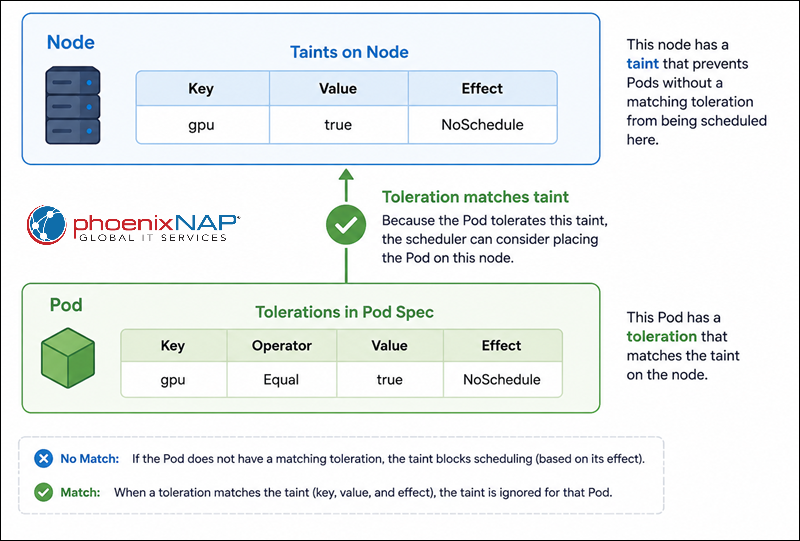
A toleration is a Pod configuration that allows the Pod to be considered for scheduling on a node with a matching taint. Without a toleration, a Pod cannot run on a tainted node if the taint's effect blocks scheduling.
Tolerations work by matching specific taints and telling Kubernetes that the Pod is allowed to ignore those restrictions. This relationship gives administrators control over which workloads can access certain nodes without requiring custom scheduling logic.
It is important to understand that a toleration does not guarantee placement on a tainted node. It simply removes a scheduling restriction and allows Kubernetes to consider that node alongside other eligible nodes. The following diagram depicts how taints and tolerations work:
Kubernetes Toleration Structure
Tolerations are defined in a Pod specification and include fields that Kubernetes uses to match taints. The exact configuration depends on whether you want to match a specific value or only acknowledge the presence of a taint.
The following example shows a basic toleration:
tolerations:
- key: "gpu"
  operator: "Equal"
  value: "true"
  effect: "NoSchedule"
Each field serves a specific purpose:
| Field | Purpose |
|---|---|
key | Matches the taint key. |
operator | Defines how the match is performed. |
value | Matches the taint value. |
effect | Matches the taint effect. |
Kubernetes supports two operators: Equal and Exists. The Equal operator requires a matching value, while Exists only checks for the presence of the specified key. Choosing the appropriate operator depends on how precisely you want the toleration to match the taint.
Add Taint in Kubernetes
Adding a taint is a common administrative task when configuring workload isolation or reserving nodes for specific purposes. Kubernetes provides the kubectl taint command to apply taints directly to nodes.
Note: Learn more about kubectl's capabilities by reading our kubectl commands article.
The following example adds a taint that prevents Pods from being scheduled onto a node unless they tolerate the restriction:
kubectl taint nodes worker-1 gpu=true:NoScheduleIn this example:
worker-1is the target node.gpu=truedefines the taint key and value.NoSchedulespecifies the effect.
After the taint is applied, Kubernetes excludes the node from scheduling decisions for Pods that lack a matching toleration.
To verify the change, inspect the node details with:
kubectl describe node worker-1The command output includes a Taints section showing all taints currently applied to the node.
Remove Taint in Kubernetes
Scheduling requirements often change over time. When a node no longer requires special restrictions, you can remove the associated taint and return it to normal scheduling behavior.
Kubernetes uses the same kubectl taint command for removal, but with a trailing dash (-). For example:
kubectl taint nodes worker-1 gpu:NoSchedule-The trailing dash instructs Kubernetes to delete the matching taint from the node.
Once removed, Pods no longer need a corresponding toleration to be scheduled there. As with adding a taint, you can verify the result by inspecting the node configuration:
kubectl describe node worker-1Checking the node after making changes helps confirm that the taint was removed successfully and prevents confusion when troubleshooting scheduling issues.
Note: See how to restart a Kubernetes pod.
How to Write Toleration
Tolerations can be written in several ways, depending on the type of taint you need to match. Some tolerations target a specific taint value, while others match any taint with a particular key.
The sections below demonstrate common toleration patterns.
Match a Specific Taint
When you want a Pod to tolerate a specific key-value combination, use the Equal operator. For example:
tolerations:
- key: "gpu"
  operator: "Equal"
  value: "true"
  effect: "NoSchedule"
This toleration matches a taint such as gpu=true:NoSchedule. Kubernetes considers a match successful only if the key, value, and effect align with the taint on the node.
Match Any Value
In some situations, the value associated with a taint is not important. The Exists operator allows a Pod to tolerate any taint that uses the specified key. For example:
tolerations:
- key: "gpu"
  operator: "Exists"
  effect: "NoSchedule"
This configuration matches any gpu taint regardless of its value, making it useful when multiple nodes use the same taint key but different values.
Temporary NoExecute Toleration
The NoExecute effect supports an additional field called tolerationSeconds, which controls how long a Pod can remain on a node after the taint appears. For example:
tolerations:
- key: "node.kubernetes.io/not-ready"
  operator: "Exists"
  effect: "NoExecute"
  tolerationSeconds: 300
Here, the Pod can continue running for up to five minutes (300 seconds) after the node becomes unavailable. If the condition persists beyond that period, Kubernetes evicts the Pod from the node.
Built-In (Automatic) Taints
Not all taints are created manually. Kubernetes automatically applies several built-in taints when node conditions change. These taints help protect cluster stability by preventing workloads from running on unhealthy or resource-constrained nodes.
Because these taints are managed by Kubernetes itself, understanding them is essential when troubleshooting scheduling issues or unexpected workload movement.
The following table summarizes the most common built-in taints.
| Built-In Taint | Purpose |
|---|---|
node.kubernetes.io/not-ready | The node is not ready to accept workloads. |
node.kubernetes.io/unreachable | The control plane cannot communicate with the node. |
node.kubernetes.io/memory-pressure | The node is experiencing memory pressure. |
node.kubernetes.io/disk-pressure | The node is experiencing disk pressure. |
node.kubernetes.io/pid-pressure | The node is running low on available process IDs. |
node.kubernetes.io/network-unavailable | Networking is not available on the node. |
node.kubernetes.io/unschedulable | The node has been marked unschedulable. |
When Pods remain in a Pending state or unexpectedly leave a node, checking for these automatic taints should be one of the first troubleshooting steps.
Evaluating Multiple Taints and Tolerations
In production clusters, nodes often have multiple taints, and Pods may define multiple tolerations. Kubernetes evaluates all of them together before making a scheduling decision.
The process is relatively straightforward:
1. Kubernetes starts with all taints on the node.
2. Any taint with a matching toleration is ignored.
3. Remaining taints determine the scheduling outcome.
Consider a node with the following taints:
gpu=true:NoSchedule
env=prod:NoExecute
And a Pod with the following toleration:
tolerations:
- key: "gpu"
  operator: "Equal"
  value: "true"
  effect: "NoSchedule"
The Pod tolerates the first taint but does not tolerate the second. Because the env=prod:NoExecute taint remains unmatched, the Pod cannot successfully run on the node.
This filtering process is important because a single unmatched taint may still prevent scheduling, even when all other taints are tolerated.
Taints and Tolerations Use Cases
Taints and tolerations are most valuable when you need to control access to specific nodes or enforce workload isolation. They are commonly used in production clusters to protect resources, improve reliability, and support specialized infrastructure.
The following examples illustrate several common use cases:
- Dedicated nodes. Organizations often reserve nodes for specific teams, environments, or applications. Applying taints to those nodes prevents unrelated workloads from being scheduled there and helps maintain predictable resource allocation.
- GPU workloads. GPU-enabled nodes are significantly more expensive than standard compute nodes. Taints ensure that only machine learning, AI, or other GPU-dependent applications can access those resources.
- Infrastructure services. Monitoring systems, ingress controllers, service meshes, and logging platforms often run on dedicated infrastructure nodes. Taints help prevent application workloads from competing for resources that support critical cluster services.
- Spot and preemptible nodes. Spot and preemptible instances provide cost savings but can be interrupted with little notice. Administrators frequently taint these nodes, allowing only fault-tolerant workloads to run on them.
- Node health management. Kubernetes uses taints as part of its node health management process. When nodes become unreachable or enter a degraded state, automatic taints can restrict scheduling or trigger workload eviction to protect application availability.
Taints and Tolerations Considerations
Although taints and tolerations are straightforward to configure, several behaviors can affect scheduling outcomes in ways that are not always obvious. Understanding these details can make troubleshooting much easier:
- Tolerations do not guarantee placement. Toleration allows a Pod to be considered for placement on a tainted node, but the scheduler still evaluates other factors such as resource availability, affinity rules, and topology constraints. As a result, a Pod with a matching toleration may still be scheduled elsewhere.
- Multiple taints are evaluated together. Kubernetes evaluates all taints on a node rather than stopping at the first match. Even if a Pod tolerates several taints, a single unmatched taint can still prevent scheduling or trigger eviction.
- Omitting effect matches all effects. The
effectfield is optional in a toleration. When omitted, Kubernetes matches all effects associated with the specified taint key. For example, the following toleration matchesgputaints regardless of whether they useNoSchedule,PreferNoSchedule, orNoExecute:
tolerations:
- key: "gpu"
operator: "Exists"NoExecutesupports grace periods. ThetolerationSecondsfield allows workloads to remain on a node temporarily after aNoExecutetaint appears. This behavior is useful for handling brief outages without immediately disrupting running applications.- Automatic taints may appear without manual changes. Kubernetes automatically applies node condition taints. If a workload suddenly stops scheduling or is evicted unexpectedly, reviewing the node's current taints can help identify the underlying cause.
NoExecuteevictions and pod availability. BecauseNoExecutecan remove running Pods from a node, administrators should understand how these evictions affect application availability. Workloads that require strict uptime guarantees may need additional planning around replica counts and disruption management.
Taints and Tolerations Best Practices
Taints and tolerations work best when they are part of a broader scheduling strategy rather than an isolated configuration. Establishing clear conventions and usage patterns makes clusters easier to manage as they grow.
The following best practices can help maintain predictable scheduling behavior:
- Use descriptive taint keys that clearly indicate their purpose.
- Establish naming standards for taints across the cluster.
- Reserve taints for meaningful scheduling boundaries rather than minor preferences.
- Combine taints with node affinity when you need stronger placement controls.
- Start with
PreferNoSchedulewhen testing new scheduling policies. - Monitor automatic node-condition taints as part of routine cluster operations.
- Use
NoExecutecarefully because it can affect running workloads. - Document tainting strategies so teams understand scheduling requirements.
- Validate taint configurations in non-production environments before deployment.
- Periodically review nodes and remove obsolete taints.
Following these practices helps reduce scheduling surprises and makes troubleshooting easier as cluster complexity increases.
Conclusion
This article explained what Kubernetes taints and tolerations are, how to configure them, and provided useful examples. Understanding how taints are applied, how tolerations match them, and how Kubernetes evaluates multiple scheduling constraints is essential for building reliable cluster policies.
Next, see how to install Jenkins on a Kubernetes cluster.