Terraform configuration files use the .tf extension and contain the infrastructure definitions Terraform uses to provision and manage resources. These files use HashiCorp Configuration Language (HCL), which provides a human-readable syntax for declaring infrastructure.
This article explains what Terraform .tf files are, how their blocks and attributes work, how to organize them in a project, and how Terraform processes them during an infrastructure deployment.
What Are Terraform Files (.tf Files)?
Terraform files are plain-text configuration files that use the .tf extension. They contain Terraform configuration written in HCL, such as provider requirements, provider configurations, resources, data sources, variables, locals, outputs, and modules. Terraform also supports a JSON-compatible configuration syntax with the .tf.json extension.
A Terraform module consists of the configuration files in a directory. Terraform loads all .tf and .tf.json files in that directory and evaluates them together as a single configuration. The file names do not determine the order in which Terraform creates resources or evaluates dependencies.
For example, a simple phoenixNAP Bare Metal Cloud configuration can use a .tf file to define the provider and a server:
terraform {
  required_providers {
    pnap = {
      source  = "phoenixnap/pnap"
      version = "0.33.0"
    }
  }
}

provider "pnap" {
  client_id     = var.client_id
  client_secret = var.client_secret
}

resource "pnap_server" "web" {
  hostname = "bmc-web-01"
  os       = "ubuntu/bionic"
  type     = "s1.c1.medium"
  location = "PHX"
}
The terraform block declares the required provider, the provider block configures access to phoenixNAP, and the resource block defines the BMC server Terraform should manage. The current phoenixNAP Terraform provider supports pnap_server for creating, modifying, and deleting Bare Metal Cloud servers.
Note: Terraform files are one way to implement Infrastructure as Code workflows. phoenixNAP Bare Metal Cloud integrates with Terraform and other Infrastructure as Code tools to automate infrastructure provisioning and management.
Key File Types: .tf vs. .tfvars vs. .terraform.lock.hcl vs. .tfstate
Terraform projects commonly contain several file types that serve different purposes. Understanding the difference prevents configuration code, input values, dependency information, and state data from being mixed together.
| File | Purpose | Typical contents |
|---|---|---|
| .tf | Defines Terraform configuration. | Providers, resources, variables, modules, outputs. |
| .tfvars | Supplies values for input variables. | Environment-specific values. |
| .terraform.lock.hcl | Locks provider dependency selections. | Provider versions and checksums. |
| .tfstate | Records Terraform state. | Resource IDs, attributes, and metadata. |
.tf files contain the configuration itself.
.tfvars files provide values to variables declared in that configuration and can be loaded automatically when they use names such as terraform.tfvars or *.auto.tfvars. You can also supply other variable files explicitly with terraform plan -var-file or terraform apply -var-file.
The .terraform.lock.hcl file records the provider versions Terraform selected and their checksums. Terraform creates or updates this file during terraform init, and HashiCorp recommends committing it to version control.
The terraform.tfstate file is different from all three. It records Terraform's state and maps resources in the configuration to real infrastructure. With the default local backend, Terraform stores this state in terraform.tfstate; remote backends can store it elsewhere. State can contain sensitive information and should not normally be committed to version control.
Anatomy and Syntax of a .tf File Block
Terraform configuration uses a small set of syntax elements to describe infrastructure. The two fundamental constructs are blocks and arguments. Blocks organize configuration into logical objects, while arguments assign values to those objects. Expressions provide the values arguments use and can include literal values, references to other configuration objects, or functions that calculate values dynamically.
A .tf file can contain multiple blocks, and a block can contain both arguments and nested blocks. For example, a resource block identifies the type of infrastructure Terraform should manage and contains arguments that configure that resource:
resource "pnap_server" "web" {
  hostname = "bmc-web-01"
  location = "PHX"
  type     = "s1.c1.medium"
  os       = "ubuntu/bionic"
}
In this example, resource is the block type, pnap_server and web are labels, and hostname, location, type, and os are arguments. The values assigned to those arguments can be literal values or expressions that reference other parts of the configuration.
HCL Block Types, Labels, and Attributes
Terraform blocks are containers that group related configuration. Each block has a block type, which tells Terraform what kind of object the block represents. Some block types require labels that further identify the object, while others do not. For example, a resource block requires two labels: one identifies the resource type, and the other identifies the resource instance within the configuration.
Arguments appear inside a block and assign values to named configuration properties. HCL documentation commonly calls these properties attributes, while Terraform documentation generally uses the term argument for values that can be assigned in configuration. This distinction is useful because Terraform resources also expose read-only attributes, such as an automatically assigned resource ID, that can be referenced but not directly assigned.
The following diagram shows the basic structure of a terraform file block:
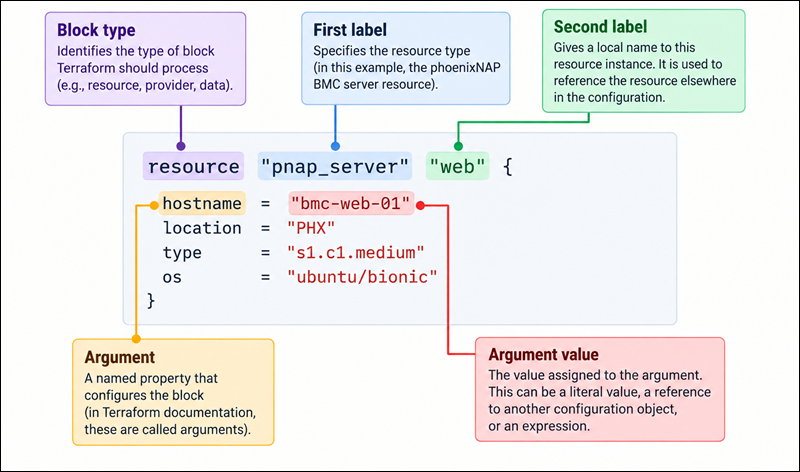
Block types determine how Terraform interprets the block and how many labels it expects. A resource block uses two labels, while other block types may use one label or none. Blocks can also contain nested blocks, allowing Terraform configuration to represent hierarchical relationships.
Core Blocks: terraform, provider, resource, and data
Terraform provides several top-level block types for describing different parts of an infrastructure configuration. The terraform block configures Terraform itself, provider blocks configure provider plugins, resource blocks define infrastructure Terraform manages, and data blocks retrieve information about existing infrastructure. These blocks serve different purposes, but they can work together within the same module.
For example, a BMC configuration can use all four:
terraform {
  required_providers {
    pnap = {
      source  = "phoenixnap/pnap"
      version = "0.33.0"
    }
  }
}

provider "pnap" {
  client_id     = var.client_id
  client_secret = var.client_secret
}

resource "pnap_server" "web" {
  hostname = "bmc-web-01"
  location = "PHX"
  type     = "s1.c1.medium"
  os       = "ubuntu/bionic"
}

data "pnap_server" "existing" {
  hostname = "bmc-existing-01"
}
The terraform block establishes configuration requirements, including the required provider. The provider block configures the phoenixNAP provider, while the resource block declares a BMC server for Terraform to manage. Lastly, the data block retrieves information about an existing server without declaring Terraform ownership of that infrastructure.
Variable and Output Blocks: inputs, locals, and outputs
Terraform configuration becomes more reusable when you separate values that change between deployments from the infrastructure definition. Input variables allow a module to accept values from its caller, local values provide reusable expressions within the module, and outputs expose values from the module for use elsewhere. These constructs help prevent duplicating the same configuration across different BMC servers or environments.
For example, an input variable can define the BMC server hostname:
variable "server_hostname" {
  description = "BMC server hostname."
  type        = string
}
The resource can then reference that variable:
resource "pnap_server" "web" {
  hostname = var.server_hostname
  os       = "ubuntu/bionic"
  type     = "s1.c1.medium"
  location = "PHX"
}
A local value can combine or transform existing values without requiring another input:
locals {
  environment = "production"
  hostname    = "bmc-${local.environment}"
}
An output can expose information produced by the resource:
output "server_ip" {
  description = "Public IP address of the BMC server."
  value       = pnap_server.web.primary_ip_address
}
This separation makes the configuration easier to reuse: the resource describes what Terraform should provision, variables provide changeable values, locals calculate internal values, and outputs expose results that other configurations or users may need.
Working with Terraform Files - Examples
A Terraform project can contain one .tf file or multiple. The best structure depends on the configuration size, the number of environments, and whether the code is intended for reuse.
For BMC deployments, a small configuration may define a single server in main.tf, while a larger project can separate providers, variables, networking, server resources, and outputs into different files or modules.
Standard Single-Directory Layout: main.tf, variables.tf, and outputs.tf
A single-directory layout keeps all Terraform configuration for one module in the same directory. This approach works well for small and moderately sized BMC deployments where the infrastructure does not require separate reusable modules or multiple independent environments. Instead of placing every configuration object in one large file, you can split the configuration by purpose to make it easier to find and maintain.
A common layout separates the primary infrastructure definitions, input variables, and outputs into three files:
bmc-terraform/
├── main.tf
├── variables.tf
└── outputs.tf
For example, main.tf can contain the BMC server resource:
resource "pnap_server" "web" {
  hostname = var.server_hostname
  os       = var.server_os
  type     = var.server_type
  location = var.location
}
The variables.tf file declares the values that can change between deployments:
variable "server_hostname" {
  description = "BMC server hostname."
  type        = string
}

variable "server_os" {
  description = "BMC server operating system."
  type        = string
}

variable "server_type" {
  description = "BMC server type."
  type        = string
}

variable "location" {
  description = "BMC server location."
  type        = string
}
The outputs.tf file defines values Terraform should expose after the deployment:
output "server_ip" {
  description = "Public IP address of the BMC server."
  value       = pnap_server.web.primary_ip_address
}
These filenames are conventions, not requirements. Terraform loads all .tf files in the directory as part of the same module, so moving a variable from variables.tf to main.tf does not change how Terraform evaluates it. This separation organizes the configuration and makes larger files easier to navigate.
Structuring Provider Configurations and Backend State in providers.tf
Provider and backend configuration controls how Terraform connects to external infrastructure and where it stores state. As a project grows, keeping these settings separate from resource definitions makes the configuration easier to navigate and helps distinguish Terraform's operational settings from the infrastructure it manages.
A common project structure places provider-related configuration in a dedicated providers.tf file:
bmc-terraform/
├── main.tf
├── providers.tf
├── variables.tf
└── outputs.tf
The file can contain the provider requirement and provider configuration:
terraform {
  required_providers {
    pnap = {
      source  = "phoenixnap/pnap"
      version = "0.33.0"
    }
  }
}

provider "pnap" {
  client_id     = var.client_id
  client_secret = var.client_secret
}
A backend can also be declared in the terraform block when the project uses remote state:
terraform {
  backend "s3" {
    bucket = "terraform-state"
    key    = "bmc/production.tfstate"
    region = "us-east-1"
  }
}
The filename has no special meaning to Terraform. You can place these blocks in main.tf or another .tf file, and Terraform will evaluate them the same way. Using providers.tf simply gives provider and backend configuration a predictable location within the project.
Note: Avoid storing provider credentials directly in .tf files. Use supported environment variables, credential files, or another appropriate secret-management mechanism instead.
Modularizing Infrastructure with Subdirectories and Reusable .tf Code
A single directory becomes less practical when you must deploy the same infrastructure pattern multiple times. Terraform modules address this by grouping related configuration into separate directories that a root module can call. For BMC infrastructure, a module can encapsulate a standard server configuration and allow different environments or applications to reuse it with different input values.
For example, a project can use a root configuration and a reusable BMC server module:
bmc-infrastructure/
├── main.tf
├── variables.tf
├── outputs.tf
└── modules/
    └── bmc-server/
        ├── main.tf
        ├── variables.tf
        └── outputs.tf
The root module calls the child module:
module "web_server" {
  source = "./modules/bmc-server"

  hostname    = "bmc-web-01"
  location    = "PHX"
  server_type = "s1.c1.medium"
  os          = "ubuntu/bionic"
}
The child module contains the resource definition:
resource "pnap_server" "this" {
  hostname = var.hostname
  os       = var.os
  type     = var.server_type
  location = var.location
}
Terraform treats the child directory as a separate module. Its configuration isn't automatically included in the root module just because the directory exists; the root configuration must reference it with a module block. This separation lets you call the same module multiple times with different inputs.
Managing Environment-Specific Configurations Across Dev, Staging, and Prod
Different environments often require the same infrastructure pattern with different server sizes, locations, hostnames, or other settings. Instead of copying and modifying the entire configuration for each environment, Terraform keeps the reusable infrastructure definition separate from the values that distinguish development, staging, and production.
One approach is to give each environment its own root module while sharing a reusable module:
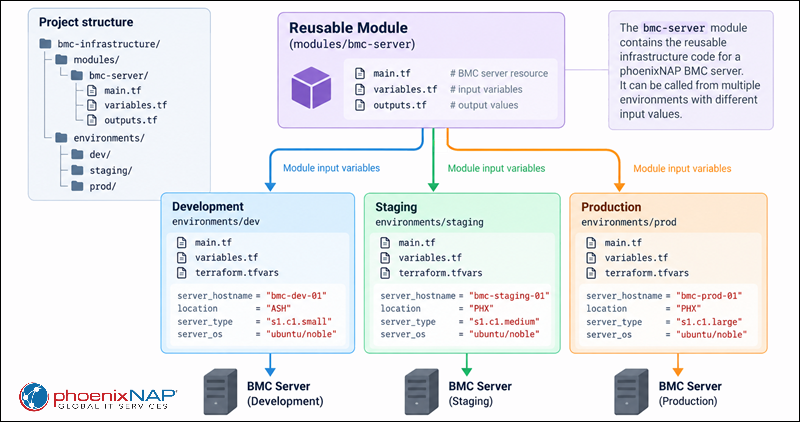
Each environment can call the same BMC module:
module "bmc_server" {
  source = "../../modules/bmc-server"

  hostname    = var.server_hostname
  location    = var.location
  server_type = var.server_type
  os          = var.server_os
}
The production environment can supply its specific values through terraform.tfvars:
server_hostname = "bmc-prod-web-01"
location        = "PHX"
server_type     = "s1.c1.medium"
server_os       = "ubuntu/bionic"
The same module can therefore serve all three environments while each environment maintains its own state and input values. This structure also makes it possible to initialize and operate each environment independently:
terraform -chdir=./environments/prod init
terraform -chdir=./environments/prod plan
terraform -chdir=./environments/prod apply
The important distinction is that .tf files define the infrastructure and its logic, while .tfvars files provide values that can vary between deployments. Terraform treats each environment directory as a separate root module, so each environment has its own configuration and state.
Validating and Formatting .tf Files with terraform fmt and terraform validate
Formatting and validation are two separate checks that help catch problems before Terraform attempts to modify infrastructure. terraform fmt standardizes the appearance of configuration files, while terraform validate checks whether the configuration is syntactically valid and internally consistent. Running these commands regularly helps identify configuration problems during development rather than during deployment.
Format the configuration with:
terraform fmtFor a directory containing multiple Terraform modules, use:
terraform fmt -recursiveThen validate the configuration:
terraform validateA typical local workflow is:
terraform fmt
terraform init
terraform validate
terraform plan
terraform validate checks the configuration itself, but it does not validate remote infrastructure or guarantee that a proposed deployment will succeed. Use terraform plan to evaluate the changes Terraform intends to make against the current state and infrastructure.
The Execution Cycle: How terraform init, plan, and apply Read .tf Files
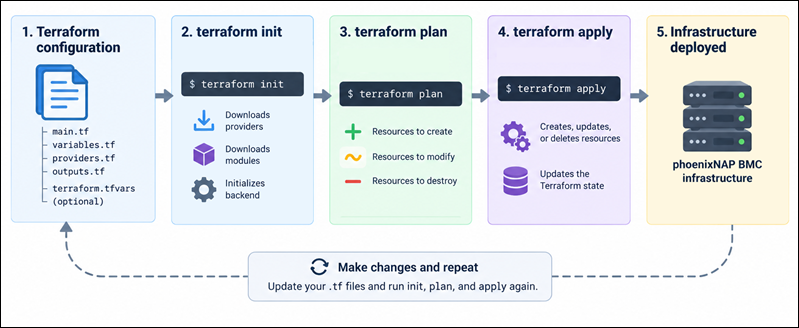
Terraform reads the .tf files in the current root module and uses their combined configuration to determine what infrastructure should exist.
The basic workflow is:
.tf files > terraform init > terraform plan > Execution plan > terraform apply > Infrastructure + updated stateterraform init prepares the working directory by initializing the backend and downloading required providers and modules.
terraform plan compares the current configuration with Terraform's state and the remote infrastructure, then generates a proposed set of changes. It does not make those changes itself.
terraform apply command executes the changes Terraform proposes.
Terraform does not execute main.tf first, followed by providers.tf and then outputs.tf. It loads the configuration as a whole and builds a dependency graph. References between resources determine implicit dependencies, allowing Terraform to determine which operations must happen first and which can happen in parallel.
Dynamic File Manipulation: Generating and Interpolating Code via CLI
Terraform does not normally generate or execute .tf files dynamically during a standard plan or apply operation. Instead, Terraform configuration can use expressions to calculate values dynamically, while CLI options can supply different input values without modifying the .tf files.
For example, a variable can be supplied from the CLI:
terraform plan -var="server_hostname=bmc-web-02"Or a variable definition file can provide multiple values:
terraform plan -var-file="production.tfvars"Terraform also supports functions such as templatefile for generating text from templates. This function generates a string value for use by a resource or another expression, but it does not dynamically add new Terraform configuration blocks to the running configuration.
For example:
locals {
  cloud_init = templatefile("${path.module}/cloud-init.yaml", {
    hostname = var.server_hostname
  })
}
You can then pass the resulting text to a resource that accepts it.
For programmatically generating Terraform configuration itself, Terraform also supports the .tf.json configuration format, which can be easier for external programs to generate than native HCL.
Common Pitfalls and Troubleshooting .tf Files
Most .tf file problems fall into a few categories: invalid HCL syntax, incorrect assumptions about how Terraform loads files, and collaboration problems caused by treating infrastructure code like isolated scripts.
The sections below explain the most common issues and how to fix/avoid them.
Preventing Syntax and Parsing Errors in HCL
HCL uses braces, quotation marks, brackets, and commas to define configuration structures. A missing character can prevent Terraform from parsing the configuration.
For example, the following configuration contains a missing closing brace:
resource "pnap_server" "web" {
  hostname = "bmc-web-01"
  location = "PHX"
  type     = "s1.c1.medium"
Terraform reports an error when it attempts to parse the file:
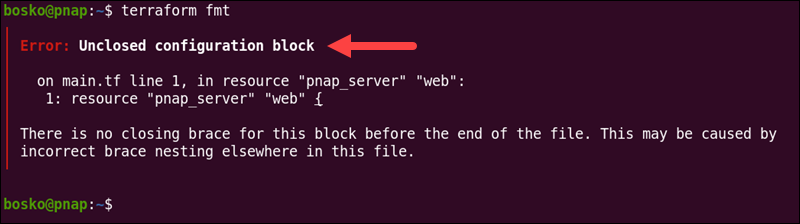
Use terraform fmt to normalize formatting and a language-aware editor to identify mismatched braces, quotation marks, and other syntax problems:
terraform fmtterraform validateWhen troubleshooting an error, start with the first reported configuration error. Later errors can sometimes result from the initial parsing problem.
Resolving File Ordering Myths and Variable Scope Misconceptions
Terraform does not process main.tf before variables.tf because of their filenames. Terraform evaluates all configuration files in the same module together. Splitting resources, variables, and outputs into separate files only improves organization and maintainability.
For example, this reference works regardless of whether the variable declaration appears in variables.tf before or after the resource in main.tf:
resource "pnap_server" "web" {
  hostname = var.server_hostname
}
variable "server_hostname" {
  type = string
}
Variable scope is a separate concept. A variable declared in one module is not automatically available in another module. Values must be passed through module arguments:
module "web_server" {
  source = "./modules/bmc-server"

  hostname = var.server_hostname
}
Similarly, local values are available only within the module where they are declared.
One exception worth knowing about is Terraform override files. Files named override.tf or ending in _override.tf receive special processing and can modify existing configuration objects. These files are intended for uncommon use cases and should not be confused with ordinary .tf file organization.
Managing Merge Conflicts in Shared Infrastructure Codebases
Terraform .tf files are commonly stored in version control, allowing teams to review and merge infrastructure changes like application code.
When multiple contributors modify the same configuration file, Git can produce merge conflicts:
<<<<<<< HEAD
location = "PHX"
=======
location = "ASH"
>>>>>>> feature/staging
Resolve the merge conflict by choosing the intended configuration, then run:
terraform fmtValidate with:
terraform validateLastly, run:
terraform planAvoid resolving infrastructure conflicts by simply accepting one side without reviewing the resulting resource definitions. A syntactically valid configuration can still produce an unintended infrastructure change.
Keep generated and environment-specific artifacts out of source-controlled configuration where appropriate. In particular, you should store Terraform state in a suitable remote backend rather than committing it to a Git repository.
Best Practices for Writing and Managing Terraform Files
Well-structured Terraform files make infrastructure configurations easier to understand, reuse, review, and maintain as deployments grow. Use consistent file organization, separate configuration from environment-specific values, protect sensitive data, and validate changes before applying them.
The following practices help keep Terraform configurations predictable and manageable, particularly when multiple BMC environments or contributors are involved:
- Use .tf files for configuration. Keep infrastructure definitions, provider configuration, variables, modules, and outputs in Terraform configuration files.
- Separate concerns logically. Use files such as main.tf, providers.tf, variables.tf, and outputs.tf when they make a configuration easier to navigate.
- Do not rely on file names for execution order. Terraform evaluates the configuration as a whole and determines dependencies from references between objects.
- Use variables for changing values. Parameterize values such as BMC hostnames, locations, operating systems, and server types instead of duplicating configurations.
- Use .tfvars files for environment-specific values. Keep reusable configuration separate from environment-specific values.
- Use modules for reusable infrastructure. Extract repeated infrastructure patterns into child modules and pass values through variables and outputs.
- Format configuration consistently. Run terraform fmt before committing changes.
- Validate before planning. Use terraform validate to detect syntax and configuration errors early.
- Review plans before applying changes. Use terraform plan to inspect the proposed infrastructure changes before running terraform apply.
- Protect credentials and state. Do not hardcode API credentials in .tf files; use appropriate mechanisms to secure Terraform state.
- Commit the dependency lock file. Keep .terraform.lock.hcl in version control so provider selections remain consistent across environments.
- Keep module structures understandable. Avoid unnecessary module nesting, and split infrastructure into modules when it improves reuse or clarity.
Conclusion
This article explained what Terraform .tf files are, how their blocks, labels, and arguments work, and how to organize, validate, and manage them in different infrastructure configurations. A well-structured Terraform file helps users define and manage BMC infrastructure as code, making deployments consistent, reusable, and easier to maintain.
Next, learn about Terraform taints and tolerations and how they work.