All Terraform variables, outputs, and resource attributes have a type. Terraform checks that type at plan time, and a mismatch prevents the run before anything changes real infrastructure. Knowing Terraform data types helps prevent these errors and makes variable and module composition predictable.
This guide covers Terraform's data types, how they work, and how to troubleshoot the errors they produce.
Prerequisites
- Terraform installed.
- (optional) phoenixNAP BMC account + API credentials for practical examples.
Terraform Data Types Basics
Terraform organizes its data types into several categories:
- Primitive.
string,number, andbool. - Complex. Groups multiple elements into a single value:
- Collection.
list,set, andmap. - Structural.
tupleandobject.
- Collection.
- Special.
null.
As part of Infrastructure as Code, data types are foundational for Terraform configurations. The sections below explain Terraform data types in greater depth.
Primitive Types: string, number, and bool
Primitive types hold a single value each. Terraform has three such types:
string. A Unicode character sequence written in double quotes. For example"PHX".number. A numeric value, either an integer or float. For example:1or5.3.bool. A true or false value, written astrueorfalse.
Note: Do not write the bool values in quotes. They will render as strings.
Collection Types: list, set, and map
Collection types group multiple values of the same element type together. Types in this category include:
list. An ordered sequence of values. Each list item is accessed using an index, starting at0.set. An unordered collection of unique values with no duplicates. Elements are inaccessible through an index.map. A collection of key-value pairs. Keys access a corresponding value. All values share the same type, and keys are unique.
Structural Types: tuple and object
Structural types group values that have different element types into one object:
tuple. An ordered, fixed-length sequence where each element can be a different type.object. A collection of named attributes, where each attribute has its own type.
Note: Terraform sometimes converts a list-like value to a tuple automatically when compatible. Be explicit with type to avoid surprises.
Special Values: null
A null value in Terraform represents the absence of a value. Terraform behaves differently depending on whether null is assigned to an optional or required argument:
- Required. If an argument is required, Terraform raises an error.
- Optional. Assigning
nullto an optional argument typically causes Terraform to treat the argument as unset.
Use null in conditional expressions to dynamically omit an argument.
Handling Type Inference
Type inference is a behavior Terraform uses when a data type is unknown or unclear from the code. Handling type inference depends on the configuration:
- When a configuration omits a
type, but has adefault, Terraform infers the data type from thedefaultvalue. - If there is no
defaultand notype, provide a value of any type. Terraform determines the type from the provided value when the variable is assigned.
Explicit typing is the safest choice for any variable, since inference provides no validation.
Working with Primitive Data Types
The sections below demonstrate how to work with primitive data types in Terraform through hands-on examples.
Text Sequences with string (Unicode Text & Interpolation)
A string type holds text and supports interpolation. Interpolation embeds an existing expression's result inside a larger string to create complex strings.
For example, to build a resource name from two variables, see the following example:
variable "environment" {
  type    = string
  default = "production"
}

variable "role" {
  type    = string
  default = "web"
}

locals {
  server_name = "${var.environment}-${var.role}-server"
}

output "server_name" {
  value = local.server_name
}
Terraform evaluates var.environment and var.role and concatenates them into a single string.
For multi-line text, use heredoc syntax:
variable "hostname" {
  type    = string
  default = "server-01"
}

locals {
    cloud_init = <<-EOT
        #cloud-config
        hostname: ${var.hostname}
    EOT
}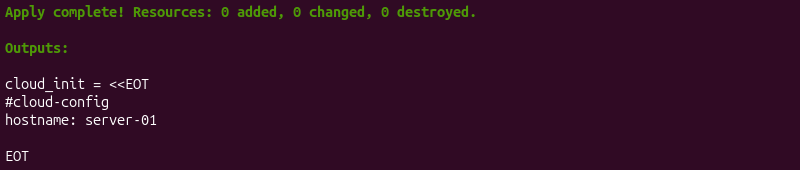
The <<-EOT marker removes leading indentation to the resulting string.
Numeric Expressions with number (Integers & Floating Points)
A number data type represents both integers and floating-point values. Terraform does not distinguish between the two at the type level, while the value itself determines the format.
For example, to perform a basic calculation:
variable "total_servers" {
  type    = number
  default = 8
}

locals {
  worker_count = var.total_servers * 0.75
}

output "worker_count" {
  value = local.worker_count
}
The output shows the calculation's result.
Terraform evaluates expressions at plan time. It uses standard arithmetic operators: +, -, *, /, and % (modulo).
Conditional Logic with bool (True/False Decision Flags)
Use bool values to control conditional expressions. Terraform uses ternary syntax:
[condition] ? [true_value] : [false_value]For example, to choose a server type based on an environment flag:
variable is_production{
    type    = bool
    default = false
}

locals {
    server_type = var.is_production ? "s2.c2.medium" : "s2.c1.small"
}

output "server_type" {
    value = local.server_type
}
In the statement above, the condition (var.is_production) is a bool value. It evaluates to false and resolves to "s2.c1.small".
Working with Complex, Collection, and Structural Types
Complex types, including collection and structural types, group several elements into a single object. Below are examples of how these data types work.
Ordered Sequences with list and tuple
A list type requires every element to match the declared type. For example, declare a list of strings:
variable "location" {
    type    = list(string)
    default = ["PHX", "ASH"]
}

output "locations" {
    value = var.location
}
Every element in location must be a string, or Terraform raises a type error during plan time.
A tuple allows each position to declare its own type. It allows mixed types at fixed positions:
variable "server_profile" {
    type    = tuple([string, number, bool])
    default = ["worker", 2, true]
}

output "profile" {
    value = var.server_profile
}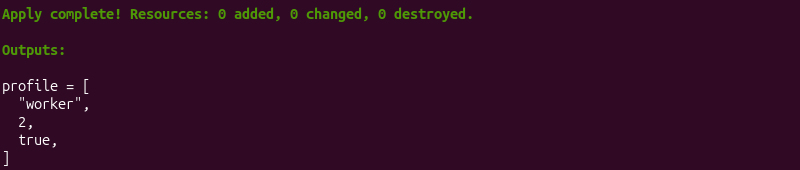
The server_profile variable always has exactly three elements in the declared order.
Unordered Unique Collections with set
A set data type stores unique values with no guaranteed order. Terraform removes duplicate values when constructing a set.
For example, declare a set with SSH key IDs:
variable "ssh_key_ids" {
    type    = set(string)
    default = ["key-1", "key-2", "key-1"]
}

output "keys" {
    value = var.ssh_key_ids
}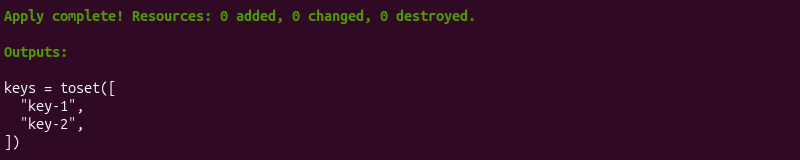
Terraform removes the duplicate key-1 entry and leaves two unique values in the set.
Note: The most common reason to use a set instead of a list is when implementing a for_each meta argument. It accepts a map or a set of strings.
Key-Value Configurations with map and object
A map type requires every value to have the same type, while keys are all strings. For example, declare a map of environment tags:
variable "tags" {
    type    = map(string)
    default = {
        environment = "production"
        team        = "delta"
    }
}

output "environment" {
    value = var.tags.environment
}
Adding numeric or boolean values instead of a string raises a type error.
An object type allows each named attribute to declare its own data type. For example:
variable "server_config" {
    type = object({
        hostname     = string
        memory_gb    = number
        monitoring   = bool
    })
    default = {
        hostname   = "web-01"
        memory_gb  = 16
        monitoring = true
    }
}

output "memory" {
    value = var.server_config.memory_gb
}
The server_config object requires exactly three named attributes with an appropriate data type.
Structural Differences: When to Choose Map vs. Object or List vs. Set
To determine when to choose a map, object, list, or set, use the table below:
| Aspect | List | Set | Map | Object |
|---|---|---|---|---|
| Order | Preserved | Not guaranteed | Not guaranteed | Not guaranteed |
| Duplicates | Allowed | Removed automatically | Unique keys | Unique attribute names |
| Element types | All the same | All the same | All values the same | Every attribute has its own type |
| Use case | Ordered sequences, such as subnets | Unique values for for_each | Homogeneous key-value config like tags | Structured, mixed-type configurations such as a server profile |
Choose based on the following:
- List. Order matters and duplicates are acceptable.
- Set. Uniqueness matters instead of order.
- Map. Every value shares a type, and keys hold meaning.
- Object. The structure has a fixed, known shape with attributes of different types.
Practical Examples with Bare Metal Cloud Instances
The following examples use the phoenixNAP pnap Terraform provider to show how data types apply to Bare Metal Cloud. The examples require a BMC account and API credentials.
Basic Server Variables Using Primitives (string, number, bool)
Use primitive variables to declare specific values for a server. For example:
variable "hostname" {
    type = string
    default = "worker-01"
}

variable "public_network" {
  type    = bool
  default = false
}

resource "pnap_server" "worker" {
  hostname     = var.hostname
  os           = "ubuntu/focal"
  type         = "s2.c2.medium"
  location     = "PHX"
  network_type = var.public_network ? "PUBLIC_AND_PRIVATE" : "PRIVATE_ONLY"
}
The example shows how to use a string variable for hostname. The network_type argument uses the public_network bool in a conditional expression to resolve to a different string depending on the flag's value.
Defining Network Subnets & SSH Key Lists with list(string)
Use a list to declare multiple SSH keys for a server cluster. For example:
variable "ssh_keys_list" {
  type = list(string)

  default = [
    "ssh-rsa AAAAB3... user1@example.com",
    "ssh-rsa AAAAB3... user2@example.com"
  ]
}

resource "pnap_server" "cluster" {
  count    = 3
  hostname = "node-${count.index}"
  os       = "ubuntu/focal"
  type     = "s2.c1.medium"
  location = "PHX"

  ssh_keys = var.ssh_keys_list
}
Another use case for a list is to declare multiple network subnets in a private network block. For example:
variable "subnet_cidrs" {
  type = list(string)

  default = [
    "10.0.0.0/24",
    "172.16.0.0/24"
  ]
}

resource "pnap_private_network" "subnets" {
  count    = length(var.subnet_cidrs)
  name     = "subnet-${count.index}"
  cidr     = var.subnet_cidrs[count.index]
  location = "PHX"
}

resource "pnap_server" "multi_network" {
  hostname                 = "worker-01"
  os                       = "ubuntu/bionic"
  type                     = "s1.c1.medium"
  location                 = "PHX"
  install_default_ssh_keys = true

  network_configuration {
    private_network_configuration {
      configuration_type = "USER_DEFINED"

      private_networks {
        server_private_network {
          id  = pnap_private_network.subnets[0].id
          ips = ["10.0.0.12"]
        }
      }

      private_networks {
        server_private_network {
          id  = pnap_private_network.subnets[1].id
          ips = ["172.16.0.12"]
        }
      }
    }
  }
}
Use a list to define multiple private-network CIDRs, then use them to create corresponding private networks. The server then connects to multiple private networks without duplicating the network resource definition.
Managing Server Tags & Server Metadata with Key-Value map(string)
A map groups related string-based configuration values. For example, use it to manage server tags:
variable "tag_config" {
  type = map(string)

  default = {
    name        = "dev"
    description = "The development environment"
  }
}

resource "pnap_tag" "environment" {
  name           = var.tag_config["name"]
  description    = var.tag_config["description"]
  is_billing_tag = false
}
Alternatively, a map can group server configuration values into one unit. Access each value by its key when configuring a server resource:
variable "server_metadata" {
  type = map(string)

  default = {
    hostname = "test-server"
    os       = "ubuntu/focal"
    type     = "s1.c1.medium"
    location = "PHX"
  }
}

resource "pnap_server" "server" {
  hostname = var.server_metadata["hostname"]
  os       = var.server_metadata["os"]
  type     = var.server_metadata["type"]
  location = var.server_metadata["location"]
  ...
}
The map data type simplifies a server's basic configuration by managing a single variable.
Modeling Network Interface Assignment Using Complex object Types
Use complex Terraform types to model structured hardware configuration. For example, a server's private network interface can be represented by an object containing a network ID and a list of IP addresses:
variable "network_interface" {
  type = object({
    id  = string
    ips = list(string)
  })

  default = {
    id  = "network-01"
    ips = ["10.0.0.15", "10.0.0.16"]
  }
}

resource "pnap_server" "multi_ip" {
  hostname = "app-01"
  os       = "ubuntu/focal"
  type     = "s2.c2.medium"
  location = "PHX"

  network_configuration {
    private_network_configuration {
      configuration_type = "USER_DEFINED"

      private_networks {
        server_private_network {
          id  = var.network_interface.id
          ips = var.network_interface.ips
        }
      }
    }
  }
}
The network_interface variable uses an object to group related network data: the private network ID and IPs.
Dynamic Resource Expansion Across Collections using for_each and count
The count and for_each meta arguments help create multiple resource instances from collections.
For example, use count to create multiple servers from a list of hostnames:
variable "server_hostnames" {
  type    = list(string)
  default = ["server-01", "server-02", "server-03"]
}

resource "pnap_server" "web" {
  count = length(var.server_hostnames)

  hostname = var.server_hostnames[count.index]
  os       = "ubuntu/focal"
  type     = "s1.c1.medium"
  location = "PHX"
  ...
}
The example uses a list and count.index to create similarly configured servers with different names.
Use for_each to iterate over a map and implement servers with different configurations:
variable "servers" {
  type = map(object({
    type     = string
    location = string
  }))

  default = {
    web = {
      type     = "s1.c1.medium"
      location = "PHX"
    }
    database = {
      type     = "s2.c2.large"
      location = "ASH"
    }
  }
}

resource "pnap_server" "configured" {
  for_each = var.servers

  hostname = each.key
  os       = "ubuntu/focal"
  type     = each.value.type
  location = each.value.location
  install_default_ssh_keys = true
}
The example uses a map to provision a web and a database server.
Troubleshooting Terraform Data Types
Using data types requires more than choosing the right types for a variable. Values passed between Terraform resources, variables, and expressions must also match the type the configuration expects. When a mismatch occurs, Terraform either converts the value (where possible), or reports an error.
The following sections cover common data type problems, how to identify them, and resolve them.
Resolving Type Mismatch and Implicit Conversion Failures
A type mismatch is an error where a value's actual type doesn't match its declared type, and Terraform can't convert between them.
For example, assigning a string to a variable declared as a number fails unless the string is a number. In that case, Terraform converts it automatically.
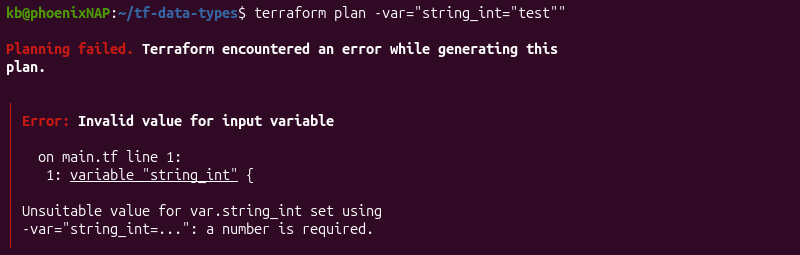
To fix a type mismatch, correct the value at its source. Avoid adjusting or loosening the type to prevent the error from recurring in the configuration.
Debugging Invalid Object Attribute and Map Key Errors
An invalid object attribute error means a required attribute is missing, has the wrong name, or type.
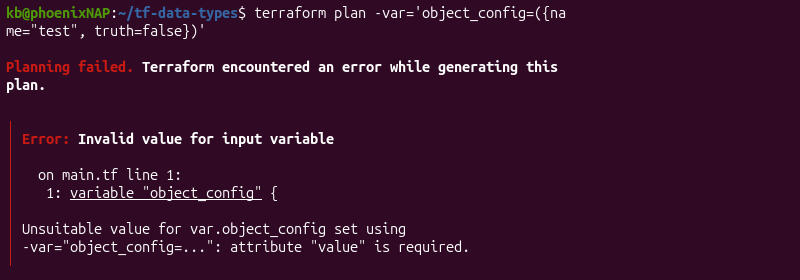
Compare the value against the object ({}) definition and adjust the attribute causing the issue.
A map key error occurs when referencing a key that doesn't exist. To debug, use the lookup() function with a default value to avoid the error. For example:
variable "tags" {
  type = map(string)

  default = {
    environment = "staging"
    owner       = "platform"
  }
}

locals {
  region = lookup(var.tags, "region", "unspecified")
}
The function defaults to "unspecified" and continues instead of raising an error when a key is missing.
Fixing Unintended Type Conversions during State Operations
Terraform converts data types to a compatible type when the contents/values match another type. This behavior shows up as an unexpected diff after an unrelated change.
To resolve it, run terraform plan and inspect the diff carefully. If the only change is the type representation (without value changes), this is typically safe. Otherwise, if the values look correct in the configuration but not in state, refresh state instead of assuming the display is wrong.
Inspection and Verification using terraform console and type()
The terraform console command opens an interactive console session. It evaluates expressions against the current configuration and state.
terraform consoleFor example, check a variable's type with:
type(var.[variable_name])
The function returns the actual type assigned to the expression. It's the quickest way to confirm why a value is behaving a certain way or what type was inferred for an unknown variable type.
Note: To exit the console, type exit or Ctrl+D.
Best Practices for Using Data Types in Terraform
Best practices when using data types in Terraform include:
- Declare explicit types. Inference works for local testing, but module consumers benefit from variable validation.
- Prefer sets in
for_each. Lists include duplicate values, which can lead to errors and mismatches. - Use object types. Anything with a fixed and known shape should be an object type. It helps document exactly what attributes are required.
- Add validation blocks. Variable validation blocks that perform type checking help catch value errors, such as numbers outside an allowed range.
- Avoid deeply nested structures. A three-level nested object is harder to debug than two smaller variables.
- Use
terraform console. Check a variable's type withtype()before writing a resource block to catch shape mismatches.
These practices ensure smoother operations and prevent unexpected deployment errors.
Conclusion
This guide covered Terraform's data types and how to apply them to Bare Metal Cloud server configuration. It also showed how to troubleshoot the type errors they produce.
Next, see our comprehensive Terraform commands list.