The Terraform Registry is where Terraform finds providers and modules referenced in a configuration. Terraform queries the registry to resolve provider sources and verifies all data before downloading.
This guide will explain what the Terraform Registry is, common integration problems, and best practices for managing registry dependencies.
What Is Terraform Registry?
The Terraform Registry is a centralized index that Terraform queries to find and install providers and modules by name. Instead of using a Git repository or a local path, Terraform uses a source argument to reference a registry namespace. It then handles the discovery, version resolution, and download.
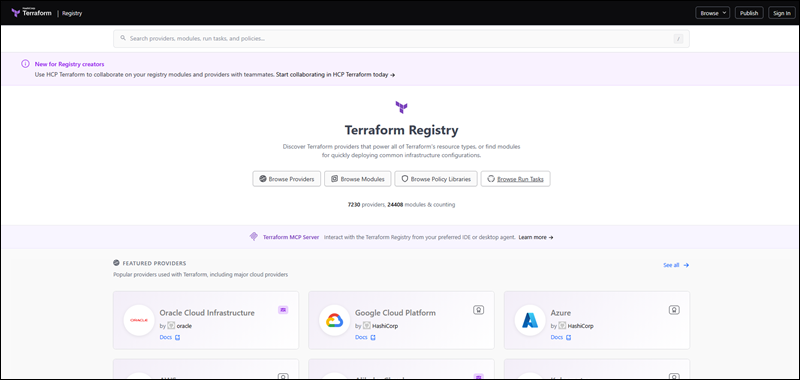
The public registry is open to anyone and includes thousands of provider and module listings. It includes official HashiCorp providers, partner providers (such as phoenixNAP's pnap provider), and community-published modules. It also supports private registries scoped to single organizations that use the same protocol and source syntax.
The registry is a browsing interface and API that the Terraform CLI queries during init. Correct publishing and source referencing matter for both the CLI workflow and human browsing.
Public vs. Private Terraform Registries
Public and private registries are two distinct registry types, each with its own features. The table below compares the two based on different aspects:
| Aspect | Public Registry | Private Registry |
|---|---|---|
| Hosting | registry.terraform.io, operated by HashiCorp. | Terraform Cloud (HCP Terraform) or Terraform Enterprise, scoped to an organization. |
| Visibility | Open to anyone. No authentication required to browse or download. | Restricted to organization members and authenticated sessions. |
| Source repository | Public GitHub repository. | Can be a private repository, GitLab, Bitbucket, or Terraform Enterprise's VCS integration. |
| Publishing | Anyone can publish using their own namespace after connecting a GitHub account. | Requires organization membership. For providers, requires Manage Private Registry permissions. |
| Provider signing | Requires a GPG key registered under the publisher's account. | Requires a GPG key registered under the organization's namespace. Uploads are manual instead of webhook-driven. |
| Use case | Used for sharing reusable modules and providers with the community. | Used for distributing internal modules and providers without exposing source code. |
The source argument's hostname segment determines which registry Terraform queries, preventing clashing. As a result, a configuration can reference both public and private registries in the same required_providers or module block.
Anatomy and Types of Registry Content
The registry hosts different content types. Each one has a specific structure and publishing rules. The sections below explain the differences between registry content types.
Terraform Providers
A Terraform provider is Go plugin that translates HCL resource and data source blocks into API calls against a specific platform (AWS, Azure, phoenixNAP). Providers are versioned independently from Terraform.
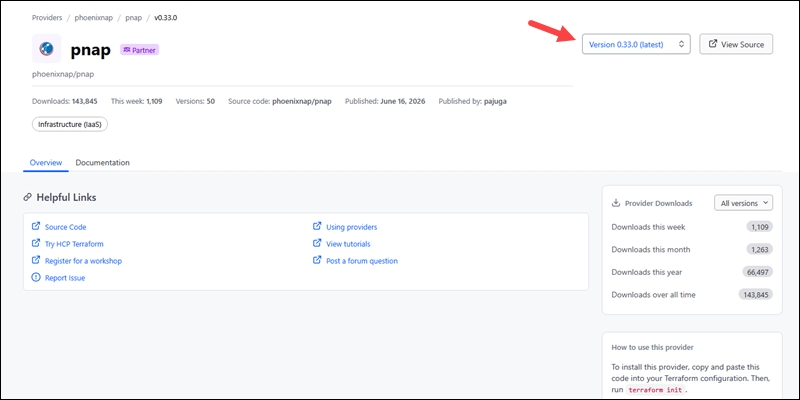
In Terraform configuration, providers are declared in a required_providers block using [hostname/][namespace]/[name] format. The [hostname] is often omitted. It defaults to registry.terraform.io when omitted.
Note: phoenixNAP maintains a public provider namespace called phoenixnap/pnap. It manages Bare Metal Cloud infrastructure through Terraform, including servers, private networks, and IP blocks.
Terraform Modules
A Terraform module is a reusable package that contains Terraform configuration. It is referenced through a module block. Registry modules follow a [namespace]/[name]/[provider] source format.
Modules are written in plain HCL. The registry parses a module's inputs, outputs, and submodules from its source files.
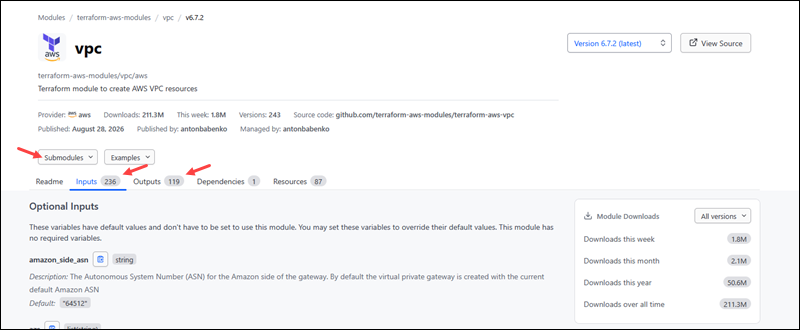
It generates automatic documentation, without a separate documentation upload step.
Infrastructure Stacks and Policy Libraries in Enterprise Environments
Terraform Enterprise and HCP Terraform extend the registry past providers and modules. Infrastructure stacks group multiple configurations into a single deployable unit, such as a network or application layer. These units have defined dependencies between their components. Policy libraries help enforce organization-wide rules against every plan before it can be applied.
Infrastructure stacks and policy libraries are managed at the organization level, and they are not published to the public registry. Both stacks and libraries depend on the same VCS-driven workflow as modules and providers. They require a properly tagged repository that is connected through the organization's configured version control provider.
Publishing Terraform Registry
Publishing to the public registry is free and requires only a GitHub login. The requirements differ depending on whether the published data is a module or a provider.
Standard Module Structure and GitHub Repository Requirements
A module repository structure must meet the following requirements before publishing:
- Public repository. The public registry requires using a public GitHub repository to host modules.
- Name. The repository name follows a specific naming convention:
terraform-[provider]-[name], where[provider]is the main provider the module targets and[name]describes what the module manages. The[name]segment may contain additional hyphens. - Description. The repository description populates the module's short description on the registry page.
- Structure. The module structure requires a main.tf, variables.tf, outputs.tf, and a README.md at the repository root directory. Submodules belong in the modules/ subdirectory. An examples/ directory is strongly recommended.
- Tag. At least one semantic version Git tag is required.
When these requirements are met, connecting a GitHub account to the registry and selecting the repository automatically publishes the module. The registry adds a new webhook to the repository so it automatically picks up tags.
Versioning Protocols, Semantic Tagging, and Release Pipelines
The Terraform registry identifies module versions using Git tags. A tag is a valid semantic version, optionally prefixed with v, like in the following example:
git tag v1.2.0git push origin v1.2.0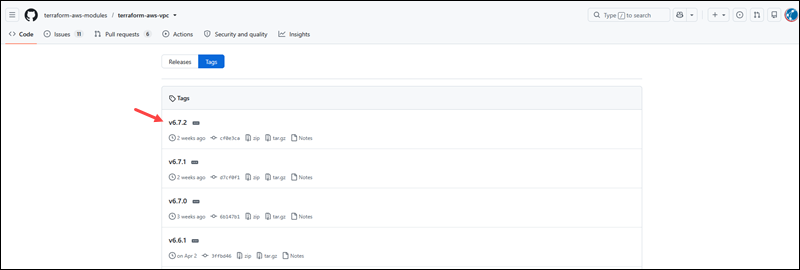
The registry ignores tags that don't resemble semantic versioning. Tags such as latest will not appear as published versions. Once a tag is published, the registry's webhook picks it up and displays it automatically.
A release pipeline typically automates tagging. For example:
name: Release

on:
  push:
    branches: [main]

jobs:
  tag:
    runs-on: ubuntu-latest
    steps:
      - uses: actions/checkout@v4
      - run: git tag v1.3.0
      - run: git push origin v1.3.0
The code shows a common pattern in a GitHub Actions workflow. It runs tests, updates a version file, and pushes a tag when merging to main.
Publishing Custom Providers and Signing Binaries with GPG Keys
Unlike modules, publishing custom providers requires more steps because it ships as a compiled binary instead of plain HCL. The repository name is in the terraform-provider-[name] format, and every release requires the following four files:
<strong>terraform-provider-[name]_[version]_[OS]_[arch].zi</strong>p. One or more zip archives, one for each target platform.- SHA256SUMS. Lists checksums for each archive.
- SHA256SUMS.sig. A detached GPG signature for the checksums file.
- terraform-registry-manifest.json. Contains the supported Terraform protocol version. Resides in the repository root directory.
GoReleaser handles all four files automatically when the project is configured with a .goreleaser.yml file and a signing key. HashiCorp publishes a reference GoReleaser configuration for provider projects. The GPG key is generated separately and registered with the registry before the first release:
gpg --full-generate-keygpg --armor --export "key-id"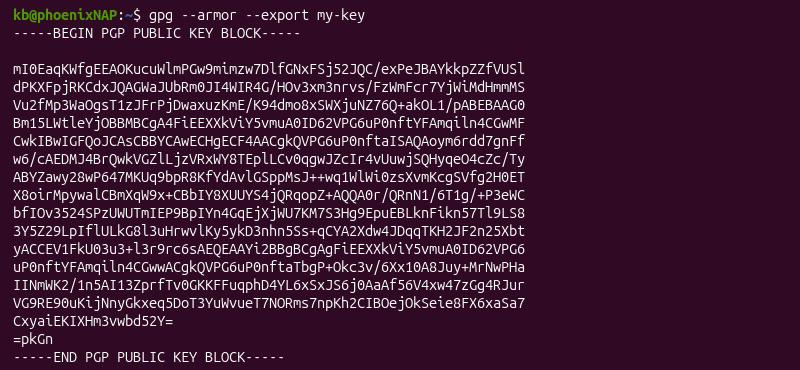
Upload the exported public key to the registry through User Settings -> Signing Keys. The registry validates every uploaded release against this key, and Terraform re-verifies the signature during terraform init whenever someone downloads that provider.
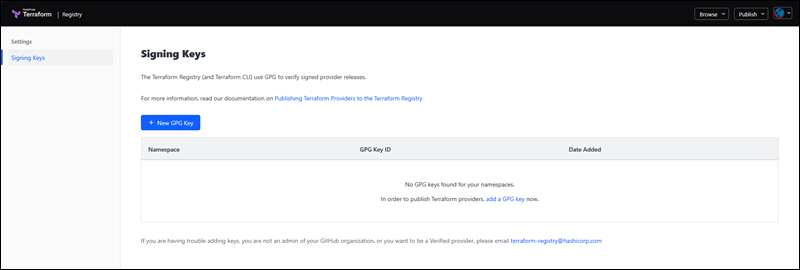
A release signed with an unregistered key, or a release that is missing any of the four required files, fails validation.
Consuming Registry Modules and Providers in .tf Files
Consuming registry modules and providers in .tf files requires two different block types. The sections below show how to consume registry content correctly.
Declaring Provider Source and Version Constraints in terraform Blocks
Declare providers inside a required_providers block, nested inside a terraform{}, like in the example below:
terraform {
    required_providers {
        pnap = {
            source  = "phoenixnap/pnap"
            version = "0.33.0"
        }
    }
}
Version constraints support several operators:
- =0.33.0. The exact version.
- >=0.33.0. Any version at or above.
- ~>0.33.0. Allows patch-level updates (0.33.x, not 0.34.0).
- ~>0.33. Allows minor-level updates (0.x, not 1.0).
Pin to the exact version for production. Use a ~> constraint to keep a development environment current with bug fixes without risking a breaking change from a major or minor update.
Referencing Public and Private Registry Modules with the module Block
A public registry module's source uses a three-part format ([namespace]/[name]/[provider]). For example:
module "vpc" {
    source  = "terraform-aws-modules/vpc/aws"
    version = "5.0.0"
}
A private registry module includes the organization's Terraform Cloud or Terraform Enterprise hostname as a fourth (leading) segment. For example:
module "network" {
  source  = "app.terraform.io/my-org/network/pnap"
  version = "2.1.0"
}
Omitting the hostname prefix assumes the module is in the public registry. A private module will fail to resolve because it exists only in a private registry.
Authenticating to Private Registries via CLI and CI/CD Pipelines
A private registry doesn't accept anonymous requests. It requires an authentication token, and there are three supported ways to supply one. Refer to the sections below.
Interactively
The terraform login command opens a browser flow asking for credentials.
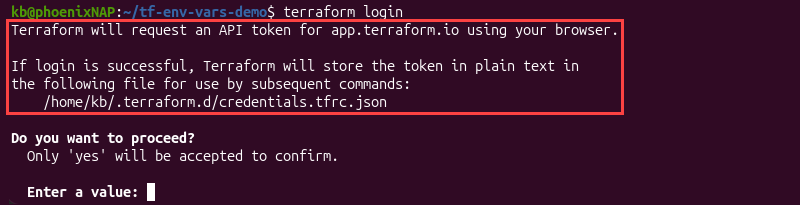
The flow stores the resulting token in ~/.terraform.d/credentials.tfrc.json.
Manually
Use a credentials block directly in the CLI configuration file:
credentials "app.terraform.io" {
    token = "[api-token]"
}
The file is ~/.terraformrc on Linux and macOS, and terraform.rc on Windows.
CI/CD
Use a host-specific environment variable called TF_TOKEN_[hostname]. Replace every dot in the hostname with an underscore. For example:
export TF_TOKEN_app_terraform_io="api-token"For a custom hostname, the variable naming convention is identical. If there are multiple credential sources, the TF_TOKEN_[hostname] variable takes priority over the credentials file and credentials block.
Common Challenges and Troubleshooting Registry Integrations
Registry-related failures tend to fall into one of the three following categories:
- Version conflict errors.
- Network issues.
- Unverified third-party code risks.
The following sections explain these three categories in depth.
Resolving Provider and Module Version Conflict Errors
Terraform records resolved provider and module versions in a .terraform.lock.hcl file is generated on the first terraform init command. A version conflict typically happens when no available version satisfies every constraint in the configuration. This happens when two modules declare incompatible version ranges for the same provider.
To re-evaluate every constraint and update the lock file to the newest version that satisfies them, use the -upgrade flag:
terraform init -upgradeIf the conflict persists after the upgrade, the constraints are incompatible. Loosen one module's version range or pin a version both modules can accept.
Handling Network Failures, Rate Limits, and Mirroring Solutions
Registry requests can fail due to network issues. Modules hosted on GitHub can additionally be rate-limited, especially when large organizations run many concurrent init operations.
Two Terraform environment variables help troubleshoot network issues:
- TF_REGISTRY_DISCOVERY_RETRY. Increases the retry count for registry connection errors.
- TF_REGISTRY_CLIENT_TIMEOUT. Extends how long Terraform waits before giving up on a slow registry response.
However, adjusting timeout and retry counts is only a temporary solution. For a more permanent solution, the CLI configuration file supports using mirrors to serve providers from a location different than the public registry:
provider_installation{
    network_mirror {
        url = "[mirror-url]"
    }
}
For a local directory, use a filesystem_mirror block instead, especially for environments without outbound network access.
Mitigating Supply Chain Risks from Unverified Third-Party Code
A module or provider runs with the same permissions as the Terraform process itself. An unverified third-party or compromised source pulled from the registry is a serious security risk.
A lock file's recorded checksums prevent a provider binary from changing between runs, and a GPG signature verification during init stops a tampered binary from installing in the first place. However, neither protects against a module that is malicious from the start.
To mitigate damage from malicious modules and providers:
- Review third-party modules' source code before adding it to a production configuration.
- Pin the exact version instead of using open-ended constraints.
- Prefer modules with a visible maintenance history and download count.
A private registry mirror lets an organization pre-approve which providers and versions are installable. This approach eliminates the risk for anything not explicitly mirrored.
Best Practices for Terraform Registry Management
Follow the best practices for Terraform registry management to minimize version conflicts and supply-chain risks. Some of the best practices are:
- Pin exact versions in production. Use = or a narrow ~> constraint for anything deployed to production. Reserve open-ended constraints for development and testing environments.
- Commit the lock file. The .terraform.lock.hcl file helps prevent two runs of the same configuration from resolving different provider versions.
- Review third-party modules. Reviewing a module's resources and any embedded provisioners helps catch most problems before they reach production.
- Use private registries for internal modules. Internal modules should not reside in public GitHub repositories. A private registry uses the same source syntax and version resolution without exposing source code.
- Automate tagging. Registry publication is automatic when you connect a repository. Instead, automate testing and tagging steps before a version reaches the registry.
- Rotate GPG signing keys. A compromised or expired signing key blocks future provider releases until the key is replaced. Treat key rotation as a planned event and schedule regular rotations instead of reacting to an incident.
- Mirror providers in air-gapped environments. Any environment without outbound internet access should implement filesystem_mirror or network_mirror to remove dependency on reaching the public registry.
These practices help maintain a secure, consistent, and reliable Terraform environment.
Conclusion
This guide explained what the Terraform Registry is and its role in the Terraform architecture. The registry turns a source argument into an installed provider or module. Teams that run Infrastructure as Code across multiple environments should follow the publishing standards outlined in this guide.
Next, learn more about Terraform resources.