When you run the terraform apply command, Terraform reviews the infrastructure it manages to make sure everything matches your configuration.
If you want Terraform to work on a specific resource instead of applying every pending change, you need to use the -target flag.
In this guide, you'll learn how to focus on individual resources using the -target flag, with practical examples to help you along the way.
What is the -target Flag and How Does It Work?
The -target flag in Terraform lets you select a specific resource for an operation. You can use it to target a single resource, several resources at the same time, or an entire module.
The basic syntax for using the -target flag is:
terraform [command] -target=[resource_address]The syntax has three parts:
terraform. Starts the Terraform CLI command.[command]. The operation you want to perform (plan,apply, ordestroy).-target=[resource_address]. The resource or module you want Terraform to focus on.
You can use the -target flag with three Terraform commands:
| Command | Description |
|---|---|
terraform plan -target | Terraform shows you what changes it would make to the resources you selected, as well as any related resources they depend on. It does not make any actual changes to your infrastructure. |
terraform apply -target | This command applies changes to the resources you selected and their dependencies. Depending on your setup, Terraform can create, update, or remove these resources. |
terraform destroy -target | You can destroy specific resources and the resources they depend on instead of removing everything Terraform manages. |
Note: In complex Infrastructure as Code projects, the -target flag is primarily used to fix partially failed deployments or to troubleshoot individual resources.
When to Use Targeted Operations?
A targeted operation can help you when:
- A Terraform operation fails halfway through, and you need to fix or recreate just one resource.
- A server stops working, and you want to replace it without affecting the rest of your configuration.
- You need to make an urgent change to your infrastructure but don’t want to apply other changes from the configuration.
It's not a good idea to use -target to deploy one server at a time. If you really want Terraform to manage resources separately, it's better to set up a separate project directory and state file for each resource.
Supported Resource Address Formats
The resource address you enter after the -target flag tells Terraform which resource you want to target. This is a simple resource block using the pnap provider. It defines a database server with its hostname, operating system, server type, and location:
resource "pnap_server" "database_server" {
  hostname = "db-03"
  os = "debian/bookworm"
  type = "s2.c2.medium"
  location = "ASH"
}
The resource address in this example is pnap_server.database_server. It consists of two parts:
pnap_serveris the resource type.database_serveris the local resource name.
The -target flag supports the following resource address formats:
| Address Format | Description |
|---|---|
pnap_server.database_server | Terraform targets the named database_server resource and all its instances. |
pnap_server.database_server[0] | If you used the count meta-argument to create multiple instances of the same database_server resource, you can target a specific one. The number in brackets shows which instance to target, starting at zero. |
pnap_server.database_server["test"] | If you create resources with the for_each meta-argument, you can target a specific instance by its key. In this example, the key is test. |
module.servers | When you use this resource address format, Terraform targets all the resources inside the servers module, including those in nested child modules. |
module.servers.pnap_server.database_server | This format targets the database_server resource inside the servers module. The other resources inside the module are ignored. |
If you are using the count and for_each address format in the terminal, add single quotes (') around them to help the terminal interpret the brackets correctly.
How Terraform Resolves Dependencies During Targeted Runs
Terraform resources often depend on each other. In this setup, the database server uses an internal private network. Terraform creates the network first because the server resource block references the network's ID:
resource "pnap_private_network" "internal" {
  name     = "internal-network"
  cidr     = "10.0.0.0/24"
  location = "ASH"
}

resource "pnap_server" "database_server" {
  hostname = "db-03"
  os       = "debian/bookworm"
  type     = "s2.c2.medium"
  location = "ASH"

  network_configuration {
    private_network_configuration {
      configuration_type = "USER_DEFINED"

      private_networks {
        server_private_network {
          id  = pnap_private_network.internal.id
          ips = ["10.0.0.15"]
        }
      }
    }
  }
}
You can use the -target flag to create the database server:
terraform apply -target=pnap_server.database_serverBecause the database depends on the network, Terraform includes both in the operation. If neither resource exists, Terraform creates the network first, then the database server.
However, this only works one way. If you target the private network, Terraform will not create the database server automatically. The server depends on the network, but the network does not depend on the server. Dependencies work differently when you destroy resources. If you run:
terraform destroy -target=pnap_server.database_serverTerraform will only destroy the database server. But if you target the private network, Terraform may also need to destroy the database server because it depends on that network.
Terraform -target Examples on Bare Metal Cloud
The following examples show how the -target flag works during basic operations on infrastructure running on phoenixNAP Bare Metal Cloud. The Terraform project has 4 servers and a private network.
The root module defines the private network and backup server. The Holmes module manages the database and email servers, and it includes a nested module called Watson for the log collector.
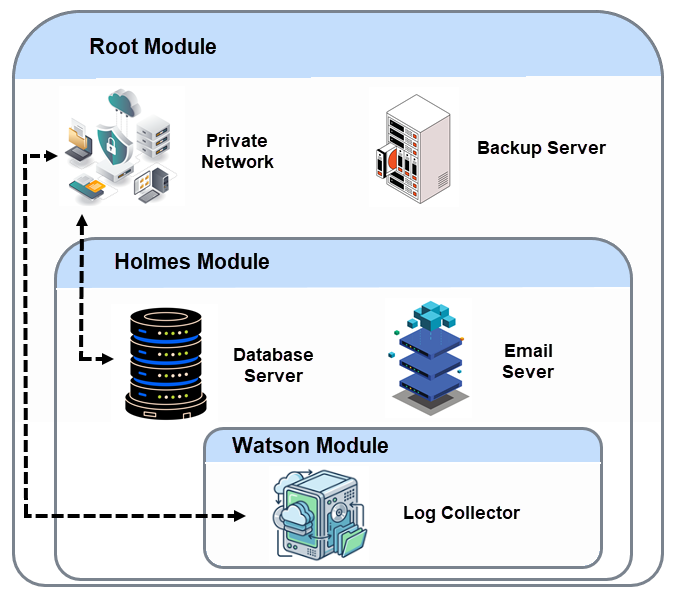
The database server and log collector both reference the private network's ID in their configuration. This creates a dependency that Terraform recognizes automatically.
Targeting a Single BMC Server
In this scenario, you need to provision the email server from the Holmes module. However, your team is still working on the backup server and does not want to include it in this deployment.
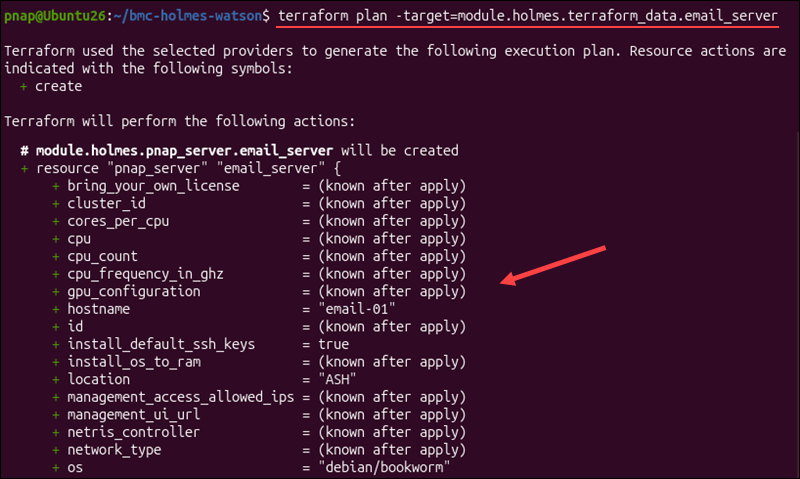
To create an execution plan for the email server, enter:
terraform plan -target=module.holmes.pnap_server.email_serverThree things can happen:
- If the email server does not exist, Terraform plans to create it.
- If the server already exists and its setup has changed, Terraform plans to update or replace it.
- If the server matches its configuration, Terraform has nothing to change.
Here, Terraform plans to create the email server.
After you review the plan, you can proceed with the deployment:
terraform apply -target=module.holmes.pnap_server.email_serverSince the email server has no declared dependencies, Terraform only needs to create one resource.
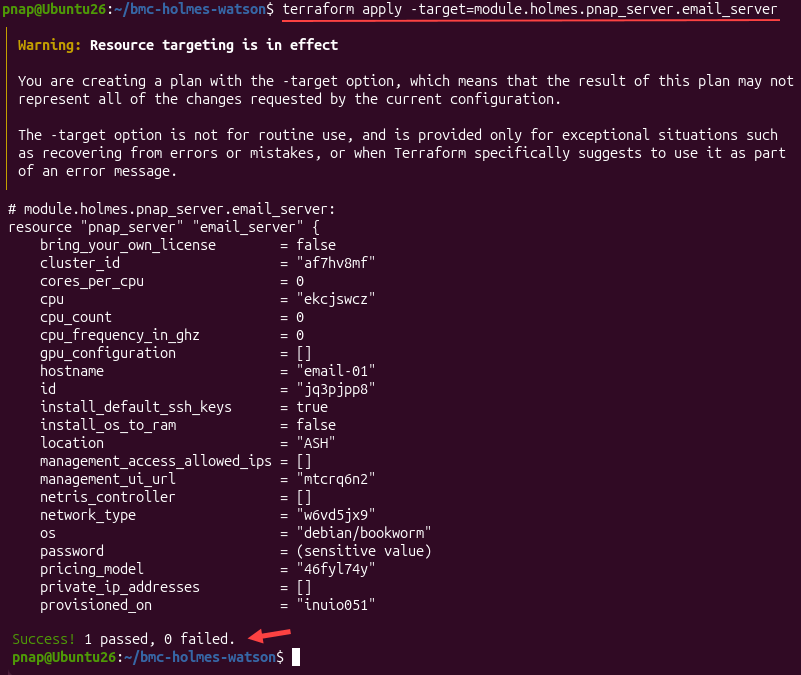
Note: After making targeted infrastructure changes, it's a good idea to run terraform plan without the -target flag. This way, you can check if Terraform plans to make any additional changes to other parts of your infrastructure.
Targeting Entire Modules and Child Modules
When you have several related resources in one module, you can use the -target flag to plan or apply changes to them as a group. In our example, the Holmes module manages the database and email servers. It also contains the Watson module, which has the log collector.
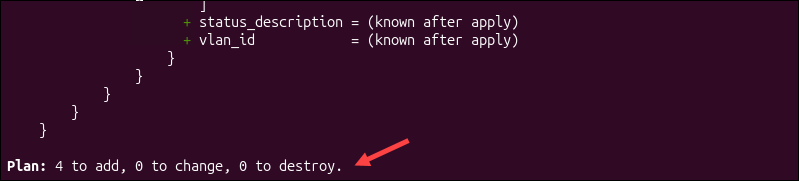
You can target all the servers in the Holmes module with the following command:
terraform plan -target=module.holmesTerraform plans to create 4 resources: the database and email servers in Holmes, the log collector in Watson, and the private network from the root module. The network is included because the database server and log collector depend on it.
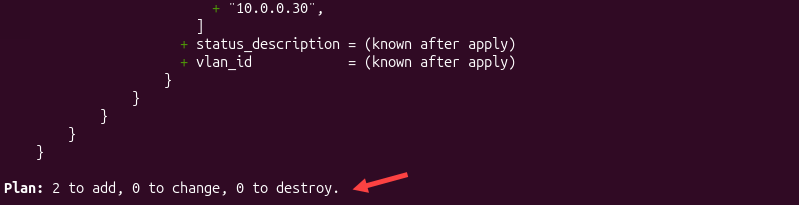
You can also target the infrastructure in Watson without affecting the servers in Holmes:
terraform plan -target=module.holmes.module.watsonOnly 2 resources are going to be created: the log collector in Watson and the private network from the root module it depends on.
This approach also allows you to target a specific resource inside the nested module:
terraform plan -target=module.holmes.module.watson.pnap_server.log_collectorIn this example, you get the same plan as with the previous command because Watson only contains the log collector, which depends on the private network.
Combining Multiple -target Flags
You can use -target more than once in the same command. Although this approach is not very elegant, it is straightforward when you want to target several resources in a single operation.
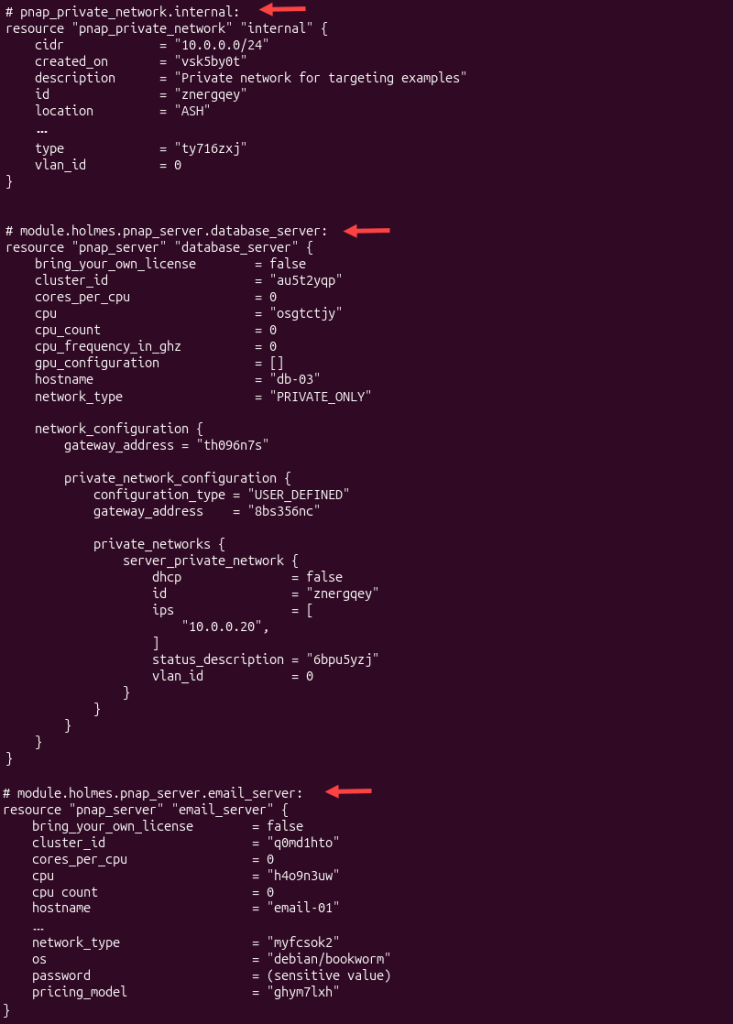
For example, if you want to apply changes to both the database server and the email server from the Holmes module, enter:
terraform apply -target=module.holmes.pnap_server.database_server -target=module.holmes.pnap_server.email_serverTerraform automatically includes the dependencies of targeted resources, even if you don't target them directly in your command. That's why, in addition to the targeted resources, Terraform also includes the private network in the same execution plan.
Another useful feature of the -target flag is that you can mix individual resources and modules in one command:
terraform plan -target=pnap_server.backup_server -target=module.holmes.module.watsonTerraform targets the backup server from the root module and the log collector from Watson. It also includes the private network that the log collector depends on.
Targeting Private Network and VLAN Changes
In our scenario, both the database server in Holmes and the log collector in Watson use the same private network. Therefore, any changes to the network can affect both servers, so you need to be very careful when targeting such an important resource.
The private network is defined in the root module:
resource "pnap_private_network" "internal" {
  name = "target-internal-network"
  description = "Private network for BMC servers."
  cidr = "10.0.0.0/24"
  location = "ASH"
}
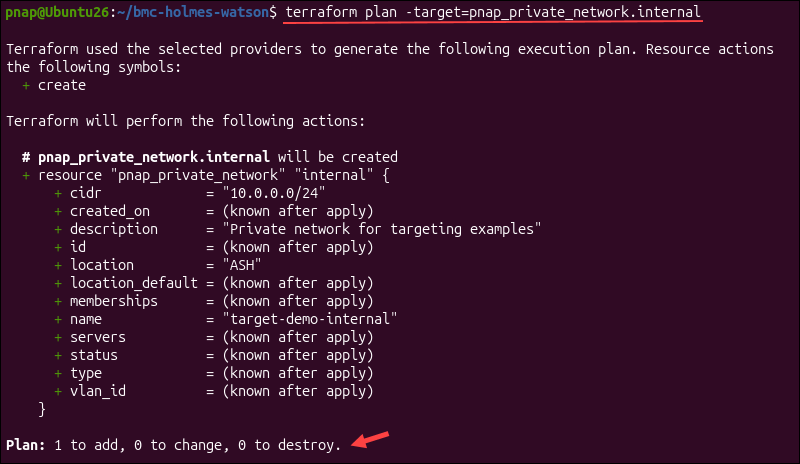
If you need to troubleshoot a failed network deployment, you can target the network directly:
terraform plan -target=pnap_private_network.internalTerraform checks the private network and identifies any changes it needs to make. But when you target the network, it does not include the servers that rely on it.
If you also want to review changes to the database server, you can target both resources:
terraform plan -target=pnap_private_network.internal -target=module.holmes.pnap_server.database_serverThis way, you can review the changes to the network and server changes together.
Be careful when changing network ranges or VLAN settings. If Terraform has to delete the current network and create a new one, servers on that network may lose their connection and become unavailable for the duration.
Re-provisioning a Damaged BMC Server with -target and -replace
Sometimes a server can fail even if you haven't changed its Terraform configuration. For instance, the email server in Holmes might have an operating system problem that a regular update cannot fix.
In this case, you can use the -target flag to choose the resources for the operation, and the -replace flag to instruct Terraform to replace the targeted resource.
To see what will happen if you replace the email server, enter:
terraform plan -target=module.holmes.pnap_server.email_server -replace=module.holmes.pnap_server.email_serverTerraform creates a plan to destroy the email server and set up a new one with the same settings.
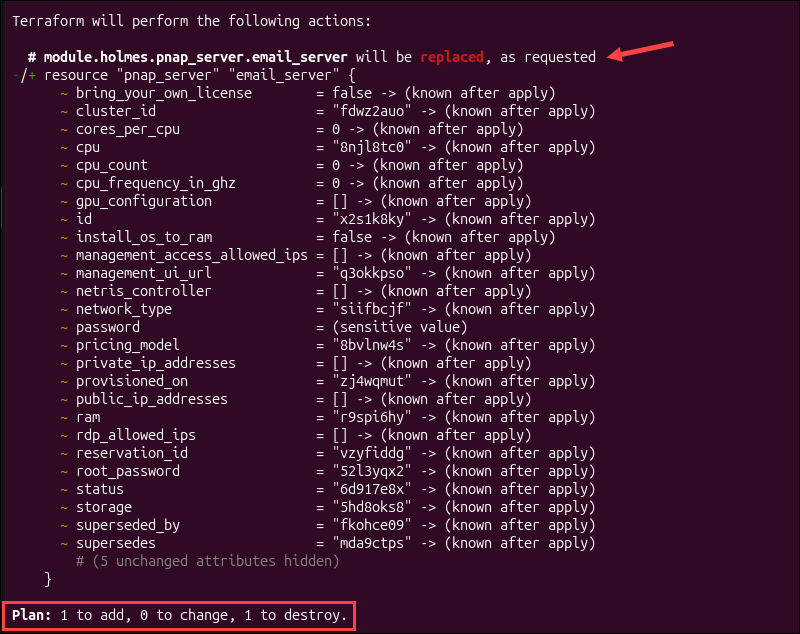
If the plan looks right, go ahead and run:
terraform apply -target=module.holmes.pnap_server.email_server -replace=module.holmes.pnap_server.email_serverTerraform will display the planned changes and ask you to confirm before changing anything.
Note: -replace can erase data on the server and disrupt services on other machines. Sometimes, just resetting the server or reinstalling the operating system is a safer option than replacing the whole machine.
Selectively Destroying a Specific BMC Server
On occasion, you may no longer need a server and want to remove it to free up resources. You can use the -target flag to remove a specific server without destroying the rest of your infrastructure.
In our example, the backup server is defined in the root module. Before destroying the server outright, first use the terraform plan command to check what Terraform plans to destroy:
terraform plan -destroy -target=pnap_server.backup_serverCheck the plan to confirm that only the intended resources are selected. If everything looks right, use the terraform destroy command:
terraform destroy -target=pnap_server.backup_serverTerraform asks you to confirm the destruction. Once the operation is complete, the backup server is removed from your infrastructure and Terraform state. But it is still in the configuration file.
This means Terraform will create the backup server again the next time you run a general terraform apply command. A better, more permanent option would be to delete the resource block from your configuration. Then run terraform plan followed by terraform apply to completely remove it.
Risks, Side Effects, and State Drift
Terraform is designed to check the entire configuration. When you use -target, it only looks at specific resources, which can create some risks.
Unapplied Configuration Changes
The -target flag only touches the targeted resource. If you made additional changes to the configuration, those changes will not take effect until you run a terraform apply command without the -target option.
For example, you can update the configuration for both the email and database servers in Holmes, but only apply the update to the email server:
<strong><em>t</em></strong>erraform apply -target=module.holmes.pnap_server.email_serverTerraform applies the changes to the email server and its dependencies, but it does not apply the changes to the database server.
This does not automatically mean Terraform state has drifted from the real infrastructure. However, your infrastructure no longer matches everything defined in your configuration.
If you continue using -target without reviewing the full configuration, it can get hard to keep track of these differences.
Dependency Issues and Upstream Changes
Terraform understands which resources depend on each other. For example, the database server in Holmes and the log collector in Watson use the same private network.
If you change the network's IP address range from 10.0.0/24 to 10.1.0.0/24 in the configuration and apply the change:
terraform apply -target=pnap_private_network.internalTerraform focuses on the private network but does not automatically include the database server or log collector, even though they depend on it.
The problem is that the servers still use IP addresses from the old network range (10.0.0.20 and 10.0.0.30). These addresses are not part of the new range, so the servers may lose connectivity or require changes to their network settings.
This is why targeting shared infrastructure, such as networks, requires particular care.
Dangers of Using -target in Automated CI/CD Pipelines
Automated Terraform workflows usually run terraform plan and terraform apply to keep infrastructure aligned with its configuration.
If you include -target in these workflows, the pipeline may repeatedly skip changes to resources that are not included in targeted operations.
For example, if your CI/CD pipeline contains the following command:
terraform apply -auto-approve -target=module.holmes.pnap_server.email_serverThis command applies the changes to the email server and its dependencies. If there are any pending changes to the database server, backup server, or other unrelated resources, they won't be applied.
Using -target together with -auto-approve is especially risky because Terraform applies the changes without asking for confirmation. You lose the chance to review the selected resource before applying changes.
For regular automation, stick to full Terraform plans. If you need to manage infrastructure separately, use different configurations.
Common Misconceptions About the -target Flag
Before you start using the -target flag, it's important to understand what it does and does not do. Here are some common misconceptions:
| Missconception | What actually happens |
|---|---|
If I use -target, the command will only affect one resource. | Terraform will automatically include any resources that the target resource depends on. |
Using the -target flag forces Terraform to recreate the resource. | Terraform will only select the resource. To force a replacement, you need to use the -replace flag. |
After I run terraform apply -target, my entire configuration will be up to date. | Other resources with pending changes stay the same until you run apply without the -target flag. |
When I use the -target flag, Terraform does not update the state file. | Terraform still tracks changes in state and updates it when you apply targeted changes. |
| If I target a resource, Terraform permanently separates it from the rest of the configuration. | The resource remains part of the same Terraform configuration and state. The -target flag affects only the current operation. |
Note: If you just want to check how individual parts of your Terraform configuration work, try using the terraform console command. This tool lets you test expressions and functions directly in the terminal without changing your configuration files or infrastructure.
Troubleshooting -target Flag Issues
There are several common issues you can run into when using the -target flag. The following section explains how to fix them.
Verifying You Targeted the Correct Resource
This seems like an obvious troubleshooting tip, but in complex Terraform projects with lots of modules and resources, it's easy to make mistakes with resource addresses.
If you get an error saying that a resource does not exist or the address is invalid, check if the path in your command is correct.
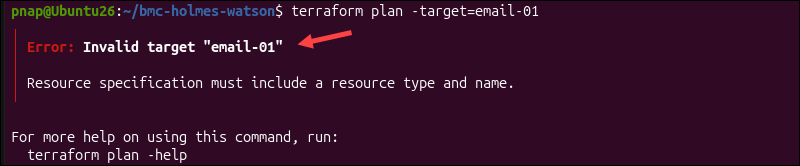
A common mistake is entering the hostname instead of the Terraform resource address. For example:
email-01is the hostname in the configurationmodule.holmes.pnap_server.email_serveris the resource address.
You need to include the module, child module, and resource name in the path. If you need a reminder on how Terraform builds these addresses, check the Supported Resource Address Formats section above.
If the resource is already deployed, you can use this command to list the resource addresses Terraform tracks:
terraform state listFind the address of the resource you want to target and use it in the command. If the resource has not been created yet, check your configuration files for the correct addresses.
Detecting Unapplied Changes in Non-Targeted Resources
If you use terraform apply with the -target flag, Terraform only applies changes to the target and its dependencies. Because other changes in your configuration may be left unapplied, Terraform displays the following warning:
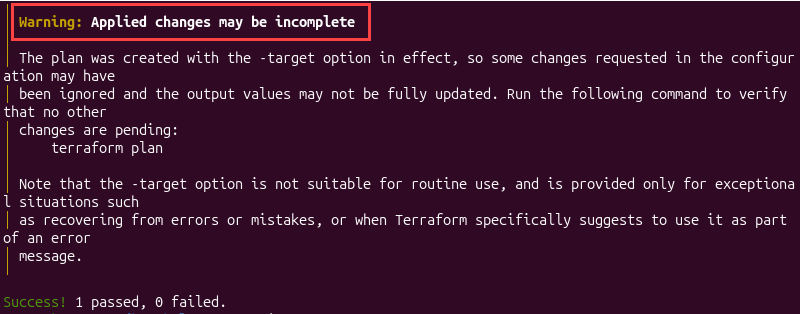
This message does not mean the targeted operation failed. It just means that Terraform may have skipped changes to the other resources.
To see which changes are still unapplied, run the following command:
terraform planSince you did not use the -target flag, Terraform checks the entire configuration and shows any additional changes it finds. If the plan includes updates to resources you left out before, you can look over the proposed changes before applying them.
Reconciling State Drift After a Targeted Run
When you run terraform apply with the -target flag, Terraform updates its state. However, this does not mean the state matches your infrastructure.
For example, someone might modify a server setting directly in the BMC portal instead of using Terraform. If you only use the targeted apply command, this change is not going to be registered in the Terraform state.
If you made the change on purpose and want Terraform to update its records without reversing it, enter:
terraform apply -refresh-onlyTerraform will compare its state with the actual infrastructure. After you confirm, it updates its state to match. It does not change the actual servers or other infrastructure resources.
Dependency Cycle Errors in Targeted Operations
Terraform uses dependencies to figure out the order in which resources should be created or updated.
Sometimes, a configuration can have two or more resources that depend on each other by mistake. For example, the database server in Holmes is configured to wait for the email server before it can be created. However, the email server is also configured to wait for the database server.
Terraform cannot tell which one should be created first. This is called a dependency cycle. If you try to target the database server, Terraform may report the following error:

The -target flag does not fix dependency cycles because the problem is in the configuration. To start resolving this issue, enter:
terraform validateCheck the resource references and depends_on arguments in your configuration. For example, the two server resources may contain conflicting dependencies:
#Database server
depends_on = [pnap_server.email_server]

#Email server
depends_on = [pnap_server.database_server]
To fix the error, remove the unnecessary dependency or adjust the configuration so Terraform knows which resource to create first. Once you fix the issue, run terraform validate again and try your targeted plan.
Best Practices for Terraform Target Flag
Follow these best practices when using the Terraform -target flag:
- Only use targeting in special cases, such as when you need to recover from errors or fix partially failed deployments.
- Do not assume that the operation will only affect the resource you are targeting. Terraform will also include any resources that the target depends on in the operation.
- If you need to recreate a resource, use the
-replaceoption together with the-targetflag. - Do not use
-targetin automated pipelines. If you do, it can cause major state drift over time if not carefully managed. - If you often target the same resources, it is better to move them into their own project instead of constantly micromanaging them.
- Be cautious when destroying resources with the
-targetcommand. Create backups before you permanently delete parts of your infrastructure and data, since this could affect other systems you still need. - If you used
countorfor_eachmeta arguments to create resources, their names might have special characters like square brackets ([]). To stop your terminal from misreading these, put the resource address in single quotes in your command.
Conclusion
You know how the Terraform -target flag works, which commands support it, and how to use it to manage specific resources during recovery and troubleshooting.
Even when you target individual resources, Terraform still relies on state to track the infrastructure it manages. To learn more about how Terraform keeps these records, see this guide to Terraform remote state.