A Terraform configuration file is the core of Terraform. It contains essential Infrastructure as Code building blocks written in HCL. Knowing a config file's structure and how Terraform parses it is essential for scaling and maintaining readability as infrastructure resources grow.
This guide covers Terraform configuration files in depth and includes practical examples for provisioning phoenixNAP Bare Metal Cloud infrastructure.
Prerequisites
- Terraform installed.
- (optional) A phoenixNAP Bare Metal Cloud account with API credentials (for testing purposes).
Note: phoenixNAP's Bare Metal Cloud (BMC) servers are high-performance and fully compatible with popular automation engines, such as Terraform.
Anatomy of a Terraform Configuration File
Every Terraform configuration file has similar building blocks, regardless of the infrastructure it manages.
The sections below cover a configuration file's syntax and essential elements.
HashiCorp Configuration Language (HCL) Syntax Fundamentals
Terraform configuration files use HashiCorp Configuration Language (HCL). It is a declarative syntax that uses blocks, arguments, and expressions.
Every block has a type, optional labels, and a body enclosed in braces. See the following snippet:
resource "pnap_server" "worker" {
  hostname = "worker-01"
  os       = "ubuntu/jammy"
}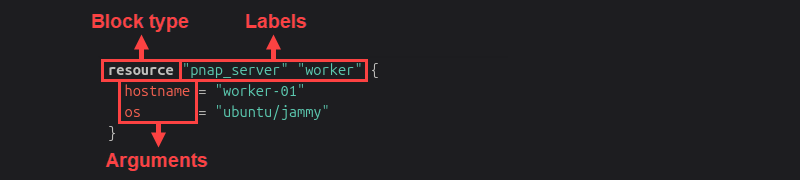
In the example code above:
resource. The block type."pnap_server"and"worker". The block's labels.hostnameandos. Arguments inside the block.
For more details, see our in-depth HCL guide.
Core Top-Level Blocks: terraform, provider, resource, data, and module
Terraform configurations use several top-level block types. Different block types perform specific functions.
The most common Terraform blocks are:
terraform. Configures how Terraform behaves, including backend settings, required Terraform versions, and provider requirements.provider. Configures a specific Terraform provider, including authentication and other provider-specific settings.resource. Defines infrastructure and other resources that Terraform creates and manages.data. Reads information from an existing data source without creating or managing it.module. Calls a reusable module that can have one or more resources, data sources, variables, outputs, and other modules.
For example, the following configuration uses several blocks to provision a phoenixNAP Bare Metal Cloud server with an existing SSH key:
terraform {
  required_providers {
    pnap = {
      source  = "phoenixnap/pnap"
      version = "0.33.0"
    }
  }
}

provider "pnap" {
  client_id = var.client_id
  client_secret = var.client_secret
}

data "pnap_ssh_key" "existing" {
 name = "team-key"
}

resource "pnap_server" "worker" {
  hostname = "worker-01"
  os  = "ubuntu/focal"
  type = "s2.c1.medium"
  location = "PHX"
  ssh_key_ids = [data.pnap_ssh_key.existing.id]
}
The code does the following:
- The
terraformblock declares the phoenixNAP provider and its version constraint. - The
providerblock configures the provider and supplies authentication credentials through input variables. - The
datablock fetches an existing SSH key by name. - The
resourceblock declares a Bare Metal Cloud server and references the SSH key by ID.
Note: A module block groups multiple resources and other configuration into a reusable unit. For more information, see our in-depth Terraform module composition guide.
Input & Output Flow: variable, local, and output Blocks
Terraform also uses blocks to control value input and output flow through a configuration:
variable. Declares an input the configuration accepts from the outside.local. Declares a value computed from other values internally.output. Exposes a value from the configuration to the outside.
For example, chain all three blocks together:
variable "environment" {
  type = string
}

locals {
  hostname = "${var.environment}-worker-01"
}

output "host" {
  value = local.hostname
}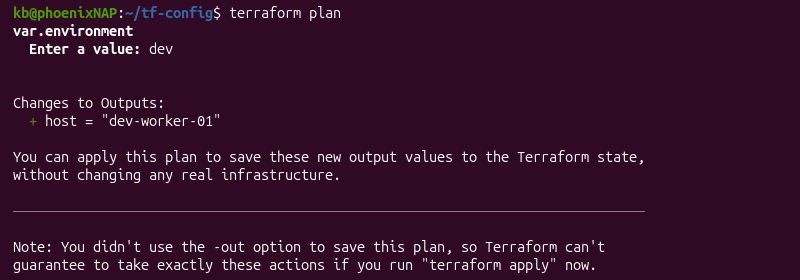
The variable block accepts an input called "environment". The local block derives a hostname from that value, and the output block exposes the result.
Essential Meta-Arguments (depends_on, for_each, lifecycle)
Meta-arguments control how Terraform treats a resource or a module block. Essential meta-arguments include:
depends_on. Forces a dependency when Terraform cannot infer one from references.for_each. Creates one instance per entry in a map or set.lifecycle. Configures different behaviors, such ascreate_before_destroy,prevent_destroy, etc.
For example, use depends_on when a dependency exists outside an argument reference. See the code below:
resource "pnap_private_network" "internal" {
  name = "internal-network"
}

resource "pnap_server" "worker" {
  hostname = "worker-01"
  os = "ubuntu/jammy"
  type = "s2.c1.medium"
  location = "PHX"
  depends_on = [pnap_private_network.internal]
}
The depends_on meta-argument explicitly states and forces Terraform to create a pnap_private_network resource before creating a pnap_server.
Standard Directory Layout & File Organization
Directory layout and file organization affect how easily a team navigates a configuration. File organization doesn't change what Terraform executes, since every .tf file in a directory is viewed as one merged configuration.
The sections below describe common file organization and directory layout approaches.
Single-File vs. Multi-File Modular Configurations
A small configuration can live in a single main.tf file without any issues. As resources and infrastructure grow, it becomes convenient to split a larger configuration into multiple files.
Terraform reads every .tf file in a directory as part of the same configuration, regardless of how many files exist or how they are named. Splitting files isn't a functional requirement; it's an organizational choice.
When a configuration passes through numerous resources, splitting it into different categories (providers, variables, resources, outputs) improves readability. Terraform treats these files as one merged configuration regardless.
Splitting Logic into main.tf, variables.tf, outputs.tf, and providers.tf
A common convention is to split configuration into four different files:
- main.tf. Contains resource and data source declarations.
- variables.tf. Defines all
variableblocks with descriptions and types. - outputs.tf. Stores every
outputblock. - providers.tf. Contains the
terraformandproviderblocks.

The file names are a convention that simplifies readability and repository navigation. Teams may choose a different organizational approach based on local circumstances.
Environment Isolation: .tfvars Files vs. Directory-Based Structures
Environment isolation is essential for separating work environments, such as dev, staging, and production. There are two common approaches to environment isolation:
- .tfvars files. All environments share a single configuration but use separate .tfvars files. The files contain environment-specific variable values. For example, run
terraform applyand provide a .tfvars file:
terraform apply -var-file="dev.tfvars"The command uses variables defined in the provided file.
Note: A file named exactly terraform.tfvars, or matching *.auto.tfvars loads automatically without the -var-file flag.
- Directory-based structures. Every environment has a separate directory, each with its own state and backend configuration. Module references are typically shared. This approach works well when environments need different resources or backend isolation.
Note: For more information about using different environments, see our guide on the terraform workspace command.
Practical Examples with Provisioning BMC Infrastructure
The following sections build various configurations using phoenixNAP Bare Metal Cloud resources. Use the examples below to create working configuration files and provision infrastructure through code.
Configuring the Bare Metal Cloud Provider Block
Use the terraform block to declare the required Bare Metal Cloud pnap provider and its version, and use the provider block to configure it:
terraform {
  required_providers {
    pnap = {
      source  = "phoenixnap/pnap"
      version = "0.33.0"
    }
  }
}

provider "pnap" {
  client_id     = var.pnap_client_id
  client_secret = var.pnap_client_secret
}
The configuration passes client_id and client_secret as variables inside a provider block. The variable values reside in a .tfvars file. This approach keeps credentials separate from the configuration file. An alternative is to set the environment variables PNAP_CLIENT_ID and PNAP_CLIENT_SECRET, which the configuration reads automatically.
Defining Server Compute Instances & Network Interfaces
The following example uses resource blocks to declare a server on a private network:
resource "pnap_private_network" "internal" {
  name     = "internal-network"
  cidr     = "10.0.0.0/24"
  location = "PHX"
}

resource "pnap_server" "worker" {
  hostname = "worker-01"
  os = "ubuntu/jammy"
  type = "s2.c1.medium"
  location = "PHX"
  network_type = "PRIVATE_ONLY"

  network_configuration {
    private_network_configuration {
      configuration_type = "USER_DEFINED"

      private_networks {
        server_private_network {
          id = pnap_private_network.internal.id
          ips = ["10.0.0.15"]
        }
      }
    }
  }
}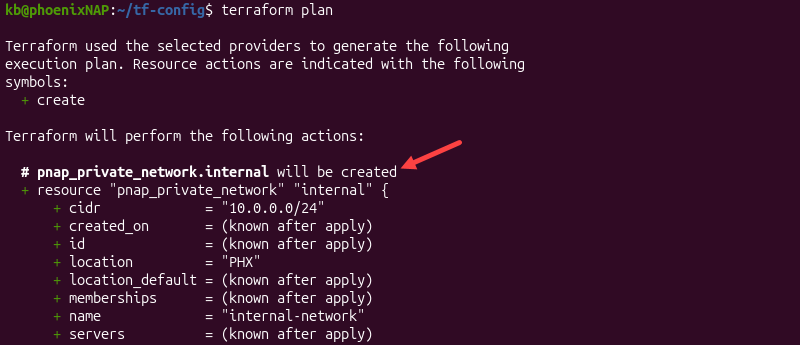
The server references the private network's ID, which creates an implicit dependency, so Terraform creates the network before the server. It does not require an explicit depends_on.
Injecting SSH Keys & User-Data Provisioning Scripts
Apply existing SSH keys and a cloud-init script to a new server:
resource "pnap_server" "worker" {
  hostname = "worker-01"
  os = "ubuntu/focal"
  type = "s2.c1.medium"
  location = "PHX"
  install_default_ssh_keys = true
  ssh_key_ids = ["key-1", "key-2"]

  cloud_init {
    user_data = filebase64("provision.yml")
  }
}
The install_default_ssh_keys field applies the account's default keys, while ssh_key_ids adds specific keys on top of that.
The cloud_init block has a user_data argument that expects Base64-encoded data. The filebase64() function reads the provision.yml file from disk and encodes it in one step.
Extracting Instance IP Outputs for Automated Deployment
To expose a server's private IP for a downstream automation step, use an output block:
output "worker_private_ip" {
  value = pnap_server.worker.private_ip_addresses[0]
}
A separate configuration or pipeline can read the private IP through remote state, without querying the API server.
Troubleshooting Common Configuration Errors
Most configuration errors fall into one of the following four categories:
- Syntax errors.
- Unresolved references.
- Type/argument mismatches.
- Issues that require deeper logging.
Working through these common errors in the order listed typically leads to quick resolutions. The sections below describe these four categories in more detail and how to troubleshoot them.
Resolving HCL Syntax & Parsing Failures (terraform fmt)
Terraform requires correct syntax to parse a file successfully. Missing quotes, braces, or a misplaced argument produces a parse error that shows the file and line number.
Use terraform fmt to rewrite files into Terraform's canonical formatting style. The command can report a syntax error, even though its primary purpose is not validation.
Fixing Unresolved Dependencies and Dependency Cycle Errors
An unresolved dependency often occurs when a reference points to a resource or attribute that doesn't exist, usually because of a typo in a resource name/label. Double-check the exact resource type and label and the block that declares it.
A dependency cycle error happens when two or more resources depend on each other, with no valid order to create them. To break the cycle, redesign or remove one of the references.
Debugging Type Mismatches & Missing Required Arguments (terraform validate)
The terraform validate command checks whether a configuration is syntactically valid and internally consistent. It inspects whether argument values have appropriate types without querying a provider's API or reading remote state. The command runs faster than a terraform plan command and catches issues before Terraform attempts a backend connection.
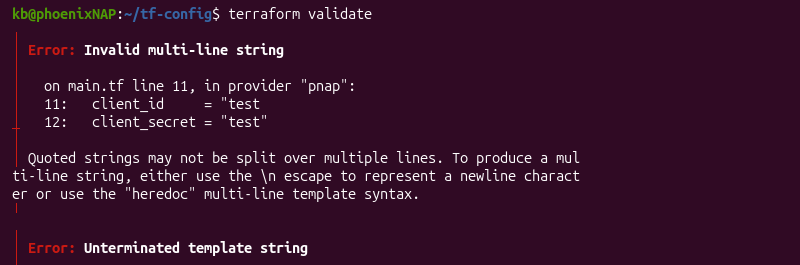
A missing required argument results in an error that names the exact resource and argument. Check the provider's documentation for all required arguments.
Detailed Verbose Logging with TF_LOG Environment Variables
When other approaches don't reveal enough details, use TF_LOG to expose internal logging data.
For example, enable detailed logging for a single command:
TF_LOG=DEBUG terraform plan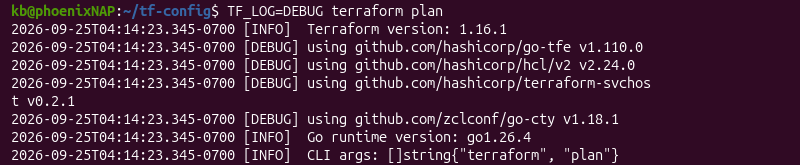
The environment variable accepts different logging levels (TRACE, DEBUG, INFO, WARN, ERROR). Use TF_LOG_CORE and TF_LOG_PROVIDER environment variables to determine if an issue originates in Тerraform's core engine or in a provider plugin.
Best Practices for Terraform Configurations
Applying best practices consistently, especially from a project's first configuration file, prevents most security and configuration errors. These habits help prevent version conflicts, exposed secrets, and unreviewable modules that are difficult to resolve later at scale.
Enforcing Version Constraints for Terraform Core & Providers
Constrain Terraform provider and core versions to avoid different behaviors across machines and CI runs. Use the required_version argument inside a terraform block for Terraform, and add version constraints inside required_providers for each provider.
For example:
terraform {
  required_version = ">=1.7.0"

  required_providers {
    pnap = {
      source  = "phoenixnap/pnap"
      version = "0.33.0"
    }
  }
}
The version constraint prevents terraform init from running with an incompatible Terraform release.
Version constraints are essential in a team setting to avoid unexpected environment differences. Terraform also uses the .terraform.lock.hcl dependency lock file to record provider versions and checksums. It helps ensure consistent provider installations across environments.
Eliminating Hardcoded Secrets with External Vaults & Environment Variables
Never commit credentials into a .tf or .tfvars file. Hardcoded secrets are easy to expose and create a security risk. Instead, use environment variables, a secrets manager, or a CI/CD platform's masked variable feature.
Structuring Small, Reusable Custom Modules
Structure small, reusable custom modules with a single purpose. They are easier to reuse and test, unlike large modules that provision whole environments.
Limit a module's required inputs and ensure that every input has a clear and useful description.
Implementing Input Variable Validation & Precondition/Postcondition Checks
Use a validation argument inside a variable block to check an input value before Terraform uses it elsewhere. For example:
variable "server_count" {
  type = number

  validation {
    condition = var.server_count > 0 && var.server_count <= 10
    error_message = "Server count must be between 1 and 10."
  }
}
For configurations that require checking more than one variable, a resource's lifecycle block supports precondition and postcondition arguments. Use them to check a resource's own configuration, other resources' values, or resulting attributes.
Conclusion
This guide covered the structure of a Terraform configuration file. A consistent structure from the start ensures a configuration is easy to review and extend.
Next, learn more about Terraform modules.