Terraform is an Infrastructure as Code (IaC) tool that uses a state file to track managed resources. The file's location impacts team workflows, security, and automation reliability. Although a local state works for personal projects, a collaborative production environment quickly outgrows it. To support collaboration and consistent infrastructure management beyond a single machine, Terraform provides remote state.
This article will explain what Terraform remote state is, how it works, and the configuration syntax. We also list the limitations and best practices for running remote state in production.
What Is Terraform Remote State?
Terraform remote state is a setup where Terraform state resides in a remote location instead of a local disk. Terraform reads from and writes to a remote backend (e.g., object storage service, managed state service, or other supported storage system) rather than requiring each CI pipeline or user to maintain its own state copy.
The state itself retains the same purpose and resource-configuration mapping. The only change is in the state's storage location and Terraform's access method.
Local State vs. Remote State
The table below compares local and remote state across different aspects:
| Aspect | Local State | Remote State |
|---|---|---|
| Storage location | Local filesystem. | Remote backend (S3, HCP Terraform, Azure Blob, etc.). |
| Collaboration | Not designed for team use. | Supports multiple users and pipelines working against the same state. |
| Locking | None by default. | Supported by backends that have state locking. |
| Secrets exposure | Plain text on a single machine. | May contain sensitive values. Protection depends on backend encryption and access controls. |
| Disaster recovery | Depends on local backups. | Durable and versioned storage when supported by the backend. |
Local state suits single developer module testing. Once multiple users, CI pipelines, or additional environments share and coordinate state, remote state becomes essential.
How Does Terraform Remote State Work?
Terraform abstracts the state backend. The core engine calls the backend's operations (read, write, lock) at the right points, regardless of the remote backend type.
Read/Write Lifecycle During terraform plan and apply Phases
The read/write lifecycle flow goes through the following Terraform command sequence against a remote backend:
- terraform plan. Reads the current state from the backend and, when applicable, refreshes the state by querying remote objects. Terraform then compares the current state with the desired configuration to determine the required changes, if any.
Note: The -refresh=false flag skips the refresh step. In that case, Terraform uses the existing state to generate the plan.
- terraform apply. Executes the proposed changes against the infrastructure. At a high level, the following process takes place:
- Acquire a lock from the backend (when the backend supports locking).
- Read the latest state.
- Apply the planned changes to infrastructure.
- Write the updated state to the backend.
- Release the lock.
Note: If terraform apply fails partway through, Terraform may still write updated state reflecting resources that were successfully created or changed. Subsequent operations use the recorded state to reconcile the actual infrastructure.
Dynamic Lock Acquisition and Release Execution Flow
Locking prevents concurrent Terraform operations from changing the same stat, reducing the risk of conflicting operations and state corruption. The dynamic lock acquisition and release execution flow looks like the following:
- Terraform requests a lock from the configured backend.
- If the state is not already locked, the backend grants the lock and Terraform proceeds.
- If a lock exists, Terraform cannot acquire the lock. Instead, it reports information about the existing lock when available.
- Once the operation completes or fails, Terraform releases the lock item so another operation can proceed.
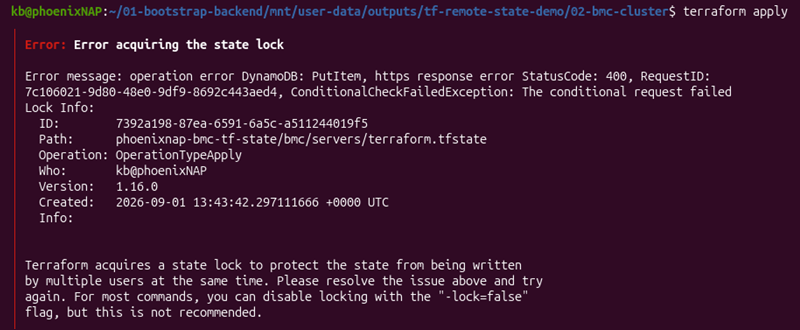
If a process crashes without releasing a lock, use the following command to release the lock:
terraform force-unlock [LOCK_ID]
Use manual release only after confirming the lock is stale and when no other operation is in progress to avoid issues.
Consuming Outputs Across Isolated State Files with the terraform_remote_state Data Source
Large infrastructures often use multiple Terraform projects. The terraform_remote_state data source allows one Terraform configuration to read the root module outputs from another configuration's state. The consuming configuration requires access to the remote backend and sufficient permissions to read that state.
Note: Although terraform_remote_state exposes only root module outputs, accessing them requires access to the entire state snapshot. Because it can contain sensitive information, grant access to only those configurations that should be able to access the referenced state.
For example, a project has the following structure:
network/
├── VPC
├── subnets
├── route tables
└── NAT gateways
application/
├── EC2
├── load balancer
└── autoscaling
The network configuration manages network infrastructure while the application configuration manages resources that depend on it.
Suppose the network configuration exposes the private subnet ID as an output:
output "private_subnet_id" {
	value = aws_subnet.private.id
}
The application configuration can read private_subnet_id from the network configuration's remote state:
data "terraform_remote_state" "network" {
  backend = "s3"

  config = {
    bucket = "phoenixnap-tf-state"
    key    = "network/terraform.tfstate"
    region = "us-east-1"
  }
}
The application resources can reference the output:
resource "aws_instance" "application" {
  subnet_id = data.terraform_remote_state.network.outputs.private_subnet_id
}
This lets the application configuration use the network configuration's output without recreating the network infrastructure or manually copying the subnet ID. The application configuration still requires permission to access the remote state backend.
Terraform Remote State Syntax
Declare the backend block inside the terraform block. The exact arguments depend on the backend type. The example below shows remote state syntax using an S3 backend:
terraform {
    backend "s3" {
        bucket         = "phoenixnap-tf-state"
        key            = "prod/network/terraform.tfstate"
        region         = "us-east-1"
        dynamodb_table = "terraform-state-locks"
        encrypt        = true
    }
}
Note: For newer configurations, use use_lockfile = true. The dynamodb_table argument is retained here for compatibility with existing configurations.
Key considerations about the syntax include:
- The
backendblock cannot use variables or interpolation. It uses only static values (see the example above) or those values passed via-backend-configat init time for environment-specific values. For example:
terraform init \
    -backend-config="bucket=phoenixnap-tf-state" \
-backend-config="key=prod/network/terraform.tfstate"keyspecifies the path for this configuration's state object inside the bucket. Multiple configurations can share one bucket as long as they use different state paths.
Re-run terraform init whenever there are changes to the backend block.
Terraform Remote State Examples
The following sections show remote state examples for managing phoenixNAP Bare Metal Cloud (BMC) infrastructure using the phoenixNAP Terraform provider.
Note: The following examples use phoenixNAP's Bare Metal Cloud servers. The API-driven bare metal is ideal for programmatic interactions and includes other custom-built IaC modules.
Provisioning an S3 and DynamoDB Backend for BMC State Storage
Before provisioning infrastructure, create the backend infrastructure to store and lock the Terraform state. This is a one-time procedure with a small configuration that uses a local state.
The configuration below creates an S3 bucket for state storage and a DynamoDB table for state locking.
Note: DynamoDB-based locking (dynamodb_table) is deprecated in favor of S3 lockfile-based locking use_lockfile. It will be removed in a future minor version. It remains supported for compatibility with existing configurations.
See the code below:
terraform {
  required_providers {
    aws = {
      source  = "hashicorp/aws"
      version = "~> 5.0"
    }
  }
}

provider "aws" {
  region = "us-east-1"
}

resource "aws_s3_bucket" "bmc_state" {
  bucket = "phoenixnap-bmc-tf-state"
}

resource "aws_s3_bucket_versioning" "bmc_state" {
  bucket = aws_s3_bucket.bmc_state.id

  versioning_configuration {
    status = "Enabled"
  }
}

resource "aws_dynamodb_table" "bmc_locks" {
  name         = "phoenixnap-bmc-tf-locks"
  billing_mode = "PAY_PER_REQUEST"
  hash_key     = "LockID"

  attribute {
    name = "LockID"
    type = "S"
  }
}
The code does the following:
provider "aws". Configures the AWS provider.aws_s3_bucket.bmc_state. Creates the S3 bucket for storing Terraform state.aws_s3_bucket_versioning.bmc_state. Enables versioning on the S3 bucket to retain previous state versions.aws_dynamodb_table.bmc_locks. Creates the DynamoDB table for locking Terraform state.
Save the file and run:
terraform init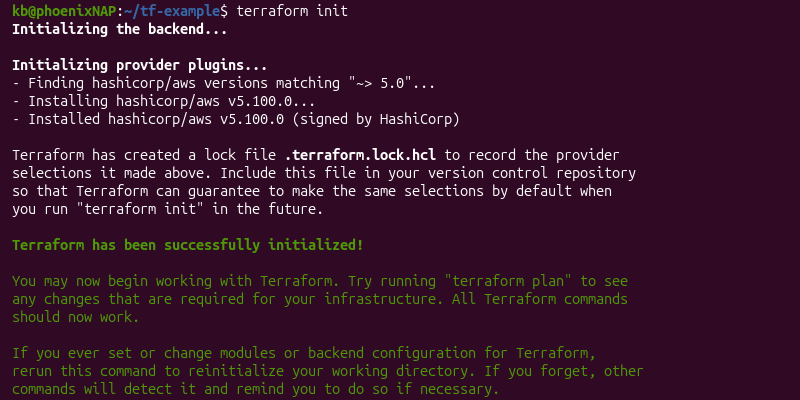
Execute the changes with:
terraform apply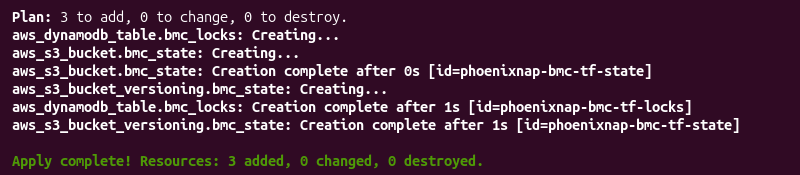
Terraform configurations in the following examples use these resources as a remote backend.
Storing and Initializing State for a Cluster of Bare Metal Cloud Servers
Once the backend infrastructure is provisioned, configure a BMC server cluster to use the S3 backend and initialize remote state tracking. Add the phoenixNAP Terraform provider to the required providers and configure the remote state storage:
terraform {
  required_providers {
    pnap = {
      source  = "phoenixnap/pnap"
      version = "0.33.0"
    }
    aws = {
      source  = "hashicorp/aws"
      version = "~> 5.0"
    }
  }

  backend "s3" {
    bucket         = "phoenixnap-bmc-tf-state"
    key            = "bmc/servers/terraform.tfstate"
    region         = "us-east-1"
    dynamodb_table = "phoenixnap-bmc-tf-locks"
    encrypt        = true
  }
}

provider "pnap" {}

resource "pnap_server" "worker" {
  count        = 2
  hostname     = "worker-${count.index}"
  os           = "ubuntu/focal"
  type         = "s2.c1.medium"
  location     = "PHX"
  network_type = "PRIVATE_ONLY"
}

output "worker_ids" {
  value = pnap_server.worker[*].id
}
The backend block configures remote state storage:
bucket. The S3 bucket where Terraform stores the state.key. The path and name of the state object. This separates this cluster's state from other configurations using the same bucket.dynamodb_table. The DynamoDB table Terraform uses for state locking.encrypt. Encrypts the state stored in the S3 bucket.
Initialize the configuration with:
terraform init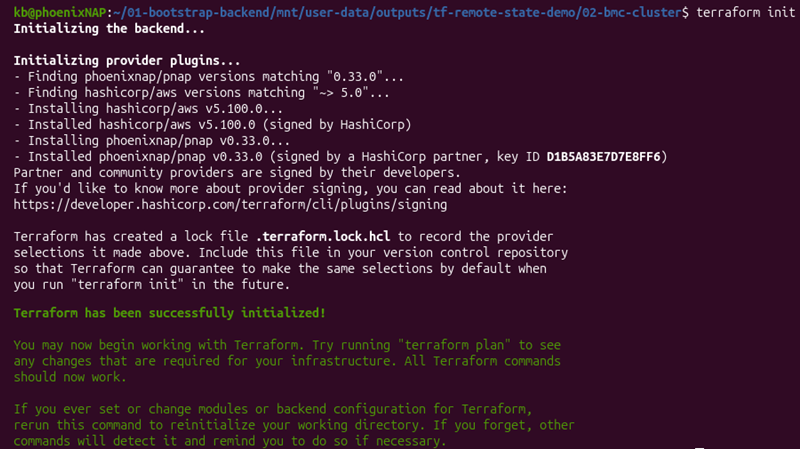
The command initializes the S3 backend for this configuration.
Reading Network State Outputs to Connect BMC Servers to Private Networks
Private network and VLAN resources are in separate configuration files from the server cluster. This separation helps manage networking and compute changes independently. The server configuration requires referencing networking resources it does not own.
The terraform_remote_state data source solves this by reading outputs from the network configuration state file.
The network configuration creates the private network and exports its ID as an output:
terraform {
  required_providers {
    pnap = {
      source  = "phoenixnap/pnap"
      version = "0.33.0"
    }
  }

  backend "s3" {
    bucket  = "phoenixnap-bmc-tf-state"
    key     = "bmc/network/terraform.tfstate"
    region  = "us-east-1"
    encrypt = true
  }
}

provider "pnap" {}

resource "pnap_private_network" "cluster_network" {
  name     = "bmc-cluster-network"
  cidr     = "10.0.0.0/24"
  location = "PHX"
}

output "private_network_id" {
  value = pnap_private_network.cluster_network.id
}
Next, the server configuration reads that state file using the same bucket and region. The separate backend key keeps the network state separate from the server state. Use terraform_remote_state to reference the network configuration backend key and read its outputs.
The private_network_id output is passed to the server's server_private_network.id argument to connect the BMC servers to the private network:
terraform {
  required_providers {
    pnap = {
      source  = "phoenixnap/pnap"
      version = "0.33.0"
    }
    aws = {
      source  = "hashicorp/aws"
      version = "~> 5.0"
    }
  }

  backend "s3" {
    bucket         = "phoenixnap-bmc-tf-state"
    key            = "bmc/servers/terraform.tfstate"
    region         = "us-east-1"
    dynamodb_table = "phoenixnap-bmc-tf-locks"
    encrypt        = true
  }
}

provider "pnap" {}

data "terraform_remote_state" "network" {
  backend = "s3"

  config = {
    bucket  = "phoenixnap-bmc-tf-state"
    key     = "bmc/network/terraform.tfstate"
    region  = "us-east-1"
    encrypt = true
  }
}

resource "pnap_server" "worker" {
  count        = 2
  hostname     = "worker-${count.index}"
  os           = "ubuntu/focal"
  type         = "s2.c1.medium"
  location     = "PHX"
  network_type = "PRIVATE_ONLY"

  network_configuration {
    private_network_configuration {
      configuration_type = "USER_DEFINED"

      private_networks {
        server_private_network {
          id  = data.terraform_remote_state.network.outputs.private_network_id
          ips = ["10.0.0.${15 + count.index}"]
        }
      }
    }
  }
}

output "worker_ids" {
  value = pnap_server.worker[*].id
}
The id argument uses the private_network_id output from the network configuration. Because the worker uses count = 2, both BMC worker servers connect to the same private network. They are assigned the private IP addresses 10.0.0.15 and 10.0.0.16.
Securing Remote State with Backend Encryption Policies
State files often contain sensitive attributes exposed by BMC and AWS resources (private IPs, tags, other configuration values). Secure the backend bucket with encryption and a strict transport policy to limit who can read that data and how.
The configuration below demonstrates how to add server-side encryption with a dedicated KMS key and a bucket policy. It denies any requests made over plain HTTP.
Add the following to the same file as the S3 configuration bucket:
resource "aws_kms_key" "bmc_state_key" {
  description = "KMS key for encrypting phoenixNAP BMC Terraform state"
}

resource "aws_s3_bucket_server_side_encryption_configuration" "bmc_state" {
  bucket = aws_s3_bucket.bmc_state.id

  rule {
    apply_server_side_encryption_by_default {
      sse_algorithm     = "aws:kms"
      kms_master_key_id = aws_kms_key.bmc_state_key.arn
    }
  }
}

resource "aws_s3_bucket_policy" "deny_unencrypted_transport" {
  bucket = aws_s3_bucket.bmc_state.id

  policy = jsonencode({
    Version = "2012-10-17"
    Statement = [{
      Sid       = "DenyInsecureTransport"
      Effect    = "Deny"
      Principal = "*"
      Action    = "s3:*"
      Resource  = [
        aws_s3_bucket.bmc_state.arn,
        "${aws_s3_bucket.bmc_state.arn}/*"
      ]
      Condition = {
        Bool = { "aws:SecureTransport" = "false" }
      }
    }]
  })
}
The configuration does the following:
aws_kms_key.bmc_state_key. Creates a dedicated KMS key for encrypting objects stored in the state bucket. Avoids relying on the default AWS-managed S3 key.aws_s3_bucket_server_side_encryption_configuration.bmc_state. Enables server-side encryption on the bucket. It sets the KMS key as the encryption method for every object written to it, including the state file.aws_s3_bucket_policy.deny_unencrypted_transport. Adds a bucket policy. Denies any S3 requests whereaws:SecureTransportisfalse, blocking plain HTTP access to the bucket.
Initialize:
terraform initApply with:
terraform apply
Combine the encrypt = true backend argument (shown earlier) with the bucket's HTTPS-only policy to protect state at rest and in transit during Terraform operations.
Limitations of Using Terraform Remote State
Remote state resolves many collaboration problems, but it also adds its own operational challenges. The sections below introduce some of these challenges.
The Bootstrapping Dilemma: Creating Backend Resources Without an Active Backend
The backend bucket must exist before Terraform can use it as an S3 backend. A configuration cannot use that same backend to manage the initial creation.
A common approach is to provision the backend infrastructure in a separate configuration that initially uses a local state (as shown in the earlier bootstrap example). Some teams use Terragrunt and similar tools to automate this step.
Plain-Text Secret Risks Within Remote State JSON Files
Terraform state can contain sensitive resource attributes and values, such as database passwords, secret keys, or connection strings. Local state stores these values in plaintext. Remote backends can provide encryption at rest, but the exact method depends on the backend configuration.
The sensitive parameter hides values from the CLI output, but it does not encrypt or redact them within the file itself. Anyone with read access can read these values.
Ensure a backend-level encryption exists and access policies are enforced, especially for production use.
Write-Locking Bottlenecks in Large Teams or Monolith Configurations
A single configuration managed by many engineers or CI pipelines results in competing apply operations. It creates queuing delays, especially when a long-lasting apply holds the lock for several minutes.
The common resolution is to split monolithic configurations into smaller state files. However, this method requires additional organization by service (or layer) and multiple terraform_remote_state connections for cross-referencing.
Best Practices for Using Terraform Remote State
To avoid accidental changes, security issues, and bugs, follow the best practices when using Terraform remote state. The sections below outline several practical recommendations.
Enforcing Least-Privilege IAM Policies for Read-Only vs. Read-Write Backends
Not everyone who uses a state file requires write access. For example, some CI pipelines only read outputs (via terraform_remote_state). Therefore, implement appropriate IAM policies for users and pipelines and enable audit logging to monitor state access. For read-only pipelines, grant only the minimum permissions to apply the least-privilege principle, such as s3:GetObject and s3:ListBucket.
The pipelines that use terraform apply still require full read-write access.
Separating Environments (Dev/Staging/Prod) Across Isolated Buckets
Isolate dev, staging, and production into separate buckets to avoid cross-environment mistakes. A mistyped key value can apply changes to the wrong environment and cause issues.
Separate buckets to reduce cross-environment mistakes and simplify applying access policies per environment.
Enabling Object Versioning and Automated Backups on Your State Storage
Use versioning on the state bucket to enable recovery to a previous state in case of accidental or corrupted writes. For example, the code below enables S3 versioning and expires non-current versions after 90 days.
resource "aws_s3_bucket_versioning" "bmc_state" {
  bucket = aws_s3_bucket.bmc_state.id

  versioning_configuration {
    status = "Enabled"
  }
}

resource "aws_s3_bucket_lifecycle_configuration" "bmc_state" {
  bucket = aws_s3_bucket.bmc_state.id

  rule {
    id     = "expire-old-versions"
    status = "Enabled"

    noncurrent_version_expiration {
      noncurrent_days = 90
    }
  }
}
Configure lifecycle policies with a retention period appropriate to your recovery and compliance requirements. This limits storage growth while retaining historical versions for an appropriate time window.
For stronger disaster recovery, configure S3 replication to copy state objects to a separate bucket, preferably in a different AWS region. Apply equivalent encryption, access controls, versioning, and retention policies to the backup.
Conclusion
This guide explained what Terraform remote state is and how to use it through practical examples. Although remote state adds complexity, it enables safe collaboration, splitting large infrastructure into smaller configurations, cross-referencing, and more.
Next, read more about Terraform modules.