Managing Kubernetes applications across multiple environments can become difficult when deployment configuration, cluster state, and application releases are handled through separate processes. GitOps addresses this problem by keeping deployment configuration version-controlled and using automated reconciliation to keep declared configuration consistent with running infrastructure.
This article explains Argo CD's role in the Kubernetes ecosystem, its architecture and reconciliation model, deployment and synchronization options, and best practices for operating it at scale.
What Is Argo CD?
Argo CD is a declarative, GitOps-based continuous delivery tool for Kubernetes. It uses configuration stored in a Git repository as the desired state for applications and continuously compares that state with the resources running in a Kubernetes cluster.
When the desired and live states differ, Argo CD reports the application as OutOfSync and can synchronize the cluster with the configuration stored in Git. It supports plain Kubernetes manifests as well as Helm and Kustomize, and provides a web interface, CLI, API, authentication, RBAC, multi-cluster management, and automated synchronization.
Role of Argo CD in the Kubernetes Ecosystem
Argo CD operates as the continuous delivery layer in a Kubernetes environment. Kubernetes runs workloads, while Argo CD ensures those workloads match the configuration defined in Git.
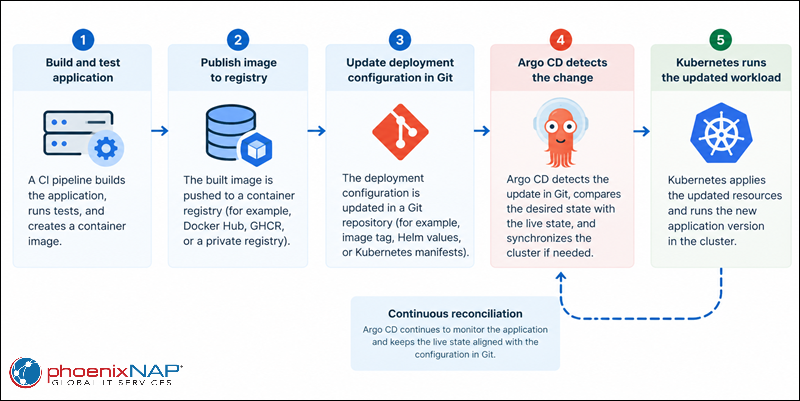
This separation gives CI and CD distinct responsibilities. A CI pipeline can build and test an application image, while a deployment workflow updates the corresponding Kubernetes configuration in Git. Argo CD detects the change and deploys it to the target cluster.
Argo CD can also manage applications across multiple Kubernetes clusters. This makes it useful for environments with separate development, testing, staging, production, or edge clusters, where a central control plane needs to manage application configuration consistently.
How Declarative GitOps Works (Desired State vs. Live State)
Git stores the desired state of an application, including resources such as Deployments, Services, ConfigMaps, and Ingress objects. The Kubernetes API stores the live state after the cluster creates or modifies those resources.
Argo CD continuously compares these states. When they differ, the application becomes OutOfSync. A synchronization operation applies the desired configuration and brings the live state closer to the version stored in Git.
| State | Description | Example |
|---|---|---|
| Desired state | Configuration defined in Git and used as the source of truth. | Deployment specifies three replicas and image version 2.0. |
| Live state | Resources and configuration currently present in the Kubernetes cluster. | Deployment currently runs two replicas or image version 1.9. |
| Synchronized state | Desired and live states match. | The cluster runs three replicas with image version 2.0. |
| Out-of-sync state | Desired and live states differ. | Git specifies three replicas, but the cluster has two. |
This model also detects configuration drift. For example, if an administrator manually changes a Deployment in the cluster, Argo CD can detect the difference. When automated self-healing is enabled, Argo CD can restore the resource to the state defined in Git.
GitOps also provides an audit trail because it records configuration changes as Git commits. Teams can review who changed a deployment configuration, inspect the difference between revisions, and revert a configuration by deploying a previous Git revision.
Argo CD Architecture & Controller Concepts
Argo CD separates API access, manifest generation, and application reconciliation into dedicated components. This architecture lets each component handle a specific part of the GitOps workflow. Some of the key components are:
| Component | Primary responsibility | Role in the workflow |
|---|---|---|
| API Server | Exposes the Argo CD API, web UI, and CLI operations. Handles authentication and authorization. | Accepts user and automation requests to manage applications and initiate synchronization. |
| Repository Server | Retrieves application configuration from Git and generates Kubernetes manifests. | Produces the desired state that Argo CD compares with the live cluster state. |
| Application Controller | Monitors application resources, compares desired and live states, and manages synchronization. | Detects configuration drift, synchronizes resources, and tracks application health. |
| Redis | Caches data used by Argo CD components. | Reduces repeated computation and improves responsiveness. It does not perform application reconciliation. |
The sections below explain each core component in detail.
API Server Component
The Argo CD API server provides the interface for the web UI, CLI, and external automation. It manages application operations, authentication, repository and cluster credentials, and RBAC.
The API server also handles requests to synchronize or roll back applications. It can receive Git webhook events and use them to trigger application refreshes.
Repository Server (Repo Server)
The repository server retrieves application configuration from Git and generates the Kubernetes manifests Argo CD requires.
It works with a repository URL, revision, application path, and tool-specific settings such as Helm values. The repository server also maintains a local cache of repository data to reduce repeated access to the source.
Application Controller
The Application Controller is the main Kubernetes controller responsible for application reconciliation. It monitors the live resources in the target cluster and compares them with the desired state generated from the configured source.
When it detects an OutOfSync application, the controller can synchronize it according to the application's sync policy. It also manages application health and invokes configured lifecycle hooks.
Reconciliation Loop & State Synchronization
The reconciliation loop repeatedly evaluates the desired and live states. Argo CD refreshes application state at configured intervals and can also react to repository changes and cluster events.
A synchronization applies the resources required to bring the cluster toward the desired state. Automated synchronization can also prune resources removed from Git and self-heal resources changed directly in the cluster.
Application and AppProject Custom Resource Definitions (CRDs)
The Application resource defines what Argo CD deploys, where it deploys it, and which repository or configuration source provides the desired state. The AppProject resource groups applications and controls their allowed repositories, destinations, resource types, and project-level roles.
Projects are particularly useful in multi-team environments because they restrict which applications can access specific clusters, namespaces, repositories, and Kubernetes resource types.
Argo CD Deployment Models & Configurations
Argo CD supports different deployment models depending on the number of applications, Kubernetes clusters, and teams involved. A small environment can run a single Argo CD installation, while larger environments can use centralized multi-cluster management and controller scaling.
Configuration also determines how and when Argo CD changes the cluster. Sync policies, RBAC, project restrictions, Helm or Kustomize sources, hooks, and sync waves allow teams to adapt deployments to different application lifecycles.
In-Cluster vs. External Multi-Cluster Management
A standard installation runs Argo CD inside a Kubernetes cluster and can manage applications in that same cluster. This model keeps the Argo CD control plane close to the workloads it manages and suits environments with a limited number of clusters.
Argo CD can also register external Kubernetes clusters and manage them from a central installation. This model allows one Argo CD instance to control applications across development, staging, production, or edge clusters.
Multi-cluster deployments require careful access control. AppProjects can restrict which applications can deploy to specific destinations, while Kubernetes and Argo CD credentials determine how the controller authenticates with each cluster.
Helm and Kustomize Application Integration
Argo CD can use Helm charts and Kustomize configurations as application sources. It generates the resulting Kubernetes manifests before comparing them with the resources in the destination cluster.
Helm is useful when applications are distributed as reusable charts with configurable values. Different environments can use separate values files or parameters while sharing the same underlying chart.
Kustomize provides another approach based on bases and overlays. A common base can define the application's standard resources, while environment-specific overlays modify values such as replica counts, image tags, resource limits, or ingress configuration.
Sync Strategies (Manual vs. Automated Prune and Self-Healing)
Manual synchronization gives operators control over when Argo CD applies changes detected in Git. This model can be useful for production environments where deployment requires explicit approval or a maintenance window.
Automated synchronization allows Argo CD to deploy new desired states without manual intervention. Additional sync features control how Argo CD handles resources that have changed or been removed:
- Automated sync applies detected changes from the configured Git revision.
- Automated pruning removes resources that are no longer defined in Git.
- Self-healing restores resources when their live state changes outside Argo CD.
- Sync options provide additional controls for resource creation, replacement, pruning, and other synchronization behavior.
These features should be enabled deliberately. Pruning can remove resources that an operator expects to remain in the cluster, while self-healing can overwrite intentional manual changes. Use sync options and repository review processes to control these behaviors.
RBAC and User Management in Argo CD
Argo CD provides role-based access control for applications and other Argo CD resources. Access policies can restrict operations such as viewing, synchronizing, deleting, or updating applications.
Argo CD can integrate with external identity providers through SSO and can also use local accounts for specific administrative or automation requirements. Group-based policies allow organizations to assign permissions based on existing identity-provider groups.
Use project-level roles when you need to limit access to a specific application group or deployment destination. This creates a smaller permission boundary than granting broad access across the entire Argo CD installation.
Hook Management and Resource Sync Waves
Argo CD hooks allow Kubernetes resources to run at specific points in an application synchronization. Common phases include PreSync, Sync, PostSync, and SyncFail.
A PreSync Job can perform a database migration before the application starts, while a PostSync Job can run validation after deployment. Hook resources can therefore become part of the application lifecycle instead of requiring separate manual procedures.
Sync waves provide ordering within a synchronization. Assigning different wave numbers allows resources to deploy in a controlled sequence, such as creating a namespace first, installing a CRD next, and deploying dependent Custom Resources afterward.
phoenixNAP Bare Metal Cloud Infrastructure Integration
Argo CD can serve as the Kubernetes application delivery layer on infrastructure provisioned through phoenixNAP Bare Metal Cloud (BMC). This creates a clear separation between infrastructure provisioning and application deployment.
Infrastructure can be provisioned through the BMC API or Infrastructure as Code tools, while Argo CD manages the Kubernetes resources running on that infrastructure. See Infrastructure as Code for more information about managing BMC infrastructure through declarative automation.
Note: phoenixNAP Bare Metal Cloud provides dedicated servers that can support Kubernetes clusters and other infrastructure workloads. Use phoenixNAP Bare Metal Cloud to provision dedicated compute resources for Kubernetes environments that require predictable performance and control over the underlying infrastructure.
Deploying Argo CD Control Planes on Bare Metal Cloud Instances
A Kubernetes cluster can run on BMC instances, with Argo CD installed as the cluster's GitOps delivery platform. The Argo CD control plane can then manage workloads in the same cluster or connect to additional Kubernetes clusters.
The underlying BMC infrastructure remains separate from the Argo CD application lifecycle. Infrastructure as Code can manage server provisioning, networking, and other infrastructure resources, while Argo CD handles Kubernetes manifests and application configuration once the cluster is available.
This separation reduces the need for application deployment workflows to interact directly with the infrastructure API. Changes to server infrastructure and changes to Kubernetes applications can follow separate review, approval, and rollback processes.
Automated Edge & Hybrid Bare Metal Cluster Provisioning via GitOps
BMC instances can provide dedicated infrastructure for Kubernetes clusters deployed across different environments. An Infrastructure as Code workflow can provision the required servers and networking, bootstrap Kubernetes, and then register the resulting clusters with Argo CD.
After registration, Argo CD can deploy the required workloads from Git. A common structure can use shared application definitions with environment-specific overlays for production, staging, or edge clusters.
This approach separates two lifecycle layers. Infrastructure as Code manages the physical or virtual infrastructure and cluster prerequisites, while GitOps manages the Kubernetes resources deployed on top of those clusters.
Managing High-Throughput Bare Metal Ingress and Network Policies for Argo CD
Bare metal Kubernetes environments can support workloads that require dedicated compute and predictable network performance. Argo CD can manage the Kubernetes configuration for ingress controllers, Services, NetworkPolicies, and related resources through Git.
Network policies can restrict communication between application namespaces and platform services. For example, an application namespace can allow traffic from an ingress namespace while denying unrelated east-west traffic.
Ingress configuration should also follow the same declarative model. Store the relevant Kubernetes resources in Git and let Argo CD sync them to the cluster, while restricting the Argo CD management interface to the networks and users that need access.
Argo CD Best Practices
Argo CD works best when Git repositories, permissions, synchronization policies, secrets, and application boundaries follow a consistent structure. These practices become increasingly important as the number of applications and clusters grows.
The sections below list the best Argo CD practices.
Structuring Application Repositories for GitOps Workflows
Organize repositories so that application configuration, reusable components, and environment-specific settings have clear boundaries. A repository can use separate directories for environments or Kustomize overlays, while another model can use dedicated repositories for different environments.
Keep production configuration version-controlled and reviewable. Avoid manually generated manifests when Helm, Kustomize, or another declarative source can reproducibly generate the same configuration.
A consistent repository structure also simplifies ApplicationSet and App-of-Apps configurations because Argo CD can reference predictable paths and configuration patterns.
Implementing Least Privilege Access Control via Built-In Argo CD RBAC
Create roles that grant only the operations each user, team, or automation account needs. For example, a development team may need to synchronize applications in a development project without having permission to delete production applications.
Use AppProjects to restrict repository sources, deployment destinations, namespaces, and resource types. This adds another authorization boundary beyond user-level RBAC.
Avoid granting administrative access for routine deployment operations. Review RBAC policies periodically and remove permissions that are no longer required.
Securing Repository Credentials and Kubernetes API Tokens
Repository credentials and cluster credentials provide access to infrastructure and should receive the same protection as other deployment secrets. Use Kubernetes Secrets or an integrated secret-management solution instead of storing credentials in Git.
Use narrowly scoped credentials whenever possible and rotate them according to organizational security requirements. SSH deploy keys, access tokens, and Kubernetes service-account credentials should have only the permissions Argo CD needs.
Limit access to Argo CD's credential resources through Kubernetes RBAC. Also protect the Argo CD API and UI with appropriate authentication and network controls.
Utilizing App-of-Apps and ApplicationSet Patterns for Scale
The App-of-Apps pattern uses an Argo CD Application to manage other Application resources. A root application can therefore define a group of child applications from a Git repository.
ApplicationSet provides a templating mechanism for generating Applications from data such as cluster lists, Git directories, or other supported generators. This is useful when many clusters or environments use the same application structure with different parameters.
Use these patterns when application count makes manual Application management difficult. Keep generated application definitions predictable so that operators can identify which source controls each deployment.
Enforcing Automated Sync Safeguards and Health Checks
Automated synchronization reduces manual deployment work but should not remove deployment controls. Configure pruning deliberately and use confirmation requirements for resources that should not be deleted automatically.
Health checks add another safeguard by letting Argo CD report whether resources have reached their expected state. Investigate unhealthy resources before considering a synchronization complete.
Use sync options, retry policies, resource hooks, and health checks according to the application's failure modes. Critical applications may require manual promotion or additional validation rather than unrestricted automated deployment.
Separating Application Source Code from Deployment Configuration Repositories
Separate application source code from deployment configuration when different teams or release processes manage them. The application repository can contain source code and build configuration, while a deployment repository contains Kubernetes manifests, Helm values, or Kustomize overlays.
This separation lets the deployment repository serve as the controlled source of production state. A CI system can build and publish an image, then create a Git change that updates the image reference in the deployment configuration.
It also reduces the permissions required by deployment tooling. Build systems don't need direct access to production clusters when Argo CD deploys from the approved Git configuration.
Monitored Progressive Delivery Using Argo Rollouts
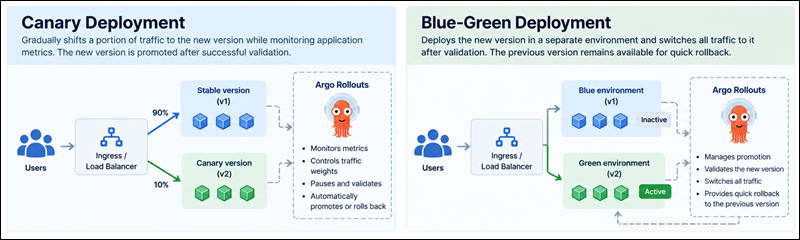
Use Argo Rollouts with Argo CD when standard Kubernetes rolling updates do not provide enough control over application releases. Argo Rollouts extends Kubernetes deployments with strategies such as canary and blue-green releases, traffic management, analysis, promotion, and rollback.
A canary rollout can gradually introduce a new application version instead of replacing all existing replicas immediately. For example, a deployment can start by directing a small percentage of traffic to the new version, pause for analysis, and increase traffic only after the defined conditions pass.
Argo CD can manage the Rollout resource declaratively from Git, while Argo Rollouts handles the runtime progression. This keeps the release strategy version-controlled while allowing application metrics and health information to influence promotion decisions.
The following diagram shows the difference between a canary and blue-green deployment:
Backing Up Argo CD Configurations and CRD Metadata
Back up Argo CD's declarative configuration, including Application and AppProject resources, repository configuration, cluster configuration, RBAC policies, and other resources required to recreate the deployment.
Store non-sensitive configuration in Git when appropriate so you can reconstruct it from version-controlled definitions. Sensitive credentials require a separate backup and recovery strategy because restoring the configuration without its required secrets may leave applications unable to connect to repositories or clusters.
Test restoration procedures regularly. A backup is useful only when the team can restore Argo CD and reconnect it to its repositories and managed clusters within the required recovery window.
Managing Secret Delivery securely with External Secrets or Sealed Secrets
Avoid storing plaintext Kubernetes Secrets in Git repositories. Instead, use a solution such as External Secrets Operator or Sealed Secrets to keep sensitive values protected while maintaining a declarative deployment workflow.
External Secrets can retrieve values from an external secret manager and create Kubernetes Secrets in the target cluster. Sealed Secrets encrypt secret data before it is stored in Git, allowing the encrypted resource to remain part of the GitOps workflow.
Choose the approach based on your existing secret-management infrastructure. Keep encryption keys, external secret-manager credentials, and other root-level secret material outside the Git repository.
Tuning Reconciliation Intervals and Controller Performance at Scale
Large Argo CD installations can generate substantial repository, Kubernetes API, and controller activity. Before changing synchronization settings, monitor application counts, reconciliation duration, manifest generation time, API-server load, and Application Controller resource consumption.
Shorter reconciliation intervals can reduce the time between a change and its detection, but they also increase system activity. A large environment should therefore balance detection latency against repository traffic and Kubernetes API load.
When application counts grow significantly, use Argo CD's scaling options and controller sharding where appropriate. Resource requests and limits should also reflect the number and complexity of applications being reconciled.
Argo CD Issues & Troubleshooting
Argo CD exposes synchronization status, resource health, application conditions, events, and controller logs that help identify deployment problems. Start troubleshooting with the affected Application and resource before moving to repository, network, or cluster-level components.
Many failures occur outside Argo CD itself. A synchronization can fail because of invalid manifests, missing CRDs, Git authentication, Kubernetes RBAC, network connectivity, or another controller continuously modifying a resource.
The sections below cover common Argo CD issues and steps to troubleshoot them.
OutOfSync and Degraded Application Statuses
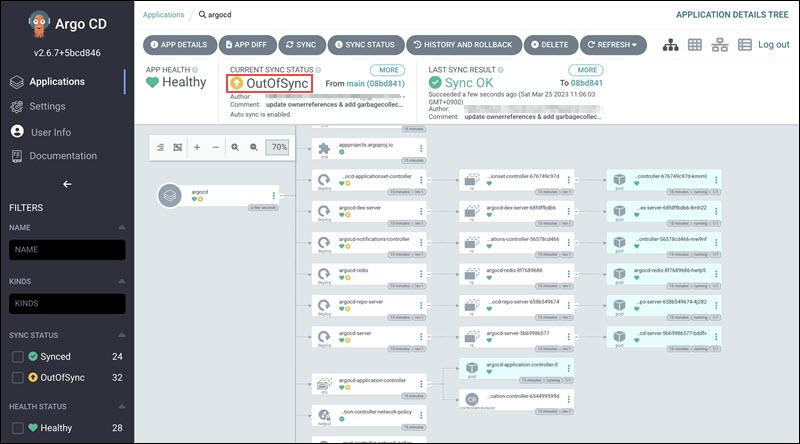
An OutOfSync status means that the desired state differs from the live state. Review the application diff in the Argo CD UI or CLI to determine which resources differ and whether the difference originates from Git or a change made directly in the cluster.
A Degraded health status indicates that one or more application resources are not healthy. Inspect the affected resource's events, pod status, logs, readiness probes, liveness probes, and controller conditions.
Do not automatically synchronize every OutOfSync application. First determine why the states differ, especially when pruning or self-healing is enabled.
The following Argo CD web UI example shows an OutOfSync app status:
Git Repository Authentication and Connection Timeout Failures
Repository authentication failures can result from incorrect credentials, expired tokens, invalid SSH keys, or insufficient repository permissions. Verify the configured repository URL and credentials, then test connectivity from the Argo CD environment.
Connection timeouts can also originate from DNS, firewalls, proxies, routing, or outbound network restrictions. Check connectivity between the Argo CD repository server and the Git provider rather than assuming that the Kubernetes API connection is responsible.
For private Git services, verify that the repository server can resolve and reach the Git endpoint and that any required CA certificates or proxy settings are configured correctly.
Resource Sync Loops and Infinite Reconciliation Errors
A synchronization loop can occur when Argo CD changes a resource and another Kubernetes controller immediately modifies it. Argo CD then detects the difference and attempts to restore the Git-defined state.
Inspect the resource's managed fields and recent events to identify which controller modifies the resource. Common examples include controllers that inject labels, annotations, replicas, or other fields after Argo CD applies a manifest.
Resolve the conflict by defining clear ownership of the affected fields. Where appropriate, configure Argo CD to ignore specific differences, but avoid broad ignore rules that hide legitimate configuration drift.
CRD Schema Validation and Manifest Syntax Errors
Manifest generation can fail because of invalid YAML, unsupported fields, incorrect API versions, or Helm and Kustomize configuration errors. Generate the manifests locally when possible and compare the result with the Kubernetes API version and CRDs available in the target cluster.
Custom Resources also depend on their corresponding CRDs. If Argo CD attempts to create a Custom Resource before its CRD exists, synchronization can fail even when the Custom Resource itself is valid.
Use sync waves or another controlled installation process to establish dependencies between CRDs and their Custom Resources. Check Argo CD repository-server logs when the failure occurs during manifest generation rather than resource application.
Permission Denied and Kubernetes RBAC Authorization Blocks During Sync
A synchronization can fail when the Argo CD service account lacks permission to create, update, or delete a required resource. Kubernetes RBAC determines what the Argo CD identity can do in the destination cluster.
Check the failed resource and identify the Kubernetes identity performing the operation. Verify the relevant Role, ClusterRole, RoleBinding, or ClusterRoleBinding and confirm that the target namespace and resource type are covered.
Argo CD's AppProject restrictions can also block an otherwise authorized Kubernetes operation. Check both layers: Kubernetes RBAC controls what the Argo CD identity can do, while Argo CD RBAC and AppProject policies control what users and applications can request.
Conclusion
This article explained how Argo CD implements declarative GitOps delivery for Kubernetes, including its architecture, controller components, synchronization model, and more. Argo CD keeps Kubernetes application configuration version-controlled in Git and continuously works to align the live cluster with that desired state.
Next, check out our comprehensive Terraform with Kubernetes guide.