Choosing a hosting environment often comes down to how much server capacity, control, and management a website or application requires. Shared hosting keeps costs and administration low by placing multiple websites on the same server, while dedicated hosting provides an entire physical server for one customer.
The difference affects more than price. Resource availability, performance, security, customization, scalability, and server management can all vary between the two options.
This article compares shared hosting and dedicated hosting based on different factors and explains how to choose the right hosting model for your workload.

Shared Hosting vs. Dedicated Hosting: Overview
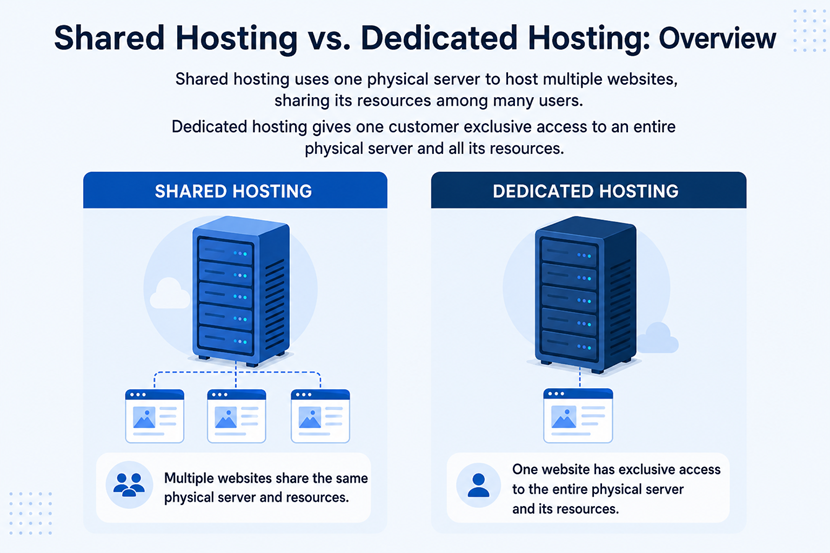
Shared hosting and dedicated hosting use different approaches to allocating physical server resources. With shared hosting, multiple customers host their websites on the same physical server and share its underlying resources. With dedicated hosting, one customer has exclusive use of a physical server and its resources.
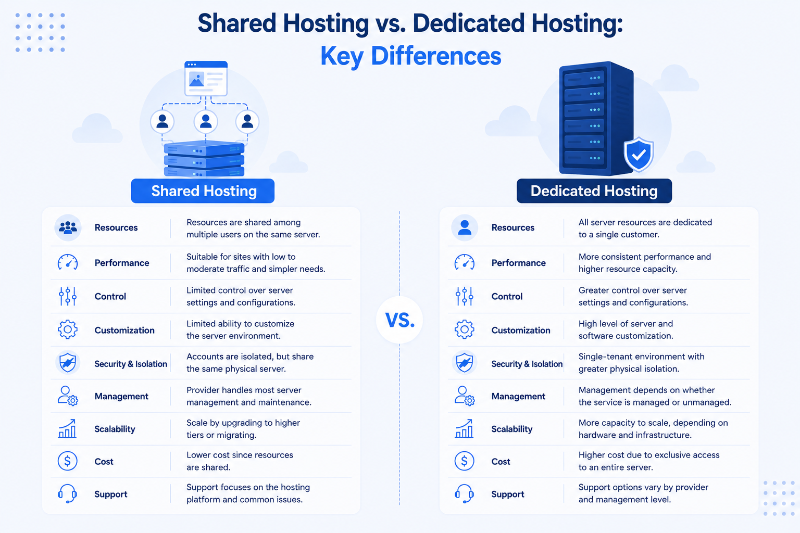
The following table summarizes the main differences between shared hosting and dedicated hosting:
| Factor | Shared Hosting | Dedicated Hosting |
|---|---|---|
| Resource Allocation | Server resources are shared among multiple customers. | Server resources are dedicated to one customer. |
| Performance | Suitable for websites with modest resource requirements. | More predictable performance and greater resource capacity. |
| Control | Limited server-level control. | Extensive server-level control. |
| Customization | Limited customization of the hosting environment. | High degree of server and software customization. |
| Security and Isolation | Accounts share the physical server but can be logically isolated. | Single-tenant physical environment. |
| Management | Usually requires little server administration. | Management depends on whether the service is managed or unmanaged. |
| Scalability | Usually scales through higher hosting tiers or migration. | Provides more capacity, with scaling options depending on the hardware and infrastructure. |
| Cost | Lower. | Higher. |
| Best Suited for | Small websites and workloads with modest requirements. | Resource-intensive workloads requiring dedicated capacity and control. |
| Support | Focuses on the hosting platform and common website-related issues. | Managed services can include server administration and infrastructure support, while unmanaged services require more technical involvement from the customer. |
Shared Hosting vs. Dedicated Hosting: In-Depth Comparison
The differences between shared and dedicated hosting become clearer when you look at how each environment handles resources, performance, security, and management.
Resources
Shared hosting places multiple websites on the same physical server, meaning that customers on a shared server split access to the same core resources:
- CPU. All accounts on the server draw from one processor.
- RAM. Memory allocated is in limited amounts per account.
- Storage. Disk space is split according to each hosting plan.
- Network capacity. Bandwidth is shared across every website on the server.
Providers impose resource limits and account-level controls to keep any single website from consuming more than its share. This model works well for websites with modest and predictable resource requirements, such as small business websites.
Learn about the key considerations for choosing a server or hosting solution for your small business.
Dedicated hosting assigns an entire physical server to one customer. The customer has access to all the server's available resources without competing with other hosting accounts on the same machine.
This resource model provides greater capacity and more predictable resource availability. The actual performance still depends on the server's hardware configuration and the workload running on it.
Performance
Shared hosting provides adequate performance for websites with low to moderate traffic and straightforward workloads. However, since multiple websites operate on the same physical infrastructure, heavy resource usage by other accounts can affect performance.
Dedicated hosting provides more predictable performance because the server's physical resources are allocated to one customer. There are no other hosting accounts consuming CPU or RAM on the same server. This makes dedicated hosting a better fit for high-traffic websites, resource-intensive applications, and workloads that require consistent access to substantial computing resources.
NOTE: Dedicated hosting is not automatically faster in every situation. Server hardware, software configuration, application design, storage, network conditions, and workload characteristics all affect actual performance.
Control and Customization
Shared hosting is designed to reduce the amount of server administration customers must handle. Providers manage the underlying infrastructure, while customers use available hosting tools and control panels (e.g., cPanel, Plesk) to manage their websites.
However, this simplicity comes with less control. Customers cannot make extensive changes to the server's operating system, system software, or underlying configuration.
Dedicated hosting provides considerably more control over the server environment. Depending on the provider and hosting plan, customers can configure the operating system, install required software, adjust server settings, and implement specialized security or performance configurations.
The additional control is useful when an application has specific technical requirements. It also means the customer needs the expertise to manage those configurations if the dedicated service doesn’t include server management.
Security and Isolation
Shared hosting puts multiple customers on the same physical server. Their accounts are separated, but they still share the underlying infrastructure. The security of a shared environment depends partly on the provider's account isolation, server configuration, patching, monitoring, and other security measures. Customers are also responsible for securing their own websites, applications, accounts, and credentials.
Dedicated hosting provides a single-tenant physical environment. Other customers do not run their workloads on the same physical server, which provides greater physical isolation. Dedicated hosting also gives customers more control over security configurations. They can choose security tools, configure access controls, harden the operating system, and implement other measures according to their requirements.
However, dedicated infrastructure does not automatically make a workload secure. Customers still need to properly configure and maintain the server, operating system, applications, and security controls.
Note: Looking for dedicated hardware without the overhead of manual provisioning? Bare Metal Cloud delivers dedicated physical servers with cloud-like deployment and management.
Management and Maintenance
One of the main advantages of shared hosting is the lower administrative burden. The hosting provider handles much of the underlying server management, including infrastructure maintenance and many server-level updates. Customers can focus primarily on their websites and applications instead of managing physical hardware and the server operating system.
Dedicated hosting can require more administration because the customer has greater control over the environment. How management responsibility is handled depends on whether the service is managed or unmanaged:
- Managed dedicated hosting. The provider handles most server administration tasks, including maintenance and monitoring.
- Unmanaged dedicated hosting. The customer handles operating system maintenance, configuration, patching, and server-level troubleshooting.
Choosing between these two service types depends on how much infrastructure management the customer wants to handle and whether their team has the expertise to handle it.
Scalability
Shared hosting scales by moving to a higher hosting plan with additional resource allocations. This approach works well as a website grows gradually, but the available resources remain constrained by the shared hosting environment and the provider's plan limits. A workload that consistently exceeds those limits may eventually need to move to a different hosting environment.
Dedicated hosting starts with substantially more available capacity because the customer gets an entire physical server. Depending on the provider and hardware configuration, customers may also be able to upgrade available resources.
Dedicated hosting is not infinitely scalable, however. A physical server has hardware limits. Workloads that outgrow a single server may require additional servers, load balancing, distributed storage, or another infrastructure architecture.
Cost
Shared hosting costs less because the provider distributes the cost of the physical infrastructure across multiple customers. Customers pay for a portion of the available resources rather than an entire server. This makes shared hosting attractive for smaller websites and workloads where dedicated hardware would provide more capacity than necessary.
Dedicated hosting costs more because one customer receives exclusive access to an entire physical server. The price also varies according to the server's hardware, storage, bandwidth, management services, backup options, and other features.
The higher cost can be justified when a workload requires dedicated resources, greater control, or more predictable performance. The lower price of shared hosting can be the better option when the workload does not need those capabilities.
Support
Support varies between providers and hosting plans, so the hosting model alone does not determine the level of assistance available.
Shared hosting requires less customer involvement in server administration, so support focuses on the hosting platform and common website-related issues.
Dedicated hosting demands more technical involvement from the customer, particularly with unmanaged services. Managed dedicated hosting reduces that responsibility by providing additional server administration and infrastructure support.
Shared Hosting vs. Dedicated Hosting: How to Choose?
The right hosting model depends on your workload, budget, required level of control, and how much server management you want to handle.
Shared hosting is a good fit for smaller websites and workloads with modest resource requirements. It keeps costs low and reduces the need for server administration, making it suitable for blogs, portfolios, small business websites, and similar use cases.
Dedicated hosting is a better fit for demanding workloads that require more resources, control, or physical isolation. It is useful for high-traffic websites, resource-intensive applications, and workloads that need specialized server configurations, such as ecommerce platforms, gaming servers, streaming platforms, or SaaS applications.
When choosing between the two, consider your current resource requirements and expected growth rather than focusing on price alone.
Finding the Right Fit for Your Hosting Needs
Shared and dedicated hosting serve different requirements rather than representing a straightforward choice between a cheaper and a more powerful option. Evaluate your current requirements as well as expected growth before choosing a plan. When the workload needs dedicated capacity, customization, or greater physical isolation, dedicated hosting can provide the infrastructure required to support it. When simplicity and cost efficiency matter more, shared hosting can be the more practical choice.