Cloud computing costs often exceed the budgets set for them. Usage-based pricing, overlapping discount programs, and on-demand provisioning cause monthly bills to grow faster than organizations can track them. Without clear insight into resource usage and ownership, companies pay for idle servers, unused storage, and unplanned data transfers.
Cloud cost management brings that spending under control. It tracks where the money goes, assigns each charge to the people and projects that generate it, and eliminates resources the organization doesn't need.
This article explains how cloud cost management works, compares the best tools that support it, and lists practices that keep cloud spending in check.
What Is Cloud Cost Management?
Cloud cost management is the ongoing practice of tracking, allocating, and controlling what an organization spends on cloud computing services. It connects billing data to the resources, applications, and business units behind each charge, so spending decisions are based on data instead of estimates.
In smaller organizations, engineers and finance staff share this work informally. Larger organizations assign it to a dedicated cloud financial operations (FinOps) function. This function connects finance, engineering, and business leadership so each group understands its share of cloud spending.
The practice applies to public or private cloud environments, as well as hybrid cloud deployments. In a multi-cloud setup, it also brings billing data from several providers into one view. Cloud cost management covers the following areas:
- Visibility. Collecting cost and usage data from every account, service, and region in one place. Allocation, budgeting, and governance all depend on this data.
- Allocation. Assigning each charge to the application, project, or business unit that generated it. Tags, account structure, and shared-cost rules make assignment possible.
- Budgeting and forecasting. Setting spending limits and projecting future costs from current usage trends. Alerts warn the budget owner before a limit is reached.
- Governance. Defining who can provision resources, which policies apply, and who reviews spending. Clear rules keep costs from drifting back up after an initial cleanup.
Cloud cost optimization builds on that foundation. Management shows how much is spent, where, and by whom, while optimization lowers the bill. Optimization involves removing idle resources, matching server sizes to actual usage, and securing better rates through commitment discounts. Without ongoing management, these efforts produce one-time savings that disappear as usage grows.
FinOps is one of the notable cloud computing trends. Its framework, maintained by the FinOps Foundation, organizes cost work into three repeating phases: Inform, Optimize, and Operate.
Why Cloud Cost Management Matters
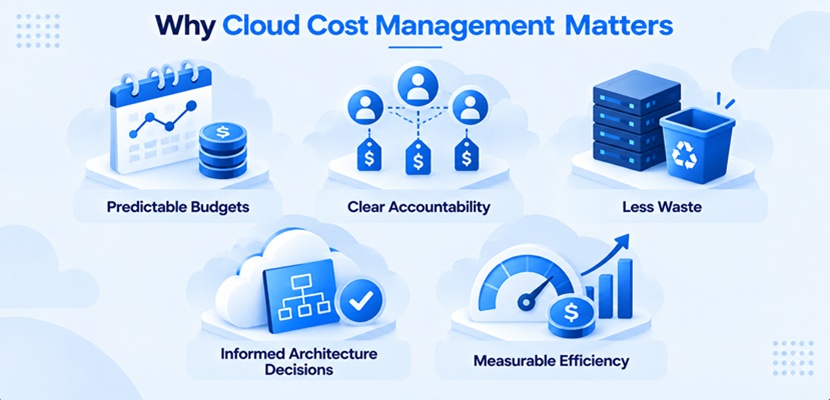
Cloud spending behaves differently from a traditional IT budget. On-premises hardware is a one-time purchase with predictable costs, while cloud charges change with every hour of usage and every deployment. The move to the cloud turns cost control from a yearly purchasing decision into a daily operational task, and handling it well pays off in several ways:
- Predictable budgets. Finance departments can plan spending based on real usage rather than rough estimates, reducing the likelihood of surprises. Anomaly alerts flag unexpected spikes before they reach the invoice.
- Clear accountability. When every charge has an assigned owner, engineers see the cost of the resources they provision. Spending is no longer an anonymous shared total.
- Less waste. Regular reviews expose idle instances, oversized servers, and storage nobody uses. Removing them lowers costs without affecting performance.
- Informed architecture decisions. Cost data shows which services, regions, and pricing models fit each workload. It also brings real figures to cloud migration plans and to decisions on how to choose a cloud provider.
- Measurable efficiency. Comparing cloud spending with business results, such as the number of customers served, shows whether costs grow in line with the business. Higher spending is acceptable when business results grow at the same pace or faster.
The goal of managing cloud costs is to spend in proportion to the value each workload delivers. Sometimes that means approving a bigger budget for a service that drives revenue.
Challenges of Cloud Cost Management
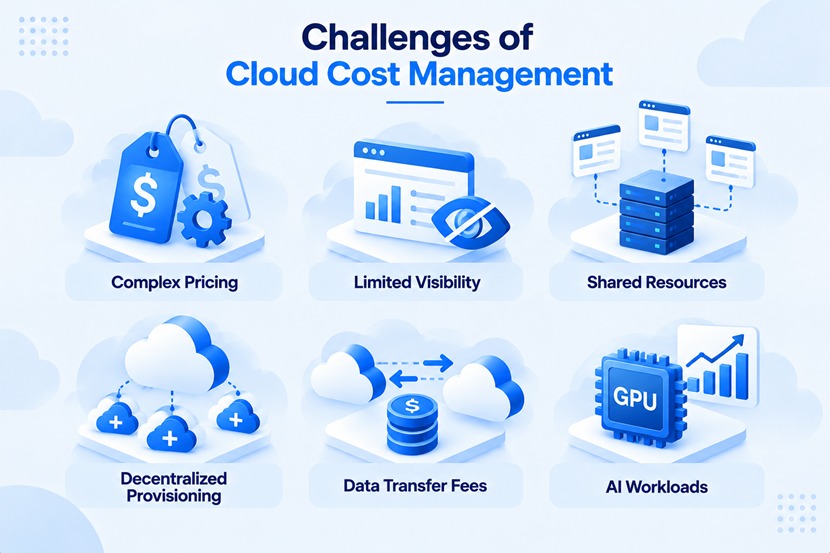
Few cloud cost problems stem from a single decision. They result from complex billing models combined with the rapid growth of services, accounts, and workloads. The most common obstacles include:
- Complex pricing. Each provider bills in different units (hours, requests, gigabytes) and combines on-demand, reserved, and spot pricing. Comparing costs across services or providers is difficult without additional data processing.
- Limited visibility. Untagged resources and spending spread across many accounts hide who is responsible for each charge. Billing data also arrives with a delay, after the money is spent.
- Shared resources. Databases, computer networks, and Kubernetes clusters serve several applications at once. Splitting their cost fairly requires allocation rules everyone agrees on.
- Decentralized provisioning. Any developer with access can launch resources quickly, and many are never shut down. The result is cloud sprawl that grows without central oversight.
- Data transfer fees. Providers charge for moving data out of their network and between regions. These charges depend on architecture and traffic patterns, so they are hard to predict from a price list.
- AI workloads. Training and running AI and machine learning models require GPU computing instances, which cost far more than general-purpose servers. Training jobs create sudden spending spikes, whether models run in the public cloud or as private AI deployments. Spending on new AI technology is also hard to forecast before usage patterns settle.
As environments grow, managing these obstacles manually becomes impractical, making dedicated cloud cost management software a necessity.
What Are Cloud Cost Management Tools?
Cloud cost management tools are applications that collect billing and usage data, organize it by owner, and turn it into reports, alerts, and savings recommendations. They replace manual bill reviews with a continuous, automated view of spending.
Cloud cost management software falls into three broad categories. Every major public cloud provider includes a free native cost console, but it covers only that provider's platform. Third-party platforms from independent vendors, delivered as software as a service (SaaS), combine data from multiple providers and add deeper allocation, governance, and automation and orchestration capabilities. Kubernetes-specific tools break shared cluster costs down by namespace, workload, or label, and several third-party platforms now include this capability.
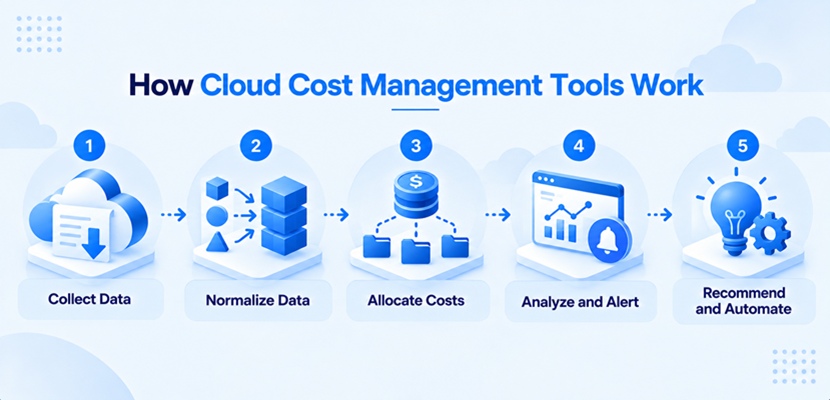
Whatever the category, these tools follow the same basic process. Billing data moves from each provider through several processing stages before it reaches a report or triggers an action. The process consists of the following steps:
- Collect data. Pull billing exports and usage metrics through provider APIs and billing integrations.
- Normalize data. Convert each provider's format into a common structure, commonly based on the FinOps Open Cost and Usage Specification (FOCUS).
- Allocate costs. Map every charge to an owner using tags, accounts, and shared-cost rules.
- Analyze and alert. Compare spending against budgets and forecasts, and flag anomalies.
- Recommend and automate. Suggest savings actions and, in some tools, apply them automatically.
Results depend on the input data. A tool works with the tags and account structure it receives, so allocation rules and tagging discipline matter as much as the software choice.
Features to Look for in Cloud Cost Management Tools
Most cloud cost management software shares a core feature set, but depth varies widely between vendors. The most valuable cloud cost optimization tools go beyond reports and apply fixes, such as shutting down idle resources or adjusting reserved capacity. The following features separate a capable platform from a basic dashboard:
- Multi-provider visibility. Support for every provider and service in use, combined in one view. Unified data makes multi-cloud management possible without switching between consoles.
- Cost allocation. Tag-based and rule-based assignment of costs, including shared costs. Reports that show each department its share of costs (showback) or bill it internally (chargeback) build on this feature.
- Budgets and anomaly detection. Spending limits, forecasts, and alerts on unexpected changes. Alerts are most useful when they reach resource owners in the tools those owners already use.
- Rightsizing recommendations. Suggestions based on actual utilization, not provisioned capacity. Reliable cloud cost management solutions explain the performance risk behind each suggestion.
- Commitment management. Tracking of reserved capacity and savings plans, with purchase recommendations. Some platforms buy and adjust commitments automatically.
- Automated actions. Scheduled shutdowns, idle resource cleanup, and policy enforcement through application automation. Automation turns recommendations into savings without manual follow-up.
- Container cost allocation. Breakdown of shared cluster costs by workload, namespace, or label. This feature matters for any organization running containers at scale.
- AI spend tracking. Cost data from AI model providers and GPU workloads, shown alongside cloud infrastructure costs. AI services bill by tokens, requests, or GPU hours and need dedicated visibility to stay predictable.
Data freshness and history also matter. Resource-level data refreshed several times a day supports quick action, while long retention improves forecasts and year-over-year comparisons.
Best Cloud Cost Management Tools
The cloud cost management tools below cover different needs, from enterprise financial planning to developer-friendly self-service. All of them support the major cloud providers but differ in automation depth, buyer focus, and pricing approach. The following table summarizes the key differences:
| Tool | Best For | Standout Feature | Pricing Model |
| IBM Cloudability | Large enterprises with mature FinOps practices. | Detailed allocation and financial planning. | Quote-based. |
| Flexera One | Enterprises and managed service providers. | Automated commitment and container optimization. | Quote-based. |
| VMware Tanzu CloudHealth | Multi-cloud enterprises and managed service providers. | Policy-driven governance with AI-assisted analysis. | Quote-based, sold through a distribution partner. |
| Vantage | Startups and growing engineering organizations. | Wide provider coverage with transparent plans. | Free tier and fixed plans based on tracked spend. |
| Harness Cloud & AI Cost Management | Engineering-led organizations. | Automatic shutdown of idle resources. | Free tier below a spend threshold, quote-based enterprise plan. |
IBM Cloudability
IBM Cloudability is an enterprise FinOps platform built for complex organizations. Its strongest areas are business mapping, chargeback, financial planning, and governance checks before provisioning. The main strengths and trade-offs are:
- Pros. Detailed allocation for complex organizations, strong reporting for finance stakeholders, and built-in Kubernetes cost insights.
- Cons. Accurate results depend on a mature tagging strategy, and initial setup of allocation rules takes time.
IBM doesn't publish Cloudability prices on its website. Pricing is quote-based, on annual contracts tied to the amount of cloud spend managed.
Flexera One
Flexera One combines cloud cost management with IT asset and SaaS management in one platform. It offers one of the broadest automation portfolios in the category, covering commitment purchasing, container optimization, and spot instance management. Its main pros and cons are:
- Pros. Automated commitment purchasing, container and spot instance optimization, and visibility across cloud, SaaS, and on-premises software spend.
- Cons. The breadth of the portfolio adds complexity, and some recently added capabilities are still being integrated into the core platform.
Flexera sells the platform through custom quotes, with dedicated programs for partners and managed service providers.
VMware Tanzu CloudHealth
VMware Tanzu CloudHealth is one of the longest-running platforms in the market. It focuses on multi-cloud governance, with policies that flag or act on spending and configuration issues, and AI-assisted features for summarizing and querying cost data. Its key advantages and drawbacks include:
- Pros. Mature policy engine, wide multi-cloud support, and strong tools for managed service providers that resell cloud services.
- Cons. Sales and support run through a distribution partner instead of the vendor directly, and some users report delays in data refresh.
CloudHealth pricing is quote-based, and trials are arranged through the same partner.
Vantage
Vantage is a self-service platform built with engineers in mind. It supports a wide range of providers beyond the major clouds, including observability, data, and developer platforms. Virtual tagging lets users fix allocation without changing tags in the source accounts. Notable pros and cons are:
- Pros. Fast setup, published pricing, broad provider coverage, and a Kubernetes agent for container costs.
- Cons. Automated commitment purchasing (Autopilot) covers a single cloud provider only, and financial planning features are lighter than in enterprise suites.
Vantage offers a free plan for small environments and fixed monthly plans that scale with the amount of tracked cloud spend. Enterprise pricing is custom.
Harness Cloud & AI Cost Management
Harness Cloud & AI Cost Management is part of the Harness software delivery platform. Its signature feature, AutoStopping, shuts down idle resources automatically and restarts them on demand. The tool also offers Kubernetes cost visibility, commitment management, and governance policies. Its strengths and limitations are:
- Pros. Automation that saves money without manual follow-up, strong container support, and a free tier for smaller environments.
- Cons. The most value comes from using other Harness modules, and the free tier limits the number of AutoStopping rules.
Harness offers a free plan for organizations below a monthly cloud spend threshold. The enterprise plan is quote-based and priced by the amount of cloud spend managed.
How to Choose the Right Cloud Cost Management Tool
The right choice depends on how well a tool fits the organization's environment, users, and budget. Most vendors cover the basics, so the differences show up in data coverage, automation depth, and pricing structure. Use the following steps to compare cloud cost management solutions:
- Map your cloud footprint. List every provider, account, Kubernetes cluster, and SaaS platform with significant spend. Shortlist only tools that ingest all of them.
- Identify the primary users. Finance and FinOps staff need allocation, chargeback, and planning. Engineers need resource-level detail and alerts inside the tools they already use.
- Decide how much automation you want. Some organizations want visibility and recommendations only. Others want the tool to buy commitments or stop resources on its own, which requires broader permissions.
- Check data granularity and retention. Confirm how often data refreshes and how much history the tool keeps. Both affect forecasting accuracy and how well the tool complements existing cloud monitoring.
- Compare pricing models. Percentage-of-spend pricing grows with the cloud bill, fixed tiers stay predictable until the next tier, and savings-based pricing charges a share of the savings the tool delivers. Estimate the cost at your expected spend a year ahead.
- Consider managed services. Cloud cost optimization services, delivered by FinOps consultancies or managed service providers, suit organizations without in-house expertise. Some combine a tool with ongoing analysis.
- Test with your own data. Run a trial on real billing data and check whether the recommendations hold up.
A tool also needs to support the organization's direction. A multi-cloud strategy calls for strong normalization across providers. A single-provider environment with a small budget often runs well on the provider's native console before moving to a dedicated cloud cost management solution.
Cloud Cost Optimization: Best Practices
While cloud cost optimization tools surface the opportunities, savings come from consistent habits. A one-time cleanup lowers the next bill, while routine practices keep waste from returning as the environment grows. The following cloud cost optimization strategies address the most common sources of waste:
- Enforce a tagging policy. Define required tags, such as owner, environment, and project. Apply them through infrastructure as code (IaC) so every new resource is tagged at creation.
- Rightsize on a schedule. Compare provisioned capacity with actual utilization across server workloads. Downsize oversized instances and recheck after major releases.
- Shut down idle resources. Use workload automation to turn off test environments outside working hours. Delete unattached volumes, old snapshots, and unused IP addresses.
- Commit to steady workloads. Analyze usage patterns to find baseline demand. Cover that baseline with reserved capacity or savings plans. Keep on-demand pricing for variable demand and spot capacity for interruptible jobs.
- Scale automatically. Configure autoscaling so capacity follows demand, supported by an architecture designed for scalability.
- Tier storage. Move infrequently accessed data to cheaper data storage classes. Lifecycle policies handle the moves automatically.
- Reduce data transfer. Keep services that exchange large volumes of data in the same region. Apply data management policies that limit unnecessary copies. Cache frequently requested content closer to users.
- Set guardrails. Use policies and infrastructure automation to block untagged or oversized resources. Review spending with resource owners regularly.
Some workloads stay expensive even after optimization. Steady, resource-intensive applications that operate continuously often cost less on dedicated hardware with fixed pricing. phoenixNAP's Bare Metal Cloud provides a dedicated server with the flexibility of the cloud, making migrating these workloads a practical way to keep their costs predictable.
Cloud Cost Management with the BMC Portal
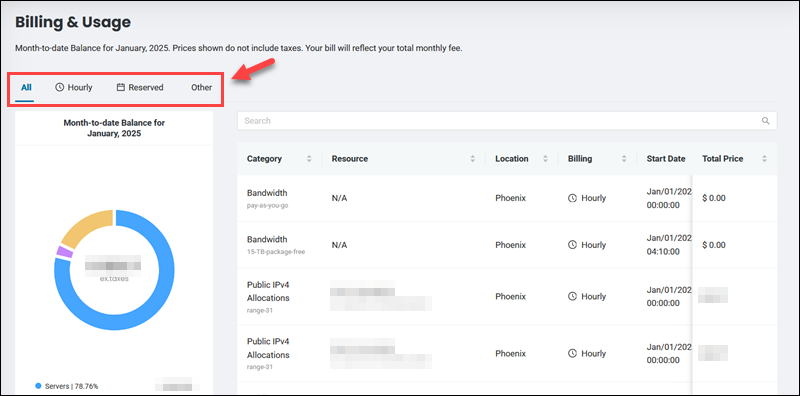
phoenixNAP's Bare Metal Cloud (BMC) bills each server instance hourly or through a reservation, so every charge maps to a specific server. The BMC portal includes built-in cost analytics, keeping spending visible without a separate tool. Its billing features include:
- Cost analytics dashboard. The Billing & Usage page shows the month-to-date balance, broken down by category, such as servers, bandwidth, public IP allocations, and storage. A searchable table lists each charge with its location, billing model, and price, with filters for hourly and reserved billing.
- Billing model selection. Each server runs on hourly billing or a reservation, with larger discounts for longer reservations. The Change Billing action switches a running server to a different model.
- Reservation management. The Reservations page lists active reservations and their terms. Auto-renewal can be disabled for any reservation that is no longer needed.
- Invoices and payments. Payment management in the portal covers automatic invoice payments with a registered card and manual payments from the Invoices page. The Payment History page logs every transaction.
- Resource tags. Tags group servers and other resources. Tagging by project or owner makes allocation straightforward.
Under every Bare Metal Cloud billing model, charges continue for powered-off servers, so release servers once they are no longer needed.
For automated cost tracking, the BMC Billing API retrieves rated usage for any period or the current month, with each record representing a single charge. It also lists products and pricing plans, creates reservations, enables or disables auto-renewal, and converts reservation pricing models. This data can feed internal dashboards or third-party cost management platforms. BMC's IaC integrations also let provisioning pipelines release servers automatically.
Keep Cloud Spending Tied to Business Value
Cloud cost management works when it becomes a routine instead of a reaction to a surprising invoice. Visibility and clear ownership come first, and optimization delivers lasting savings only once they are in place. Start by tagging every resource and setting budget alerts, then test a cloud cost management tool against your own billing data to see which savings it uncovers.